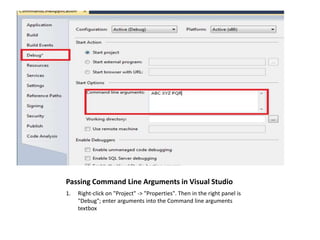
Command line arguments are parameters passed to the main function of an application via a string array, allowing for flexible program execution. These arguments are useful when the program needs specific input upon starting. Instructions for using command line arguments in Visual Studio include creating an executable program and entering arguments in the project properties under the debug tab.
![What are Command Line Arguments?
• Command line arguments are the parameters
we pass to the Main Function of any
application or program via String Array. We
can pass n numbers of parameters via this
String array in Main Method or function.
• Main Function In c#
Public static void Main( String []args )
{
}](https://image.slidesharecdn.com/whatarecommandlinearguments-180408075155/85/Command-Line-Arguments-in-C-1-320.jpg)
![How to Use command line arguments
in Visual Studio?
1. Create a executable program
• The following Program is an executable program that is showing arguments on
command.
using System;
namespace CommandLineApplication
{
class Program
{
static void Main(string[] args)
{
for (int i = 0; i < args.Length; i++)
{
Console.WriteLine("Arguments Values are {0}", args[i]);
}
Console.Read();
}
}
}](https://image.slidesharecdn.com/whatarecommandlinearguments-180408075155/85/Command-Line-Arguments-in-C-3-320.jpg)