Coming Soon:
  Book Trailers @ Your Library


                                               Emily Ellis
                                     Young Adult Librarian
                                 Greenwood Public Library
                                 www.greenwoodlibrary.us
What is a book trailer?
A video advertisement for a book similar to
movie trailers or teasers.

Types of Book Trailers
  Full production book trailers – similar to a short film with
   actors, costumes, scripts, etc.
  Flash video – an animated trailer created using
   specialized computer software (ex. Adobe Flash or
   Scratch)
  Still photos – created using gathered still images, mood
   music, and a written summary, quotes, or narration.
Is it worth my time?
  Teens and the Internet

     93% of teens ages 12-17 go online
     73% of teens use social networking sites
     57% have watched a video on a video sharing site like
      YouTube
     64% of online teens are creating content

“To respect the unique needs of young adults means to understand
those needs, to accept them, to accommodate them, and to
provide services which help to meet those needs.”

                  Jones, Patrick. New Directions for Library Service to Young Adults.
                      Chicago: American Library Association, 2002.
How do I make a book trailer?
    Book Trailers in 4 Basic Steps

1) Planning                 3) Editing
 Pick a book                Determine software
 Choose a format            Add logo
 Write a script             Include credits
 Prepare a storyboard


2) Producing                4) Sharing
 Determine length           Save file to computer
 Gather media               Upload or embed
 Film video                 Choose multiple
 Create narrations           locations
Finding Graphics
                     Creative Commons
                   www.creativecommons.or
                              g

                      Creative commons is a
                        nonprofit corporation
                   dedicated to making it easier
                   for people to share and build
                     upon the work of others,
                    consistent with the rules of
                      copyright. Click Find to
                   search for video, music, and
                              images.
                    Tip:
                    If you host a tech program
                    that includes book trailers, be
                    sure to take the time to
                    explain copyright to your
                    teens!
Finding Graphics
                          Stock.Xchng
                           www.sxc.hu

                   Stock.xchng provides access
                   to stock photography. Not all
                    of the images are available
                      free of charge. After you
                        search for an item, the
                       results page will list the
                     images for a charge at the
                     top and free at the bottom.
Finding Audio
Finding Audio
Editing
   Photo Story 3
  www.microsoft.com
     Free Download


Using a drag & drop
method of adding
media to a timeline,
include:

 Images
 Text
 Narrations
 Music
Editing
                 Cyberlink
               PowerDirector 8
              www.cyberlink.com
                $70 for Software


          Using a drag & drop
          method of adding
          media to a timeline,
          include:

             Images
             Text
             Narrations
             Music
Planning Your Book Trailer
  1.   Pick out a book
  2.   Choose a format
  3.   Write a script
  4.   Create a storyboard


Tip:
Book trailers provide an excellent
opportunity to teach kids and teens
how to summarize a book! Consider
teaching a homeschool book trailer
class, spending time on discussing
plot, character, setting, etc.
Finding Graphics
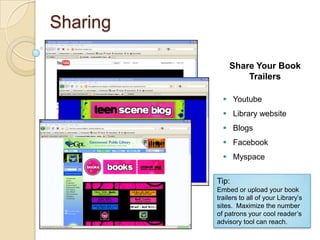
Sharing

              Share Your Book
                  Trailers

             Youtube
             Library website
             Blogs
             Facebook
             Myspace


          Tip:
          Embed or upload your book
          trailers to all of your Library’s
          sites. Maximize the number
          of patrons your cool reader’s
          advisory tool can reach.
Programming Ideas
   Teen Tech Week
           Video/audio mixing and editing
           Video uploading and sharing
           Online video building and editing resources
   Teen Read Week
           Book trailer contest
   Homeschool Tech Program
           Book trailer workshop
           Discuss summarizing a book, plot, characters, setting, etc.
   Teen Film Festival
           Include book trailers as an entry format
   Teen Advisory Board Project
           Build book trailers for all age levels
           Use puppets, costumes, written scripts
   Teen Book Club Contest
Thank you!
  Coming Soon: Book Trailers @ Your
  Library


                                          Emily Ellis
                                Young Adult Librarian
                            Greenwood Public Library
                            www.greenwoodlibrary.us

Coming soon

  • 1.
    Coming Soon: Book Trailers @ Your Library Emily Ellis Young Adult Librarian Greenwood Public Library www.greenwoodlibrary.us
  • 2.
    What is abook trailer? A video advertisement for a book similar to movie trailers or teasers. Types of Book Trailers  Full production book trailers – similar to a short film with actors, costumes, scripts, etc.  Flash video – an animated trailer created using specialized computer software (ex. Adobe Flash or Scratch)  Still photos – created using gathered still images, mood music, and a written summary, quotes, or narration.
  • 3.
    Is it worthmy time? Teens and the Internet  93% of teens ages 12-17 go online  73% of teens use social networking sites  57% have watched a video on a video sharing site like YouTube  64% of online teens are creating content “To respect the unique needs of young adults means to understand those needs, to accept them, to accommodate them, and to provide services which help to meet those needs.” Jones, Patrick. New Directions for Library Service to Young Adults. Chicago: American Library Association, 2002.
  • 4.
    How do Imake a book trailer? Book Trailers in 4 Basic Steps 1) Planning 3) Editing  Pick a book  Determine software  Choose a format  Add logo  Write a script  Include credits  Prepare a storyboard 2) Producing 4) Sharing  Determine length  Save file to computer  Gather media  Upload or embed  Film video  Choose multiple  Create narrations locations
  • 5.
    Finding Graphics Creative Commons www.creativecommons.or g Creative commons is a nonprofit corporation dedicated to making it easier for people to share and build upon the work of others, consistent with the rules of copyright. Click Find to search for video, music, and images. Tip: If you host a tech program that includes book trailers, be sure to take the time to explain copyright to your teens!
  • 6.
    Finding Graphics Stock.Xchng www.sxc.hu Stock.xchng provides access to stock photography. Not all of the images are available free of charge. After you search for an item, the results page will list the images for a charge at the top and free at the bottom.
  • 7.
  • 8.
  • 9.
    Editing Photo Story 3 www.microsoft.com Free Download Using a drag & drop method of adding media to a timeline, include:  Images  Text  Narrations  Music
  • 10.
    Editing Cyberlink PowerDirector 8 www.cyberlink.com $70 for Software Using a drag & drop method of adding media to a timeline, include:  Images  Text  Narrations  Music
  • 11.
    Planning Your BookTrailer 1. Pick out a book 2. Choose a format 3. Write a script 4. Create a storyboard Tip: Book trailers provide an excellent opportunity to teach kids and teens how to summarize a book! Consider teaching a homeschool book trailer class, spending time on discussing plot, character, setting, etc.
  • 12.
  • 13.
    Sharing Share Your Book Trailers  Youtube  Library website  Blogs  Facebook  Myspace Tip: Embed or upload your book trailers to all of your Library’s sites. Maximize the number of patrons your cool reader’s advisory tool can reach.
  • 14.
    Programming Ideas  Teen Tech Week  Video/audio mixing and editing  Video uploading and sharing  Online video building and editing resources  Teen Read Week  Book trailer contest  Homeschool Tech Program  Book trailer workshop  Discuss summarizing a book, plot, characters, setting, etc.  Teen Film Festival  Include book trailers as an entry format  Teen Advisory Board Project  Build book trailers for all age levels  Use puppets, costumes, written scripts  Teen Book Club Contest
  • 15.
    Thank you! Coming Soon: Book Trailers @ Your Library Emily Ellis Young Adult Librarian Greenwood Public Library www.greenwoodlibrary.us

Editor's Notes

  • #2 Welcome to Coming Soon: Book Trailers @ Your Library. As Staci mentioned, my name is Emily Ellis; I’m the Young Adult Librarian at the Greenwood Public Library, and I’ve been making book trailers for about 2.5 years now. I presented on book trailers at last year’s conference as well, and I spent a lot of time explaining why it’s worth your time to create multimedia readers’ advisory tools. Now that book trailers are more popular, I get to condense that part of the presentation, and I thought it would be fun if I made a book trailer with all of you. For those of you unfamiliar with this idea or hesitant to get started just, to see just how simple it is, how cheap it is, and how fun and easy it is.
  • #3 What is a book trailer?We’ve all see the previews at the movie theater. The goal of a preview is to make the audience want to see the movie. So how do they pull this off? Well they show a few short exciting clips from the movie, give you just enough information to let you know what the story is about, and hopefully leave you wanting more. That’s the effect you want to create with a book trailer. You’re creating a commercial that doesn’t give too much away, but that gives enough information for an interested teen to want to check the book out.There are three types of book trailers you can create. how much time access you have to technology and softwarewhat is appropriate for the book you’ve selectedLengthHow is a book trailer different from a book talk?
  • #4 Why should you bother? Multimedia reader’s advisory focuses on providing services in our digital world. Any department in any library can take advantage of technology, and with a little creativity produce fun, effective, and free reader’s advisory tools for the web that will continue to bridge the gap between media and print. All age groups are now actively online. Research shows: (statistics) Patrons are online, so the presence of libraries and library services offered online needs to meet the demand.
  • #5 Planning(Brief Explanation – In detail during creation)Producing(In depth – highlight important sites, etc.)Editing(In depth – highlight editing options)Sharing(Brief Explanation – In detail after creation)
  • #6 Discuss copyrightAlways check license for each image Opportunities to discuss copyright with teens and kidsGathering imagesNaming your saved fileCreative CommonsFlickr CCStock.xchngWikipedia Public Domain Image ResourcesTeacher Tap
  • #7 Discuss copyrightAlways check license for each image Opportunities to discuss copyright with teens and kidsDirect to handout for additional sitesGathering imagesNaming your saved fileCreative CommonsFlickr CCStock.xchngWikipedia Public Domain Image ResourcesTeacher Tap
  • #8 Difficulty in finding musicCreate own to by pass copyright and royalty issuesBriefly go over websites / digital juiceDirect to handout for additional sitesGathering music and soundsJamendoFreesound.orgDigital JuiceFree Play MusicInternet ArchiveRoyalty Free Music for Educational Use
  • #9 Difficulty in finding musicCreate own to by pass copyright and royalty issuesBriefly go over websites / digital juiceDirect to handout for additional sitesGathering music and soundsJamendoFreesound.orgDigital JuiceFree Play MusicInternet ArchiveRoyalty Free Music for Educational Use
  • #10 Discuss free and for cost editing optionsMention difference between free and for costChoosing softwareWindows Movie MakerPhotostory 3Adobe PremiereCyberlinkPowerDirector 8Movie MasherOne True MediaAnimotoScratch
  • #11 Discuss free and for cost editing optionsMention difference between free and for costChoosing softwareWindows Movie MakerPhotostory 3Adobe PremiereCyberlinkPowerDirector 8Movie MasherOne True MediaAnimotoScratch
  • #12 Importance of organizingPick out a bookChoose a format What lends itself best to the story? What do technology do you have access to? How much time do you have to commit to the project?Writing a script Original summary vs. quotes vs. book jacketCreating a storyboardDon’t have to be an artist!What book did I choose?How did I come up with format and idea?Creating my storyboard?Planning narrations?
  • #13 Finding imagesFinding musicCreating narrationsOPEN WINDOWS MOVIE MAKER TO SHOW VIDEO EDITING
  • #14 Places to shareHow to shareYouTubeBlogsWebsitesFacebookDVDShare with local schools and librariesProgramming
  • #15 Programming ideasMention LSTA grantDiscuss homeschool 3 week course1) Workshop 1: Learning how to summarize, planning trailer, writing script, creating storyboard2) Workshop 2: Producing book trailer including understanding copyright, finding images and music3) Workshop 3: Video editing…putting it all together Tell about older and younger kids. How we made it all ages.