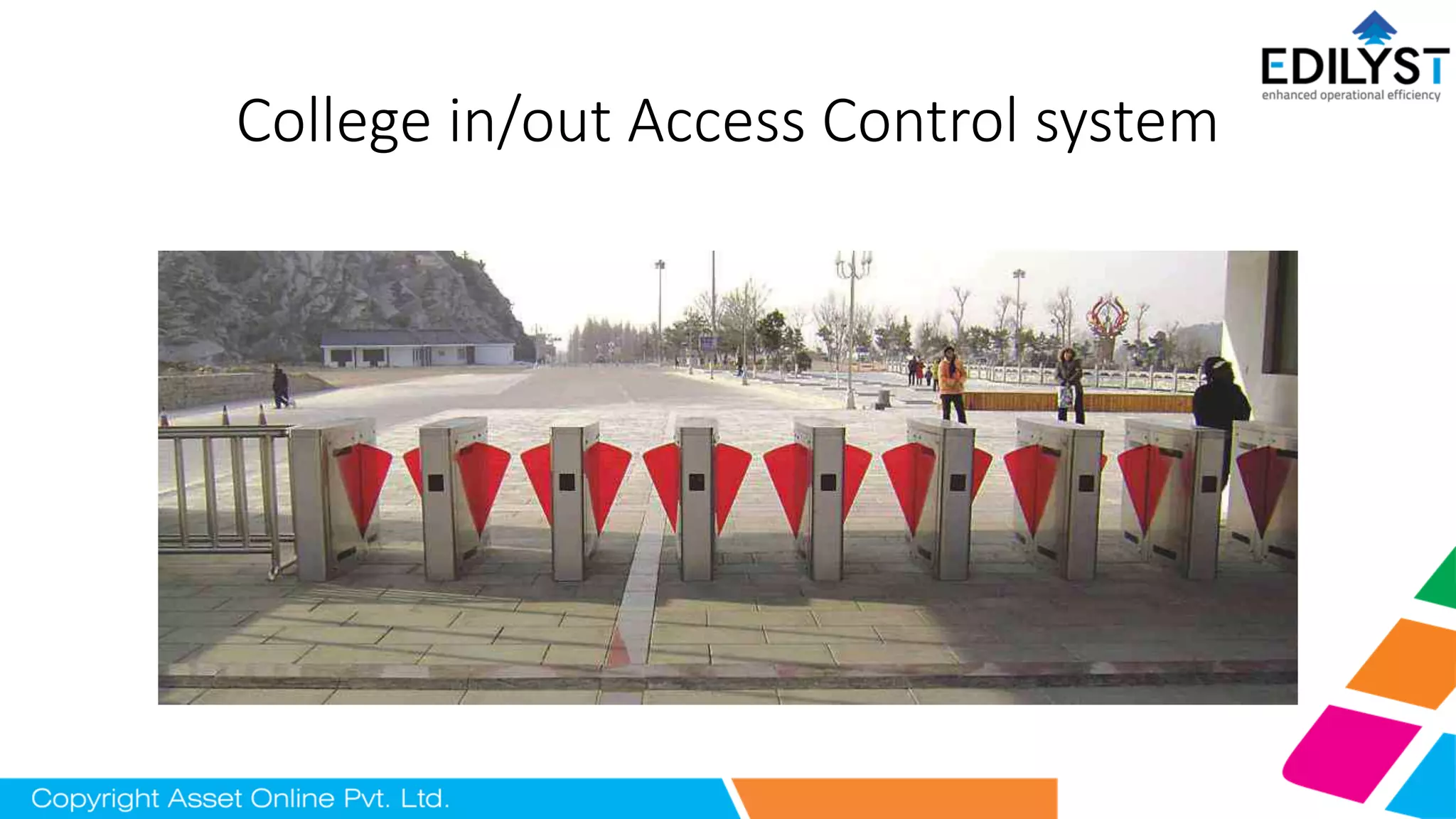
College in/out Access Control system
Flap Barrier with RFID or Biometric
Components of System
• RFID HF tags or Biometric.
• Flap barrier turnstile.
• RFID Fixed reader.
• Window application.
RFID High Frequency Tags
• The details of authorized student is mapped to Tags.
• They operate at 13.56 MHz with read ranges approximate 7cm.
• It experience moderate sensitivity to interference.
Fingerprint Biometric
• These are used to determine the uniqueness of the fingerprint.
• Once registered on the fingerprint scanner, the image of these
patterns is converted into a digital form.
• This is stored on a database for comparison which grants
authentication and access through the Flap barrier.
Flap barrier
• It is pedestrian barrier installed in conjunction with any access control
system provides valuable assistance to security personnel at any
monitored entrance.
• Its combine features like high throughput rate, user acceptance,
comfort and different levels of security to prevent unauthorized
access pedestrian safety has also been taken into account.
• They are compatible with most access control systems, such as
magnetic, biometric and proximity readers.
RFID Fixed reader
• It detects the authorized students.
• Allows Flap barrier to open/close.
Window Application
• It is an external control on flap barrier using desktop through Window
application.
• Uploads the data to server through LAN , Wi-Fi within campus range.
Features
• Attendance.
• Authorized Access.
• Prevention of Unauthorized visitor.
• Automation.
Working
• Normally Closed Working Mode (Default): after authorization by a
RFID reader or Biometric .
• Operate symbols on top of the unit changes from a red cross into a
green arrow.
• After passing finish, it will close immediately.
• To allow larger capacity through the Flap Barrier, the authorized
number can be memorized.
Normally Open Working Mode
• The arms will always open and only closes if an unauthorized visitor
steps into the Flap Barrier.
• After authorization the display on the top plate shows a green arrow
and the user can walk through the lane.
The visitors detection and alarming in
normally closed / Open mode
• Stand by.
• Following After Authorized Passage.
• Counter Direction Intrusion Alarming.
• Overtime Alarming.
• Stay Intrusion Alarming.
• Emergency Open / Close Mode.
• Degradation Mode.
Emergency Open / Close
Mode
• Emergency modes is used in special applications, such as fire alarm,
etc.
• In those modes, the authorization will be shield and arms remains
open/close till input any signal to change be other mode.
Degradation Mode
• This mode appears when the detection cell are broken or blocked
during initialization.
• authorization is valid but all of the detection cell are shield, the arms
will only close the after the valid time.
Asset Online Pvt.Ltd.
#388,Bluemoon x, Lnt. 9th main, sector 7, HSR layout, Bangalore-560102.
Name: Bharath Kumar
Mob number: 8277110064.

College inout access control system with RFID technologies

  • 1.
    College in/out AccessControl system
  • 2.
    Flap Barrier withRFID or Biometric
  • 3.
    Components of System •RFID HF tags or Biometric. • Flap barrier turnstile. • RFID Fixed reader. • Window application.
  • 4.
    RFID High FrequencyTags • The details of authorized student is mapped to Tags. • They operate at 13.56 MHz with read ranges approximate 7cm. • It experience moderate sensitivity to interference.
  • 5.
    Fingerprint Biometric • Theseare used to determine the uniqueness of the fingerprint. • Once registered on the fingerprint scanner, the image of these patterns is converted into a digital form. • This is stored on a database for comparison which grants authentication and access through the Flap barrier.
  • 6.
    Flap barrier • Itis pedestrian barrier installed in conjunction with any access control system provides valuable assistance to security personnel at any monitored entrance. • Its combine features like high throughput rate, user acceptance, comfort and different levels of security to prevent unauthorized access pedestrian safety has also been taken into account. • They are compatible with most access control systems, such as magnetic, biometric and proximity readers.
  • 7.
    RFID Fixed reader •It detects the authorized students. • Allows Flap barrier to open/close.
  • 8.
    Window Application • Itis an external control on flap barrier using desktop through Window application. • Uploads the data to server through LAN , Wi-Fi within campus range.
  • 9.
    Features • Attendance. • AuthorizedAccess. • Prevention of Unauthorized visitor. • Automation.
  • 10.
    Working • Normally ClosedWorking Mode (Default): after authorization by a RFID reader or Biometric . • Operate symbols on top of the unit changes from a red cross into a green arrow. • After passing finish, it will close immediately. • To allow larger capacity through the Flap Barrier, the authorized number can be memorized.
  • 11.
    Normally Open WorkingMode • The arms will always open and only closes if an unauthorized visitor steps into the Flap Barrier. • After authorization the display on the top plate shows a green arrow and the user can walk through the lane.
  • 12.
    The visitors detectionand alarming in normally closed / Open mode • Stand by. • Following After Authorized Passage. • Counter Direction Intrusion Alarming.
  • 13.
    • Overtime Alarming. •Stay Intrusion Alarming. • Emergency Open / Close Mode. • Degradation Mode.
  • 14.
    Emergency Open /Close Mode • Emergency modes is used in special applications, such as fire alarm, etc. • In those modes, the authorization will be shield and arms remains open/close till input any signal to change be other mode.
  • 15.
    Degradation Mode • Thismode appears when the detection cell are broken or blocked during initialization. • authorization is valid but all of the detection cell are shield, the arms will only close the after the valid time.
  • 16.
    Asset Online Pvt.Ltd. #388,Bluemoonx, Lnt. 9th main, sector 7, HSR layout, Bangalore-560102. Name: Bharath Kumar Mob number: 8277110064.