Proposed
Collaboration with
your University
AI Center of Excellence
© 2017 IBM Corporation2
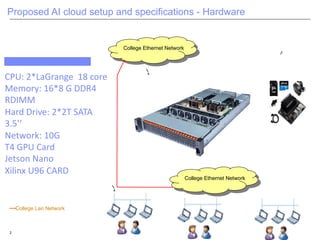
Proposed AI cloud setup and specifications - Hardware
College Ethernet Network
4
4
College Lan Network
College Ethernet Network
CPU: 2*LaGrange 18 core
Memory: 16*8 G DDR4
RDIMM
Hard Drive: 2*2T SATA
3.5’’
Network: 10G
T4 GPU Card
Jetson Nano
Xilinx U96 CARD
© 2017 IBM Corporation3
AI Lab users
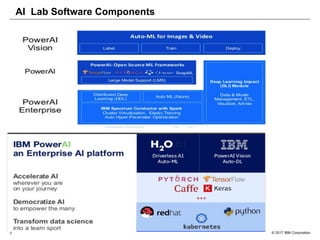
AI Lab Software Components
University Use Cases and Scenarios of
Proposed AI Lab
AI Cloud at Universities
© 2017 IBM Corporation5
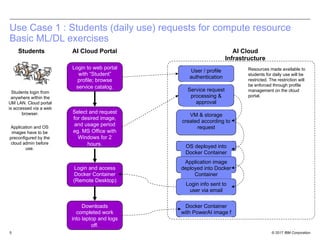
Use Case 1 : Students (daily use) requests for compute resource
Basic ML/DL exercises
Login to web portal
with “Student”
profile; browse
service catalog.
Select and request
for desired image,
and usage period
eg. MS Office with
Windows for 2
hours.
Login and access
Docker Container
(Remote Desktop)
AI Cloud Portal AI Cloud
Infrastructure
User / profile
authentication
Service request
processing &
approval
VM & storage
created according to
request
OS deployed into
Docker Container
Application image
deployed into Docker
Container
Login info sent to
user via email
Docker Container
with PowerAI image f
Downloads
completed work
into laptop and logs
off.
Resources made available to
students for daily use will be
restricted. The restriction will
be enforced through profile
management on the cloud
portal.
Students
Students login from
anywhere within the
UM LAN. Cloud portal
is accessed via a web
browser.
Application and OS
images have to be
preconfigured by the
cloud admin before
use.
© 2017 IBM Corporation6
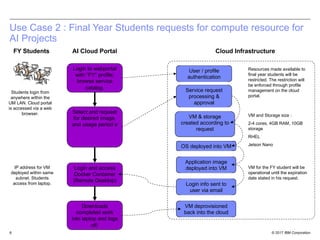
Use Case 2 : Final Year Students requests for compute resource for
AI Projects
Login to webportal
with “FY” profile;
browse service
catalog.
Select and request
for desired image,
and usage period e
Login and access
Docker Container
(Remote Desktop)
AI Cloud Portal Cloud Infrastructure
User / profile
authentication
Service request
processing &
approval
VM & storage
created according to
request
OS deployed into VM
Application image
deployed into VM
Login info sent to
user via email
VM deprovisioned
back into the cloud
Downloads
completed work
into laptop and logs
off.
Resources made available to
final year students will be
restricted. The restriction will
be enforced through profile
management on the cloud
portal.
FY Students
Students login from
anywhere within the
UM LAN. Cloud portal
is accessed via a web
browser.
IP address for VM
deployed within same
subnet. Students
access from laptop.
VM and Storage size :
2-4 cores, 4GB RAM, 10GB
storage
RHEL
Jetson Nano
VM for the FY student will be
operational until the expiration
date stated in his request.
© 2017 IBM Corporation7
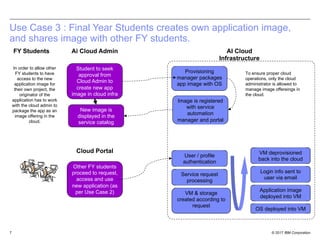
Use Case 3 : Final Year Students creates own application image,
and shares image with other FY students.
Student to seek
approval from
Cloud Admin to
create new app
image in cloud infra
New image is
displayed in the
service catalog
Other FY students
proceed to request,
access and use
new application (as
per Use Case 2)
Ai Cloud Admin AI Cloud
Infrastructure
To ensure proper cloud
operations, only the cloud
administrator is allowed to
manage image offereings in
the cloud.
FY Students
In order to allow other
FY students to have
access to the new
application image for
their own project, the
originator of the
application has to work
with the cloud admin to
package the app as an
image offering in the
cloud.
Cloud Portal
Provisioning
manager packages
app image with OS
Image is registered
with service
automation
manager and portal
User / profile
authentication
Service request
processing
VM & storage
created according to
request
OS deployed into VM
Application image
deployed into VM
Login info sent to
user via email
VM deprovisioned
back into the cloud
© 2017 IBM Corporation8
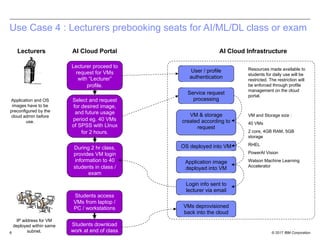
During 2 hr class,
provides VM login
information to 40
students in class /
exam
Use Case 4 : Lecturers prebooking seats for AI/ML/DL class or exam
AI Cloud Portal AI Cloud Infrastructure
User / profile
authentication
Service request
processing
VM & storage
created according to
request
OS deployed into VM
Application image
deployed into VM
Login info sent to
lecturer via email
VMs deprovisioned
back into the cloud
Resources made available to
students for daily use will be
restricted. The restriction will
be enforced through profile
management on the cloud
portal.
Lecturers
VM and Storage size :
40 VMs
2 core, 4GB RAM, 5GB
storage
RHEL
PowerAI Vision
Watson Machine Learning
Accelerator
Lecturer proceed to
request for VMs
with “Lecturer”
profile.
Select and request
for desired image,
and future usage
period eg. 40 VMs
of SPSS with LInux
for 2 hours.
Students access
VMs from laptop /
PC / workstations
Students download
work at end of class
Application and OS
images have to be
preconfigured by the
cloud admin before
use.
IP address for VM
deployed within same
subnet.
© 2017 IBM Corporation9
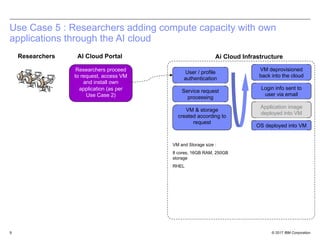
Use Case 5 : Researchers adding compute capacity with own
applications through the AI cloud
AI Cloud Portal Ai Cloud InfrastructureResearchers
Researchers proceed
to request, access VM
and install own
application (as per
Use Case 2)
User / profile
authentication
Service request
processing
VM & storage
created according to
request
OS deployed into VM
Application image
deployed into VM
Login info sent to
user via email
VM deprovisioned
back into the cloud
VM and Storage size :
8 cores, 16GB RAM, 250GB
storage
RHEL
© 2017 IBM Corporation
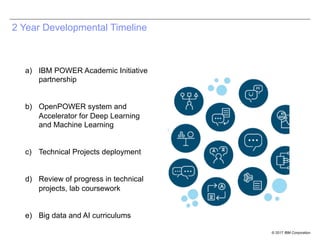
2 Year Developmental Timeline
a) IBM POWER Academic Initiative
partnership
b) OpenPOWER system and
Accelerator for Deep Learning
and Machine Learning
c) Technical Projects deployment
d) Review of progress in technical
projects, lab coursework
e) Big data and AI curriculums
© 2017 IBM Corporation
AI Cloud (On
Premise)
PowerAI makes deep
learning, machine learning
and AI more accessible and
more performant
By combining this software
platform for deep learning with
IBM Power Systems,
enterprises and Institutions can
rapidly deploy a fully optimized
and supported platform for
machine learning frameworks
and their dependencies. And it
is built for easy and rapid
deployment
PowerAI runs on the IBM Power
System AC922 for High
Performance Computer server
infrastructure
© 2017 IBM Corporation
Advantages for Your Faculty and
Students
§ Talent and Skills: (Remote Interns; Skills and Training)
Students and Research scholars will start working on the
advanced technologies will enable them to work on
many applications
Publications and Mindshare: (Press releases, Articles,
and Publications; Conferences and Events)
1. Conference Paper on software-based application
research /development in 6 months
§ Intellectual Capital: (Patents, Open source; Prototypes,
Demos; Curriculum; Student projects, Theses)
1. Prototype building of many research problems using
software-centric approach (hardware-centric baseline
implementation almost getting completed)
2. Potential to file disclosures
§ Opportunities: (Seed revenue; Leverage other funding;
Build ecosystems; Build government/client relationships)
1. Once software-centric solution available with
comparable performance using latest technologies ,
your team would create prototypes which can be
demonstrated to several colleges
© 2017 IBM Corporation
13
Ganesan Narayanasamy
ganesana@in.ibm.com
OpenPOWER leader in
Education and Research WW
IBM Systems
Thank
you!
© 2017 IBM Corporation14
AI Cloud Administrator’s tasks and to-dos.
1. Register and create user profiles for various user groups that will utilize the cloud. The
administrator must also register the members in each group. Members can be specific
(for long term usage eg. Final year students) or generic (eg. daily usage). This would
determine the access rights and rights to resources of each user.
2. Preconfigure and prepackage images for OS and application prior to going live. These
images will be used for automated provisioning and deployment in the cloud.
3. Monitoring and managing the cloud infrastructure – performance, utilization,
availability, energy consumption, configuration. This includes servers, storage, networks,
virtualization layer.
4. Configure and package images for new applications.
5. Level 1 support for user and operational issues.
The list of AI cloud administrator’s task is not limited to only the above. The list above is meant to highlight
the key roles as a start.
© 2017 IBM Corporation15
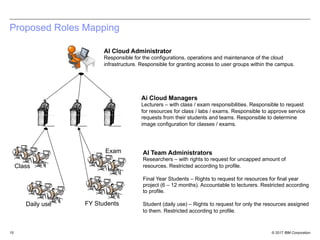
Proposed Roles Mapping
AI Cloud Administrator
Responsible for the configurations, operations and maintenance of the cloud
infrastructure. Responsible for granting access to user groups within the campus.
AI Team Administrators
Researchers – with rights to request for uncapped amount of
resources. Restricted according to profile.
Final Year Students – Rights to request for resources for final year
project (6 – 12 months). Accountable to lecturers. Restricted according
to profile.
Student (daily use) – Rights to request for only the resources assigned
to them. Restricted according to profile.
Ai Cloud Managers
Lecturers – with class / exam responsibilities. Responsible to request
for resources for class / labs / exams. Responsible to approve service
requests from their students and teams. Responsible to determine
image configuration for classes / exams.
Class
Exam
FY StudentsDaily use

COE AI lab OpenPOWER for Universities

  • 1.
  • 2.
    © 2017 IBMCorporation2 Proposed AI cloud setup and specifications - Hardware College Ethernet Network 4 4 College Lan Network College Ethernet Network CPU: 2*LaGrange 18 core Memory: 16*8 G DDR4 RDIMM Hard Drive: 2*2T SATA 3.5’’ Network: 10G T4 GPU Card Jetson Nano Xilinx U96 CARD
  • 3.
    © 2017 IBMCorporation3 AI Lab users AI Lab Software Components
  • 4.
    University Use Casesand Scenarios of Proposed AI Lab AI Cloud at Universities
  • 5.
    © 2017 IBMCorporation5 Use Case 1 : Students (daily use) requests for compute resource Basic ML/DL exercises Login to web portal with “Student” profile; browse service catalog. Select and request for desired image, and usage period eg. MS Office with Windows for 2 hours. Login and access Docker Container (Remote Desktop) AI Cloud Portal AI Cloud Infrastructure User / profile authentication Service request processing & approval VM & storage created according to request OS deployed into Docker Container Application image deployed into Docker Container Login info sent to user via email Docker Container with PowerAI image f Downloads completed work into laptop and logs off. Resources made available to students for daily use will be restricted. The restriction will be enforced through profile management on the cloud portal. Students Students login from anywhere within the UM LAN. Cloud portal is accessed via a web browser. Application and OS images have to be preconfigured by the cloud admin before use.
  • 6.
    © 2017 IBMCorporation6 Use Case 2 : Final Year Students requests for compute resource for AI Projects Login to webportal with “FY” profile; browse service catalog. Select and request for desired image, and usage period e Login and access Docker Container (Remote Desktop) AI Cloud Portal Cloud Infrastructure User / profile authentication Service request processing & approval VM & storage created according to request OS deployed into VM Application image deployed into VM Login info sent to user via email VM deprovisioned back into the cloud Downloads completed work into laptop and logs off. Resources made available to final year students will be restricted. The restriction will be enforced through profile management on the cloud portal. FY Students Students login from anywhere within the UM LAN. Cloud portal is accessed via a web browser. IP address for VM deployed within same subnet. Students access from laptop. VM and Storage size : 2-4 cores, 4GB RAM, 10GB storage RHEL Jetson Nano VM for the FY student will be operational until the expiration date stated in his request.
  • 7.
    © 2017 IBMCorporation7 Use Case 3 : Final Year Students creates own application image, and shares image with other FY students. Student to seek approval from Cloud Admin to create new app image in cloud infra New image is displayed in the service catalog Other FY students proceed to request, access and use new application (as per Use Case 2) Ai Cloud Admin AI Cloud Infrastructure To ensure proper cloud operations, only the cloud administrator is allowed to manage image offereings in the cloud. FY Students In order to allow other FY students to have access to the new application image for their own project, the originator of the application has to work with the cloud admin to package the app as an image offering in the cloud. Cloud Portal Provisioning manager packages app image with OS Image is registered with service automation manager and portal User / profile authentication Service request processing VM & storage created according to request OS deployed into VM Application image deployed into VM Login info sent to user via email VM deprovisioned back into the cloud
  • 8.
    © 2017 IBMCorporation8 During 2 hr class, provides VM login information to 40 students in class / exam Use Case 4 : Lecturers prebooking seats for AI/ML/DL class or exam AI Cloud Portal AI Cloud Infrastructure User / profile authentication Service request processing VM & storage created according to request OS deployed into VM Application image deployed into VM Login info sent to lecturer via email VMs deprovisioned back into the cloud Resources made available to students for daily use will be restricted. The restriction will be enforced through profile management on the cloud portal. Lecturers VM and Storage size : 40 VMs 2 core, 4GB RAM, 5GB storage RHEL PowerAI Vision Watson Machine Learning Accelerator Lecturer proceed to request for VMs with “Lecturer” profile. Select and request for desired image, and future usage period eg. 40 VMs of SPSS with LInux for 2 hours. Students access VMs from laptop / PC / workstations Students download work at end of class Application and OS images have to be preconfigured by the cloud admin before use. IP address for VM deployed within same subnet.
  • 9.
    © 2017 IBMCorporation9 Use Case 5 : Researchers adding compute capacity with own applications through the AI cloud AI Cloud Portal Ai Cloud InfrastructureResearchers Researchers proceed to request, access VM and install own application (as per Use Case 2) User / profile authentication Service request processing VM & storage created according to request OS deployed into VM Application image deployed into VM Login info sent to user via email VM deprovisioned back into the cloud VM and Storage size : 8 cores, 16GB RAM, 250GB storage RHEL
  • 10.
    © 2017 IBMCorporation 2 Year Developmental Timeline a) IBM POWER Academic Initiative partnership b) OpenPOWER system and Accelerator for Deep Learning and Machine Learning c) Technical Projects deployment d) Review of progress in technical projects, lab coursework e) Big data and AI curriculums
  • 11.
    © 2017 IBMCorporation AI Cloud (On Premise) PowerAI makes deep learning, machine learning and AI more accessible and more performant By combining this software platform for deep learning with IBM Power Systems, enterprises and Institutions can rapidly deploy a fully optimized and supported platform for machine learning frameworks and their dependencies. And it is built for easy and rapid deployment PowerAI runs on the IBM Power System AC922 for High Performance Computer server infrastructure
  • 12.
    © 2017 IBMCorporation Advantages for Your Faculty and Students § Talent and Skills: (Remote Interns; Skills and Training) Students and Research scholars will start working on the advanced technologies will enable them to work on many applications Publications and Mindshare: (Press releases, Articles, and Publications; Conferences and Events) 1. Conference Paper on software-based application research /development in 6 months § Intellectual Capital: (Patents, Open source; Prototypes, Demos; Curriculum; Student projects, Theses) 1. Prototype building of many research problems using software-centric approach (hardware-centric baseline implementation almost getting completed) 2. Potential to file disclosures § Opportunities: (Seed revenue; Leverage other funding; Build ecosystems; Build government/client relationships) 1. Once software-centric solution available with comparable performance using latest technologies , your team would create prototypes which can be demonstrated to several colleges
  • 13.
    © 2017 IBMCorporation 13 Ganesan Narayanasamy ganesana@in.ibm.com OpenPOWER leader in Education and Research WW IBM Systems Thank you!
  • 14.
    © 2017 IBMCorporation14 AI Cloud Administrator’s tasks and to-dos. 1. Register and create user profiles for various user groups that will utilize the cloud. The administrator must also register the members in each group. Members can be specific (for long term usage eg. Final year students) or generic (eg. daily usage). This would determine the access rights and rights to resources of each user. 2. Preconfigure and prepackage images for OS and application prior to going live. These images will be used for automated provisioning and deployment in the cloud. 3. Monitoring and managing the cloud infrastructure – performance, utilization, availability, energy consumption, configuration. This includes servers, storage, networks, virtualization layer. 4. Configure and package images for new applications. 5. Level 1 support for user and operational issues. The list of AI cloud administrator’s task is not limited to only the above. The list above is meant to highlight the key roles as a start.
  • 15.
    © 2017 IBMCorporation15 Proposed Roles Mapping AI Cloud Administrator Responsible for the configurations, operations and maintenance of the cloud infrastructure. Responsible for granting access to user groups within the campus. AI Team Administrators Researchers – with rights to request for uncapped amount of resources. Restricted according to profile. Final Year Students – Rights to request for resources for final year project (6 – 12 months). Accountable to lecturers. Restricted according to profile. Student (daily use) – Rights to request for only the resources assigned to them. Restricted according to profile. Ai Cloud Managers Lecturers – with class / exam responsibilities. Responsible to request for resources for class / labs / exams. Responsible to approve service requests from their students and teams. Responsible to determine image configuration for classes / exams. Class Exam FY StudentsDaily use