Git Flow
A simple, automated,
Continuous Delivery compliant
strategy for using Git
__
ClearCase UCM Plugin
www.josra.org
Continuous Delivery Pipeline
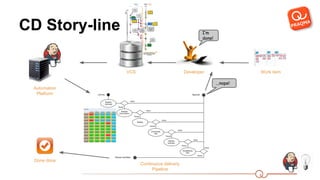
CD Story-line
VCS Developer
I’m
done!
Work item
Continuous delivery
Pipeline
Automation
Platform
Done done
...nope!
The “branchy” approach
...to pretested integration
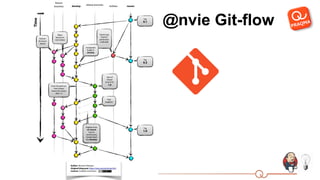
@nvie Git-flow
Project integration branch
The shared work context of the developers where integrations are done frequently.
Typically master but occasionally a maintenance branch.
Promotion branches (a.k.a big picture branches)
All the branches which are above and beyond the project integration branch.
Development branches (a.k.a small picture branches)
All the branches that produce contributions to the integration branches. These are
the branches where developers actually commit code.
Vocabulary
Maintenance branches
Seen from the perspective of the project integration branch it’s merely a
development branch - which someone just happened to allow a release from.
Hot-fix branches
In Continuous Delivery a hot-fix in the meaning “a shorter and faster track to a
release than the regular path” is a contradiction in terms, they simply do not exist.
There is only one track to a release and that is a successful ride through the
pipeline. We will erase this term from our vocabulary.
Vocabulary
Principles Git-flow
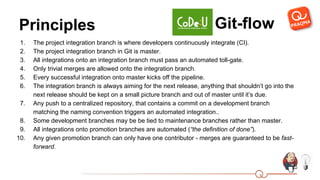
1. The project integration branch is where developers continuously integrate (CI).
2. The project integration branch in Git is master.
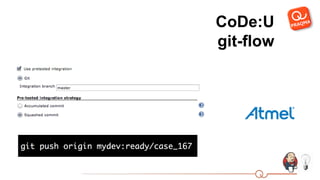
3. All integrations onto an integration branch must pass an automated toll-gate.
4. Only trivial merges are allowed onto the integration branch.
5. Every successful integration onto master kicks off the pipeline.
6. The integration branch is always aiming for the next release, anything that shouldn’t go into the
next release should be kept on a small picture branch and out of master until it’s due.
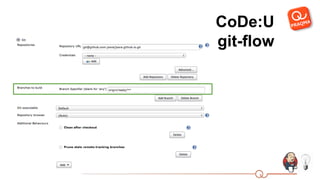
7. Any push to a centralized repository, that contains a commit on a development branch
matching the naming convention triggers an automated integration..
8. Some development branches may be be tied to maintenance branches rather than master.
9. All integrations onto promotion branches are automated (“the definition of done”).
10. Any given promotion branch can only have one contributor - merges are guaranteed to be fast-
forward.
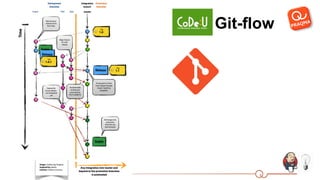
Git-flow
CoDe:U
git-flow
CoDe:U
git-flow
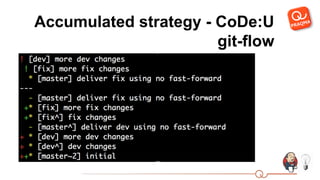
Accumulated strategy - CoDe:U
git-flow
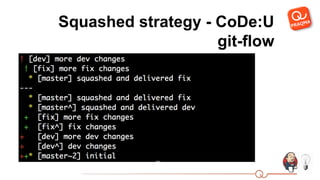
Squashed strategy - CoDe:U
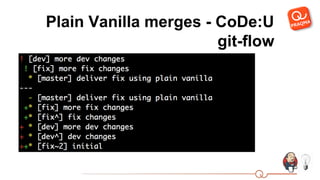
git-flow
Plain Vanilla merges - CoDe:U
git-flow
References
● The Pretested Integration Plugin: wiki.jenkins-ci.
org/display/JENKINS/Pretested+Integration+Plugin
● The CoDe:U Git Flow paper:
www.praqma.com/git-flow
● Blog post on some of the finer details of the plugin: www.josra.
org/blog/2014/06/23/Pretested+integration+plugin.html
● Joint Open Source Roadmap Alliance:
www.josra.org
● Continuous Delivery Users on LinkedIn:
www.linkedin.com/groups/Continuous-Delivery-Users-4893734
● Praqma:
www.praqma.com
● Mail to Lars:
mailto:lak@praqma.com
Know your tools - practice your knife skills

CoDe:U Git Flow

  • 1.
    Git Flow A simple,automated, Continuous Delivery compliant strategy for using Git __
  • 2.
  • 3.
  • 4.
    CD Story-line VCS Developer I’m done! Workitem Continuous delivery Pipeline Automation Platform Done done ...nope!
  • 5.
    The “branchy” approach ...topretested integration
  • 6.
  • 7.
    Project integration branch Theshared work context of the developers where integrations are done frequently. Typically master but occasionally a maintenance branch. Promotion branches (a.k.a big picture branches) All the branches which are above and beyond the project integration branch. Development branches (a.k.a small picture branches) All the branches that produce contributions to the integration branches. These are the branches where developers actually commit code. Vocabulary
  • 8.
    Maintenance branches Seen fromthe perspective of the project integration branch it’s merely a development branch - which someone just happened to allow a release from. Hot-fix branches In Continuous Delivery a hot-fix in the meaning “a shorter and faster track to a release than the regular path” is a contradiction in terms, they simply do not exist. There is only one track to a release and that is a successful ride through the pipeline. We will erase this term from our vocabulary. Vocabulary
  • 9.
    Principles Git-flow 1. Theproject integration branch is where developers continuously integrate (CI). 2. The project integration branch in Git is master. 3. All integrations onto an integration branch must pass an automated toll-gate. 4. Only trivial merges are allowed onto the integration branch. 5. Every successful integration onto master kicks off the pipeline. 6. The integration branch is always aiming for the next release, anything that shouldn’t go into the next release should be kept on a small picture branch and out of master until it’s due. 7. Any push to a centralized repository, that contains a commit on a development branch matching the naming convention triggers an automated integration.. 8. Some development branches may be be tied to maintenance branches rather than master. 9. All integrations onto promotion branches are automated (“the definition of done”). 10. Any given promotion branch can only have one contributor - merges are guaranteed to be fast- forward.
  • 10.
  • 11.
  • 12.
  • 13.
    Accumulated strategy -CoDe:U git-flow
  • 14.
    Squashed strategy -CoDe:U git-flow
  • 15.
    Plain Vanilla merges- CoDe:U git-flow
  • 16.
    References ● The PretestedIntegration Plugin: wiki.jenkins-ci. org/display/JENKINS/Pretested+Integration+Plugin ● The CoDe:U Git Flow paper: www.praqma.com/git-flow ● Blog post on some of the finer details of the plugin: www.josra. org/blog/2014/06/23/Pretested+integration+plugin.html ● Joint Open Source Roadmap Alliance: www.josra.org ● Continuous Delivery Users on LinkedIn: www.linkedin.com/groups/Continuous-Delivery-Users-4893734 ● Praqma: www.praqma.com ● Mail to Lars: mailto:lak@praqma.com
  • 17.
    Know your tools- practice your knife skills