Mohammad Nasir Qureshi 03334034174 Page 1
Language: A language is a means to communicate with another being or person. In other
words, we can say that a language is a way to convey our ideas to other people.
Before we begin to write programs in the C++ language, it will be good for us to
take a look at the historical background of this language.
Computer Languages: In 1960 a number of computer languages had come into
existence. Each and every language had its specific purpose. For example, COBOL
(Common Business Oriented Language) was used for commercial applications;
FORTRAN (Formula Translation) Language was used for Engineering and Scientific
Applications and so on. Some people started to develop a single language, which could
serve all the purposes in place of learning all the languages separately. Therefore, an
international committee was set up to develop such a language. This committee prepared
a language called ALGOL 60. But this language never attained popularity because it was
too abstract and too general. To remove these defects another language was developed at
Cambridge University called CPL. CPL language turned out to be very big to learn and
difficult to implement. During the same period Ken Thompson at AT&T’s Bell Labs
wrote another language removing some defects of CPL called B. this language was a
developed form of CPL Language so it was called BCPL.
Year Language Developed By Remarks
1960 ALGOL International Committee Too general, too abstract
1963 CPL Cambridge University
Hard to learn, difficult to
implement.
1967 BCPL
Martin Richards at Cambridge
University
Could deal with only specific
problems.
1970 B Ken Thompson at AT&T
Could deal with only specific
problems.
1972 C Dennis Ritchie at AT&T
Lost generality of BCPL and B
restored.
What is C: It is a programmable language developed at AT & T’s Bell Laboratories of
USA in 1972. It was designed and written by a man named Dennis Ritchie. In the late
seventies C began to replace most of the languages. Everyone was surprised with the
popularity of C language. The question arises why C seems to be so popular? The reason
being this that it is simple, reliable and easy to use.
Let us see how C is compared with other programming languages. All the
programming languages are divided into two categories:
 Problem Oriented or High Level Languages: These languages are designed to
give a better programming efficiency i.e. faster program development. For
example, FORTRAN, BASIC, PASCAL, etc.
 Machine Oriented or Low Level Languages: These languages are designed to
give a better machine efficiency, i.e. faster program execution. For example,
Assembly Language, Machine Language, etc.
C language stands in between these two categories. That is why it is called a middle level
language. As it has both a good programming efficiency and also a good machine
efficiency.
C++: Like other languages there were limitations to the functionality of C language. A
certain man named Bajerney Stoustrp was assigned a project. He started working on this
project using the C language. But soon he came to know the limitations of C. He devised
Mohammad Nasir Qureshi 03334034174 Page 2
some functions of his own and included them with C language. This new form of C
language was called C with Classes and afterwards it was named as C++ language. The
main difference between C and C++ is this that there are some extra security features in
C++ which were deficient in C language.
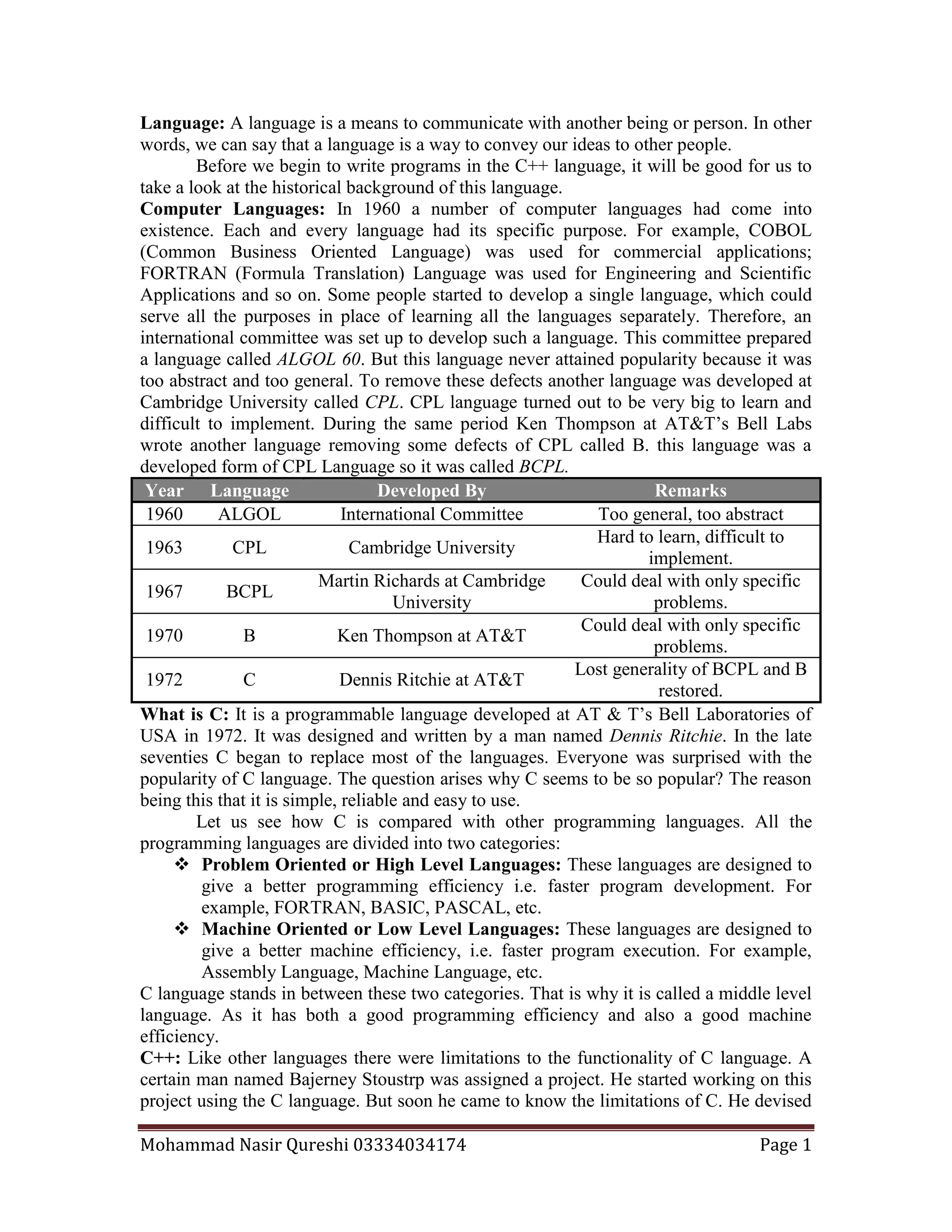
Getting Started with C++: There is an analogy between learning English and C++
Language. The classical method of learning English is to first learn the alphabets or
characters used in the language, then learn to combine these alphabets to form words,
which in turn are combined to form sentences and sentences are combined to form
paragraphs. Learning C++ is similar and much more easy, i.e. we will first learn the
alphabets, numbers and special symbols of C++, afterwards we will combine them to
construct constants, variables and keywords then we will make commands or instructions
from them and when we will combine commands or Instructions we will be writing a
computer program.
The Character Set of C++: The following table shows the character set of C++
Language.
Alphabets A, B… Y, Z a, b…y, z
Digits 0, 1, 2, 3, 4, 5, 6, 7, 8, 9
Special Symbols ~ ` ! @ # $ % ^ & ( ) _ - + = |  { } [ ] ? / < > , . ; : “ ‘
Program: A set of instructions in true sequence is called a program.
Writing our First Program in C++: To write a program we should be familiar with
some terms and conditions of the C++ language. There are five basic steps of
programming in C++ language.
1- Including header files.
2- Main function starts.
3- Variable declaration (optional).
4- Commands.
5- End of program.
Alphabets Words Sentences Paragraph
Steps in Learning English Language
Alphabets,
Digits,
Special
symbols
Constants
Variables
Keywords
Instructions
or
Commands
Program
Steps in Learning C++ Language
Mohammad Nasir Qureshi 03334034174 Page 3
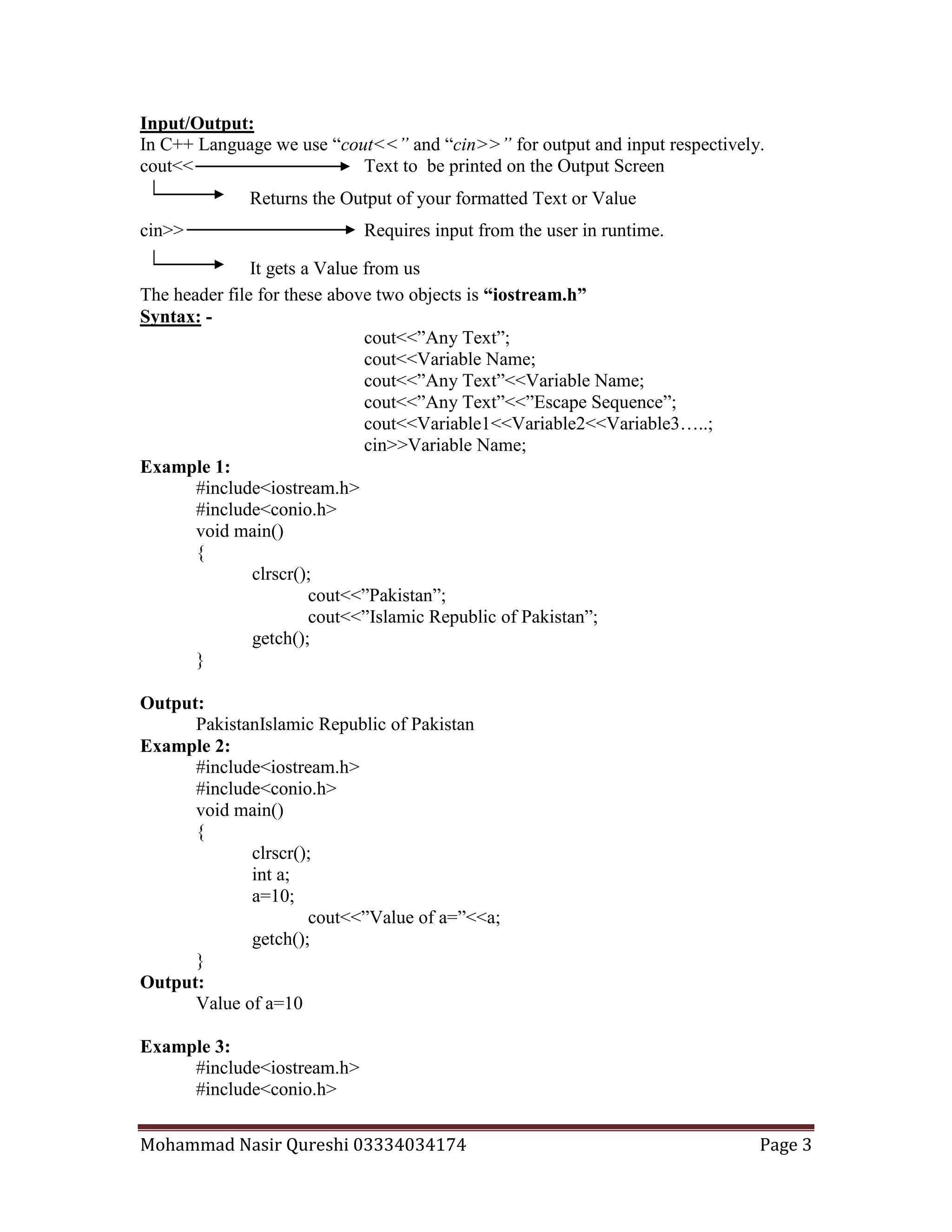
Returns the Output of your formatted Text or Value
It gets a Value from us
Input/Output:
In C++ Language we use “cout<<” and “cin>>” for output and input respectively.
cout<< Text to be printed on the Output Screen
cin>> Requires input from the user in runtime.
The header file for these above two objects is “iostream.h”
Syntax: -
cout<<”Any Text”;
cout<<Variable Name;
cout<<”Any Text”<<Variable Name;
cout<<”Any Text”<<”Escape Sequence”;
cout<<Variable1<<Variable2<<Variable3…..;
cin>>Variable Name;
Example 1:
#include<iostream.h>
#include<conio.h>
void main()
{
clrscr();
cout<<”Pakistan”;
cout<<”Islamic Republic of Pakistan”;
getch();
}
Output:
PakistanIslamic Republic of Pakistan
Example 2:
#include<iostream.h>
#include<conio.h>
void main()
{
clrscr();
int a;
a=10;
cout<<”Value of a=”<<a;
getch();
}
Output:
Value of a=10
Example 3:
#include<iostream.h>
#include<conio.h>
Mohammad Nasir Qureshi 03334034174 Page 4
void main()
{
clrscr();
int a,b,c;
a=10,b=12, c=13;
cout<<”Value of a=”<<a<<”Value of b=”<<b<<”Value of c=”<<c;
getch();
}
Output:
Value of a=10Value of b=12Value of c=13
Example 4:
#include<iostream.h>
#include<conio.h>
void main()
{
clrscr();
int a,b,c;
a=10,b=12, c=13;
cout<<”Value of a=”<<a;
cout<<”Value of b=”<<b;
cout<<”Value of c=”<<c;
getch();
}
Output:
Value of a=10Value of b=12Value of c=13
Example 5:
#include<iostream.h>
#include<conio.h>
void main()
{
clrscr();
int a,b,c;
cout<<”Enter the value of a=”;
cin>>a;
cout<<”Enter the value of b=”;
cin>>b;
cout<<”Enter the value of c=”;
cin>>c;
getch();
}
Output:
Enter value of a=10
Enter value of b=10
Mohammad Nasir Qureshi 03334034174 Page 5
Enter value of c=10
Example 5:
#include<iostream.h>
#include<conio.h>
void main()
{
clrscr();
int a,b,c;
cout<<”Enter the value of a=”;
cin>>a;
cout<<”Enter the value of b=”;
cin>>b;
cout<<”Enter the value of c=”;
cin>>c;
cout<<”The Value of a=”<<a;
cout<<”The Value of b=”<<b;
cout<<”The Value of c=”<<c;
getch();
}
Output:
Enter value of a=10
Enter value of b=11
Enter value of c=12
The Value of a=10The Value of b=11The Value of c=12
Escape Sequences: - There are eight escape sequences we use in the C++ Language:
n New Line t Tab or Eight Spaces Jump
a Beep or Alert f Form Feed
b Backspace ” For Printing Double Quotes
r Return Carriage ’ For Printing Single Quotes
Example 6:
#include<iostream.h>
#include<conio.h>
void main()
{
clrscr();
cout<<”Pakistan”;
cout<<”nIslamic Republic of Pakistan”;
cout<<”nCountryt Pakistan”;
cout<<”nCountrybPakistan”;
cout<<”nCountryr Pakistan”;
Mohammad Nasir Qureshi 03334034174 Page 6
cout<<”n”Country Pakistan””;
cout<<”n’Country Pakistan’”;
getch();
}
Output:
Pakistan
Islamic Republic of Pakistan
Country Pakistan
CountrPakistan
Pakistan
“Country Pakistan”
‘Country Pakistan’
Example 7:
#include<iostream.h>
#include<conio.h>
void main()
{
clrscr();
cout<<"tttttttDate: 12 January 1948"
<<"nn The Quaid-e-Azam said,n"
<<"t" We are not aggressors we have won our freedom through unity, faith,"
<<"nDiscipline. Anyone who will even stare towards us should be taught such a"
<<"nlesson that he must never repeat this mistake again. It should be our motto"
<<"nnot to giveup but to carry on the war and struggle under any circumstances"
<<"nin the rivers, landscapes and the mountains to keep our independence and "
<<"ncountry secure."";
getch();
}
Output:
Date: 12 January 1948
The Quaid-e-Azam said,
" We are not aggsressors we have won our freedom through unity, faith,
Discipline. Anyone who will even stare towards us should be taught such a
lesson that he must never repeat this mistake again. It should be our motto
not to giveup but to carry on the war and struggle under any circumstances
in the rivers, landscapes and the mountains to keep our independence and
country secure."
Example 8:
#include<iostream.h>
#include<conio.h>
void main()
{
clrscr();
Mohammad Nasir Qureshi 03334034174 Page 7
int a,b,c;
cout<<”Enter the value of a=”;
cin>>a;
cout<<”Enter the value of b=”;
cin>>b;
cout<<”Enter the value of c=”;
cin>>c;
cout<<”nThe Value of a=t”<<a;
cout<<”nThe Value of b=t”<<b;
cout<<”nThe Value of c=t”<<c;
getch();
}
Output:
Enter value of a=10
Enter value of b=11
Enter value of c=12
The Value of a= 10
The Value of b= 11
The Value of c= 12
Operators: -
Arithematical + , - , * , / , % , =
Increment And Decrement ++ , --
Comparison or Relational < , > , <= , >= , = = ,!=
Logical && (And), || (Or) , ! (Not)
We will just see the example of Arithematical Operators and will discuss the Logical and
Comparison or Relational Operators in the topic of If and If Else whereas, we will take a
look on the Increment and decrement Operators in the topic of Loops.
Example 9:
#include<iostream.h>
#include<conio.h>
void main()
{
clrscr();
int a,b,c;
cout<<”Enter the value of a=”;
cin>>a;
cout<<”Enter the value of b=”;
cin>>b;
c = a + b;
cout<<”tAddition=”<<c;
c = a - b;
Mohammad Nasir Qureshi 03334034174 Page 8
cout<<”ntSubtraction=”<<c;
c = a * b;
cout<<”ntMultiplication=”<<c;
c = a / b;
cout<<”ntDivision=”<<c;
c = a % b;
cout<<”ntRemainder=”<<c;
getch();
}
Output:
Enter value of a=10
Enter value of b=2
Addition=12
Subtraction=8
Multiplication=20
Division=5
Remainder=0
Example 10: In Store X while purchasing items a discount of 10% is offered on the
items. We have to write a program, which demands input of the quantity and the rate per
item through the keyboard and displays the total afterwards.
/* Program to calculate the total expenses while shopping from a store after dicsount*/
#include<iostream.h>
#include<conio.h>
void main()
{
clrscr();
int quantity,discount;
float rate,total;
discount=10;
cout<<”Enter Quantity=”;
cin>>a;
cout<<”Enter Rate=”;
cin>>b;
c = ( (quantity * rate ) – ( (quantity * rate ) * discount / 100 );
cout<<”tnTotal=Rs.”<<c;
getch();
}
Output: -
Enter Quantity=1200
Enter Rate=15.50
Total=Rs.16740
Mohammad Nasir Qureshi 03334034174 Page 9
Semicolon is not allowed here
Selection Statement
The selection statements are used to select one command from a program
(program is a set of commands), which we want to be executed by the compiler for us.
We have the following selection statements:
 if
 if else
 switch case
 ? :
The “ if ” Statement: -
Syntax:-
if ( Condition )
Statement;
if ( Condition )
{
Statement1;
Statement2;
Statement3;
}
The keyword if tells the complier that what follows, is a decision control
instruction. The condition following the keyword if is always enclosed within a pair of
parenthesis. If the condition whatever it is, is true, then the statement is executed. If the
condition is not true then the statement is not executed; instead the program skips past it.
We look at some conditions:
x = = y x is equal to y
x != y x is not equal to y
x < y x is less than y
x > y x is greater than y
x <= y x is less than or equal to y
x >= y x is greater than or equal to y
Example 1:
#include<iostream.h>
#include<conio.h>
void main()
{
clrscr();
int a;
cout<<”Enter Value for a=”;
Mohammad Nasir Qureshi 03334034174 Page 10
cin>>a;
if ( a<10 )
cout<<”Value of a is less than 10”;
getch();
}
Output: -
Enter Value for a=2
Value of a is less than 10
Example 2:
#include<iostream.h>
#include<conio.h>
void main()
{
clrscr();
int a;
cout<<”Enter Value for a=”;
cin>>a;
if ( a<10 )
cout<<”Limit is 10”;
if ( a<20 )
cout<<”Limit is 20”;
getch();
}
Output: -
Enter Value for a=2
Limit is 10
Limit is 20
Now look at the above program we get both the lines in the output. The output
will remain the same till we enter a number from 0 to 9. We want to make a program
which should give us that the message “Limit is 10” when we enter a number less than 10
and when we enter a number from 10 to 19 we should get the message “Limit is 20”.
We can get the required output by using the logical operator And ( && ). The
And operator concatenates (joins) two or more conditions with one another to refine the
decision making. Its syntax is:
if ( ( condition ) && ( condition) )
Statement;
if ( ( condition ) && ( condition) && ( condition) && … )
Statement;
Mohammad Nasir Qureshi 03334034174 Page 11
According to the syntaxes given above the conditions given in the bracket after the if
should all be true then the statement following the if statements will be executed
otherwise the statement following the if condition will not be executed.
Example 3:
#include<iostream.h>
#include<conio.h>
void main()
{
clrscr();
int a;
cout<<”Enter Value for a=”;
cin>>a;
if ( a<10 )
cout<<”Limit is 10”;
if ( ( a > 10 ) && ( a<20 ) )
cout<<”Limit is 20”;
getch();
}
Output: -
Enter Value for a=2
Limit is 10
Now only first if statement is true as 2 is less than 10. But the second if condition
is false as it states ”a is greater than 10 and a is less than 20”. The value of a is less than
20 but not greater than 10 that is why the condition is false.
Example 4:
#include<iostream.h>
#include<conio.h>
void main()
{
clrscr();
int a;
cout<<”Enter Value for a=”;
cin>>a;
if ( ( a = = 20 ) && (a = = 120 ) )
cout<<”Number Niner”;
getch();
}
Output: -
Enter Value for a=20
Mohammad Nasir Qureshi 03334034174 Page 12
Strange! In the above example we entered the value is 20 and do not get anything
in output. A problem what if we are asked to write a program which tells us either the
value of a is 20 or 120. We have studied earlier that in case of And operator all the
conditions must be true otherwise the whole condition will be false. That is the point
where we come to know that there is another operator which exactly just like And ( && )
concatenates two conditions in an if statement but provides you a choice between the
values. The name of this logical operator is Or ( | | ). The Syntax of Or is like this:
if ( ( condition ) | | ( condition) )
Statement;
if ( ( condition ) | | ( condition) | | ( condition) | | … )
Statement;
Example 5:
#include<iostream.h>
#include<conio.h>
void main()
{
clrscr();
int a;
cout<<”Enter Value for a=”;
cin>>a;
if ( ( a = = 20 ) | | (a = = 120 ) )
cout<<”Number Niner”;
getch();
}
Output: -
Enter Value for a=20
Number Niner
Example 6: A bookstore has offered discount of 20 % on next purchase to the customers
who have purchased between 12 January 2003 and 12 February 2003. Write a Program,
which takes the price of books purchased, and the date of last purchase and gives us
discount if the date of purchase meets the above-mentioned range.
#include<iostream.h>
#include<conio.h>
void main()
{
clrscr();
int date,month,discount=0;
float price,total;
cout<< ”Enter the Price of Books=”;
cin>>price;
Mohammad Nasir Qureshi 03334034174 Page 13
cout<<”Enter the Date of Last Purchase”;
cin>>date;
cout<<”Enter the Month of Last Pruchase”;
cin>>month;
if ( ( date >= 12 && month = = 1 ) | | ( date >= 12 && month = = 2 ) )
{
discount=20;
}
total = price – ( price * discount /100 );
cout<<”Total Price=”<<total;
getch();
}
Output: -
Price of Books=2000
Enter the Date of Last Purchase=14
Enter the Month of Last Purchase=1
Total Price=1600
Example 7:
#include<iostream.h>
#include<conio.h>
void main()
{
clrscr();
int a;
cout<<”Enter Value for a=”;
cin>>a;
if ( a < 20 )
{
if (a < 10 )
{
cout<<”The Number is less than 20 and 10”;
}
}
getch();
}
Output: -
Enter Value for a=8
The Number is less than 20 and 10
Example 8:
#include<iostream.h>
Mohammad Nasir Qureshi 03334034174 Page 14
Semicolon is not allowed here
There is no condition here
#include<conio.h>
void main()
{
clrscr();
int a;
cout<<”Enter Value for a=”;
cin>>a;
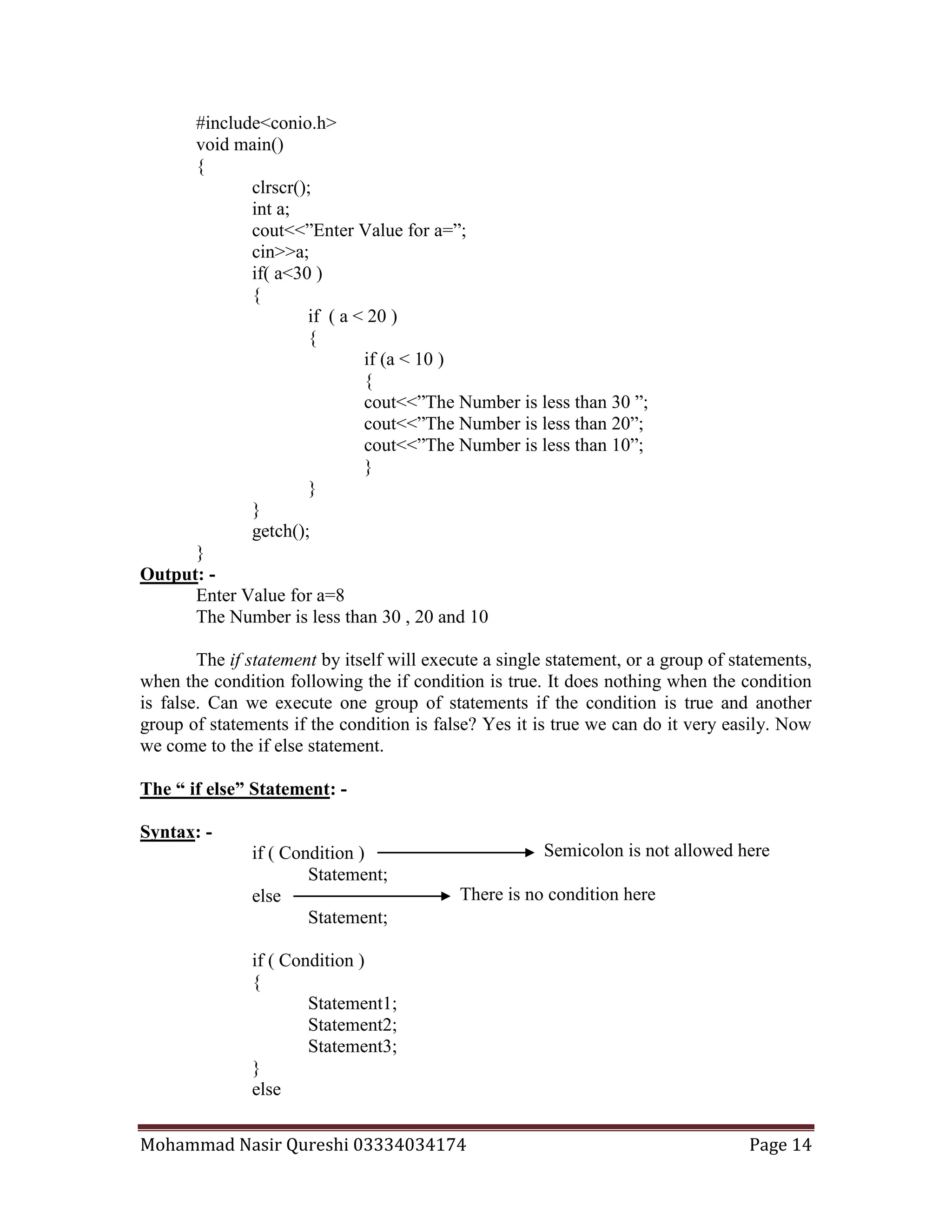
if( a<30 )
{
if ( a < 20 )
{
if (a < 10 )
{
cout<<”The Number is less than 30 ”;
cout<<”The Number is less than 20”;
cout<<”The Number is less than 10”;
}
}
}
getch();
}
Output: -
Enter Value for a=8
The Number is less than 30 , 20 and 10
The if statement by itself will execute a single statement, or a group of statements,
when the condition following the if condition is true. It does nothing when the condition
is false. Can we execute one group of statements if the condition is true and another
group of statements if the condition is false? Yes it is true we can do it very easily. Now
we come to the if else statement.
The “ if else” Statement: -
Syntax: -
if ( Condition )
Statement;
else
Statement;
if ( Condition )
{
Statement1;
Statement2;
Statement3;
}
else
Mohammad Nasir Qureshi 03334034174 Page 15
{
Statement1;
Statement2;
Statement3;
}
The purpose of else is this that when the if condition is false and the set of
statements following the if condition will not be executed then the statements present in
the else block will be executed. Let us see on a small example:
Example 9:
#include<iostream.h>
#include<conio.h>
void main()
{
clrscr();
int a;
cout<<”Enter Value for a=”;
cin>>a;
if( a<30 )
{
cout<<”The If Block”;
}
else
{
cout<<”The Else Part”;
}
getch();
}
Output: -
Enter Value for a=68
The Else Part
Example 10:
#include<iostream.h>
#include<conio.h>
void main()
{
clrscr();
int a;
cout<<”Enter Value for a=”;
cin>>a;
if( a = = 30 )
{
Mohammad Nasir Qureshi 03334034174 Page 16
cout<<”The Number is 30”;
}
else
{
cout<<”The Number is not 30”;
}
getch();
}
Output: -
Enter Value for a=68
The Number is not 30
Example 11: A bookstore has offered discount on next purchase to the customers who
have purchased according to following criteria:
Tenure of Purchase Discount
12 January 2003 and 12 February 2003 30%
12 February 2003 and 12 March 2003 20%
12 March 2003 and 12 April 2003 10%
. Write a Program, which takes the price of books purchased, and the date of last
purchase and gives us discount if the date of purchase meets the above-mentioned ranges
and provide the discount if the purchase is made after the date of 12 April 2003 then no
discount should be provided.
#include<iostream.h>
#include<conio.h>
void main()
{
clrscr();
int date,month,discount;
float price,total;
cout<< ”Enter the Price of Books=”;
cin>>price;
cout<<”Enter the Date of Last Purchase”;
cin>>date;
cout<<”Enter the Month of Last Pruchase”;
cin>>month;
if ( ( date >= 12 && month = = 1 ) | | ( date >= 12 && month = = 2 ) )
{
discount=30;
}
else if ( (date >= 12 && month = = 2) | | (date >= 12 && month = = 3 ) )
{
discount=20
Mohammad Nasir Qureshi 03334034174 Page 17
}
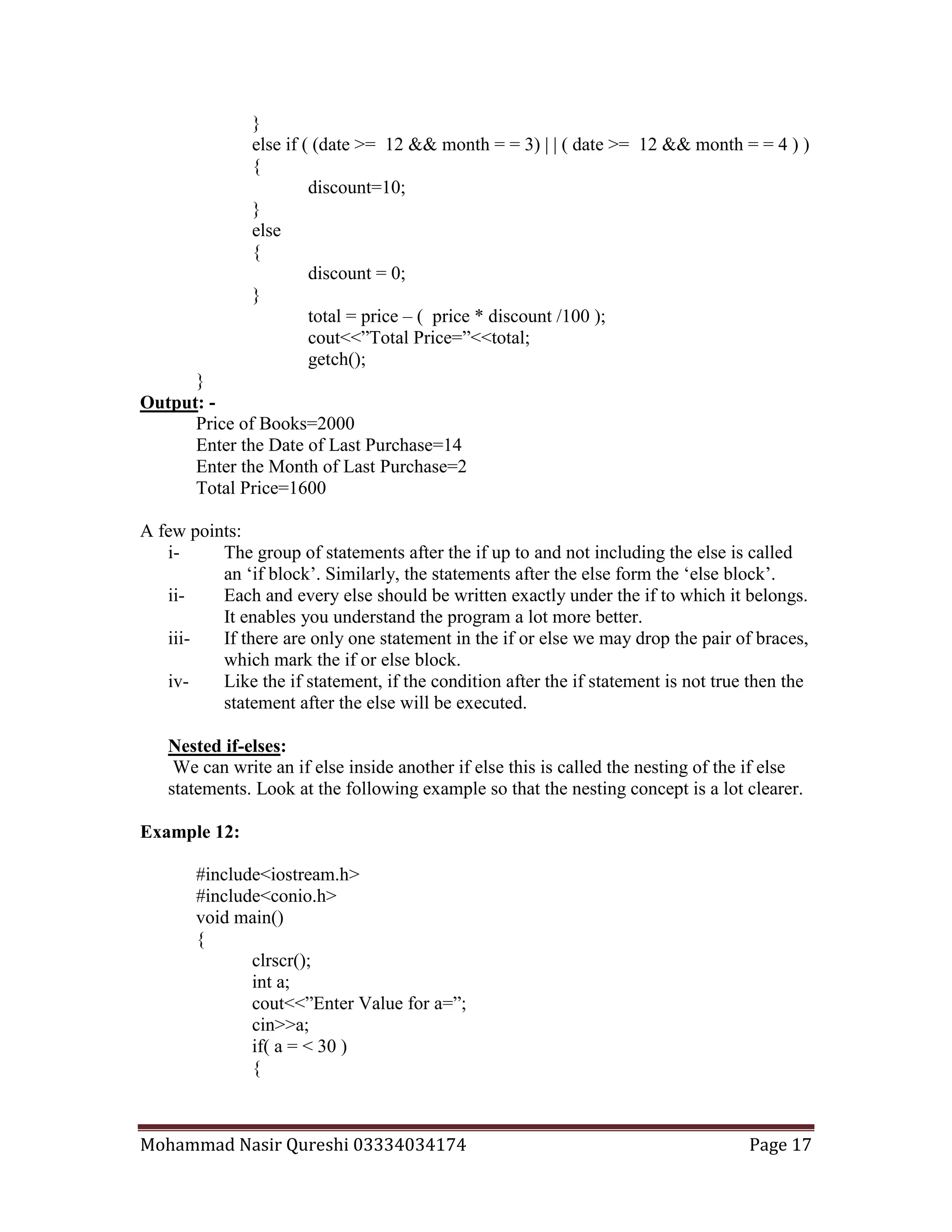
else if ( (date >= 12 && month = = 3) | | ( date >= 12 && month = = 4 ) )
{
discount=10;
}
else
{
discount = 0;
}
total = price – ( price * discount /100 );
cout<<”Total Price=”<<total;
getch();
}
Output: -
Price of Books=2000
Enter the Date of Last Purchase=14
Enter the Month of Last Purchase=2
Total Price=1600
A few points:
i- The group of statements after the if up to and not including the else is called
an ‘if block’. Similarly, the statements after the else form the ‘else block’.
ii- Each and every else should be written exactly under the if to which it belongs.
It enables you understand the program a lot more better.
iii- If there are only one statement in the if or else we may drop the pair of braces,
which mark the if or else block.
iv- Like the if statement, if the condition after the if statement is not true then the
statement after the else will be executed.
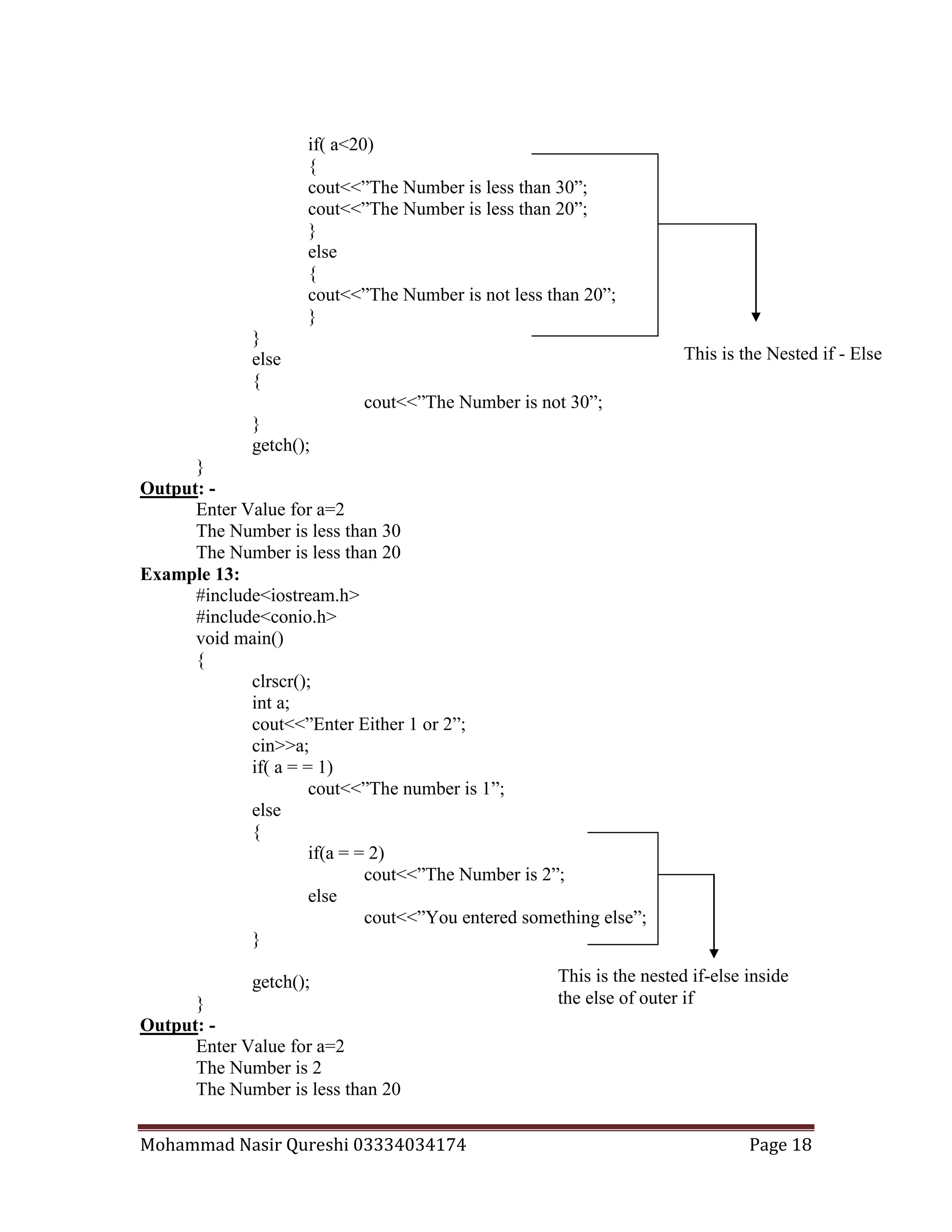
Nested if-elses:
We can write an if else inside another if else this is called the nesting of the if else
statements. Look at the following example so that the nesting concept is a lot clearer.
Example 12:
#include<iostream.h>
#include<conio.h>
void main()
{
clrscr();
int a;
cout<<”Enter Value for a=”;
cin>>a;
if( a = < 30 )
{
Mohammad Nasir Qureshi 03334034174 Page 18
if( a<20)
{
cout<<”The Number is less than 30”;
cout<<”The Number is less than 20”;
}
else
{
cout<<”The Number is not less than 20”;
}
}
else
{
cout<<”The Number is not 30”;
}
getch();
}
Output: -
Enter Value for a=2
The Number is less than 30
The Number is less than 20
Example 13:
#include<iostream.h>
#include<conio.h>
void main()
{
clrscr();
int a;
cout<<”Enter Either 1 or 2”;
cin>>a;
if( a = = 1)
cout<<”The number is 1”;
else
{
if(a = = 2)
cout<<”The Number is 2”;
else
cout<<”You entered something else”;
}
getch();
}
Output: -
Enter Value for a=2
The Number is 2
The Number is less than 20
This is the Nested if - Else
This is the nested if-else inside
the else of outer if
Mohammad Nasir Qureshi 03334034174 Page 19
To see how the logical operators are used in the if else statement so we see an
example in which we make the program using with and without the logical operators.
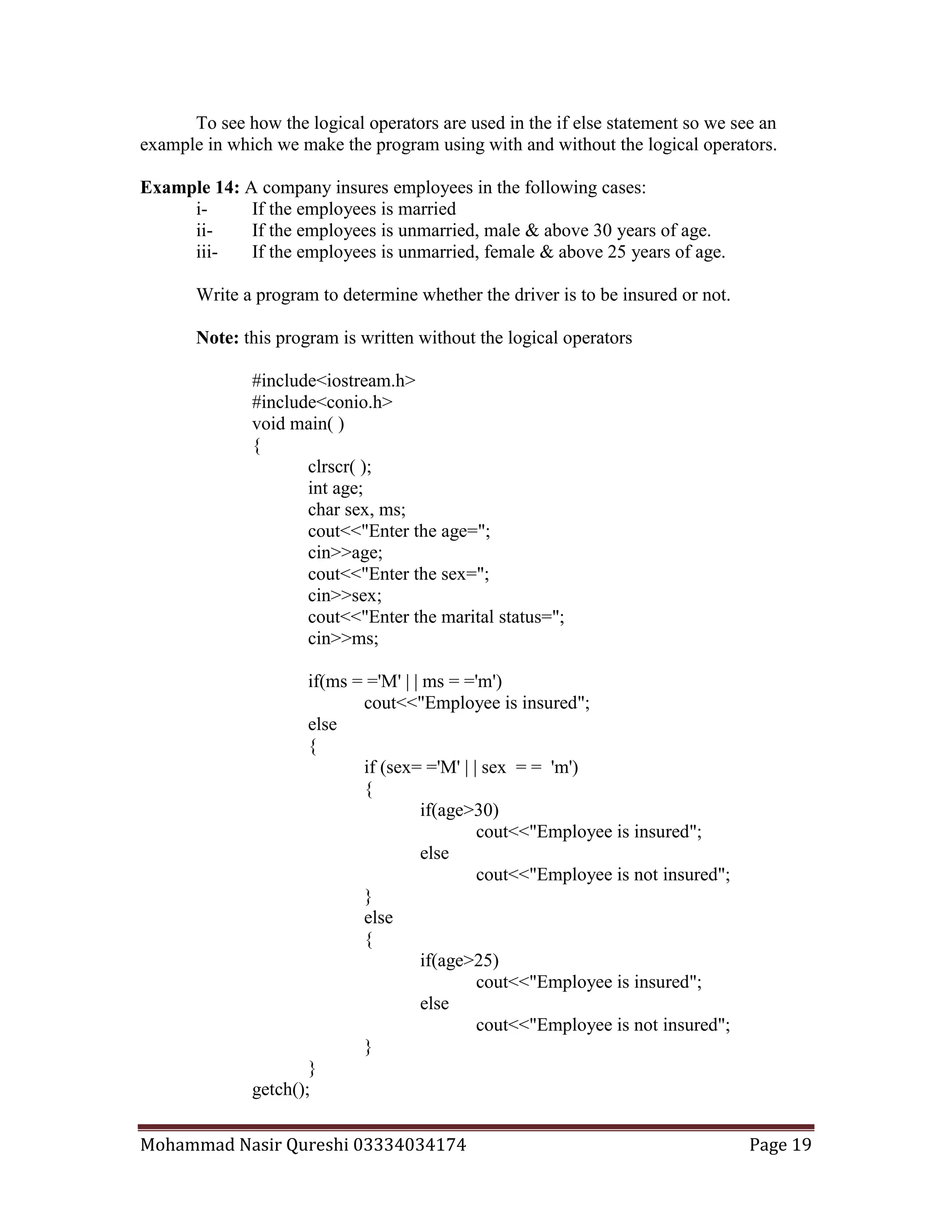
Example 14: A company insures employees in the following cases:
i- If the employees is married
ii- If the employees is unmarried, male & above 30 years of age.
iii- If the employees is unmarried, female & above 25 years of age.
Write a program to determine whether the driver is to be insured or not.
Note: this program is written without the logical operators
#include<iostream.h>
#include<conio.h>
void main( )
{
clrscr( );
int age;
char sex, ms;
cout<<"Enter the age=";
cin>>age;
cout<<"Enter the sex=";
cin>>sex;
cout<<"Enter the marital status=";
cin>>ms;
if(ms = ='M' | | ms = ='m')
cout<<"Employee is insured";
else
{
if (sex= ='M' | | sex = = 'm')
{
if(age>30)
cout<<"Employee is insured";
else
cout<<"Employee is not insured";
}
else
{
if(age>25)
cout<<"Employee is insured";
else
cout<<"Employee is not insured";
}
}
getch();
Mohammad Nasir Qureshi 03334034174 Page 20
}
Output: -
Enter the age=30
Enter the sex=m
Enter the martial Status=m
The Employee is insured
Note: this program is written with the logical operators
#include<iostream.h>
#include<conio.h>
void main( )
{
clrscr( );
int age;
char sex, ms;
cout<<"Enter the age=";
cin>>age;
cout<<"Enter the sex=";
cin>>sex;
cout<<"Enter the marital status=";
cin>>ms;
if((ms = ='M' | | ms = ='m') | |
(( ms= =’U’ | | ms= =’u’) && (sex = = ‘M’ | | sex= =’m’) && (age >30) | |
( ms= =’U’ | | ms= =’u’) && (sex = = ‘F’ | | sex= =’f’) && (age >25) )
cout<<"Employee is insured";
else
cout<<"Employee is not insured";
getch();
}
Output: -
Enter the age=30
Enter the sex=m
Enter the martial Status=m
The Employee is insured
Mohammad Nasir Qureshi 03334034174 Page 21
Some Common Errors:
Look at the following program:
Example 15:
#include<iostream.h>
#include<conio.h>
void main()
{
clrscr();
int i;
cout<<”Enter Value for i=”;
cin>>i;
if(I=5)
{
cout<<”You Entered 5”;
}
else
{
cout<<”You Entered Something Other Than 5”;
}
getch();
}
Output of the Program:
Enter Value for i= 400
You Entered 5
Strange? We entered 400 in the output and get the message that we entered the
value 5. What is wrong with the condition? Here is a technical point we have written the
condition wrongly. We have used the assignment operator “ = ” in place of comparison
operator “ = = ”. So when the compiler reads the program it reads the line if ( i = 5 ) as
if(5). In C++ the ‘truth’ is always non-zero. So as if(5) is non-zero so the if condition is
true and the statement inside the if body is executed rather than that of else.
#include<iostream.h>
#include<conio.h>
void main()
{
clrscr();
int i;
cout<<”Enter Value for i=”;
cin>>i;
if ( i = = 5 );
cout<<”You Entered 5”;
getch();
}
Mohammad Nasir Qureshi 03334034174 Page 22
Output of the Program:
Enter Value for i= 400
You Entered 5
Here the output is again You entered 5 what is the reason of this? The reason is this that
the compiler reads the if condition like this:
if ( i = = 5 )
;
cout<<”You Entered 5”;
Here, if the condition evaluates to true the ; (null statement, which does nothing on
execution) gets executed, and the next cout statement is considered an independent
statement so it is executed either the if condition is false or true.
The Conditional Operator:
This operator is also called ternary operators. Since they take three arguments. In
other words we can call it the shorthand of if-then-else.
Syntax
Expression 1 ? expression 2 : expression 3
It says if expression 1 is true then execute the expression 2 otherwise execute the
expression 3. Let us see some examples of this.
Example 1
#include<iostream.h>
#include<conio.h>
void main()
{
clrscr();
int i,j;
cout<<”Enter Value for i=”;
cin>>i;
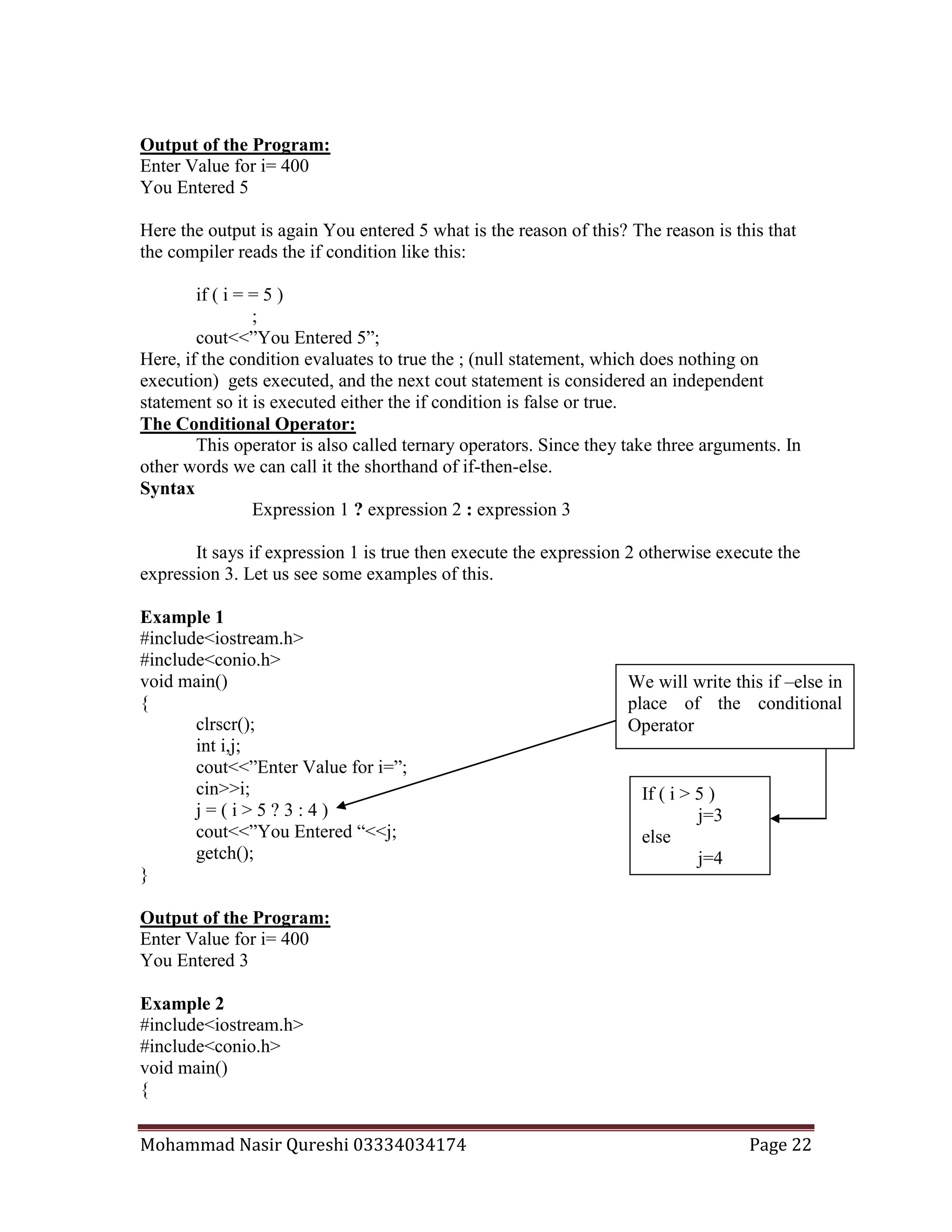
j = ( i > 5 ? 3 : 4 )
cout<<”You Entered “<<j;
getch();
}
Output of the Program:
Enter Value for i= 400
You Entered 3
Example 2
#include<iostream.h>
#include<conio.h>
void main()
{
If ( i > 5 )
j=3
else
j=4
We will write this if –else in
place of the conditional
Operator
Mohammad Nasir Qureshi 03334034174 Page 23
clrscr();
int i;
cout<<”Enter Value for i=”;
cin>>i;
(i = = 5 ? cout<<”You Entered 5” : cout<<”You Entered Other Than 5” );
getch();
}
Output of the Program:
Enter Value for i= 5
You Entered 5
Example 3
#include<iostream.h>
#include<conio.h>
void main()
{
clrscr();
int big,a,b,c;
cout<<”Enter Value for a=”;
cin>>a;
cout<<”Enter Value for b=”;
cin>>b;
cout<<”Enter Value for c=”;
cin>>c;
big = (a > b 5 ? (a > c ? 3 : 4 ) : (b > c ? 6 : 8 ) );
cont<<”Value of Big=”<<big;
getch();
}
Output of the Program:
Enter Value for a= 35
Enter Value for a= 25
Enter Value for a= 5
Value of Big=3
The main difference between if and the conditional operator is this that after the ?
Or after : only one statement can be used. So that’s why the conditional operators are not
so commonly used.
The Switch-Case:
Sometimes we come to know to some situations when we are required to make
selection between a limited numbers of options. For such purposes C++ provides a
special case control statement that allows us to handle such matters more efficiently than
the above two statements.
Mohammad Nasir Qureshi 03334034174 Page 24
Syntax:
Switch ( Variable Name or any expression)
{
case constant:
{
Statements;
break;
}
case constant:
{
Statements;
break;
}
default:
{
Statements;
}
}
First of all comes the keyword Switch that is followed by the variable name or any
expression, which evaluates a value. Then starts the body of the switch case with a
bracket “{” in which there comes the case which is a key word after this keyword we
come to a constant which may be an integer or a character (but remember this must be a
constant). After the constant we again put a bracket “{“ this bracket shows the starting of
the body of the case in which the statements are written i.e. the statements which should
execute on the selection of the case. After the statements comes the keyword “break” and
then the body of the case is closed by an ending bracket “}”. This was one case you can
put as many as you want after it. At the end of the cases comes the keyword “default” this
keyword in other words, is the else of the switch case. If any case is not true then the
default is executed. After the keyword “default” we put a bracket showing the start of the
body of the default and then the statements. After the end of default i.e. closing the
bracket of default close the bracket of the switch, which we have opened in the start.
Example 1
#include<iostream.h>
#include<conio.h>
void main()
{
clrscr();
int a;
cout<<”Enter Value for a=”;
cin>>a;
switch ( a )
{
case 1:
{
Mohammad Nasir Qureshi 03334034174 Page 25
True
True
True
False
False
cout<<”Pakistan”;
break;
}
case 2:
{
cout<<”Karachi”;
break;
}
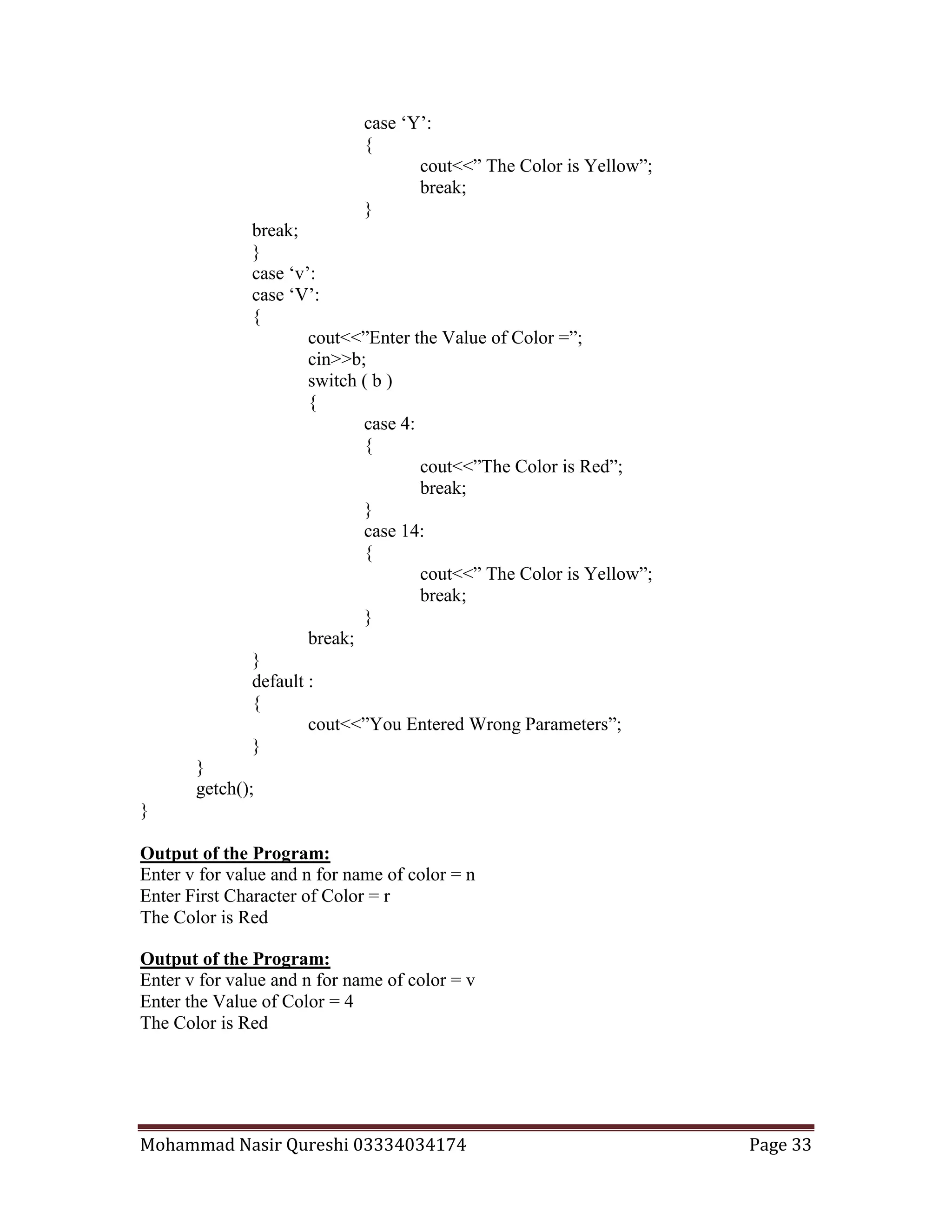
default :
{
cout<<”Lahore”;
}
}
getch();
}
Output of the Program:
Enter Value for a= 1
Pakistan
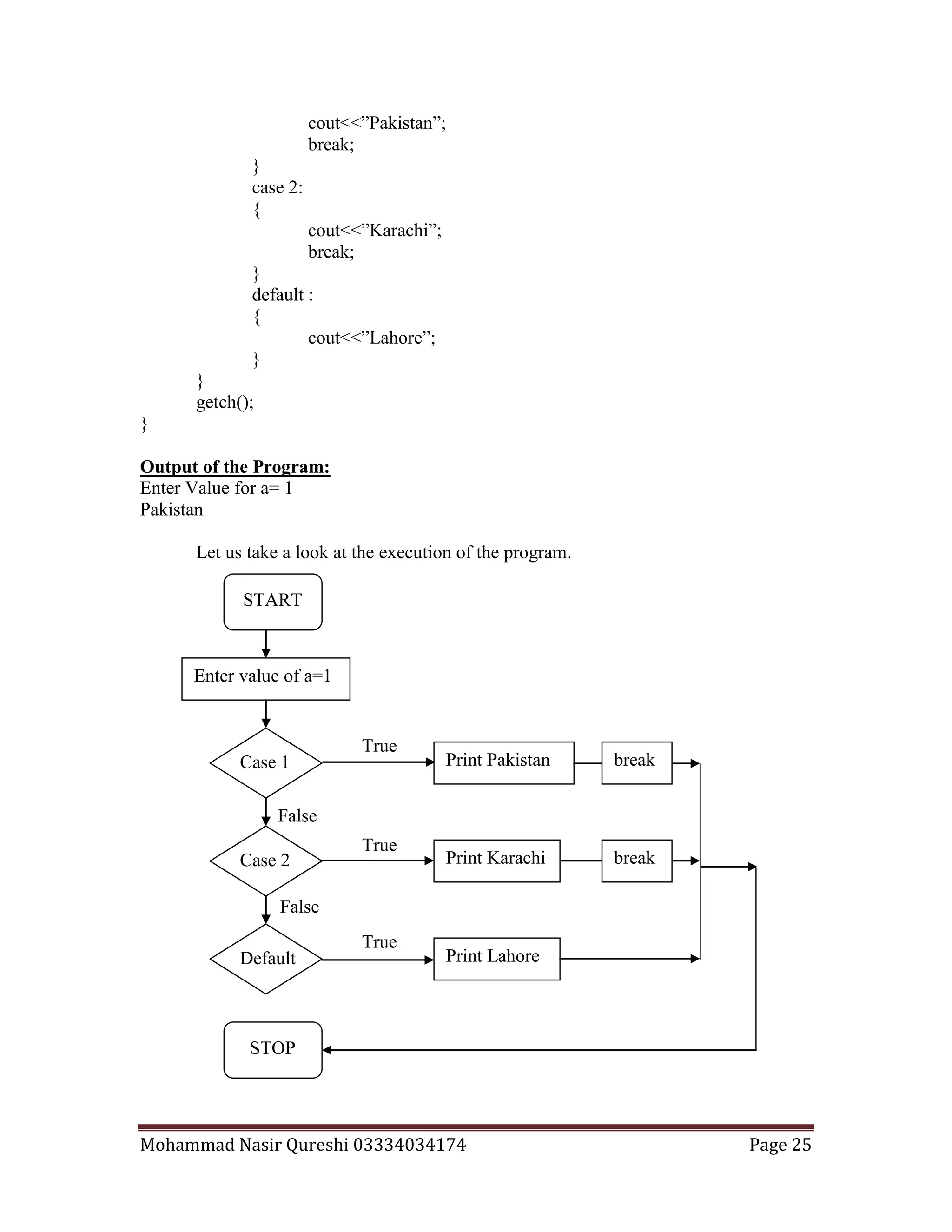
Let us take a look at the execution of the program.
START
Enter value of a=1
Case 1
Case 2
Default
STOP
Print Pakistan
Print Karachi
Print Lahore
break
break
Mohammad Nasir Qureshi 03334034174 Page 26
It is a fact that the keyword “break” after every case is necessary otherwise the control of
the control of the program will go on dropping and every case after the true case will be
executed including the default. Let us have a look on a program not having the “break”
keyword.
Example 2
#include<iostream.h>
#include<conio.h>
void main()
{
clrscr();
int a;
cout<<”Enter Value for a=”;
cin>>a;
switch ( a )
{
case 1:
{
cout<<”Pakistan”;
}
case 2:
{
cout<<”Karachi”;
}
default :
{
cout<<”Lahore”;
}
}
getch();
}
Output of the Program:
Enter Value for a= 1
Pakistan
Karachi
Lahore
Second time if we run the program and we enter 2 we get the following output.
Output of the Program:
Enter Value for a= 2
Karachi
Lahore
Mohammad Nasir Qureshi 03334034174 Page 27
So if you will not use the “break” keyword then the case which is true and all the
cases along with default after the true case will be executed. That is why we use the break
keyword.
Note: Keywords are always white in color in the C++ code editor.
If we use characters we will write the program as shown below in the following
example. Here the case is executed whose character is entered and vice versa.
Example 3
#include<iostream.h>
#include<conio.h>
void main()
{
clrscr();
char a;
cout<<”Enter First Character of Color =”;
cin>>a;
switch ( a )
{
case ‘r’:
{
cout<<”The Color is Red”;
break;
}
case ‘o’:
{
cout<<” The Color is Orange”;
break;
}
case ‘y’:
{
cout<<” The Color is Yellow”;
break;
}
case ‘b’:
{
cout<<” The Color is Blue”;
break;
}
default :
{
cout<<”You Entered Wrong Parameters”;
}
}
getch();
Mohammad Nasir Qureshi 03334034174 Page 28
}
Output of the Program:
Enter First Character of Color = r
The Color is Red
During the coding of the program it is not necessary that the cases should be in
order they can be unordered like the following example depicts:
Example 4
#include<iostream.h>
#include<conio.h>
void main()
{
clrscr();
int a;
cout<<”Enter Value for a=”;
cin>>a;
switch ( a )
{
case 121:
{
cout<<”This is Case 121”;
break;
}
case 3000:
{
cout<<” This is Case 3000”;
break;
}
case 1:
{
cout<<” This is Case 1”;
break;
}
default :
{
cout<<” This is Default”;
}
}
getch();
}
Output of the Program:
Enter Value for a= 1
This is Case 1
Mohammad Nasir Qureshi 03334034174 Page 29
We can mix integer and character constants in different cases of a switch as
shown in the following example:
Example 5
#include<iostream.h>
#include<conio.h>
void main()
{
clrscr();
int a;
cout<<”Enter Value for a=”;
cin>>a;
switch ( a )
{
case ‘y’:
{
cout<<”This is Case Y“;
break;
}
case 3:
{
cout<<” This is Case 3”;
break;
}
case 1:
{
cout<<” This is Case 1”;
break;
}
default :
{
cout<<” This is Default”;
}
}
getch();
}
Output of the Program:
Enter Value for a= 1
This is Case 1
You can use only an integer or a single character in the cases no floats can be
used. For example:
case 1: Valid
case ‘a’: Valid
case 2.34: Invalid
Mohammad Nasir Qureshi 03334034174 Page 30
Further more you cannot use a case like this:
case a<=20:
Example 6: In example 3 we wrote a program, which showed us the name of the color,
whose first character we entered. But the case was this we can only use small characters
“r” what if the user entered capital letters? Let us look at the following program.
#include<iostream.h>
#include<conio.h>
void main()
{
clrscr();
char a;
cout<<”Enter First Character of Color =”;
cin>>a;
switch ( a )
{
case ‘r’:
case ‘R’:
{
cout<<”The Color is Red”;
break;
}
case ‘o’:
case ‘O’:
{
cout<<” The Color is Orange”;
break;
}
case ‘y’:
case ‘Y’:
{
cout<<” The Color is Yellow”;
break;
}
case ‘b’:
case ‘B’:
{
cout<<” The Color is Blue”;
break;
}
default :
{
cout<<”You Entered Wrong Parameters”;
}
}
getch();
Mohammad Nasir Qureshi 03334034174 Page 31
}
Output of the Program:
Enter First Character of Color =r
The Color is Red
Output of the Program:
Enter First Character of Color =R
The Color is Red
Example 7:
#include<iostream.h>
#include<conio.h>
void main()
{
clrscr();
int a;
cout<<”Enter Value for a=”;
cin>>a;
switch ( a )
{
case 121:
cout<<”This is Case 121”;
break;
case 3000:
cout<<” This is Case 3000”;
break;
case 1:
cout<<” This is Case 1”;
break;
}
getch();
}
Output of the Program:
Enter Value for a= 1
This is Case 1
We can avoid the brackets of the switches even if there are multiple statements in
a case. That is why “break” will tell the compiler the end of the case. If we don’t use
“default” at the end of the switch case. Then if no case is true the statement after the
switch case will be executed.
Mohammad Nasir Qureshi 03334034174 Page 32
Nested Switch-Case:
Just like the if and the if-else we can use the switch case in the same manner i.e.
one switch case inside another. This is called nested Switch-Case. But this is not a
common practice and it is rarely done.
In the C++ Language there is an integer value for each and every color. All the
values are shown in the following table.
Color Value Color Value
Black 0 Blue 1
Green 2 Cyan 3
Red 4 Magenta 5
Brown 6 Light Gray 7
Dark Gray 8 Light Blue 9
Light Green 10 Light Cyan 11
Light Red 12 Light Magenta 13
Yellow 14 White 15
Example 7: In example 6 we developed the program to show the name of color either the
user entered the letter “r” or “R”. But what if the user entered “r” or “R” or 4 then how
we will handle the situation.
#include<iostream.h>
#include<conio.h>
void main()
{
clrscr();
int b;
char a, c;
cout<<”Enter v for value and n for name of color =”;
cin>>a;
switch ( a )
{
case ‘n’:
case ‘N’:
{
cout<<”Enter First Character of Color =”;
cin>>c;
switch ( c )
{
case ‘r’:
case ‘R’:
{
cout<<”The Color is Red”;
break;
}
case ‘y’:
Mohammad Nasir Qureshi 03334034174 Page 33
case ‘Y’:
{
cout<<” The Color is Yellow”;
break;
}
break;
}
case ‘v’:
case ‘V’:
{
cout<<”Enter the Value of Color =”;
cin>>b;
switch ( b )
{
case 4:
{
cout<<”The Color is Red”;
break;
}
case 14:
{
cout<<” The Color is Yellow”;
break;
}
break;
}
default :
{
cout<<”You Entered Wrong Parameters”;
}
}
getch();
}
Output of the Program:
Enter v for value and n for name of color = n
Enter First Character of Color = r
The Color is Red
Output of the Program:
Enter v for value and n for name of color = v
Enter the Value of Color = 4
The Color is Red
Mohammad Nasir Qureshi 03334034174 Page 34
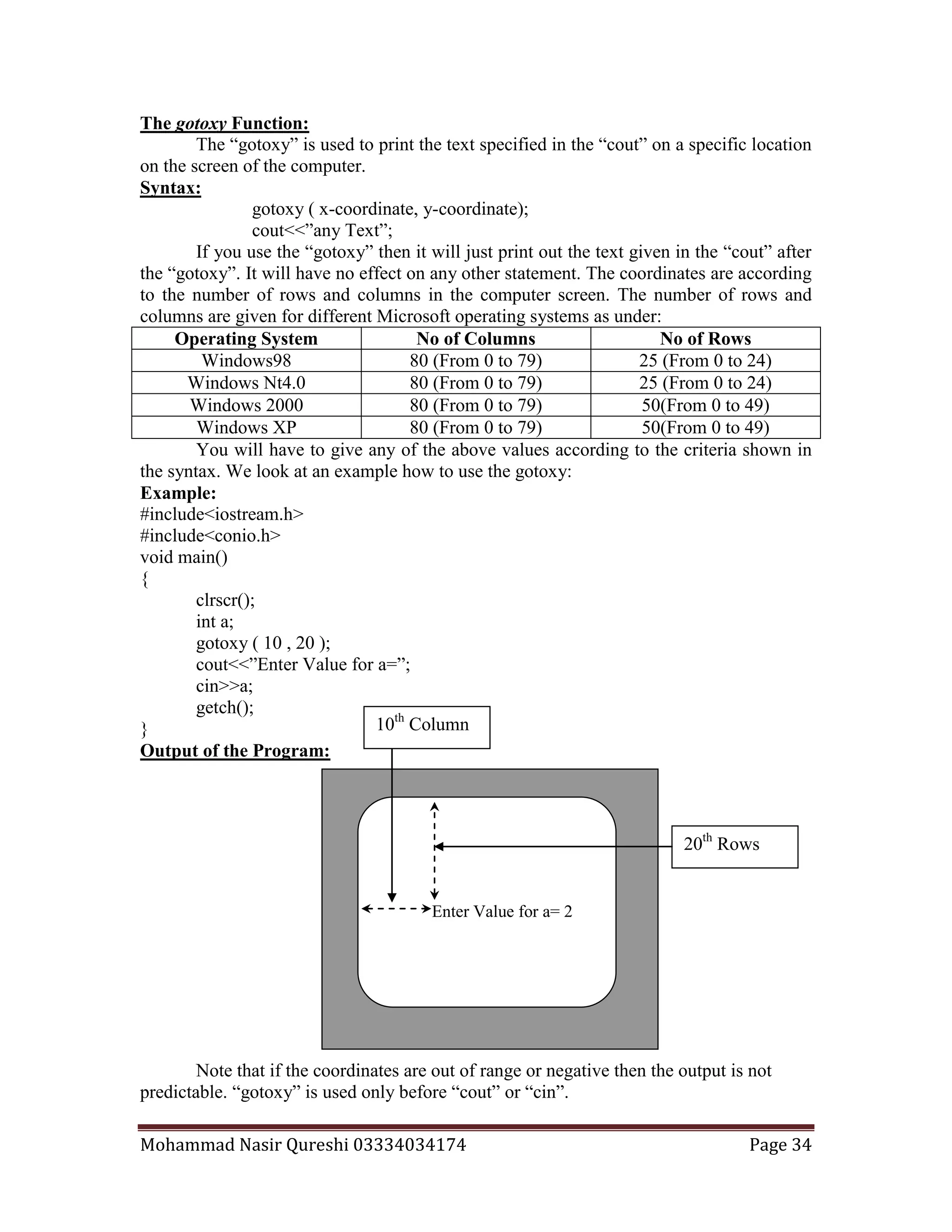
The gotoxy Function:
The “gotoxy” is used to print the text specified in the “cout” on a specific location
on the screen of the computer.
Syntax:
gotoxy ( x-coordinate, y-coordinate);
cout<<”any Text”;
If you use the “gotoxy” then it will just print out the text given in the “cout” after
the “gotoxy”. It will have no effect on any other statement. The coordinates are according
to the number of rows and columns in the computer screen. The number of rows and
columns are given for different Microsoft operating systems as under:
Operating System No of Columns No of Rows
Windows98 80 (From 0 to 79) 25 (From 0 to 24)
Windows Nt4.0 80 (From 0 to 79) 25 (From 0 to 24)
Windows 2000 80 (From 0 to 79) 50(From 0 to 49)
Windows XP 80 (From 0 to 79) 50(From 0 to 49)
You will have to give any of the above values according to the criteria shown in
the syntax. We look at an example how to use the gotoxy:
Example:
#include<iostream.h>
#include<conio.h>
void main()
{
clrscr();
int a;
gotoxy ( 10 , 20 );
cout<<”Enter Value for a=”;
cin>>a;
getch();
}
Output of the Program:
Note that if the coordinates are out of range or negative then the output is not
predictable. “gotoxy” is used only before “cout” or “cin”.
Enter Value for a= 2
20th
Rows
10th
Column
Mohammad Nasir Qureshi 03334034174 Page 35
The goto Statement (A dangerous statement):
Like the “gotoxy” the “goto” statement also takes you to a specific position. But
the difference is this that the “gotoxy” takes you to a specific position on the output
screen and the “goto” takes you to a specific point in the code of the program during
execution. In other words, we can say that the “gotoxy” works on the front end while the
“goto” works on the backend of the program during the execution. But it is not the
practice of good programmers to use a “goto” statement. You can use it if you have no
choice. C++ has inherited the “goto” from the C language due to some drawbacks found
in the C language limitation. As you could not use the same code again in C language
hence there we sometimes use “goto” but C++ is much developed to handle the problems
of reusability of code without the “goto” statement, which we will see later.
Syntax:
goto label-name;
Example:
#include<iostream.h>
#include<conio.h>
void main()
{
abc:
clrscr();
char a, ch;
gotoxy(10,12);
cout<<”Enter First Character of Color =”;
cin>>a;
switch ( a )
{
case ‘r’:
case ‘R’:
{
gotoxy(10,13);
cout<<”The Color is Red”;
break;
}
case ‘o’:
case ‘O’:
{
gotoxy(10,13);
cout<<” The Color is Orange”;
break;
}
default :
{
gotoxy(10,13);
cout<<”You Entered Wrong Parameters”;
}
}
The Label which is called if the
“if condition” at the end of the
program is true.
Mohammad Nasir Qureshi 03334034174 Page 36
gotoxy(10,14);
cout<<”Do you want to repeat?”;
cin>>ch;
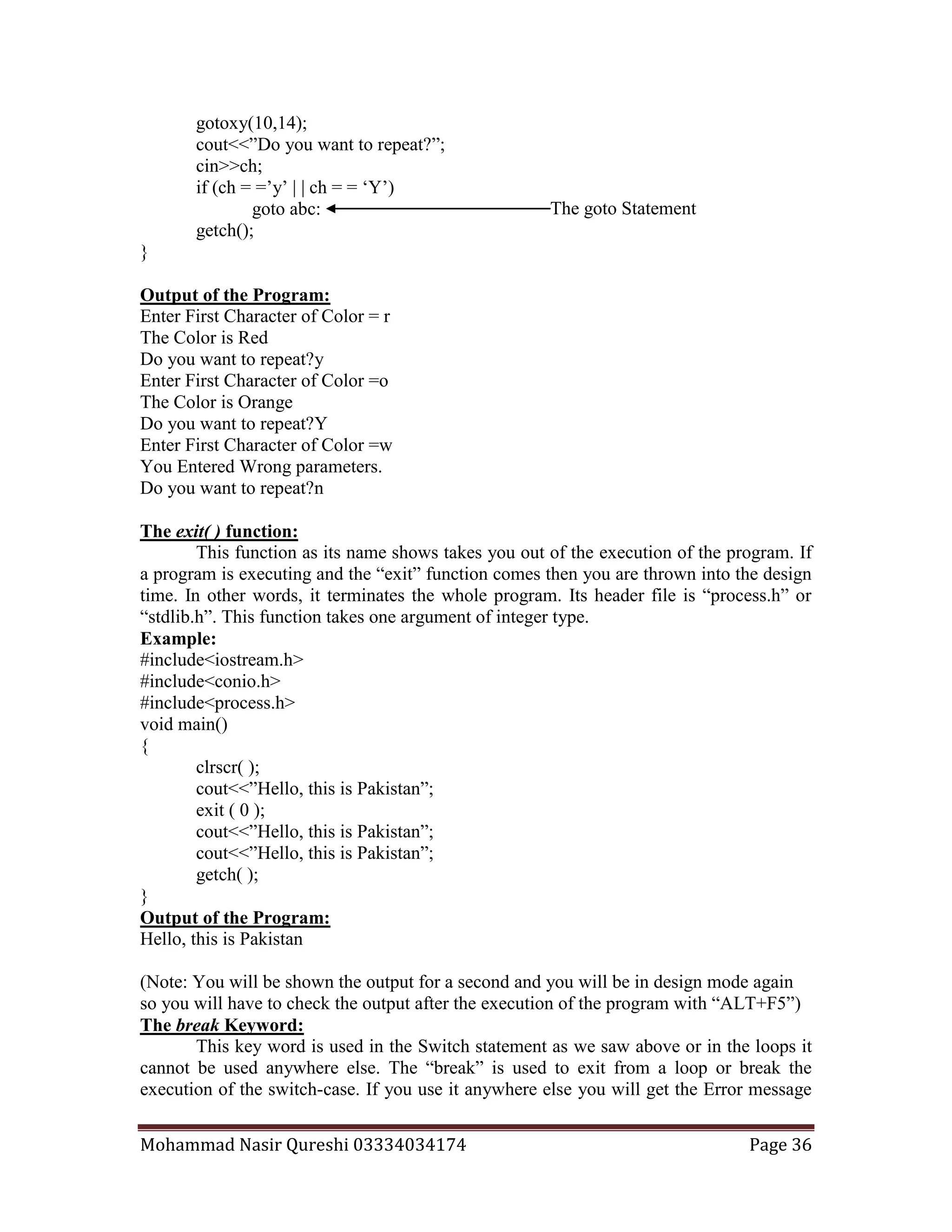
if (ch = =’y’ | | ch = = ‘Y’)
goto abc:
getch();
}
Output of the Program:
Enter First Character of Color = r
The Color is Red
Do you want to repeat?y
Enter First Character of Color =o
The Color is Orange
Do you want to repeat?Y
Enter First Character of Color =w
You Entered Wrong parameters.
Do you want to repeat?n
The exit( ) function:
This function as its name shows takes you out of the execution of the program. If
a program is executing and the “exit” function comes then you are thrown into the design
time. In other words, it terminates the whole program. Its header file is “process.h” or
“stdlib.h”. This function takes one argument of integer type.
Example:
#include<iostream.h>
#include<conio.h>
#include<process.h>
void main()
{
clrscr( );
cout<<”Hello, this is Pakistan”;
exit ( 0 );
cout<<”Hello, this is Pakistan”;
getch( );
}
Output of the Program:
Hello, this is Pakistan
(Note: You will be shown the output for a second and you will be in design mode again
so you will have to check the output after the execution of the program with “ALT+F5”)
The break Keyword:
This key word is used in the Switch statement as we saw above or in the loops it
cannot be used anywhere else. The “break” is used to exit from a loop or break the
execution of the switch-case. If you use it anywhere else you will get the Error message
The goto Statement
Mohammad Nasir Qureshi 03334034174 Page 37
misplaced “break”. During the execution program when the “break” keyword comes
inside a loop or switch case it will take the control to the end of the program. As we
observed above in the switch-case programs.
Increment and Decrement:
Increment has come from increase, which means adding something to the value of
a variable. Whereas, the decrement which has come from decrease subtracts something
from the value of the variable. The operators “++” or “--” are used for single increment
and decrement respectively. Single increment and decrement are shown below:
Variable name ++; Post-increment
Variable name --; Post-decrement
In Post-increment the value of the variable is first used and then 1 is added to the
value of the variable. While in Post-decrement the value of variable is first used and then
1 is subtracted from the variable value.
Example 1:
#include<iostream.h>
#include<conio.h>
void main()
{
clrscr();
int a = 4;
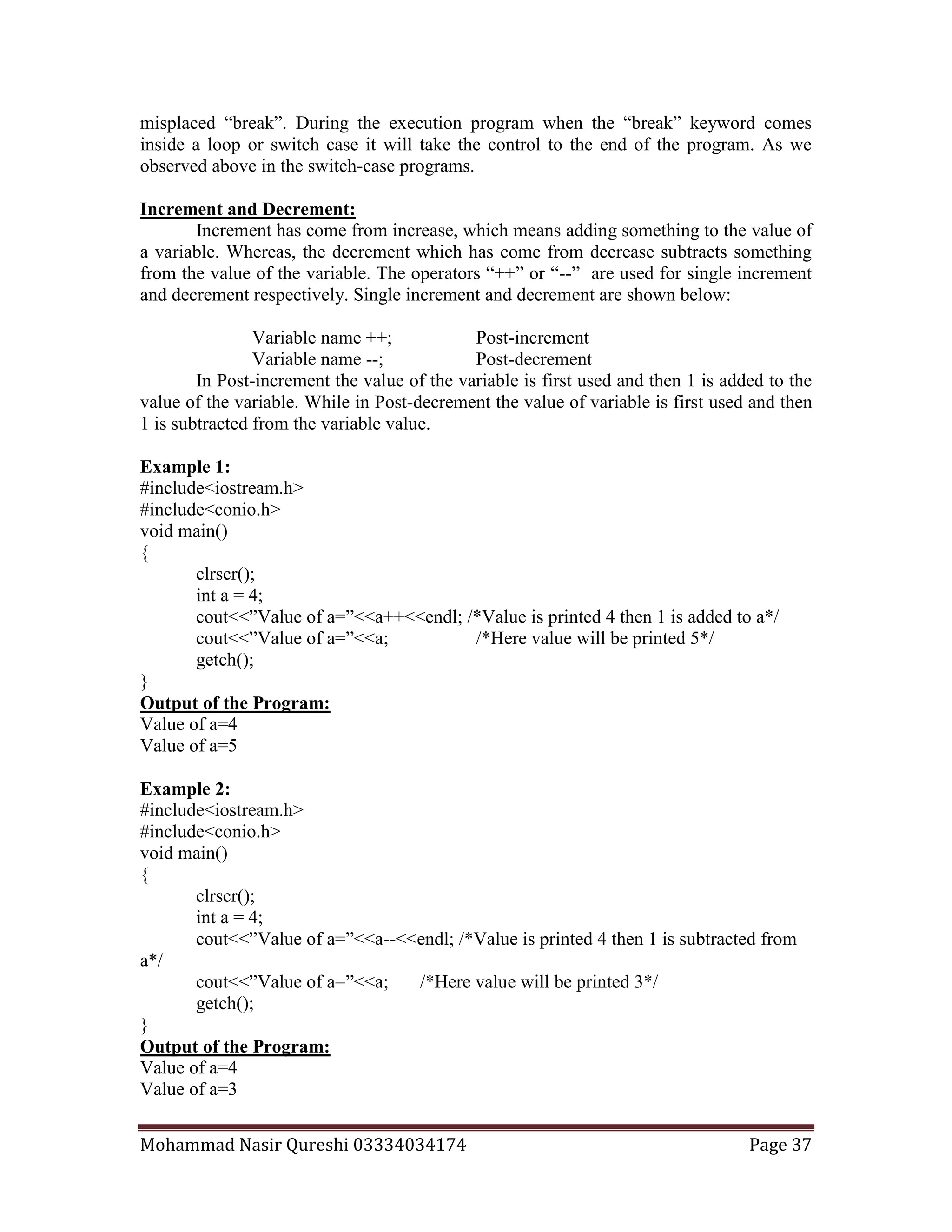
cout<<”Value of a=”<<a++<<endl; /*Value is printed 4 then 1 is added to a*/
cout<<”Value of a=”<<a; /*Here value will be printed 5*/
getch();
}
Output of the Program:
Value of a=4
Value of a=5
Example 2:
#include<iostream.h>
#include<conio.h>
void main()
{
clrscr();
int a = 4;
cout<<”Value of a=”<<a--<<endl; /*Value is printed 4 then 1 is subtracted from
a*/
cout<<”Value of a=”<<a; /*Here value will be printed 3*/
getch();
}
Output of the Program:
Value of a=4
Value of a=3
Mohammad Nasir Qureshi 03334034174 Page 38
Similarly, in Pre-increment first 1 is added to the value of the variable and then
the value of the variable is used. While in Pre-decrement first 1 is subtracted from the
value of variable and then the value of variable is used.
Example 3:
#include<iostream.h>
#include<conio.h>
void main()
{
clrscr();
int a = 4;
cout<<”Value of a=”<<++a; /*1 is added to a then it is printed*/
cout<<”Value of a=”<< -- a; /*1 is subtracted from a and then printed*/
cout<<”Value of a=”<<a; /*Here value will be printed 4*/
getch();
}
Output of the Program:
Value of a=5
Value of a=4
Value of a=4
But the difference is this that pre-increment or pre-decrement can be used as
many times with the operator as the range of the data-type of variable allows. But in post-
increment and post-decrement you can use the operator “++” or “--” only one time after
the variable. Hence,
a++ Valid (uses value of a then adds 1 to the value of a)
a-- Valid (uses value of a then subtracts 1 from the value of a)
++a Valid (adds 1 to the value of a before using value of a)
--a Valid (subtracts 1 from the value of a before using value of a)
++++a Valid ( adds 2 to the value of a and then uses it)
----a Valid ( subtracts 2 from the value of a and then uses it)
a++++ Invalid ( gives error message )
a---- Invalid ( gives error message )
++++++++a Valid ( adds 4 to the value of a and then uses it)
--------a Valid ( subtracts 2 from the value of a and then uses it)
--++a Valid ( first subtracts 1 then adds 1 to the value of a and then uses it)
--------a Valid ( subtracts 2 from the value of a and then uses it)
Example 4:
#include<iostream.h>
#include<conio.h>
void main()
{
clrscr();
int a=4;
cout<<"+-a="<<+-a<<endl;
a=4;
Mohammad Nasir Qureshi 03334034174 Page 39
cout<<"-+a="<<-+a<<endl;
a=4;
cout<<"++++a="<<++++a<<endl;
a=4;
cout<<"----a="<<----a<<endl;
a=4;
cout<<"++--a="<<++--a<<endl;
a=4;
cout<<"--++a="<<--++a<<endl;
a=4;
cout<<"-+-+a="<<-+-+a<<endl;
a=4;
cout<<"+-+-a="<<+-+-a<<endl;
getch();
}
Output of the Program:
+-a=-4
-+a=-4
++++a=6
----a=2
++--a=4
--++a=4
-+-+a=4
+-+-a=4
Mohammad Nasir Qureshi 03334034174 Page 40
Loops
As the name loop shows repetition of some kind. So the loops in C++ Language
are used to repeat the code written inside them a number of times you specify or until a
particular condition is satisfied. There are three methods with the help of which we can
repeat a part of the program again and again:
(a) Using the for Loop
(b)Using the while Loop
(c) Using the do-while Loop
We will discuss each of these loops in turn:
The for Loop:
The for loop is used for the repetition of a number of statements certain number of
times. The syntax of the “for” is as follows:
Syntax:
for ( starting value/initialization ; test expression/condition; increment/decrement )
{
Statements;
Statements;
Statements;
……..
}
Example 1
#include<iostream.h>
#include<conio.h>
void main()
{
clrscr();
int a;
for (a = 0 ; a < 5 ; a++)
{
cout<<”Pakistan”;
}
getch();
}
Output of the Program:
PakistanPakistanPakistanPakistanPakistan
Now we look at the execution of the above program. First of all the program’s
execution started the value of a is 0 the condition is checked either a is less than 5 or not
if the condition is true then the message in the body of the if is printed. Then the program
goes to the increment/decrement portion of the loop where 1 is added to the value of “a”
and it becomes 1 again the condition is checked either “a” is less than 5 or not if it is then
the message is printed one more time again 1 is added to the value of “a” which becomes
Mohammad Nasir Qureshi 03334034174 Page 41
2 again the condition is checked which is true i.e. less than 5 then message is printed one
more time. Then 1 is added to the value of “a” and it becomes 3 after which the condition
is checked and if it is true then message is printed and 1 is added to the value of “a”
which becomes 4 the condition again becomes true and message is printed. After it again
1 is added to the value of “a” which becomes 5, the condition is checked “5 is less than
5”, the condition becomes false and the loop terminates there and the control goes on the
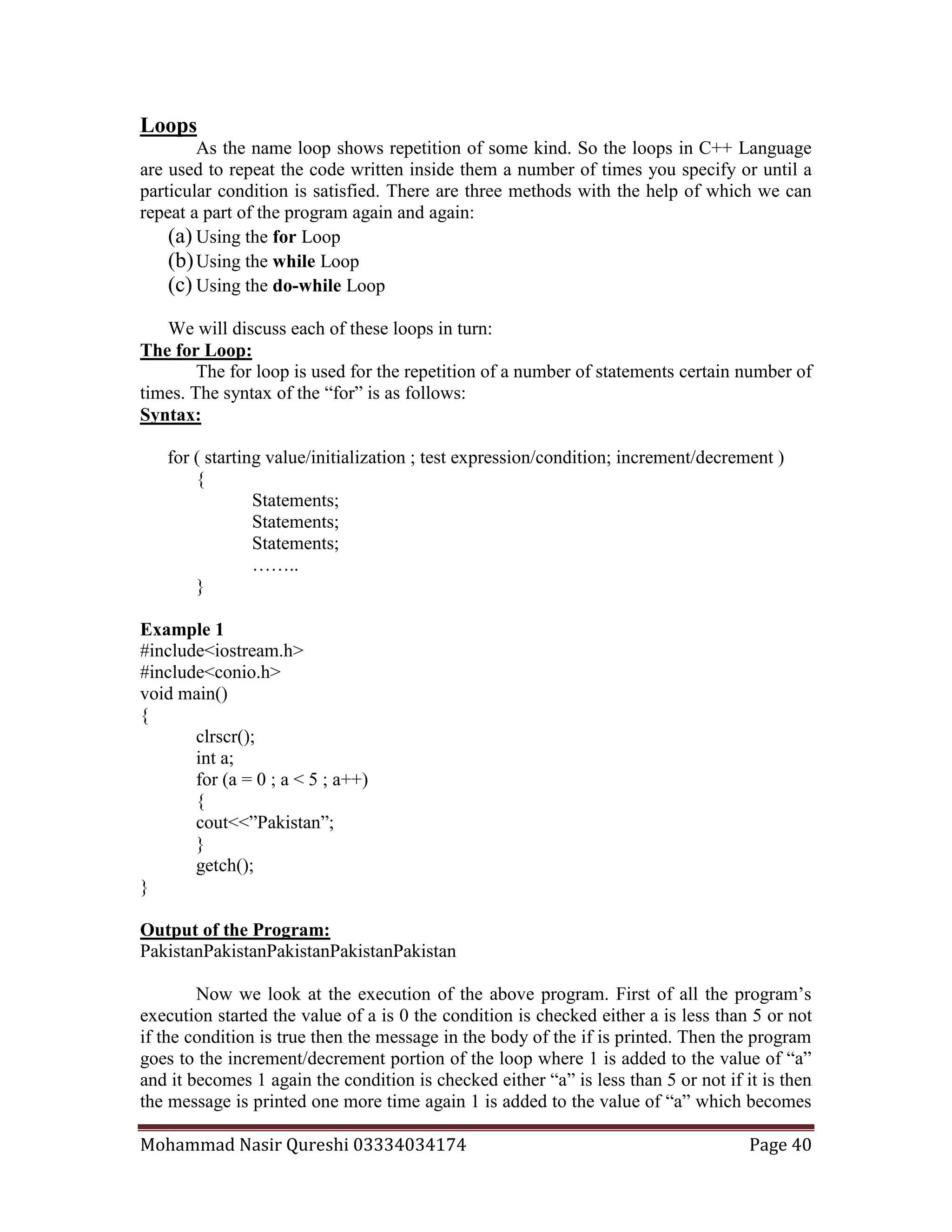
getch() or in other words, on the end of the program. We can draw the flowchart as
under:
Example 2
#include<iostream.h>
#include<conio.h>
void main()
{
clrscr();
int a;
for (a = 0 ; a <3 ; a++)
{
cout<<”Pakistan”<<endl;
cout<<”Lahore”<<endl;
}
getch();
}
Start
a < 5
Yes
No
StopPrint Pakistan
a = a +1
a=0
Mohammad Nasir Qureshi 03334034174 Page 42
Output of the Program:
Pakistan
Lahore
Pakistan
Lahore
Pakistan
Lahore
Pakistan
Let us now write a program to print numbers from 1 to 10 in different ways:
Example 3 We can write the program in different ways as under:
(a) We can write the program in the usual way as shown below:
#include<iostream.h>
#include<conio.h>
void main()
{
clrscr();
int a;
for (a = 1 ; a <=10 ; a++)
{
cout<<a;
}
getch();
}
Output of the Program:
12345678910
(b) In the following you can see that you can use the statement a=a+1 or a+=1 in place of
a++.
#include<iostream.h>
#include<conio.h>
void main()
{
clrscr();
int a;
for (a = 1 ; a <=10 ; a=a+1)
{
cout<<a;
}
getch();
}
Output of the Program:
12345678910
Mohammad Nasir Qureshi 03334034174 Page 43
(c) Here we can see that the increment is done within the body of for loop and not in the
loop itself. But along with this the semicolon after the condition is as essential as ever.
#include<iostream.h>
#include<conio.h>
void main()
{
clrscr();
int a;
for (a = 1 ; a <=10 ; )
{
cout<<a;
a=a+1;
}
getch();
}
Output of the Program:
12345678910
(d) We can do the initialization in the declaration statement but you will have to place the
semi colon before the condition.
#include<iostream.h>
#include<conio.h>
void main()
{
clrscr();
int a=1;
for ( ; a <=10 ; a+=1)
{
cout<<a;
}
getch();
}
Output of the Program:
12345678910
(e) Here we have done neither the initialization nor the increment in the for statement but
still we have put the two semicolons.
#include<iostream.h>
#include<conio.h>
void main()
{
clrscr();
int a=1;
for (; a <=10 ; )
{
cout<<a;
Mohammad Nasir Qureshi 03334034174 Page 44
a=a+1;
}
getch();
}
Output of the Program:
12345678910
(f) Here the comparision as well as the increment is done through the same statement i.e.
a++<=10. As the operator is after the variable ‘a’ the comparison is done first and
increment is done.
#include<iostream.h>
#include<conio.h>
void main()
{
clrscr();
int a;
for (a=0; a ++<=10 ; )
{
cout<<a;
}
getch();
}
Output of the Program:
12345678910
(g) Here the case is the same as above i.e. comparison as well as the increment is done
through the same statement i.e. ++a<=10. But the difference is this that increment is done
first and then the value of ‘a’ is compared with the value 10.
#include<iostream.h>
#include<conio.h>
void main()
{
clrscr();
int a;
for (a=0; ++a <=10 ; )
{
cout<<a;
}
getch();
}
Output of the Program:
12345678910
Example 4
/*A program to print the values of above in reverse order*/
#include<iostream.h>
#include<conio.h>
Mohammad Nasir Qureshi 03334034174 Page 45
void main()
{
clrscr();
int a;
for (a = 10 ; a > 0 ; a--)
{
cout<<a;
}
getch();
}
Output of the Program:
10987654321
Example 4
/*A program to calculate the sum of 3 values*/
#include<iostream.h>
#include<conio.h>
void main()
{
clrscr();
int a,b,c = 0;
for (a = 0 ; a <3 ; a++)
{
cout<<”Enter ”<<a<<” Value=”;
cin>>b;
c = c+b;
}
cout<<”Sum=”<<c;
getch();
}
Output of the Program:
Enter 0 Value=2
Enter 1 Value=4
Enter 2 Value=3
Sum=9
The delay(int) function:
The “delay( milliseconds in int )” is used to suspend the execution of the program
for the specified number of milliseconds inside the parenthesis. For example,
delay(100 ); /* this will give a pause of 100 milliseconds*/
The header file used for the delay is “dos.h”. It should be included when we make
a program using the delay function.
Mohammad Nasir Qureshi 03334034174 Page 46
Example 4
/*A program to print the characters and their ASCII values of first 6 characters*/
#include<iostream.h>
#include<dos.h>
#include<conio.h>
void main()
{
clrscr();
int a;
char b;
for (a = 65 ; a <=71 ; a++)
{
b=a;
cout<<a<<" "<<b<<endl;
delay(100);
}
getch();
}
Output of the Program:
65 A
66 B
67 C
68 D
69 E
70 F
71 G
Some Common Errors: Look at the following example and what will be its output.
Example 15:
#include<iostream.h>
#include<conio.h>
void main()
{
clrscr();
int a;
for (a=0; a=10 ; a++ )
{
cout<<a;
}
getch();
}
Output of the Program:
10101010101010101010………
Yes, the above loop is an infinite loop and it will go on printing till you not
”Ctrl+Break” the loop explicitly. The reason is this we have converted the condition into
There will be a delay of 100 milliseconds
after the printing of A and then B will be
printed. Again a delay of 100
milliseconds will be given before the C is
printed after B and vice verca.
Mohammad Nasir Qureshi 03334034174 Page 47
an assignment expression so when the loop is executed each time the value 10 is stored in
the variable a and hence it is printed. And this process goes on till the interaction of user.
Example 16:
#include<iostream.h>
#include<conio.h>
void main()
{
clrscr();
int a;
for (a=0; a<=10 ; a++ );
{
cout<<a;
}
getch();
}
Output of the Program:
10
Now what happened, the above loop is not an infinite loop after all. When we run
the program the semicolon placed at the end of the for loop statement tells the computer
that it has been terminated here and hence the value of a becomes 10 after the execution
of the loop and then the value of a is printed that is the reason that 10 is printed in the
output of the program.
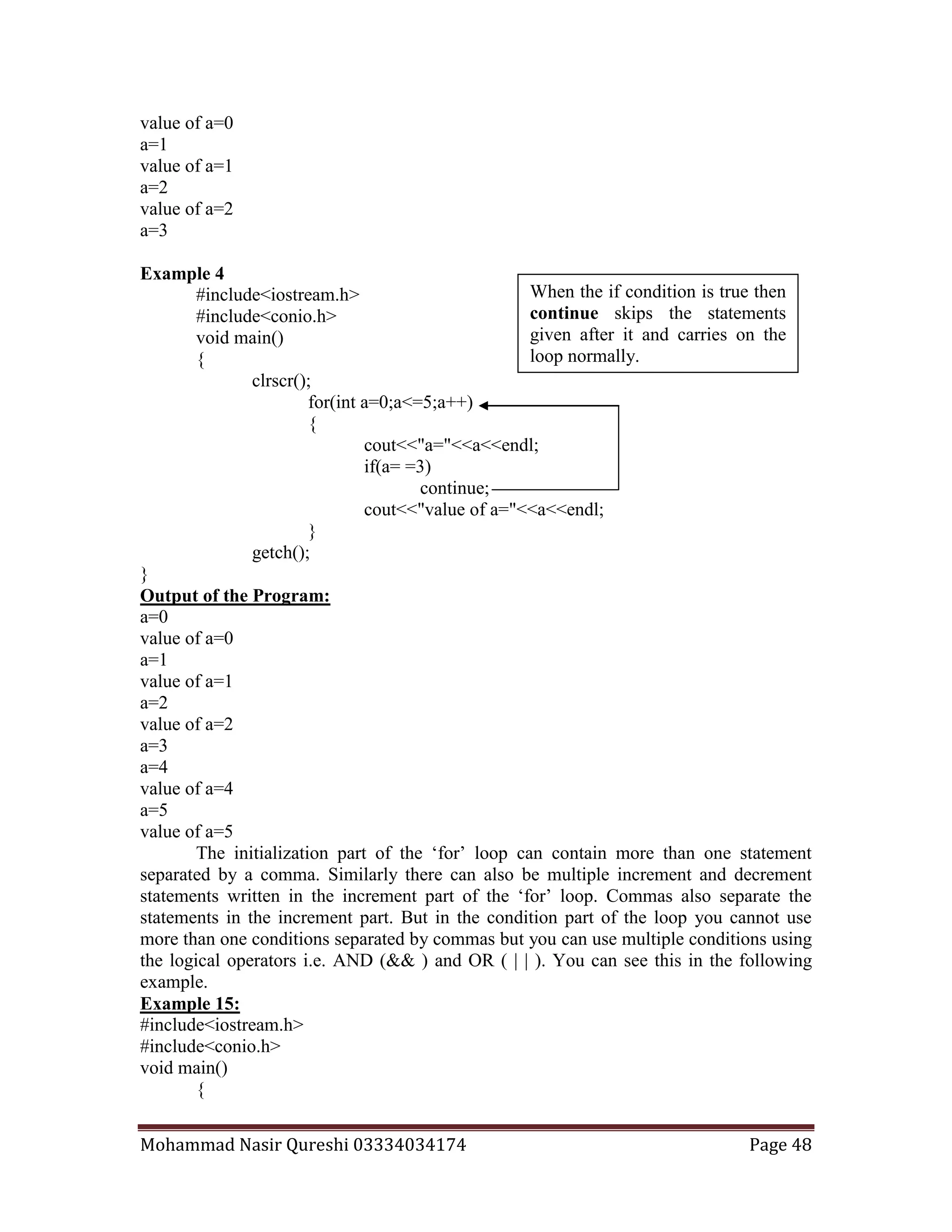
The Continue Keyword:
As we used the keyword “break” above in the switch case. There is also a
keyword “continue” which is quite opposite in functionality and meaning to “break”.
This key word is used in the loops and cannot be used anywhere else. When a “continue”
keyword comes in a loop the control is again transferred to the top of the loop skipping
all the statements after the “continue” inside the body of loop.
Example 4
#include<iostream.h>
#include<conio.h>
void main()
{
clrscr();
for(int a=0;a<=5;a++)
{
cout<<"a="<<a<<endl;
if(a= =3)
break;
cout<<"value of a="<<a<<endl;
}
getch();
}
Output of the Program:
a=0
This semicolon terminates the loop
and the value of a becomes 10 at
once and then printed.
When the if condition is true then
break skips the statements given
after it and proceeds to next
statements after the closing
bracket of at the end of the loop.
Mohammad Nasir Qureshi 03334034174 Page 48
value of a=0
a=1
value of a=1
a=2
value of a=2
a=3
Example 4
#include<iostream.h>
#include<conio.h>
void main()
{
clrscr();
for(int a=0;a<=5;a++)
{
cout<<"a="<<a<<endl;
if(a= =3)
continue;
cout<<"value of a="<<a<<endl;
}
getch();
}
Output of the Program:
a=0
value of a=0
a=1
value of a=1
a=2
value of a=2
a=3
a=4
value of a=4
a=5
value of a=5
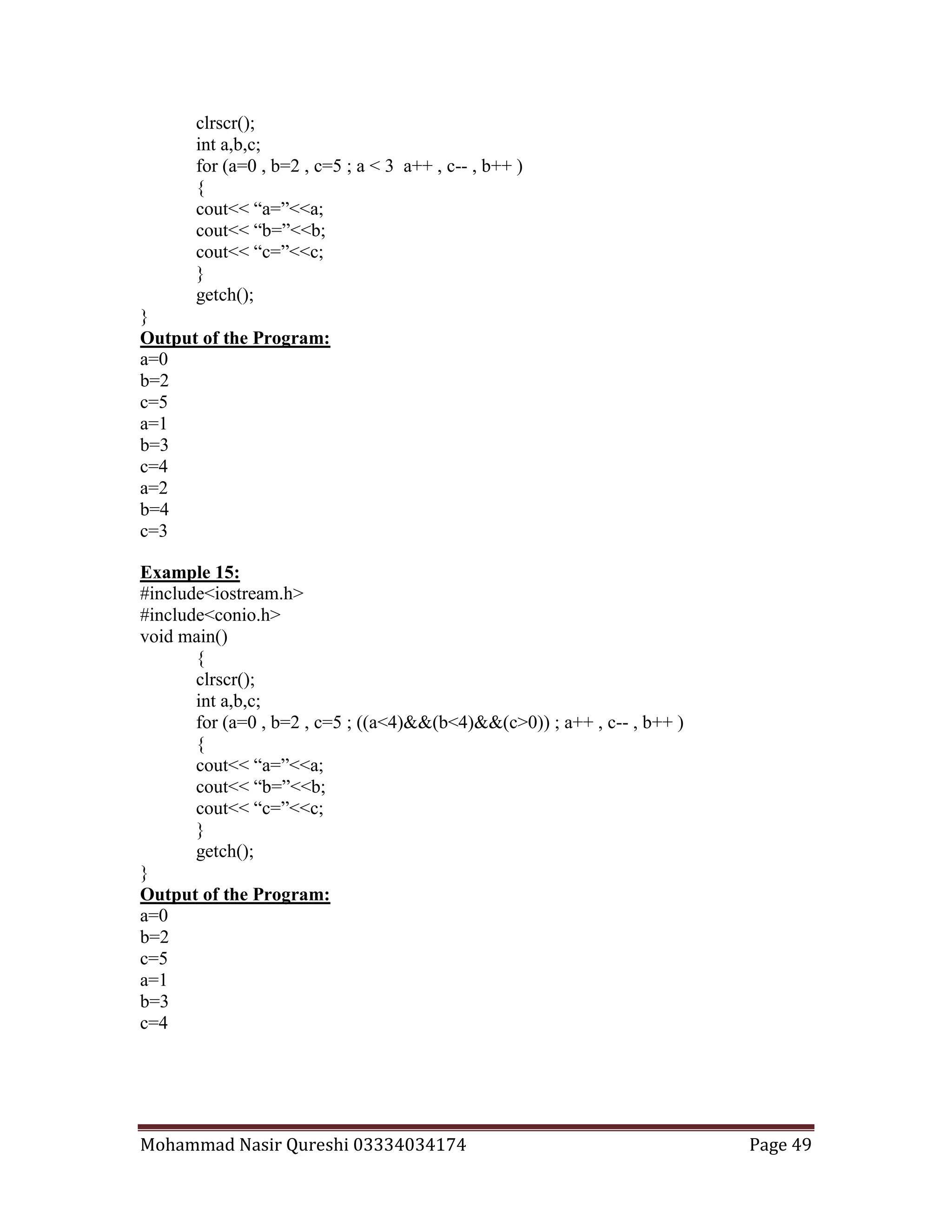
The initialization part of the ‘for’ loop can contain more than one statement
separated by a comma. Similarly there can also be multiple increment and decrement
statements written in the increment part of the ‘for’ loop. Commas also separate the
statements in the increment part. But in the condition part of the loop you cannot use
more than one conditions separated by commas but you can use multiple conditions using
the logical operators i.e. AND (&& ) and OR ( | | ). You can see this in the following
example.
Example 15:
#include<iostream.h>
#include<conio.h>
void main()
{
When the if condition is true then
continue skips the statements
given after it and carries on the
loop normally.
Mohammad Nasir Qureshi 03334034174 Page 49
clrscr();
int a,b,c;
for (a=0 , b=2 , c=5 ; a < 3 a++ , c-- , b++ )
{
cout<< “a=”<<a;
cout<< “b=”<<b;
cout<< “c=”<<c;
}
getch();
}
Output of the Program:
a=0
b=2
c=5
a=1
b=3
c=4
a=2
b=4
c=3
Example 15:
#include<iostream.h>
#include<conio.h>
void main()
{
clrscr();
int a,b,c;
for (a=0 , b=2 , c=5 ; ((a<4)&&(b<4)&&(c>0)) ; a++ , c-- , b++ )
{
cout<< “a=”<<a;
cout<< “b=”<<b;
cout<< “c=”<<c;
}
getch();
}
Output of the Program:
a=0
b=2
c=5
a=1
b=3
c=4
Mohammad Nasir Qureshi 03334034174 Page 50
The While Loop:
The “while” loop is also used for the repetition of a number of statements certain
number of times but the initialization, increment/decrement is not done in the loop
statement itself like the “for” loop. In other words inside a “while” loop we make the
condition true or false in the run time but in the “for” loop we have to specify the ending
point or the condition in the design time or the coding of the program. The syntax of the
“While” is as follows:
Syntax:
While (test expression/condition)
{
Statements;
Statements;
Statements;
……..
}
The while loop is also called ‘top testing loop’ or the ‘conditional loop’. Because
in this we have no increment or decrement or initialization which was a must in for loop.
Example 4
#include<iostream.h>
#include<conio.h>
void main()
{
clrscr();
int a = 0;
while ( a <3 )
{
cout<<”Pakistan”<<endl;
a++;
}
getch();
}
Output of the Program:
Pakistan
Pakistan
Pakistan
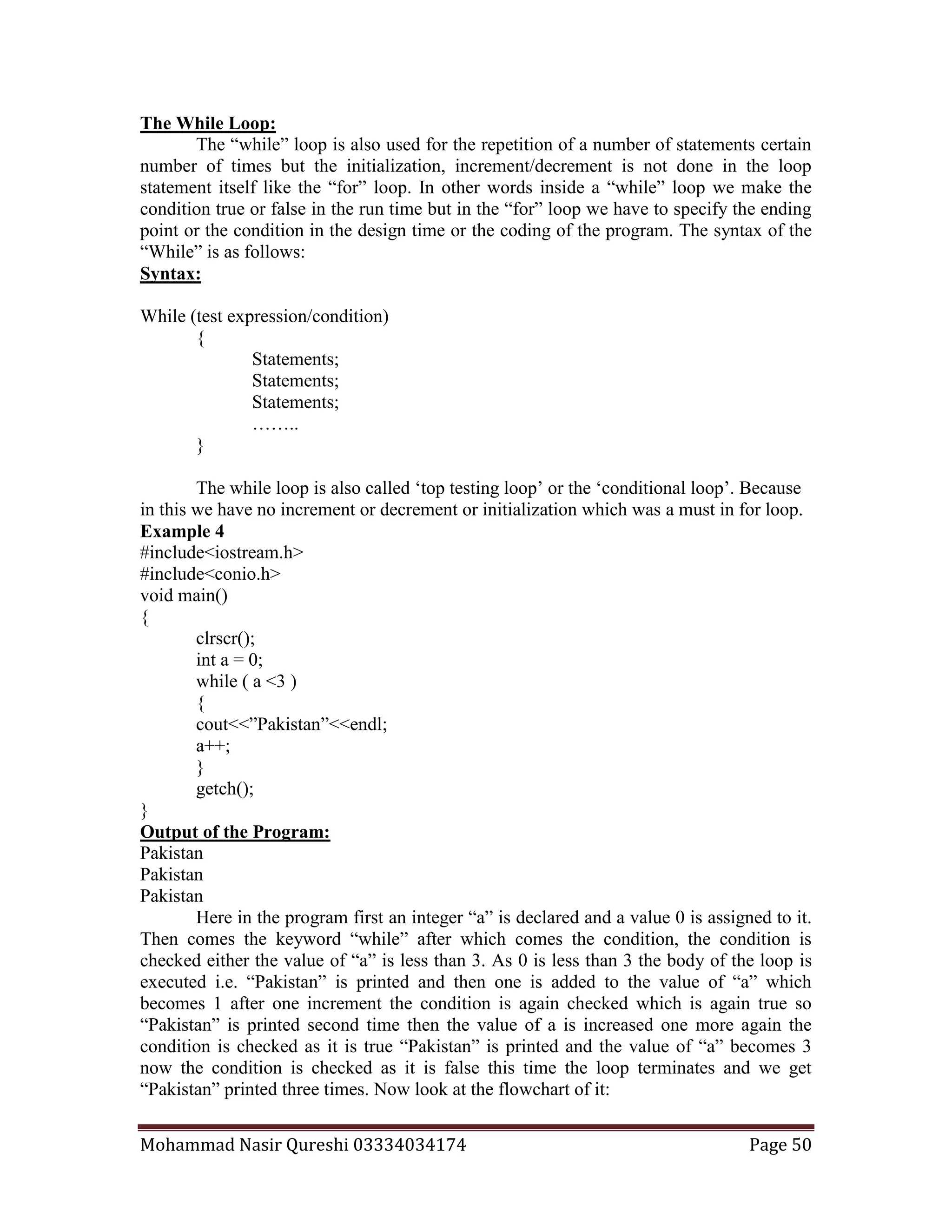
Here in the program first an integer “a” is declared and a value 0 is assigned to it.
Then comes the keyword “while” after which comes the condition, the condition is
checked either the value of “a” is less than 3. As 0 is less than 3 the body of the loop is
executed i.e. “Pakistan” is printed and then one is added to the value of “a” which
becomes 1 after one increment the condition is again checked which is again true so
“Pakistan” is printed second time then the value of a is increased one more again the
condition is checked as it is true “Pakistan” is printed and the value of “a” becomes 3
now the condition is checked as it is false this time the loop terminates and we get
“Pakistan” printed three times. Now look at the flowchart of it:
Mohammad Nasir Qureshi 03334034174 Page 51
Example 4
#include<iostream.h>
#include<conio.h>
void main()
{
clrscr();
int a = 5;
while ( a > 0 )
{
cout<<”a=”<<a<<”,”;
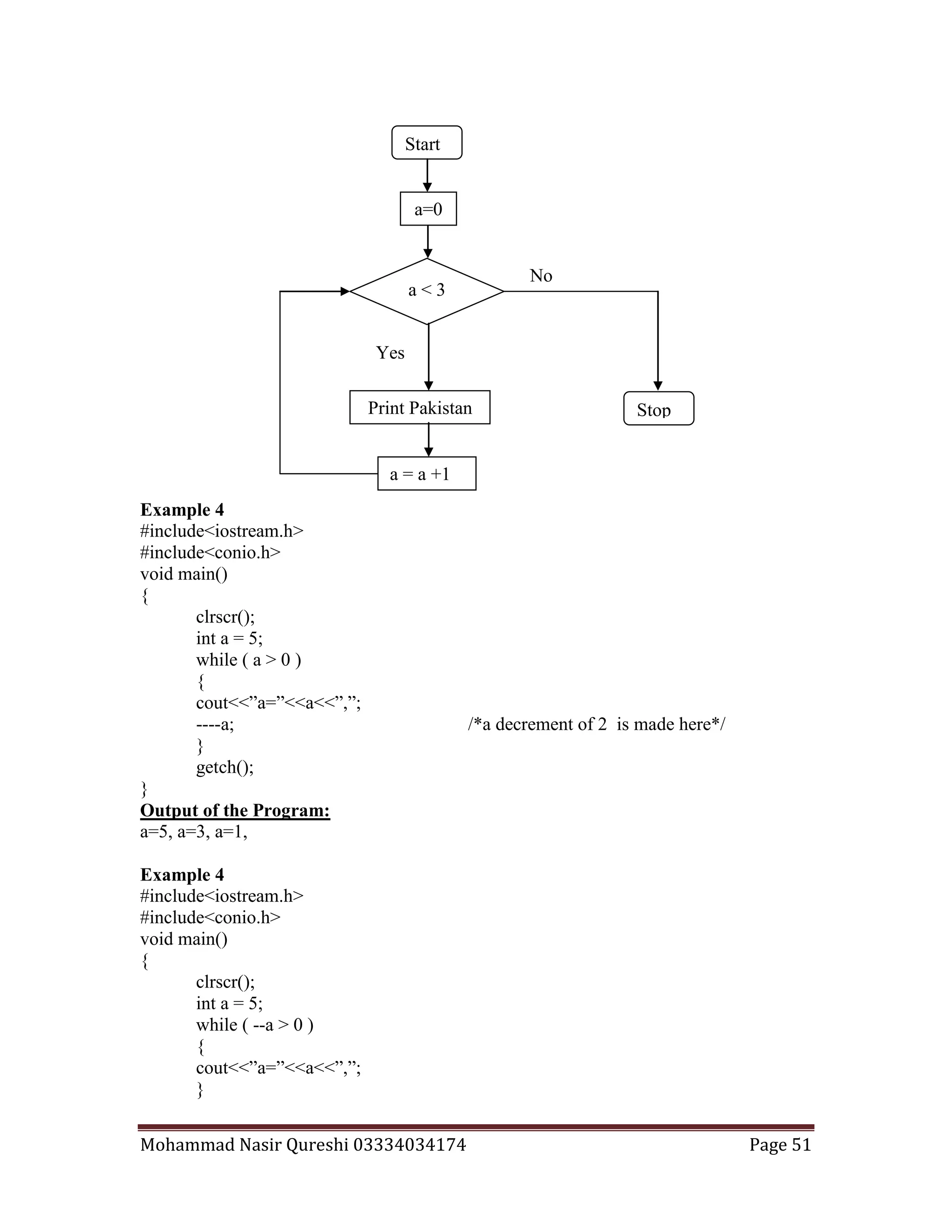
----a; /*a decrement of 2 is made here*/
}
getch();
}
Output of the Program:
a=5, a=3, a=1,
Example 4
#include<iostream.h>
#include<conio.h>
void main()
{
clrscr();
int a = 5;
while ( --a > 0 )
{
cout<<”a=”<<a<<”,”;
}
Start
a < 3
Yes
No
StopPrint Pakistan
a = a +1
a=0
Mohammad Nasir Qureshi 03334034174 Page 52
getch();
}
Output of the Program:
a=4, a=3, a=2, a=1,
We can use the conditions we have created above for the different forms of for
loop as we have used the condition along with the decrement at the same place.
In the for loop we cannot use the character constants but in the while loop we can
use the character constant to check the condition either it is true or false.
The getche() function:
The function “getche()” is used to take the user input in characters especially. It is
an input function which gets the value and stores the character value from the user in a
variable through the assignment operator. For example,
char a;
a = getche();
Let us make a program, which takes two numbers and adds them and shows us the
sum. Then it asks us if we wanted to do it again if we enter ‘y’ then the program should
one more time ask us two numbers and add them. Take a look at the following program:
Example 4
#include<iostream.h>
#include<conio.h>
void main()
{
clrscr();
int a ,b;
char ch=’y’;
while ( ch = = ‘y’)
{
cout<<”Enter first Value=”;
cin>>a;
cout<<”Enter second Value=”;
cin>>b;
cout<<”Sum=”<<a+b<<endl;
cout<<”Do you want to repeat?(Y/N)”;
ch=getche();
}
getch();
}
Output of the Program:
Enter first Value=2
Enter second Value=3
Sum=5
Do you want to repeat?(Y/N)y
Enter first Value=6
Enter second Value=3
Mohammad Nasir Qureshi 03334034174 Page 53
Sum=9
Do you want to repeat?(Y/N)n
The do-While Loop:
There is a minor difference between the execution of the “while” and the “do-
while” loops. The difference arises at the point where the condition is tested. The “while”
loop tests the condition before the execution of the loop. That’s why the “while” loop is
called “top-testing-loop”. Whereas the “do-while” loop checks the condition after the
loop has been executed so it is also called “bottom-testing-loop”. So this difference
places apart this loop from the other two loops (for & while). Because “do-while” loop
executes at least one time either the condition is true or not but the other two loops ( for
& while) will not execute at all until the condition is true.
Syntax:
do
{
Statements;
Statements;
Statements;
……..
} While (test expression/condition);
Example 4
#include<iostream.h>
#include<conio.h>
void main()
{
clrscr();
int a = 0;
do
{
cout<<”Pakistan”<<endl;
a++;
} while ( a <3 );
getch();
}
Output of the Program:
Pakistan
Pakistan
Pakistan
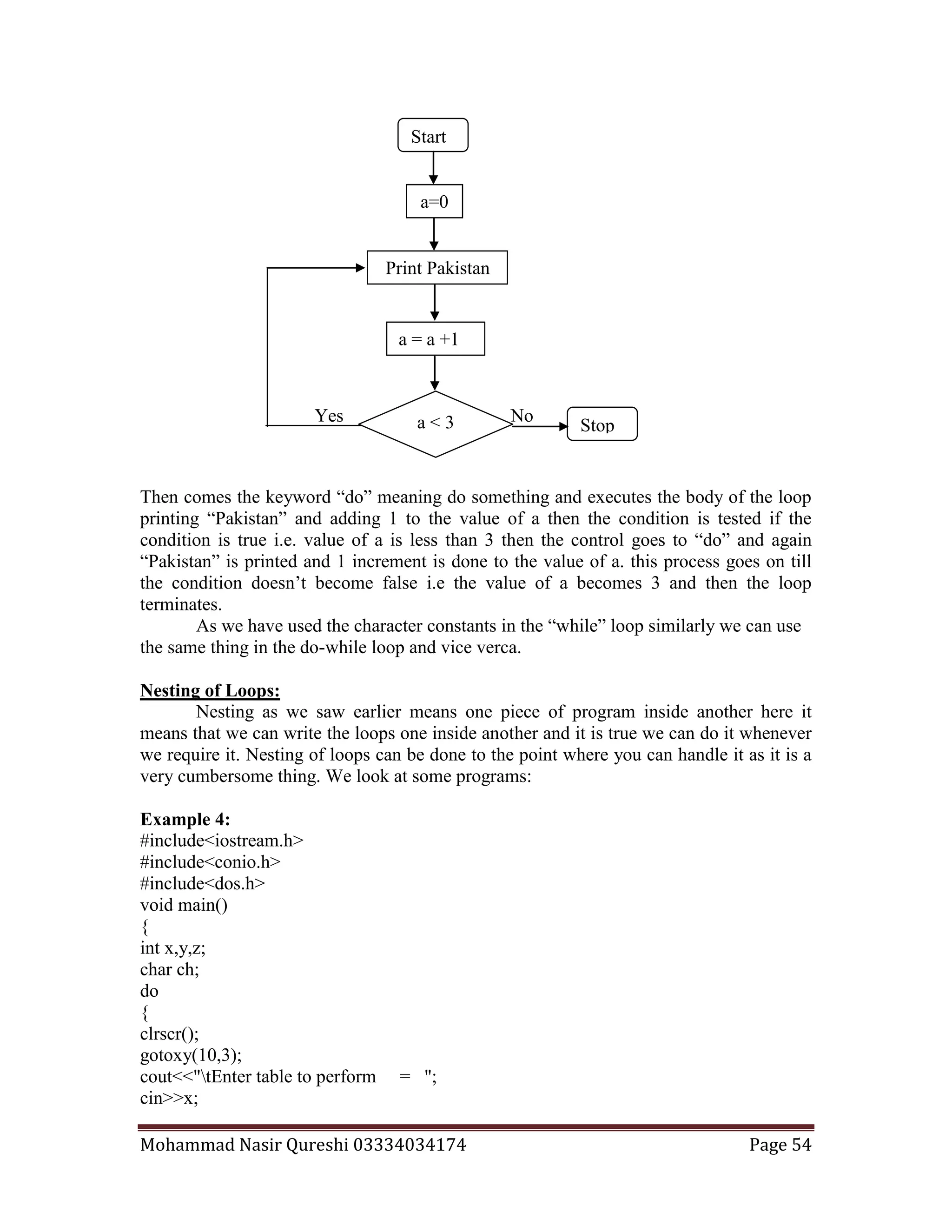
Here in the program first an integer “a” is declared and a value 0 is assigned to it.
This semicolon is the part
of the syntax.
Mohammad Nasir Qureshi 03334034174 Page 54
Then comes the keyword “do” meaning do something and executes the body of the loop
printing “Pakistan” and adding 1 to the value of a then the condition is tested if the
condition is true i.e. value of a is less than 3 then the control goes to “do” and again
“Pakistan” is printed and 1 increment is done to the value of a. this process goes on till
the condition doesn’t become false i.e the value of a becomes 3 and then the loop
terminates.
As we have used the character constants in the “while” loop similarly we can use
the same thing in the do-while loop and vice verca.
Nesting of Loops:
Nesting as we saw earlier means one piece of program inside another here it
means that we can write the loops one inside another and it is true we can do it whenever
we require it. Nesting of loops can be done to the point where you can handle it as it is a
very cumbersome thing. We look at some programs:
Example 4:
#include<iostream.h>
#include<conio.h>
#include<dos.h>
void main()
{
int x,y,z;
char ch;
do
{
clrscr();
gotoxy(10,3);
cout<<"tEnter table to perform = ";
cin>>x;
Yes No
Stopa < 3
Start
a = a +1
Print Pakistan
a=0
Mohammad Nasir Qureshi 03334034174 Page 55
int f=5;
for(int i=1;i<=10;i++)
{
gotoxy(15,f++);
delay(20);
cout<<"t"<<x<<" x "<<i<<" = "<<x*i<<endl;
}
gotoxy(15,20);
cout<<"Do You Want to Repeat?(Y/N)";
//cin>>ch; /*you can write this line or the other using getche();*/
ch=getche();
}while(ch= ='y' | | ch= ='Y');
getch();
}
Output of the Program:
Enter table to perform= 2
2 x 1 =2
2 x 2 =4
2 x 3 =6
2 x 4 =8
2 x 5 =10
2 x 6 =12
2 x 7 =14
2 x 8 =16
2 x 9 =18
2 x 10 =20
Do You Want to Continue? (Y/N)n
Example 4:
#include<iostream.h>
#include<conio.h>
void main()
{
clrscr();
int a,b,i,d;
char ch;
for( a =1 ; a < 5 ; a + +)
{
for( i = 0 ; i < 6 ; i + + )
{ do
{
cout<<a<<endl<<i<<endl;
cout<<"want to repeat";
cin>>ch;
Mohammad Nasir Qureshi 03334034174 Page 56
}while (ch! = 'n' );
cout<<i++<<endl;
}
cout<<++a<<endl;
}
getch();
}
Output of the Program:
The output of the program is left for you
Mohammad Nasir Qureshi 03334034174 Page 57
Array:
An array is a data structure used for the storage of a collection of data items that
are of same data type and interrelated with each other in memory.
In other words, it is a collection of variables of similar data type. In variable we
can store a single value but in an array we can store more than one value at a time. The
data items of an array are stored in sequence inside the memory. So we also call it the
sequential arrangement of more than variables interrelated and having the same data type.
Syntax:
Single array 1 - Any data-type name [ size in number];
2 - Any data-type name [ size in number]={val1,val2,val3,….};
3 - Any data-type name [ size in number]= “Any String”;
4 - Any data-type name [ ]= “Any String”;
We look at some examples:
int x[5];
int x[5] = {1,2,3,4,5} ;
char x[5] = {‘n’, ‘a’, ‘s’, ‘i’, ‘r’} ;
char x[5]= “nasir”;
char x[ ]= “nasir”;
Array is divided into parts and each part is called a sub-script. Each and every
sub-script has a unique number with the help of which we identify the value stored at that
number in an array. The first subscript of every array is always zero and ends with a
value less than the size written by us.
Example 1:
#include<iostream.h>
#include<conio.h>
void main()
{
clrscr();
int x[5]={10,100,13,2,8};
cout<< “The Sub-script no 2 is=”<<x[2];
cout<< “The Sub-script no 4 is=”<<x[4];
getch();
}
Output of the Program:
The Sub-script no 2 is=13
The Sub-script no 4 is= 8
x[0] x[1] x[2] x[3] x[4]
Sub-Script
810 100 13 2
Mohammad Nasir Qureshi 03334034174 Page 58
The array declared above has a name ‘x’ and its size is ‘5’. It means that the name
‘x’ is common among all the sub-scripts the uniqueness is due to their sub-script
numbers. And the first subscript will have a name x[0], second will be x[1], third will be
x[2], fourth will be x[3], the fifth and the last one will be x[4]. The reason is this that the
numbers started with zero and ended with ‘4’ making it totally five.
So if we want to store the marks of five students in variables then we will have to
declare five variables one for each student. That is the point where array comes in and
simplifies the problem.
Example 2:
#include<iostream.h>
#include<conio.h>
void main()
{
clrscr();
int x[5];
cout<<”Enter marks of Aslam=”; cin>>x[0];
cout<<”Enter marks of Murad=”; cin>>x[1];
cout<<”Enter marks of Mustafa=”; cin>>x[2];
cout<<”Enter marks of Ismail=”; cin>>x[3];
cout<<”Enter marks of Kausar=”; cin>>x[4];
cout<<”Press enter to view the marks”;
cout<<”Aslam=”<<x[0]<<endl;
cout<<”Ismail=”<<x[3] <<endl;
cout<<”Murad=”<<x[1] <<endl;
cout<<”Kausar=”<<x[4] <<endl;
cout<<”Mustafa=”<<x[2] <<endl;
getch();
}
Output of the Program:
Enter marks of Aslam= 45
Enter marks of Murad= 32
Enter marks of Mustafa=22
Enter marks of Ismail= 14
Enter marks of Kausar= 67
Press enter to view the marks
Aslam= 45
Ismail= 14
Murad= 32
Kausar= 67
Mustafa= 22
Example 2:
#include<iostream.h>
#include<conio.h>
void main()
Mohammad Nasir Qureshi 03334034174 Page 59
{
clrscr();
int x[3];
for(int a=0 ; a<3 ; a++)
{
cout<<”Enter a number=”;
cin>>x[a];
}
cout<<”Press enter”;
getch();
for(int a=0 ; a<3 ; a++)
{
cout<< “x[”<<a<< “]=”<<x[a]<<endl;
}
getch();
}
Output of the Program:
Enter a number=3
Enter a number=2
Enter a number=6
Press Enter
x[0]=3
x[1]=2
x[2]=6
Example 2:
#include<iostream.h>
#include<conio.h>
void main()
{
clrscr();
char x[5];
int a;
cout<<”Enter Your Name=”;
for( a=0;a<5;a++)
cin>>x[a];
cout<<”You Entered=”;
for( a=0;a<5;a++)
cout<<x[a];
getch();
}
Output of the Program:
Enter Your Name=Sana Nasir
You Entered=Sana Nasir
Mohammad Nasir Qureshi 03334034174 Page 60
String Input and Output:
Array of characters is called string. With “cin>>” we did only one character input
but if we want to input a string from the keyboard we use some other functions to do it.
These syntax of the functions are given below:
Syntax:
gets( array name ); inputs a string
puts( array name ); prints a string
The header file used for these functions is “stdio.h”
The “gets( );” takes a whole line input and allows you blanks, tabs ( white space
characters) between the line. It terminates the line when you press enter. Similarly the
“puts( );” outputs displays the whole line or string inputted through an array or with the
help of “gets( );” function and puts a new line character at the end of the string. In other
words, “puts” outputs the whole string and takes the cursor to the new line.
Example 2:
#include<stdio.h>
#include<iostream.h>
#include<conio.h>
void main()
{
clrscr();
char x[ 25 ];
cout<<”Enter Your Name=”;
cin>>x;
cout<< “Hello!”<<endl;
cout<<x;
getch();
}
Output of the Program:
Enter Your Name = Mohammad Nasir Qureshi
Hello!
Mohammad
Example 2:
#include<stdio.h>
#include<iostream.h>
#include<conio.h>
void main()
{
clrscr();
char x[ 25 ];
cout<<”Enter Your Name=”;
gets(x);
puts(“Hello!”);
puts(x);
getch();
Mohammad Nasir Qureshi 03334034174 Page 61
}
Output of the Program:
Enter Your Name = Mohammad Nasir Qureshi
Hello!
Mohammad Nasir Qureshi
First you stored a name in the array using the “cin” and when you output the name
only first part of the name was displayed. The reason is this that when you press
“spacebar” or “ tab” while inputting multiword-strings then the cin terminates the input at
the first “blank” space. Whereas in the second program you can see that the whole name
is printed as it was entered. So that is the reason we use “gets” for string input in place of
“cin”. And further we have not to use the for loop as we used in case of “cin”.
There are some more functions used for string manipulations:
Function Use
Strlen Calculates the length of a string
Strcmp Compares two strings.
Strrev Reverses a string.
Strcat Combines two strings.
Strcpy Copies the whole string from one array into another.
Note:Header file for all the above functions is “string.h”
Strlen ( )
It returns us the length of the string given to it as input. We can either write the
string directly in the brackets of the function or we may write the string type variable.
Syntax:
strlen ( “Any String” );
strlen ( String Variable );
Example 7:
#include<string.h>
#include<iostream.h>
#include<conio.h>
void main()
{
clrscr();
char x[ ]=”Mohammad”;
int a,b;
a= strlen(x);
b= strlen(“Doctor”);
cout<<”String=”<<x<<”Length=”<<a<<endl;
cout<<”String=Doctor Length=”<<b;
getch();
}
Mohammad Nasir Qureshi 03334034174 Page 62
Output of the Program:
String = Mohammad Length=8
String = Doctor Length=6
Strcmp ( )
It is used to compare two strings. It compares two strings character by character
until mismatch occurs or end of one of the strings is reached, whichever occurs first. If
both the strings are identical the function returns a zero value. If they are not it returns the
numeric difference between the ascii values of the non-matching characters.
Syntax:
strcmp ( “Any String”, “Any String”);
strcmp ( String Variable , “Any String”);
strcmp (“Any String” , String Variable);
strcmp ( String Variable , String Variable);
Example 8:
#include<string.h>
#include<iostream.h>
#include<conio.h>
void main()
{
clrscr();
char x[ ]=”Mohammad”;
char y[ ]=”Mohammad”;
int a, b, c, d;
a= strcmp(“Doctor”,”Doctor”);
b= strcmp(x , “Mohammad”);
c= strcmp( “Mohammad”, y );
d= strcmp( x , y );
cout<<”Value =”<<a<<endl;
cout<<”Value =”<<b<<endl;
cout<<”Value =”<<c<<endl;
cout<<”Value =”<<d<<endl;
getch();
}
Output of the Program:
Value=0
Value=0
Value=0
Value=0
Strrev ( )
It is used to reverse a string stored in a character array or string variable. We just
give the variable inside the brackets of the functions and when we again print the variable
we get the opposite value.
Syntax:
strrev( String Variable );
Mohammad Nasir Qureshi 03334034174 Page 63
Example 9:
#include<string.h>
#include<iostream.h>
#include<conio.h>
void main()
{
clrscr();
char y[ ]=”Doctor”;
cout<<”Before=”<<y<<endl;
strrev (y );
cout<<”After=”<<y;
getch();
}
Output of the Program:
Before = Doctor
After = rotcoD
Strcpy ( )
It is used to copy the contents of one string to another. It actually assigns one
string to another string variable.
Syntax:
strcpy(String Variable , “Any String”);
strcpy(String Variable , String Variable );
Example 10:
#include<string.h>
#include<iostream.h>
#include<conio.h>
void main()
{
clrscr();
char name[20];
char x[ ]=”Nasir”;
strcpy ( name , “Doctor”);
cout<<name<<endl;
strcpy ( name , x );
cout<<name<<endl;
getch();
}
Output of the Program:
Doctor
Nasir
Strcat ( )
It appends one string to another. In other words, it stores the string where the first
string ends. But the size of the another string variable where the string is going to be
append must be large enough.
Mohammad Nasir Qureshi 03334034174 Page 64
Syntax:
strcat(String Variable , “Any String”);
strcat(String Variable , String Variable );
Example 11:
#include<string.h>
#include<iostream.h>
#include<conio.h>
void main()
{
clrscr();
char name[12]=”Doctor”;
char x[12 ]=”Doctor”;
char y[6]=”Nasir”;
strcat ( x , y );
cout<<x<<endl;
strcpy ( name , “Nasir” );
cout<<name<<endl;
getch();
}
Output of the Program:
DoctorNasir
DoctorNasir

C++notes

  • 1.
    Mohammad Nasir Qureshi03334034174 Page 1 Language: A language is a means to communicate with another being or person. In other words, we can say that a language is a way to convey our ideas to other people. Before we begin to write programs in the C++ language, it will be good for us to take a look at the historical background of this language. Computer Languages: In 1960 a number of computer languages had come into existence. Each and every language had its specific purpose. For example, COBOL (Common Business Oriented Language) was used for commercial applications; FORTRAN (Formula Translation) Language was used for Engineering and Scientific Applications and so on. Some people started to develop a single language, which could serve all the purposes in place of learning all the languages separately. Therefore, an international committee was set up to develop such a language. This committee prepared a language called ALGOL 60. But this language never attained popularity because it was too abstract and too general. To remove these defects another language was developed at Cambridge University called CPL. CPL language turned out to be very big to learn and difficult to implement. During the same period Ken Thompson at AT&T’s Bell Labs wrote another language removing some defects of CPL called B. this language was a developed form of CPL Language so it was called BCPL. Year Language Developed By Remarks 1960 ALGOL International Committee Too general, too abstract 1963 CPL Cambridge University Hard to learn, difficult to implement. 1967 BCPL Martin Richards at Cambridge University Could deal with only specific problems. 1970 B Ken Thompson at AT&T Could deal with only specific problems. 1972 C Dennis Ritchie at AT&T Lost generality of BCPL and B restored. What is C: It is a programmable language developed at AT & T’s Bell Laboratories of USA in 1972. It was designed and written by a man named Dennis Ritchie. In the late seventies C began to replace most of the languages. Everyone was surprised with the popularity of C language. The question arises why C seems to be so popular? The reason being this that it is simple, reliable and easy to use. Let us see how C is compared with other programming languages. All the programming languages are divided into two categories:  Problem Oriented or High Level Languages: These languages are designed to give a better programming efficiency i.e. faster program development. For example, FORTRAN, BASIC, PASCAL, etc.  Machine Oriented or Low Level Languages: These languages are designed to give a better machine efficiency, i.e. faster program execution. For example, Assembly Language, Machine Language, etc. C language stands in between these two categories. That is why it is called a middle level language. As it has both a good programming efficiency and also a good machine efficiency. C++: Like other languages there were limitations to the functionality of C language. A certain man named Bajerney Stoustrp was assigned a project. He started working on this project using the C language. But soon he came to know the limitations of C. He devised
  • 2.
    Mohammad Nasir Qureshi03334034174 Page 2 some functions of his own and included them with C language. This new form of C language was called C with Classes and afterwards it was named as C++ language. The main difference between C and C++ is this that there are some extra security features in C++ which were deficient in C language. Getting Started with C++: There is an analogy between learning English and C++ Language. The classical method of learning English is to first learn the alphabets or characters used in the language, then learn to combine these alphabets to form words, which in turn are combined to form sentences and sentences are combined to form paragraphs. Learning C++ is similar and much more easy, i.e. we will first learn the alphabets, numbers and special symbols of C++, afterwards we will combine them to construct constants, variables and keywords then we will make commands or instructions from them and when we will combine commands or Instructions we will be writing a computer program. The Character Set of C++: The following table shows the character set of C++ Language. Alphabets A, B… Y, Z a, b…y, z Digits 0, 1, 2, 3, 4, 5, 6, 7, 8, 9 Special Symbols ~ ` ! @ # $ % ^ & ( ) _ - + = | { } [ ] ? / < > , . ; : “ ‘ Program: A set of instructions in true sequence is called a program. Writing our First Program in C++: To write a program we should be familiar with some terms and conditions of the C++ language. There are five basic steps of programming in C++ language. 1- Including header files. 2- Main function starts. 3- Variable declaration (optional). 4- Commands. 5- End of program. Alphabets Words Sentences Paragraph Steps in Learning English Language Alphabets, Digits, Special symbols Constants Variables Keywords Instructions or Commands Program Steps in Learning C++ Language
  • 3.
    Mohammad Nasir Qureshi03334034174 Page 3 Returns the Output of your formatted Text or Value It gets a Value from us Input/Output: In C++ Language we use “cout<<” and “cin>>” for output and input respectively. cout<< Text to be printed on the Output Screen cin>> Requires input from the user in runtime. The header file for these above two objects is “iostream.h” Syntax: - cout<<”Any Text”; cout<<Variable Name; cout<<”Any Text”<<Variable Name; cout<<”Any Text”<<”Escape Sequence”; cout<<Variable1<<Variable2<<Variable3…..; cin>>Variable Name; Example 1: #include<iostream.h> #include<conio.h> void main() { clrscr(); cout<<”Pakistan”; cout<<”Islamic Republic of Pakistan”; getch(); } Output: PakistanIslamic Republic of Pakistan Example 2: #include<iostream.h> #include<conio.h> void main() { clrscr(); int a; a=10; cout<<”Value of a=”<<a; getch(); } Output: Value of a=10 Example 3: #include<iostream.h> #include<conio.h>
  • 4.
    Mohammad Nasir Qureshi03334034174 Page 4 void main() { clrscr(); int a,b,c; a=10,b=12, c=13; cout<<”Value of a=”<<a<<”Value of b=”<<b<<”Value of c=”<<c; getch(); } Output: Value of a=10Value of b=12Value of c=13 Example 4: #include<iostream.h> #include<conio.h> void main() { clrscr(); int a,b,c; a=10,b=12, c=13; cout<<”Value of a=”<<a; cout<<”Value of b=”<<b; cout<<”Value of c=”<<c; getch(); } Output: Value of a=10Value of b=12Value of c=13 Example 5: #include<iostream.h> #include<conio.h> void main() { clrscr(); int a,b,c; cout<<”Enter the value of a=”; cin>>a; cout<<”Enter the value of b=”; cin>>b; cout<<”Enter the value of c=”; cin>>c; getch(); } Output: Enter value of a=10 Enter value of b=10
  • 5.
    Mohammad Nasir Qureshi03334034174 Page 5 Enter value of c=10 Example 5: #include<iostream.h> #include<conio.h> void main() { clrscr(); int a,b,c; cout<<”Enter the value of a=”; cin>>a; cout<<”Enter the value of b=”; cin>>b; cout<<”Enter the value of c=”; cin>>c; cout<<”The Value of a=”<<a; cout<<”The Value of b=”<<b; cout<<”The Value of c=”<<c; getch(); } Output: Enter value of a=10 Enter value of b=11 Enter value of c=12 The Value of a=10The Value of b=11The Value of c=12 Escape Sequences: - There are eight escape sequences we use in the C++ Language: n New Line t Tab or Eight Spaces Jump a Beep or Alert f Form Feed b Backspace ” For Printing Double Quotes r Return Carriage ’ For Printing Single Quotes Example 6: #include<iostream.h> #include<conio.h> void main() { clrscr(); cout<<”Pakistan”; cout<<”nIslamic Republic of Pakistan”; cout<<”nCountryt Pakistan”; cout<<”nCountrybPakistan”; cout<<”nCountryr Pakistan”;
  • 6.
    Mohammad Nasir Qureshi03334034174 Page 6 cout<<”n”Country Pakistan””; cout<<”n’Country Pakistan’”; getch(); } Output: Pakistan Islamic Republic of Pakistan Country Pakistan CountrPakistan Pakistan “Country Pakistan” ‘Country Pakistan’ Example 7: #include<iostream.h> #include<conio.h> void main() { clrscr(); cout<<"tttttttDate: 12 January 1948" <<"nn The Quaid-e-Azam said,n" <<"t" We are not aggressors we have won our freedom through unity, faith," <<"nDiscipline. Anyone who will even stare towards us should be taught such a" <<"nlesson that he must never repeat this mistake again. It should be our motto" <<"nnot to giveup but to carry on the war and struggle under any circumstances" <<"nin the rivers, landscapes and the mountains to keep our independence and " <<"ncountry secure.""; getch(); } Output: Date: 12 January 1948 The Quaid-e-Azam said, " We are not aggsressors we have won our freedom through unity, faith, Discipline. Anyone who will even stare towards us should be taught such a lesson that he must never repeat this mistake again. It should be our motto not to giveup but to carry on the war and struggle under any circumstances in the rivers, landscapes and the mountains to keep our independence and country secure." Example 8: #include<iostream.h> #include<conio.h> void main() { clrscr();
  • 7.
    Mohammad Nasir Qureshi03334034174 Page 7 int a,b,c; cout<<”Enter the value of a=”; cin>>a; cout<<”Enter the value of b=”; cin>>b; cout<<”Enter the value of c=”; cin>>c; cout<<”nThe Value of a=t”<<a; cout<<”nThe Value of b=t”<<b; cout<<”nThe Value of c=t”<<c; getch(); } Output: Enter value of a=10 Enter value of b=11 Enter value of c=12 The Value of a= 10 The Value of b= 11 The Value of c= 12 Operators: - Arithematical + , - , * , / , % , = Increment And Decrement ++ , -- Comparison or Relational < , > , <= , >= , = = ,!= Logical && (And), || (Or) , ! (Not) We will just see the example of Arithematical Operators and will discuss the Logical and Comparison or Relational Operators in the topic of If and If Else whereas, we will take a look on the Increment and decrement Operators in the topic of Loops. Example 9: #include<iostream.h> #include<conio.h> void main() { clrscr(); int a,b,c; cout<<”Enter the value of a=”; cin>>a; cout<<”Enter the value of b=”; cin>>b; c = a + b; cout<<”tAddition=”<<c; c = a - b;
  • 8.
    Mohammad Nasir Qureshi03334034174 Page 8 cout<<”ntSubtraction=”<<c; c = a * b; cout<<”ntMultiplication=”<<c; c = a / b; cout<<”ntDivision=”<<c; c = a % b; cout<<”ntRemainder=”<<c; getch(); } Output: Enter value of a=10 Enter value of b=2 Addition=12 Subtraction=8 Multiplication=20 Division=5 Remainder=0 Example 10: In Store X while purchasing items a discount of 10% is offered on the items. We have to write a program, which demands input of the quantity and the rate per item through the keyboard and displays the total afterwards. /* Program to calculate the total expenses while shopping from a store after dicsount*/ #include<iostream.h> #include<conio.h> void main() { clrscr(); int quantity,discount; float rate,total; discount=10; cout<<”Enter Quantity=”; cin>>a; cout<<”Enter Rate=”; cin>>b; c = ( (quantity * rate ) – ( (quantity * rate ) * discount / 100 ); cout<<”tnTotal=Rs.”<<c; getch(); } Output: - Enter Quantity=1200 Enter Rate=15.50 Total=Rs.16740
  • 9.
    Mohammad Nasir Qureshi03334034174 Page 9 Semicolon is not allowed here Selection Statement The selection statements are used to select one command from a program (program is a set of commands), which we want to be executed by the compiler for us. We have the following selection statements:  if  if else  switch case  ? : The “ if ” Statement: - Syntax:- if ( Condition ) Statement; if ( Condition ) { Statement1; Statement2; Statement3; } The keyword if tells the complier that what follows, is a decision control instruction. The condition following the keyword if is always enclosed within a pair of parenthesis. If the condition whatever it is, is true, then the statement is executed. If the condition is not true then the statement is not executed; instead the program skips past it. We look at some conditions: x = = y x is equal to y x != y x is not equal to y x < y x is less than y x > y x is greater than y x <= y x is less than or equal to y x >= y x is greater than or equal to y Example 1: #include<iostream.h> #include<conio.h> void main() { clrscr(); int a; cout<<”Enter Value for a=”;
  • 10.
    Mohammad Nasir Qureshi03334034174 Page 10 cin>>a; if ( a<10 ) cout<<”Value of a is less than 10”; getch(); } Output: - Enter Value for a=2 Value of a is less than 10 Example 2: #include<iostream.h> #include<conio.h> void main() { clrscr(); int a; cout<<”Enter Value for a=”; cin>>a; if ( a<10 ) cout<<”Limit is 10”; if ( a<20 ) cout<<”Limit is 20”; getch(); } Output: - Enter Value for a=2 Limit is 10 Limit is 20 Now look at the above program we get both the lines in the output. The output will remain the same till we enter a number from 0 to 9. We want to make a program which should give us that the message “Limit is 10” when we enter a number less than 10 and when we enter a number from 10 to 19 we should get the message “Limit is 20”. We can get the required output by using the logical operator And ( && ). The And operator concatenates (joins) two or more conditions with one another to refine the decision making. Its syntax is: if ( ( condition ) && ( condition) ) Statement; if ( ( condition ) && ( condition) && ( condition) && … ) Statement;
  • 11.
    Mohammad Nasir Qureshi03334034174 Page 11 According to the syntaxes given above the conditions given in the bracket after the if should all be true then the statement following the if statements will be executed otherwise the statement following the if condition will not be executed. Example 3: #include<iostream.h> #include<conio.h> void main() { clrscr(); int a; cout<<”Enter Value for a=”; cin>>a; if ( a<10 ) cout<<”Limit is 10”; if ( ( a > 10 ) && ( a<20 ) ) cout<<”Limit is 20”; getch(); } Output: - Enter Value for a=2 Limit is 10 Now only first if statement is true as 2 is less than 10. But the second if condition is false as it states ”a is greater than 10 and a is less than 20”. The value of a is less than 20 but not greater than 10 that is why the condition is false. Example 4: #include<iostream.h> #include<conio.h> void main() { clrscr(); int a; cout<<”Enter Value for a=”; cin>>a; if ( ( a = = 20 ) && (a = = 120 ) ) cout<<”Number Niner”; getch(); } Output: - Enter Value for a=20
  • 12.
    Mohammad Nasir Qureshi03334034174 Page 12 Strange! In the above example we entered the value is 20 and do not get anything in output. A problem what if we are asked to write a program which tells us either the value of a is 20 or 120. We have studied earlier that in case of And operator all the conditions must be true otherwise the whole condition will be false. That is the point where we come to know that there is another operator which exactly just like And ( && ) concatenates two conditions in an if statement but provides you a choice between the values. The name of this logical operator is Or ( | | ). The Syntax of Or is like this: if ( ( condition ) | | ( condition) ) Statement; if ( ( condition ) | | ( condition) | | ( condition) | | … ) Statement; Example 5: #include<iostream.h> #include<conio.h> void main() { clrscr(); int a; cout<<”Enter Value for a=”; cin>>a; if ( ( a = = 20 ) | | (a = = 120 ) ) cout<<”Number Niner”; getch(); } Output: - Enter Value for a=20 Number Niner Example 6: A bookstore has offered discount of 20 % on next purchase to the customers who have purchased between 12 January 2003 and 12 February 2003. Write a Program, which takes the price of books purchased, and the date of last purchase and gives us discount if the date of purchase meets the above-mentioned range. #include<iostream.h> #include<conio.h> void main() { clrscr(); int date,month,discount=0; float price,total; cout<< ”Enter the Price of Books=”; cin>>price;
  • 13.
    Mohammad Nasir Qureshi03334034174 Page 13 cout<<”Enter the Date of Last Purchase”; cin>>date; cout<<”Enter the Month of Last Pruchase”; cin>>month; if ( ( date >= 12 && month = = 1 ) | | ( date >= 12 && month = = 2 ) ) { discount=20; } total = price – ( price * discount /100 ); cout<<”Total Price=”<<total; getch(); } Output: - Price of Books=2000 Enter the Date of Last Purchase=14 Enter the Month of Last Purchase=1 Total Price=1600 Example 7: #include<iostream.h> #include<conio.h> void main() { clrscr(); int a; cout<<”Enter Value for a=”; cin>>a; if ( a < 20 ) { if (a < 10 ) { cout<<”The Number is less than 20 and 10”; } } getch(); } Output: - Enter Value for a=8 The Number is less than 20 and 10 Example 8: #include<iostream.h>
  • 14.
    Mohammad Nasir Qureshi03334034174 Page 14 Semicolon is not allowed here There is no condition here #include<conio.h> void main() { clrscr(); int a; cout<<”Enter Value for a=”; cin>>a; if( a<30 ) { if ( a < 20 ) { if (a < 10 ) { cout<<”The Number is less than 30 ”; cout<<”The Number is less than 20”; cout<<”The Number is less than 10”; } } } getch(); } Output: - Enter Value for a=8 The Number is less than 30 , 20 and 10 The if statement by itself will execute a single statement, or a group of statements, when the condition following the if condition is true. It does nothing when the condition is false. Can we execute one group of statements if the condition is true and another group of statements if the condition is false? Yes it is true we can do it very easily. Now we come to the if else statement. The “ if else” Statement: - Syntax: - if ( Condition ) Statement; else Statement; if ( Condition ) { Statement1; Statement2; Statement3; } else
  • 15.
    Mohammad Nasir Qureshi03334034174 Page 15 { Statement1; Statement2; Statement3; } The purpose of else is this that when the if condition is false and the set of statements following the if condition will not be executed then the statements present in the else block will be executed. Let us see on a small example: Example 9: #include<iostream.h> #include<conio.h> void main() { clrscr(); int a; cout<<”Enter Value for a=”; cin>>a; if( a<30 ) { cout<<”The If Block”; } else { cout<<”The Else Part”; } getch(); } Output: - Enter Value for a=68 The Else Part Example 10: #include<iostream.h> #include<conio.h> void main() { clrscr(); int a; cout<<”Enter Value for a=”; cin>>a; if( a = = 30 ) {
  • 16.
    Mohammad Nasir Qureshi03334034174 Page 16 cout<<”The Number is 30”; } else { cout<<”The Number is not 30”; } getch(); } Output: - Enter Value for a=68 The Number is not 30 Example 11: A bookstore has offered discount on next purchase to the customers who have purchased according to following criteria: Tenure of Purchase Discount 12 January 2003 and 12 February 2003 30% 12 February 2003 and 12 March 2003 20% 12 March 2003 and 12 April 2003 10% . Write a Program, which takes the price of books purchased, and the date of last purchase and gives us discount if the date of purchase meets the above-mentioned ranges and provide the discount if the purchase is made after the date of 12 April 2003 then no discount should be provided. #include<iostream.h> #include<conio.h> void main() { clrscr(); int date,month,discount; float price,total; cout<< ”Enter the Price of Books=”; cin>>price; cout<<”Enter the Date of Last Purchase”; cin>>date; cout<<”Enter the Month of Last Pruchase”; cin>>month; if ( ( date >= 12 && month = = 1 ) | | ( date >= 12 && month = = 2 ) ) { discount=30; } else if ( (date >= 12 && month = = 2) | | (date >= 12 && month = = 3 ) ) { discount=20
  • 17.
    Mohammad Nasir Qureshi03334034174 Page 17 } else if ( (date >= 12 && month = = 3) | | ( date >= 12 && month = = 4 ) ) { discount=10; } else { discount = 0; } total = price – ( price * discount /100 ); cout<<”Total Price=”<<total; getch(); } Output: - Price of Books=2000 Enter the Date of Last Purchase=14 Enter the Month of Last Purchase=2 Total Price=1600 A few points: i- The group of statements after the if up to and not including the else is called an ‘if block’. Similarly, the statements after the else form the ‘else block’. ii- Each and every else should be written exactly under the if to which it belongs. It enables you understand the program a lot more better. iii- If there are only one statement in the if or else we may drop the pair of braces, which mark the if or else block. iv- Like the if statement, if the condition after the if statement is not true then the statement after the else will be executed. Nested if-elses: We can write an if else inside another if else this is called the nesting of the if else statements. Look at the following example so that the nesting concept is a lot clearer. Example 12: #include<iostream.h> #include<conio.h> void main() { clrscr(); int a; cout<<”Enter Value for a=”; cin>>a; if( a = < 30 ) {
  • 18.
    Mohammad Nasir Qureshi03334034174 Page 18 if( a<20) { cout<<”The Number is less than 30”; cout<<”The Number is less than 20”; } else { cout<<”The Number is not less than 20”; } } else { cout<<”The Number is not 30”; } getch(); } Output: - Enter Value for a=2 The Number is less than 30 The Number is less than 20 Example 13: #include<iostream.h> #include<conio.h> void main() { clrscr(); int a; cout<<”Enter Either 1 or 2”; cin>>a; if( a = = 1) cout<<”The number is 1”; else { if(a = = 2) cout<<”The Number is 2”; else cout<<”You entered something else”; } getch(); } Output: - Enter Value for a=2 The Number is 2 The Number is less than 20 This is the Nested if - Else This is the nested if-else inside the else of outer if
  • 19.
    Mohammad Nasir Qureshi03334034174 Page 19 To see how the logical operators are used in the if else statement so we see an example in which we make the program using with and without the logical operators. Example 14: A company insures employees in the following cases: i- If the employees is married ii- If the employees is unmarried, male & above 30 years of age. iii- If the employees is unmarried, female & above 25 years of age. Write a program to determine whether the driver is to be insured or not. Note: this program is written without the logical operators #include<iostream.h> #include<conio.h> void main( ) { clrscr( ); int age; char sex, ms; cout<<"Enter the age="; cin>>age; cout<<"Enter the sex="; cin>>sex; cout<<"Enter the marital status="; cin>>ms; if(ms = ='M' | | ms = ='m') cout<<"Employee is insured"; else { if (sex= ='M' | | sex = = 'm') { if(age>30) cout<<"Employee is insured"; else cout<<"Employee is not insured"; } else { if(age>25) cout<<"Employee is insured"; else cout<<"Employee is not insured"; } } getch();
  • 20.
    Mohammad Nasir Qureshi03334034174 Page 20 } Output: - Enter the age=30 Enter the sex=m Enter the martial Status=m The Employee is insured Note: this program is written with the logical operators #include<iostream.h> #include<conio.h> void main( ) { clrscr( ); int age; char sex, ms; cout<<"Enter the age="; cin>>age; cout<<"Enter the sex="; cin>>sex; cout<<"Enter the marital status="; cin>>ms; if((ms = ='M' | | ms = ='m') | | (( ms= =’U’ | | ms= =’u’) && (sex = = ‘M’ | | sex= =’m’) && (age >30) | | ( ms= =’U’ | | ms= =’u’) && (sex = = ‘F’ | | sex= =’f’) && (age >25) ) cout<<"Employee is insured"; else cout<<"Employee is not insured"; getch(); } Output: - Enter the age=30 Enter the sex=m Enter the martial Status=m The Employee is insured
  • 21.
    Mohammad Nasir Qureshi03334034174 Page 21 Some Common Errors: Look at the following program: Example 15: #include<iostream.h> #include<conio.h> void main() { clrscr(); int i; cout<<”Enter Value for i=”; cin>>i; if(I=5) { cout<<”You Entered 5”; } else { cout<<”You Entered Something Other Than 5”; } getch(); } Output of the Program: Enter Value for i= 400 You Entered 5 Strange? We entered 400 in the output and get the message that we entered the value 5. What is wrong with the condition? Here is a technical point we have written the condition wrongly. We have used the assignment operator “ = ” in place of comparison operator “ = = ”. So when the compiler reads the program it reads the line if ( i = 5 ) as if(5). In C++ the ‘truth’ is always non-zero. So as if(5) is non-zero so the if condition is true and the statement inside the if body is executed rather than that of else. #include<iostream.h> #include<conio.h> void main() { clrscr(); int i; cout<<”Enter Value for i=”; cin>>i; if ( i = = 5 ); cout<<”You Entered 5”; getch(); }
  • 22.
    Mohammad Nasir Qureshi03334034174 Page 22 Output of the Program: Enter Value for i= 400 You Entered 5 Here the output is again You entered 5 what is the reason of this? The reason is this that the compiler reads the if condition like this: if ( i = = 5 ) ; cout<<”You Entered 5”; Here, if the condition evaluates to true the ; (null statement, which does nothing on execution) gets executed, and the next cout statement is considered an independent statement so it is executed either the if condition is false or true. The Conditional Operator: This operator is also called ternary operators. Since they take three arguments. In other words we can call it the shorthand of if-then-else. Syntax Expression 1 ? expression 2 : expression 3 It says if expression 1 is true then execute the expression 2 otherwise execute the expression 3. Let us see some examples of this. Example 1 #include<iostream.h> #include<conio.h> void main() { clrscr(); int i,j; cout<<”Enter Value for i=”; cin>>i; j = ( i > 5 ? 3 : 4 ) cout<<”You Entered “<<j; getch(); } Output of the Program: Enter Value for i= 400 You Entered 3 Example 2 #include<iostream.h> #include<conio.h> void main() { If ( i > 5 ) j=3 else j=4 We will write this if –else in place of the conditional Operator
  • 23.
    Mohammad Nasir Qureshi03334034174 Page 23 clrscr(); int i; cout<<”Enter Value for i=”; cin>>i; (i = = 5 ? cout<<”You Entered 5” : cout<<”You Entered Other Than 5” ); getch(); } Output of the Program: Enter Value for i= 5 You Entered 5 Example 3 #include<iostream.h> #include<conio.h> void main() { clrscr(); int big,a,b,c; cout<<”Enter Value for a=”; cin>>a; cout<<”Enter Value for b=”; cin>>b; cout<<”Enter Value for c=”; cin>>c; big = (a > b 5 ? (a > c ? 3 : 4 ) : (b > c ? 6 : 8 ) ); cont<<”Value of Big=”<<big; getch(); } Output of the Program: Enter Value for a= 35 Enter Value for a= 25 Enter Value for a= 5 Value of Big=3 The main difference between if and the conditional operator is this that after the ? Or after : only one statement can be used. So that’s why the conditional operators are not so commonly used. The Switch-Case: Sometimes we come to know to some situations when we are required to make selection between a limited numbers of options. For such purposes C++ provides a special case control statement that allows us to handle such matters more efficiently than the above two statements.
  • 24.
    Mohammad Nasir Qureshi03334034174 Page 24 Syntax: Switch ( Variable Name or any expression) { case constant: { Statements; break; } case constant: { Statements; break; } default: { Statements; } } First of all comes the keyword Switch that is followed by the variable name or any expression, which evaluates a value. Then starts the body of the switch case with a bracket “{” in which there comes the case which is a key word after this keyword we come to a constant which may be an integer or a character (but remember this must be a constant). After the constant we again put a bracket “{“ this bracket shows the starting of the body of the case in which the statements are written i.e. the statements which should execute on the selection of the case. After the statements comes the keyword “break” and then the body of the case is closed by an ending bracket “}”. This was one case you can put as many as you want after it. At the end of the cases comes the keyword “default” this keyword in other words, is the else of the switch case. If any case is not true then the default is executed. After the keyword “default” we put a bracket showing the start of the body of the default and then the statements. After the end of default i.e. closing the bracket of default close the bracket of the switch, which we have opened in the start. Example 1 #include<iostream.h> #include<conio.h> void main() { clrscr(); int a; cout<<”Enter Value for a=”; cin>>a; switch ( a ) { case 1: {
  • 25.
    Mohammad Nasir Qureshi03334034174 Page 25 True True True False False cout<<”Pakistan”; break; } case 2: { cout<<”Karachi”; break; } default : { cout<<”Lahore”; } } getch(); } Output of the Program: Enter Value for a= 1 Pakistan Let us take a look at the execution of the program. START Enter value of a=1 Case 1 Case 2 Default STOP Print Pakistan Print Karachi Print Lahore break break
  • 26.
    Mohammad Nasir Qureshi03334034174 Page 26 It is a fact that the keyword “break” after every case is necessary otherwise the control of the control of the program will go on dropping and every case after the true case will be executed including the default. Let us have a look on a program not having the “break” keyword. Example 2 #include<iostream.h> #include<conio.h> void main() { clrscr(); int a; cout<<”Enter Value for a=”; cin>>a; switch ( a ) { case 1: { cout<<”Pakistan”; } case 2: { cout<<”Karachi”; } default : { cout<<”Lahore”; } } getch(); } Output of the Program: Enter Value for a= 1 Pakistan Karachi Lahore Second time if we run the program and we enter 2 we get the following output. Output of the Program: Enter Value for a= 2 Karachi Lahore
  • 27.
    Mohammad Nasir Qureshi03334034174 Page 27 So if you will not use the “break” keyword then the case which is true and all the cases along with default after the true case will be executed. That is why we use the break keyword. Note: Keywords are always white in color in the C++ code editor. If we use characters we will write the program as shown below in the following example. Here the case is executed whose character is entered and vice versa. Example 3 #include<iostream.h> #include<conio.h> void main() { clrscr(); char a; cout<<”Enter First Character of Color =”; cin>>a; switch ( a ) { case ‘r’: { cout<<”The Color is Red”; break; } case ‘o’: { cout<<” The Color is Orange”; break; } case ‘y’: { cout<<” The Color is Yellow”; break; } case ‘b’: { cout<<” The Color is Blue”; break; } default : { cout<<”You Entered Wrong Parameters”; } } getch();
  • 28.
    Mohammad Nasir Qureshi03334034174 Page 28 } Output of the Program: Enter First Character of Color = r The Color is Red During the coding of the program it is not necessary that the cases should be in order they can be unordered like the following example depicts: Example 4 #include<iostream.h> #include<conio.h> void main() { clrscr(); int a; cout<<”Enter Value for a=”; cin>>a; switch ( a ) { case 121: { cout<<”This is Case 121”; break; } case 3000: { cout<<” This is Case 3000”; break; } case 1: { cout<<” This is Case 1”; break; } default : { cout<<” This is Default”; } } getch(); } Output of the Program: Enter Value for a= 1 This is Case 1
  • 29.
    Mohammad Nasir Qureshi03334034174 Page 29 We can mix integer and character constants in different cases of a switch as shown in the following example: Example 5 #include<iostream.h> #include<conio.h> void main() { clrscr(); int a; cout<<”Enter Value for a=”; cin>>a; switch ( a ) { case ‘y’: { cout<<”This is Case Y“; break; } case 3: { cout<<” This is Case 3”; break; } case 1: { cout<<” This is Case 1”; break; } default : { cout<<” This is Default”; } } getch(); } Output of the Program: Enter Value for a= 1 This is Case 1 You can use only an integer or a single character in the cases no floats can be used. For example: case 1: Valid case ‘a’: Valid case 2.34: Invalid
  • 30.
    Mohammad Nasir Qureshi03334034174 Page 30 Further more you cannot use a case like this: case a<=20: Example 6: In example 3 we wrote a program, which showed us the name of the color, whose first character we entered. But the case was this we can only use small characters “r” what if the user entered capital letters? Let us look at the following program. #include<iostream.h> #include<conio.h> void main() { clrscr(); char a; cout<<”Enter First Character of Color =”; cin>>a; switch ( a ) { case ‘r’: case ‘R’: { cout<<”The Color is Red”; break; } case ‘o’: case ‘O’: { cout<<” The Color is Orange”; break; } case ‘y’: case ‘Y’: { cout<<” The Color is Yellow”; break; } case ‘b’: case ‘B’: { cout<<” The Color is Blue”; break; } default : { cout<<”You Entered Wrong Parameters”; } } getch();
  • 31.
    Mohammad Nasir Qureshi03334034174 Page 31 } Output of the Program: Enter First Character of Color =r The Color is Red Output of the Program: Enter First Character of Color =R The Color is Red Example 7: #include<iostream.h> #include<conio.h> void main() { clrscr(); int a; cout<<”Enter Value for a=”; cin>>a; switch ( a ) { case 121: cout<<”This is Case 121”; break; case 3000: cout<<” This is Case 3000”; break; case 1: cout<<” This is Case 1”; break; } getch(); } Output of the Program: Enter Value for a= 1 This is Case 1 We can avoid the brackets of the switches even if there are multiple statements in a case. That is why “break” will tell the compiler the end of the case. If we don’t use “default” at the end of the switch case. Then if no case is true the statement after the switch case will be executed.
  • 32.
    Mohammad Nasir Qureshi03334034174 Page 32 Nested Switch-Case: Just like the if and the if-else we can use the switch case in the same manner i.e. one switch case inside another. This is called nested Switch-Case. But this is not a common practice and it is rarely done. In the C++ Language there is an integer value for each and every color. All the values are shown in the following table. Color Value Color Value Black 0 Blue 1 Green 2 Cyan 3 Red 4 Magenta 5 Brown 6 Light Gray 7 Dark Gray 8 Light Blue 9 Light Green 10 Light Cyan 11 Light Red 12 Light Magenta 13 Yellow 14 White 15 Example 7: In example 6 we developed the program to show the name of color either the user entered the letter “r” or “R”. But what if the user entered “r” or “R” or 4 then how we will handle the situation. #include<iostream.h> #include<conio.h> void main() { clrscr(); int b; char a, c; cout<<”Enter v for value and n for name of color =”; cin>>a; switch ( a ) { case ‘n’: case ‘N’: { cout<<”Enter First Character of Color =”; cin>>c; switch ( c ) { case ‘r’: case ‘R’: { cout<<”The Color is Red”; break; } case ‘y’:
  • 33.
    Mohammad Nasir Qureshi03334034174 Page 33 case ‘Y’: { cout<<” The Color is Yellow”; break; } break; } case ‘v’: case ‘V’: { cout<<”Enter the Value of Color =”; cin>>b; switch ( b ) { case 4: { cout<<”The Color is Red”; break; } case 14: { cout<<” The Color is Yellow”; break; } break; } default : { cout<<”You Entered Wrong Parameters”; } } getch(); } Output of the Program: Enter v for value and n for name of color = n Enter First Character of Color = r The Color is Red Output of the Program: Enter v for value and n for name of color = v Enter the Value of Color = 4 The Color is Red
  • 34.
    Mohammad Nasir Qureshi03334034174 Page 34 The gotoxy Function: The “gotoxy” is used to print the text specified in the “cout” on a specific location on the screen of the computer. Syntax: gotoxy ( x-coordinate, y-coordinate); cout<<”any Text”; If you use the “gotoxy” then it will just print out the text given in the “cout” after the “gotoxy”. It will have no effect on any other statement. The coordinates are according to the number of rows and columns in the computer screen. The number of rows and columns are given for different Microsoft operating systems as under: Operating System No of Columns No of Rows Windows98 80 (From 0 to 79) 25 (From 0 to 24) Windows Nt4.0 80 (From 0 to 79) 25 (From 0 to 24) Windows 2000 80 (From 0 to 79) 50(From 0 to 49) Windows XP 80 (From 0 to 79) 50(From 0 to 49) You will have to give any of the above values according to the criteria shown in the syntax. We look at an example how to use the gotoxy: Example: #include<iostream.h> #include<conio.h> void main() { clrscr(); int a; gotoxy ( 10 , 20 ); cout<<”Enter Value for a=”; cin>>a; getch(); } Output of the Program: Note that if the coordinates are out of range or negative then the output is not predictable. “gotoxy” is used only before “cout” or “cin”. Enter Value for a= 2 20th Rows 10th Column
  • 35.
    Mohammad Nasir Qureshi03334034174 Page 35 The goto Statement (A dangerous statement): Like the “gotoxy” the “goto” statement also takes you to a specific position. But the difference is this that the “gotoxy” takes you to a specific position on the output screen and the “goto” takes you to a specific point in the code of the program during execution. In other words, we can say that the “gotoxy” works on the front end while the “goto” works on the backend of the program during the execution. But it is not the practice of good programmers to use a “goto” statement. You can use it if you have no choice. C++ has inherited the “goto” from the C language due to some drawbacks found in the C language limitation. As you could not use the same code again in C language hence there we sometimes use “goto” but C++ is much developed to handle the problems of reusability of code without the “goto” statement, which we will see later. Syntax: goto label-name; Example: #include<iostream.h> #include<conio.h> void main() { abc: clrscr(); char a, ch; gotoxy(10,12); cout<<”Enter First Character of Color =”; cin>>a; switch ( a ) { case ‘r’: case ‘R’: { gotoxy(10,13); cout<<”The Color is Red”; break; } case ‘o’: case ‘O’: { gotoxy(10,13); cout<<” The Color is Orange”; break; } default : { gotoxy(10,13); cout<<”You Entered Wrong Parameters”; } } The Label which is called if the “if condition” at the end of the program is true.
  • 36.
    Mohammad Nasir Qureshi03334034174 Page 36 gotoxy(10,14); cout<<”Do you want to repeat?”; cin>>ch; if (ch = =’y’ | | ch = = ‘Y’) goto abc: getch(); } Output of the Program: Enter First Character of Color = r The Color is Red Do you want to repeat?y Enter First Character of Color =o The Color is Orange Do you want to repeat?Y Enter First Character of Color =w You Entered Wrong parameters. Do you want to repeat?n The exit( ) function: This function as its name shows takes you out of the execution of the program. If a program is executing and the “exit” function comes then you are thrown into the design time. In other words, it terminates the whole program. Its header file is “process.h” or “stdlib.h”. This function takes one argument of integer type. Example: #include<iostream.h> #include<conio.h> #include<process.h> void main() { clrscr( ); cout<<”Hello, this is Pakistan”; exit ( 0 ); cout<<”Hello, this is Pakistan”; cout<<”Hello, this is Pakistan”; getch( ); } Output of the Program: Hello, this is Pakistan (Note: You will be shown the output for a second and you will be in design mode again so you will have to check the output after the execution of the program with “ALT+F5”) The break Keyword: This key word is used in the Switch statement as we saw above or in the loops it cannot be used anywhere else. The “break” is used to exit from a loop or break the execution of the switch-case. If you use it anywhere else you will get the Error message The goto Statement
  • 37.
    Mohammad Nasir Qureshi03334034174 Page 37 misplaced “break”. During the execution program when the “break” keyword comes inside a loop or switch case it will take the control to the end of the program. As we observed above in the switch-case programs. Increment and Decrement: Increment has come from increase, which means adding something to the value of a variable. Whereas, the decrement which has come from decrease subtracts something from the value of the variable. The operators “++” or “--” are used for single increment and decrement respectively. Single increment and decrement are shown below: Variable name ++; Post-increment Variable name --; Post-decrement In Post-increment the value of the variable is first used and then 1 is added to the value of the variable. While in Post-decrement the value of variable is first used and then 1 is subtracted from the variable value. Example 1: #include<iostream.h> #include<conio.h> void main() { clrscr(); int a = 4; cout<<”Value of a=”<<a++<<endl; /*Value is printed 4 then 1 is added to a*/ cout<<”Value of a=”<<a; /*Here value will be printed 5*/ getch(); } Output of the Program: Value of a=4 Value of a=5 Example 2: #include<iostream.h> #include<conio.h> void main() { clrscr(); int a = 4; cout<<”Value of a=”<<a--<<endl; /*Value is printed 4 then 1 is subtracted from a*/ cout<<”Value of a=”<<a; /*Here value will be printed 3*/ getch(); } Output of the Program: Value of a=4 Value of a=3
  • 38.
    Mohammad Nasir Qureshi03334034174 Page 38 Similarly, in Pre-increment first 1 is added to the value of the variable and then the value of the variable is used. While in Pre-decrement first 1 is subtracted from the value of variable and then the value of variable is used. Example 3: #include<iostream.h> #include<conio.h> void main() { clrscr(); int a = 4; cout<<”Value of a=”<<++a; /*1 is added to a then it is printed*/ cout<<”Value of a=”<< -- a; /*1 is subtracted from a and then printed*/ cout<<”Value of a=”<<a; /*Here value will be printed 4*/ getch(); } Output of the Program: Value of a=5 Value of a=4 Value of a=4 But the difference is this that pre-increment or pre-decrement can be used as many times with the operator as the range of the data-type of variable allows. But in post- increment and post-decrement you can use the operator “++” or “--” only one time after the variable. Hence, a++ Valid (uses value of a then adds 1 to the value of a) a-- Valid (uses value of a then subtracts 1 from the value of a) ++a Valid (adds 1 to the value of a before using value of a) --a Valid (subtracts 1 from the value of a before using value of a) ++++a Valid ( adds 2 to the value of a and then uses it) ----a Valid ( subtracts 2 from the value of a and then uses it) a++++ Invalid ( gives error message ) a---- Invalid ( gives error message ) ++++++++a Valid ( adds 4 to the value of a and then uses it) --------a Valid ( subtracts 2 from the value of a and then uses it) --++a Valid ( first subtracts 1 then adds 1 to the value of a and then uses it) --------a Valid ( subtracts 2 from the value of a and then uses it) Example 4: #include<iostream.h> #include<conio.h> void main() { clrscr(); int a=4; cout<<"+-a="<<+-a<<endl; a=4;
  • 39.
    Mohammad Nasir Qureshi03334034174 Page 39 cout<<"-+a="<<-+a<<endl; a=4; cout<<"++++a="<<++++a<<endl; a=4; cout<<"----a="<<----a<<endl; a=4; cout<<"++--a="<<++--a<<endl; a=4; cout<<"--++a="<<--++a<<endl; a=4; cout<<"-+-+a="<<-+-+a<<endl; a=4; cout<<"+-+-a="<<+-+-a<<endl; getch(); } Output of the Program: +-a=-4 -+a=-4 ++++a=6 ----a=2 ++--a=4 --++a=4 -+-+a=4 +-+-a=4
  • 40.
    Mohammad Nasir Qureshi03334034174 Page 40 Loops As the name loop shows repetition of some kind. So the loops in C++ Language are used to repeat the code written inside them a number of times you specify or until a particular condition is satisfied. There are three methods with the help of which we can repeat a part of the program again and again: (a) Using the for Loop (b)Using the while Loop (c) Using the do-while Loop We will discuss each of these loops in turn: The for Loop: The for loop is used for the repetition of a number of statements certain number of times. The syntax of the “for” is as follows: Syntax: for ( starting value/initialization ; test expression/condition; increment/decrement ) { Statements; Statements; Statements; …….. } Example 1 #include<iostream.h> #include<conio.h> void main() { clrscr(); int a; for (a = 0 ; a < 5 ; a++) { cout<<”Pakistan”; } getch(); } Output of the Program: PakistanPakistanPakistanPakistanPakistan Now we look at the execution of the above program. First of all the program’s execution started the value of a is 0 the condition is checked either a is less than 5 or not if the condition is true then the message in the body of the if is printed. Then the program goes to the increment/decrement portion of the loop where 1 is added to the value of “a” and it becomes 1 again the condition is checked either “a” is less than 5 or not if it is then the message is printed one more time again 1 is added to the value of “a” which becomes
  • 41.
    Mohammad Nasir Qureshi03334034174 Page 41 2 again the condition is checked which is true i.e. less than 5 then message is printed one more time. Then 1 is added to the value of “a” and it becomes 3 after which the condition is checked and if it is true then message is printed and 1 is added to the value of “a” which becomes 4 the condition again becomes true and message is printed. After it again 1 is added to the value of “a” which becomes 5, the condition is checked “5 is less than 5”, the condition becomes false and the loop terminates there and the control goes on the getch() or in other words, on the end of the program. We can draw the flowchart as under: Example 2 #include<iostream.h> #include<conio.h> void main() { clrscr(); int a; for (a = 0 ; a <3 ; a++) { cout<<”Pakistan”<<endl; cout<<”Lahore”<<endl; } getch(); } Start a < 5 Yes No StopPrint Pakistan a = a +1 a=0
  • 42.
    Mohammad Nasir Qureshi03334034174 Page 42 Output of the Program: Pakistan Lahore Pakistan Lahore Pakistan Lahore Pakistan Let us now write a program to print numbers from 1 to 10 in different ways: Example 3 We can write the program in different ways as under: (a) We can write the program in the usual way as shown below: #include<iostream.h> #include<conio.h> void main() { clrscr(); int a; for (a = 1 ; a <=10 ; a++) { cout<<a; } getch(); } Output of the Program: 12345678910 (b) In the following you can see that you can use the statement a=a+1 or a+=1 in place of a++. #include<iostream.h> #include<conio.h> void main() { clrscr(); int a; for (a = 1 ; a <=10 ; a=a+1) { cout<<a; } getch(); } Output of the Program: 12345678910
  • 43.
    Mohammad Nasir Qureshi03334034174 Page 43 (c) Here we can see that the increment is done within the body of for loop and not in the loop itself. But along with this the semicolon after the condition is as essential as ever. #include<iostream.h> #include<conio.h> void main() { clrscr(); int a; for (a = 1 ; a <=10 ; ) { cout<<a; a=a+1; } getch(); } Output of the Program: 12345678910 (d) We can do the initialization in the declaration statement but you will have to place the semi colon before the condition. #include<iostream.h> #include<conio.h> void main() { clrscr(); int a=1; for ( ; a <=10 ; a+=1) { cout<<a; } getch(); } Output of the Program: 12345678910 (e) Here we have done neither the initialization nor the increment in the for statement but still we have put the two semicolons. #include<iostream.h> #include<conio.h> void main() { clrscr(); int a=1; for (; a <=10 ; ) { cout<<a;
  • 44.
    Mohammad Nasir Qureshi03334034174 Page 44 a=a+1; } getch(); } Output of the Program: 12345678910 (f) Here the comparision as well as the increment is done through the same statement i.e. a++<=10. As the operator is after the variable ‘a’ the comparison is done first and increment is done. #include<iostream.h> #include<conio.h> void main() { clrscr(); int a; for (a=0; a ++<=10 ; ) { cout<<a; } getch(); } Output of the Program: 12345678910 (g) Here the case is the same as above i.e. comparison as well as the increment is done through the same statement i.e. ++a<=10. But the difference is this that increment is done first and then the value of ‘a’ is compared with the value 10. #include<iostream.h> #include<conio.h> void main() { clrscr(); int a; for (a=0; ++a <=10 ; ) { cout<<a; } getch(); } Output of the Program: 12345678910 Example 4 /*A program to print the values of above in reverse order*/ #include<iostream.h> #include<conio.h>
  • 45.
    Mohammad Nasir Qureshi03334034174 Page 45 void main() { clrscr(); int a; for (a = 10 ; a > 0 ; a--) { cout<<a; } getch(); } Output of the Program: 10987654321 Example 4 /*A program to calculate the sum of 3 values*/ #include<iostream.h> #include<conio.h> void main() { clrscr(); int a,b,c = 0; for (a = 0 ; a <3 ; a++) { cout<<”Enter ”<<a<<” Value=”; cin>>b; c = c+b; } cout<<”Sum=”<<c; getch(); } Output of the Program: Enter 0 Value=2 Enter 1 Value=4 Enter 2 Value=3 Sum=9 The delay(int) function: The “delay( milliseconds in int )” is used to suspend the execution of the program for the specified number of milliseconds inside the parenthesis. For example, delay(100 ); /* this will give a pause of 100 milliseconds*/ The header file used for the delay is “dos.h”. It should be included when we make a program using the delay function.
  • 46.
    Mohammad Nasir Qureshi03334034174 Page 46 Example 4 /*A program to print the characters and their ASCII values of first 6 characters*/ #include<iostream.h> #include<dos.h> #include<conio.h> void main() { clrscr(); int a; char b; for (a = 65 ; a <=71 ; a++) { b=a; cout<<a<<" "<<b<<endl; delay(100); } getch(); } Output of the Program: 65 A 66 B 67 C 68 D 69 E 70 F 71 G Some Common Errors: Look at the following example and what will be its output. Example 15: #include<iostream.h> #include<conio.h> void main() { clrscr(); int a; for (a=0; a=10 ; a++ ) { cout<<a; } getch(); } Output of the Program: 10101010101010101010……… Yes, the above loop is an infinite loop and it will go on printing till you not ”Ctrl+Break” the loop explicitly. The reason is this we have converted the condition into There will be a delay of 100 milliseconds after the printing of A and then B will be printed. Again a delay of 100 milliseconds will be given before the C is printed after B and vice verca.
  • 47.
    Mohammad Nasir Qureshi03334034174 Page 47 an assignment expression so when the loop is executed each time the value 10 is stored in the variable a and hence it is printed. And this process goes on till the interaction of user. Example 16: #include<iostream.h> #include<conio.h> void main() { clrscr(); int a; for (a=0; a<=10 ; a++ ); { cout<<a; } getch(); } Output of the Program: 10 Now what happened, the above loop is not an infinite loop after all. When we run the program the semicolon placed at the end of the for loop statement tells the computer that it has been terminated here and hence the value of a becomes 10 after the execution of the loop and then the value of a is printed that is the reason that 10 is printed in the output of the program. The Continue Keyword: As we used the keyword “break” above in the switch case. There is also a keyword “continue” which is quite opposite in functionality and meaning to “break”. This key word is used in the loops and cannot be used anywhere else. When a “continue” keyword comes in a loop the control is again transferred to the top of the loop skipping all the statements after the “continue” inside the body of loop. Example 4 #include<iostream.h> #include<conio.h> void main() { clrscr(); for(int a=0;a<=5;a++) { cout<<"a="<<a<<endl; if(a= =3) break; cout<<"value of a="<<a<<endl; } getch(); } Output of the Program: a=0 This semicolon terminates the loop and the value of a becomes 10 at once and then printed. When the if condition is true then break skips the statements given after it and proceeds to next statements after the closing bracket of at the end of the loop.
  • 48.
    Mohammad Nasir Qureshi03334034174 Page 48 value of a=0 a=1 value of a=1 a=2 value of a=2 a=3 Example 4 #include<iostream.h> #include<conio.h> void main() { clrscr(); for(int a=0;a<=5;a++) { cout<<"a="<<a<<endl; if(a= =3) continue; cout<<"value of a="<<a<<endl; } getch(); } Output of the Program: a=0 value of a=0 a=1 value of a=1 a=2 value of a=2 a=3 a=4 value of a=4 a=5 value of a=5 The initialization part of the ‘for’ loop can contain more than one statement separated by a comma. Similarly there can also be multiple increment and decrement statements written in the increment part of the ‘for’ loop. Commas also separate the statements in the increment part. But in the condition part of the loop you cannot use more than one conditions separated by commas but you can use multiple conditions using the logical operators i.e. AND (&& ) and OR ( | | ). You can see this in the following example. Example 15: #include<iostream.h> #include<conio.h> void main() { When the if condition is true then continue skips the statements given after it and carries on the loop normally.
  • 49.
    Mohammad Nasir Qureshi03334034174 Page 49 clrscr(); int a,b,c; for (a=0 , b=2 , c=5 ; a < 3 a++ , c-- , b++ ) { cout<< “a=”<<a; cout<< “b=”<<b; cout<< “c=”<<c; } getch(); } Output of the Program: a=0 b=2 c=5 a=1 b=3 c=4 a=2 b=4 c=3 Example 15: #include<iostream.h> #include<conio.h> void main() { clrscr(); int a,b,c; for (a=0 , b=2 , c=5 ; ((a<4)&&(b<4)&&(c>0)) ; a++ , c-- , b++ ) { cout<< “a=”<<a; cout<< “b=”<<b; cout<< “c=”<<c; } getch(); } Output of the Program: a=0 b=2 c=5 a=1 b=3 c=4
  • 50.
    Mohammad Nasir Qureshi03334034174 Page 50 The While Loop: The “while” loop is also used for the repetition of a number of statements certain number of times but the initialization, increment/decrement is not done in the loop statement itself like the “for” loop. In other words inside a “while” loop we make the condition true or false in the run time but in the “for” loop we have to specify the ending point or the condition in the design time or the coding of the program. The syntax of the “While” is as follows: Syntax: While (test expression/condition) { Statements; Statements; Statements; …….. } The while loop is also called ‘top testing loop’ or the ‘conditional loop’. Because in this we have no increment or decrement or initialization which was a must in for loop. Example 4 #include<iostream.h> #include<conio.h> void main() { clrscr(); int a = 0; while ( a <3 ) { cout<<”Pakistan”<<endl; a++; } getch(); } Output of the Program: Pakistan Pakistan Pakistan Here in the program first an integer “a” is declared and a value 0 is assigned to it. Then comes the keyword “while” after which comes the condition, the condition is checked either the value of “a” is less than 3. As 0 is less than 3 the body of the loop is executed i.e. “Pakistan” is printed and then one is added to the value of “a” which becomes 1 after one increment the condition is again checked which is again true so “Pakistan” is printed second time then the value of a is increased one more again the condition is checked as it is true “Pakistan” is printed and the value of “a” becomes 3 now the condition is checked as it is false this time the loop terminates and we get “Pakistan” printed three times. Now look at the flowchart of it:
  • 51.
    Mohammad Nasir Qureshi03334034174 Page 51 Example 4 #include<iostream.h> #include<conio.h> void main() { clrscr(); int a = 5; while ( a > 0 ) { cout<<”a=”<<a<<”,”; ----a; /*a decrement of 2 is made here*/ } getch(); } Output of the Program: a=5, a=3, a=1, Example 4 #include<iostream.h> #include<conio.h> void main() { clrscr(); int a = 5; while ( --a > 0 ) { cout<<”a=”<<a<<”,”; } Start a < 3 Yes No StopPrint Pakistan a = a +1 a=0
  • 52.
    Mohammad Nasir Qureshi03334034174 Page 52 getch(); } Output of the Program: a=4, a=3, a=2, a=1, We can use the conditions we have created above for the different forms of for loop as we have used the condition along with the decrement at the same place. In the for loop we cannot use the character constants but in the while loop we can use the character constant to check the condition either it is true or false. The getche() function: The function “getche()” is used to take the user input in characters especially. It is an input function which gets the value and stores the character value from the user in a variable through the assignment operator. For example, char a; a = getche(); Let us make a program, which takes two numbers and adds them and shows us the sum. Then it asks us if we wanted to do it again if we enter ‘y’ then the program should one more time ask us two numbers and add them. Take a look at the following program: Example 4 #include<iostream.h> #include<conio.h> void main() { clrscr(); int a ,b; char ch=’y’; while ( ch = = ‘y’) { cout<<”Enter first Value=”; cin>>a; cout<<”Enter second Value=”; cin>>b; cout<<”Sum=”<<a+b<<endl; cout<<”Do you want to repeat?(Y/N)”; ch=getche(); } getch(); } Output of the Program: Enter first Value=2 Enter second Value=3 Sum=5 Do you want to repeat?(Y/N)y Enter first Value=6 Enter second Value=3
  • 53.
    Mohammad Nasir Qureshi03334034174 Page 53 Sum=9 Do you want to repeat?(Y/N)n The do-While Loop: There is a minor difference between the execution of the “while” and the “do- while” loops. The difference arises at the point where the condition is tested. The “while” loop tests the condition before the execution of the loop. That’s why the “while” loop is called “top-testing-loop”. Whereas the “do-while” loop checks the condition after the loop has been executed so it is also called “bottom-testing-loop”. So this difference places apart this loop from the other two loops (for & while). Because “do-while” loop executes at least one time either the condition is true or not but the other two loops ( for & while) will not execute at all until the condition is true. Syntax: do { Statements; Statements; Statements; …….. } While (test expression/condition); Example 4 #include<iostream.h> #include<conio.h> void main() { clrscr(); int a = 0; do { cout<<”Pakistan”<<endl; a++; } while ( a <3 ); getch(); } Output of the Program: Pakistan Pakistan Pakistan Here in the program first an integer “a” is declared and a value 0 is assigned to it. This semicolon is the part of the syntax.
  • 54.
    Mohammad Nasir Qureshi03334034174 Page 54 Then comes the keyword “do” meaning do something and executes the body of the loop printing “Pakistan” and adding 1 to the value of a then the condition is tested if the condition is true i.e. value of a is less than 3 then the control goes to “do” and again “Pakistan” is printed and 1 increment is done to the value of a. this process goes on till the condition doesn’t become false i.e the value of a becomes 3 and then the loop terminates. As we have used the character constants in the “while” loop similarly we can use the same thing in the do-while loop and vice verca. Nesting of Loops: Nesting as we saw earlier means one piece of program inside another here it means that we can write the loops one inside another and it is true we can do it whenever we require it. Nesting of loops can be done to the point where you can handle it as it is a very cumbersome thing. We look at some programs: Example 4: #include<iostream.h> #include<conio.h> #include<dos.h> void main() { int x,y,z; char ch; do { clrscr(); gotoxy(10,3); cout<<"tEnter table to perform = "; cin>>x; Yes No Stopa < 3 Start a = a +1 Print Pakistan a=0
  • 55.
    Mohammad Nasir Qureshi03334034174 Page 55 int f=5; for(int i=1;i<=10;i++) { gotoxy(15,f++); delay(20); cout<<"t"<<x<<" x "<<i<<" = "<<x*i<<endl; } gotoxy(15,20); cout<<"Do You Want to Repeat?(Y/N)"; //cin>>ch; /*you can write this line or the other using getche();*/ ch=getche(); }while(ch= ='y' | | ch= ='Y'); getch(); } Output of the Program: Enter table to perform= 2 2 x 1 =2 2 x 2 =4 2 x 3 =6 2 x 4 =8 2 x 5 =10 2 x 6 =12 2 x 7 =14 2 x 8 =16 2 x 9 =18 2 x 10 =20 Do You Want to Continue? (Y/N)n Example 4: #include<iostream.h> #include<conio.h> void main() { clrscr(); int a,b,i,d; char ch; for( a =1 ; a < 5 ; a + +) { for( i = 0 ; i < 6 ; i + + ) { do { cout<<a<<endl<<i<<endl; cout<<"want to repeat"; cin>>ch;
  • 56.
    Mohammad Nasir Qureshi03334034174 Page 56 }while (ch! = 'n' ); cout<<i++<<endl; } cout<<++a<<endl; } getch(); } Output of the Program: The output of the program is left for you
  • 57.
    Mohammad Nasir Qureshi03334034174 Page 57 Array: An array is a data structure used for the storage of a collection of data items that are of same data type and interrelated with each other in memory. In other words, it is a collection of variables of similar data type. In variable we can store a single value but in an array we can store more than one value at a time. The data items of an array are stored in sequence inside the memory. So we also call it the sequential arrangement of more than variables interrelated and having the same data type. Syntax: Single array 1 - Any data-type name [ size in number]; 2 - Any data-type name [ size in number]={val1,val2,val3,….}; 3 - Any data-type name [ size in number]= “Any String”; 4 - Any data-type name [ ]= “Any String”; We look at some examples: int x[5]; int x[5] = {1,2,3,4,5} ; char x[5] = {‘n’, ‘a’, ‘s’, ‘i’, ‘r’} ; char x[5]= “nasir”; char x[ ]= “nasir”; Array is divided into parts and each part is called a sub-script. Each and every sub-script has a unique number with the help of which we identify the value stored at that number in an array. The first subscript of every array is always zero and ends with a value less than the size written by us. Example 1: #include<iostream.h> #include<conio.h> void main() { clrscr(); int x[5]={10,100,13,2,8}; cout<< “The Sub-script no 2 is=”<<x[2]; cout<< “The Sub-script no 4 is=”<<x[4]; getch(); } Output of the Program: The Sub-script no 2 is=13 The Sub-script no 4 is= 8 x[0] x[1] x[2] x[3] x[4] Sub-Script 810 100 13 2
  • 58.
    Mohammad Nasir Qureshi03334034174 Page 58 The array declared above has a name ‘x’ and its size is ‘5’. It means that the name ‘x’ is common among all the sub-scripts the uniqueness is due to their sub-script numbers. And the first subscript will have a name x[0], second will be x[1], third will be x[2], fourth will be x[3], the fifth and the last one will be x[4]. The reason is this that the numbers started with zero and ended with ‘4’ making it totally five. So if we want to store the marks of five students in variables then we will have to declare five variables one for each student. That is the point where array comes in and simplifies the problem. Example 2: #include<iostream.h> #include<conio.h> void main() { clrscr(); int x[5]; cout<<”Enter marks of Aslam=”; cin>>x[0]; cout<<”Enter marks of Murad=”; cin>>x[1]; cout<<”Enter marks of Mustafa=”; cin>>x[2]; cout<<”Enter marks of Ismail=”; cin>>x[3]; cout<<”Enter marks of Kausar=”; cin>>x[4]; cout<<”Press enter to view the marks”; cout<<”Aslam=”<<x[0]<<endl; cout<<”Ismail=”<<x[3] <<endl; cout<<”Murad=”<<x[1] <<endl; cout<<”Kausar=”<<x[4] <<endl; cout<<”Mustafa=”<<x[2] <<endl; getch(); } Output of the Program: Enter marks of Aslam= 45 Enter marks of Murad= 32 Enter marks of Mustafa=22 Enter marks of Ismail= 14 Enter marks of Kausar= 67 Press enter to view the marks Aslam= 45 Ismail= 14 Murad= 32 Kausar= 67 Mustafa= 22 Example 2: #include<iostream.h> #include<conio.h> void main()
  • 59.
    Mohammad Nasir Qureshi03334034174 Page 59 { clrscr(); int x[3]; for(int a=0 ; a<3 ; a++) { cout<<”Enter a number=”; cin>>x[a]; } cout<<”Press enter”; getch(); for(int a=0 ; a<3 ; a++) { cout<< “x[”<<a<< “]=”<<x[a]<<endl; } getch(); } Output of the Program: Enter a number=3 Enter a number=2 Enter a number=6 Press Enter x[0]=3 x[1]=2 x[2]=6 Example 2: #include<iostream.h> #include<conio.h> void main() { clrscr(); char x[5]; int a; cout<<”Enter Your Name=”; for( a=0;a<5;a++) cin>>x[a]; cout<<”You Entered=”; for( a=0;a<5;a++) cout<<x[a]; getch(); } Output of the Program: Enter Your Name=Sana Nasir You Entered=Sana Nasir
  • 60.
    Mohammad Nasir Qureshi03334034174 Page 60 String Input and Output: Array of characters is called string. With “cin>>” we did only one character input but if we want to input a string from the keyboard we use some other functions to do it. These syntax of the functions are given below: Syntax: gets( array name ); inputs a string puts( array name ); prints a string The header file used for these functions is “stdio.h” The “gets( );” takes a whole line input and allows you blanks, tabs ( white space characters) between the line. It terminates the line when you press enter. Similarly the “puts( );” outputs displays the whole line or string inputted through an array or with the help of “gets( );” function and puts a new line character at the end of the string. In other words, “puts” outputs the whole string and takes the cursor to the new line. Example 2: #include<stdio.h> #include<iostream.h> #include<conio.h> void main() { clrscr(); char x[ 25 ]; cout<<”Enter Your Name=”; cin>>x; cout<< “Hello!”<<endl; cout<<x; getch(); } Output of the Program: Enter Your Name = Mohammad Nasir Qureshi Hello! Mohammad Example 2: #include<stdio.h> #include<iostream.h> #include<conio.h> void main() { clrscr(); char x[ 25 ]; cout<<”Enter Your Name=”; gets(x); puts(“Hello!”); puts(x); getch();
  • 61.
    Mohammad Nasir Qureshi03334034174 Page 61 } Output of the Program: Enter Your Name = Mohammad Nasir Qureshi Hello! Mohammad Nasir Qureshi First you stored a name in the array using the “cin” and when you output the name only first part of the name was displayed. The reason is this that when you press “spacebar” or “ tab” while inputting multiword-strings then the cin terminates the input at the first “blank” space. Whereas in the second program you can see that the whole name is printed as it was entered. So that is the reason we use “gets” for string input in place of “cin”. And further we have not to use the for loop as we used in case of “cin”. There are some more functions used for string manipulations: Function Use Strlen Calculates the length of a string Strcmp Compares two strings. Strrev Reverses a string. Strcat Combines two strings. Strcpy Copies the whole string from one array into another. Note:Header file for all the above functions is “string.h” Strlen ( ) It returns us the length of the string given to it as input. We can either write the string directly in the brackets of the function or we may write the string type variable. Syntax: strlen ( “Any String” ); strlen ( String Variable ); Example 7: #include<string.h> #include<iostream.h> #include<conio.h> void main() { clrscr(); char x[ ]=”Mohammad”; int a,b; a= strlen(x); b= strlen(“Doctor”); cout<<”String=”<<x<<”Length=”<<a<<endl; cout<<”String=Doctor Length=”<<b; getch(); }
  • 62.
    Mohammad Nasir Qureshi03334034174 Page 62 Output of the Program: String = Mohammad Length=8 String = Doctor Length=6 Strcmp ( ) It is used to compare two strings. It compares two strings character by character until mismatch occurs or end of one of the strings is reached, whichever occurs first. If both the strings are identical the function returns a zero value. If they are not it returns the numeric difference between the ascii values of the non-matching characters. Syntax: strcmp ( “Any String”, “Any String”); strcmp ( String Variable , “Any String”); strcmp (“Any String” , String Variable); strcmp ( String Variable , String Variable); Example 8: #include<string.h> #include<iostream.h> #include<conio.h> void main() { clrscr(); char x[ ]=”Mohammad”; char y[ ]=”Mohammad”; int a, b, c, d; a= strcmp(“Doctor”,”Doctor”); b= strcmp(x , “Mohammad”); c= strcmp( “Mohammad”, y ); d= strcmp( x , y ); cout<<”Value =”<<a<<endl; cout<<”Value =”<<b<<endl; cout<<”Value =”<<c<<endl; cout<<”Value =”<<d<<endl; getch(); } Output of the Program: Value=0 Value=0 Value=0 Value=0 Strrev ( ) It is used to reverse a string stored in a character array or string variable. We just give the variable inside the brackets of the functions and when we again print the variable we get the opposite value. Syntax: strrev( String Variable );
  • 63.
    Mohammad Nasir Qureshi03334034174 Page 63 Example 9: #include<string.h> #include<iostream.h> #include<conio.h> void main() { clrscr(); char y[ ]=”Doctor”; cout<<”Before=”<<y<<endl; strrev (y ); cout<<”After=”<<y; getch(); } Output of the Program: Before = Doctor After = rotcoD Strcpy ( ) It is used to copy the contents of one string to another. It actually assigns one string to another string variable. Syntax: strcpy(String Variable , “Any String”); strcpy(String Variable , String Variable ); Example 10: #include<string.h> #include<iostream.h> #include<conio.h> void main() { clrscr(); char name[20]; char x[ ]=”Nasir”; strcpy ( name , “Doctor”); cout<<name<<endl; strcpy ( name , x ); cout<<name<<endl; getch(); } Output of the Program: Doctor Nasir Strcat ( ) It appends one string to another. In other words, it stores the string where the first string ends. But the size of the another string variable where the string is going to be append must be large enough.
  • 64.
    Mohammad Nasir Qureshi03334034174 Page 64 Syntax: strcat(String Variable , “Any String”); strcat(String Variable , String Variable ); Example 11: #include<string.h> #include<iostream.h> #include<conio.h> void main() { clrscr(); char name[12]=”Doctor”; char x[12 ]=”Doctor”; char y[6]=”Nasir”; strcat ( x , y ); cout<<x<<endl; strcpy ( name , “Nasir” ); cout<<name<<endl; getch(); } Output of the Program: DoctorNasir DoctorNasir