C++ PROGRAMMING
LANGUAGE
Copyright © 2003 Pearson
Education, Inc.
Slide 4
C++ History
• C developed by Dennis Ritchie at AT&T Bell Labs in the 1970s.
• Used to maintain UNIX systems
• Many commercial applications written in c
• C++ developed by Bjarne Stroustrup at AT&T Bell Labs in the 1980s.
• Overcame several shortcomings of C
• Incorporated object oriented programming
• C remains a subset of C++
Computer Systems
• A computer program is…
• A set of instructions for a computer to follow
• Computer software is …
• The collection of programs used by a computer
• Includes:
• Editors
• Translators
• System Managers
Hardware
• Three main classes of computers
• PCs (Personal Computer)
• Relatively small used by one person at a time
• Workstation
• Larger and more powerful than a PC
• Mainframe
• Still larger
• Requires support staff
• Shared by multiple users
Computer Memory
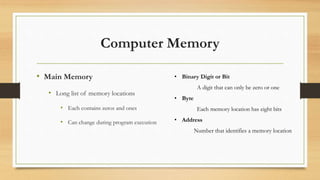
• Main Memory
• Long list of memory locations
• Each contains zeros and ones
• Can change during program execution
• Binary Digit or Bit
A digit that can only be zero or one
• Byte
Each memory location has eight bits
• Address
Number that identifies a memory location
Larger Data Items
• Some data is too large for a single byte
• Most integers and real numbers are too large
• Address refers to the first byte
• Next few consecutive bytes can store the additional
bits for larger data
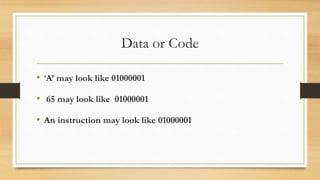
Data or Code
• ‘A’ may look like 01000001
• 65 may look like 01000001
• An instruction may look like 01000001
• How does the computer know the meaning of 01000001?
• Interpretation depends on the current instruction
• Programmers rarely need to be concerned with this
problem.
• Reason as if memory locations contain letters and
numbers rather than zeroes and ones
Computer Software
• The operating system
• Allows us to communicate with the computer
• Is a program
• Allocates the computer’s resources
• Responds to user requests to run other programs
• Common operating systems include…
• UNIX Linux DOS Windows Macintosh VMS
Compilers
• Translate high-level language to machine language
• Source code
• the original program in a high level language
• Object code
• the translated version in machine language
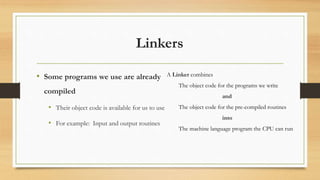
Linkers
• Some programs we use are already
compiled
• Their object code is available for us to use
• For example: Input and output routines
A Linker combines
The object code for the programs we write
and
The object code for the pre-compiled routines
into
The machine language program the CPU can run
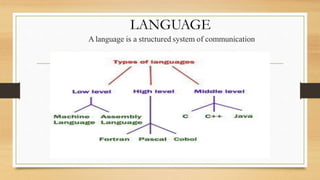
LANGUAGE
A language is a structured system of communication
High-level Languages
• Common programming languages include …
C C++ Java Pascal Visual Basic FORTRAN
COBOL Lisp Scheme Ada
• These high – level languages
• Resemble human languages
• Are designed to be easy to read and write
• Use more complicated instructions than the CPU can follow
• Must be translated to zeros and ones for the CPU to execute a program
Low-level Languages
• An assembly language command such as
ADD X Y Z
might mean add the values found at x and y
in memory, and store the result in location z.
• Assembly language must be translated to machine language (zeros and
ones)
0110 1001 1010 1011
• The CPU can follow machine language
SOFTWARE EVOLUTION
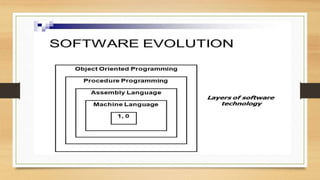
Like a tree, the software evolution has had distinct phases “layers” of growth.
 These layers were building up one by one over the last five decades as
shown in below diagram, with each layer representing and improvement over
the previous one.
 However, the analogy fails if we consider the life of these layers.
 In software system each of the layers continues to be functional, whereas in the
case of trees, only the uppermost layer is functional
Introduction to C++
• C++ is a general purpose, case-sensitive, free-form
programming language that supports object-oriented,
procedural and generic programming.
• C++ is a middle-level language, as it encapsulates both
high and low level language features.
Object-Oriented Programming (OOPs)
• C++ supports the object-oriented programming, the four major pillar of object-
oriented programming (OOPs) used in C++ are:
1.Inheritance
2.Polymorphism
3.Encapsulation
4.Abstraction
C++ Standard Libraries
• Standard C++ programming is divided into three important parts:
• The core library includes the data types, variables and literals, etc.
• The standard library includes the set of functions manipulating strings, files,
etc.
• The Standard Template Library (STL) includes the set of methods
manipulating a data structure.
Usage of C++
• By the help of C++ programming language, we can develop different types of
secured and robust applications:
•Window application
•Client-Server application
•Device drivers
•Embedded firmware etc
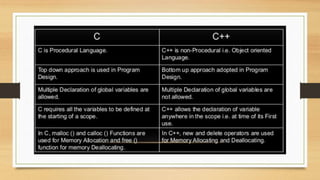
Difference between C and C++
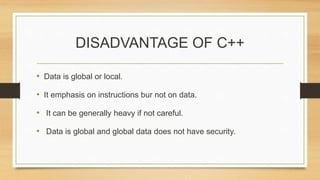
DISADVANTAGE OF C++
• Data is global or local.
• It emphasis on instructions bur not on data.
• It can be generally heavy if not careful.
• Data is global and global data does not have security.
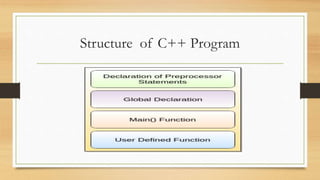
Structure of C++ Program
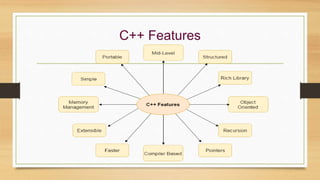
C++ Features
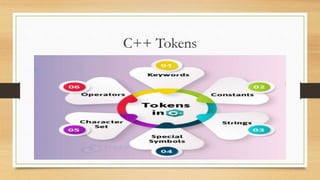
C++ Tokens
C++ Variable
• A variable is a name of memory location. It is used to store data.
• Its value can be changed and it can be reused many times.
• It is a way to represent memory location through symbol so that it can be easily
identified.
• Let's see the syntax to declare a variable: type variable_list;
Rules for defining variables
• A variable can have alphabets, digits and underscore.
• A variable name can start with alphabet and underscore only.
• It can't start with digit.
• No white space is allowed within variable name.
• A variable name must not be any reserved word or keyword e.g. char, float etc.
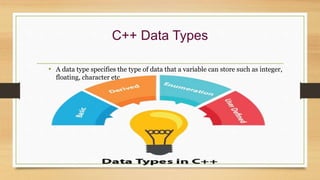
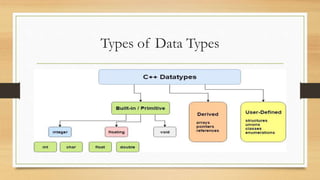
C++ Data Types
• A data type specifies the type of data that a variable can store such as integer,
floating, character etc.
Types of Data Types
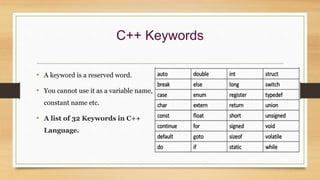
C++ Keywords
• A keyword is a reserved word.
• You cannot use it as a variable name,
constant name etc.
• A list of 32 Keywords in C++
Language.
C++ Operators
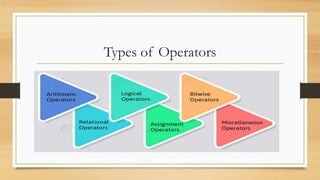
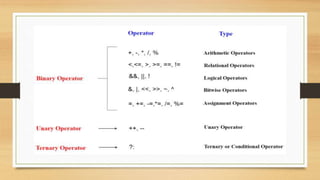
• An operator is simply a symbol that is used to perform operations
• There can be many types of operations like arithmetic, logical, bitwise etc.
Types of Operators
Precedence of Operators in C++
• The precedence of operator species that which operator will be evaluated first
and next.
• The associativity specifies the operators direction to be evaluated, it may be left
to right or right to left.
• Let's understand the precedence by the example given below:
int data=5+10*10;
C++ Identifiers
• C++ identifiers in a program are used to refer to the name of the
variables, functions, arrays, or other user-defined data types
created by the programmer
• They are the basic requirement of any language.
• Every language has its own rules for naming the identifiers.
Rules of Identifiers
• Only alphabetic characters, digits, and underscores are allowed.
• The identifier name cannot start with a digit, i.e., the first letter should be
alphabetical.
• After the first letter, we can use letters, digits, or underscores.
• In C++, uppercase and lowercase letters are distinct.
• Therefore, we can say that C++ identifiers are case-sensitive.
• A declared keyword cannot be used as a variable name.
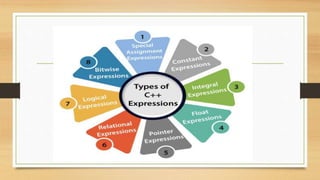
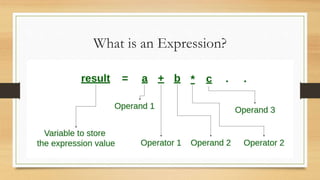
C++ Expression
• C++ expression consists of operators, constants, and variables which are
arranged according to the rules of the language.
• It can also contain function calls which return values.
• An expression can consist of one or more operands, zero or more
operators to compute a value.
• Every expression produces some value which is assigned to the variable
with the help of an assignment operator.
What is an Expression?
 c++

c++

  • 1.
  • 4.
    Copyright © 2003Pearson Education, Inc. Slide 4 C++ History • C developed by Dennis Ritchie at AT&T Bell Labs in the 1970s. • Used to maintain UNIX systems • Many commercial applications written in c • C++ developed by Bjarne Stroustrup at AT&T Bell Labs in the 1980s. • Overcame several shortcomings of C • Incorporated object oriented programming • C remains a subset of C++
  • 5.
    Computer Systems • Acomputer program is… • A set of instructions for a computer to follow • Computer software is … • The collection of programs used by a computer • Includes: • Editors • Translators • System Managers
  • 6.
    Hardware • Three mainclasses of computers • PCs (Personal Computer) • Relatively small used by one person at a time • Workstation • Larger and more powerful than a PC
  • 7.
    • Mainframe • Stilllarger • Requires support staff • Shared by multiple users
  • 8.
    Computer Memory • MainMemory • Long list of memory locations • Each contains zeros and ones • Can change during program execution • Binary Digit or Bit A digit that can only be zero or one • Byte Each memory location has eight bits • Address Number that identifies a memory location
  • 9.
    Larger Data Items •Some data is too large for a single byte • Most integers and real numbers are too large • Address refers to the first byte • Next few consecutive bytes can store the additional bits for larger data
  • 10.
    Data or Code •‘A’ may look like 01000001 • 65 may look like 01000001 • An instruction may look like 01000001
  • 11.
    • How doesthe computer know the meaning of 01000001? • Interpretation depends on the current instruction • Programmers rarely need to be concerned with this problem. • Reason as if memory locations contain letters and numbers rather than zeroes and ones
  • 12.
    Computer Software • Theoperating system • Allows us to communicate with the computer • Is a program • Allocates the computer’s resources • Responds to user requests to run other programs • Common operating systems include… • UNIX Linux DOS Windows Macintosh VMS
  • 13.
    Compilers • Translate high-levellanguage to machine language • Source code • the original program in a high level language • Object code • the translated version in machine language
  • 14.
    Linkers • Some programswe use are already compiled • Their object code is available for us to use • For example: Input and output routines A Linker combines The object code for the programs we write and The object code for the pre-compiled routines into The machine language program the CPU can run
  • 15.
    LANGUAGE A language isa structured system of communication
  • 16.
    High-level Languages • Commonprogramming languages include … C C++ Java Pascal Visual Basic FORTRAN COBOL Lisp Scheme Ada
  • 17.
    • These high– level languages • Resemble human languages • Are designed to be easy to read and write • Use more complicated instructions than the CPU can follow • Must be translated to zeros and ones for the CPU to execute a program
  • 18.
    Low-level Languages • Anassembly language command such as ADD X Y Z might mean add the values found at x and y in memory, and store the result in location z. • Assembly language must be translated to machine language (zeros and ones) 0110 1001 1010 1011 • The CPU can follow machine language
  • 19.
    SOFTWARE EVOLUTION Like atree, the software evolution has had distinct phases “layers” of growth.  These layers were building up one by one over the last five decades as shown in below diagram, with each layer representing and improvement over the previous one.  However, the analogy fails if we consider the life of these layers.  In software system each of the layers continues to be functional, whereas in the case of trees, only the uppermost layer is functional
  • 21.
    Introduction to C++ •C++ is a general purpose, case-sensitive, free-form programming language that supports object-oriented, procedural and generic programming. • C++ is a middle-level language, as it encapsulates both high and low level language features.
  • 22.
    Object-Oriented Programming (OOPs) •C++ supports the object-oriented programming, the four major pillar of object- oriented programming (OOPs) used in C++ are: 1.Inheritance 2.Polymorphism 3.Encapsulation 4.Abstraction
  • 23.
    C++ Standard Libraries •Standard C++ programming is divided into three important parts: • The core library includes the data types, variables and literals, etc. • The standard library includes the set of functions manipulating strings, files, etc. • The Standard Template Library (STL) includes the set of methods manipulating a data structure.
  • 24.
    Usage of C++ •By the help of C++ programming language, we can develop different types of secured and robust applications: •Window application •Client-Server application •Device drivers •Embedded firmware etc
  • 25.
  • 27.
    DISADVANTAGE OF C++ •Data is global or local. • It emphasis on instructions bur not on data. • It can be generally heavy if not careful. • Data is global and global data does not have security.
  • 28.
  • 29.
  • 30.
  • 31.
    C++ Variable • Avariable is a name of memory location. It is used to store data. • Its value can be changed and it can be reused many times. • It is a way to represent memory location through symbol so that it can be easily identified. • Let's see the syntax to declare a variable: type variable_list;
  • 32.
    Rules for definingvariables • A variable can have alphabets, digits and underscore. • A variable name can start with alphabet and underscore only. • It can't start with digit. • No white space is allowed within variable name. • A variable name must not be any reserved word or keyword e.g. char, float etc.
  • 33.
    C++ Data Types •A data type specifies the type of data that a variable can store such as integer, floating, character etc.
  • 34.
  • 35.
    C++ Keywords • Akeyword is a reserved word. • You cannot use it as a variable name, constant name etc. • A list of 32 Keywords in C++ Language.
  • 36.
    C++ Operators • Anoperator is simply a symbol that is used to perform operations • There can be many types of operations like arithmetic, logical, bitwise etc.
  • 37.
  • 39.
    Precedence of Operatorsin C++ • The precedence of operator species that which operator will be evaluated first and next. • The associativity specifies the operators direction to be evaluated, it may be left to right or right to left. • Let's understand the precedence by the example given below: int data=5+10*10;
  • 40.
    C++ Identifiers • C++identifiers in a program are used to refer to the name of the variables, functions, arrays, or other user-defined data types created by the programmer • They are the basic requirement of any language. • Every language has its own rules for naming the identifiers.
  • 41.
    Rules of Identifiers •Only alphabetic characters, digits, and underscores are allowed. • The identifier name cannot start with a digit, i.e., the first letter should be alphabetical. • After the first letter, we can use letters, digits, or underscores. • In C++, uppercase and lowercase letters are distinct. • Therefore, we can say that C++ identifiers are case-sensitive. • A declared keyword cannot be used as a variable name.
  • 42.
    C++ Expression • C++expression consists of operators, constants, and variables which are arranged according to the rules of the language. • It can also contain function calls which return values. • An expression can consist of one or more operands, zero or more operators to compute a value. • Every expression produces some value which is assigned to the variable with the help of an assignment operator.
  • 44.
    What is anExpression?