Dr.Sushruta Mishra (CN lecture notes)
Routing is a process of selecting path along which the data can be transferred from source to the destination.
Routing is performed by a special device known as a router.
A Router works at the network layer in the OSI model and internet layer in TCP/IP model.
A router is a networking device that forwards the packet based on the information available in the packet
header and forwarding table.
The routing algorithms are used for routing the packets. The routing algorithm is nothing but a software
responsible for deciding the optimal path through which packet can be transmitted.
The routing protocols use the metric to determine the best path for the packet delivery. The metric is the
standard of measurement such as hop count, bandwidth, delay, current load on the path, etc. used by the
routing algorithm to determine the optimal path to the destination.
The routing algorithm initializes and maintains the routing table for the process of path determination.
Routing metrics and costs are used for determining the best route to the destination. The factors used by the
protocols to determine the shortest path, these factors are known as a metric.
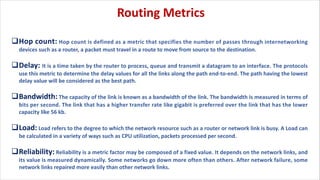
qHop count: Hop count is defined as a metric that specifies the number of passes through internetworking
devices such as a router, a packet must travel in a route to move from source to the destination.
qDelay: It is a time taken by the router to process, queue and transmit a datagram to an interface. The protocols
use this metric to determine the delay values for all the links along the path end-to-end. The path having the lowest
delay value will be considered as the best path.
qBandwidth: The capacity of the link is known as a bandwidth of the link. The bandwidth is measured in terms of
bits per second. The link that has a higher transfer rate like gigabit is preferred over the link that has the lower
capacity like 56 kb.
qLoad: Load refers to the degree to which the network resource such as a router or network link is busy. A Load can
be calculated in a variety of ways such as CPU utilization, packets processed per second.
qReliability: Reliability is a metric factor may be composed of a fixed value. It depends on the network links, and
its value is measured dynamically. Some networks go down more often than others. After network failure, some
network links repaired more easily than other network links.
Routing Metrics
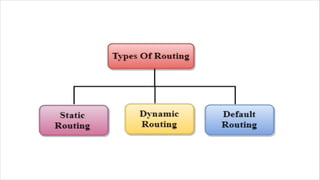
v Static Routing is also known as Nonadaptive Routing.
v It is a technique in which the administrator manually adds the routes in a routing table.
v A Router can send the packets for the destination along the route defined by the administrator.
v In this technique, routing decisions are not made based on the condition or topology of the networks
Static Routing
BENEFITS:
Ø No Overhead: It has ho overhead on the CPU usage
of the router. Therefore, the cheaper router can be
used to obtain static routing.
Ø Bandwidth: It has not bandwidth usage between
the routers.
Ø Security: It provides security as the system
administrator is allowed only to have control over
the routing to a particular network.
Disadvantages:
For a large network, it becomes a very
difficult task to add each route manually to
the routing table.
The system administrator should have a good
knowledge of a topology as he has to add
each route manually.
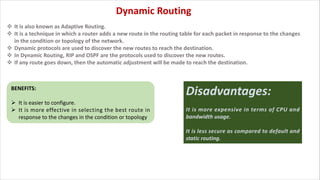
v It is also known as Adaptive Routing.
v It is a technique in which a router adds a new route in the routing table for each packet in response to the changes
in the condition or topology of the network.
v Dynamic protocols are used to discover the new routes to reach the destination.
v In Dynamic Routing, RIP and OSPF are the protocols used to discover the new routes.
v If any route goes down, then the automatic adjustment will be made to reach the destination.
Dynamic Routing
BENEFITS:
Ø It is easier to configure.
Ø It is more effective in selecting the best route in
response to the changes in the condition or topology
Disadvantages:
It is more expensive in terms of CPU and
bandwidth usage.
It is less secure as compared to default and
static routing.
Distance Vector Routing Algorithm
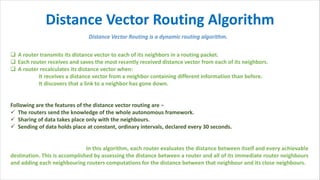
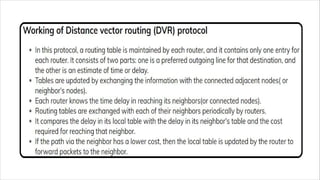
q A router transmits its distance vector to each of its neighbors in a routing packet.
q Each router receives and saves the most recently received distance vector from each of its neighbors.
q A router recalculates its distance vector when:
It receives a distance vector from a neighbor containing different information than before.
It discovers that a link to a neighbor has gone down.
Following are the features of the distance vector routing are −
ü The routers send the knowledge of the whole autonomous framework.
ü Sharing of data takes place only with the neighbours.
ü Sending of data holds place at constant, ordinary intervals, declared every 30 seconds.
In this algorithm, each router evaluates the distance between itself and every achievable
destination. This is accomplished by assessing the distance between a router and all of its immediate router neighbours
and adding each neighbouring routers computations for the distance between that neighbour and its close neighbours.
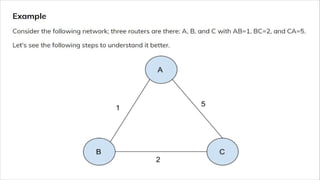
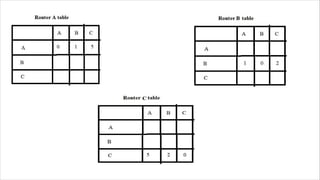
Step 1:
Each router shares its routing table with every
neighbor in this distance vector routing network. As
A will share its routing table with neighbors B and C,
neighbors B and C will share their routing table with
A.
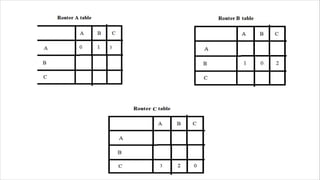
Step 2:
If the path via a neighbor has a lower cost, the router
updates its local table to forward packets to the
neighbor. In this table, router A will be updated.
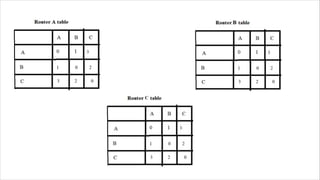
Step 3:
The following are the final routing table for all the
routers A, B, and C with lower cost distance vector
routing protocols.
Important Notes-
In Distance Vector Routing, only distance vectors are exchanged.
“Next hop”values are not exchanged as it results in exchanging the large amount of data which consumes more bandwidth.
While preparing a new routing table- a router takes into consideration only the distance vectors it has obtained from its neighboring
routers. It does not take into consideration its old routing table.
The algorithm is called so because- It involves exchanging of distance vectors between the routers.
Distance vector is nothing but an array of distances.
The algorithm keeps on repeating periodically and never stops.
This is to update the shortest path in case any link goes down or topology changes.
Routing tables are prepared total (n-1) times if there are n routers in the given network.
This is because shortest path between any 2 nodes contains at most n-1 edges if there are n nodes in the graph.
Distance Vector Routing suffers from count to infinity problem.
Distance Vector Routing uses UDP at transport layer.
In link-state routing, each router attempt to construct its own internal map of the network topology. At the initial stage
of start-up, when a router becomes active, it sends the messages into the network and collects the information from
the routers to which it is directly connected.
It also provides information about whether the link to reach the router is active or not. This information is used by
other routers to build a map of network topology. Then the router uses the map to choose the best path.
The link state routing protocols respond swiftly to the network changes. It sends triggered updates when a network
change occurs and sends periodic updates at long time intervals such as 30 minutes.
If the link alters state, the device detected the alteration generates and propagate an update message regarding that
link to all routers. Then each router takes a copy of the update message and update its routing table and forwards the
message to all neighbouring router.
This flooding of the update message is needed to ensure that all routers update their database before creating an
update routing table that reflects the new technology. OSPF protocol is the example link state routing.
Link-state Routing
q Bellman-Ford algorithm is used for performing distance vector routing whereas Dijsktra is used for performing the link state routing.
q In distance vector routing the routers receive the topological information from the neighbour point of view. On the contrary, in link
state routing the router receive complete information on the network topology.
q Distance vector routing calculates the best route based on the distance (fewest number of hops). As against, Link state routing
calculates the best route on the basis of least cost.
q Link state routing updates only the link state while Distance vector routing updates full routing table.
q The frequency of update in both routing technique is different distance vector update periodically whereas link state update
frequency employs triggered updates.
q The utilization of CPU and memory in distance vector routing is lower than the link state routing.
q The distance vector routing is simple to implement and manage. In contrast, the link state routing is complex and requires trained
network administrator.
q The convergence time in distance vector routing is slow, and it usually suffers from count to infinity problem. Conversely, the
convergence time in link state routing is fast, and it is more reliable.
q Distance vector doesn’t have hierarchical structure while in link state routing the nodes can have a hierarchical structure.
Key Differences Between Distance Vector Routing and Link State Routing:
ICMP Protocol
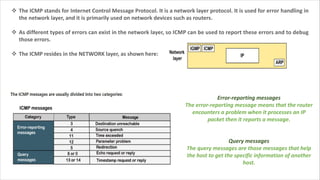
v The ICMP stands for Internet Control Message Protocol. It is a network layer protocol. It is used for error handling in
the network layer, and it is primarily used on network devices such as routers.
v As different types of errors can exist in the network layer, so ICMP can be used to report these errors and to debug
those errors.
v The ICMP resides in the NETWORK layer, as shown here:
Error-reporting messages
The error-reporting message means that the router
encounters a problem when it processes an IP
packet then it reports a message.
Query messages
The query messages are those messages that help
the host to get the specific information of another
host.
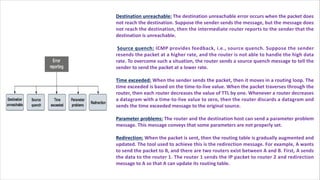
Destination unreachable: The destination unreachable error occurs when the packet does
not reach the destination. Suppose the sender sends the message, but the message does
not reach the destination, then the intermediate router reports to the sender that the
destination is unreachable.
Source quench: ICMP provides feedback, i.e., source quench. Suppose the sender
resends the packet at a higher rate, and the router is not able to handle the high data
rate. To overcome such a situation, the router sends a source quench message to tell the
sender to send the packet at a lower rate.
Time exceeded: When the sender sends the packet, then it moves in a routing loop. The
time exceeded is based on the time-to-live value. When the packet traverses through the
router, then each router decreases the value of TTL by one. Whenever a router decreases
a datagram with a time-to-live value to zero, then the router discards a datagram and
sends the time exceeded message to the original source.
Parameter problems: The router and the destination host can send a parameter problem
message. This message conveys that some parameters are not properly set.
Redirection: When the packet is sent, then the routing table is gradually augmented and
updated. The tool used to achieve this is the redirection message. For example, A wants
to send the packet to B, and there are two routers exist between A and B. First, A sends
the data to the router 1. The router 1 sends the IP packet to router 2 and redirection
message to A so that A can update its routing table.
NAT
(Network Address
Translation)
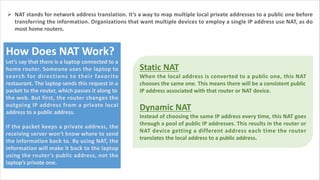
Ø NAT stands for network address translation. It’s a way to map multiple local private addresses to a public one before
transferring the information. Organizations that want multiple devices to employ a single IP address use NAT, as do
most home routers.
How Does NAT Work?
Let’s say that there is a laptop connected to a
home router. Someone uses the laptop to
search for directions to their favorite
restaurant. The laptop sends this request in a
packet to the router, which passes it along to
the web. But first, the router changes the
outgoing IP address from a private local
address to a public address.
If the packet keeps a private address, the
receiving server won’t know where to send
the information back to. By using NAT, the
information will make it back to the laptop
using the router’s public address, not the
laptop’s private one.
Static NAT
When the local address is converted to a public one, this NAT
chooses the same one. This means there will be a consistent public
IP address associated with that router or NAT device.
Dynamic NAT
Instead of choosing the same IP address every time, this NAT goes
through a pool of public IP addresses. This results in the router or
NAT device getting a different address each time the router
translates the local address to a public address.
Why Use NAT?
IP addresses identify each device connected to the internet. The
existing IP version 4 (IPv4) uses 32-bit numbered IP addresses,
which allows for 4 billion possible IP addresses, which seemed like
more than enough when it launched in the 1970s.
However, the internet has exploded, and while not all 7 billion
people on the planet access the internet regularly, those that do
often have multiple connected devices: phones, personal desktop,
work laptop, tablet, TV, even refrigerators.
Therefore, the number of devices accessing the internet far
surpasses the number of IP addresses available. Routing all of
these devices via one connection using NAT helps to consolidate
multiple private IP addresses into one public IP address. This helps
to keep more public IP addresses available even while private IP
addresses proliferate.
Address Resolution
Protocol (ARP)
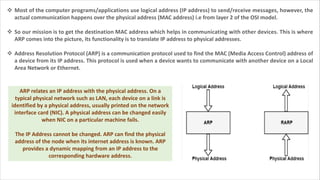
v Most of the computer programs/applications use logical address (IP address) to send/receive messages, however, the
actual communication happens over the physical address (MAC address) i.e from layer 2 of the OSI model.
v So our mission is to get the destination MAC address which helps in communicating with other devices. This is where
ARP comes into the picture, its functionality is to translate IP address to physical addresses.
v Address Resolution Protocol (ARP) is a communication protocol used to find the MAC (Media Access Control) address of
a device from its IP address. This protocol is used when a device wants to communicate with another device on a Local
Area Network or Ethernet.
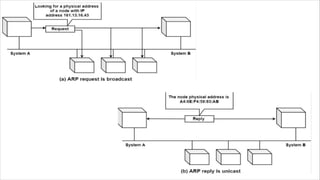
ARP relates an IP address with the physical address. On a
typical physical network such as LAN, each device on a link is
identified by a physical address, usually printed on the network
interface card (NIC). A physical address can be changed easily
when NIC on a particular machine fails.
The IP Address cannot be changed. ARP can find the physical
address of the node when its internet address is known. ARP
provides a dynamic mapping from an IP address to the
corresponding hardware address.
How Address Resolution Protocol (ARP) works?
STEP 1: When a host tries to interact with another host, an ARP request is
initiated. If the IP address is for the local network, the source host checks its ARP
cache to find out the hardware address of the destination computer.
STEP 2: If the correspondence hardware address is not found, ARP broadcasts
the request to all the local hosts.
STEP 3: All hosts receive the broadcast and check their own IP address. If no
match is discovered, the request is ignored.
STEP 4: The destination host that finds the matching IP address sends an ARP
reply to the source host along with its hardware address, thus establishing the
communication. The ARP cache is then updated with the hardware address of
the destination host.
Dynamic Host
Configuration Protocol
Dynamic Host Configuration Protocol (DHCP) is a
network management protocol used to dynamically
assign an IP address to nay device, or node, on a
network so they can communicate using IP (Internet
Protocol). DHCP automates and centrally manages
these configurations. There is no need to manually
assign IP addresses to new devices. Therefore, there
is no requirement for any user configuration to
connect to a DHCP based network.
DHCP can be implemented on local networks as well
as large enterprise networks. DHCP is the default
protocol used by the most routers and networking
equipment. DHCP is also called RFC (Request for
comments) 2131.
DHCP does the following:
q DHCP manages the provision of all the nodes or
devices added or dropped from the network.
q DHCP maintains the unique IP address of the
host using a DHCP server.
q It sends a request to the DHCP server whenever
a client/node/device, which is configured to
work with DHCP, connects to a network. The
server acknowledges by providing an IP address
to the client/node/device.
q DHCP is also used to configure the proper
subnet mask, default gateway and DNS server
information on the node or device.
How DHCP works:
DHCP runs at the application layer of the
TCP/IP protocol stack to dynamically assign
IP addresses to DHCP clients/nodes and to
allocate TCP/IP configuration information
to the DHCP clients. Information includes
subnet mask information, default gateway,
IP addresses and domain name system
addresses.
DHCP is based on client-server protocol in
which servers manage a pool of unique IP
addresses, as well as information about
client configuration parameters, and assign
addresses out of those address pools.
The DHCP lease process works
as follows:
v First of all, a client (network device) must be connected
to the internet.
v DHCP clients request an IP address. Typically, client
broadcasts a query for this information.
v DHCP server responds to the client request by providing
IP server address and other configuration information.
This configuration information also includes time period,
called a lease, for which the allocation is valid.
v When refreshing an assignment, a DHCP clients request
the same parameters, but the DHCP server may assign a
new IP address. This is based on the policies set by the
administrator.
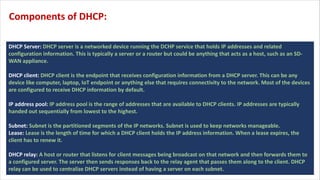
DHCP Server: DHCP server is a networked device running the DCHP service that holds IP addresses and related
configuration information. This is typically a server or a router but could be anything that acts as a host, such as an SD-
WAN appliance.
DHCP client: DHCP client is the endpoint that receives configuration information from a DHCP server. This can be any
device like computer, laptop, IoT endpoint or anything else that requires connectivity to the network. Most of the devices
are configured to receive DHCP information by default.
IP address pool: IP address pool is the range of addresses that are available to DHCP clients. IP addresses are typically
handed out sequentially from lowest to the highest.
Subnet: Subnet is the partitioned segments of the IP networks. Subnet is used to keep networks manageable.
Lease: Lease is the length of time for which a DHCP client holds the IP address information. When a lease expires, the
client has to renew it.
DHCP relay: A host or router that listens for client messages being broadcast on that network and then forwards them to
a configured server. The server then sends responses back to the relay agent that passes them along to the client. DHCP
relay can be used to centralize DHCP servers instead of having a server on each subnet.
Components of DHCP:
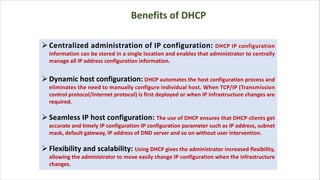
ØCentralized administration of IP configuration: DHCP IP configuration
information can be stored in a single location and enables that administrator to centrally
manage all IP address configuration information.
ØDynamic host configuration: DHCP automates the host configuration process and
eliminates the need to manually configure individual host. When TCP/IP (Transmission
control protocol/Internet protocol) is first deployed or when IP infrastructure changes are
required.
ØSeamless IP host configuration: The use of DHCP ensures that DHCP clients get
accurate and timely IP configuration IP configuration parameter such as IP address, subnet
mask, default gateway, IP address of DND server and so on without user intervention.
ØFlexibility and scalability: Using DHCP gives the administrator increased flexibility,
allowing the administrator to move easily change IP configuration when the infrastructure
changes.
Benefits of DHCP
Hamming
Distance
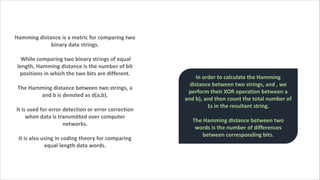
Hamming distance is a metric for comparing two
binary data strings.
While comparing two binary strings of equal
length, Hamming distance is the number of bit
positions in which the two bits are different.
The Hamming distance between two strings, a
and b is denoted as d(a,b).
It is used for error detection or error correction
when data is transmitted over computer
networks.
It is also using in coding theory for comparing
equal length data words.
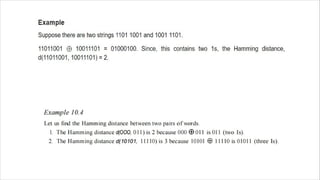
In order to calculate the Hamming
distance between two strings, and , we
perform their XOR operation between a
and b), and then count the total number of
1s in the resultant string.
The Hamming distance between two
words is the number of differences
between corresponding bits.
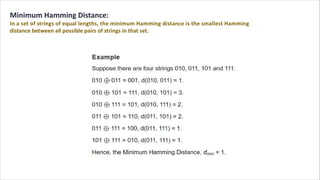
Minimum Hamming Distance:
In a set of strings of equal lengths, the minimum Hamming distance is the smallest Hamming
distance between all possible pairs of strings in that set.
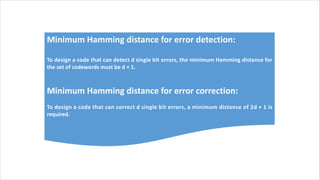
Minimum Hamming distance for error detection:
To design a code that can detect d single bit errors, the minimum Hamming distance for
the set of codewords must be d + 1.
Minimum Hamming distance for error correction:
To design a code that can correct d single bit errors, a minimum distance of 2d + 1 is
required.
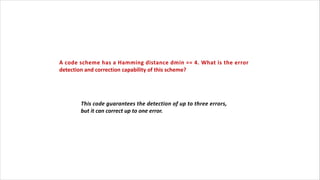
A code scheme has a Hamming distance dmin == 4. What is the error
detection and correction capability of this scheme?
This code guarantees the detection of up to three errors,
but it can correct up to one error.
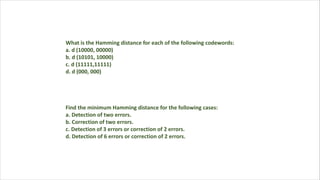
What is the Hamming distance for each of the following codewords:
a. d (10000, 00000)
b. d (10101, 10000)
c. d (11111,11111)
d. d (000, 000)
Find the minimum Hamming distance for the following cases:
a. Detection of two errors.
b. Correction of two errors.
c. Detection of 3 errors or correction of 2 errors.
d. Detection of 6 errors or correction of 2 errors.
CN WEEK 11.pdf

CN WEEK 11.pdf

  • 1.
    Dr.Sushruta Mishra (CNlecture notes)
  • 3.
    Routing is aprocess of selecting path along which the data can be transferred from source to the destination. Routing is performed by a special device known as a router. A Router works at the network layer in the OSI model and internet layer in TCP/IP model. A router is a networking device that forwards the packet based on the information available in the packet header and forwarding table. The routing algorithms are used for routing the packets. The routing algorithm is nothing but a software responsible for deciding the optimal path through which packet can be transmitted. The routing protocols use the metric to determine the best path for the packet delivery. The metric is the standard of measurement such as hop count, bandwidth, delay, current load on the path, etc. used by the routing algorithm to determine the optimal path to the destination. The routing algorithm initializes and maintains the routing table for the process of path determination. Routing metrics and costs are used for determining the best route to the destination. The factors used by the protocols to determine the shortest path, these factors are known as a metric.
  • 4.
    qHop count: Hopcount is defined as a metric that specifies the number of passes through internetworking devices such as a router, a packet must travel in a route to move from source to the destination. qDelay: It is a time taken by the router to process, queue and transmit a datagram to an interface. The protocols use this metric to determine the delay values for all the links along the path end-to-end. The path having the lowest delay value will be considered as the best path. qBandwidth: The capacity of the link is known as a bandwidth of the link. The bandwidth is measured in terms of bits per second. The link that has a higher transfer rate like gigabit is preferred over the link that has the lower capacity like 56 kb. qLoad: Load refers to the degree to which the network resource such as a router or network link is busy. A Load can be calculated in a variety of ways such as CPU utilization, packets processed per second. qReliability: Reliability is a metric factor may be composed of a fixed value. It depends on the network links, and its value is measured dynamically. Some networks go down more often than others. After network failure, some network links repaired more easily than other network links. Routing Metrics
  • 6.
    v Static Routingis also known as Nonadaptive Routing. v It is a technique in which the administrator manually adds the routes in a routing table. v A Router can send the packets for the destination along the route defined by the administrator. v In this technique, routing decisions are not made based on the condition or topology of the networks Static Routing BENEFITS: Ø No Overhead: It has ho overhead on the CPU usage of the router. Therefore, the cheaper router can be used to obtain static routing. Ø Bandwidth: It has not bandwidth usage between the routers. Ø Security: It provides security as the system administrator is allowed only to have control over the routing to a particular network. Disadvantages: For a large network, it becomes a very difficult task to add each route manually to the routing table. The system administrator should have a good knowledge of a topology as he has to add each route manually.
  • 7.
    v It isalso known as Adaptive Routing. v It is a technique in which a router adds a new route in the routing table for each packet in response to the changes in the condition or topology of the network. v Dynamic protocols are used to discover the new routes to reach the destination. v In Dynamic Routing, RIP and OSPF are the protocols used to discover the new routes. v If any route goes down, then the automatic adjustment will be made to reach the destination. Dynamic Routing BENEFITS: Ø It is easier to configure. Ø It is more effective in selecting the best route in response to the changes in the condition or topology Disadvantages: It is more expensive in terms of CPU and bandwidth usage. It is less secure as compared to default and static routing.
  • 8.
    Distance Vector RoutingAlgorithm q A router transmits its distance vector to each of its neighbors in a routing packet. q Each router receives and saves the most recently received distance vector from each of its neighbors. q A router recalculates its distance vector when: It receives a distance vector from a neighbor containing different information than before. It discovers that a link to a neighbor has gone down. Following are the features of the distance vector routing are − ü The routers send the knowledge of the whole autonomous framework. ü Sharing of data takes place only with the neighbours. ü Sending of data holds place at constant, ordinary intervals, declared every 30 seconds. In this algorithm, each router evaluates the distance between itself and every achievable destination. This is accomplished by assessing the distance between a router and all of its immediate router neighbours and adding each neighbouring routers computations for the distance between that neighbour and its close neighbours.
  • 11.
    Step 1: Each routershares its routing table with every neighbor in this distance vector routing network. As A will share its routing table with neighbors B and C, neighbors B and C will share their routing table with A.
  • 13.
    Step 2: If thepath via a neighbor has a lower cost, the router updates its local table to forward packets to the neighbor. In this table, router A will be updated.
  • 15.
    Step 3: The followingare the final routing table for all the routers A, B, and C with lower cost distance vector routing protocols.
  • 17.
    Important Notes- In DistanceVector Routing, only distance vectors are exchanged. “Next hop”values are not exchanged as it results in exchanging the large amount of data which consumes more bandwidth. While preparing a new routing table- a router takes into consideration only the distance vectors it has obtained from its neighboring routers. It does not take into consideration its old routing table. The algorithm is called so because- It involves exchanging of distance vectors between the routers. Distance vector is nothing but an array of distances. The algorithm keeps on repeating periodically and never stops. This is to update the shortest path in case any link goes down or topology changes. Routing tables are prepared total (n-1) times if there are n routers in the given network. This is because shortest path between any 2 nodes contains at most n-1 edges if there are n nodes in the graph. Distance Vector Routing suffers from count to infinity problem. Distance Vector Routing uses UDP at transport layer.
  • 18.
    In link-state routing,each router attempt to construct its own internal map of the network topology. At the initial stage of start-up, when a router becomes active, it sends the messages into the network and collects the information from the routers to which it is directly connected. It also provides information about whether the link to reach the router is active or not. This information is used by other routers to build a map of network topology. Then the router uses the map to choose the best path. The link state routing protocols respond swiftly to the network changes. It sends triggered updates when a network change occurs and sends periodic updates at long time intervals such as 30 minutes. If the link alters state, the device detected the alteration generates and propagate an update message regarding that link to all routers. Then each router takes a copy of the update message and update its routing table and forwards the message to all neighbouring router. This flooding of the update message is needed to ensure that all routers update their database before creating an update routing table that reflects the new technology. OSPF protocol is the example link state routing. Link-state Routing
  • 19.
    q Bellman-Ford algorithmis used for performing distance vector routing whereas Dijsktra is used for performing the link state routing. q In distance vector routing the routers receive the topological information from the neighbour point of view. On the contrary, in link state routing the router receive complete information on the network topology. q Distance vector routing calculates the best route based on the distance (fewest number of hops). As against, Link state routing calculates the best route on the basis of least cost. q Link state routing updates only the link state while Distance vector routing updates full routing table. q The frequency of update in both routing technique is different distance vector update periodically whereas link state update frequency employs triggered updates. q The utilization of CPU and memory in distance vector routing is lower than the link state routing. q The distance vector routing is simple to implement and manage. In contrast, the link state routing is complex and requires trained network administrator. q The convergence time in distance vector routing is slow, and it usually suffers from count to infinity problem. Conversely, the convergence time in link state routing is fast, and it is more reliable. q Distance vector doesn’t have hierarchical structure while in link state routing the nodes can have a hierarchical structure. Key Differences Between Distance Vector Routing and Link State Routing:
  • 20.
  • 21.
    v The ICMPstands for Internet Control Message Protocol. It is a network layer protocol. It is used for error handling in the network layer, and it is primarily used on network devices such as routers. v As different types of errors can exist in the network layer, so ICMP can be used to report these errors and to debug those errors. v The ICMP resides in the NETWORK layer, as shown here: Error-reporting messages The error-reporting message means that the router encounters a problem when it processes an IP packet then it reports a message. Query messages The query messages are those messages that help the host to get the specific information of another host.
  • 22.
    Destination unreachable: Thedestination unreachable error occurs when the packet does not reach the destination. Suppose the sender sends the message, but the message does not reach the destination, then the intermediate router reports to the sender that the destination is unreachable. Source quench: ICMP provides feedback, i.e., source quench. Suppose the sender resends the packet at a higher rate, and the router is not able to handle the high data rate. To overcome such a situation, the router sends a source quench message to tell the sender to send the packet at a lower rate. Time exceeded: When the sender sends the packet, then it moves in a routing loop. The time exceeded is based on the time-to-live value. When the packet traverses through the router, then each router decreases the value of TTL by one. Whenever a router decreases a datagram with a time-to-live value to zero, then the router discards a datagram and sends the time exceeded message to the original source. Parameter problems: The router and the destination host can send a parameter problem message. This message conveys that some parameters are not properly set. Redirection: When the packet is sent, then the routing table is gradually augmented and updated. The tool used to achieve this is the redirection message. For example, A wants to send the packet to B, and there are two routers exist between A and B. First, A sends the data to the router 1. The router 1 sends the IP packet to router 2 and redirection message to A so that A can update its routing table.
  • 23.
  • 24.
    Ø NAT standsfor network address translation. It’s a way to map multiple local private addresses to a public one before transferring the information. Organizations that want multiple devices to employ a single IP address use NAT, as do most home routers. How Does NAT Work? Let’s say that there is a laptop connected to a home router. Someone uses the laptop to search for directions to their favorite restaurant. The laptop sends this request in a packet to the router, which passes it along to the web. But first, the router changes the outgoing IP address from a private local address to a public address. If the packet keeps a private address, the receiving server won’t know where to send the information back to. By using NAT, the information will make it back to the laptop using the router’s public address, not the laptop’s private one. Static NAT When the local address is converted to a public one, this NAT chooses the same one. This means there will be a consistent public IP address associated with that router or NAT device. Dynamic NAT Instead of choosing the same IP address every time, this NAT goes through a pool of public IP addresses. This results in the router or NAT device getting a different address each time the router translates the local address to a public address.
  • 25.
    Why Use NAT? IPaddresses identify each device connected to the internet. The existing IP version 4 (IPv4) uses 32-bit numbered IP addresses, which allows for 4 billion possible IP addresses, which seemed like more than enough when it launched in the 1970s. However, the internet has exploded, and while not all 7 billion people on the planet access the internet regularly, those that do often have multiple connected devices: phones, personal desktop, work laptop, tablet, TV, even refrigerators. Therefore, the number of devices accessing the internet far surpasses the number of IP addresses available. Routing all of these devices via one connection using NAT helps to consolidate multiple private IP addresses into one public IP address. This helps to keep more public IP addresses available even while private IP addresses proliferate.
  • 26.
  • 27.
    v Most ofthe computer programs/applications use logical address (IP address) to send/receive messages, however, the actual communication happens over the physical address (MAC address) i.e from layer 2 of the OSI model. v So our mission is to get the destination MAC address which helps in communicating with other devices. This is where ARP comes into the picture, its functionality is to translate IP address to physical addresses. v Address Resolution Protocol (ARP) is a communication protocol used to find the MAC (Media Access Control) address of a device from its IP address. This protocol is used when a device wants to communicate with another device on a Local Area Network or Ethernet. ARP relates an IP address with the physical address. On a typical physical network such as LAN, each device on a link is identified by a physical address, usually printed on the network interface card (NIC). A physical address can be changed easily when NIC on a particular machine fails. The IP Address cannot be changed. ARP can find the physical address of the node when its internet address is known. ARP provides a dynamic mapping from an IP address to the corresponding hardware address.
  • 28.
    How Address ResolutionProtocol (ARP) works? STEP 1: When a host tries to interact with another host, an ARP request is initiated. If the IP address is for the local network, the source host checks its ARP cache to find out the hardware address of the destination computer. STEP 2: If the correspondence hardware address is not found, ARP broadcasts the request to all the local hosts. STEP 3: All hosts receive the broadcast and check their own IP address. If no match is discovered, the request is ignored. STEP 4: The destination host that finds the matching IP address sends an ARP reply to the source host along with its hardware address, thus establishing the communication. The ARP cache is then updated with the hardware address of the destination host.
  • 30.
  • 31.
    Dynamic Host ConfigurationProtocol (DHCP) is a network management protocol used to dynamically assign an IP address to nay device, or node, on a network so they can communicate using IP (Internet Protocol). DHCP automates and centrally manages these configurations. There is no need to manually assign IP addresses to new devices. Therefore, there is no requirement for any user configuration to connect to a DHCP based network. DHCP can be implemented on local networks as well as large enterprise networks. DHCP is the default protocol used by the most routers and networking equipment. DHCP is also called RFC (Request for comments) 2131. DHCP does the following: q DHCP manages the provision of all the nodes or devices added or dropped from the network. q DHCP maintains the unique IP address of the host using a DHCP server. q It sends a request to the DHCP server whenever a client/node/device, which is configured to work with DHCP, connects to a network. The server acknowledges by providing an IP address to the client/node/device. q DHCP is also used to configure the proper subnet mask, default gateway and DNS server information on the node or device.
  • 32.
    How DHCP works: DHCPruns at the application layer of the TCP/IP protocol stack to dynamically assign IP addresses to DHCP clients/nodes and to allocate TCP/IP configuration information to the DHCP clients. Information includes subnet mask information, default gateway, IP addresses and domain name system addresses. DHCP is based on client-server protocol in which servers manage a pool of unique IP addresses, as well as information about client configuration parameters, and assign addresses out of those address pools. The DHCP lease process works as follows: v First of all, a client (network device) must be connected to the internet. v DHCP clients request an IP address. Typically, client broadcasts a query for this information. v DHCP server responds to the client request by providing IP server address and other configuration information. This configuration information also includes time period, called a lease, for which the allocation is valid. v When refreshing an assignment, a DHCP clients request the same parameters, but the DHCP server may assign a new IP address. This is based on the policies set by the administrator.
  • 33.
    DHCP Server: DHCPserver is a networked device running the DCHP service that holds IP addresses and related configuration information. This is typically a server or a router but could be anything that acts as a host, such as an SD- WAN appliance. DHCP client: DHCP client is the endpoint that receives configuration information from a DHCP server. This can be any device like computer, laptop, IoT endpoint or anything else that requires connectivity to the network. Most of the devices are configured to receive DHCP information by default. IP address pool: IP address pool is the range of addresses that are available to DHCP clients. IP addresses are typically handed out sequentially from lowest to the highest. Subnet: Subnet is the partitioned segments of the IP networks. Subnet is used to keep networks manageable. Lease: Lease is the length of time for which a DHCP client holds the IP address information. When a lease expires, the client has to renew it. DHCP relay: A host or router that listens for client messages being broadcast on that network and then forwards them to a configured server. The server then sends responses back to the relay agent that passes them along to the client. DHCP relay can be used to centralize DHCP servers instead of having a server on each subnet. Components of DHCP:
  • 34.
    ØCentralized administration ofIP configuration: DHCP IP configuration information can be stored in a single location and enables that administrator to centrally manage all IP address configuration information. ØDynamic host configuration: DHCP automates the host configuration process and eliminates the need to manually configure individual host. When TCP/IP (Transmission control protocol/Internet protocol) is first deployed or when IP infrastructure changes are required. ØSeamless IP host configuration: The use of DHCP ensures that DHCP clients get accurate and timely IP configuration IP configuration parameter such as IP address, subnet mask, default gateway, IP address of DND server and so on without user intervention. ØFlexibility and scalability: Using DHCP gives the administrator increased flexibility, allowing the administrator to move easily change IP configuration when the infrastructure changes. Benefits of DHCP
  • 35.
  • 36.
    Hamming distance isa metric for comparing two binary data strings. While comparing two binary strings of equal length, Hamming distance is the number of bit positions in which the two bits are different. The Hamming distance between two strings, a and b is denoted as d(a,b). It is used for error detection or error correction when data is transmitted over computer networks. It is also using in coding theory for comparing equal length data words. In order to calculate the Hamming distance between two strings, and , we perform their XOR operation between a and b), and then count the total number of 1s in the resultant string. The Hamming distance between two words is the number of differences between corresponding bits.
  • 38.
    Minimum Hamming Distance: Ina set of strings of equal lengths, the minimum Hamming distance is the smallest Hamming distance between all possible pairs of strings in that set.
  • 39.
    Minimum Hamming distancefor error detection: To design a code that can detect d single bit errors, the minimum Hamming distance for the set of codewords must be d + 1. Minimum Hamming distance for error correction: To design a code that can correct d single bit errors, a minimum distance of 2d + 1 is required.
  • 40.
    A code schemehas a Hamming distance dmin == 4. What is the error detection and correction capability of this scheme? This code guarantees the detection of up to three errors, but it can correct up to one error.
  • 41.
    What is theHamming distance for each of the following codewords: a. d (10000, 00000) b. d (10101, 10000) c. d (11111,11111) d. d (000, 000) Find the minimum Hamming distance for the following cases: a. Detection of two errors. b. Correction of two errors. c. Detection of 3 errors or correction of 2 errors. d. Detection of 6 errors or correction of 2 errors.