Click to edit Master title style
37
CMD
Command Line Interface
MOST USEFUL CMD COMMANDS
 Instructor Aziz Khan
 Last Lecture #15
Full Course in Hindi-Urdu
SUBSCRIBE FOR FREE COURSES
Click to edit Master title style
3838
Must Practice all the these commands in your PC.
• OPEN CMD”
• “COLOR 02”
• “TITLE MYNAME”
• “PROMPT MYNAME $G”
• “telnet towel.blinkenlights.nl”
• “ATTIRIB +H +S +R FLDNAME”
• “TASKMGR | CLIP”
• “WMIC PRODUCT GET NAME”
• “OPEN CMD DIRECTLY ANYWHERE”
• “ F7” | “arrow keys” | “tab” |
SUBSCRIBE FOR FREE COURSES
To write the custom name in the address.
To watch star war movie in the command prompt terminal.
To hide any folder with full privacy. To unhide just type “attrib –h –s –r filenames
Type CMD in search bar and Open CMD.
To use custom name of the terminal.
To change the color of the terminal.
This directly copy all the list of task manager and U able to past anywhere.
MOST USEFUL CMD COMMANDS
List all installed program on your PC.
Open anywhere just type cmd in the current directory address bar.
F7 to show history commands | ARROW KEYS to navigate to prev
and next command | TAB to auto complete the commands
Click to edit Master title style
3939
Must Practice all the these commands in your PC.
• “APPWIZ.CPL”
• “DISKPART”
• “MRT”
• “MAIN.CPL”
• “NCPA.CPL”
• “OSK”
• “REGEDIT”
• “SHUTDOWN /S ”
• “MSINFO32”
• “ ECHO”
SUBSCRIBE FOR FREE COURSES
Mouse Properties
Network Connections.
On Screen Keyboard.
Add/Remove Programs.
Malicious Software Removal Tool.
Disk Partition Manager.
Registry Editor.
MOST USEFUL CMD COMMANDS
Shuts Down Windows.
To get all the System Information.
Displaying Message On Screen.
Click to edit Master title style
4040
Must Practice all the these commands in your PC.
• “ASSOC .FILETYPE”
• “PING”
• “MD AUX”
• “netsh wlan set hostednetwork ssid=myhotspot key=1234234”
• “netsh wlan start/stop hostednetwork”
• “DATE”
• “TIME”
• “NET STATISTICS SRV”
• “NETSH WLAN SHOW PROFILE”
• “ NETSH WLAN EXPORT PROFILE FOLDER=C: KEY=CLEAR ”
SUBSCRIBE FOR FREE COURSES
Create a hotspot.
To start/stop this Wi-Fi hotspot.
Change date of your system.
Check the extension of the file.
Create undeletable folder. To delete just type “rd aux”.
Testing a network connecting.
Change time of your system.
MOST USEFUL CMD COMMANDS
How long your computer is up.
Show you all the wifi in your local area.
Show you all Wi-Fi passwords.
Click to edit Master title style
4141
SUBSCRIBE FOR FREE COURSES

CMD 15.pdf

  • 1.
    Click to editMaster title style 37 CMD Command Line Interface MOST USEFUL CMD COMMANDS  Instructor Aziz Khan  Last Lecture #15 Full Course in Hindi-Urdu SUBSCRIBE FOR FREE COURSES
  • 2.
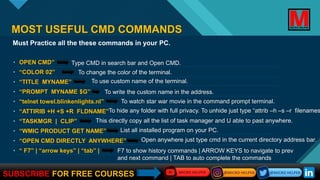
    Click to editMaster title style 3838 Must Practice all the these commands in your PC. • OPEN CMD” • “COLOR 02” • “TITLE MYNAME” • “PROMPT MYNAME $G” • “telnet towel.blinkenlights.nl” • “ATTIRIB +H +S +R FLDNAME” • “TASKMGR | CLIP” • “WMIC PRODUCT GET NAME” • “OPEN CMD DIRECTLY ANYWHERE” • “ F7” | “arrow keys” | “tab” | SUBSCRIBE FOR FREE COURSES To write the custom name in the address. To watch star war movie in the command prompt terminal. To hide any folder with full privacy. To unhide just type “attrib –h –s –r filenames Type CMD in search bar and Open CMD. To use custom name of the terminal. To change the color of the terminal. This directly copy all the list of task manager and U able to past anywhere. MOST USEFUL CMD COMMANDS List all installed program on your PC. Open anywhere just type cmd in the current directory address bar. F7 to show history commands | ARROW KEYS to navigate to prev and next command | TAB to auto complete the commands
  • 3.
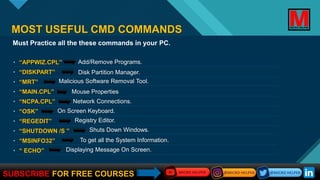
    Click to editMaster title style 3939 Must Practice all the these commands in your PC. • “APPWIZ.CPL” • “DISKPART” • “MRT” • “MAIN.CPL” • “NCPA.CPL” • “OSK” • “REGEDIT” • “SHUTDOWN /S ” • “MSINFO32” • “ ECHO” SUBSCRIBE FOR FREE COURSES Mouse Properties Network Connections. On Screen Keyboard. Add/Remove Programs. Malicious Software Removal Tool. Disk Partition Manager. Registry Editor. MOST USEFUL CMD COMMANDS Shuts Down Windows. To get all the System Information. Displaying Message On Screen.
  • 4.
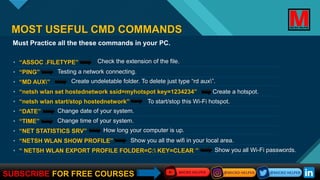
    Click to editMaster title style 4040 Must Practice all the these commands in your PC. • “ASSOC .FILETYPE” • “PING” • “MD AUX” • “netsh wlan set hostednetwork ssid=myhotspot key=1234234” • “netsh wlan start/stop hostednetwork” • “DATE” • “TIME” • “NET STATISTICS SRV” • “NETSH WLAN SHOW PROFILE” • “ NETSH WLAN EXPORT PROFILE FOLDER=C: KEY=CLEAR ” SUBSCRIBE FOR FREE COURSES Create a hotspot. To start/stop this Wi-Fi hotspot. Change date of your system. Check the extension of the file. Create undeletable folder. To delete just type “rd aux”. Testing a network connecting. Change time of your system. MOST USEFUL CMD COMMANDS How long your computer is up. Show you all the wifi in your local area. Show you all Wi-Fi passwords.
  • 5.
    Click to editMaster title style 4141 SUBSCRIBE FOR FREE COURSES