Cloud Foundry
How it works
@jacopen
Kazuto Kusama
NTT Communications
Developer of Cloudn PaaS
Introduction
Planned topic was originally,
• Briefly discuss about Cloud Foundry architecture
overview
• Talk about the featured changed in V2
But ! Overview slides nearly become 100, gave up to
deep dive into it.
So, this material is for beginner
Deep dive is next time!
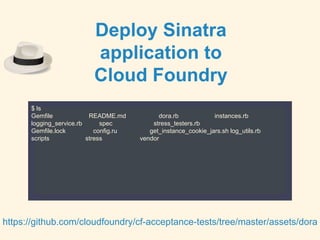
$ ls
Gemfile README.md dora.rb instances.rb
logging_service.rb spec stress_testers.rb
Gemfile.lock config.ru get_instance_cookie_jars.sh log_utils.rb
scripts stress vendor
https://github.com/cloudfoundry/cf-acceptance-tests/tree/master/assets/dora
Deploy Sinatra
application to
Cloud Foundry
[23:08] jacopen@cape ~/Project/dora ✘╹◡╹✘ (master) cf push dora
Creating app dora in org jacopen / space jacopen-space as admin...
OK
Creating route dora.107.22.72.200.xip.io...
OK
Binding dora.107.22.72.200.xip.io to dora...
OK
Uploading dora...
Uploading from: /Users/jacopen/Project/dora
1.2M, 36 files
OK
Starting app dora in org jacopen / space jacopen-space as admin...
OK
(中略)
1 of 1 instances running
App started
Showing health and status for app dora in org jacopen / space jacopen-space as admin...
OK
requested state: started
instances: 1/1
usage: 256M x 1 instances
urls: dora.107.22.72.200.xip.io
state since cpu memory disk
#0 running 2014-04-21 11:09:25 PM 0.0% 72.2M of 256M 0 of 1G
ok
[23:09] jacopen@cape ~/Project/dora ✘╹◡╹✘ (master) cf apps
Getting apps in org jacopen / space jacopen-space as admin...
OK
name requested state instances memory disk urls
dora started 1/1 256M 1G dora.107.22.72.200.xip.io
cf push
What happened inside
CF during this time
Let’s reveal Cloud Foundry
black box
Agenda
3 chapters to understand mechanism of Cloud Foundry
• Inspect Cloud Foundry internal from external interface
• Understand role of Cloud Foundry components
• Understand communications between Cloud Foundry
components
Not included this time
• Explanation of Warden container and Buildpack
• Explanation of services such as MySQL or
Postgress.
• Explanation of related services such as
loggregator
Let’s begin
Inspect Cloud Foundry internal
from external interface
CF_TRACE=true
[23:49] jacopen@cape ~/Project/dora ✘╹◡╹✘ export CF_TRACE=true
[23:49] jacopen@cape ~/Project/dora ✘╹◡╹✘ cf push dora
REQUEST:
GET /v2/spaces/dbf6ed0a-3108-45d8-9c78-a512d5071358/apps?q=name%3Adora&inline-relations-depth=1 HTTP/1.1
Host: api.107.22.72.200.xip.io
Accept: application/json
Authorization: [PRIVATE DATA HIDDEN]
Content-Type: application/json
User-Agent: go-cli 6.0.0-90db382 / darwin
RESPONSE:
HTTP/1.1 200 OK
Content-Length: 107
Content-Type: application/json;charset=utf-8
Date: Mon, 21 Apr 2014 14:49:13 GMT
Server: nginx
X-Content-Type-Options: nosniff
X-Vcap-Request-Id: 18dcd4aefdd000506e49c4b5cf739aaa::65195823-dac9-410a-855a-4ef5ba249198
{
"total_results": 0,
"total_pages": 0,
"prev_url": null,
"next_url": null,
"resources": [
]
}
Creating app dora in org jacopen / space jacopen-space as admin...
CF_TRACE=true : Key to inspect
CF_TRACE=true
Enable to trace requests behind cf command.
Take a look at
cf push
GET /v2/spaces/dbf6ed0a-3108-45d8-9c78-a512d5071358/apps?q=name%3Adora&inline-relations-depth=1 HTTP/1.1
HTTP/1.1 200 OK
POST /v2/apps?async=true HTTP/1.1
{"name":"dora","space_guid":"dbf6ed0a-3108-45d8-9c78-a512d5071358"}
HTTP/1.1 201 Created
GET /v2/shared_domains HTTP/1.1
HTTP/1.1 200 OK
GET /v2/domains?inline-relations-depth=1&q=name%3A107.22.72.200.xip.io HTTP/1.1
HTTP/1.1 200 OK
GET /v2/routes?inline-relations-depth=1&q=host%3Adora%3Bdomain_guid%3A524ba14d-4d3f-495f-a2c7-a5ed25a70e81 HTTP/1.1
HTTP/1.1 200 OK
POST /v2/routes?async=true&inline-relations-depth=1 HTTP/1.1
{"host":"dora","domain_guid":"524ba14d-4d3f-495f-a2c7-a5ed25a70e81","space_guid":"dbf6ed0a-3108-45d8-9c78-a512d5071358"}
HTTP/1.1 201 Created
PUT /v2/apps/0e948568-aa90-47e9-a128-9ff3cc680600/routes/ed912294-be29-4013-8b1c-735851acee24 HTTP/1.1
HTTP/1.1 201 Created
PUT /v2/apps/0e948568-aa90-47e9-a128-9ff3cc680600/bits?async=true HTTP/1.1
Content-Type: multipart/form-data;
HTTP/1.1 201 Created
GET /v2/jobs/6dd46fe7-40b0-41d1-94aa-dd2ee80fd3b2 HTTP/1.1
HTTP/1.1 200 OK
(queued)
GET /v2/jobs/6dd46fe7-40b0-41d1-94aa-dd2ee80fd3b2 HTTP/1.1
HTTP/1.1 200 OK
(finished)
CONNECTING TO WEBSOCKET: wss://loggregator.107.22.72.200.xip.io:443/tail/?app=0e948568-aa90-47e9-a128-9ff3cc680600
PUT /v2/apps/0e948568-aa90-47e9-a128-9ff3cc680600?async=true&inline-relations-depth=1 HTTP/1.1
{"state":"STARTED"}
GET /v2/apps/0e948568-aa90-47e9-a128-9ff3cc680600/instances HTTP/1.1
HTTP/1.1 400 Bad Request
{"code":170002,"description":"App has not finished staging","error_code":"CF-NotStaged"}
GET /v2/apps/0e948568-aa90-47e9-a128-9ff3cc680600/instances HTTP/1.1
HTTP/1.1 400 Bad Request
{"code":170002,"description":"App has not finished staging","error_code":"CF-NotStaged"}
GET /v2/apps/0e948568-aa90-47e9-a128-9ff3cc680600/instances HTTP/1.1
HTTP/1.1 200 OK
{"0":{"state":"RUNNING","since":1398092703.1739626,"debug_ip":null,"debug_port":null,"console_ip":null,"console_port":null}}
GET /v2/apps/0e948568-aa90-47e9-a128-9ff3cc680600/stats HTTP/1.1
HTTP/1.1 200 OK
{"0":{"state":"RUNNING","stats":{"name":"dora","uris":["dora.107.22.72.200.xip.io"],"host":"10.244.0.26","port":61026,"uptime":3,"mem_quota":268435456,"disk_quota":1073741824,"fds_quota":16384,"usage"
:{"time":"2014-04-21 15:05:04 +0000","cpu":0,"mem":75673600,"disk":0}}}}
GET /v2/apps/0e948568-aa90-47e9-a128-9ff3cc680600/instances HTTP/1.1
HTTP/1.1 200 OK
{"0":{"state":"RUNNING","since":1398092703.1739626,"debug_ip":null,"debug_port":null,"console_ip":null,"console_port":null}}
GET /v2/apps/0e948568-aa90-47e9-a128-9ff3cc680600/stats HTTP/1.1
HTTP/1.1 200 OK
{"0":{"state":"RUNNING","stats":{"name":"dora","uris":["dora.107.22.72.200.xip.io"],"host":"10.244.0.26","port":61026,"uptime":4,"mem_quota":268435456,"disk_quota":1073741824,"fds_quota":16384,"usage"
:{"time":"2014-04-21 15:05:05 +0000","cpu":0,"mem":75673600,"disk":0}}}}
GET /v2/apps/0e948568-aa90-47e9-a128-9ff3cc680600/summary HTTP/1.1
HTTP/1.1 200 OK
GET /v2/apps/0e948568-aa90-47e9-a128-9ff3cc680600/instances HTTP/1.1
HTTP/1.1 200 OK
GET /v2/apps/0e948568-aa90-47e9-a128-9ff3cc680600/stats HTTP/1.1
HTTP/1.1 200 OK
Communicating something to
api.107.22.72.200.xip.io
Things found out
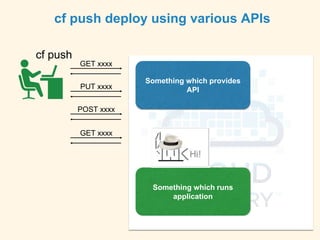
cf push
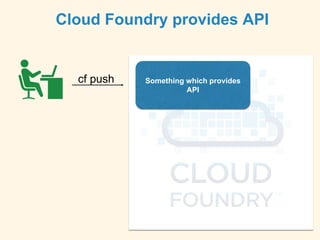
Cloud Foundry provides API
Something which provides
API
cf push
cf push deploy using various APIs
GET xxxx
PUT xxxx
POST xxxx
GET xxxx
Something which runs
application
Something which provides
API
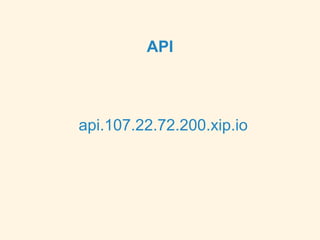
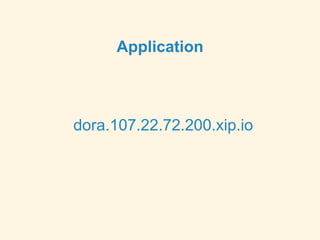
Let’s check access point
API
api.107.22.72.200.xip.io
Application
dora.107.22.72.200.xip.io
Uhm?
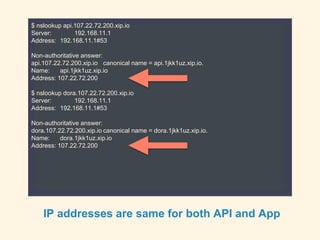
$ nslookup api.107.22.72.200.xip.io
Server: 192.168.11.1
Address: 192.168.11.1#53
Non-authoritative answer:
api.107.22.72.200.xip.io canonical name = api.1jkk1uz.xip.io.
Name: api.1jkk1uz.xip.io
Address: 107.22.72.200
$ nslookup dora.107.22.72.200.xip.io
Server: 192.168.11.1
Address: 192.168.11.1#53
Non-authoritative answer:
dora.107.22.72.200.xip.io canonical name = dora.1jkk1uz.xip.io.
Name: dora.1jkk1uz.xip.io
Address: 107.22.72.200
IP addresses are same for both API and App
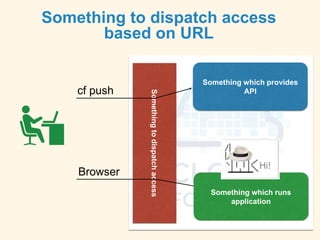
cf push
Something to dispatch access
based on URL
Somethingtodispatchaccess
Browser
Something which runs
application
Something which provides
API
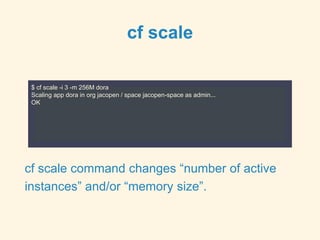
cf scale
$ cf scale -i 3 -m 256M dora
Scaling app dora in org jacopen / space jacopen-space as admin...
OK
cf scale command changes “number of active
instances” and/or “memory size”.
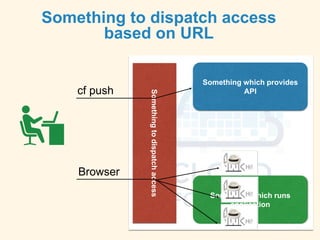
Somethingtodispatchaccess
cf push
Browser
Something which runs
application
Something which provides
API
Something to dispatch access
based on URL
What happens when
application die ?
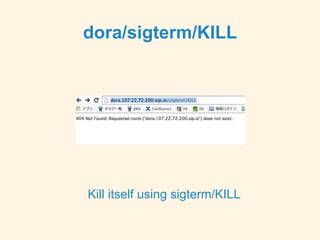
dora/sigterm/KILL
Kill itself using sigterm/KILL
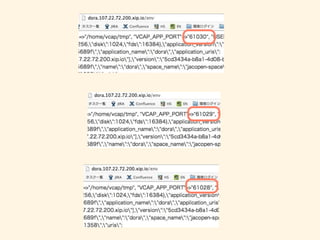
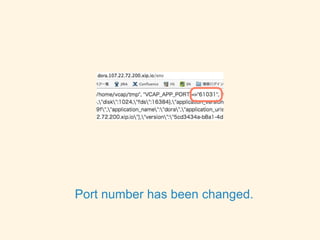
Port number has been changed.
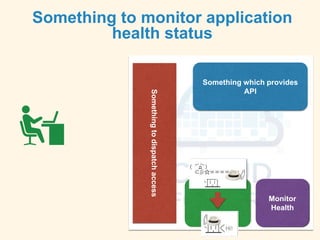
Something to monitor application
health status
Monitor
Health
Somethingtodispatchaccess
Something which provides
API
Result
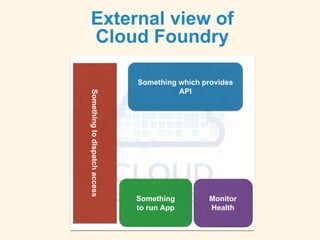
External view of
Cloud Foundry
Something
to run App
Monitor
Health
Somethingtodispatchaccess
Something which provides
API
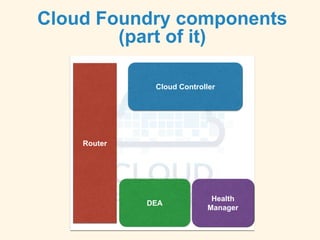
Cloud Foundry components
(part of it)
DEA
Health
Manager
Router
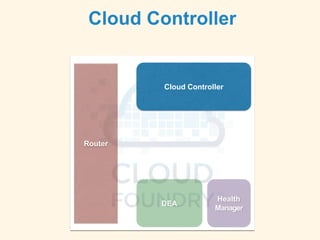
Cloud Controller
Understand role of
Cloud Foundry
components
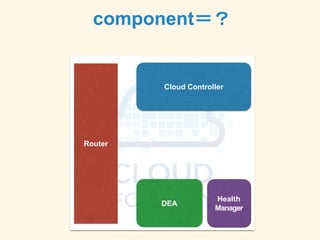
component=?
Cloud Controller
Router
DEA
Health
Manager
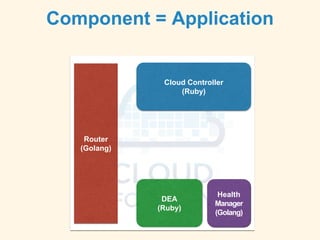
Component = Application
Cloud Controller
(Ruby)
Router
(Golang)
DEA
(Ruby)
Health
Manager
(Golang)
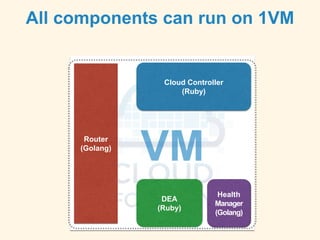
All components can run on 1VM
Cloud Controller
(Ruby)
Router
(Golang)
DEA
(Ruby)
Health
Manager
(Golang)
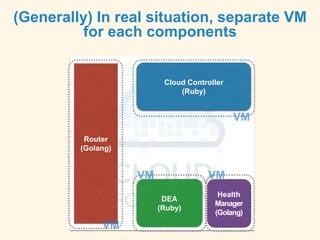
(Generally) In real situation, separate VM
for each components
Cloud Controller
(Ruby)
Router
(Golang)
DEA
(Ruby)
Health
Manager
(Golang)
Let’s take a look at each
components
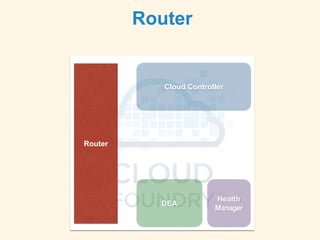
Router
Cloud Controller
Router
DEA
Health
Manager
Router
Based on URL, dispatches access to appropriate
component. Similar to L7 load balancer.
This is different from “router” in network equipment.
It is implemented as an application (called Gorouter)
which runs on Ubuntu. Written in Go.
Cloud Controller
Router
DEA
Health
Manager
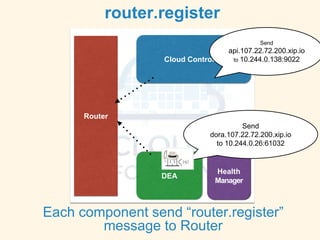
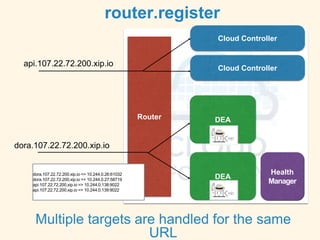
router.register
Each component send “router.register”
message to Router
Send
api.107.22.72.200.xip.io
to 10.244.0.138:9022
Send
dora.107.22.72.200.xip.io
to 10.244.0.26:61032
Cloud Controller
Router
DEA
Health
Manager
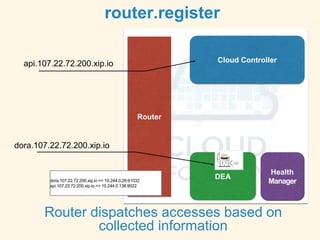
router.register
Router dispatches accesses based on
collected information
dora.107.22.72.200.xip.io => 10.244.0.26:61032
api.107.22.72.200.xip.io => 10.244.0.138:9022
api.107.22.72.200.xip.io
dora.107.22.72.200.xip.io
Cloud Controller
Router
DEA
Health
Manager
router.register
Multiple targets are handled for the same
URL
dora.107.22.72.200.xip.io => 10.244.0.26:61032
dora.107.22.72.200.xip.io => 10.244.0.27:58719
api.107.22.72.200.xip.io => 10.244.0.138:9022
api.107.22.72.200.xip.io => 10.244.0.139:9022
api.107.22.72.200.xip.io
dora.107.22.72.200.xip.io
Cloud Controller
DEA
Cloud Controller
Cloud Controller
Router
DEA
Health
Manager
Cloud Controller
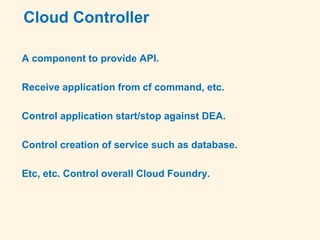
A component to provide API.
Receive application from cf command, etc.
Control application start/stop against DEA.
Control creation of service such as database.
Etc, etc. Control overall Cloud Foundry.
POST /v2/apps?async=true HTTP/1.1
{"name":"dora","space_guid":"dbf6ed0a-3108-45d8-9c78-a512d5071358"}
HTTP/1.1 201 Created
GET /v2/shared_domains HTTP/1.1
HTTP/1.1 200 OK
GET /v2/domains?inline-relations-depth=1&q=name%3A107.22.72.200.xip.io HTTP/1.1
HTTP/1.1 200 OK
GET /v2/routes?inline-relations-depth=1&q=host%3Adora%3Bdomain_guid%3A524ba14d-4d3f-495f-a2c7-a5ed25a70e81 HTTP/1.1
HTTP/1.1 200 OK
POST /v2/routes?async=true&inline-relations-depth=1 HTTP/1.1
{"host":"dora","domain_guid":"524ba14d-4d3f-495f-a2c7-a5ed25a70e81","space_guid":"dbf6ed0a-3108-45d8-9c78-a512d5071358"}
HTTP/1.1 201 Created
PUT /v2/apps/0e948568-aa90-47e9-a128-9ff3cc680600/routes/ed912294-be29-4013-8b1c-735851acee24 HTTP/1.1
HTTP/1.1 201 Created
PUT /v2/apps/0e948568-aa90-47e9-a128-9ff3cc680600/bits?async=true HTTP/1.1
Content-Type: multipart/form-data;
HTTP/1.1 201 Created
GET /v2/jobs/6dd46fe7-40b0-41d1-94aa-dd2ee80fd3b2 HTTP/1.1
HTTP/1.1 200 OK
(queued)
GET /v2/jobs/6dd46fe7-40b0-41d1-94aa-dd2ee80fd3b2 HTTP/1.1
HTTP/1.1 200 OK
(finished)
CONNECTING TO WEBSOCKET: wss://loggregator.107.22.72.200.xip.io:443/tail/?app=0e948568-aa90-47e9-a128-9ff3cc680600
PUT /v2/apps/0e948568-aa90-47e9-a128-9ff3cc680600?async=true&inline-relations-depth=1 HTTP/1.1
{"state":"STARTED"}
GET /v2/apps/0e948568-aa90-47e9-a128-9ff3cc680600/instances HTTP/1.1
HTTP/1.1 400 Bad Request
{"code":170002,"description":"App has not finished staging","error_code":"CF-NotStaged"}
GET /v2/apps/0e948568-aa90-47e9-a128-9ff3cc680600/instances HTTP/1.1
HTTP/1.1 400 Bad Request
{"code":170002,"description":"App has not finished staging","error_code":"CF-NotStaged"}
GET /v2/apps/0e948568-aa90-47e9-a128-9ff3cc680600/instances HTTP/1.1
HTTP/1.1 200 OK
{"0":{"state":"RUNNING","since":1398092703.1739626,"debug_ip":null,"debug_port":null,"console_ip":null,"console_port":null}}
GET /v2/apps/0e948568-aa90-47e9-a128-9ff3cc680600/stats HTTP/1.1
HTTP/1.1 200 OK
{"0":{"state":"RUNNING","stats":{"name":"dora","uris":["dora.107.22.72.200.xip.io"],"host":"10.244.0.26","port":61026,"uptime":3,"mem_quota":268435456,"disk_quota":1073741824,"fds_quota":16384,"usage":{"time":"2014-
04-21 15:05:04 +0000","cpu":0,"mem":75673600,"disk":0}}}}
GET /v2/apps/0e948568-aa90-47e9-a128-9ff3cc680600/instances HTTP/1.1
HTTP/1.1 200 OK
{"0":{"state":"RUNNING","since":1398092703.1739626,"debug_ip":null,"debug_port":null,"console_ip":null,"console_port":null}}
GET /v2/apps/0e948568-aa90-47e9-a128-9ff3cc680600/stats HTTP/1.1
HTTP/1.1 200 OK
{"0":{"state":"RUNNING","stats":{"name":"dora","uris":["dora.107.22.72.200.xip.io"],"host":"10.244.0.26","port":61026,"uptime":4,"mem_quota":268435456,"disk_quota":1073741824,"fds_quota":16384,"usage":{"time":"2014-
04-21 15:05:05 +0000","cpu":0,"mem":75673600,"disk":0}}}}
GET /v2/apps/0e948568-aa90-47e9-a128-9ff3cc680600/summary HTTP/1.1
HTTP/1.1 200 OK
GET /v2/apps/0e948568-aa90-47e9-a128-9ff3cc680600/instances HTTP/1.1
HTTP/1.1 200 OK
GET /v2/apps/0e948568-aa90-47e9-a128-9ff3cc680600/stats HTTP/1.1
HTTP/1.1 200 OK
⇐ Create app
⇐ Obtain domain
⇐verify routes
⇐create routes
⇐ bind app and routes
⇐upload source files
⇐start app
DEA
Cloud Controller
Router
DEA
Health
Manager
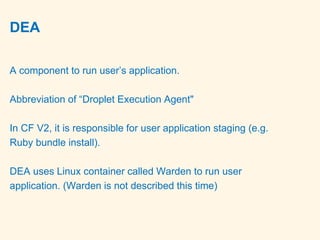
DEA
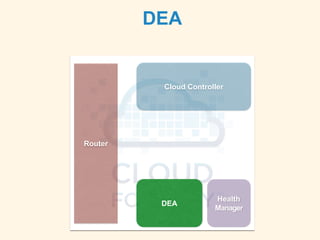
A component to run user’s application.
Abbreviation of “Droplet Execution Agent"
In CF V2, it is responsible for user application staging (e.g.
Ruby bundle install).
DEA uses Linux container called Warden to run user
application. (Warden is not described this time)
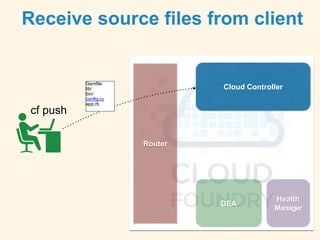
Receive source files from client
Cloud Controller
Router
DEA
Health
Manager
cf push
Gemfile
lib/
bin/
config.ru
app.rb
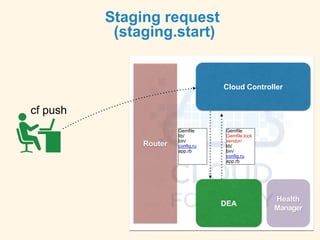
Staging request
(staging.start)
Cloud Controller
Router
DEA
Health
Manager
cf push
Gemfile
lib/
bin/
config.ru
app.rb
Gemfile
Gemfile.lock
vendor/
lib/
bin/
config.ru
app.rb
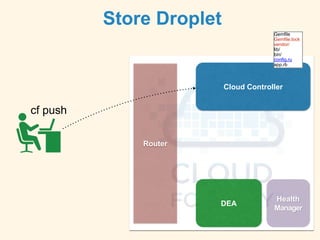
Store Droplet
Cloud Controller
Router
DEA
Health
Manager
cf push
Gemfile
Gemfile.lock
vendor/
lib/
bin/
config.ru
app.rb
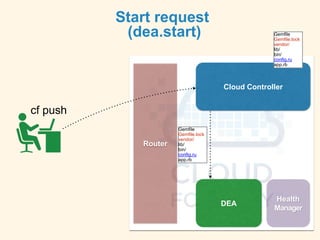
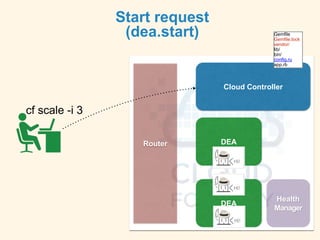
Start request
(dea.start)
Cloud Controller
Router
DEA
Health
Manager
cf push
Gemfile
Gemfile.lock
vendor/
lib/
bin/
config.ru
app.rb
Gemfile
Gemfile.lock
vendor/
lib/
bin/
config.ru
app.rb
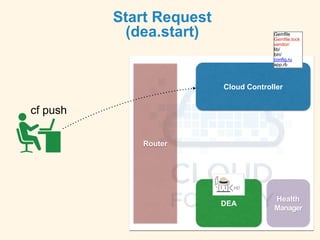
Start Request
(dea.start)
Cloud Controller
Router
DEA
Health
Manager
cf push
Gemfile
Gemfile.lock
vendor/
lib/
bin/
config.ru
app.rb
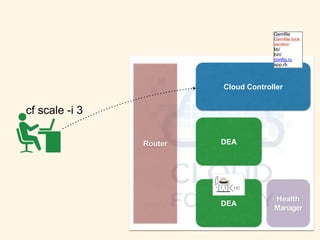
Cloud Controller
Router
DEA
Health
Manager
cf scale -i 3
Gemfile
Gemfile.lock
vendor/
lib/
bin/
config.ru
app.rb
DEA
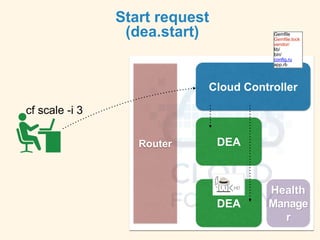
Start request
(dea.start)
Cloud Controller
Router
DEA
Health
Manage
r
cf scale -i 3
Gemfile
Gemfile.lock
vendor/
lib/
bin/
config.ru
app.rb
DEA
Start request
(dea.start)
Cloud Controller
Router
DEA
Health
Manager
cf scale -i 3
Gemfile
Gemfile.lock
vendor/
lib/
bin/
config.ru
app.rb
DEA
Health Manager
Cloud Controller
Router
DEA
Health
Manager
DEA
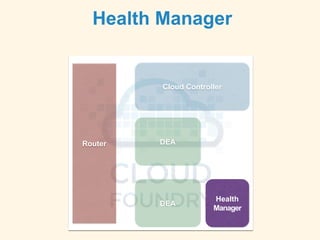
Health Manager
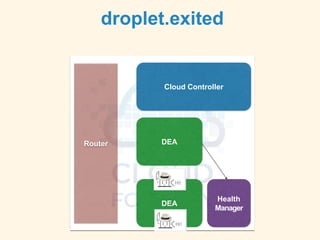
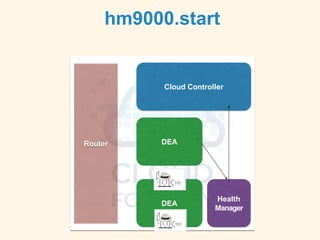
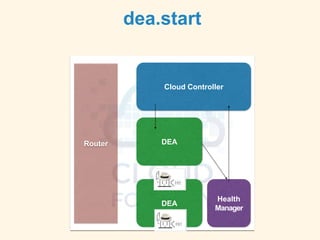
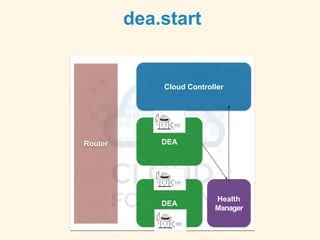
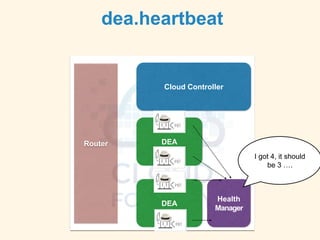
A component to monitor user application to see if the
status is “what it should be”.
The latest version is “hm9000” written in Go.
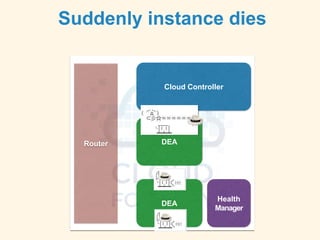
Suddenly instance dies
Cloud Controller
Router
DEA
Health
Manager
DEA
droplet.exited
Cloud Controller
Router
DEA
Health
Manager
DEA
hm9000.start
Cloud Controller
Router
DEA
Health
Manager
DEA
dea.start
Cloud Controller
Router
DEA
Health
Manager
DEA
dea.start
Cloud Controller
Router
DEA
Health
Manager
DEA
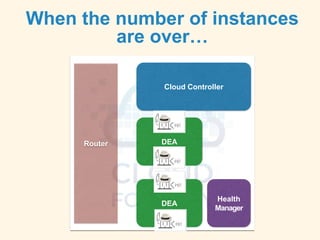
When the number of instances
are over…
Cloud Controller
Router
DEA
Health
Manager
DEA
dea.heartbeat
Cloud Controller
Router
DEA
Health
Manager
DEA
I got 4, it should
be 3 ….
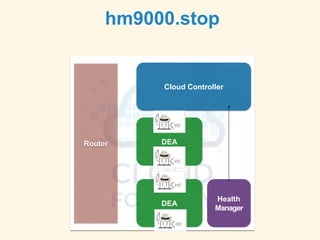
hm9000.stop
Cloud Controller
Router
DEA
Health
Manager
DEA
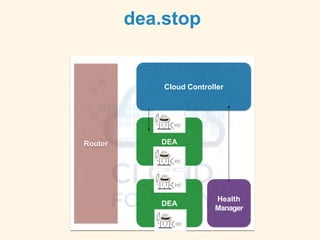
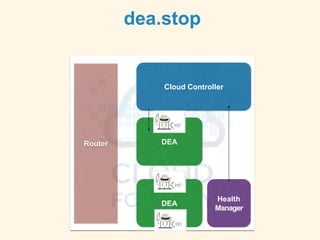
dea.stop
Cloud Controller
Router
DEA
Health
Manager
DEA
dea.stop
Cloud Controller
Router
DEA
Health
Manager
DEA
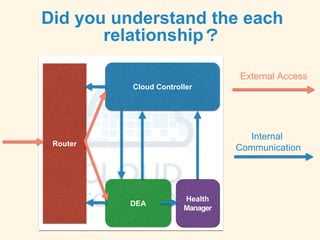
Did you understand the each
relationship?
Cloud Controller
Router
DEA
Health
Manager
Internal
Communication
External Access
Understand communications
between Cloud Foundry
components
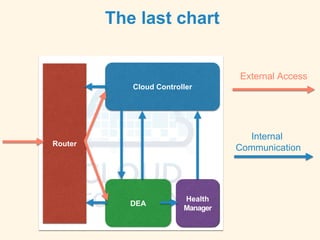
The last chart
Cloud Controller
Router
DEA
Health
Manager
Internal
Communication
External Access
Cloud Controller
Router
DEA
Health
Manager
NATS
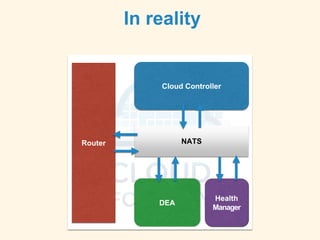
In reality
NATS
Publish-Subscribe model lightweight messaging
Developed by Derek Collison designed and architected
the industry's first Open PaaS, Cloud Foundry
Exists at the beginning of Cloud Foundry. Key component
in the architecture.
It was implemented in Ruby using EventMachine. It is re-
written using Go language (dnatsd)
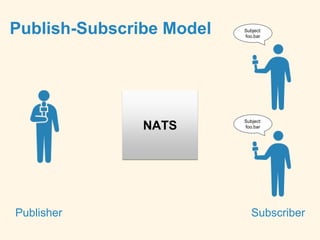
Publish-Subscribe Model
Publisher Subscriber
NATS
Subject:
foo.bar
Subject:
foo.bar
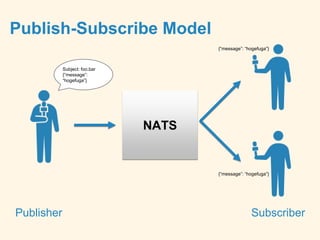
Publish-Subscribe Model
Publisher Subscriber
NATS
Subject: foo.bar
{“message”:
“hogefuga”}
{“message”: “hogefuga”}
Publish-Subscribe Model
Publisher Subscriber
NATS
Cloud
Controller
DEA
Router
Subject: router.register
{“host":"10.244.0.138","port":
9022,"uris":["api.107.22.72.2
00.xip.io"]}
Subject: router.register
{“host":"10.244.0.111","port":
37902,"uris":["dora.107.22.7
2.200.xip.io"]}
All subscriber receive the same message
NATS
Cloud
Controller
DEA
Router
Subject: router.register
{“host":"10.244.0.138","port":
9022,"uris":["api.107.22.72.2
00.xip.io"]}
Subject: router.register
{“host":"10.244.0.111","port":
37902,"uris":["dora.107.22.7
2.200.xip.io"]}
Router
Router
Publisher Subscriber
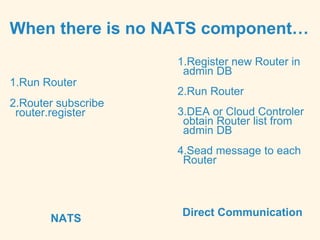
When there is no NATS component…
NATS
Direct Communication
1.Run Router
2.Router subscribe
router.register
1.Register new Router in
admin DB
2.Run Router
3.DEA or Cloud Controler
obtain Router list from
admin DB
4.Sead message to each
Router
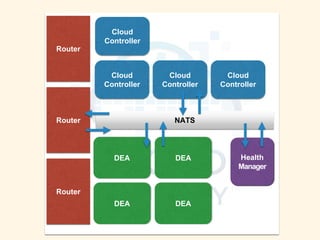
Cloud
Controller
Router
DEA Health
Manager
NATSRouter
Router
Cloud
Controller
DEA
DEA
DEA
Cloud
Controller
Cloud
Controller
Cloud Foundry Architecture
• Centered around NATS, loosely coupled
component communications. Scalable.
• Self-organized distributed system. Administrative
information is minimal.
• Self healing. The point is that it heals by itself.
• Removes SPoF( Single Point of Failure). Except
recent NATS.
Cloud Foundry V1
What’s the difference ?
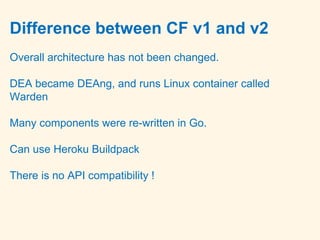
Difference between CF v1 and v2
Overall architecture has not been changed.
DEA became DEAng, and runs Linux container called
Warden
Many components were re-written in Go.
Can use Heroku Buildpack
There is no API compatibility !
We will deep dive into Cloud
Foundry next time.
End Note.
This material was translated by @ibmamnt
From original chart by @jacopen
http://www.slideshare.net/jacopen/cloud-foundry-33851040

Cloud Foundry | How it works

  • 1.
  • 2.
  • 4.
    Introduction Planned topic wasoriginally, • Briefly discuss about Cloud Foundry architecture overview • Talk about the featured changed in V2
  • 5.
    But ! Overviewslides nearly become 100, gave up to deep dive into it. So, this material is for beginner Deep dive is next time!
  • 6.
    $ ls Gemfile README.mddora.rb instances.rb logging_service.rb spec stress_testers.rb Gemfile.lock config.ru get_instance_cookie_jars.sh log_utils.rb scripts stress vendor https://github.com/cloudfoundry/cf-acceptance-tests/tree/master/assets/dora Deploy Sinatra application to Cloud Foundry
  • 7.
    [23:08] jacopen@cape ~/Project/dora✘╹◡╹✘ (master) cf push dora Creating app dora in org jacopen / space jacopen-space as admin... OK Creating route dora.107.22.72.200.xip.io... OK Binding dora.107.22.72.200.xip.io to dora... OK Uploading dora... Uploading from: /Users/jacopen/Project/dora 1.2M, 36 files OK Starting app dora in org jacopen / space jacopen-space as admin... OK (中略) 1 of 1 instances running App started Showing health and status for app dora in org jacopen / space jacopen-space as admin... OK requested state: started instances: 1/1 usage: 256M x 1 instances urls: dora.107.22.72.200.xip.io state since cpu memory disk #0 running 2014-04-21 11:09:25 PM 0.0% 72.2M of 256M 0 of 1G
  • 8.
    ok [23:09] jacopen@cape ~/Project/dora✘╹◡╹✘ (master) cf apps Getting apps in org jacopen / space jacopen-space as admin... OK name requested state instances memory disk urls dora started 1/1 256M 1G dora.107.22.72.200.xip.io
  • 9.
  • 10.
    What happened inside CFduring this time
  • 11.
    Let’s reveal CloudFoundry black box
  • 12.
    Agenda 3 chapters tounderstand mechanism of Cloud Foundry • Inspect Cloud Foundry internal from external interface • Understand role of Cloud Foundry components • Understand communications between Cloud Foundry components
  • 13.
    Not included thistime • Explanation of Warden container and Buildpack • Explanation of services such as MySQL or Postgress. • Explanation of related services such as loggregator
  • 14.
  • 15.
    Inspect Cloud Foundryinternal from external interface
  • 16.
    CF_TRACE=true [23:49] jacopen@cape ~/Project/dora✘╹◡╹✘ export CF_TRACE=true [23:49] jacopen@cape ~/Project/dora ✘╹◡╹✘ cf push dora REQUEST: GET /v2/spaces/dbf6ed0a-3108-45d8-9c78-a512d5071358/apps?q=name%3Adora&inline-relations-depth=1 HTTP/1.1 Host: api.107.22.72.200.xip.io Accept: application/json Authorization: [PRIVATE DATA HIDDEN] Content-Type: application/json User-Agent: go-cli 6.0.0-90db382 / darwin RESPONSE: HTTP/1.1 200 OK Content-Length: 107 Content-Type: application/json;charset=utf-8 Date: Mon, 21 Apr 2014 14:49:13 GMT Server: nginx X-Content-Type-Options: nosniff X-Vcap-Request-Id: 18dcd4aefdd000506e49c4b5cf739aaa::65195823-dac9-410a-855a-4ef5ba249198 { "total_results": 0, "total_pages": 0, "prev_url": null, "next_url": null, "resources": [ ] } Creating app dora in org jacopen / space jacopen-space as admin...
  • 17.
    CF_TRACE=true : Keyto inspect CF_TRACE=true Enable to trace requests behind cf command.
  • 18.
    Take a lookat cf push
  • 19.
    GET /v2/spaces/dbf6ed0a-3108-45d8-9c78-a512d5071358/apps?q=name%3Adora&inline-relations-depth=1 HTTP/1.1 HTTP/1.1200 OK POST /v2/apps?async=true HTTP/1.1 {"name":"dora","space_guid":"dbf6ed0a-3108-45d8-9c78-a512d5071358"} HTTP/1.1 201 Created GET /v2/shared_domains HTTP/1.1 HTTP/1.1 200 OK GET /v2/domains?inline-relations-depth=1&q=name%3A107.22.72.200.xip.io HTTP/1.1 HTTP/1.1 200 OK GET /v2/routes?inline-relations-depth=1&q=host%3Adora%3Bdomain_guid%3A524ba14d-4d3f-495f-a2c7-a5ed25a70e81 HTTP/1.1 HTTP/1.1 200 OK POST /v2/routes?async=true&inline-relations-depth=1 HTTP/1.1 {"host":"dora","domain_guid":"524ba14d-4d3f-495f-a2c7-a5ed25a70e81","space_guid":"dbf6ed0a-3108-45d8-9c78-a512d5071358"} HTTP/1.1 201 Created PUT /v2/apps/0e948568-aa90-47e9-a128-9ff3cc680600/routes/ed912294-be29-4013-8b1c-735851acee24 HTTP/1.1 HTTP/1.1 201 Created PUT /v2/apps/0e948568-aa90-47e9-a128-9ff3cc680600/bits?async=true HTTP/1.1 Content-Type: multipart/form-data; HTTP/1.1 201 Created GET /v2/jobs/6dd46fe7-40b0-41d1-94aa-dd2ee80fd3b2 HTTP/1.1 HTTP/1.1 200 OK (queued) GET /v2/jobs/6dd46fe7-40b0-41d1-94aa-dd2ee80fd3b2 HTTP/1.1 HTTP/1.1 200 OK (finished) CONNECTING TO WEBSOCKET: wss://loggregator.107.22.72.200.xip.io:443/tail/?app=0e948568-aa90-47e9-a128-9ff3cc680600 PUT /v2/apps/0e948568-aa90-47e9-a128-9ff3cc680600?async=true&inline-relations-depth=1 HTTP/1.1 {"state":"STARTED"} GET /v2/apps/0e948568-aa90-47e9-a128-9ff3cc680600/instances HTTP/1.1 HTTP/1.1 400 Bad Request {"code":170002,"description":"App has not finished staging","error_code":"CF-NotStaged"} GET /v2/apps/0e948568-aa90-47e9-a128-9ff3cc680600/instances HTTP/1.1 HTTP/1.1 400 Bad Request {"code":170002,"description":"App has not finished staging","error_code":"CF-NotStaged"} GET /v2/apps/0e948568-aa90-47e9-a128-9ff3cc680600/instances HTTP/1.1 HTTP/1.1 200 OK {"0":{"state":"RUNNING","since":1398092703.1739626,"debug_ip":null,"debug_port":null,"console_ip":null,"console_port":null}} GET /v2/apps/0e948568-aa90-47e9-a128-9ff3cc680600/stats HTTP/1.1 HTTP/1.1 200 OK {"0":{"state":"RUNNING","stats":{"name":"dora","uris":["dora.107.22.72.200.xip.io"],"host":"10.244.0.26","port":61026,"uptime":3,"mem_quota":268435456,"disk_quota":1073741824,"fds_quota":16384,"usage" :{"time":"2014-04-21 15:05:04 +0000","cpu":0,"mem":75673600,"disk":0}}}} GET /v2/apps/0e948568-aa90-47e9-a128-9ff3cc680600/instances HTTP/1.1 HTTP/1.1 200 OK {"0":{"state":"RUNNING","since":1398092703.1739626,"debug_ip":null,"debug_port":null,"console_ip":null,"console_port":null}} GET /v2/apps/0e948568-aa90-47e9-a128-9ff3cc680600/stats HTTP/1.1 HTTP/1.1 200 OK {"0":{"state":"RUNNING","stats":{"name":"dora","uris":["dora.107.22.72.200.xip.io"],"host":"10.244.0.26","port":61026,"uptime":4,"mem_quota":268435456,"disk_quota":1073741824,"fds_quota":16384,"usage" :{"time":"2014-04-21 15:05:05 +0000","cpu":0,"mem":75673600,"disk":0}}}} GET /v2/apps/0e948568-aa90-47e9-a128-9ff3cc680600/summary HTTP/1.1 HTTP/1.1 200 OK GET /v2/apps/0e948568-aa90-47e9-a128-9ff3cc680600/instances HTTP/1.1 HTTP/1.1 200 OK GET /v2/apps/0e948568-aa90-47e9-a128-9ff3cc680600/stats HTTP/1.1 HTTP/1.1 200 OK Communicating something to api.107.22.72.200.xip.io
  • 20.
  • 21.
    cf push Cloud Foundryprovides API Something which provides API
  • 22.
    cf push cf pushdeploy using various APIs GET xxxx PUT xxxx POST xxxx GET xxxx Something which runs application Something which provides API
  • 23.
  • 24.
  • 25.
  • 26.
  • 27.
    $ nslookup api.107.22.72.200.xip.io Server:192.168.11.1 Address: 192.168.11.1#53 Non-authoritative answer: api.107.22.72.200.xip.io canonical name = api.1jkk1uz.xip.io. Name: api.1jkk1uz.xip.io Address: 107.22.72.200 $ nslookup dora.107.22.72.200.xip.io Server: 192.168.11.1 Address: 192.168.11.1#53 Non-authoritative answer: dora.107.22.72.200.xip.io canonical name = dora.1jkk1uz.xip.io. Name: dora.1jkk1uz.xip.io Address: 107.22.72.200 IP addresses are same for both API and App
  • 28.
    cf push Something todispatch access based on URL Somethingtodispatchaccess Browser Something which runs application Something which provides API
  • 29.
    cf scale $ cfscale -i 3 -m 256M dora Scaling app dora in org jacopen / space jacopen-space as admin... OK cf scale command changes “number of active instances” and/or “memory size”.
  • 31.
    Somethingtodispatchaccess cf push Browser Something whichruns application Something which provides API Something to dispatch access based on URL
  • 32.
  • 33.
  • 34.
    Port number hasbeen changed.
  • 35.
    Something to monitorapplication health status Monitor Health Somethingtodispatchaccess Something which provides API
  • 36.
  • 37.
    External view of CloudFoundry Something to run App Monitor Health Somethingtodispatchaccess Something which provides API
  • 38.
    Cloud Foundry components (partof it) DEA Health Manager Router Cloud Controller
  • 39.
    Understand role of CloudFoundry components
  • 40.
  • 41.
    Component = Application CloudController (Ruby) Router (Golang) DEA (Ruby) Health Manager (Golang)
  • 42.
    All components canrun on 1VM Cloud Controller (Ruby) Router (Golang) DEA (Ruby) Health Manager (Golang)
  • 43.
    (Generally) In realsituation, separate VM for each components Cloud Controller (Ruby) Router (Golang) DEA (Ruby) Health Manager (Golang)
  • 44.
    Let’s take alook at each components
  • 45.
  • 46.
    Router Based on URL,dispatches access to appropriate component. Similar to L7 load balancer. This is different from “router” in network equipment. It is implemented as an application (called Gorouter) which runs on Ubuntu. Written in Go.
  • 47.
    Cloud Controller Router DEA Health Manager router.register Each componentsend “router.register” message to Router Send api.107.22.72.200.xip.io to 10.244.0.138:9022 Send dora.107.22.72.200.xip.io to 10.244.0.26:61032
  • 48.
    Cloud Controller Router DEA Health Manager router.register Router dispatchesaccesses based on collected information dora.107.22.72.200.xip.io => 10.244.0.26:61032 api.107.22.72.200.xip.io => 10.244.0.138:9022 api.107.22.72.200.xip.io dora.107.22.72.200.xip.io
  • 49.
    Cloud Controller Router DEA Health Manager router.register Multiple targetsare handled for the same URL dora.107.22.72.200.xip.io => 10.244.0.26:61032 dora.107.22.72.200.xip.io => 10.244.0.27:58719 api.107.22.72.200.xip.io => 10.244.0.138:9022 api.107.22.72.200.xip.io => 10.244.0.139:9022 api.107.22.72.200.xip.io dora.107.22.72.200.xip.io Cloud Controller DEA
  • 50.
  • 51.
    Cloud Controller A componentto provide API. Receive application from cf command, etc. Control application start/stop against DEA. Control creation of service such as database. Etc, etc. Control overall Cloud Foundry.
  • 52.
    POST /v2/apps?async=true HTTP/1.1 {"name":"dora","space_guid":"dbf6ed0a-3108-45d8-9c78-a512d5071358"} HTTP/1.1201 Created GET /v2/shared_domains HTTP/1.1 HTTP/1.1 200 OK GET /v2/domains?inline-relations-depth=1&q=name%3A107.22.72.200.xip.io HTTP/1.1 HTTP/1.1 200 OK GET /v2/routes?inline-relations-depth=1&q=host%3Adora%3Bdomain_guid%3A524ba14d-4d3f-495f-a2c7-a5ed25a70e81 HTTP/1.1 HTTP/1.1 200 OK POST /v2/routes?async=true&inline-relations-depth=1 HTTP/1.1 {"host":"dora","domain_guid":"524ba14d-4d3f-495f-a2c7-a5ed25a70e81","space_guid":"dbf6ed0a-3108-45d8-9c78-a512d5071358"} HTTP/1.1 201 Created PUT /v2/apps/0e948568-aa90-47e9-a128-9ff3cc680600/routes/ed912294-be29-4013-8b1c-735851acee24 HTTP/1.1 HTTP/1.1 201 Created PUT /v2/apps/0e948568-aa90-47e9-a128-9ff3cc680600/bits?async=true HTTP/1.1 Content-Type: multipart/form-data; HTTP/1.1 201 Created GET /v2/jobs/6dd46fe7-40b0-41d1-94aa-dd2ee80fd3b2 HTTP/1.1 HTTP/1.1 200 OK (queued) GET /v2/jobs/6dd46fe7-40b0-41d1-94aa-dd2ee80fd3b2 HTTP/1.1 HTTP/1.1 200 OK (finished) CONNECTING TO WEBSOCKET: wss://loggregator.107.22.72.200.xip.io:443/tail/?app=0e948568-aa90-47e9-a128-9ff3cc680600 PUT /v2/apps/0e948568-aa90-47e9-a128-9ff3cc680600?async=true&inline-relations-depth=1 HTTP/1.1 {"state":"STARTED"} GET /v2/apps/0e948568-aa90-47e9-a128-9ff3cc680600/instances HTTP/1.1 HTTP/1.1 400 Bad Request {"code":170002,"description":"App has not finished staging","error_code":"CF-NotStaged"} GET /v2/apps/0e948568-aa90-47e9-a128-9ff3cc680600/instances HTTP/1.1 HTTP/1.1 400 Bad Request {"code":170002,"description":"App has not finished staging","error_code":"CF-NotStaged"} GET /v2/apps/0e948568-aa90-47e9-a128-9ff3cc680600/instances HTTP/1.1 HTTP/1.1 200 OK {"0":{"state":"RUNNING","since":1398092703.1739626,"debug_ip":null,"debug_port":null,"console_ip":null,"console_port":null}} GET /v2/apps/0e948568-aa90-47e9-a128-9ff3cc680600/stats HTTP/1.1 HTTP/1.1 200 OK {"0":{"state":"RUNNING","stats":{"name":"dora","uris":["dora.107.22.72.200.xip.io"],"host":"10.244.0.26","port":61026,"uptime":3,"mem_quota":268435456,"disk_quota":1073741824,"fds_quota":16384,"usage":{"time":"2014- 04-21 15:05:04 +0000","cpu":0,"mem":75673600,"disk":0}}}} GET /v2/apps/0e948568-aa90-47e9-a128-9ff3cc680600/instances HTTP/1.1 HTTP/1.1 200 OK {"0":{"state":"RUNNING","since":1398092703.1739626,"debug_ip":null,"debug_port":null,"console_ip":null,"console_port":null}} GET /v2/apps/0e948568-aa90-47e9-a128-9ff3cc680600/stats HTTP/1.1 HTTP/1.1 200 OK {"0":{"state":"RUNNING","stats":{"name":"dora","uris":["dora.107.22.72.200.xip.io"],"host":"10.244.0.26","port":61026,"uptime":4,"mem_quota":268435456,"disk_quota":1073741824,"fds_quota":16384,"usage":{"time":"2014- 04-21 15:05:05 +0000","cpu":0,"mem":75673600,"disk":0}}}} GET /v2/apps/0e948568-aa90-47e9-a128-9ff3cc680600/summary HTTP/1.1 HTTP/1.1 200 OK GET /v2/apps/0e948568-aa90-47e9-a128-9ff3cc680600/instances HTTP/1.1 HTTP/1.1 200 OK GET /v2/apps/0e948568-aa90-47e9-a128-9ff3cc680600/stats HTTP/1.1 HTTP/1.1 200 OK ⇐ Create app ⇐ Obtain domain ⇐verify routes ⇐create routes ⇐ bind app and routes ⇐upload source files ⇐start app
  • 53.
  • 54.
    DEA A component torun user’s application. Abbreviation of “Droplet Execution Agent" In CF V2, it is responsible for user application staging (e.g. Ruby bundle install). DEA uses Linux container called Warden to run user application. (Warden is not described this time)
  • 55.
    Receive source filesfrom client Cloud Controller Router DEA Health Manager cf push Gemfile lib/ bin/ config.ru app.rb
  • 56.
    Staging request (staging.start) Cloud Controller Router DEA Health Manager cfpush Gemfile lib/ bin/ config.ru app.rb Gemfile Gemfile.lock vendor/ lib/ bin/ config.ru app.rb
  • 57.
    Store Droplet Cloud Controller Router DEA Health Manager cfpush Gemfile Gemfile.lock vendor/ lib/ bin/ config.ru app.rb
  • 58.
    Start request (dea.start) Cloud Controller Router DEA Health Manager cfpush Gemfile Gemfile.lock vendor/ lib/ bin/ config.ru app.rb Gemfile Gemfile.lock vendor/ lib/ bin/ config.ru app.rb
  • 59.
    Start Request (dea.start) Cloud Controller Router DEA Health Manager cfpush Gemfile Gemfile.lock vendor/ lib/ bin/ config.ru app.rb
  • 60.
    Cloud Controller Router DEA Health Manager cf scale-i 3 Gemfile Gemfile.lock vendor/ lib/ bin/ config.ru app.rb DEA
  • 61.
    Start request (dea.start) Cloud Controller Router DEA Health Manage r cfscale -i 3 Gemfile Gemfile.lock vendor/ lib/ bin/ config.ru app.rb DEA
  • 62.
    Start request (dea.start) Cloud Controller Router DEA Health Manager cfscale -i 3 Gemfile Gemfile.lock vendor/ lib/ bin/ config.ru app.rb DEA
  • 63.
  • 64.
    Health Manager A componentto monitor user application to see if the status is “what it should be”. The latest version is “hm9000” written in Go.
  • 65.
    Suddenly instance dies CloudController Router DEA Health Manager DEA
  • 66.
  • 67.
  • 68.
  • 69.
  • 70.
    When the numberof instances are over… Cloud Controller Router DEA Health Manager DEA
  • 71.
  • 72.
  • 73.
  • 74.
  • 75.
    Did you understandthe each relationship? Cloud Controller Router DEA Health Manager Internal Communication External Access
  • 76.
  • 77.
    The last chart CloudController Router DEA Health Manager Internal Communication External Access
  • 78.
  • 79.
    NATS Publish-Subscribe model lightweightmessaging Developed by Derek Collison designed and architected the industry's first Open PaaS, Cloud Foundry Exists at the beginning of Cloud Foundry. Key component in the architecture. It was implemented in Ruby using EventMachine. It is re- written using Go language (dnatsd)
  • 80.
  • 81.
    Publish-Subscribe Model Publisher Subscriber NATS Subject:foo.bar {“message”: “hogefuga”} {“message”: “hogefuga”} {“message”: “hogefuga”}
  • 82.
    Publish-Subscribe Model Publisher Subscriber NATS Cloud Controller DEA Router Subject:router.register {“host":"10.244.0.138","port": 9022,"uris":["api.107.22.72.2 00.xip.io"]} Subject: router.register {“host":"10.244.0.111","port": 37902,"uris":["dora.107.22.7 2.200.xip.io"]}
  • 83.
    All subscriber receivethe same message NATS Cloud Controller DEA Router Subject: router.register {“host":"10.244.0.138","port": 9022,"uris":["api.107.22.72.2 00.xip.io"]} Subject: router.register {“host":"10.244.0.111","port": 37902,"uris":["dora.107.22.7 2.200.xip.io"]} Router Router Publisher Subscriber
  • 84.
    When there isno NATS component… NATS Direct Communication 1.Run Router 2.Router subscribe router.register 1.Register new Router in admin DB 2.Run Router 3.DEA or Cloud Controler obtain Router list from admin DB 4.Sead message to each Router
  • 85.
  • 86.
    Cloud Foundry Architecture •Centered around NATS, loosely coupled component communications. Scalable. • Self-organized distributed system. Administrative information is minimal. • Self healing. The point is that it heals by itself. • Removes SPoF( Single Point of Failure). Except recent NATS.
  • 87.
    Cloud Foundry V1 What’sthe difference ?
  • 88.
    Difference between CFv1 and v2 Overall architecture has not been changed. DEA became DEAng, and runs Linux container called Warden Many components were re-written in Go. Can use Heroku Buildpack There is no API compatibility !
  • 89.
    We will deepdive into Cloud Foundry next time.
  • 90.
    End Note. This materialwas translated by @ibmamnt From original chart by @jacopen http://www.slideshare.net/jacopen/cloud-foundry-33851040

Editor's Notes

  • #3 まずは簡単に自己紹介(35sec)
  • #4 Cloud Foundryはご存じの方が多いと思いますが、VMwareからスピンオフしたpivotal社が中心となって開発しているPaaSで(42sec)