开发者的角度	
         mark lucovsky
vp of engineering, cloud foundry
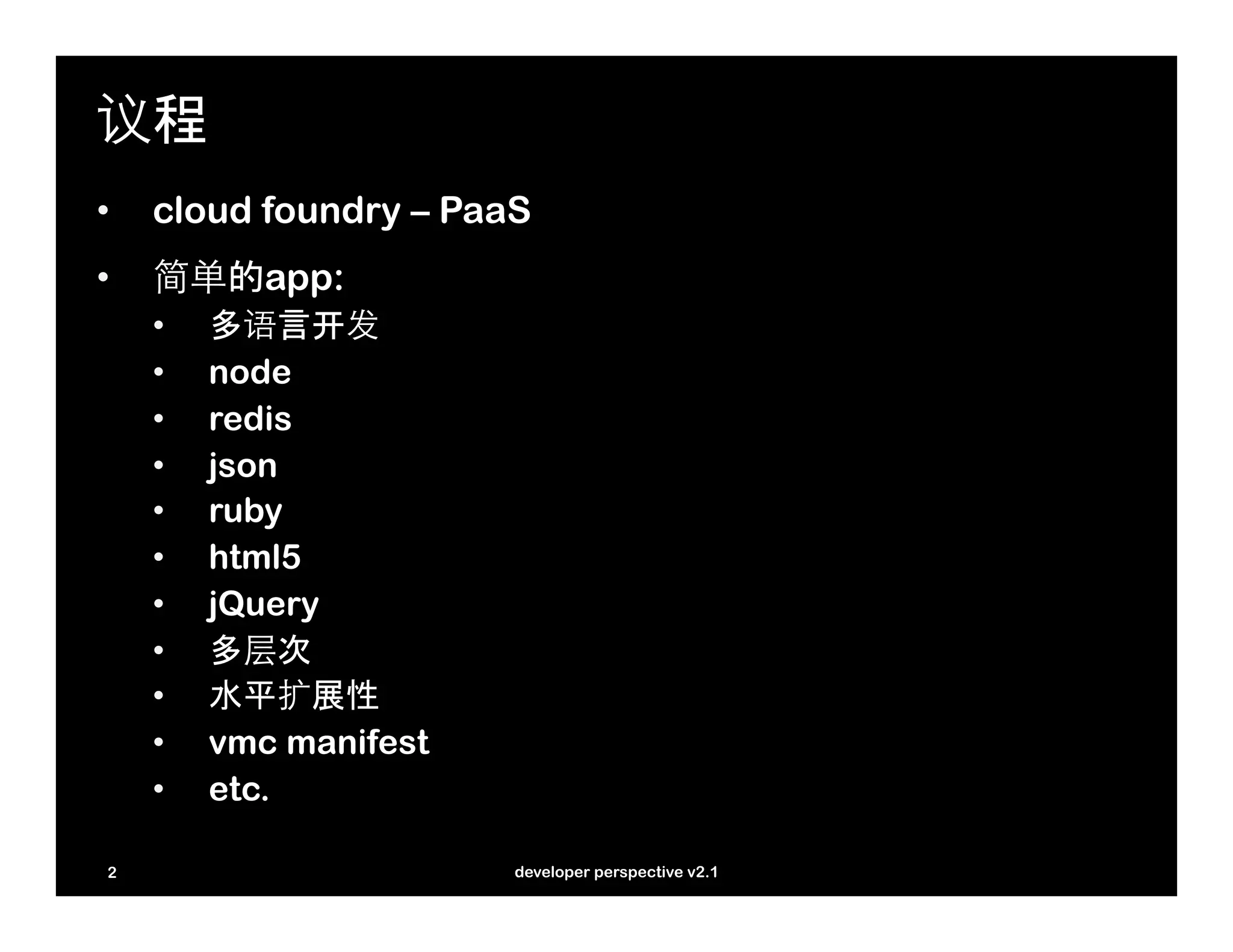
议程
•    cloud foundry – PaaS
•    简单的app:
     •    多语言开发
     •    node
     •    redis
     •    json
     •    ruby
     •    html5
     •    jQuery
     •    多层次
     •    水平扩展性
     •    vmc manifest
     •    etc.

 2                       developer perspective v2.1
cloud foundry


3       developer perspective v2.1
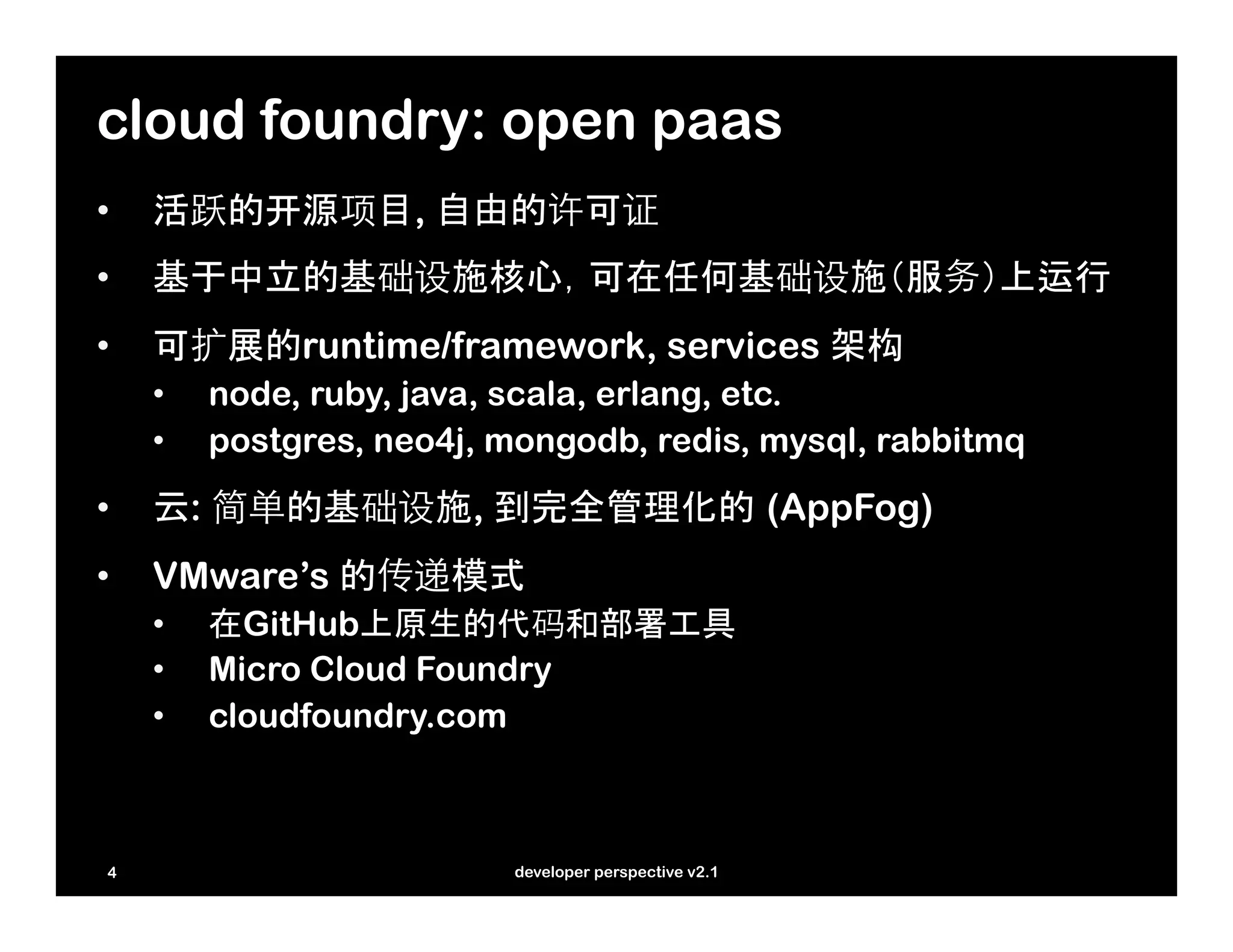
cloud foundry: open paas
•    活跃的开源项目, 自由的许可证
•    基于中立的基础设施核心,可在任何基础设施(服务)上运行
•    可扩展的runtime/framework, services 架构
     •    node, ruby, java, scala, erlang, etc.
     •    postgres, neo4j, mongodb, redis, mysql, rabbitmq
•    云: 简单的基础设施, 到完全管理化的 (AppFog)
•    VMware’s 的传递模式
     •    在GitHub上原生的代码和部署工具
     •    Micro Cloud Foundry
     •    cloudfoundry.com


 4                         developer perspective v2.1
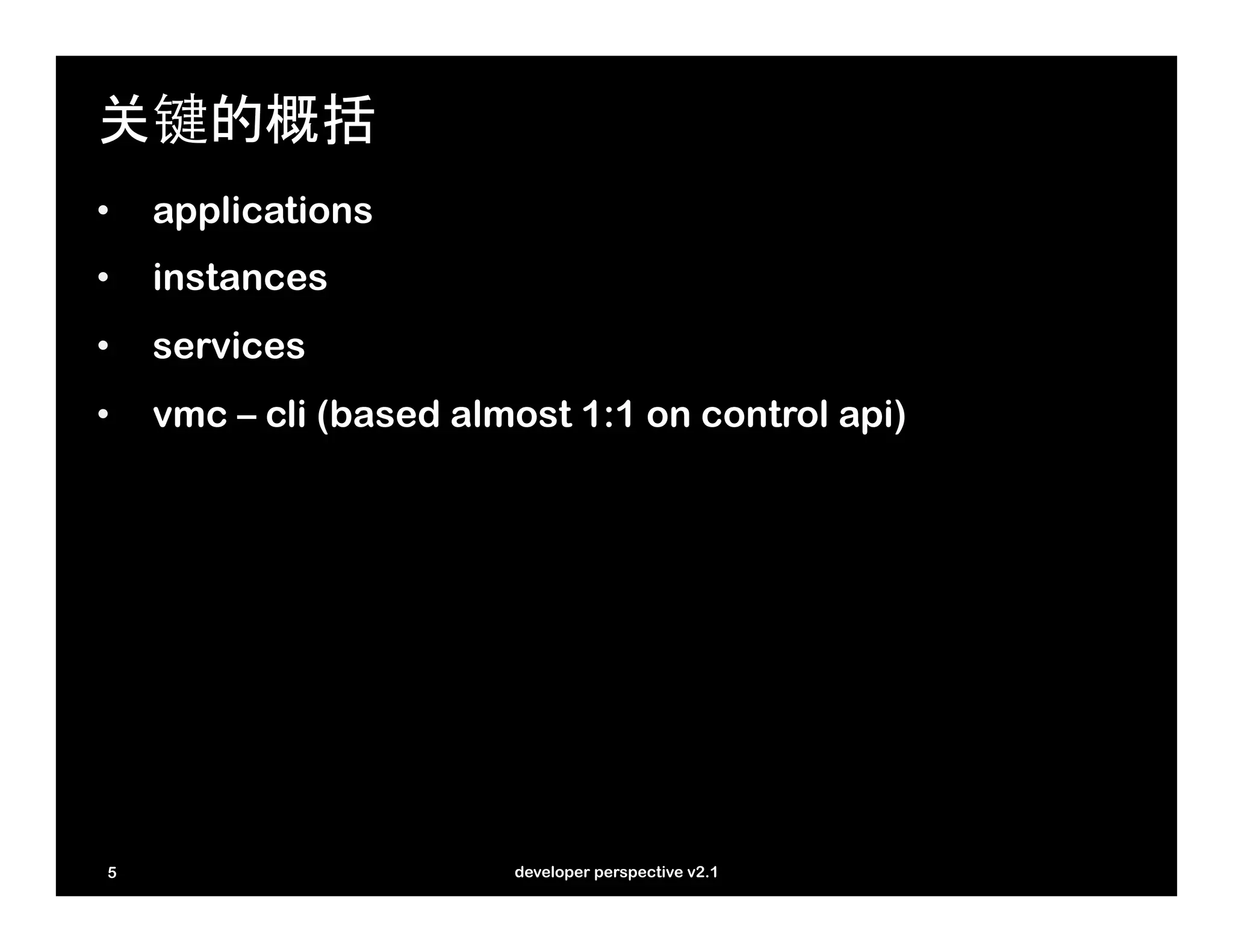
关键的概括
•    applications
•    instances
•    services
•    vmc – cli (based almost 1:1 on control api)


 5                       developer perspective v2.1
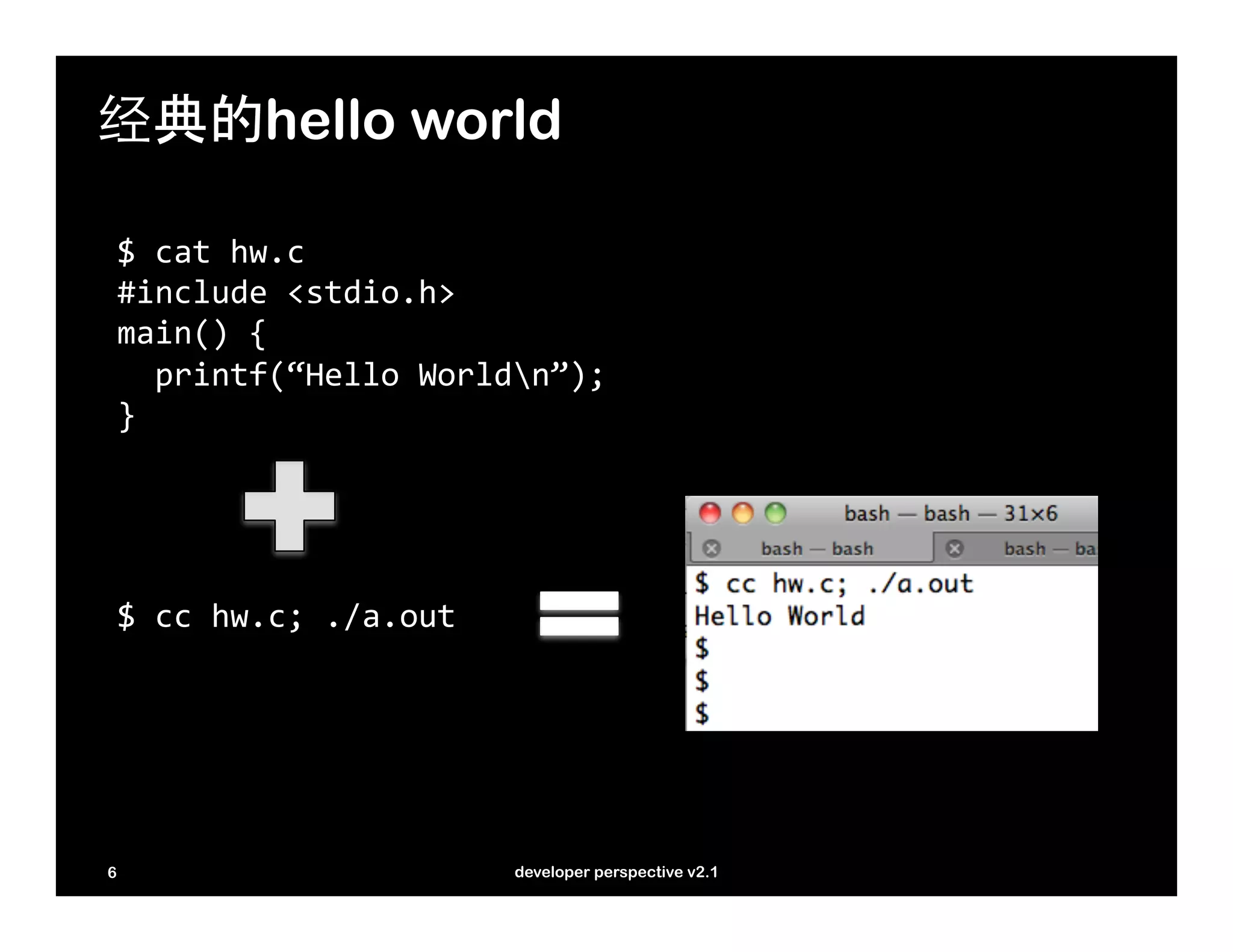
经典的hello world

    $	
  cat	
  hw.c	
  
    #include	
  <stdio.h>	
  
    main()	
  {	


  printf(“Hello	
  Worldn”);	
  
    }	


    $	
  cc	
  hw.c;	
  ./a.out	


6                                     developer perspective v2.1
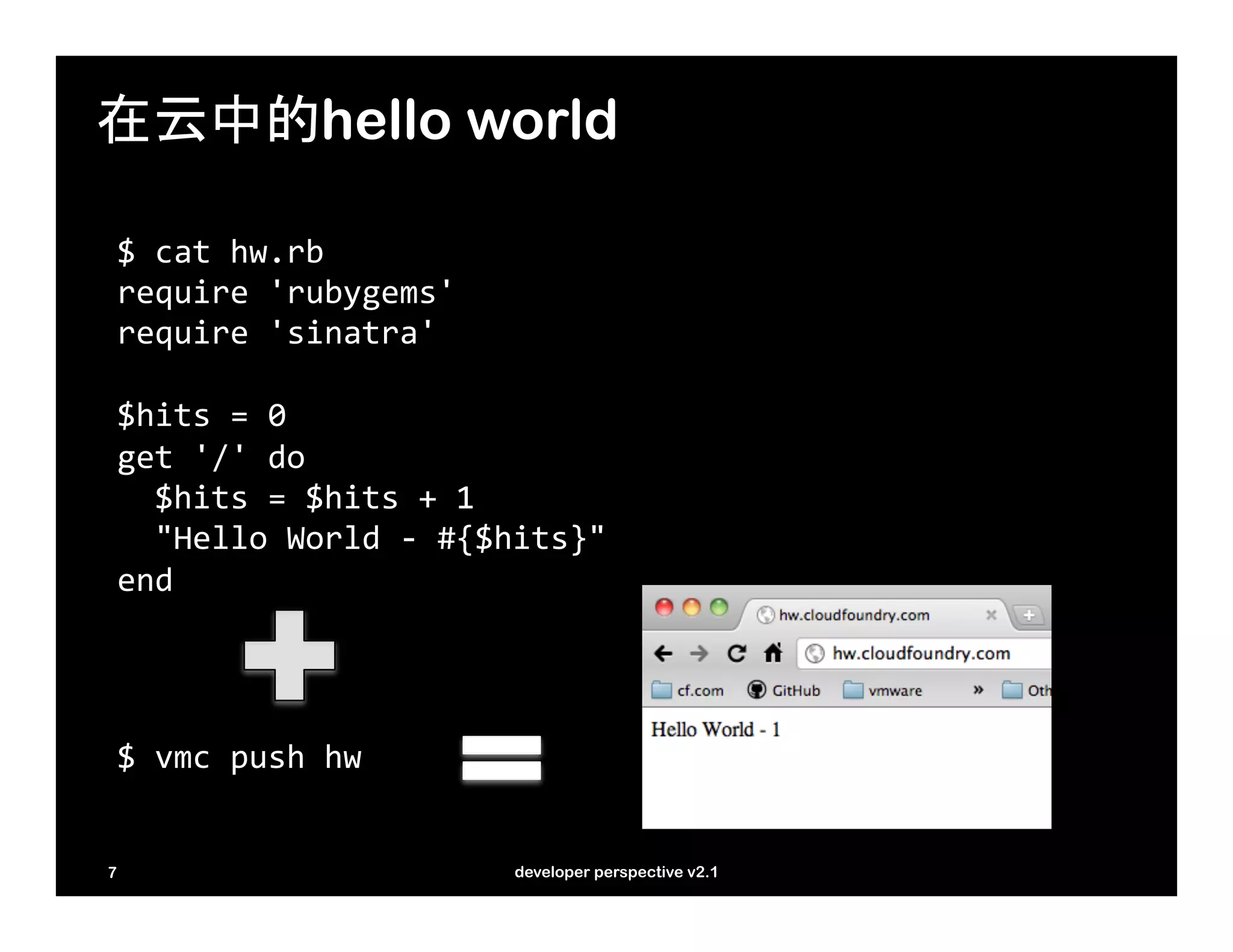
在云中的hello world

    $	
  cat	
  hw.rb	
  
    require	
  'rubygems'	
  
    require	
  'sinatra'	


    $hits	
  =	
  0	
  
    get	
  '/'	
  do	


  $hits	
  =	
  $hits	
  +	
  1	


  "Hello	
  World	
  -­‐	
  #{$hits}"	
  
    end	


    $	
  vmc	
  push	
  hw	


7                                       developer perspective v2.1
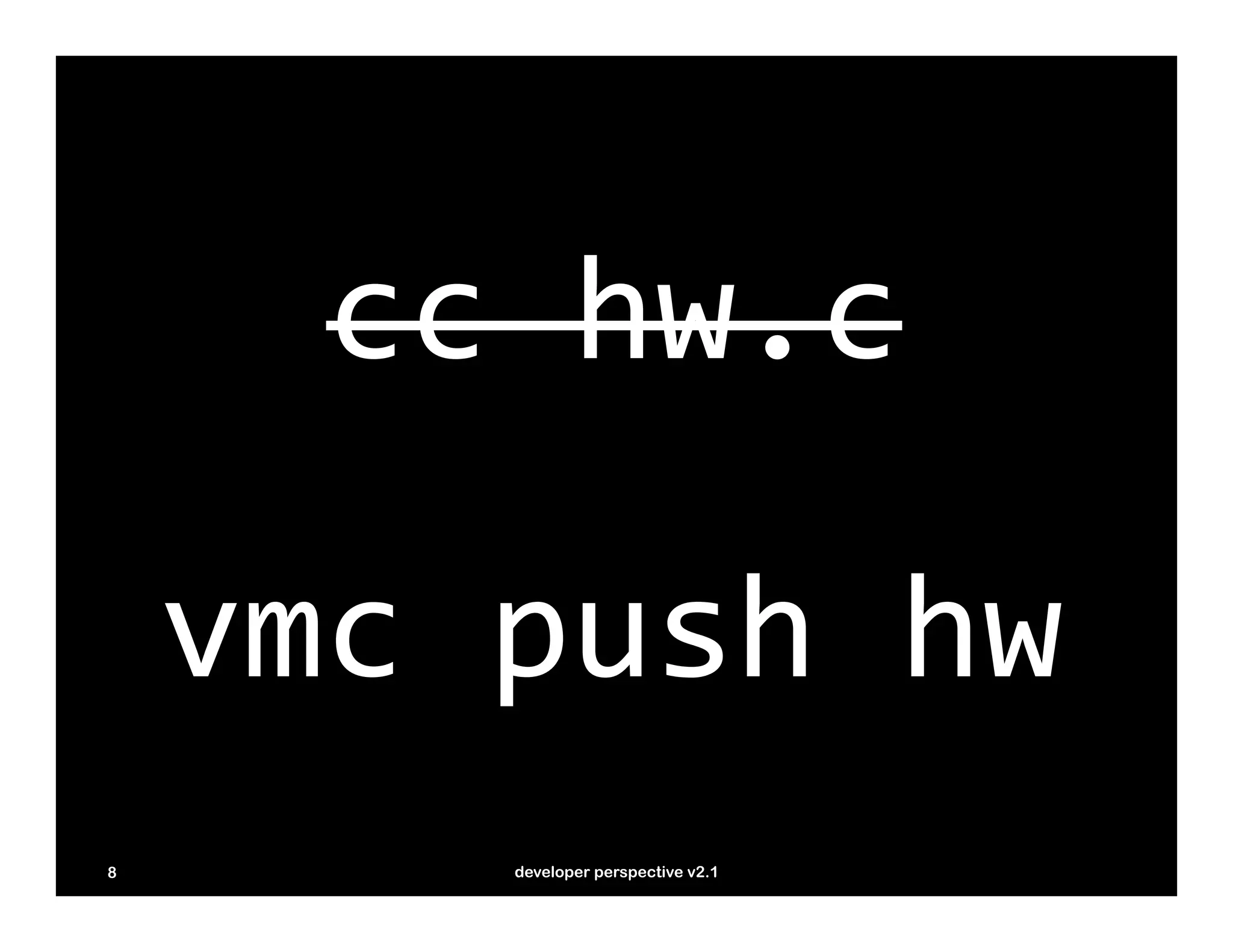
cc	
  hw.c

    vmc	
  push	
  hw
8         developer perspective v2.1
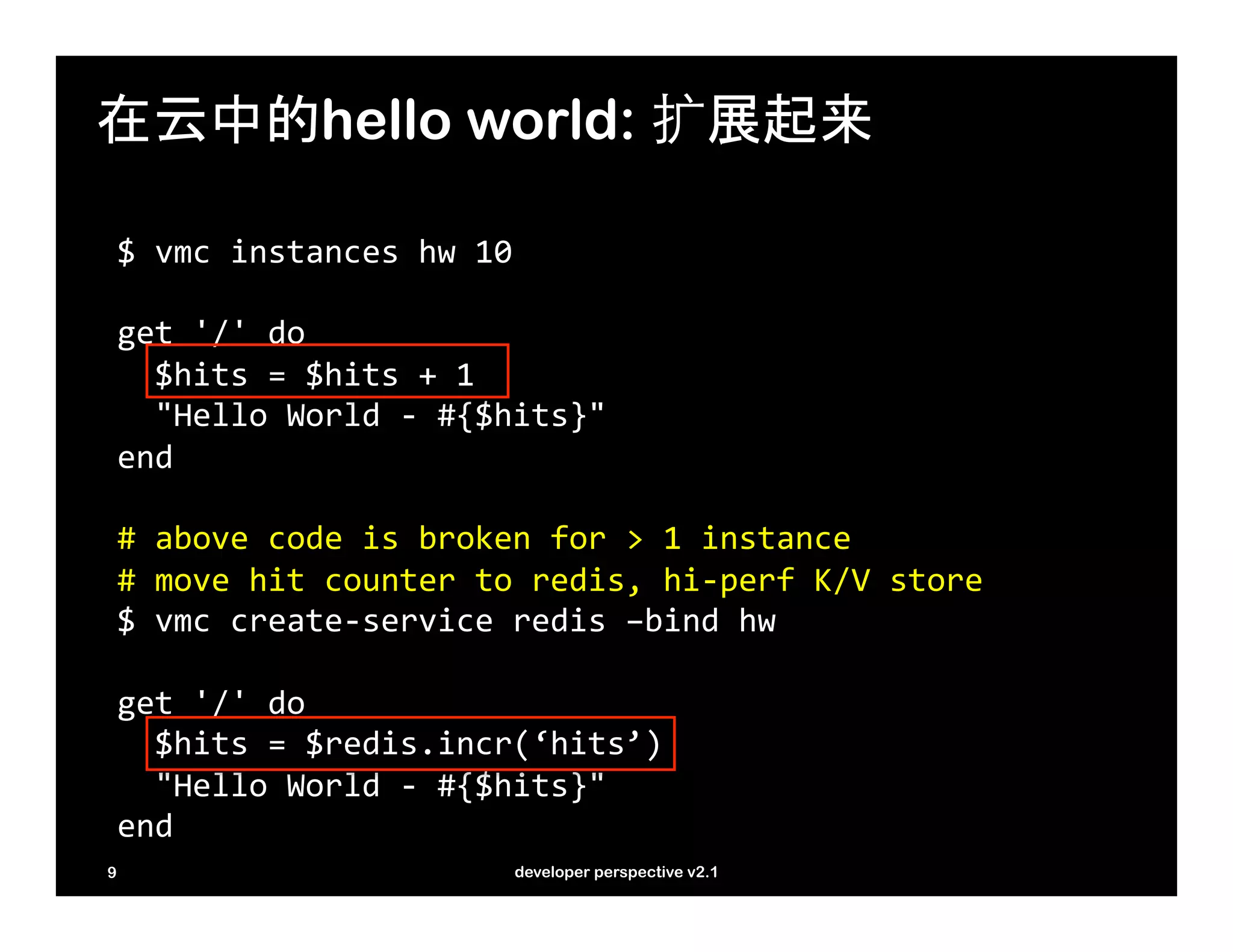
在云中的hello world: 扩展起来

    $	
  vmc	
  instances	
  hw	
  10	


    get	
  '/'	
  do	


  $hits	
  =	
  $hits	
  +	
  1	


  "Hello	
  World	
  -­‐	
  #{$hits}"	
  
    end	


    #	
  above	
  code	
  is	
  broken	
  for	
  >	
  1	
  instance	
  
    #	
  move	
  hit	
  counter	
  to	
  redis,	
  hi-­‐perf	
  K/V	
  store	
  
    $	
  vmc	
  create-­‐service	
  redis	
  –bind	
  hw	


    get	
  '/'	
  do	


  $hits	
  =	
  $redis.incr(‘hits’)	


  "Hello	
  World	
  -­‐	
  #{$hits}"	
  
    end	
  
9                                     developer perspective v2.1
vmc 命令行工具
Create	
  app,	
  update	
  app,	
  control	
  app	
  
vmc	
  push	
  [appname]	
  [-­‐-­‐path]	
  [-­‐-­‐url]	
  [-­‐-­‐instances	
  N]	
  [-­‐-­‐mem]	
  [-­‐-­‐no-­‐start]	
  
vmc	
  update	
  <appname>	
  [-­‐-­‐path	
  PATH]	
  
vmc	
  stop	
  <appname>	
  
vmc	
  start	
  <appname>	
  
vmc	
  target	
  [url]	


Update	
  app	
  settings,	
  get	
  app	
  information	
  
vmc	
  mem	
  <appname>	
  [memsize]	
  
vmc	
  map	
  <appname>	
  <url>	
  
vmc	
  instances	
  <appname>	
  <num	
  |	
  delta>	
  
vmc	
  {crashes,	
  crashlogs,	
  logs}	
  <appname>	
  
vmc	
  files	
  <appname>	
  [path]	


Deal	
  with	
  services,	
  users,	
  and	
  information	
  
vmc	
  create-­‐service	
  <service>	
  [-­‐-­‐name	
  servicename]	
  [-­‐-­‐bind	
  appname]	
  
vmc	
  bind-­‐service	
  <servicename>	
  <appname>	
  
vmc	
  unbind-­‐service	
  	
  <servicename>	
  <appname>	
  
vmc	
  delete-­‐service	
  <servicename>	


vmc	
  user,	
  vmc	
  passwd,	
  vmc	
  login,	
  vmc	
  logout,	
  vmc	
  add-­‐user	
  
vmc	
  services,	
  vmc	
  apps,	
  vmc	
  info	


10                                                 developer perspective v2.1
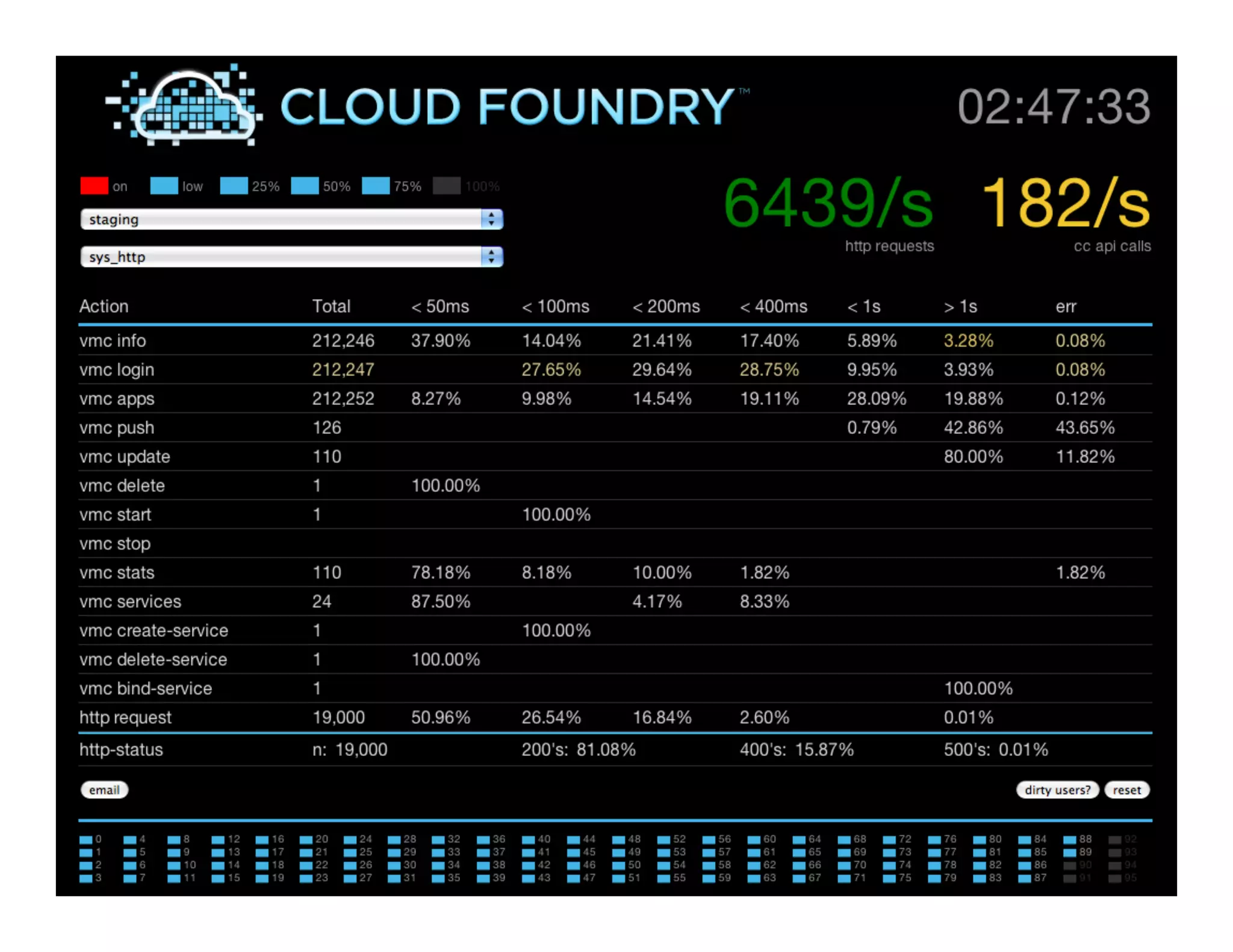
sample app


11     developer perspective v2.1
12   developer perspective v2.1
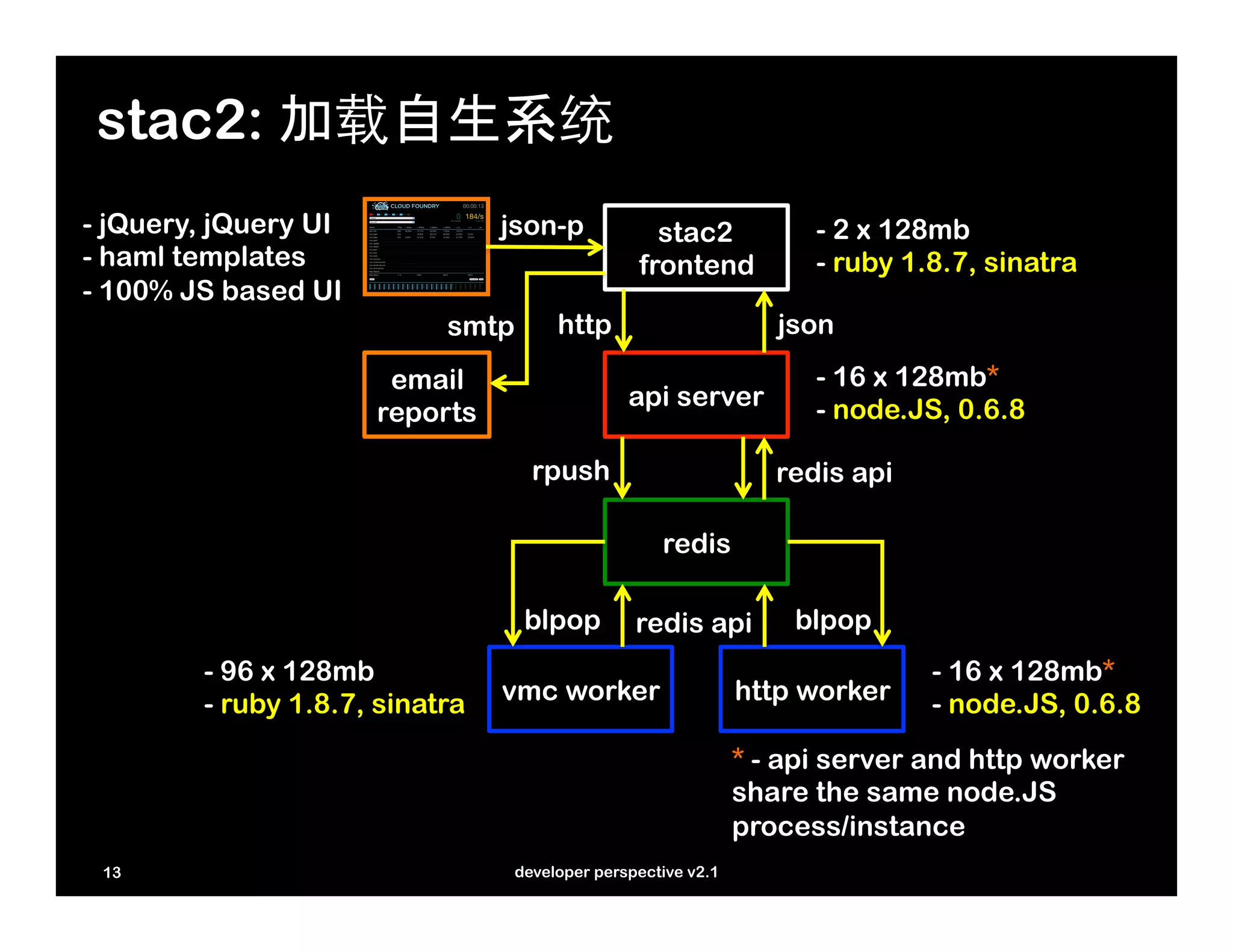
stac2: 加载自生系统
- jQuery, jQuery UI             json-p            stac2             - 2 x 128mb
- haml templates                                frontend            - ruby 1.8.7, sinatra
- 100% JS based UI
                           smtp       http                       json
                       email                                        - 16 x 128mb*
                                               api server           - node.JS, 0.6.8
                      reports

                                   rpush                         redis api

                                                   redis

                                  blpop         redis api         blpop
        - 96 x 128mb                                                         - 16 x 128mb*
        - ruby 1.8.7, sinatra   vmc worker                    http worker    - node.JS, 0.6.8
                                                              * - api server and http worker
                                                              share the same node.JS
                                                              process/instance
 13                              developer perspective v2.1
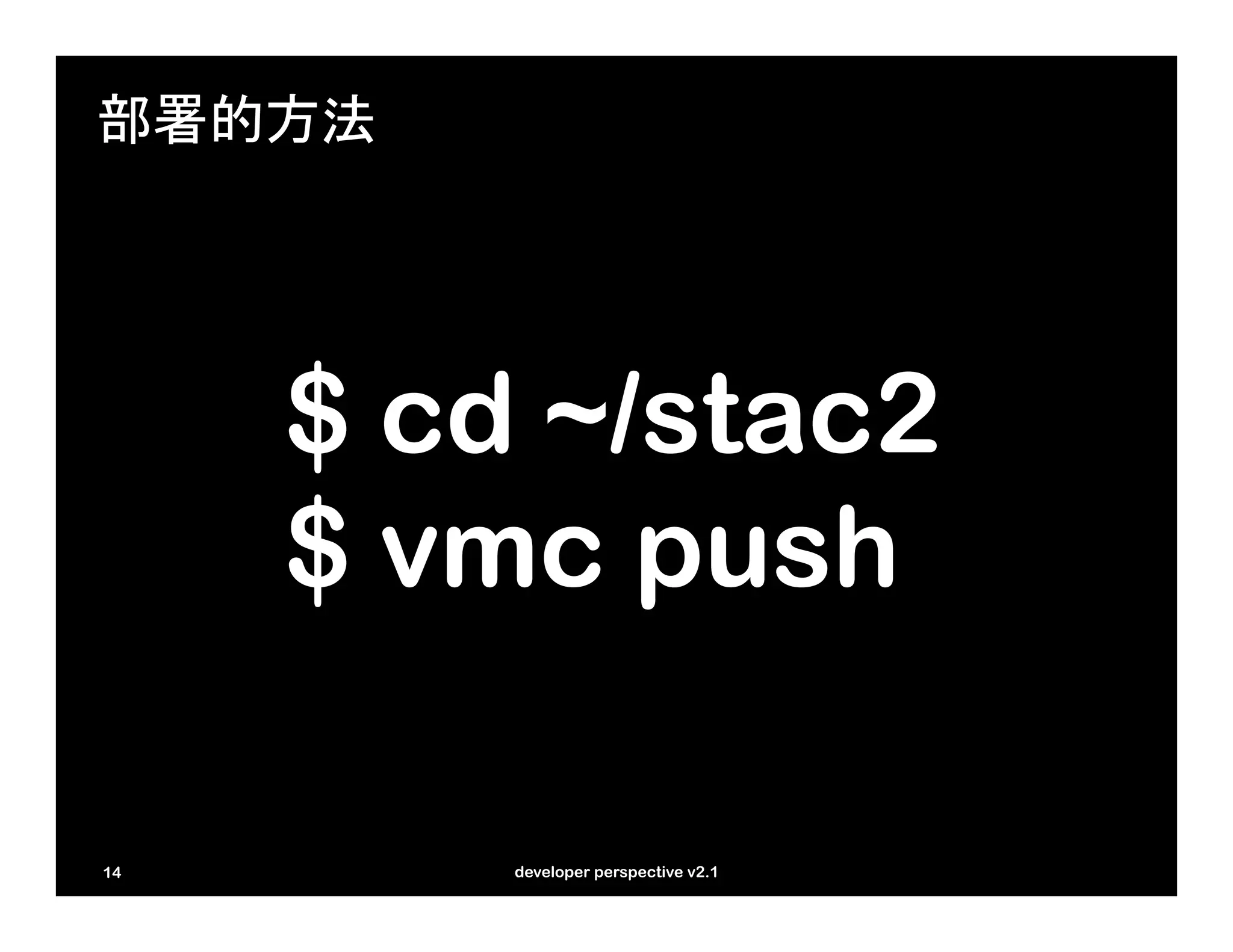
部署的方法


     $ cd ~/stac2
     $ vmc push

14       developer perspective v2.1
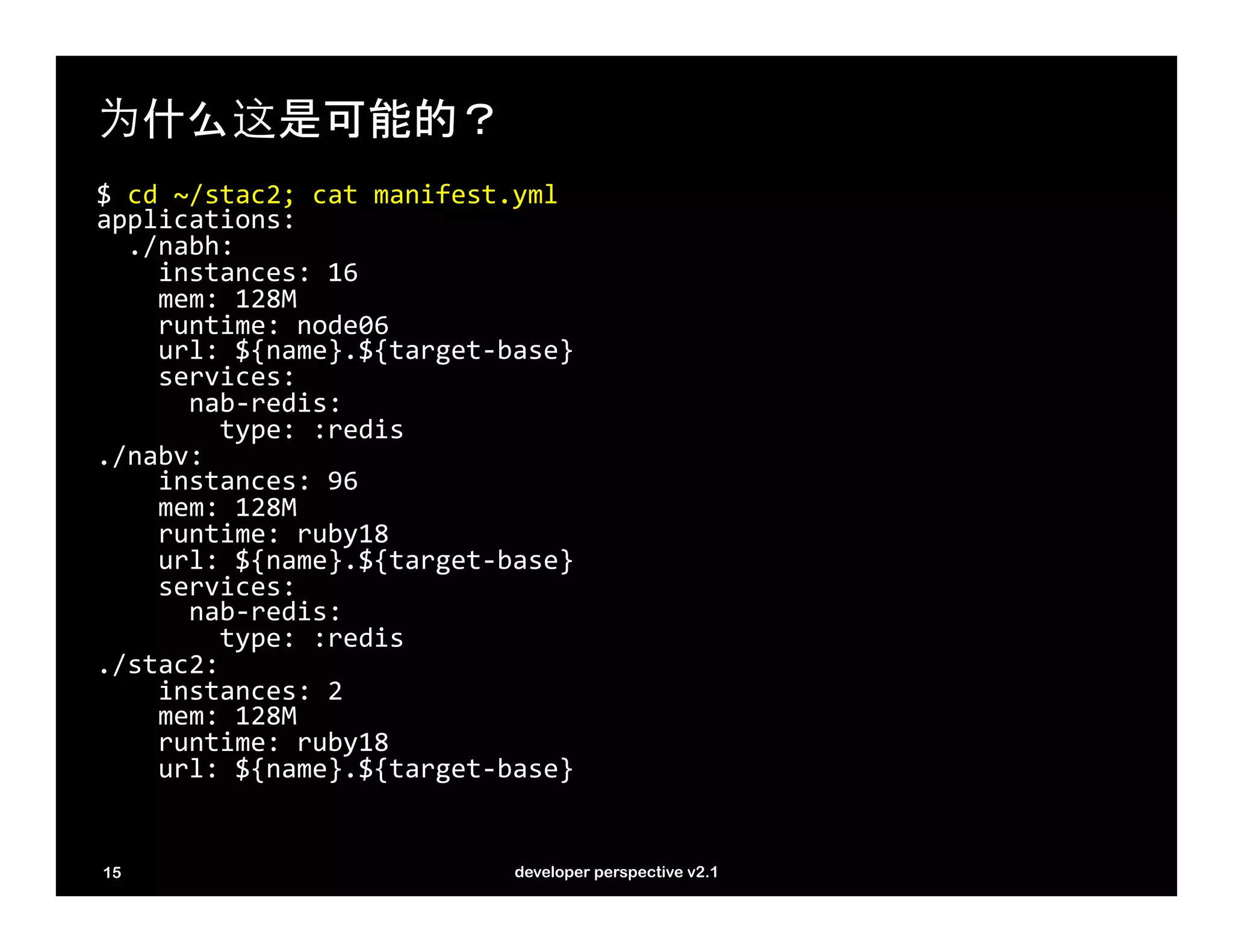
为什么这是可能的?
$	
  cd	
  ~/stac2;	
  cat	
  manifest.yml	
  
applications:	


  ./nabh:	


  instances:	
  16	


  mem:	
  128M	


  runtime:	
  node06	


  url:	
  ${name}.${target-­‐base}	


  services:	


  nab-­‐redis:	


  type:	
  :redis	
  
./nabv:	


  instances:	
  96	


  mem:	
  128M 	


  runtime:	
  ruby18	


  url:	
  ${name}.${target-­‐base}	


  services:	


  nab-­‐redis:	


  type:	
  :redis	
  
./stac2:	


  instances:	
  2	


  mem:	
  128M 	


  runtime:	
  ruby18	


  url:	
  ${name}.${target-­‐base}	


15                                          developer perspective v2.1
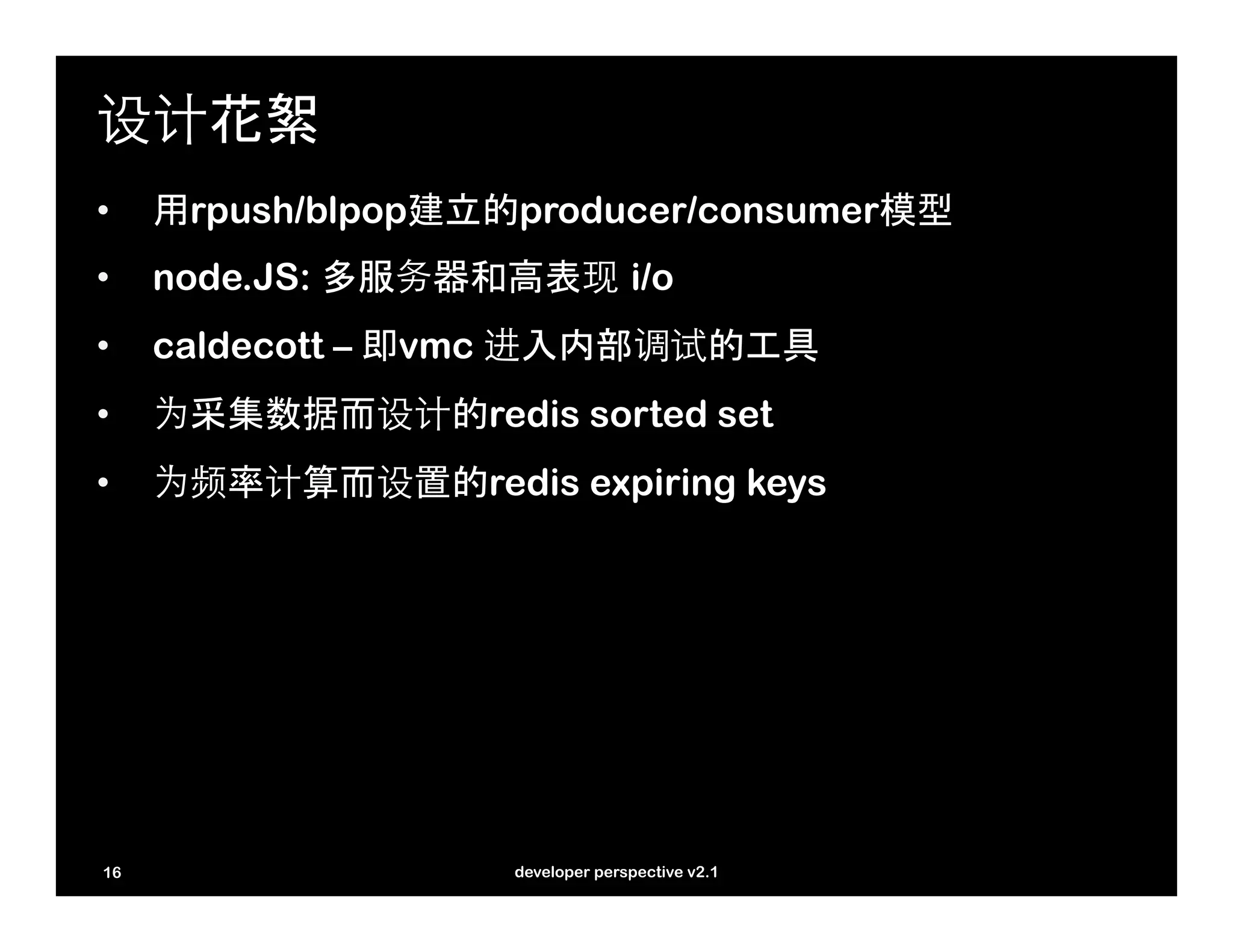
设计花絮
•    用rpush/blpop建立的producer/consumer模型
•    node.JS: 多服务器和高表现 i/o
•    caldecott – 即vmc 进入内部调试的工具
•    为采集数据而设计的redis sorted set
•    为频率计算而设置的redis expiring keys


16                  developer perspective v2.1
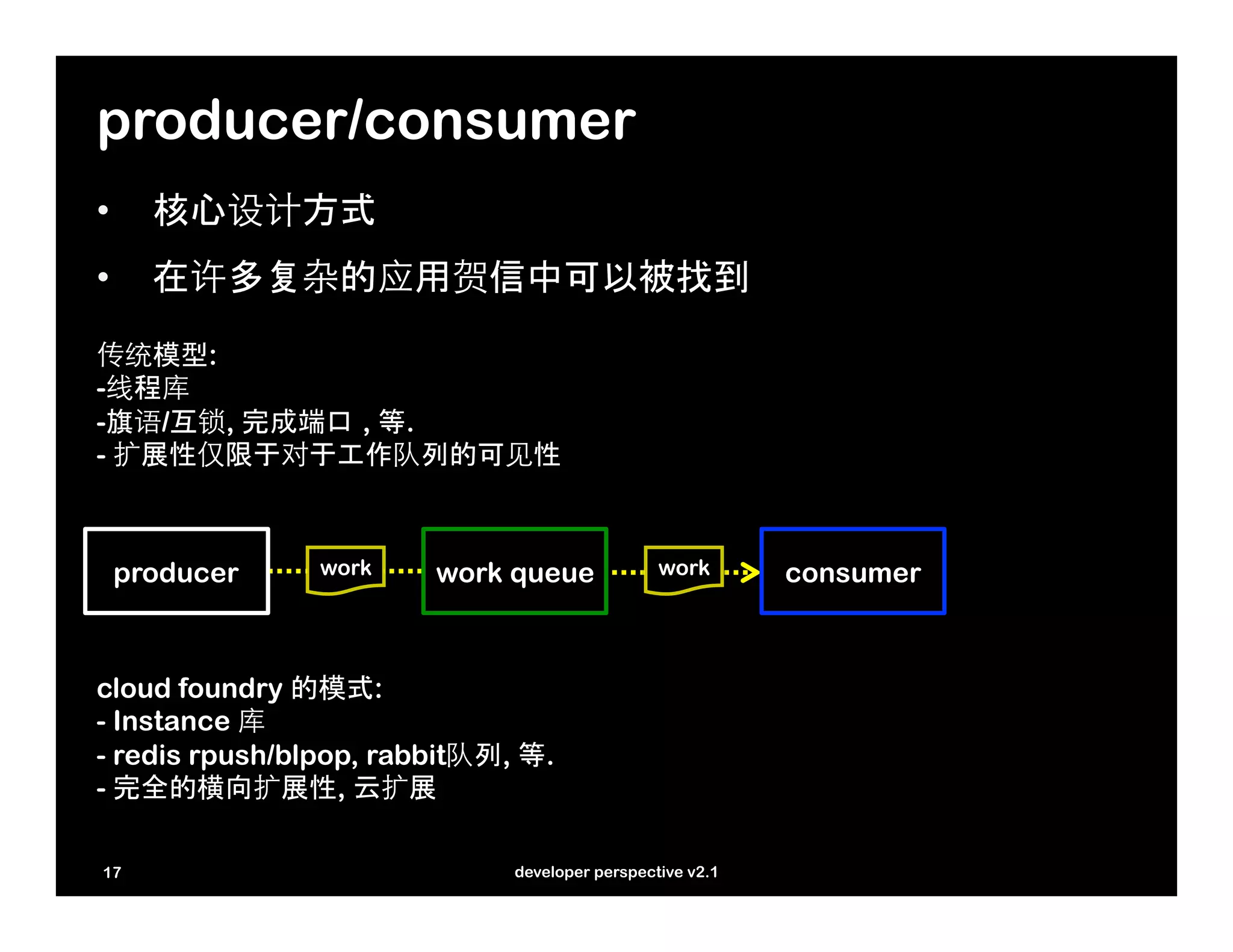
producer/consumer
•    核心设计方式	
•    在许多复杂的应用贺信中可以被找到

传统模型:
-线程库
-旗语/互锁, 完成端口 , 等.
- 扩展性仅限于对于工作队列的可见性


 producer       work    work queue              work       consumer


cloud foundry 的模式:
- Instance 库
- redis rpush/blpop, rabbit队列, 等.
- 完全的横向扩展性, 云扩展

17                            developer perspective v2.1
producer/consumer: 代码
//	
  producer	
  
function	
  commit_item(queue,	
  item)	
  {	


  //	
  push	
  the	
  work	
  item	
  onto	
  the	
  proper	
  queue	


  redis.rpush(queue,	
  item,	
  function(err,	
  data)	
  {	


  //	
  optionally	
  trim	
  the	
  queue,	
  throwing	
  away	


  //	
  data	
  as	
  needed	
  to	
  ensure	
  the	
  queue	
  does	


  //	
  not	
  grow	
  unbounded	


  if	
  (!err	
  &&	
  data	
  >	
  queueTrim)	
  {	


  redis.ltrim(queue,	
  0,	
  queueTrim-­‐1);	


  }	


  });	
  
}	


//	
  consumer	
  
function	
  worker()	
  {	


  //	
  blocking	
  wait	
  for	
  workitems	


  blpop_redis.blpop(queue,	
  0,	
  function(err,	
  data)	
  {	


  //	
  data[0]	
  ==	
  queue,	
  data[1]	
  ==	
  item	


  if	
  (!err)	
  {	


  doWork(data[1]);	


  }	


  process.nextTick(worker);	


  });	
  
}	


  18                                               developer perspective v2.1
node.JS 多服务器: http API server
//	
  the	
  api	
  server	
  handles	
  two	
  key	
  load	
  generation	
  apis	
  
//	
  /http	
  –	
  for	
  http	
  load,	
  /vmc	
  for	
  Cloud	
  Foundry	
  API	
  load	
  
var	
  routes	
  =	
  {“/http”:	
  httpCmd,	
  “/vmc”:	
  vmcCmd}	


//	
  http	
  api	
  server	
  booted	
  by	
  app.js,	
  passing	
  redis	
  client	
  
//	
  and	
  Cloud	
  Foundry	
  instance	
  	
  
function	
  boot(redis_client,	
  cfinstance)	
  {	


  var	
  redis	
  =	
  redis_client;	


  function	
  onRequest(request,	
  response)	
  {	


  var	
  u	
  =	
  url.parse(request.url);	


  var	
  path	
  =	
  u.pathname;	


  if	
  (routes[path]	
  &&	
  typeof	
  routes[path]	
  ==	
  ‘function’)	
  {	


  routes[path](request,	
  response);	


  }	
  else	
  {	


  response.writeHead(404,	
  {‘Content-­‐Type’:	
  ‘text/plain’});	


  response.write(‘404	
  Not	
  Found’);	


  response.end();	


  }	


  }	


  server	
  =	
  http.createServer(onRequest).listen(cfinstance[‘port’]);                   	
  
}	


19                                      developer perspective v2.1
node.JS 多服务器: blpop server
var	
  blpop_redis	
  =	
  null;	
  
var	
  status_redis	
  =	
  null;	
  
var	
  cfinstance	
  =	
  null;	


//	
  blpop	
  server	
  handles	
  work	
  requests	
  for	
  http	
  traffic	
  
//	
  that	
  are	
  placed	
  on	
  the	
  queue	
  by	
  the	
  http	
  API	
  server	
  
//	
  another	
  blpop	
  server	
  sits	
  in	
  the	
  ruby/sinatra	
  VMC	
  server	
  
function	
  boot(r1,	
  r2,	
  cfi)	
  {	


  //	
  multiple	
  redis	
  clients	
  due	
  to	
  concurrency	
  constraints	


  blpop_redis	
  =	
  r1;	


  status_redis	
  =	
  r2;	


  cfinstance	
  =	
  cfi;	


  worker();	
  
}	


//	
  this	
  is	
  the	
  blpop	
  server	
  loop	
  
function	
  worker()	
  {	


  blpop_redis.blpop(queue,	
  0,	
  function(err,	
  data)	
  {	


  if	
  (!err)	
  {	


  doWork(data[1]);	


  }	


  process.nextTick(worker);	


  });	
  
}	


20                                       developer perspective v2.1
caldecott: 即vmc tunnel
#	
  create	
  a	
  caldecott	
  tunnel	
  to	
  the	
  redis	
  server	
  
$	
  vmc	
  tunnel	
  nab-­‐redis	
  redis-­‐cli	
  
Binding	
  Service	
  [nab-­‐redis]:	
  OK	
  
…	
  
Launching	
  'redis-­‐cli	
  -­‐h	
  localhost	
  -­‐p	
  10000	
  -­‐a	
  ...’	


#	
  enumerate	
  the	
  keys	
  used	
  by	
  stac2	
  
redis>	
  keys	
  vmc::staging::*	
  
1)	
  “vmc::staging::actions::time_50”	
  
2)	
  “vmc::staging::active_workers”	
  
…	


#	
  enumerate	
  actions	
  that	
  took	
  less	
  that	
  50ms	
  
redis>	
  zrange	
  vmc::staging::actions::time_50	
  0	
  -­‐1	
  withscores	
  
1)	
  “delete_app”	
  
2)	
  “1”	
  
3)	
  “login”	
  
4)	
  “58676”	
  
5)	
  “info”	
  
6)	
  “80390”	


#	
  see	
  how	
  many	
  work	
  items	
  we	
  dumped	
  due	
  to	
  concurrency	
  constraint	
  
redis>	
  get	
  vmc::staging::wastegate	
  
“7829”	


  21                                         developer perspective v2.1
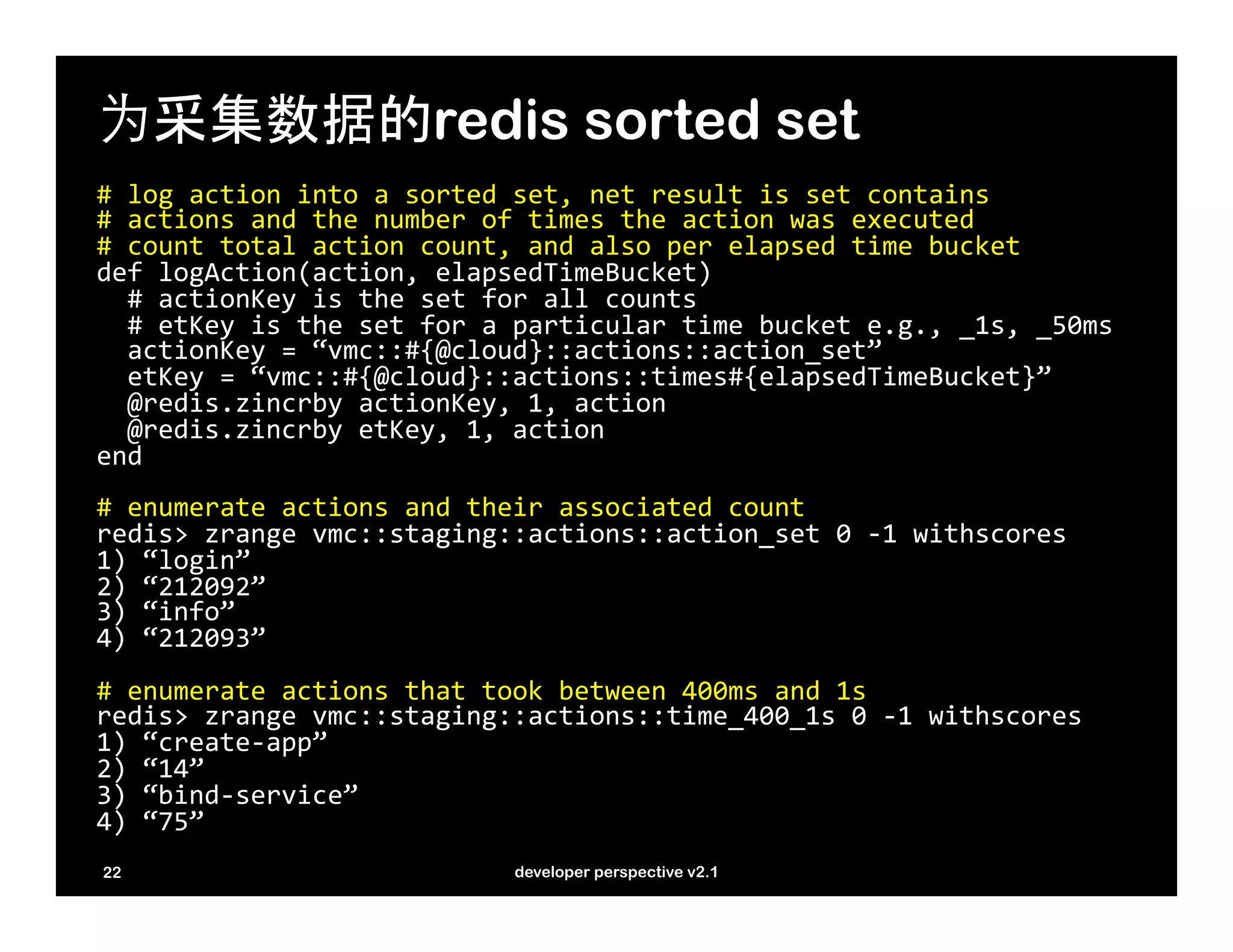
为采集数据的redis sorted set
#	
  log	
  action	
  into	
  a	
  sorted	
  set,	
  net	
  result	
  is	
  set	
  contains	
  
#	
  actions	
  and	
  the	
  number	
  of	
  times	
  the	
  action	
  was	
  executed	
  
#	
  count	
  total	
  action	
  count,	
  and	
  also	
  per	
  elapsed	
  time	
  bucket	
  
def	
  logAction(action,	
  elapsedTimeBucket)	


  #	
  actionKey	
  is	
  the	
  set	
  for	
  all	
  counts	


  #	
  etKey	
  is	
  the	
  set	
  for	
  a	
  particular	
  time	
  bucket	
  e.g.,	
  _1s,	
  _50ms	


  actionKey	
  =	
  “vmc::#{@cloud}::actions::action_set”	


  etKey	
  =	
  “vmc::#{@cloud}::actions::times#{elapsedTimeBucket}”	


  @redis.zincrby	
  actionKey,	
  1,	
  action	


  @redis.zincrby	
  etKey,	
  1,	
  action	
  
end	


#	
  enumerate	
  actions	
  and	
  their	
  associated	
  count	
  
redis>	
  zrange	
  vmc::staging::actions::action_set	
  0	
  -­‐1	
  withscores	
  
1)	
  “login”	
  
2)	
  “212092”	
  
3)	
  “info”	
  
4)	
  “212093”	


#	
  enumerate	
  actions	
  that	
  took	
  between	
  400ms	
  and	
  1s	
  
redis>	
  zrange	
  vmc::staging::actions::time_400_1s	
  0	
  -­‐1	
  withscores	
  
1)	
  “create-­‐app”	
  
2)	
  “14”	
  
3)	
  “bind-­‐service”	
  
4)	
  “75”	


22                                           developer perspective v2.1
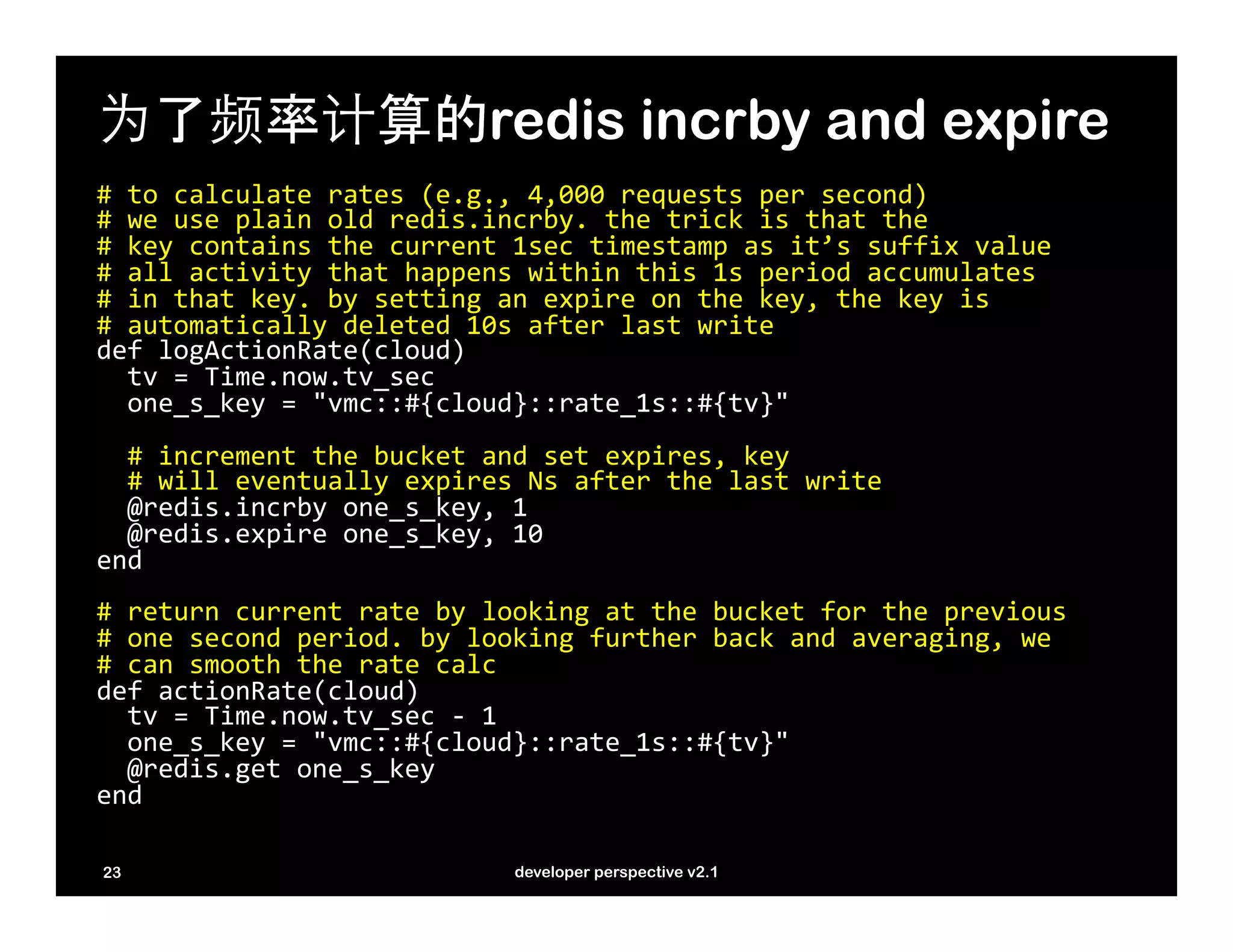
为了频率计算的redis incrby and expire
#	
  to	
  calculate	
  rates	
  (e.g.,	
  4,000	
  requests	
  per	
  second)	
  
#	
  we	
  use	
  plain	
  old	
  redis.incrby.	
  the	
  trick	
  is	
  that	
  the	
  	
  
#	
  key	
  contains	
  the	
  current	
  1sec	
  timestamp	
  as	
  it’s	
  suffix	
  value	
  
#	
  all	
  activity	
  that	
  happens	
  within	
  this	
  1s	
  period	
  accumulates	
  
#	
  in	
  that	
  key.	
  by	
  setting	
  an	
  expire	
  on	
  the	
  key,	
  the	
  key	
  is	
  	
  
#	
  automatically	
  deleted	
  10s	
  after	
  last	
  write	
  
def	
  logActionRate(cloud)	


  tv	
  =	
  Time.now.tv_sec	


  one_s_key	
  =	
  "vmc::#{cloud}::rate_1s::#{tv}"	


  #	
  increment	
  the	
  bucket	
  and	
  set	
  expires,	
  key	


  #	
  will	
  eventually	
  expires	
  Ns	
  after	
  the	
  last	
  write	


  @redis.incrby	
  one_s_key,	
  1	


  @redis.expire	
  one_s_key,	
  10	
  
end	


#	
  return	
  current	
  rate	
  by	
  looking	
  at	
  the	
  bucket	
  for	
  the	
  previous	
  	
  
#	
  one	
  second	
  period.	
  by	
  looking	
  further	
  back	
  and	
  averaging,	
  we	
  	
  
#	
  can	
  smooth	
  the	
  rate	
  calc	
  
def	
  actionRate(cloud)	


  tv	
  =	
  Time.now.tv_sec	
  -­‐	
  1	


  one_s_key	
  =	
  "vmc::#{cloud}::rate_1s::#{tv}"	


  @redis.get	
  one_s_key	
  
end	


23                                         developer perspective v2.1
24   developer perspective v2.1
www.cloudfoundry.com/jobs
25          developer perspective v2.1

Cloud Foundry Open Tour China

  • 1.
    开发者的角度 mark lucovsky vp of engineering, cloud foundry
  • 2.
    议程 •  cloud foundry – PaaS •  简单的app: •  多语言开发 •  node •  redis •  json •  ruby •  html5 •  jQuery •  多层次 •  水平扩展性 •  vmc manifest •  etc. 2 developer perspective v2.1
  • 3.
    cloud foundry 3 developer perspective v2.1
  • 4.
    cloud foundry: openpaas •  活跃的开源项目, 自由的许可证 •  基于中立的基础设施核心,可在任何基础设施(服务)上运行 •  可扩展的runtime/framework, services 架构 •  node, ruby, java, scala, erlang, etc. •  postgres, neo4j, mongodb, redis, mysql, rabbitmq •  云: 简单的基础设施, 到完全管理化的 (AppFog) •  VMware’s 的传递模式 •  在GitHub上原生的代码和部署工具 •  Micro Cloud Foundry •  cloudfoundry.com 4 developer perspective v2.1
  • 5.
    关键的概括 •  applications •  instances •  services •  vmc – cli (based almost 1:1 on control api) 5 developer perspective v2.1
  • 6.
    经典的hello world $  cat  hw.c   #include  <stdio.h>   main()  {      printf(“Hello  Worldn”);   }   $  cc  hw.c;  ./a.out   6 developer perspective v2.1
  • 7.
    在云中的hello world $  cat  hw.rb   require  'rubygems'   require  'sinatra'     $hits  =  0   get  '/'  do      $hits  =  $hits  +  1      "Hello  World  -­‐  #{$hits}"   end   $  vmc  push  hw   7 developer perspective v2.1
  • 8.
    cc  hw.c vmc  push  hw 8 developer perspective v2.1
  • 9.
    在云中的hello world: 扩展起来 $  vmc  instances  hw  10     get  '/'  do      $hits  =  $hits  +  1      "Hello  World  -­‐  #{$hits}"   end     #  above  code  is  broken  for  >  1  instance   #  move  hit  counter  to  redis,  hi-­‐perf  K/V  store   $  vmc  create-­‐service  redis  –bind  hw     get  '/'  do      $hits  =  $redis.incr(‘hits’)      "Hello  World  -­‐  #{$hits}"   end   9 developer perspective v2.1
  • 10.
    vmc 命令行工具 Create  app,  update  app,  control  app   vmc  push  [appname]  [-­‐-­‐path]  [-­‐-­‐url]  [-­‐-­‐instances  N]  [-­‐-­‐mem]  [-­‐-­‐no-­‐start]   vmc  update  <appname>  [-­‐-­‐path  PATH]   vmc  stop  <appname>   vmc  start  <appname>   vmc  target  [url]     Update  app  settings,  get  app  information   vmc  mem  <appname>  [memsize]   vmc  map  <appname>  <url>   vmc  instances  <appname>  <num  |  delta>   vmc  {crashes,  crashlogs,  logs}  <appname>   vmc  files  <appname>  [path]     Deal  with  services,  users,  and  information   vmc  create-­‐service  <service>  [-­‐-­‐name  servicename]  [-­‐-­‐bind  appname]   vmc  bind-­‐service  <servicename>  <appname>   vmc  unbind-­‐service    <servicename>  <appname>   vmc  delete-­‐service  <servicename>     vmc  user,  vmc  passwd,  vmc  login,  vmc  logout,  vmc  add-­‐user   vmc  services,  vmc  apps,  vmc  info   10 developer perspective v2.1
  • 11.
    sample app 11 developer perspective v2.1
  • 12.
    12 developer perspective v2.1
  • 13.
    stac2: 加载自生系统 - jQuery,jQuery UI json-p stac2 - 2 x 128mb - haml templates frontend - ruby 1.8.7, sinatra - 100% JS based UI smtp http json email - 16 x 128mb* api server - node.JS, 0.6.8 reports rpush redis api redis blpop redis api blpop - 96 x 128mb - 16 x 128mb* - ruby 1.8.7, sinatra vmc worker http worker - node.JS, 0.6.8 * - api server and http worker share the same node.JS process/instance 13 developer perspective v2.1
  • 14.
    部署的方法 $ cd ~/stac2 $ vmc push 14 developer perspective v2.1
  • 15.
    为什么这是可能的? $  cd  ~/stac2;  cat  manifest.yml   applications:      ./nabh:          instances:  16          mem:  128M          runtime:  node06          url:  ${name}.${target-­‐base}          services:              nab-­‐redis:                  type:  :redis   ./nabv:          instances:  96          mem:  128M            runtime:  ruby18          url:  ${name}.${target-­‐base}          services:              nab-­‐redis:                  type:  :redis   ./stac2:          instances:  2          mem:  128M            runtime:  ruby18          url:  ${name}.${target-­‐base}   15 developer perspective v2.1
  • 16.
    设计花絮 •  用rpush/blpop建立的producer/consumer模型 •  node.JS: 多服务器和高表现 i/o •  caldecott – 即vmc 进入内部调试的工具 •  为采集数据而设计的redis sorted set •  为频率计算而设置的redis expiring keys 16 developer perspective v2.1
  • 17.
    producer/consumer •  核心设计方式 •  在许多复杂的应用贺信中可以被找到 传统模型: -线程库 -旗语/互锁, 完成端口 , 等. - 扩展性仅限于对于工作队列的可见性 producer work work queue work consumer cloud foundry 的模式: - Instance 库 - redis rpush/blpop, rabbit队列, 等. - 完全的横向扩展性, 云扩展 17 developer perspective v2.1
  • 18.
    producer/consumer: 代码 //  producer   function  commit_item(queue,  item)  {      //  push  the  work  item  onto  the  proper  queue        redis.rpush(queue,  item,  function(err,  data)  {            //  optionally  trim  the  queue,  throwing  away          //  data  as  needed  to  ensure  the  queue  does          //  not  grow  unbounded          if  (!err  &&  data  >  queueTrim)  {              redis.ltrim(queue,  0,  queueTrim-­‐1);          }            });   }     //  consumer   function  worker()  {      //  blocking  wait  for  workitems      blpop_redis.blpop(queue,  0,  function(err,  data)  {                    //  data[0]  ==  queue,  data[1]  ==  item          if  (!err)  {              doWork(data[1]);          }          process.nextTick(worker);            });   }     18 developer perspective v2.1
  • 19.
    node.JS 多服务器: httpAPI server //  the  api  server  handles  two  key  load  generation  apis   //  /http  –  for  http  load,  /vmc  for  Cloud  Foundry  API  load   var  routes  =  {“/http”:  httpCmd,  “/vmc”:  vmcCmd}     //  http  api  server  booted  by  app.js,  passing  redis  client   //  and  Cloud  Foundry  instance     function  boot(redis_client,  cfinstance)  {      var  redis  =  redis_client;            function  onRequest(request,  response)  {          var  u  =  url.parse(request.url);          var  path  =  u.pathname;          if  (routes[path]  &&  typeof  routes[path]  ==  ‘function’)  {              routes[path](request,  response);          }  else  {              response.writeHead(404,  {‘Content-­‐Type’:  ‘text/plain’});              response.write(‘404  Not  Found’);              response.end();          }      }      server  =  http.createServer(onRequest).listen(cfinstance[‘port’]);   }   19 developer perspective v2.1
  • 20.
    node.JS 多服务器: blpopserver var  blpop_redis  =  null;   var  status_redis  =  null;   var  cfinstance  =  null;     //  blpop  server  handles  work  requests  for  http  traffic   //  that  are  placed  on  the  queue  by  the  http  API  server   //  another  blpop  server  sits  in  the  ruby/sinatra  VMC  server   function  boot(r1,  r2,  cfi)  {      //  multiple  redis  clients  due  to  concurrency  constraints      blpop_redis  =  r1;      status_redis  =  r2;      cfinstance  =  cfi;      worker();   }     //  this  is  the  blpop  server  loop   function  worker()  {      blpop_redis.blpop(queue,  0,  function(err,  data)  {          if  (!err)  {              doWork(data[1]);          }          process.nextTick(worker);            });   }     20 developer perspective v2.1
  • 21.
    caldecott: 即vmc tunnel #  create  a  caldecott  tunnel  to  the  redis  server   $  vmc  tunnel  nab-­‐redis  redis-­‐cli   Binding  Service  [nab-­‐redis]:  OK   …   Launching  'redis-­‐cli  -­‐h  localhost  -­‐p  10000  -­‐a  ...’         #  enumerate  the  keys  used  by  stac2   redis>  keys  vmc::staging::*   1)  “vmc::staging::actions::time_50”   2)  “vmc::staging::active_workers”   …     #  enumerate  actions  that  took  less  that  50ms   redis>  zrange  vmc::staging::actions::time_50  0  -­‐1  withscores   1)  “delete_app”   2)  “1”   3)  “login”   4)  “58676”   5)  “info”   6)  “80390”     #  see  how  many  work  items  we  dumped  due  to  concurrency  constraint   redis>  get  vmc::staging::wastegate   “7829”       21 developer perspective v2.1
  • 22.
    为采集数据的redis sorted set #  log  action  into  a  sorted  set,  net  result  is  set  contains   #  actions  and  the  number  of  times  the  action  was  executed   #  count  total  action  count,  and  also  per  elapsed  time  bucket   def  logAction(action,  elapsedTimeBucket)        #  actionKey  is  the  set  for  all  counts      #  etKey  is  the  set  for  a  particular  time  bucket  e.g.,  _1s,  _50ms      actionKey  =  “vmc::#{@cloud}::actions::action_set”      etKey  =  “vmc::#{@cloud}::actions::times#{elapsedTimeBucket}”      @redis.zincrby  actionKey,  1,  action      @redis.zincrby  etKey,  1,  action   end     #  enumerate  actions  and  their  associated  count   redis>  zrange  vmc::staging::actions::action_set  0  -­‐1  withscores   1)  “login”   2)  “212092”   3)  “info”   4)  “212093”     #  enumerate  actions  that  took  between  400ms  and  1s   redis>  zrange  vmc::staging::actions::time_400_1s  0  -­‐1  withscores   1)  “create-­‐app”   2)  “14”   3)  “bind-­‐service”   4)  “75”     22 developer perspective v2.1
  • 23.
    为了频率计算的redis incrby andexpire #  to  calculate  rates  (e.g.,  4,000  requests  per  second)   #  we  use  plain  old  redis.incrby.  the  trick  is  that  the     #  key  contains  the  current  1sec  timestamp  as  it’s  suffix  value   #  all  activity  that  happens  within  this  1s  period  accumulates   #  in  that  key.  by  setting  an  expire  on  the  key,  the  key  is     #  automatically  deleted  10s  after  last  write   def  logActionRate(cloud)      tv  =  Time.now.tv_sec      one_s_key  =  "vmc::#{cloud}::rate_1s::#{tv}"        #  increment  the  bucket  and  set  expires,  key      #  will  eventually  expires  Ns  after  the  last  write      @redis.incrby  one_s_key,  1      @redis.expire  one_s_key,  10   end     #  return  current  rate  by  looking  at  the  bucket  for  the  previous     #  one  second  period.  by  looking  further  back  and  averaging,  we     #  can  smooth  the  rate  calc   def  actionRate(cloud)      tv  =  Time.now.tv_sec  -­‐  1      one_s_key  =  "vmc::#{cloud}::rate_1s::#{tv}"      @redis.get  one_s_key   end     23 developer perspective v2.1
  • 24.
    24 developer perspective v2.1
  • 25.
    www.cloudfoundry.com/jobs 25 developer perspective v2.1