


Cloud Computing Defined


  Convenient, on-demand network access to a shared pool of
  configurable computing resources
  (e.g., networks, servers, storage, applications, and services) that
  can be rapidly provisioned and released with minimal
  management effort or service provider interaction
Essential Characteristics


   •   On-demand Self-service
   •   Broad Network Access
   •   Resource Pooling
   •   Rapid Elasticity
   •   Measured Service
On-demand Self-service


  • Unilaterally provision computing resources, as needed
  • Does not requiring human interaction with service provider.
Broad Network Access


  • Capabilities are available over the network and accessed
    through standard mechanisms (e.g., mobile phones, tablets,
    laptops, and workstations).
Resource Pooling


  • Provider’s computing resources are pooled with different
    physical and virtual resources dynamically assigned and
    reassigned according to consumer demand.
  • Location independence in that the consumer generally has no
    control or knowledge over the exact location of the provided
    resources, but may be able to specify location at a higher level
    of abstraction (e.g., country, state, or datacenter).
Rapid Elasticity


   • Capabilities can be elastically provisioned and released, in
     some cases automatically, to scale rapidly outward and inward
     commensurate with demand.
   • The capabilities available for provisioning appear to be
     unlimited and can be provisioned in any quantity at any time.
Measured Service


  • Pay-per-use model appropriate to the type of resource or
    service (e.g., storage, processing, bandwidth, and active user
    accounts).
  • Usage can be monitored, controlled, and reported, providing
    transparency for both the provider and consumer of the
    utilized service.
Deployment Models


  • Private Cloud
  • Public Cloud
  • Hybrid Cloud
Private Cloud


  • Provisioned for exclusive use by a single organization
  • May be owned, managed, and operated by the organization, a
    third party, or some combination of them
  • May exist on or off premises
Public Cloud


  • Provisioned for open use by the general public
  • Owned, managed, and operated by a business, academic, or
    government organization, or some combination of them
  • Exists on the premises of the cloud provider
Hybrid Cloud


  • Combination of Public and Private clouds
  • Remain unique entities, but are bound together by
    standardized or proprietary technology
  • Enables data and application portability
Service Models


  • Infrastructure as a Service (IaaS)
  • Platform as a Service (PaaS)
  • Software as a Service (SaaS)
Infrastructure as a Service


   • Allows the consumer to deploy and run off-the-shelf software
     just like they would on their own IT infrastructure.
   • Provides on-demand provisioning of computing resources
     allowing a company to pay for only as much capacity as is
     needed, and bring more online as soon as required.
   • Consumer does not manage or control the underlying cloud
     infrastructure but has control over operating systems, storage,
     deployed applications, and select networking components
     (e.g., host firewalls).
   • Amazon Web Services, Rackspace Cloud Servers
Platform as a Service


   • A set of software and product development tools hosted on
     the provider's infrastructure that developers use to create
     applications over the Internet.
   • The consumer of the service does not manage or control the
     underlying cloud infrastructure, but has control over the
     deployed applications and application hosting environment
     configurations.
   • Used by consumers who develop their own software and
     desire a common off-the-shelf development and runtime
     platform.
   • Microsoft Azure, Google App Engine
Software as a Service


   • Consumer uses a provider’s applications running on a cloud
     infrastructure from through a thin client interface such as a
     web browser.
   • Consumer does not manage or control the underlying cloud
     infrastructure.
   • Consumer pays a fee for use of the application.
   • Hotmail.com, Google Apps
Benefits


  •   Economic Benefits
  •   Better Agility
  •   Greater Accessibility
  •   Improved Reliability
  •   Superior Security
Economic Benefits


  • Instead of using capital budget to purchase machines, storage, and
    networking equipment, companies can expense the monthly costs
    of only the resources that they actually need and use.
  • Cloud computing provides access to almost unlimited processing
    power and storage. Companies can provision large data servers for
    online historical databases, but only pay for the actual storage that
    they are using.
  • Companies do not have to purchase redundant hardware and
    software licenses, or set-up disaster recovery sites that they pay for
    and may never use. Instead they can provision new resources on
    demand when and if they need them. Add in the costs that a
    company would otherwise incur to manage an IT infrastructure and
    the savings of moving to a cloud infrastructure can be huge.
Better Agility


   • Building an IT infrastructure is usually a long term
     commitment and can take months to
     purchase, install, configure, and test. Equivalent cloud
     resources can be running in as little as a few minutes, and on-
     demand allows for trial-and-error. If some resource doesn't
     fit, simply stop, and start a new one that seems more
     appropriate.
   • Projects that involve significant cost, resources, and long
     timelines include significant risk of project failure. Projects
     that can be completed in a few hours with little or no financial
     and resource commitments include much less risk.
   • The faster a business can change, the faster a business can
     react to changing requirements. Cloud resources can
     immediately be scaled up or down to match.
Greater Accessibility


   • Most companies have a single Internet provider. If that
     provider experiences an outage, then any users who need
     remote access applications are out of luck. Cloud computing
     providers have multiple, redundant internet connections. As
     long as a user has Internet access, then they have access to
     their applications.
Improved Reliability


   • Redundancy and disaster recovery capabilities are built into
     cloud computing environments and on-demand resource
     capacity can be used for better resilience when facing
     increased service demands or distributed denial of service
     attacks, and for quicker recovery from serious incidents.
   • The backup and recovery policies and procedures of a cloud
     service may be superior to those of the organization and, if
     copies are maintained in diverse geographic locations, may be
     more robust.
   • Data maintained within a cloud can be more available, faster
     to restore, and more reliable in many circumstances than that
     maintained in a traditional data center.
Superior Security


   • Cloud providers have dedicated staff that specialize in
     security, privacy, and other areas of high interest and concern
     to the organization.
   • Increases in the scale of computing induce specialization,
     which in turn allows security staff to shed other duties and
     concentrate exclusively on security issues.
   • The structure of cloud computing platforms is typically more
     uniform than that of most traditional computing centers.
     Greater uniformity and homogeneity facilitate platform
     hardening and enable better automation of security
     management activities like configuration control, vulnerability
     testing, security audits, and security patching of platform
     components.
Challenges


  •   System Complexity
  •   Data Protection
  •   Availability
  •   Internet-facing Services
  •   Multi-Tenancy
  •   Loss of Control
  •   Botnets and other threats
System Complexity


  • A public cloud computing environment is extremely complex
    compared with that of a traditional data center.
  • Security depends not only on the correctness and
    effectiveness of many components, but also on the
    interactions among them.
  • The number of possible interactions between components
    pushes the level of complexity upward.
  • Complexity typically relates inversely to security, with greater
    complexity giving rise to vulnerabilities.
Data Protection


  • Data stored in the cloud typically resides in a shared
    environment collocated with data from other customers.
  • Organizations moving sensitive and regulated data into the
    cloud, therefore, must account for the means by which access
    to the data is controlled and the data is kept secure.
Availability


   • In simple terms, availability is the extent to which an
     organization’s full set of computational resources is accessible
     and usable.
   • Availability can be affected temporarily or permanently, and a
     loss can be partial or complete.
   • Denial of service attacks, equipment outages, and natural
     disasters are all threats to availability.
Internet-facing Services


   • Applications and data that were previously accessed from the
     confines of an organization’s intranet, but moved to the
     cloud, now face increased risk from network threats that were
     previously defended against at the perimeter of the
     organization’s intranet and from new threats that target the
     exposed interfaces.
   • Requiring remote administrative access as the sole means to
     manage the assets of the organization held by the cloud
     provider also increases risk, compared with a traditional data
     center, where administrative access to platforms can be
     restricted to direct or internal connections.
Multi-Tenancy


  • Having to share an infrastructure with unknown outside
    parties can be a major drawback for some applications and
    requires a high level of assurance for the strength of the
    security mechanisms used for logical separation.
  • Access to organizational data and resources could
    inadvertently be exposed to other subscribers through a
    configuration or software error.
  • An attacker could also pose as a subscriber to exploit
    vulnerabilities from within the cloud environment to gain
    unauthorized access.
Loss of Control


   • Migrating to a public cloud requires a transfer of control to
     the cloud provider over information as well as system
     components that were previously under the organization’s
     direct control.
   • Loss of control over both the physical and logical aspects of
     the system and data diminishes the organization’s ability to
     maintain situational awareness, weigh alternatives, set
     priorities, and effect changes in security and privacy that are
     in the best interest of the organization.
Botnets and other threats


  • Botnets could be used to launch a denial of service attack
    against the infrastructure of a cloud provider.
  • The possibility that a cloud service could become infiltrated by
    a botnet has already occurred.
  • In 2009, a command-and-control node was discovered
    operating from within one of the leading cloud providers.
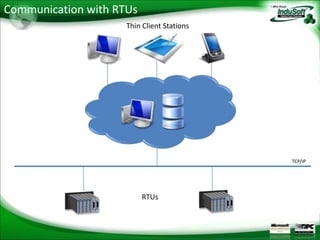
Communication with RTUs
                     Thin Client Stations


                                            TCP/IP


                          RTUs
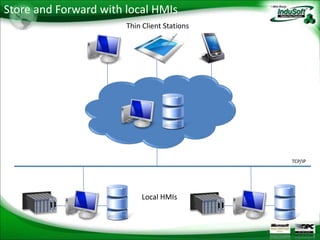
Store and Forward with local HMIs
                       Thin Client Stations


                                              TCP/IP


                           Local HMIs
Email
   (US)           info@indusoft.com
   (Brazil)       info@indusoft.com.br
   (Germany)      info@indusoft-germany.de
                                                            USA
Support           support@indusoft.com
Web site
   (English)      www.indusoft.com
   (Portuguese)   www.indusoft.com.br
   (German)       www.indusoft-germany.de         Brazil
Phone             (512) 349-0334 (US)
                  +55-11-3293-9139 (Brazil)
                  +49 (0) 6227-732510 (Germany)            Germany
Toll-Free         877-INDUSOFT (877-463-8763)
Fax               (512) 349-0375

Cloud Computing with InduSoft

  • 4.
    Cloud Computing Defined Convenient, on-demand network access to a shared pool of configurable computing resources (e.g., networks, servers, storage, applications, and services) that can be rapidly provisioned and released with minimal management effort or service provider interaction
  • 5.
    Essential Characteristics • On-demand Self-service • Broad Network Access • Resource Pooling • Rapid Elasticity • Measured Service
  • 6.
    On-demand Self-service • Unilaterally provision computing resources, as needed • Does not requiring human interaction with service provider.
  • 7.
    Broad Network Access • Capabilities are available over the network and accessed through standard mechanisms (e.g., mobile phones, tablets, laptops, and workstations).
  • 8.
    Resource Pooling • Provider’s computing resources are pooled with different physical and virtual resources dynamically assigned and reassigned according to consumer demand. • Location independence in that the consumer generally has no control or knowledge over the exact location of the provided resources, but may be able to specify location at a higher level of abstraction (e.g., country, state, or datacenter).
  • 9.
    Rapid Elasticity • Capabilities can be elastically provisioned and released, in some cases automatically, to scale rapidly outward and inward commensurate with demand. • The capabilities available for provisioning appear to be unlimited and can be provisioned in any quantity at any time.
  • 10.
    Measured Service • Pay-per-use model appropriate to the type of resource or service (e.g., storage, processing, bandwidth, and active user accounts). • Usage can be monitored, controlled, and reported, providing transparency for both the provider and consumer of the utilized service.
  • 11.
    Deployment Models • Private Cloud • Public Cloud • Hybrid Cloud
  • 12.
    Private Cloud • Provisioned for exclusive use by a single organization • May be owned, managed, and operated by the organization, a third party, or some combination of them • May exist on or off premises
  • 13.
    Public Cloud • Provisioned for open use by the general public • Owned, managed, and operated by a business, academic, or government organization, or some combination of them • Exists on the premises of the cloud provider
  • 14.
    Hybrid Cloud • Combination of Public and Private clouds • Remain unique entities, but are bound together by standardized or proprietary technology • Enables data and application portability
  • 15.
    Service Models • Infrastructure as a Service (IaaS) • Platform as a Service (PaaS) • Software as a Service (SaaS)
  • 16.
    Infrastructure as aService • Allows the consumer to deploy and run off-the-shelf software just like they would on their own IT infrastructure. • Provides on-demand provisioning of computing resources allowing a company to pay for only as much capacity as is needed, and bring more online as soon as required. • Consumer does not manage or control the underlying cloud infrastructure but has control over operating systems, storage, deployed applications, and select networking components (e.g., host firewalls). • Amazon Web Services, Rackspace Cloud Servers
  • 17.
    Platform as aService • A set of software and product development tools hosted on the provider's infrastructure that developers use to create applications over the Internet. • The consumer of the service does not manage or control the underlying cloud infrastructure, but has control over the deployed applications and application hosting environment configurations. • Used by consumers who develop their own software and desire a common off-the-shelf development and runtime platform. • Microsoft Azure, Google App Engine
  • 18.
    Software as aService • Consumer uses a provider’s applications running on a cloud infrastructure from through a thin client interface such as a web browser. • Consumer does not manage or control the underlying cloud infrastructure. • Consumer pays a fee for use of the application. • Hotmail.com, Google Apps
  • 19.
    Benefits • Economic Benefits • Better Agility • Greater Accessibility • Improved Reliability • Superior Security
  • 20.
    Economic Benefits • Instead of using capital budget to purchase machines, storage, and networking equipment, companies can expense the monthly costs of only the resources that they actually need and use. • Cloud computing provides access to almost unlimited processing power and storage. Companies can provision large data servers for online historical databases, but only pay for the actual storage that they are using. • Companies do not have to purchase redundant hardware and software licenses, or set-up disaster recovery sites that they pay for and may never use. Instead they can provision new resources on demand when and if they need them. Add in the costs that a company would otherwise incur to manage an IT infrastructure and the savings of moving to a cloud infrastructure can be huge.
  • 21.
    Better Agility • Building an IT infrastructure is usually a long term commitment and can take months to purchase, install, configure, and test. Equivalent cloud resources can be running in as little as a few minutes, and on- demand allows for trial-and-error. If some resource doesn't fit, simply stop, and start a new one that seems more appropriate. • Projects that involve significant cost, resources, and long timelines include significant risk of project failure. Projects that can be completed in a few hours with little or no financial and resource commitments include much less risk. • The faster a business can change, the faster a business can react to changing requirements. Cloud resources can immediately be scaled up or down to match.
  • 22.
    Greater Accessibility • Most companies have a single Internet provider. If that provider experiences an outage, then any users who need remote access applications are out of luck. Cloud computing providers have multiple, redundant internet connections. As long as a user has Internet access, then they have access to their applications.
  • 23.
    Improved Reliability • Redundancy and disaster recovery capabilities are built into cloud computing environments and on-demand resource capacity can be used for better resilience when facing increased service demands or distributed denial of service attacks, and for quicker recovery from serious incidents. • The backup and recovery policies and procedures of a cloud service may be superior to those of the organization and, if copies are maintained in diverse geographic locations, may be more robust. • Data maintained within a cloud can be more available, faster to restore, and more reliable in many circumstances than that maintained in a traditional data center.
  • 24.
    Superior Security • Cloud providers have dedicated staff that specialize in security, privacy, and other areas of high interest and concern to the organization. • Increases in the scale of computing induce specialization, which in turn allows security staff to shed other duties and concentrate exclusively on security issues. • The structure of cloud computing platforms is typically more uniform than that of most traditional computing centers. Greater uniformity and homogeneity facilitate platform hardening and enable better automation of security management activities like configuration control, vulnerability testing, security audits, and security patching of platform components.
  • 25.
    Challenges • System Complexity • Data Protection • Availability • Internet-facing Services • Multi-Tenancy • Loss of Control • Botnets and other threats
  • 26.
    System Complexity • A public cloud computing environment is extremely complex compared with that of a traditional data center. • Security depends not only on the correctness and effectiveness of many components, but also on the interactions among them. • The number of possible interactions between components pushes the level of complexity upward. • Complexity typically relates inversely to security, with greater complexity giving rise to vulnerabilities.
  • 27.
    Data Protection • Data stored in the cloud typically resides in a shared environment collocated with data from other customers. • Organizations moving sensitive and regulated data into the cloud, therefore, must account for the means by which access to the data is controlled and the data is kept secure.
  • 28.
    Availability • In simple terms, availability is the extent to which an organization’s full set of computational resources is accessible and usable. • Availability can be affected temporarily or permanently, and a loss can be partial or complete. • Denial of service attacks, equipment outages, and natural disasters are all threats to availability.
  • 29.
    Internet-facing Services • Applications and data that were previously accessed from the confines of an organization’s intranet, but moved to the cloud, now face increased risk from network threats that were previously defended against at the perimeter of the organization’s intranet and from new threats that target the exposed interfaces. • Requiring remote administrative access as the sole means to manage the assets of the organization held by the cloud provider also increases risk, compared with a traditional data center, where administrative access to platforms can be restricted to direct or internal connections.
  • 30.
    Multi-Tenancy •Having to share an infrastructure with unknown outside parties can be a major drawback for some applications and requires a high level of assurance for the strength of the security mechanisms used for logical separation. • Access to organizational data and resources could inadvertently be exposed to other subscribers through a configuration or software error. • An attacker could also pose as a subscriber to exploit vulnerabilities from within the cloud environment to gain unauthorized access.
  • 31.
    Loss of Control • Migrating to a public cloud requires a transfer of control to the cloud provider over information as well as system components that were previously under the organization’s direct control. • Loss of control over both the physical and logical aspects of the system and data diminishes the organization’s ability to maintain situational awareness, weigh alternatives, set priorities, and effect changes in security and privacy that are in the best interest of the organization.
  • 32.
    Botnets and otherthreats • Botnets could be used to launch a denial of service attack against the infrastructure of a cloud provider. • The possibility that a cloud service could become infiltrated by a botnet has already occurred. • In 2009, a command-and-control node was discovered operating from within one of the leading cloud providers.
  • 34.
    Communication with RTUs Thin Client Stations TCP/IP RTUs
  • 35.
    Store and Forwardwith local HMIs Thin Client Stations TCP/IP Local HMIs
  • 38.
    Email (US) info@indusoft.com (Brazil) info@indusoft.com.br (Germany) info@indusoft-germany.de USA Support support@indusoft.com Web site (English) www.indusoft.com (Portuguese) www.indusoft.com.br (German) www.indusoft-germany.de Brazil Phone (512) 349-0334 (US) +55-11-3293-9139 (Brazil) +49 (0) 6227-732510 (Germany) Germany Toll-Free 877-INDUSOFT (877-463-8763) Fax (512) 349-0375