Packages
JADHAV S. B.
Chap- 3
Chapter 3
Packages & Interfaces
S.NO. TOPIC
1 Defining, Creating and Accessing a Package
2 Importing packages
3 Differences between classes and interfaces
4 Defining an interface
5 Implementing interface
6 Applying interfaces
7 variables in interface and extending interfaces
JADHAV S. B.
Java Packages:
 Its special library where the group of similar
types of classes are stored.
 Packages are act as “containers” for classes.
 Packages are stored in hierarchical manner.
 Java packages are divided into two types
1. Java API Packages
2. User Defined Packages
JADHAV S. B.
Java API Packages:
 Java API provides a number of classes groped
into different packages according to their
functionality.
 Java API Packages are:
- lang (import java.lang.*)
- util (import java.util.*)
- io (import java.io.*)
- awt (import java.awt.*)
- net (import java.net.*)
- applet (import java.applet.*)
JADHAV S. B.
java.lang.*;
 This package contains language support
classes.
 It includes classes for
- primitive types, strings, math functions,
threads & exceptions.
Syntax to import lang package:
import java.lang.*;
JADHAV S. B.
Java.util.*;
 This is the language utility classes such as
- vectors, hash tables, random numbers, data
etc..
 Syntax to import util package:
import java.util.*;
JADHAV S. B.
Java.io.*;
 This package contains input/output support
classes.
 They provide facilities for input/output of data.
- DataInputStream, DataoutputStream,
Bufferedreader etc…
 Syntax to import io package:
import java.io.*;
JADHAV S. B.
Java.awt.*;
 This package contains the set of classes
implementing graphical user interface(GUI).
 They include classes for
- windows, buttons, lists, menus and so on..
 Syntax to import awt package:
import java.awt.*;
JADHAV S. B.
Java.net.*;
 It contains the classes for networking.
 They include classes for communication with
local computers as well as with internal servers.
 Syntax to import net package:
import java.net.*;
JADHAV S. B.
Java.applet.*;
 It contains the classes for creating and
implementing applets.
 Syntax to import applet package:
import java.applet.*;
JADHAV S. B.
User Defined Package
 As predefined packages we can create our own
packages called user defined packages.
 To create user defined package following steps
are required.
1. Declare a package
2. Define a class
3. create sub directory under main directory.
4. Store the packages into subdirectory.
5. Compile the source file.
JADHAV S. B.
User Defined Package
1. Declare a package at the beginning of the file
using the form.
 Package package_name;
‘package’ is the keyword followed by package
name.
JADHAV S. B.
User Defined Package
2. Define a class which is to be put in the package
& declare it as public.
 Syntax:
package firstpackage;
public class firstclass
{
-----------
-----------
}
JADHAV S. B.
User Defined Package
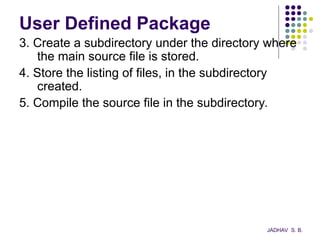
3. Create a subdirectory under the directory where
the main source file is stored.
4. Store the listing of files, in the subdirectory
created.
5. Compile the source file in the subdirectory.
JADHAV S. B.
Accessing a Package
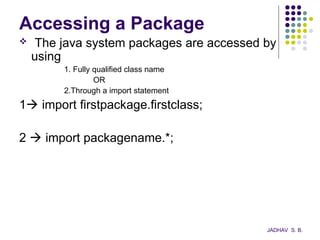
 The java system packages are accessed by
using
1. Fully qualified class name
OR
2.Through a import statement
1 import firstpackage.firstclass;
2  import packagename.*;
JADHAV S. B.
Creating a Package
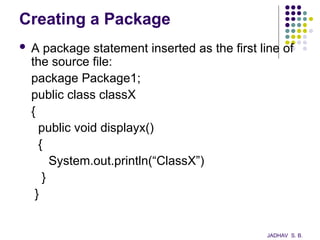
 A package statement inserted as the first line of
the source file:
package Package1;
public class classX
{
public void displayx()
{
System.out.println(“ClassX”)
}
}
JADHAV S. B.
Creating a Package
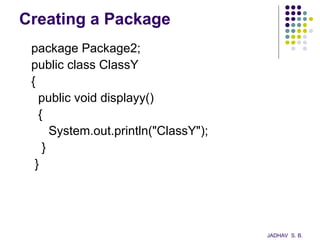
package Package2;
public class ClassY
{
public void displayy()
{
System.out.println("ClassY");
}
}
JADHAV S. B.
Creating a Package
import Package1.ClassX;
import Package2.*;
public class PackageTest
{
public static void main(String a[])
{
ClassX x=new ClassX();
ClassY y=new ClassY();
x.displayx();
y.displayy();
}
}
JADHAV S. B.
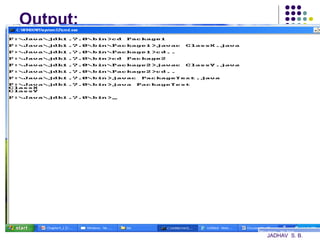
Output:
JADHAV S. B.
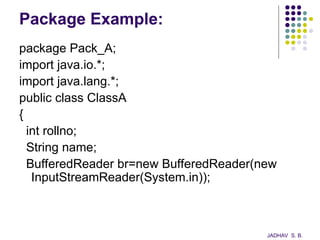
Package Example:
package Pack_A;
import java.io.*;
import java.lang.*;
public class ClassA
{
int rollno;
String name;
BufferedReader br=new BufferedReader(new
InputStreamReader(System.in));
JADHAV S. B.
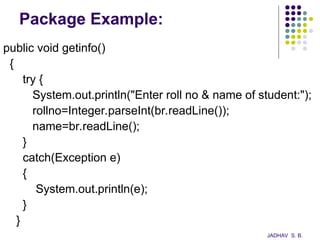
Package Example:
public void getinfo()
{
try {
System.out.println("Enter roll no & name of student:");
rollno=Integer.parseInt(br.readLine());
name=br.readLine();
}
catch(Exception e)
{
System.out.println(e);
}
}
JADHAV S. B.
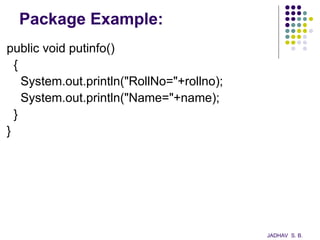
Package Example:
public void putinfo()
{
System.out.println("RollNo="+rollno);
System.out.println("Name="+name);
}
}
JADHAV S. B.
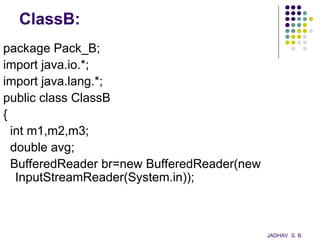
ClassB:
package Pack_B;
import java.io.*;
import java.lang.*;
public class ClassB
{
int m1,m2,m3;
double avg;
BufferedReader br=new BufferedReader(new
InputStreamReader(System.in));
JADHAV S. B.
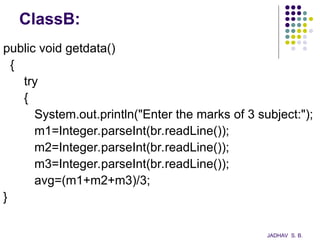
ClassB:
public void getdata()
{
try
{
System.out.println("Enter the marks of 3 subject:");
m1=Integer.parseInt(br.readLine());
m2=Integer.parseInt(br.readLine());
m3=Integer.parseInt(br.readLine());
avg=(m1+m2+m3)/3;
}
JADHAV S. B.
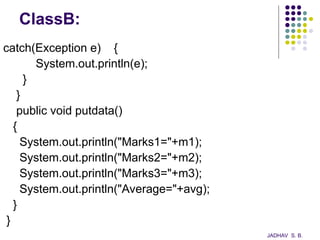
ClassB:
catch(Exception e) {
System.out.println(e);
}
}
public void putdata()
{
System.out.println("Marks1="+m1);
System.out.println("Marks2="+m2);
System.out.println("Marks3="+m3);
System.out.println("Average="+avg);
}
}
JADHAV S. B.
PackageDemo.java
import Pack_A.ClassA;
import Pack_B.*;
public class PackageDemo{
public static void main(String args[]) {
ClassA a=new ClassA();
ClassB b=new ClassB();
a.getinfo();
a.putinfo();
b.getdata();
b.putdata();
}
}
JADHAV S. B.
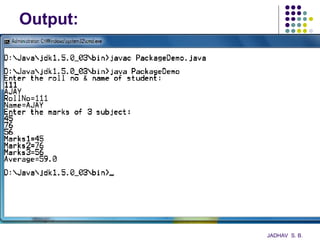
Output:
JADHAV S. B.
Importing of Packages
 Since classes within packages must be fully-
qualified with their package names, it would
be tedious to always type long dot-separated
names.
 The import statement allows to use classes
or whole packages directly.
 Importing of a concrete class:
import myPackage1.myPackage2.myClass;
 Importing of all classes within a package:
import myPackage1.myPackage2.*;
JADHAV S. B.
Import Statement
 The import statement occurs immediately after the
package statement and before the class statement:
package myPackage;
 import otherPackage1;otherPackage2.otherClass;
class myClass { … }
 The Java system accepts this import statement by
default:
import java.lang.*;
 This package includes the basic language functions.
Without such functions, Java is of no much use.
JADHAV S. B.
Introduction to java programming Packages

  • 1.
  • 2.
    Chapter 3 Packages &Interfaces S.NO. TOPIC 1 Defining, Creating and Accessing a Package 2 Importing packages 3 Differences between classes and interfaces 4 Defining an interface 5 Implementing interface 6 Applying interfaces 7 variables in interface and extending interfaces JADHAV S. B.
  • 3.
    Java Packages:  Itsspecial library where the group of similar types of classes are stored.  Packages are act as “containers” for classes.  Packages are stored in hierarchical manner.  Java packages are divided into two types 1. Java API Packages 2. User Defined Packages JADHAV S. B.
  • 4.
    Java API Packages: Java API provides a number of classes groped into different packages according to their functionality.  Java API Packages are: - lang (import java.lang.*) - util (import java.util.*) - io (import java.io.*) - awt (import java.awt.*) - net (import java.net.*) - applet (import java.applet.*) JADHAV S. B.
  • 5.
    java.lang.*;  This packagecontains language support classes.  It includes classes for - primitive types, strings, math functions, threads & exceptions. Syntax to import lang package: import java.lang.*; JADHAV S. B.
  • 6.
    Java.util.*;  This isthe language utility classes such as - vectors, hash tables, random numbers, data etc..  Syntax to import util package: import java.util.*; JADHAV S. B.
  • 7.
    Java.io.*;  This packagecontains input/output support classes.  They provide facilities for input/output of data. - DataInputStream, DataoutputStream, Bufferedreader etc…  Syntax to import io package: import java.io.*; JADHAV S. B.
  • 8.
    Java.awt.*;  This packagecontains the set of classes implementing graphical user interface(GUI).  They include classes for - windows, buttons, lists, menus and so on..  Syntax to import awt package: import java.awt.*; JADHAV S. B.
  • 9.
    Java.net.*;  It containsthe classes for networking.  They include classes for communication with local computers as well as with internal servers.  Syntax to import net package: import java.net.*; JADHAV S. B.
  • 10.
    Java.applet.*;  It containsthe classes for creating and implementing applets.  Syntax to import applet package: import java.applet.*; JADHAV S. B.
  • 11.
    User Defined Package As predefined packages we can create our own packages called user defined packages.  To create user defined package following steps are required. 1. Declare a package 2. Define a class 3. create sub directory under main directory. 4. Store the packages into subdirectory. 5. Compile the source file. JADHAV S. B.
  • 12.
    User Defined Package 1.Declare a package at the beginning of the file using the form.  Package package_name; ‘package’ is the keyword followed by package name. JADHAV S. B.
  • 13.
    User Defined Package 2.Define a class which is to be put in the package & declare it as public.  Syntax: package firstpackage; public class firstclass { ----------- ----------- } JADHAV S. B.
  • 14.
    User Defined Package 3.Create a subdirectory under the directory where the main source file is stored. 4. Store the listing of files, in the subdirectory created. 5. Compile the source file in the subdirectory. JADHAV S. B.
  • 15.
    Accessing a Package The java system packages are accessed by using 1. Fully qualified class name OR 2.Through a import statement 1 import firstpackage.firstclass; 2  import packagename.*; JADHAV S. B.
  • 16.
    Creating a Package A package statement inserted as the first line of the source file: package Package1; public class classX { public void displayx() { System.out.println(“ClassX”) } } JADHAV S. B.
  • 17.
    Creating a Package packagePackage2; public class ClassY { public void displayy() { System.out.println("ClassY"); } } JADHAV S. B.
  • 18.
    Creating a Package importPackage1.ClassX; import Package2.*; public class PackageTest { public static void main(String a[]) { ClassX x=new ClassX(); ClassY y=new ClassY(); x.displayx(); y.displayy(); } } JADHAV S. B.
  • 19.
  • 20.
    Package Example: package Pack_A; importjava.io.*; import java.lang.*; public class ClassA { int rollno; String name; BufferedReader br=new BufferedReader(new InputStreamReader(System.in)); JADHAV S. B.
  • 21.
    Package Example: public voidgetinfo() { try { System.out.println("Enter roll no & name of student:"); rollno=Integer.parseInt(br.readLine()); name=br.readLine(); } catch(Exception e) { System.out.println(e); } } JADHAV S. B.
  • 22.
    Package Example: public voidputinfo() { System.out.println("RollNo="+rollno); System.out.println("Name="+name); } } JADHAV S. B.
  • 23.
    ClassB: package Pack_B; import java.io.*; importjava.lang.*; public class ClassB { int m1,m2,m3; double avg; BufferedReader br=new BufferedReader(new InputStreamReader(System.in)); JADHAV S. B.
  • 24.
    ClassB: public void getdata() { try { System.out.println("Enterthe marks of 3 subject:"); m1=Integer.parseInt(br.readLine()); m2=Integer.parseInt(br.readLine()); m3=Integer.parseInt(br.readLine()); avg=(m1+m2+m3)/3; } JADHAV S. B.
  • 25.
    ClassB: catch(Exception e) { System.out.println(e); } } publicvoid putdata() { System.out.println("Marks1="+m1); System.out.println("Marks2="+m2); System.out.println("Marks3="+m3); System.out.println("Average="+avg); } } JADHAV S. B.
  • 26.
    PackageDemo.java import Pack_A.ClassA; import Pack_B.*; publicclass PackageDemo{ public static void main(String args[]) { ClassA a=new ClassA(); ClassB b=new ClassB(); a.getinfo(); a.putinfo(); b.getdata(); b.putdata(); } } JADHAV S. B.
  • 27.
  • 28.
    Importing of Packages Since classes within packages must be fully- qualified with their package names, it would be tedious to always type long dot-separated names.  The import statement allows to use classes or whole packages directly.  Importing of a concrete class: import myPackage1.myPackage2.myClass;  Importing of all classes within a package: import myPackage1.myPackage2.*; JADHAV S. B.
  • 29.
    Import Statement  Theimport statement occurs immediately after the package statement and before the class statement: package myPackage;  import otherPackage1;otherPackage2.otherClass; class myClass { … }  The Java system accepts this import statement by default: import java.lang.*;  This package includes the basic language functions. Without such functions, Java is of no much use. JADHAV S. B.