Cloud file systems: GFS and HDFS, BigTable, HBase and Dynamo Cloud data stores:
Datastore and Simple DB Gautam Shrauf, Cloud Storage-Overview, Cloud Storage
Providers.
Securing the Cloud- General Security Advantages of Cloud-Based Solutions, Introducing
Business Continuity and Disaster Recovery. Disaster Recovery- Understanding the Threats.
1
 Cloud computing is Internet-based computing, whereby
shared resources, software and information are provided to
computers and other devices on-demand, like the electricity
grid.
 The cloud computing is a culmination of numerous
attempts at large scale computing with seamless access to
virtually limitless resources.
◦ on-demand computing, utility computing, ubiquitous computing,
autonomic computing, platform computing, edge computing, elastic
computing, grid computing, …
 Grid computing is a computing infrastructure that
combines computer resources spread over different
geographical locations to achieve a common goal.
 All unused resources on multiple computers are pooled
together and made available for a single task.
 Organizations use grid computing to perform large tasks
or solve complex problems that are difficult to do on a
single computer.
 i.e Weather Modeling
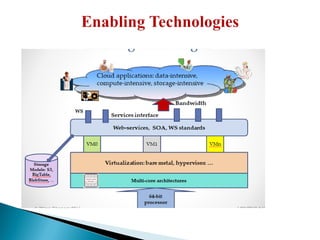
 Emerging enabling technology.
 Natural evolution of distributed systems and the Internet.
Middleware supporting network of systems to facilitate sharing,
standardization and openness.
 Infrastructure and application model dealing with sharing of
compute cycles, data, storage and other resources.
 Publicized by prominent industries as on-demand computing, utility
computing, etc. Move towards delivering “computing” to masses
similar to other utilities (electricity and voice communication).”
 Efficiency - With grid computing, you can break down an enormous,
complex task into multiple subtasks. Multiple computers can work on the
subtasks concurrently, making grid computing an efficient computational
solution.
 Cost - Grid computing works with existing hardware, which means
you can reuse existing computers.
 Flexibility - Grid computing is not constrained to a specific building or
location. You can set up a grid computing network that spans several
regions. This allows researchers in different countries to work
collaboratively with the same supercomputing power.
 Financial services - Financial institutions use grid computing
primarily to solve problems involving risk management. By
harnessing the combined computing powers in the grid, they can
shorten the duration of forecasting portfolio changes in volatile
markets.
 Gaming - The gaming industry uses grid computing to provide
additional computational resources for game developers. The grid
computing system splits large tasks, such as creating in-game
designs, and allocates them to multiple machines.
 Entertainment - Some movies have complex special effects that
require a powerful computer to create. The special effects designers
use grid computing to speed up the production timeline.
 Engineering - Engineers use grid computing to perform
simulations, create models, and analyze designs. They run
specialized applications concurrently on multiple machines to
process massive amounts of data.
 Data mining huge amounts of data collected in a wide range of domains from
astronomy to healthcare has become essential for planning and performance.
 We are in a knowledge economy.
◦ Data is an important asset to any organization
◦ Discovery of knowledge; Enabling discovery; annotation of data
◦ Complex computational models
◦ No single environment is good enough: need elastic, on-demand capacities
 We are looking at newer
◦ Programming models, and
◦ Supporting algorithms and data structures.
10
 Google Inc. developed the Google File System (GFS), a scalable
distributed file system (DFS), to meet the company’s growing
data processing needs.
 GFS offers fault tolerance, dependability, scalability, availability,
and performance to big networks and connected nodes.
 GFS is made up of a number of storage systems constructed
from inexpensive commodity hardware parts.
11
 Internet introduced a new challenge in the form web logs, web
crawler’s data: large scale “peta scale”
 This type of data has an uniquely different characteristic than
transactional or the “customer order” data : “write once read
many (WORM)” ;
• Privacy protected healthcare and patient information;
• Historical financial data;
• Other historical data
 Google exploited this characteristics in its Google file system
(GFS)
12
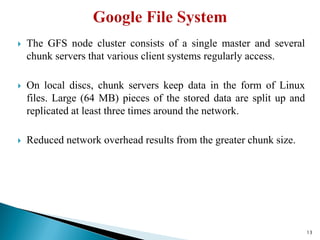
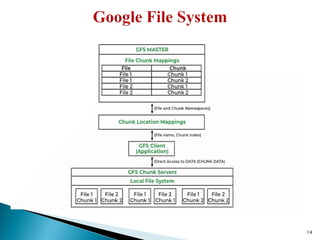
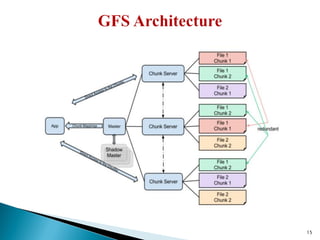
 The GFS node cluster consists of a single master and several
chunk servers that various client systems regularly access.
 On local discs, chunk servers keep data in the form of Linux
files. Large (64 MB) pieces of the stored data are split up and
replicated at least three times around the network.
 Reduced network overhead results from the greater chunk size.
13
14
15
 GFS Clients: They can be computer programs or applications
which may be used to request files.
 GFS Master Server: It serves as the cluster’s coordinator. It
preserves a record of the cluster’s actions in an operation log.
Additionally, it keeps track of the data that describes chunks, or
metadata.
 GFS Chunk Servers: They are the GFS’s workhorses. They
keep 64 MB-sized file chunks. The master server does not
receive any chunks from the chunk servers. Instead, they directly
deliver the client the desired chunks.
16
 High accessibility Data is still accessible even if a few nodes
fail. (replication) Component failures are more common than
not, as the saying goes.
 Excessive throughput. many nodes operating concurrently.
 Dependable storing. Data that has been corrupted can be found
and duplicated.
17
 Not the best fit for small files.
 Master may act as a bottleneck.
 unable to type at random.
 Suitable for procedures or data that are written once and only
read (appended) later.
18
 At Google MapReduce operation are run on a special file system
called Google File System (GFS) that is highly optimized for this
purpose.
 GFS is not open source. Doug Cutting and others at Yahoo!
reverse engineered the GFS and called it Hadoop Distributed File
System (HDFS).
 The software framework that supports HDFS, MapReduce and
other related entities is called the project Hadoop or simply
Hadoop. This is open source and distributed by Apache.
6/23/2010
Wipro Chennai 2011 19
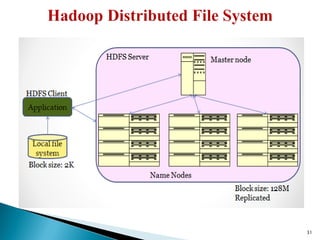
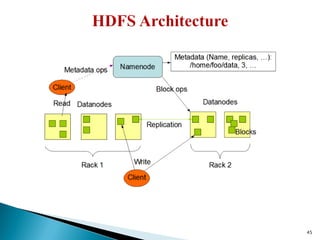
 Hadoop comes with a distributed file system called HDFS.
 In HDFS data is distributed over several machines and replicated
to ensure their durability to failure and high availability to
parallel application.
 It is cost effective as it uses commodity hardware. It involves the
concept of blocks, data nodes and node name.
20
 Very Large Files: Files should be of hundreds of megabytes,
gigabytes or more.
 Streaming Data Access: The time to read whole data set is more
important than latency in reading the first. HDFS is built on
write-once and read-many-times pattern.
 Commodity Hardware: It works on low cost hardware.
21
 Low Latency data access: Applications that require very less
time to access the first data should not use HDFS as it is giving
importance to whole data rather than time to fetch the first
record.
 Lots Of Small Files: The name node contains the metadata of
files in memory and if the files are small in size it takes a lot of
memory for name node's memory which is not feasible.
 Multiple Writes: It should not be used when we have to write
multiple times.
22
 Blocks
 Name Node
 Data Node
23
 A Block is the minimum amount of data that it can read or write.
 HDFS blocks are 128 MB by default and this is configurable.
 Files on HDFS are broken into block-sized chunks, which are
stored as independent units.
24
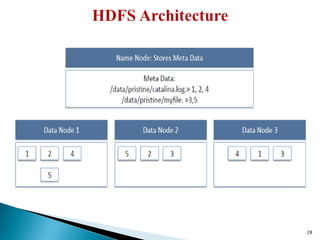
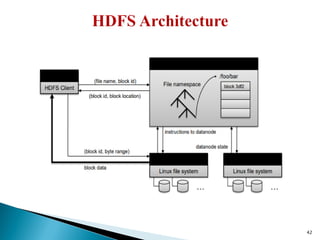
 HDFS works in master-worker pattern where the name node acts
as master.
 Name Node is controller and manager of HDFS as it knows the
status and the metadata of all the files in HDFS; the metadata
information being file permission, names and location of each
block.
 The metadata are small, so it is stored in the memory of name
node, allowing faster access to data.
25
 They store and retrieve blocks when they are told to; by client or
name node.
 They report back to name node periodically, with list of blocks
that they are storing.
 The data node being a commodity hardware also does the work
of block creation, deletion and replication as stated by the name
node.
26
27
28
29
30
31
 Failure is the norm rather than exception. A HDFS instance may
consist of thousands of server machines, each storing part of the file
system’s data.
 Since we have huge number of components and that each
component has non-trivial probability of failure means that there is
always some component that is non-functional.
 Detection of faults and quick, automatic recovery from them is a
core architectural goal of HDFS.
32
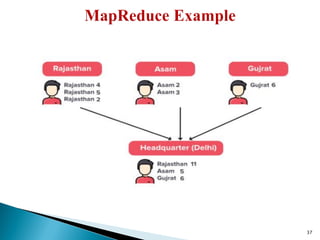
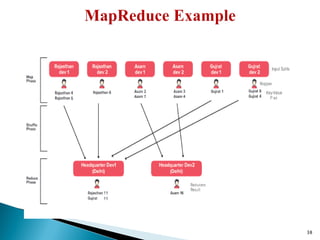
 MapReduce is a framework using which we can write applications to
process huge amounts of data, in parallel, on large clusters of
commodity hardware in a reliable manner.
 MapReduce is a processing technique and a program model for
distributed computing based on java. The MapReduce algorithm
contains two important tasks, namely Map and Reduce. Map takes a set
of data and converts it into another set of data, where individual
elements are broken down into tuples (key/value pairs). Secondly,
reduce task, which takes the output from a map as an input and
combines those data tuples into a smaller set of tuples.
33
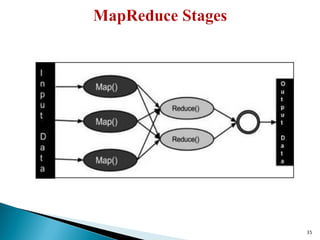
 Map stage − The map or mapper’s job is to process the input data.
Generally the input data is in the form of file or directory and is
stored in the Hadoop file system (HDFS). The input file is passed to
the mapper function line by line. The mapper processes the data and
creates small chunks of data.
 Reduce stage − This stage is the combination of the Shuffle stage
and the Reduce stage. The Reducer’s job is to process the data that
comes from the mapper. After processing, it produces a new set of
output, which will be stored in the HDFS.
34
35
36
37
38
 MapReduce is a programming model Google has used successfully
is processing its “big-data” sets (~ 20000 peta bytes per day)
◦ A map function extracts some intelligence from raw data.
◦ A reduce function aggregates according to some guides the data output
by the map.
◦ Users specify the computation in terms of a map and a reduce function,
◦ Underlying runtime system automatically parallelizes the computation
across large-scale clusters of machines, and
◦ Underlying system also handles machine failures, efficient
communications, and performance issues.
39
 A Distributed File System (that provides global file namespace) is
the answer – GFS (Google File System) for Google’s MapReduce –
HDFS (Hadoop Distributed File System) for Hadoop •
 HDFS = GFS clone (same basic ideas) • Typical usage pattern –
Huge files (100s of GB to TB) – Data is rarely updated in place –
Reads and appends are common
40
 The problem of reliability: if nodes fail, how to store data
persistently? –
 Data kept in “chunks” spread across machines – Each chunk
replicated on different machines – Seamless recovery from disk or
machine failure
41
42
 Meta-data in Memory –
◦ The entire metadata is in main memory
◦ No demand paging of meta-data
 Types of Metadata –
◦ List of files –
 List of blocks for each file –
 List of DataNodes for each block –
 File attributes, e.g creation time, replication factor
 A Transaction Log – Records file creations, file deletions. etc
43
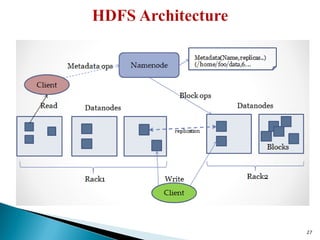
 Managing the file system namespace:
◦ Holds file/directory structure, metadata,
◦ file-toblock mapping, access permissions, etc.
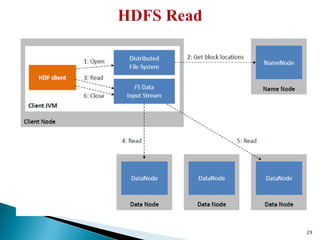
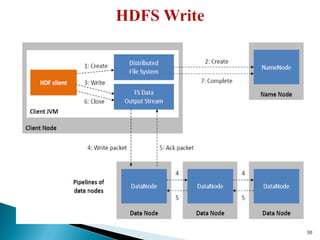
 Coordinating file operations: –
◦ Directs clients to datanodes for reads and writes
◦ No data is moved through the namenode
 Maintaining overall health: –
◦ Periodic communication with the datanodes
◦ Block re-replication and rebalancing – Garbage collection
44
45
46
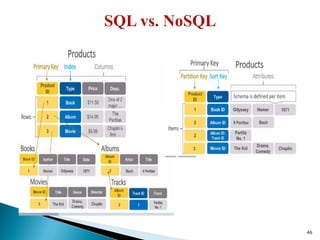
 SQL relational (Normalized) databases are optimized for storage
while NoSQL is optimized for Compute (De-normalized).
 SQL scale vertically while NoSQL scale horizontally.
47
 DynamoDB allows users to create databases capable of storing
and retrieving any amount of data and comes in handy while
serving any amount of traffic.
 It dynamically manages each customer’s requests and provides
high performance by automatically distributing data and traffic
over servers.
 It is a fully managed NoSQL database service that is fast,
predictable in terms of performance, and seamlessly scalable.
48
 Amazon DynamoDB is a fully managed NoSQL database service
that lets you offload the administrative burdens of operating and
scaling a distributed database.
 It relieves the user from the administrative burdens of operating
and scaling a distributed database as the user doesn’t have to
worry about hardware provisioning, patching Softwares, or cluster
scaling.
 It also eliminates the operational burden and complexity involved
in protecting sensitive data by providing encryption at REST.
49
 It has fast and predictable performance.
 It is highly scalable.
 It offloads the administrative burden operation and scaling.
 It offers encryption at REST for data protection.
 Its scalability is highly flexible.
 AWS Management Console can be used to monitor resource
utilization and performance metrics.
 It provides on-demand backups.
 It enables point-in-time recovery for your Amazon DynamoDB
tables.
 It can be highly automated.
50
 It has a low read capacity unit of 4kB per second and a write
capacity unit of 1KB per second.
 All tables and global secondary indexes must have a minimum of
one read and one write capacity unit.
 Table sizes have no limits, but accounts have a 256 table limit
unless you request a higher cap.
 Only Five local and five global secondary indexes per table are
permitted.
 DynamoDB does not prevent the use of reserved words as names.
 Partition key length and value minimum length sits at 1 byte, and
maximum at 2048 bytes, however, DynamoDB places no limit on
values.
51
 It uses HTTP requests and API operations while RDBMS uses a
persistent connection and SQL commands.
 It mainly requires the Primary key and no schema on the creation
and can have various data sources while RDBMS requires a well-
defined table for its operations.
 Only Primary keys are revealed. In RDBMS, All data inside the
table is accessible.
52
 In tables, it uses items made of attributes. RDBMS, uses rows
made of columns.
 It uses GetItem, Query, and Scan, RDBMS uses SELECT
statements and filtering statements.
 It uses a secondary index to achieve the same function. It requires
specifications (partition key and sort key). RDBMS Standard
Indexes created by SQL is used.
53
 Tables - Similar to other database systems, DynamoDB stores data in
tables. A table is a collection of data.
 Items - Each table contains zero or more items. An item is a group of
attributes that is uniquely identifiable among all of the other items. In
DynamoDB, there is no limit to the number of items you can store in a
table. Items are like rows in a relational database.
 Attributes - Each item is composed of one or more attributes. An
attribute is a fundamental data element, something that does not need to
be broken down any further. Attributes in DynamoDB are similar in
many ways to fields or columns in other database systems.
54
 Each item in the table has a unique identifier, or primary key, that
distinguishes the item from all of the others in the table.
 Other than the primary key, a table is schemaless, which means that
neither the attributes nor their data types need to be defined beforehand.
Each item can have its own distinct attributes.
 Most of the attributes are scalar, which means that they can have only
one value. Strings and numbers are common examples of scalars.
 Some of the items have a nested attribute (Address). DynamoDB
supports nested attributes up to 32 levels deep.
55
 Security issue in Cloud Computing :
◦ Cloud security is an evolving sub-domain of computer security,
network security, and, more broadly, information security.
◦ It refers to a broad set of policies, technologies, and controls
deployed to protect data, applications, and the associated
infrastructure of cloud computing.
 Cloud security, also known as cloud computing security, is a
collection of security measures designed to protect cloud-based
infrastructure, applications, and data.
 These measures ensure user and device authentication, data and
resource access control, and data privacy protection.
 They also support regulatory data compliance. Cloud security is
employed in cloud environments to protect a company's data from
distributed denial of service (DDoS) attacks, malware, hackers,
and unauthorized user access or use.
 Important security and privacy issues :
◦ Data Protection - To be considered protected, data from one
customer must be properly segregated from that of another.
◦ Identity Management - Every enterprise will have its own
identity management system to control access to information
and computing resources.
◦ Application Security - Cloud providers should ensure that
applications available as a service via the cloud are secure.
◦ Privacy - Providers ensure that all critical data are masked and
that only authorized users have access to data in its entirety.
 Cloud computing security or cloud security is an important
concern which refers to the act of protecting cloud environments,
data, information and applications against unauthorized access,
DDOS attacks, malwares, hackers and other similar attacks.
 Three main factors on which planning of cloud security depends.
◦ Resources that can be moved to the cloud and test its sensitivity risk are
picked.
◦ The type of cloud is to be considered.
◦ The risk in the deployment of the cloud depends on the types of cloud
and service models.
59
 Preventive Controls : Preventive controls make the system resilient to
attacks by eliminating vulnerabilities in it.
 Detective Controls : It identifies and reacts to security threats and
control. Some examples of detective control software are Intrusion
detection software and network security monitoring tools.
 Corrective Controls : In the event of a security attack these controls are
activated. They limit the damage caused by the attack.
 Deterrent/Compensatory Controls : Deterrent controls are designed to
block nefarious attacks on a cloud system. These come in handy when
there are insider attackers.
60
 Hardening - process of reducing security exposure and tightening security controls
 Security Awareness Training - process of providing formal cybersecurity
education to your workforce
 Security Guards - A person employed by a public or private party to protect an
organization’s assets.
 Change Management - The methods and manners in which a company describes
and implements change within both its internal and external processes.
 Account Disablement Policy - A policy that defines what to do with user access
accounts for employees who leave voluntarily, immediate terminations, or on a
leave of absence.
61
 Log Monitoring
 Security Information and Event Management (SIEM) Tool
 Trend Analysis
 Security Audits
 Video Surveillance
 Motion Detection
62
 Intrusion Prevention System (IPS) - A network security
technology that monitors network traffic to detect anomalies in
traffic flow. IPS security systems intercept network traffic and can
quickly prevent malicious activity by dropping packets or
resetting connections.
 Backups And System Recovery - Backups and system recovery
is the process of creating and storing copies of data that can be
used to protect organizations against data loss.
63
 Time-based One Time-Password (TOTP) - A temporary
passcode generated by an algorithm that uses the current time of
day as one of its authentication factors.
 Encryption - Database security applications, e-mail encryption
and other tools.
64
 What is fault tolerant system ?
◦ Fault-tolerance is the property that enables a system to continue
operating properly in the event of the failure of some of its
components.
◦ If its operating quality decreases at all, the decrease is proportional to
the severity of the failure, as compared to a naively-designed system
in which even a small failure can cause total breakdown.
 Four basic characteristics :
◦ No single point of failure
◦ Fault detection and isolation to the failing component
◦ Fault containment to prevent propagation of the failure
◦ Availability of reversion modes
 Single Point Of Failure (SPOF)
◦ A part of a system which, if it fails, will stop the entire
system from working.
◦ The assessment of a potentially single location of failure
identifies the critical components of a complex system that
would provoke a total systems failure in case of malfunction.
 Preventing single point of failure
◦ If a system experiences a failure, it must continue to operate
without interruption during the repair process.
 Fault Detection and Isolation (FDI)
◦ A subfield of control engineering which concerns itself with
monitoring a system, identifying when a fault has occurred and
pinpoint the type of fault and its location.
 Isolate failing component
◦ When a failure occurs, the system
must be able to isolate the failure
to the offending component.
 Fault Containment
◦ Some failure mechanisms can cause a system to fail by
propagating the failure to the rest of the system.
◦ Mechanisms that isolate a rogue transmitter or failing
component to protect the system are required.
 Available of reversion modes
◦ System should be able to maintain some check points which
can be used in managing the state changes.
 Resilience is the ability to provide and maintain an
acceptable level of service in the face of faults and
challenges to normal operation.
 Resiliency pertains to the system's ability to return to its
original state after encountering trouble.
 In other words, if a risk event knocks a system offline, a
highly resilient system will return back to work and
function as planned as soon as possible.
 Disaster Recovery - Disaster recovery is the process,
policies and procedures related to preparing for recovery or
continuation of technology infrastructure critical to an
organization after a natural or human-induced disaster.
 Some common strategies :
◦ Backup
 Make data off-site at regular interval
 Replicate data to an off-site location
 Replicate whole system
◦ Preparing
 Local mirror systems
 Surge protector
 Uninterruptible Power Supply (UPS)
 Data is one of the most valuable assets that any company can
hold. One of the best ways to store these assets is within the cloud.
However, what can you do if a disaster occurs that affects your
cloud data?
 Disaster recovery in cloud computing can be done through
measures such as a robust backup system or even by
using multiple servers in different regions to reduce the harm
that a single disaster could cause.
71
 Disaster recovery (DR) is the process that goes into preparing for
and recovering from a disaster.
 This disaster could take one of a number of forms, but they all end
up in the same result: the prevention of a system from
functioning as it normally does, preventing a business from
completing its daily objectives.
72
 Natural disasters: Natural disasters such as floods or earthquakes are
rarer but not infrequent. If a disaster strikes an area that contains a
server that hosts the cloud service you’re using, this could disrupt
services and require disaster recovery operations.
 Technical disasters: Perhaps the most obvious of the three, technical
disasters encompass anything that could go wrong with the cloud
technology. This could include power failures or a loss of network
connectivity.
 Human disasters: Human failures are a common occurrence and are
usually accidents that happen whilst using the cloud services. These
could include inadvertent misconfiguration or even malicious third-
party access to the cloud service.
73
 In the event of a disaster, a company with disaster recovery
protocols and options can minimize the disruption to their
services and reduce the overall impact on business
performance.
 Minimal service interruption means a reduced loss of revenue
which, in turn, means user dissatisfaction is also minimized.
74
 Having plans for disaster in place also means your company can
define its Recovery Time Objective (RTO) and its Recovery
Point Objective (RPO).
 The RTO is the maximum acceptable delay between the
interruption and continuation of the service and the RPO is the
maximum amount of time between data recovery points.
75
 A data centre run by OVHCloud was destroyed in early 2021 by a fire.
All four data centres had been too close, and it took over six hours for
firefighters at the scene to put out the blaze.
 In June 2016, storms in Sydney battered the electrical infrastructure and
caused an extensive power outage. This led to the failure of a number
of Elastic Compute Cloud instances and Elastic Block Store
volumes which hosted critical workloads for a number of large
companies.
 In February 2017 an Amazon employee was attempting to debug an
issue with the billing system when they accidentally took more servers
offline than they needed to.
76
 Backup and restore - Backing up data and restoring it is one of the
easiest, cheapest and fastest ways to recover from a cloud computing
disaster. This can be mainly used to mitigate regional disasters such as
natural disasters by replicating the data and storing it in a geographically
different location.
 Pilot Light – This approach is a method where your company replicates
only the minimal and core services it needs to function. This means that
only a small part of your IT structure needs to be replicated and provides
a minimally functional replacement in case of disaster
77
 Warm Standby - The warm standby approach is when a scaled down
version of your fully functional environment is available and always
running in a separate location to your main server. This means that in
the event of a disaster, your company can still run a version of the site
that is based in a different region.
 Multi-site deployment - Although the most expensive solution of the
three, multi-site deployment provides the most comprehensive solution
to regional disasters. Multi-site deployment involves running your full
workload simultaneously in multiple regions. These regions can be
actively used or on a standby in case of disaster in a different region.
78
 Data Loss
 Interference of Hackers and Insecure API’s
 User Account Hijacking
 Changing Service Provider
 Lack of Skill
 Denial of Service (DoS) attack
79
 Data Loss is one of the issues faced in Cloud Computing. This is
also known as Data Leakage.
 As we know that our sensitive data is in the hands of Somebody
else, and we don’t have full control over our database.
 So if the security of cloud service is to break by hackers then it
may be possible that hackers will get access to our sensitive data
or personal files.
80
 Easiest way to communicate with Cloud is using API. So it is
important to protect the Interface’s and API’s which are used by
an external user. But also in cloud computing, few services are
available in the public domain.
 An is the vulnerable part of Cloud Computing because it may be
possible that these services are accessed by some third parties. So
it may be possible that with the help of these services hackers can
easily hack or harm our data.
81
 Account Hijacking is the most serious security issue in Cloud
Computing.
 If somehow the Account of User or an Organization is hijacked by
Hacker. Then the hacker has full authority to perform
Unauthorized Activities.
82
 Vendor lock In is also an important Security issue in Cloud
Computing. Many organizations will face different problems
while shifting from one vendor to another.
 For example, An Organization wants to shift from AWS
Cloud to Google Cloud Services then they ace various problem’s
like shifting of all data, also both cloud services have different
techniques and functions, so they also face problems regarding
that.
83
 While working, shifting to another service provider, need an extra
feature, how to use a feature, etc. are the main problems caused in
IT Company who doesn’t have skilled Employee.
 So it requires a skilled person to work with cloud Computing.
84
 This type of attack occurs when the system receives too much
traffic.
 Mostly DoS attacks occur in large organizations such as the
banking sector, government sector, etc. When a DoS attack occurs
data is lost. So in order to recover data, it requires a great amount
of money as well as time to handle it
85
86

cloud computing notes for enginnering students

  • 1.
    Cloud file systems:GFS and HDFS, BigTable, HBase and Dynamo Cloud data stores: Datastore and Simple DB Gautam Shrauf, Cloud Storage-Overview, Cloud Storage Providers. Securing the Cloud- General Security Advantages of Cloud-Based Solutions, Introducing Business Continuity and Disaster Recovery. Disaster Recovery- Understanding the Threats. 1
  • 2.
     Cloud computingis Internet-based computing, whereby shared resources, software and information are provided to computers and other devices on-demand, like the electricity grid.  The cloud computing is a culmination of numerous attempts at large scale computing with seamless access to virtually limitless resources. ◦ on-demand computing, utility computing, ubiquitous computing, autonomic computing, platform computing, edge computing, elastic computing, grid computing, …
  • 3.
     Grid computingis a computing infrastructure that combines computer resources spread over different geographical locations to achieve a common goal.  All unused resources on multiple computers are pooled together and made available for a single task.  Organizations use grid computing to perform large tasks or solve complex problems that are difficult to do on a single computer.  i.e Weather Modeling
  • 4.
     Emerging enablingtechnology.  Natural evolution of distributed systems and the Internet. Middleware supporting network of systems to facilitate sharing, standardization and openness.  Infrastructure and application model dealing with sharing of compute cycles, data, storage and other resources.  Publicized by prominent industries as on-demand computing, utility computing, etc. Move towards delivering “computing” to masses similar to other utilities (electricity and voice communication).”
  • 5.
     Efficiency -With grid computing, you can break down an enormous, complex task into multiple subtasks. Multiple computers can work on the subtasks concurrently, making grid computing an efficient computational solution.  Cost - Grid computing works with existing hardware, which means you can reuse existing computers.  Flexibility - Grid computing is not constrained to a specific building or location. You can set up a grid computing network that spans several regions. This allows researchers in different countries to work collaboratively with the same supercomputing power.
  • 6.
     Financial services- Financial institutions use grid computing primarily to solve problems involving risk management. By harnessing the combined computing powers in the grid, they can shorten the duration of forecasting portfolio changes in volatile markets.  Gaming - The gaming industry uses grid computing to provide additional computational resources for game developers. The grid computing system splits large tasks, such as creating in-game designs, and allocates them to multiple machines.
  • 7.
     Entertainment -Some movies have complex special effects that require a powerful computer to create. The special effects designers use grid computing to speed up the production timeline.  Engineering - Engineers use grid computing to perform simulations, create models, and analyze designs. They run specialized applications concurrently on multiple machines to process massive amounts of data.
  • 10.
     Data mininghuge amounts of data collected in a wide range of domains from astronomy to healthcare has become essential for planning and performance.  We are in a knowledge economy. ◦ Data is an important asset to any organization ◦ Discovery of knowledge; Enabling discovery; annotation of data ◦ Complex computational models ◦ No single environment is good enough: need elastic, on-demand capacities  We are looking at newer ◦ Programming models, and ◦ Supporting algorithms and data structures. 10
  • 11.
     Google Inc.developed the Google File System (GFS), a scalable distributed file system (DFS), to meet the company’s growing data processing needs.  GFS offers fault tolerance, dependability, scalability, availability, and performance to big networks and connected nodes.  GFS is made up of a number of storage systems constructed from inexpensive commodity hardware parts. 11
  • 12.
     Internet introduceda new challenge in the form web logs, web crawler’s data: large scale “peta scale”  This type of data has an uniquely different characteristic than transactional or the “customer order” data : “write once read many (WORM)” ; • Privacy protected healthcare and patient information; • Historical financial data; • Other historical data  Google exploited this characteristics in its Google file system (GFS) 12
  • 13.
     The GFSnode cluster consists of a single master and several chunk servers that various client systems regularly access.  On local discs, chunk servers keep data in the form of Linux files. Large (64 MB) pieces of the stored data are split up and replicated at least three times around the network.  Reduced network overhead results from the greater chunk size. 13
  • 14.
  • 15.
  • 16.
     GFS Clients:They can be computer programs or applications which may be used to request files.  GFS Master Server: It serves as the cluster’s coordinator. It preserves a record of the cluster’s actions in an operation log. Additionally, it keeps track of the data that describes chunks, or metadata.  GFS Chunk Servers: They are the GFS’s workhorses. They keep 64 MB-sized file chunks. The master server does not receive any chunks from the chunk servers. Instead, they directly deliver the client the desired chunks. 16
  • 17.
     High accessibilityData is still accessible even if a few nodes fail. (replication) Component failures are more common than not, as the saying goes.  Excessive throughput. many nodes operating concurrently.  Dependable storing. Data that has been corrupted can be found and duplicated. 17
  • 18.
     Not thebest fit for small files.  Master may act as a bottleneck.  unable to type at random.  Suitable for procedures or data that are written once and only read (appended) later. 18
  • 19.
     At GoogleMapReduce operation are run on a special file system called Google File System (GFS) that is highly optimized for this purpose.  GFS is not open source. Doug Cutting and others at Yahoo! reverse engineered the GFS and called it Hadoop Distributed File System (HDFS).  The software framework that supports HDFS, MapReduce and other related entities is called the project Hadoop or simply Hadoop. This is open source and distributed by Apache. 6/23/2010 Wipro Chennai 2011 19
  • 20.
     Hadoop comeswith a distributed file system called HDFS.  In HDFS data is distributed over several machines and replicated to ensure their durability to failure and high availability to parallel application.  It is cost effective as it uses commodity hardware. It involves the concept of blocks, data nodes and node name. 20
  • 21.
     Very LargeFiles: Files should be of hundreds of megabytes, gigabytes or more.  Streaming Data Access: The time to read whole data set is more important than latency in reading the first. HDFS is built on write-once and read-many-times pattern.  Commodity Hardware: It works on low cost hardware. 21
  • 22.
     Low Latencydata access: Applications that require very less time to access the first data should not use HDFS as it is giving importance to whole data rather than time to fetch the first record.  Lots Of Small Files: The name node contains the metadata of files in memory and if the files are small in size it takes a lot of memory for name node's memory which is not feasible.  Multiple Writes: It should not be used when we have to write multiple times. 22
  • 23.
     Blocks  NameNode  Data Node 23
  • 24.
     A Blockis the minimum amount of data that it can read or write.  HDFS blocks are 128 MB by default and this is configurable.  Files on HDFS are broken into block-sized chunks, which are stored as independent units. 24
  • 25.
     HDFS worksin master-worker pattern where the name node acts as master.  Name Node is controller and manager of HDFS as it knows the status and the metadata of all the files in HDFS; the metadata information being file permission, names and location of each block.  The metadata are small, so it is stored in the memory of name node, allowing faster access to data. 25
  • 26.
     They storeand retrieve blocks when they are told to; by client or name node.  They report back to name node periodically, with list of blocks that they are storing.  The data node being a commodity hardware also does the work of block creation, deletion and replication as stated by the name node. 26
  • 27.
  • 28.
  • 29.
  • 30.
  • 31.
  • 32.
     Failure isthe norm rather than exception. A HDFS instance may consist of thousands of server machines, each storing part of the file system’s data.  Since we have huge number of components and that each component has non-trivial probability of failure means that there is always some component that is non-functional.  Detection of faults and quick, automatic recovery from them is a core architectural goal of HDFS. 32
  • 33.
     MapReduce isa framework using which we can write applications to process huge amounts of data, in parallel, on large clusters of commodity hardware in a reliable manner.  MapReduce is a processing technique and a program model for distributed computing based on java. The MapReduce algorithm contains two important tasks, namely Map and Reduce. Map takes a set of data and converts it into another set of data, where individual elements are broken down into tuples (key/value pairs). Secondly, reduce task, which takes the output from a map as an input and combines those data tuples into a smaller set of tuples. 33
  • 34.
     Map stage− The map or mapper’s job is to process the input data. Generally the input data is in the form of file or directory and is stored in the Hadoop file system (HDFS). The input file is passed to the mapper function line by line. The mapper processes the data and creates small chunks of data.  Reduce stage − This stage is the combination of the Shuffle stage and the Reduce stage. The Reducer’s job is to process the data that comes from the mapper. After processing, it produces a new set of output, which will be stored in the HDFS. 34
  • 35.
  • 36.
  • 37.
  • 38.
  • 39.
     MapReduce isa programming model Google has used successfully is processing its “big-data” sets (~ 20000 peta bytes per day) ◦ A map function extracts some intelligence from raw data. ◦ A reduce function aggregates according to some guides the data output by the map. ◦ Users specify the computation in terms of a map and a reduce function, ◦ Underlying runtime system automatically parallelizes the computation across large-scale clusters of machines, and ◦ Underlying system also handles machine failures, efficient communications, and performance issues. 39
  • 40.
     A DistributedFile System (that provides global file namespace) is the answer – GFS (Google File System) for Google’s MapReduce – HDFS (Hadoop Distributed File System) for Hadoop •  HDFS = GFS clone (same basic ideas) • Typical usage pattern – Huge files (100s of GB to TB) – Data is rarely updated in place – Reads and appends are common 40
  • 41.
     The problemof reliability: if nodes fail, how to store data persistently? –  Data kept in “chunks” spread across machines – Each chunk replicated on different machines – Seamless recovery from disk or machine failure 41
  • 42.
  • 43.
     Meta-data inMemory – ◦ The entire metadata is in main memory ◦ No demand paging of meta-data  Types of Metadata – ◦ List of files –  List of blocks for each file –  List of DataNodes for each block –  File attributes, e.g creation time, replication factor  A Transaction Log – Records file creations, file deletions. etc 43
  • 44.
     Managing thefile system namespace: ◦ Holds file/directory structure, metadata, ◦ file-toblock mapping, access permissions, etc.  Coordinating file operations: – ◦ Directs clients to datanodes for reads and writes ◦ No data is moved through the namenode  Maintaining overall health: – ◦ Periodic communication with the datanodes ◦ Block re-replication and rebalancing – Garbage collection 44
  • 45.
  • 46.
  • 47.
     SQL relational(Normalized) databases are optimized for storage while NoSQL is optimized for Compute (De-normalized).  SQL scale vertically while NoSQL scale horizontally. 47
  • 48.
     DynamoDB allowsusers to create databases capable of storing and retrieving any amount of data and comes in handy while serving any amount of traffic.  It dynamically manages each customer’s requests and provides high performance by automatically distributing data and traffic over servers.  It is a fully managed NoSQL database service that is fast, predictable in terms of performance, and seamlessly scalable. 48
  • 49.
     Amazon DynamoDBis a fully managed NoSQL database service that lets you offload the administrative burdens of operating and scaling a distributed database.  It relieves the user from the administrative burdens of operating and scaling a distributed database as the user doesn’t have to worry about hardware provisioning, patching Softwares, or cluster scaling.  It also eliminates the operational burden and complexity involved in protecting sensitive data by providing encryption at REST. 49
  • 50.
     It hasfast and predictable performance.  It is highly scalable.  It offloads the administrative burden operation and scaling.  It offers encryption at REST for data protection.  Its scalability is highly flexible.  AWS Management Console can be used to monitor resource utilization and performance metrics.  It provides on-demand backups.  It enables point-in-time recovery for your Amazon DynamoDB tables.  It can be highly automated. 50
  • 51.
     It hasa low read capacity unit of 4kB per second and a write capacity unit of 1KB per second.  All tables and global secondary indexes must have a minimum of one read and one write capacity unit.  Table sizes have no limits, but accounts have a 256 table limit unless you request a higher cap.  Only Five local and five global secondary indexes per table are permitted.  DynamoDB does not prevent the use of reserved words as names.  Partition key length and value minimum length sits at 1 byte, and maximum at 2048 bytes, however, DynamoDB places no limit on values. 51
  • 52.
     It usesHTTP requests and API operations while RDBMS uses a persistent connection and SQL commands.  It mainly requires the Primary key and no schema on the creation and can have various data sources while RDBMS requires a well- defined table for its operations.  Only Primary keys are revealed. In RDBMS, All data inside the table is accessible. 52
  • 53.
     In tables,it uses items made of attributes. RDBMS, uses rows made of columns.  It uses GetItem, Query, and Scan, RDBMS uses SELECT statements and filtering statements.  It uses a secondary index to achieve the same function. It requires specifications (partition key and sort key). RDBMS Standard Indexes created by SQL is used. 53
  • 54.
     Tables -Similar to other database systems, DynamoDB stores data in tables. A table is a collection of data.  Items - Each table contains zero or more items. An item is a group of attributes that is uniquely identifiable among all of the other items. In DynamoDB, there is no limit to the number of items you can store in a table. Items are like rows in a relational database.  Attributes - Each item is composed of one or more attributes. An attribute is a fundamental data element, something that does not need to be broken down any further. Attributes in DynamoDB are similar in many ways to fields or columns in other database systems. 54
  • 55.
     Each itemin the table has a unique identifier, or primary key, that distinguishes the item from all of the others in the table.  Other than the primary key, a table is schemaless, which means that neither the attributes nor their data types need to be defined beforehand. Each item can have its own distinct attributes.  Most of the attributes are scalar, which means that they can have only one value. Strings and numbers are common examples of scalars.  Some of the items have a nested attribute (Address). DynamoDB supports nested attributes up to 32 levels deep. 55
  • 56.
     Security issuein Cloud Computing : ◦ Cloud security is an evolving sub-domain of computer security, network security, and, more broadly, information security. ◦ It refers to a broad set of policies, technologies, and controls deployed to protect data, applications, and the associated infrastructure of cloud computing.
  • 57.
     Cloud security,also known as cloud computing security, is a collection of security measures designed to protect cloud-based infrastructure, applications, and data.  These measures ensure user and device authentication, data and resource access control, and data privacy protection.  They also support regulatory data compliance. Cloud security is employed in cloud environments to protect a company's data from distributed denial of service (DDoS) attacks, malware, hackers, and unauthorized user access or use.
  • 58.
     Important securityand privacy issues : ◦ Data Protection - To be considered protected, data from one customer must be properly segregated from that of another. ◦ Identity Management - Every enterprise will have its own identity management system to control access to information and computing resources. ◦ Application Security - Cloud providers should ensure that applications available as a service via the cloud are secure. ◦ Privacy - Providers ensure that all critical data are masked and that only authorized users have access to data in its entirety.
  • 59.
     Cloud computingsecurity or cloud security is an important concern which refers to the act of protecting cloud environments, data, information and applications against unauthorized access, DDOS attacks, malwares, hackers and other similar attacks.  Three main factors on which planning of cloud security depends. ◦ Resources that can be moved to the cloud and test its sensitivity risk are picked. ◦ The type of cloud is to be considered. ◦ The risk in the deployment of the cloud depends on the types of cloud and service models. 59
  • 60.
     Preventive Controls: Preventive controls make the system resilient to attacks by eliminating vulnerabilities in it.  Detective Controls : It identifies and reacts to security threats and control. Some examples of detective control software are Intrusion detection software and network security monitoring tools.  Corrective Controls : In the event of a security attack these controls are activated. They limit the damage caused by the attack.  Deterrent/Compensatory Controls : Deterrent controls are designed to block nefarious attacks on a cloud system. These come in handy when there are insider attackers. 60
  • 61.
     Hardening -process of reducing security exposure and tightening security controls  Security Awareness Training - process of providing formal cybersecurity education to your workforce  Security Guards - A person employed by a public or private party to protect an organization’s assets.  Change Management - The methods and manners in which a company describes and implements change within both its internal and external processes.  Account Disablement Policy - A policy that defines what to do with user access accounts for employees who leave voluntarily, immediate terminations, or on a leave of absence. 61
  • 62.
     Log Monitoring Security Information and Event Management (SIEM) Tool  Trend Analysis  Security Audits  Video Surveillance  Motion Detection 62
  • 63.
     Intrusion PreventionSystem (IPS) - A network security technology that monitors network traffic to detect anomalies in traffic flow. IPS security systems intercept network traffic and can quickly prevent malicious activity by dropping packets or resetting connections.  Backups And System Recovery - Backups and system recovery is the process of creating and storing copies of data that can be used to protect organizations against data loss. 63
  • 64.
     Time-based OneTime-Password (TOTP) - A temporary passcode generated by an algorithm that uses the current time of day as one of its authentication factors.  Encryption - Database security applications, e-mail encryption and other tools. 64
  • 65.
     What isfault tolerant system ? ◦ Fault-tolerance is the property that enables a system to continue operating properly in the event of the failure of some of its components. ◦ If its operating quality decreases at all, the decrease is proportional to the severity of the failure, as compared to a naively-designed system in which even a small failure can cause total breakdown.  Four basic characteristics : ◦ No single point of failure ◦ Fault detection and isolation to the failing component ◦ Fault containment to prevent propagation of the failure ◦ Availability of reversion modes
  • 66.
     Single PointOf Failure (SPOF) ◦ A part of a system which, if it fails, will stop the entire system from working. ◦ The assessment of a potentially single location of failure identifies the critical components of a complex system that would provoke a total systems failure in case of malfunction.  Preventing single point of failure ◦ If a system experiences a failure, it must continue to operate without interruption during the repair process.
  • 67.
     Fault Detectionand Isolation (FDI) ◦ A subfield of control engineering which concerns itself with monitoring a system, identifying when a fault has occurred and pinpoint the type of fault and its location.  Isolate failing component ◦ When a failure occurs, the system must be able to isolate the failure to the offending component.
  • 68.
     Fault Containment ◦Some failure mechanisms can cause a system to fail by propagating the failure to the rest of the system. ◦ Mechanisms that isolate a rogue transmitter or failing component to protect the system are required.  Available of reversion modes ◦ System should be able to maintain some check points which can be used in managing the state changes.
  • 69.
     Resilience isthe ability to provide and maintain an acceptable level of service in the face of faults and challenges to normal operation.  Resiliency pertains to the system's ability to return to its original state after encountering trouble.  In other words, if a risk event knocks a system offline, a highly resilient system will return back to work and function as planned as soon as possible.
  • 70.
     Disaster Recovery- Disaster recovery is the process, policies and procedures related to preparing for recovery or continuation of technology infrastructure critical to an organization after a natural or human-induced disaster.  Some common strategies : ◦ Backup  Make data off-site at regular interval  Replicate data to an off-site location  Replicate whole system ◦ Preparing  Local mirror systems  Surge protector  Uninterruptible Power Supply (UPS)
  • 71.
     Data isone of the most valuable assets that any company can hold. One of the best ways to store these assets is within the cloud. However, what can you do if a disaster occurs that affects your cloud data?  Disaster recovery in cloud computing can be done through measures such as a robust backup system or even by using multiple servers in different regions to reduce the harm that a single disaster could cause. 71
  • 72.
     Disaster recovery(DR) is the process that goes into preparing for and recovering from a disaster.  This disaster could take one of a number of forms, but they all end up in the same result: the prevention of a system from functioning as it normally does, preventing a business from completing its daily objectives. 72
  • 73.
     Natural disasters:Natural disasters such as floods or earthquakes are rarer but not infrequent. If a disaster strikes an area that contains a server that hosts the cloud service you’re using, this could disrupt services and require disaster recovery operations.  Technical disasters: Perhaps the most obvious of the three, technical disasters encompass anything that could go wrong with the cloud technology. This could include power failures or a loss of network connectivity.  Human disasters: Human failures are a common occurrence and are usually accidents that happen whilst using the cloud services. These could include inadvertent misconfiguration or even malicious third- party access to the cloud service. 73
  • 74.
     In theevent of a disaster, a company with disaster recovery protocols and options can minimize the disruption to their services and reduce the overall impact on business performance.  Minimal service interruption means a reduced loss of revenue which, in turn, means user dissatisfaction is also minimized. 74
  • 75.
     Having plansfor disaster in place also means your company can define its Recovery Time Objective (RTO) and its Recovery Point Objective (RPO).  The RTO is the maximum acceptable delay between the interruption and continuation of the service and the RPO is the maximum amount of time between data recovery points. 75
  • 76.
     A datacentre run by OVHCloud was destroyed in early 2021 by a fire. All four data centres had been too close, and it took over six hours for firefighters at the scene to put out the blaze.  In June 2016, storms in Sydney battered the electrical infrastructure and caused an extensive power outage. This led to the failure of a number of Elastic Compute Cloud instances and Elastic Block Store volumes which hosted critical workloads for a number of large companies.  In February 2017 an Amazon employee was attempting to debug an issue with the billing system when they accidentally took more servers offline than they needed to. 76
  • 77.
     Backup andrestore - Backing up data and restoring it is one of the easiest, cheapest and fastest ways to recover from a cloud computing disaster. This can be mainly used to mitigate regional disasters such as natural disasters by replicating the data and storing it in a geographically different location.  Pilot Light – This approach is a method where your company replicates only the minimal and core services it needs to function. This means that only a small part of your IT structure needs to be replicated and provides a minimally functional replacement in case of disaster 77
  • 78.
     Warm Standby- The warm standby approach is when a scaled down version of your fully functional environment is available and always running in a separate location to your main server. This means that in the event of a disaster, your company can still run a version of the site that is based in a different region.  Multi-site deployment - Although the most expensive solution of the three, multi-site deployment provides the most comprehensive solution to regional disasters. Multi-site deployment involves running your full workload simultaneously in multiple regions. These regions can be actively used or on a standby in case of disaster in a different region. 78
  • 79.
     Data Loss Interference of Hackers and Insecure API’s  User Account Hijacking  Changing Service Provider  Lack of Skill  Denial of Service (DoS) attack 79
  • 80.
     Data Lossis one of the issues faced in Cloud Computing. This is also known as Data Leakage.  As we know that our sensitive data is in the hands of Somebody else, and we don’t have full control over our database.  So if the security of cloud service is to break by hackers then it may be possible that hackers will get access to our sensitive data or personal files. 80
  • 81.
     Easiest wayto communicate with Cloud is using API. So it is important to protect the Interface’s and API’s which are used by an external user. But also in cloud computing, few services are available in the public domain.  An is the vulnerable part of Cloud Computing because it may be possible that these services are accessed by some third parties. So it may be possible that with the help of these services hackers can easily hack or harm our data. 81
  • 82.
     Account Hijackingis the most serious security issue in Cloud Computing.  If somehow the Account of User or an Organization is hijacked by Hacker. Then the hacker has full authority to perform Unauthorized Activities. 82
  • 83.
     Vendor lockIn is also an important Security issue in Cloud Computing. Many organizations will face different problems while shifting from one vendor to another.  For example, An Organization wants to shift from AWS Cloud to Google Cloud Services then they ace various problem’s like shifting of all data, also both cloud services have different techniques and functions, so they also face problems regarding that. 83
  • 84.
     While working,shifting to another service provider, need an extra feature, how to use a feature, etc. are the main problems caused in IT Company who doesn’t have skilled Employee.  So it requires a skilled person to work with cloud Computing. 84
  • 85.
     This typeof attack occurs when the system receives too much traffic.  Mostly DoS attacks occur in large organizations such as the banking sector, government sector, etc. When a DoS attack occurs data is lost. So in order to recover data, it requires a great amount of money as well as time to handle it 85
  • 86.