Cloud Computing
CLOUD COMPUTING
Cloud computing is a model for enabling convenient, on-demand network
access to a shared pool of configurable computing resources (e.g., networks,
servers, storage, applications, and services) that can be rapidly provisioned
and released with minimal management effort or service provider
interaction.
Cloud computing provides computation, software, data access, and storage
services that do not require end-user knowledge of the physical location and
configuration of the system that delivers the services.
Cloud computing providers deliver applications via the internet, which are
accessed from a web browser, while the business software and data are store
on servers at a remote location.
Delivery Models
Cloud software as a service (SaaS) :
Use the provider’s applications running on a cloud
infrastructure. Software running on a cloud infrastructure.
The applications are accessible from various client devices
through a thin client interface such as a web browser.
• Cloud platform as a service (PaaS) : User-created
applications running on a cloud infrastructure.
• Cloud Infrastructure as a service (IaaS)
Processing, storage, networks, and other fundamental
computing resources running on cloud infrastructure
Deployment Methods
• Private cloud (Internal Cloud) : The cloud infrastructure
is operated solely for a single organization.
• Public Cloud : The cloud infrastructure is made available to the general public
or a large industry group and is owned by an organization selling cloud services.
• Community Cloud : The cloud infrastructure is shared by several
organizations and supports a specific community that has shared concerns. It may be
managed by the organizations or a third party and may exist on-premises or off-
premises.
• Hybrid Cloud : The cloud infrastructure is a composition of two or more
clouds (private, community, or public) that remain unique entities but are bound
together by standardized or proprietary technology that enables data and
application portability.
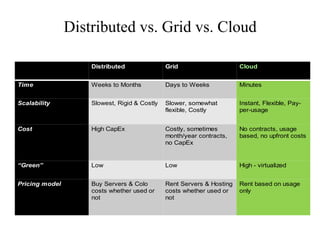
Distributed vs. Grid vs. Cloud
Rent based on usage
only
Rent Servers & Hosting
costs whether used or
not
Buy Servers & Colo
costs whether used or
not
Pricing model
High - virtualizedLowLow“Green”
No contracts, usage
based, no upfront costs
Costly, sometimes
month/year contracts,
no CapEx
High CapExCost
Instant, Flexible, Pay-
per-usage
Slower, somewhat
flexible, Costly
Slowest, Rigid & CostlyScalability
MinutesDays to WeeksWeeks to MonthsTime
CloudGridDistributed
Advantages
1 .Flexibility
2. Disaster recovery
3. Automatic software updates
4. Cap-Ex Free
5. Increased collaboration
6. Work from anywhere
7. Document control
8. Security
9. Competitiveness
10. Environmentally friendly
• Cloud Servers and Network Hardware are
much Higher Quality:
Cloud solution providers cannot afford
equipment failure, so very high quality
equipment is used and all of it is highly
redundant within the data center.
• No expenditures on expensive hardware :
Cloud solutions do not require the outright
purchase of server hardware, network
storage, backup systems, disaster recovery
systems, power or cooling systems, data
center or utility costs. When a business moves
to a cloud environment they eliminate the
need for servers and the physical space
needed to house those servers.
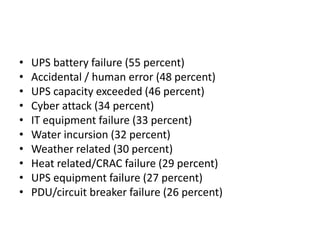
• UPS battery failure (55 percent)
• Accidental / human error (48 percent)
• UPS capacity exceeded (46 percent)
• Cyber attack (34 percent)
• IT equipment failure (33 percent)
• Water incursion (32 percent)
• Weather related (30 percent)
• Heat related/CRAC failure (29 percent)
• UPS equipment failure (27 percent)
• PDU/circuit breaker failure (26 percent)
• No need for the Upfront Capital Expense of
Infrastructure Software – Cloud computing
eliminates the need for the upfront capital
requirement of purchasing software like
Windows Server, SQL Server, Application and
Database Servers, Client Access Licenses,
Middleware, SharePoint, Citrix Server and
client licenses … etc. These costs are paid in
the monthly fees for the cloud environment
and support.
• Fewer Expensive Software Upgrades – Many
software manufacturers are including free
software upgrades for applications that are
hosted in the cloud and are paid as a
subscription within the monthly cloud
environment fees. This means no expensive
software upgrades and none of the
interruption that software upgrades create in
businesses.
Shining Examples of Cloud Computing
in Action
• 1. Through cloud cost flexibility, online
marketplace gains access to more powerful
analytics online
• 2. Greater business scalability enables online
video retailer to meet spikes in demand.
• 3. Greater market adaptability provides
online entertainment platform the ability to
reach any type of customer device
• 4. Masked complexity enables access to
services, no matter how intricate the
technology they’re built on
Issues over Cloud Computing
Cross Border Legal Issues
• Cloud Cloud inherently being stateless
and serves located in different locations
and countries creates issues related to
conflict of laws, applicable law and
jurisdiction.
• Cross-border data flow, potentially
conflicting regulations, applicable
regulations
Privacy and Security
• Multi-tenant architecture
• Data from different user are usually stored on
a single virtual
server
• Multiple virtual servers run on a single physical
server
• Data security depends upon the integrity of
the virtualization
IPR and Ownership Issues
• Trade Secret Protection. As third parties
might have access to data, which can be
detrimental to trade secrets of a company.
• Companies should have non-disclosure
agreements with the vendor.
• Ensure that no rights in IPR are transferred
to the vendor.
Hacking of cloud vendor
In the event that cloud vendor system is
hacked, does the owner of the data has the
right to move against the vendor for
claiming lost profits.
Legal and practical liability for
force majeure events
• What happens to the owner’s data in case
of a disaster? How much is the vendor
liable for the recovery and restoration of
the data?
• What are the back-up mechanisms for
recovery of the data?
Jurisdictional Issues
• In cloud services location of data is usually uncertain. The owner of data is not
aware of the country where the data is stored. The physical location of the data
raises the question of law to be governed and jurisdiction. Its important to be
aware of the prevailing law in that particular nation.
• What if a dispute arises, what will be the place of jurisdiction. The owner of the data
should be aware of the country’s court system which will govern the conflict arose
between the parties.
• For eg. The owner is based at India and cloud service provider is based in the US.
The vendor would prefer jurisdiction of American Court. But can the owner afford
to contest the matter in American court.
Risk
allocation/mitigation/insurance
• No vendor offers a 100% guarantee. The
most trusted vendor can also fail.
• Replication of data should be done and
application should be available at multiple
sites.
Top Cloud Service
providers
1. Amazon
• There's no question who the most important
cloud player is: Amazon. Amazon basically
invented the IaaS market
Amazon's cloud offers a huge array of choices. It
does everything from provide a bit of cloud
storage for a few pennies a month to renting
supercomputer-strength power for $5,000 an
hour.
2. VMware
• It offered software called vCloud for building
clouds.
• It is one of the biggest players in the cloud
software market, competing against a tech
called OpenStack (run by a consortium of
vendors, including IBM, Rackspace, HP) and
Citrix.
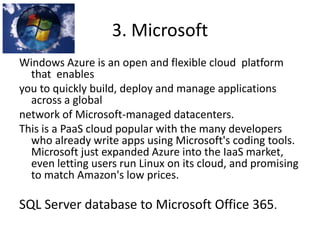
3. Microsoft
Windows Azure is an open and flexible cloud platform
that enables
you to quickly build, deploy and manage applications
across a global
network of Microsoft-managed datacenters.
This is a PaaS cloud popular with the many developers
who already write apps using Microsoft's coding tools.
Microsoft just expanded Azure into the IaaS market,
even letting users run Linux on its cloud, and promising
to match Amazon's low prices.
SQL Server database to Microsoft Office 365.
4. SalesForce.com
• The name Salesforce.com is almost
synonymous with cloud computing.
Salesforce.com proved that the world wants
to buy software-as-a-service.
• In 2012, Salesforce pushed into a bunch of
new areas, spending more than $1 billion to
acquire Radian6(social media engagement
software)
Some Service providers for
SaaS – Software as a Service
Some Service providers for
DaaS – Data as a Service
Some Service providers for
PaaS– Platform as a Service
Some Service providers for
IaaS – Infrastructure as a Service
Some Service providers for
NaaS – Network as a Service
examples
• Government can take advantage of cloud computing is
India’s Unique Identification (UID) project. The UID aims to
provide a positive change to the lives of the people at the
bottom rung of the economic pyramid simply by providing
a real time service for the verification of the identity of any
Indian resident through biometrics or demographic
information. The UID’s advantage is that it’s a generalized
online service that is accessible by a wide variety of
national, state, and local government authorized agencies
as well as private businesses. The previous e-governance
systems were limited in comparison, having been
dependent on individual ministries and lacked
standardization.
• India’s UID Authority has already collected the biometric
and demographic information from over 200M people,
• 1. By 2015, end-user spending on cloud services could be more than $180
billion
• .
2. It is predicted that the global market for cloud equipment will reach
$79.1 billion by 2018
• .
• 3. If given the choice of only being able to move one application to the
cloud, 25% of respondents would choose storage
• .
• 4. By 2014, businesses in the United States will spend more than $13
billion on cloud computing and managed hosting services
• .
• 5. Throughout the next five years, a 44% annual growth in workloads for
the public cloud versus an 8.9% growth for “on-premise” computing
workloads is expected
• 6. 82% of companies reportedly saved money by moving to the
cloud
• .
• 7. More than 60% of businesses utilize cloud for performing IT-
related operations
• .
• 8. 14% of companies downsized their IT after cloud adoption
• .
• 9. 80% of cloud adopters saw improvements within 6 months of
moving to the cloud
• .
• 10. 32% of Americans believe cloud computing is a thing of the
future
• 11. There’s an estimated 1 Exabyte (1 000 000 000 000 000 000
bytes).of data stored in the cloud
• .
• 12. More than half of survey respondents say their organization currently
transfers sensitive or confidential data to the cloud
• .
• 13. Cisco forecasts that global data center traffic will triple from 2.6
zettabytes in 2012 to 7.7 zettabytes annually in 2017, representing a 25
percent CAGR
• .
• 14. Global data center traffic will grow threefold (a 25 percent CAGR) from
2012 to 2017, while global cloud traffic will grow 4.5-fold (a 35 percent
CAGR) over the same period
• .
• 15. From 2012 to 2017, data center workloads will grow 2.3-fold; cloud
workloads will grow 3.7-fold
• 16. 2014 is the first year the majority of workloads will be on the
cloud as 51% will be processed in the cloud versus 49% in the
traditional IT space
• .
• 17. 545 cloud services are in use by an organization on average
• .
• 18. 56% of survey respondents trust the ability of cloud providers to
protect the sensitive and confidential data entrusted to them
• .
• 19. 59% of all new spending on cloud computing services originates
from North American enterprises, a trend projected to accelerate
through 2016
• .

Cloud Computing in Business and facts

  • 1.
  • 2.
    CLOUD COMPUTING Cloud computingis a model for enabling convenient, on-demand network access to a shared pool of configurable computing resources (e.g., networks, servers, storage, applications, and services) that can be rapidly provisioned and released with minimal management effort or service provider interaction. Cloud computing provides computation, software, data access, and storage services that do not require end-user knowledge of the physical location and configuration of the system that delivers the services. Cloud computing providers deliver applications via the internet, which are accessed from a web browser, while the business software and data are store on servers at a remote location.
  • 3.
    Delivery Models Cloud softwareas a service (SaaS) : Use the provider’s applications running on a cloud infrastructure. Software running on a cloud infrastructure. The applications are accessible from various client devices through a thin client interface such as a web browser. • Cloud platform as a service (PaaS) : User-created applications running on a cloud infrastructure. • Cloud Infrastructure as a service (IaaS) Processing, storage, networks, and other fundamental computing resources running on cloud infrastructure
  • 6.
    Deployment Methods • Privatecloud (Internal Cloud) : The cloud infrastructure is operated solely for a single organization. • Public Cloud : The cloud infrastructure is made available to the general public or a large industry group and is owned by an organization selling cloud services. • Community Cloud : The cloud infrastructure is shared by several organizations and supports a specific community that has shared concerns. It may be managed by the organizations or a third party and may exist on-premises or off- premises. • Hybrid Cloud : The cloud infrastructure is a composition of two or more clouds (private, community, or public) that remain unique entities but are bound together by standardized or proprietary technology that enables data and application portability.
  • 8.
    Distributed vs. Gridvs. Cloud Rent based on usage only Rent Servers & Hosting costs whether used or not Buy Servers & Colo costs whether used or not Pricing model High - virtualizedLowLow“Green” No contracts, usage based, no upfront costs Costly, sometimes month/year contracts, no CapEx High CapExCost Instant, Flexible, Pay- per-usage Slower, somewhat flexible, Costly Slowest, Rigid & CostlyScalability MinutesDays to WeeksWeeks to MonthsTime CloudGridDistributed
  • 9.
    Advantages 1 .Flexibility 2. Disasterrecovery 3. Automatic software updates 4. Cap-Ex Free 5. Increased collaboration 6. Work from anywhere 7. Document control 8. Security 9. Competitiveness 10. Environmentally friendly
  • 10.
    • Cloud Serversand Network Hardware are much Higher Quality: Cloud solution providers cannot afford equipment failure, so very high quality equipment is used and all of it is highly redundant within the data center.
  • 11.
    • No expenditureson expensive hardware : Cloud solutions do not require the outright purchase of server hardware, network storage, backup systems, disaster recovery systems, power or cooling systems, data center or utility costs. When a business moves to a cloud environment they eliminate the need for servers and the physical space needed to house those servers.
  • 12.
    • UPS batteryfailure (55 percent) • Accidental / human error (48 percent) • UPS capacity exceeded (46 percent) • Cyber attack (34 percent) • IT equipment failure (33 percent) • Water incursion (32 percent) • Weather related (30 percent) • Heat related/CRAC failure (29 percent) • UPS equipment failure (27 percent) • PDU/circuit breaker failure (26 percent)
  • 13.
    • No needfor the Upfront Capital Expense of Infrastructure Software – Cloud computing eliminates the need for the upfront capital requirement of purchasing software like Windows Server, SQL Server, Application and Database Servers, Client Access Licenses, Middleware, SharePoint, Citrix Server and client licenses … etc. These costs are paid in the monthly fees for the cloud environment and support.
  • 14.
    • Fewer ExpensiveSoftware Upgrades – Many software manufacturers are including free software upgrades for applications that are hosted in the cloud and are paid as a subscription within the monthly cloud environment fees. This means no expensive software upgrades and none of the interruption that software upgrades create in businesses.
  • 15.
    Shining Examples ofCloud Computing in Action • 1. Through cloud cost flexibility, online marketplace gains access to more powerful analytics online • 2. Greater business scalability enables online video retailer to meet spikes in demand. • 3. Greater market adaptability provides online entertainment platform the ability to reach any type of customer device
  • 16.
    • 4. Maskedcomplexity enables access to services, no matter how intricate the technology they’re built on
  • 17.
  • 18.
    Cross Border LegalIssues • Cloud Cloud inherently being stateless and serves located in different locations and countries creates issues related to conflict of laws, applicable law and jurisdiction. • Cross-border data flow, potentially conflicting regulations, applicable regulations
  • 19.
    Privacy and Security •Multi-tenant architecture • Data from different user are usually stored on a single virtual server • Multiple virtual servers run on a single physical server • Data security depends upon the integrity of the virtualization
  • 20.
    IPR and OwnershipIssues • Trade Secret Protection. As third parties might have access to data, which can be detrimental to trade secrets of a company. • Companies should have non-disclosure agreements with the vendor. • Ensure that no rights in IPR are transferred to the vendor.
  • 21.
    Hacking of cloudvendor In the event that cloud vendor system is hacked, does the owner of the data has the right to move against the vendor for claiming lost profits.
  • 22.
    Legal and practicalliability for force majeure events • What happens to the owner’s data in case of a disaster? How much is the vendor liable for the recovery and restoration of the data? • What are the back-up mechanisms for recovery of the data?
  • 23.
    Jurisdictional Issues • Incloud services location of data is usually uncertain. The owner of data is not aware of the country where the data is stored. The physical location of the data raises the question of law to be governed and jurisdiction. Its important to be aware of the prevailing law in that particular nation. • What if a dispute arises, what will be the place of jurisdiction. The owner of the data should be aware of the country’s court system which will govern the conflict arose between the parties. • For eg. The owner is based at India and cloud service provider is based in the US. The vendor would prefer jurisdiction of American Court. But can the owner afford to contest the matter in American court.
  • 24.
    Risk allocation/mitigation/insurance • No vendoroffers a 100% guarantee. The most trusted vendor can also fail. • Replication of data should be done and application should be available at multiple sites.
  • 25.
  • 26.
    1. Amazon • There'sno question who the most important cloud player is: Amazon. Amazon basically invented the IaaS market Amazon's cloud offers a huge array of choices. It does everything from provide a bit of cloud storage for a few pennies a month to renting supercomputer-strength power for $5,000 an hour.
  • 27.
    2. VMware • Itoffered software called vCloud for building clouds. • It is one of the biggest players in the cloud software market, competing against a tech called OpenStack (run by a consortium of vendors, including IBM, Rackspace, HP) and Citrix.
  • 28.
    3. Microsoft Windows Azureis an open and flexible cloud platform that enables you to quickly build, deploy and manage applications across a global network of Microsoft-managed datacenters. This is a PaaS cloud popular with the many developers who already write apps using Microsoft's coding tools. Microsoft just expanded Azure into the IaaS market, even letting users run Linux on its cloud, and promising to match Amazon's low prices. SQL Server database to Microsoft Office 365.
  • 29.
    4. SalesForce.com • Thename Salesforce.com is almost synonymous with cloud computing. Salesforce.com proved that the world wants to buy software-as-a-service. • In 2012, Salesforce pushed into a bunch of new areas, spending more than $1 billion to acquire Radian6(social media engagement software)
  • 33.
    Some Service providersfor SaaS – Software as a Service
  • 34.
    Some Service providersfor DaaS – Data as a Service
  • 35.
    Some Service providersfor PaaS– Platform as a Service
  • 36.
    Some Service providersfor IaaS – Infrastructure as a Service
  • 37.
    Some Service providersfor NaaS – Network as a Service
  • 38.
    examples • Government cantake advantage of cloud computing is India’s Unique Identification (UID) project. The UID aims to provide a positive change to the lives of the people at the bottom rung of the economic pyramid simply by providing a real time service for the verification of the identity of any Indian resident through biometrics or demographic information. The UID’s advantage is that it’s a generalized online service that is accessible by a wide variety of national, state, and local government authorized agencies as well as private businesses. The previous e-governance systems were limited in comparison, having been dependent on individual ministries and lacked standardization. • India’s UID Authority has already collected the biometric and demographic information from over 200M people,
  • 39.
    • 1. By2015, end-user spending on cloud services could be more than $180 billion • . 2. It is predicted that the global market for cloud equipment will reach $79.1 billion by 2018 • . • 3. If given the choice of only being able to move one application to the cloud, 25% of respondents would choose storage • . • 4. By 2014, businesses in the United States will spend more than $13 billion on cloud computing and managed hosting services • . • 5. Throughout the next five years, a 44% annual growth in workloads for the public cloud versus an 8.9% growth for “on-premise” computing workloads is expected
  • 40.
    • 6. 82%of companies reportedly saved money by moving to the cloud • . • 7. More than 60% of businesses utilize cloud for performing IT- related operations • . • 8. 14% of companies downsized their IT after cloud adoption • . • 9. 80% of cloud adopters saw improvements within 6 months of moving to the cloud • . • 10. 32% of Americans believe cloud computing is a thing of the future
  • 41.
    • 11. There’san estimated 1 Exabyte (1 000 000 000 000 000 000 bytes).of data stored in the cloud • . • 12. More than half of survey respondents say their organization currently transfers sensitive or confidential data to the cloud • . • 13. Cisco forecasts that global data center traffic will triple from 2.6 zettabytes in 2012 to 7.7 zettabytes annually in 2017, representing a 25 percent CAGR • . • 14. Global data center traffic will grow threefold (a 25 percent CAGR) from 2012 to 2017, while global cloud traffic will grow 4.5-fold (a 35 percent CAGR) over the same period • . • 15. From 2012 to 2017, data center workloads will grow 2.3-fold; cloud workloads will grow 3.7-fold
  • 42.
    • 16. 2014is the first year the majority of workloads will be on the cloud as 51% will be processed in the cloud versus 49% in the traditional IT space • . • 17. 545 cloud services are in use by an organization on average • . • 18. 56% of survey respondents trust the ability of cloud providers to protect the sensitive and confidential data entrusted to them • . • 19. 59% of all new spending on cloud computing services originates from North American enterprises, a trend projected to accelerate through 2016 • .