INTRODUCTION TO
CLOUD
COMPUTING DAY 1
Woo-hoo Wednesday


Edward Iglesias
WHAT IS IT?
 Cloud computing is the delivery of computing as a service rather
  than a product, whereby shared resources, software, and
  information are provided to computers and other devices as a
  metered service over a network (typically the Internet).
    Wikipedia http://en.wikipedia.org/wiki/Cloud_computing
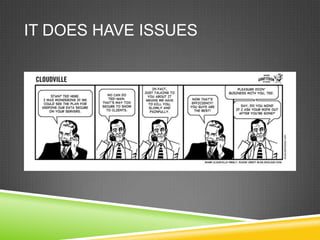
IT DOES HAVE ISSUES
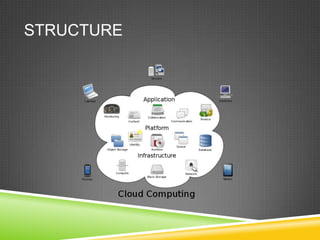
STRUCTURE
PUBLIC CLOUD
 A public cloud is one based on the standard cloud computing
  model, in which a service provider makes resources, such as
  applications and storage, available to the general public over the
  Internet. Public cloud services may be free or offered on a pay-
  per-usage model.
COMMUNITY CLOUD
 Community cloud shares infrastructure between several
  organizations from a specific community with common concerns
  (security, compliance, jurisdiction, etc.), whether managed
  internally or by a third-party and hosted internally or externally.
  The costs are spread over fewer users than a public cloud (but
  more than a private cloud), so only some of the benefits of cloud
  computing are realized
PRIVATE CLOUD
 Private cloud is infrastructure operated solely for a single
  organization, whether managed internally or by a third-party and
  hosted internally or externally
EXAMPLES: DATA STORAGE
 Amazon S3 http://aws.amazon.com/s3/
    Write, read, and delete objects containing from 1 byte to 5 terabytes of data
      each. The number of objects you can store is unlimited.
    Each object is stored in a bucket and retrieved via a unique, developer-
      assigned key.
EXAMPLE: ELASTIC CLOUD
 Amazon Elastic Compute Cloud (Amazon EC2) is a web service
  that provides resizable compute capacity in the cloud. It is
  designed to make web-scale computing easier for developers.
EXAMPLE: PRODUCTIVITY: GOOGLE
DOCS
 Google Docs is a free, Web-based office suite, and data storage
  service offered by Google. It allows users to create and edit
  documents online while collaborating in real-time with other users.
  Google Docs combines the features of Writely and Spreadsheets
  with a presentation program incorporating technology designed by
  Tonic Systems. Data storage of files up to 1 GB total in size was
  introduced on January 13, 2011, documents created inside
  Google Docs do not count towards this quota.
EXAMPLE: FINANCE: MINT
 Mint pulls in all your accounts.
 We connect your checking, savings, loans,
and credit card
  accounts in one place,
so you can see balances and
  transactions
at any time.
EXAMPLE: ILS: CONSULS
 http://www.consuls.org/
 Through java based client (Millennium) allows for read write
  access to complex online database facilitating transactions.
EXAMPLE: DATABASE:
EBSCOHOST
 EBSCOHost
 Search ALL EBSCOHost databases (Academic and Business
  Source Premier, PsycINFO, MLA Bibliography, ERIC and others).
  Try the mobile version for smart phones
EXAMPLE: BANNER
 Banner is an administrative software application developed
  specifically for higher education institutions by Systems and
  Computer Technology Corporation (SCT). Banner maintains student,
  alumni, financial and personnel data.

 The Enterprise Resource Planning (ERP) Office functions as the
  resource, planning, and liaison office for all ERP Banner
  projects. The ERP Manager serves as a CCSU lead
  coordinator/project manager for Banner system upgrades with all
  major areas of the University, CSU System and each University
  location. As a CCSU point-of-contact for Banner projects, the ERP
  Office is directly involved with third party software interfaces and
  programming projects especially the areas directly involved with ERP
  day-to-day University operations.
ASSIGNMENT
 Create a google docs account.
 Create a google doc.
 Share that doc.

Cloud Computing Day 1

  • 1.
    INTRODUCTION TO CLOUD COMPUTING DAY1 Woo-hoo Wednesday Edward Iglesias
  • 2.
    WHAT IS IT? Cloud computing is the delivery of computing as a service rather than a product, whereby shared resources, software, and information are provided to computers and other devices as a metered service over a network (typically the Internet).  Wikipedia http://en.wikipedia.org/wiki/Cloud_computing
  • 3.
  • 4.
  • 5.
    PUBLIC CLOUD  Apublic cloud is one based on the standard cloud computing model, in which a service provider makes resources, such as applications and storage, available to the general public over the Internet. Public cloud services may be free or offered on a pay- per-usage model.
  • 6.
    COMMUNITY CLOUD  Communitycloud shares infrastructure between several organizations from a specific community with common concerns (security, compliance, jurisdiction, etc.), whether managed internally or by a third-party and hosted internally or externally. The costs are spread over fewer users than a public cloud (but more than a private cloud), so only some of the benefits of cloud computing are realized
  • 7.
    PRIVATE CLOUD  Privatecloud is infrastructure operated solely for a single organization, whether managed internally or by a third-party and hosted internally or externally
  • 8.
    EXAMPLES: DATA STORAGE Amazon S3 http://aws.amazon.com/s3/  Write, read, and delete objects containing from 1 byte to 5 terabytes of data each. The number of objects you can store is unlimited.  Each object is stored in a bucket and retrieved via a unique, developer- assigned key.
  • 9.
    EXAMPLE: ELASTIC CLOUD Amazon Elastic Compute Cloud (Amazon EC2) is a web service that provides resizable compute capacity in the cloud. It is designed to make web-scale computing easier for developers.
  • 10.
    EXAMPLE: PRODUCTIVITY: GOOGLE DOCS Google Docs is a free, Web-based office suite, and data storage service offered by Google. It allows users to create and edit documents online while collaborating in real-time with other users. Google Docs combines the features of Writely and Spreadsheets with a presentation program incorporating technology designed by Tonic Systems. Data storage of files up to 1 GB total in size was introduced on January 13, 2011, documents created inside Google Docs do not count towards this quota.
  • 11.
    EXAMPLE: FINANCE: MINT Mint pulls in all your accounts.  We connect your checking, savings, loans,
and credit card accounts in one place,
so you can see balances and transactions
at any time.
  • 12.
    EXAMPLE: ILS: CONSULS http://www.consuls.org/  Through java based client (Millennium) allows for read write access to complex online database facilitating transactions.
  • 13.
    EXAMPLE: DATABASE: EBSCOHOST  EBSCOHost Search ALL EBSCOHost databases (Academic and Business Source Premier, PsycINFO, MLA Bibliography, ERIC and others). Try the mobile version for smart phones
  • 14.
    EXAMPLE: BANNER  Banneris an administrative software application developed specifically for higher education institutions by Systems and Computer Technology Corporation (SCT). Banner maintains student, alumni, financial and personnel data.  The Enterprise Resource Planning (ERP) Office functions as the resource, planning, and liaison office for all ERP Banner projects. The ERP Manager serves as a CCSU lead coordinator/project manager for Banner system upgrades with all major areas of the University, CSU System and each University location. As a CCSU point-of-contact for Banner projects, the ERP Office is directly involved with third party software interfaces and programming projects especially the areas directly involved with ERP day-to-day University operations.
  • 15.
    ASSIGNMENT  Create agoogle docs account.  Create a google doc.  Share that doc.

Editor's Notes

  • #5 Storage and consumption