Cloud ComputingBy ShubhamShrivastavamr.shrivastava_shubham@yahoo.in
Definition:-Cloud computing provides the facility to access shared resources and common infrastructure, offering services on demand over the network to perform operations that meet changing business needs.
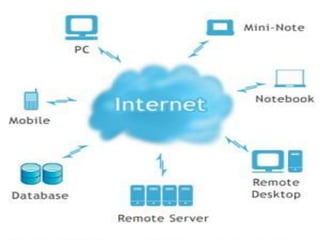
In Other WordsCloud computing is a general term for anything that involves delivering hosted services over the Internet.The name cloud computing was inspired by the cloud symbol that's often used to represent the Internet in flowcharts and diagrams.
“Cloud“ refers to:-Before we dig further into how does cloud computing work, first let’s understand what the term “cloud“ refers to.  The concept of the cloud has been around for a long time in many different incarnations in the business world. It mostly means a grid of computers serving as a service-oriented architecture to deliver software and data.
Other Definitions:-“Cloud computing is an emerging approach to shared infrastructure in which large pools of systems are linked together to provide IT services.” –IBM press release on “Blue Cloud”“…a hosted infrastructure model that delivers abstracted IT resources over the Internet” – Thomas Weisel Partners LLC from “Into the Clouds: Leveraging  Data Centers and the Road to Cloud Computing”“Cloud computing describes a systems architecture. Period. This particular architecture assumes nothing about the physical location, internal composition or ownership of its component parts.” – James Urquhart blog post
Defining the Segments:-SaaSSoftware as a ServiceStorage as a ServicePaaS – Platform as a ServiceIaaS – Infrastructure as a Service
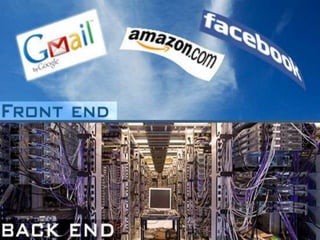
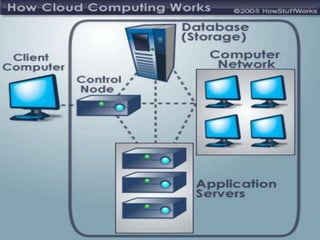
Cloud Computing ArchitectureWhen talking about a cloud computing system, it's helpful to divide it into two sections: the front end and the back end. They connect to each other through a network, usually the Internet. The front end is the side the computer user, or client, sees. The back end is the "cloud" section of the system.
The Front EndThe front end includes the client's computer (or computer network) and the application required to access the cloud computing system. Not all cloud computing systems have the same user interface. Services like Web-based e-mail programs leverage existing Web browsers like Internet Explorer or Firefox And Gmail, Facebook etc . Other systems have unique applications that provide network access to clients.
The Back EndOn the back end of the system are the various computers, servers and data storage systems that create the "cloud" of computing services. In theory, a cloud computing system could include practically any computer program you can imagine, from data processing to video games. Usually, each application will have its own dedicated server.
In New AgeCloud computing has been changing how most people use the web and how they store their files. It’s the structure that runs sites like Facebook, Amazon and Twitter and the core that allows us to take advantage of services like Google Docs and Gmail. But how does it work?
The key attributes that distinguish cloud computing from conventional computing are:Compute and storage functions are abstracted and offered as servicesServices are built on a massively scalable infrastructureServices are delivered on demand through dynamic, flexibly configurable resourcesServices are easily purchased and billed by consumptionResources are shared among multiple users (multi-tenancy)Services are accessible over the Internet or internal network by any device.
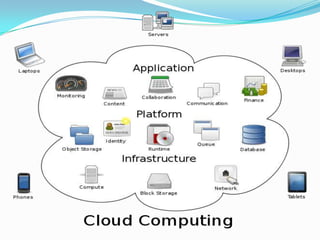
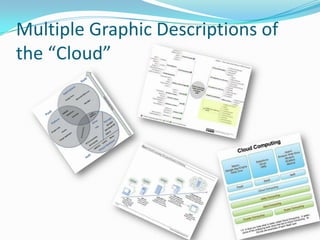
Multiple Graphic Descriptions of the “Cloud”
Hosting Industry Ripe for ChangeTechnology has evolvedPeople demand more controlInstant gratificationIn-house too costly from CapEx and Human CapitalColocation for those who want to be physically thereManaged is not dynamic enoughCloud Computing -“Enabling Technology” to move from Traditional Hosting to Cloud Hosting
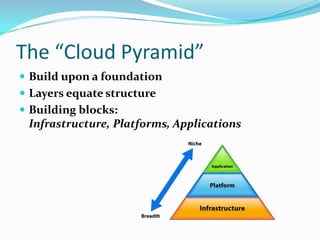
The “Cloud Pyramid”Build upon a foundationLayers equate structureBuilding blocks: Infrastructure, Platforms, Applications
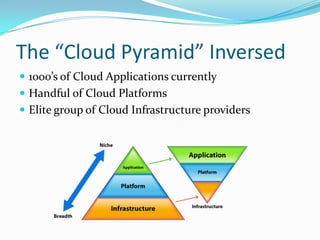
The “Cloud Pyramid” Inversed1000’s of Cloud Applications currentlyHandful of Cloud PlatformsElite group of Cloud Infrastructure providers
Cloud “Applications”SaaS resides hereMost common Cloud / Many providers of different servicesExamples: SalesForce, Gmail, Yahoo! Mail, Quicken OnlineAdvantages: Free, Easy, Consumer AdoptionDisadvantages: Limited functionality, no control or access to underlying technology
Cloud “Extenders” (Wild Card)Provides extension to Cloud Infrastructure and Platforms with basic functionalityExamples: Amazon SimpleDB, Amazon SQS, Google BigTableAdvantages: Extends functionality of Compute & Storage Clouds to integrate with legacy system or other cloudsDisadvantages: Sometimes requires use of specific Platforms or Infrastructure
Cloud “Aggregators” (Wild Card)Sits on top of various Cloud Infrastructures for managementExamples: RightScale, AppistryAdvantages: Provides more options for Cloud environmentsDisadvantages: Dependent on Cloud Providers

Cloud computing

  • 1.
  • 2.
    Definition:-Cloud computing providesthe facility to access shared resources and common infrastructure, offering services on demand over the network to perform operations that meet changing business needs.
  • 3.
    In Other WordsCloudcomputing is a general term for anything that involves delivering hosted services over the Internet.The name cloud computing was inspired by the cloud symbol that's often used to represent the Internet in flowcharts and diagrams.
  • 4.
    “Cloud“ refers to:-Beforewe dig further into how does cloud computing work, first let’s understand what the term “cloud“ refers to.  The concept of the cloud has been around for a long time in many different incarnations in the business world. It mostly means a grid of computers serving as a service-oriented architecture to deliver software and data.
  • 7.
    Other Definitions:-“Cloud computingis an emerging approach to shared infrastructure in which large pools of systems are linked together to provide IT services.” –IBM press release on “Blue Cloud”“…a hosted infrastructure model that delivers abstracted IT resources over the Internet” – Thomas Weisel Partners LLC from “Into the Clouds: Leveraging Data Centers and the Road to Cloud Computing”“Cloud computing describes a systems architecture. Period. This particular architecture assumes nothing about the physical location, internal composition or ownership of its component parts.” – James Urquhart blog post
  • 8.
    Defining the Segments:-SaaSSoftwareas a ServiceStorage as a ServicePaaS – Platform as a ServiceIaaS – Infrastructure as a Service
  • 9.
    Cloud Computing ArchitectureWhentalking about a cloud computing system, it's helpful to divide it into two sections: the front end and the back end. They connect to each other through a network, usually the Internet. The front end is the side the computer user, or client, sees. The back end is the "cloud" section of the system.
  • 11.
    The Front EndThefront end includes the client's computer (or computer network) and the application required to access the cloud computing system. Not all cloud computing systems have the same user interface. Services like Web-based e-mail programs leverage existing Web browsers like Internet Explorer or Firefox And Gmail, Facebook etc . Other systems have unique applications that provide network access to clients.
  • 12.
    The Back EndOnthe back end of the system are the various computers, servers and data storage systems that create the "cloud" of computing services. In theory, a cloud computing system could include practically any computer program you can imagine, from data processing to video games. Usually, each application will have its own dedicated server.
  • 13.
    In New AgeCloudcomputing has been changing how most people use the web and how they store their files. It’s the structure that runs sites like Facebook, Amazon and Twitter and the core that allows us to take advantage of services like Google Docs and Gmail. But how does it work?
  • 15.
    The key attributesthat distinguish cloud computing from conventional computing are:Compute and storage functions are abstracted and offered as servicesServices are built on a massively scalable infrastructureServices are delivered on demand through dynamic, flexibly configurable resourcesServices are easily purchased and billed by consumptionResources are shared among multiple users (multi-tenancy)Services are accessible over the Internet or internal network by any device.
  • 16.
  • 17.
    Hosting Industry Ripefor ChangeTechnology has evolvedPeople demand more controlInstant gratificationIn-house too costly from CapEx and Human CapitalColocation for those who want to be physically thereManaged is not dynamic enoughCloud Computing -“Enabling Technology” to move from Traditional Hosting to Cloud Hosting
  • 18.
    The “Cloud Pyramid”Buildupon a foundationLayers equate structureBuilding blocks: Infrastructure, Platforms, Applications
  • 19.
    The “Cloud Pyramid”Inversed1000’s of Cloud Applications currentlyHandful of Cloud PlatformsElite group of Cloud Infrastructure providers
  • 20.
    Cloud “Applications”SaaS resideshereMost common Cloud / Many providers of different servicesExamples: SalesForce, Gmail, Yahoo! Mail, Quicken OnlineAdvantages: Free, Easy, Consumer AdoptionDisadvantages: Limited functionality, no control or access to underlying technology
  • 21.
    Cloud “Extenders” (WildCard)Provides extension to Cloud Infrastructure and Platforms with basic functionalityExamples: Amazon SimpleDB, Amazon SQS, Google BigTableAdvantages: Extends functionality of Compute & Storage Clouds to integrate with legacy system or other cloudsDisadvantages: Sometimes requires use of specific Platforms or Infrastructure
  • 22.
    Cloud “Aggregators” (WildCard)Sits on top of various Cloud Infrastructures for managementExamples: RightScale, AppistryAdvantages: Provides more options for Cloud environmentsDisadvantages: Dependent on Cloud Providers