Blue Ridge Public School
Std: IX
Subject: Computer Applications
Operators in JAVA
Blue
Ridge
Public
School
1
Operators and Operands
Blue
Ridge
Public
School
2
 Operator is a symbol or token used to perform
arithmetical or logical operations.
 Operands are objects or elements that are acted upon by
operators.
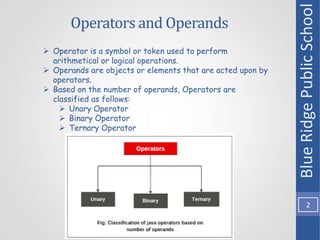
 Based on the number of operands, Operators are
classified as follows:
 Unary Operator
 Binary Operator
 Ternary Operator
Unary Operator
Blue
Ridge
Public
School
3
 Unary operators require only one operand.
 They are used to perform various operations like:
 Negating or reversing the sign of an operand
 Incrementing/decrementing a value by one
 Inverting the value of a boolean
 Unary (+) and (-) Operator:
 Consider the following code snippet
 public class OperatorEg1{
 public static void main(String [] args)
 {
 int a = 8, b = -10;
 System.out.println(+a);
 System.out.println(-a);
 System.out.println(+b);
 System.out.println(-b);
 }
}
 The output of the above code would be:
 8
 -8
 -10
 10
Unary Incrementand DecrementOperators
Blue
Ridge
Public
School
4
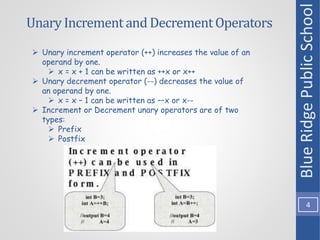
 Unary increment operator (++) increases the value of an
operand by one.
 x = x + 1 can be written as ++x or x++
 Unary decrement operator (--) decreases the value of
an operand by one.
 x = x – 1 can be written as ––x or x--
 Increment or Decrement unary operators are of two
types:
 Prefix
 Postfix
Prefix Unary Operator
Blue
Ridge
Public
School
5
 These are applied before the operand.
 The prefix form increments/decrements the value first, and
then performs the specified operation.
 Consider the following code snippet:
 public class prefixExample {
public static void main(String [] args) {
int a = 5;
int b = ++a;
System.out.println(a);
System.out.println(b);
}
}
 The output of the above code would be:
 6
6
Postfix Unary Operator
Blue
Ridge
Public
School
6
 These are applied after the operand.
 The postfix form performs the specified operation and then
increments/decrements the value.
 Consider the following code snippet:
 public class postfixExample {
public static void main (String [] args) {
int a = 3;
int b = a--;
System.out.println(a);
System.out.println(b);
}
}
 The output of the above code would be:
 2
 3
Prefix and Postfix Operator Example
Blue
Ridge
Public
School
7
 Consider the following code snippet:
 public class OperatorExample {
public static void main(String [] args) {
int x = 10;
System.out.println(x++);
System.out.println(++x);
System.out.println(x--);
System.out.println(--x);
}
}
 The output of the above code would be:
 10
 12
 12
 10
Logical Complement Unary Operator
Blue
Ridge
Public
School
8
 The logical operator !(NOT) is used when the result of a boolean
expression has to be reversed.
 For e.g. !(8 > 3) will give the result as false because (8 > 3) is
true
 Consider the following code snippet:
 public class OperatorExample2 {
public static void main (String [] args) {
boolean flag = true;
boolean check = false;
System.out.println(!flag);
System.out.println(!check);
}
}
 The output of the above code would be:
 false
 true
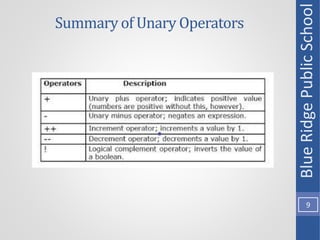
Summary of Unary Operators
Blue
Ridge
Public
School
9
Binary Arithmetic Operators
Blue
Ridge
Public
School
10
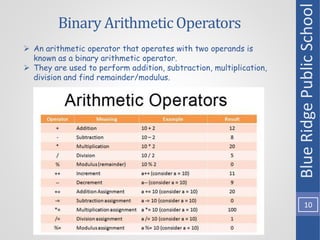
 An arithmetic operator that operates with two operands is
known as a binary arithmetic operator.
 They are used to perform addition, subtraction, multiplication,
division and find remainder/modulus.
Arithmetic expressions
Blue
Ridge
Public
School
11
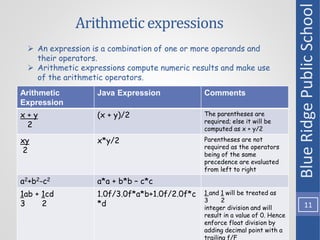
 An expression is a combination of one or more operands and
their operators.
 Arithmetic expressions compute numeric results and make use
of the arithmetic operators.
Arithmetic
Expression
Java Expression Comments
x + y
2
(x + y)/2 The parentheses are
required; else it will be
computed as x + y/2
xy
2
x*y/2 Parentheses are not
required as the operators
being of the same
precedence are evaluated
from left to right
a2+b2-c2 a*a + b*b – c*c
1ab + 1cd
3 2
1.0f/3.0f*a*b+1.0f/2.0f*c
*d
1 and 1 will be treated as
3 2
integer division and will
result in a value of 0. Hence
enforce float division by
adding decimal point with a
trailing f/F
Shorthand expressions
Blue
Ridge
Public
School
12
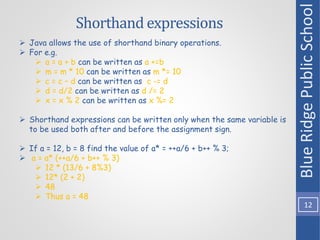
 Java allows the use of shorthand binary operations.
 For e.g.
 a = a + b can be written as a +=b
 m = m * 10 can be written as m *= 10
 c = c – d can be written as c -= d
 d = d/2 can be written as d /= 2
 x = x % 2 can be written as x %= 2
 Shorthand expressions can be written only when the same variable is
to be used both after and before the assignment sign.
 If a = 12, b = 8 find the value of a* = ++a/6 + b++ % 3;
 a = a* (++a/6 + b++ % 3)
 12 * (13/6 + 8%3)
 12* (2 + 2)
 48
 Thus a = 48
Evaluate (Notebook work)
Blue
Ridge
Public
School
13
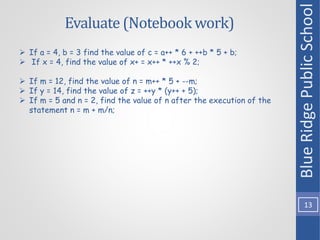
 If a = 4, b = 3 find the value of c = a++ * 6 + ++b * 5 + b;
 If x = 4, find the value of x+ = x++ * ++x % 2;
 If m = 12, find the value of n = m++ * 5 + --m;
 If y = 14, find the value of z = ++y * (y++ + 5);
 If m = 5 and n = 2, find the value of n after the execution of the
statement n = m + m/n;
Ternary Operator
Blue
Ridge
Public
School
14
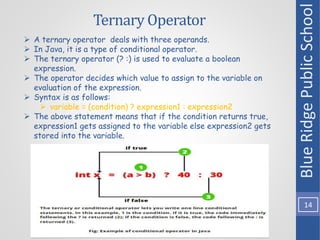
 A ternary operator deals with three operands.
 In Java, it is a type of conditional operator.
 The ternary operator (? :) is used to evaluate a boolean
expression.
 The operator decides which value to assign to the variable on
evaluation of the expression.
 Syntax is as follows:
 variable = (condition) ? expression1 : expression2
 The above statement means that if the condition returns true,
expression1 gets assigned to the variable else expression2 gets
stored into the variable.
Relational Operators
Blue
Ridge
Public
School
15
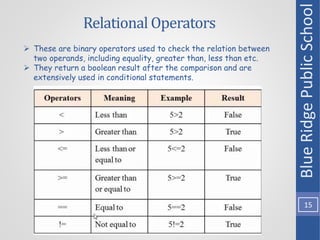
 These are binary operators used to check the relation between
two operands, including equality, greater than, less than etc.
 They return a boolean result after the comparison and are
extensively used in conditional statements.
Logical Operators
Blue
Ridge
Public
School
16
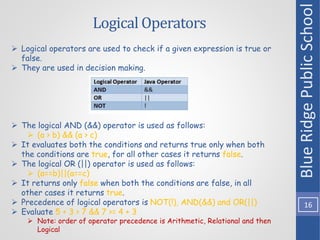
 Logical operators are used to check if a given expression is true or
false.
 They are used in decision making.
 The logical AND (&&) operator is used as follows:
 (a > b) && (a > c)
 It evaluates both the conditions and returns true only when both
the conditions are true, for all other cases it returns false.
 The logical OR (||) operator is used as follows:
 (a==b)||(a==c)
 It returns only false when both the conditions are false, in all
other cases it returns true.
 Precedence of logical operators is NOT(!), AND(&&) and OR(||)
 Evaluate 5 + 3 > 7 && 7 >= 4 + 3
 Note: order of operator precedence is Arithmetic, Relational and then
Logical
Bitwise Logical Operators
Blue
Ridge
Public
School
17
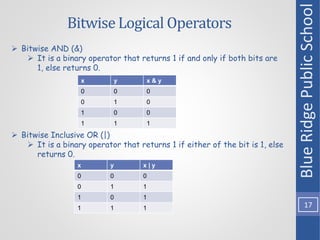
 Bitwise AND (&)
 It is a binary operator that returns 1 if and only if both bits are
1, else returns 0.
 Bitwise Inclusive OR (|)
 It is a binary operator that returns 1 if either of the bit is 1, else
returns 0.
x y x & y
0 0 0
0 1 0
1 0 0
1 1 1
x y x | y
0 0 0
0 1 1
1 0 1
1 1 1
Bitwise Logical Operators
Blue
Ridge
Public
School
18
 Bitwise Exclusive OR (^)
 It is a binary operator that returns 0 if both the bits are same
else returns 1.
x y x ^ y
0 0 0
0 1 1
1 0 1
1 1 0
 Consider the following code snippet:
 public class OperatorBitwise {
public static void main (String [] args) {
int x = 9, y = 3;
System.out.println(x & y); //bitwise AND 1001 & 0011 = 0001 = 1
System.out.println(x | y); //bitwise OR 1001 | 0011 = 1011 = 11
System.out.println(x ^ y); //bitwise XOR 1001 ^ 0011 = 1010 = 10
}
}
Operator precedence in Java
Blue
Ridge
Public
School
19
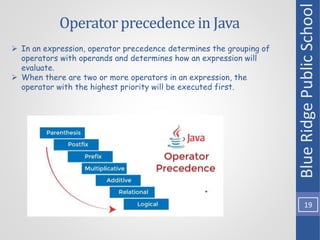
 In an expression, operator precedence determines the grouping of
operators with operands and determines how an expression will
evaluate.
 When there are two or more operators in an expression, the
operator with the highest priority will be executed first.
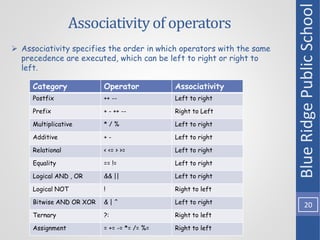
Associativity of operators
Blue
Ridge
Public
School
20
 Associativity specifies the order in which operators with the same
precedence are executed, which can be left to right or right to
left.
Category Operator Associativity
Postfix ++ -- Left to right
Prefix + - ++ -- Right to Left
Multiplicative * / % Left to right
Additive + - Left to right
Relational < <= > >= Left to right
Equality == != Left to right
Logical AND , OR && || Left to right
Logical NOT ! Right to left
Bitwise AND OR XOR & | ^ Left to right
Ternary ?: Right to left
Assignment = += -= *= /= %= Right to left
Assignment (Notebook work)
Blue
Ridge
Public
School
21
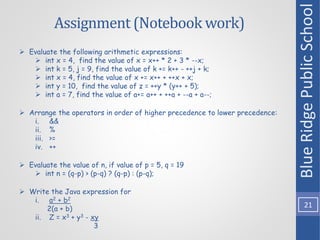
 Evaluate the following arithmetic expressions:
 int x = 4, find the value of x = x++ * 2 + 3 * --x;
 int k = 5, j = 9, find the value of k += k++ - ++j + k;
 int x = 4, find the value of x += x++ + ++x + x;
 int y = 10, find the value of z = ++y * (y++ + 5);
 int a = 7, find the value of a+= a++ + ++a + --a + a--;
 Arrange the operators in order of higher precedence to lower precedence:
i. &&
ii. %
iii. >=
iv. ++
 Evaluate the value of n, if value of p = 5, q = 19
 int n = (q-p) > (p-q) ? (q-p) : (p-q);
 Write the Java expression for
i. a2 + b2
2(a + b)
ii. Z = x3 + y3 - xy
3
Blue
Ridge
Public
School
22

Class_IX_Operators.pptx

  • 1.
    Blue Ridge PublicSchool Std: IX Subject: Computer Applications Operators in JAVA Blue Ridge Public School 1
  • 2.
    Operators and Operands Blue Ridge Public School 2 Operator is a symbol or token used to perform arithmetical or logical operations.  Operands are objects or elements that are acted upon by operators.  Based on the number of operands, Operators are classified as follows:  Unary Operator  Binary Operator  Ternary Operator
  • 3.
    Unary Operator Blue Ridge Public School 3  Unaryoperators require only one operand.  They are used to perform various operations like:  Negating or reversing the sign of an operand  Incrementing/decrementing a value by one  Inverting the value of a boolean  Unary (+) and (-) Operator:  Consider the following code snippet  public class OperatorEg1{  public static void main(String [] args)  {  int a = 8, b = -10;  System.out.println(+a);  System.out.println(-a);  System.out.println(+b);  System.out.println(-b);  } }  The output of the above code would be:  8  -8  -10  10
  • 4.
    Unary Incrementand DecrementOperators Blue Ridge Public School 4 Unary increment operator (++) increases the value of an operand by one.  x = x + 1 can be written as ++x or x++  Unary decrement operator (--) decreases the value of an operand by one.  x = x – 1 can be written as ––x or x--  Increment or Decrement unary operators are of two types:  Prefix  Postfix
  • 5.
    Prefix Unary Operator Blue Ridge Public School 5 These are applied before the operand.  The prefix form increments/decrements the value first, and then performs the specified operation.  Consider the following code snippet:  public class prefixExample { public static void main(String [] args) { int a = 5; int b = ++a; System.out.println(a); System.out.println(b); } }  The output of the above code would be:  6 6
  • 6.
    Postfix Unary Operator Blue Ridge Public School 6 These are applied after the operand.  The postfix form performs the specified operation and then increments/decrements the value.  Consider the following code snippet:  public class postfixExample { public static void main (String [] args) { int a = 3; int b = a--; System.out.println(a); System.out.println(b); } }  The output of the above code would be:  2  3
  • 7.
    Prefix and PostfixOperator Example Blue Ridge Public School 7  Consider the following code snippet:  public class OperatorExample { public static void main(String [] args) { int x = 10; System.out.println(x++); System.out.println(++x); System.out.println(x--); System.out.println(--x); } }  The output of the above code would be:  10  12  12  10
  • 8.
    Logical Complement UnaryOperator Blue Ridge Public School 8  The logical operator !(NOT) is used when the result of a boolean expression has to be reversed.  For e.g. !(8 > 3) will give the result as false because (8 > 3) is true  Consider the following code snippet:  public class OperatorExample2 { public static void main (String [] args) { boolean flag = true; boolean check = false; System.out.println(!flag); System.out.println(!check); } }  The output of the above code would be:  false  true
  • 9.
    Summary of UnaryOperators Blue Ridge Public School 9
  • 10.
    Binary Arithmetic Operators Blue Ridge Public School 10 An arithmetic operator that operates with two operands is known as a binary arithmetic operator.  They are used to perform addition, subtraction, multiplication, division and find remainder/modulus.
  • 11.
    Arithmetic expressions Blue Ridge Public School 11  Anexpression is a combination of one or more operands and their operators.  Arithmetic expressions compute numeric results and make use of the arithmetic operators. Arithmetic Expression Java Expression Comments x + y 2 (x + y)/2 The parentheses are required; else it will be computed as x + y/2 xy 2 x*y/2 Parentheses are not required as the operators being of the same precedence are evaluated from left to right a2+b2-c2 a*a + b*b – c*c 1ab + 1cd 3 2 1.0f/3.0f*a*b+1.0f/2.0f*c *d 1 and 1 will be treated as 3 2 integer division and will result in a value of 0. Hence enforce float division by adding decimal point with a trailing f/F
  • 12.
    Shorthand expressions Blue Ridge Public School 12  Javaallows the use of shorthand binary operations.  For e.g.  a = a + b can be written as a +=b  m = m * 10 can be written as m *= 10  c = c – d can be written as c -= d  d = d/2 can be written as d /= 2  x = x % 2 can be written as x %= 2  Shorthand expressions can be written only when the same variable is to be used both after and before the assignment sign.  If a = 12, b = 8 find the value of a* = ++a/6 + b++ % 3;  a = a* (++a/6 + b++ % 3)  12 * (13/6 + 8%3)  12* (2 + 2)  48  Thus a = 48
  • 13.
    Evaluate (Notebook work) Blue Ridge Public School 13 If a = 4, b = 3 find the value of c = a++ * 6 + ++b * 5 + b;  If x = 4, find the value of x+ = x++ * ++x % 2;  If m = 12, find the value of n = m++ * 5 + --m;  If y = 14, find the value of z = ++y * (y++ + 5);  If m = 5 and n = 2, find the value of n after the execution of the statement n = m + m/n;
  • 14.
    Ternary Operator Blue Ridge Public School 14  Aternary operator deals with three operands.  In Java, it is a type of conditional operator.  The ternary operator (? :) is used to evaluate a boolean expression.  The operator decides which value to assign to the variable on evaluation of the expression.  Syntax is as follows:  variable = (condition) ? expression1 : expression2  The above statement means that if the condition returns true, expression1 gets assigned to the variable else expression2 gets stored into the variable.
  • 15.
    Relational Operators Blue Ridge Public School 15  Theseare binary operators used to check the relation between two operands, including equality, greater than, less than etc.  They return a boolean result after the comparison and are extensively used in conditional statements.
  • 16.
    Logical Operators Blue Ridge Public School 16  Logicaloperators are used to check if a given expression is true or false.  They are used in decision making.  The logical AND (&&) operator is used as follows:  (a > b) && (a > c)  It evaluates both the conditions and returns true only when both the conditions are true, for all other cases it returns false.  The logical OR (||) operator is used as follows:  (a==b)||(a==c)  It returns only false when both the conditions are false, in all other cases it returns true.  Precedence of logical operators is NOT(!), AND(&&) and OR(||)  Evaluate 5 + 3 > 7 && 7 >= 4 + 3  Note: order of operator precedence is Arithmetic, Relational and then Logical
  • 17.
    Bitwise Logical Operators Blue Ridge Public School 17 Bitwise AND (&)  It is a binary operator that returns 1 if and only if both bits are 1, else returns 0.  Bitwise Inclusive OR (|)  It is a binary operator that returns 1 if either of the bit is 1, else returns 0. x y x & y 0 0 0 0 1 0 1 0 0 1 1 1 x y x | y 0 0 0 0 1 1 1 0 1 1 1 1
  • 18.
    Bitwise Logical Operators Blue Ridge Public School 18 Bitwise Exclusive OR (^)  It is a binary operator that returns 0 if both the bits are same else returns 1. x y x ^ y 0 0 0 0 1 1 1 0 1 1 1 0  Consider the following code snippet:  public class OperatorBitwise { public static void main (String [] args) { int x = 9, y = 3; System.out.println(x & y); //bitwise AND 1001 & 0011 = 0001 = 1 System.out.println(x | y); //bitwise OR 1001 | 0011 = 1011 = 11 System.out.println(x ^ y); //bitwise XOR 1001 ^ 0011 = 1010 = 10 } }
  • 19.
    Operator precedence inJava Blue Ridge Public School 19  In an expression, operator precedence determines the grouping of operators with operands and determines how an expression will evaluate.  When there are two or more operators in an expression, the operator with the highest priority will be executed first.
  • 20.
    Associativity of operators Blue Ridge Public School 20 Associativity specifies the order in which operators with the same precedence are executed, which can be left to right or right to left. Category Operator Associativity Postfix ++ -- Left to right Prefix + - ++ -- Right to Left Multiplicative * / % Left to right Additive + - Left to right Relational < <= > >= Left to right Equality == != Left to right Logical AND , OR && || Left to right Logical NOT ! Right to left Bitwise AND OR XOR & | ^ Left to right Ternary ?: Right to left Assignment = += -= *= /= %= Right to left
  • 21.
    Assignment (Notebook work) Blue Ridge Public School 21 Evaluate the following arithmetic expressions:  int x = 4, find the value of x = x++ * 2 + 3 * --x;  int k = 5, j = 9, find the value of k += k++ - ++j + k;  int x = 4, find the value of x += x++ + ++x + x;  int y = 10, find the value of z = ++y * (y++ + 5);  int a = 7, find the value of a+= a++ + ++a + --a + a--;  Arrange the operators in order of higher precedence to lower precedence: i. && ii. % iii. >= iv. ++  Evaluate the value of n, if value of p = 5, q = 19  int n = (q-p) > (p-q) ? (q-p) : (p-q);  Write the Java expression for i. a2 + b2 2(a + b) ii. Z = x3 + y3 - xy 3
  • 22.

Editor's Notes

  • #2 THIS IS AN AUDIO PPT,CLICK TO PROCEED