COURSE STRUCTURE
                     OVERVIEW
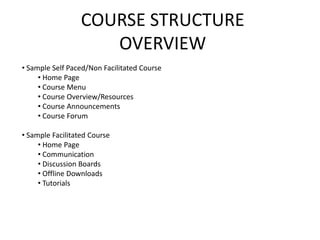
• Sample Self Paced/Non Facilitated Course
     • Home Page
     • Course Menu
     • Course Overview/Resources
     • Course Announcements
     • Course Forum

• Sample Facilitated Course
     • Home Page
     • Communication
     • Discussion Boards
     • Offline Downloads
     • Tutorials
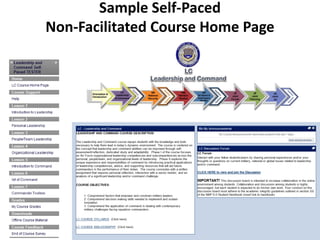
Sample Self-Paced
Non-Facilitated Course Home Page
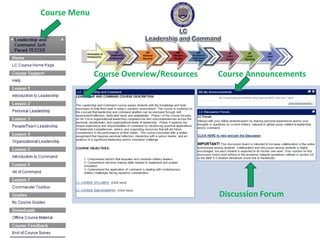
Course Menu


              Course Overview/Resources   Course Announcements


                                          Discussion Forum
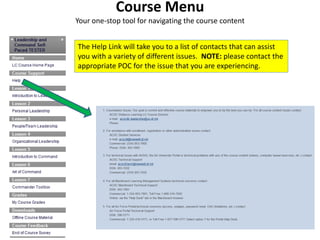
Course Menu
Your one-stop tool for navigating the course content


The Help Link will take you to a list of contacts that can assist
you with a variety of different issues. NOTE: please contact the
appropriate POC for the issue that you are experiencing.
Course Menu
Your one-stop tool for navigating the course content


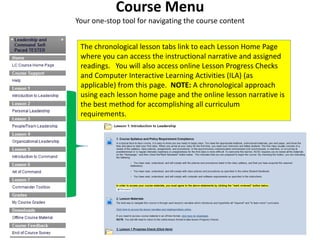
 The chronological lesson tabs link to each Lesson Home Page
 where you can access the instructional narrative and assigned
 readings. You will also access online Lesson Progress Checks
 and Computer Interactive Learning Activities (ILA) (as
 applicable) from this page. NOTE: A chronological approach
 using each lesson home page and the online lesson narrative is
 the best method for accomplishing all curriculum
 requirements.
Course Menu
Your one-stop tool for navigating the course content


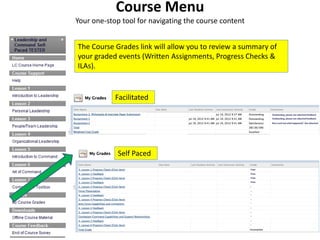
The Course Grades link will allow you to review a summary of
your graded events (Written Assignments, Progress Checks &
ILAs).


            Facilitated


             Self Paced
                     NEED EXAMPLE HERE
Course Menu
Your one-stop tool for navigating the course content
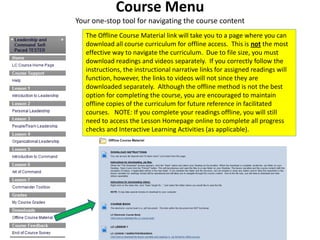
   The Offline Course Material link will take you to a page where you can
   download all course curriculum for offline access. This is not the most
   effective way to navigate the curriculum. Due to file size, you must
   download readings and videos separately. If you correctly follow the
   instructions, the instructional narrative links for assigned readings will
   function, however, the links to videos will not since they are
   downloaded separately. Although the offline method is not the best
   option for completing the course, you are encouraged to maintain
   offline copies of the curriculum for future reference in facilitated
   courses. NOTE: If you complete your readings offline, you will still
   need to access the Lesson Homepage online to complete all progress
   checks and Interactive Learning Activities (as applicable).
Course Menu
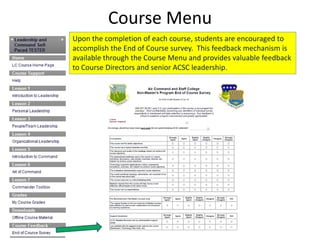
Upon the completion of each course, students are encouraged to
accomplish the End of Course survey. This feedback mechanism is
available through the Course Menu and provides valuable feedback
to Course Directors and senior ACSC leadership.
Course Overview/Resources
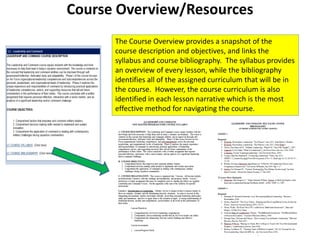
      The Course Overview provides a snapshot of the
      course description and objectives, and links the
      syllabus and course bibliography. The syllabus provides
      an overview of every lesson, while the bibliography
      identifies all of the assigned curriculum that will be in
      the course. However, the course curriculum is also
      identified in each lesson narrative which is the most
      effective method for navigating the course.
Course Announcements
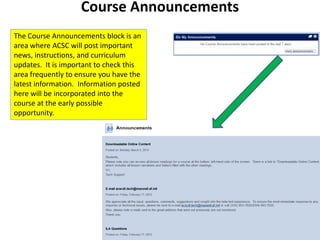
The Course Announcements block is an
area where ACSC will post important
news, instructions, and curriculum
updates. It is important to check this
area frequently to ensure you have the
latest information. Information posted
here will be incorporated into the
course at the early possible
opportunity.
Course Forums
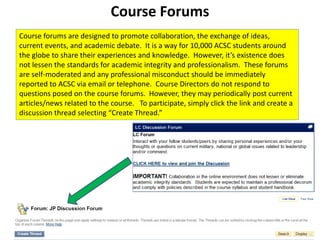
Course forums are designed to promote collaboration, the exchange of ideas,
current events, and academic debate. It is a way for 10,000 ACSC students around
the globe to share their experiences and knowledge. However, it’s existence does
not lessen the standards for academic integrity and professionalism. These forums
are self-moderated and any professional misconduct should be immediately
reported to ACSC via email or telephone. Course Directors do not respond to
questions posed on the course forums. However, they may periodically post current
articles/news related to the course. To participate, simply click the link and create a
discussion thread selecting “Create Thread.”
Sample Facilitated Course
      Home Page
Sample Facilitated Course
      Home Page
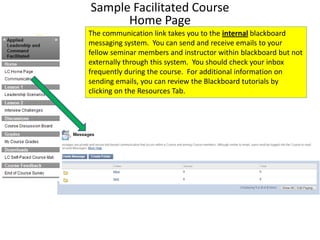
The communication link takes you to the internal blackboard
messaging system. You can send and receive emails to your
fellow seminar members and instructor within blackboard but not
externally through this system. You should check your inbox
frequently during the course. For additional information on
sending emails, you can review the Blackboard tutorials by
clicking on the Resources Tab.
Sample Facilitated Course
         Home Page
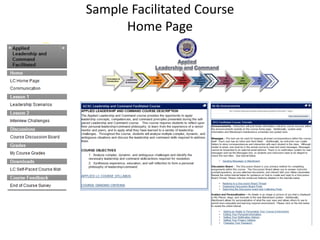
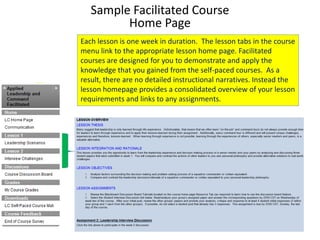
Each lesson is one week in duration. The lesson tabs in the course
menu link to the appropriate lesson home page. Facilitated
courses are designed for you to demonstrate and apply the
knowledge that you gained from the self-paced courses. As a
result, there are no detailed instructional narratives. Instead the
lesson homepage provides a consolidated overview of your lesson
requirements and links to any assignments.
Sample Facilitated Course
              Home Page
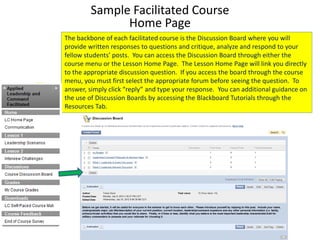
The backbone of each facilitated course is the Discussion Board where you will
provide written responses to questions and critique, analyze and respond to your
fellow students’ posts. You can access the Discussion Board through either the
course menu or the Lesson Home Page. The Lesson Home Page will link you directly
to the appropriate discussion question. If you access the board through the course
menu, you must first select the appropriate forum before seeing the question. To
answer, simply click “reply” and type your response. You can additional guidance on
the use of Discussion Boards by accessing the Blackboard Tutorials through the
Resources Tab.
Sample Facilitated Course
           Home Page
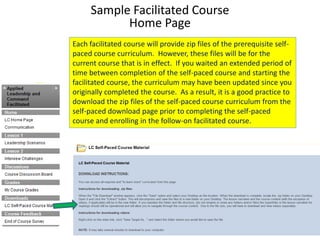
Each facilitated course will provide zip files of the prerequisite self-
paced course curriculum. However, these files will be for the
current course that is in effect. If you waited an extended period of
time between completion of the self-paced course and starting the
facilitated course, the curriculum may have been updated since you
originally completed the course. As a result, it is a good practice to
download the zip files of the self-paced course curriculum from the
self-paced download page prior to completing the self-paced
course and enrolling in the follow-on facilitated course.
Sample Facilitated Course
            Home Page
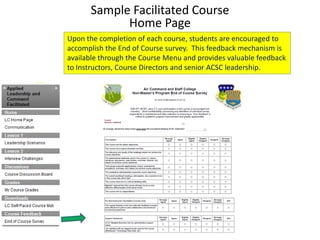
Upon the completion of each course, students are encouraged to
accomplish the End of Course survey. This feedback mechanism is
available through the Course Menu and provides valuable feedback
to Instructors, Course Directors and senior ACSC leadership.
Sample Facilitated Course
                              Home Page

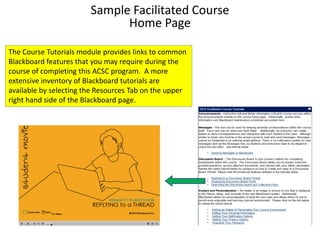
The Course Tutorials module provides links to common
Blackboard features that you may require during the
course of completing this ACSC program. A more
extensive inventory of Blackboard tutorials are
available by selecting the Resources Tab on the upper
right hand side of the Blackboard page.
COURSE STRUCTURE
                     SUMMARY
• Sample Self Paced/Non Facilitated Course
     • Home Page
     • Course Menu
     • Course Overview/Resources
     • Course Announcements
     • Course Forum

• Sample Facilitated Course
     • Home Page
     • Communication
     • Discussion Boards
     • Offline Downloads
     • Tutorials

Class walk through acsc dl 6 (1)

  • 1.
    COURSE STRUCTURE OVERVIEW • Sample Self Paced/Non Facilitated Course • Home Page • Course Menu • Course Overview/Resources • Course Announcements • Course Forum • Sample Facilitated Course • Home Page • Communication • Discussion Boards • Offline Downloads • Tutorials
  • 2.
  • 3.
    Course Menu Course Overview/Resources Course Announcements Discussion Forum
  • 4.
    Course Menu Your one-stoptool for navigating the course content The Help Link will take you to a list of contacts that can assist you with a variety of different issues. NOTE: please contact the appropriate POC for the issue that you are experiencing.
  • 5.
    Course Menu Your one-stoptool for navigating the course content The chronological lesson tabs link to each Lesson Home Page where you can access the instructional narrative and assigned readings. You will also access online Lesson Progress Checks and Computer Interactive Learning Activities (ILA) (as applicable) from this page. NOTE: A chronological approach using each lesson home page and the online lesson narrative is the best method for accomplishing all curriculum requirements.
  • 6.
    Course Menu Your one-stoptool for navigating the course content The Course Grades link will allow you to review a summary of your graded events (Written Assignments, Progress Checks & ILAs). Facilitated Self Paced NEED EXAMPLE HERE
  • 7.
    Course Menu Your one-stoptool for navigating the course content The Offline Course Material link will take you to a page where you can download all course curriculum for offline access. This is not the most effective way to navigate the curriculum. Due to file size, you must download readings and videos separately. If you correctly follow the instructions, the instructional narrative links for assigned readings will function, however, the links to videos will not since they are downloaded separately. Although the offline method is not the best option for completing the course, you are encouraged to maintain offline copies of the curriculum for future reference in facilitated courses. NOTE: If you complete your readings offline, you will still need to access the Lesson Homepage online to complete all progress checks and Interactive Learning Activities (as applicable).
  • 8.
    Course Menu Upon thecompletion of each course, students are encouraged to accomplish the End of Course survey. This feedback mechanism is available through the Course Menu and provides valuable feedback to Course Directors and senior ACSC leadership.
  • 9.
    Course Overview/Resources The Course Overview provides a snapshot of the course description and objectives, and links the syllabus and course bibliography. The syllabus provides an overview of every lesson, while the bibliography identifies all of the assigned curriculum that will be in the course. However, the course curriculum is also identified in each lesson narrative which is the most effective method for navigating the course.
  • 10.
    Course Announcements The CourseAnnouncements block is an area where ACSC will post important news, instructions, and curriculum updates. It is important to check this area frequently to ensure you have the latest information. Information posted here will be incorporated into the course at the early possible opportunity.
  • 11.
    Course Forums Course forumsare designed to promote collaboration, the exchange of ideas, current events, and academic debate. It is a way for 10,000 ACSC students around the globe to share their experiences and knowledge. However, it’s existence does not lessen the standards for academic integrity and professionalism. These forums are self-moderated and any professional misconduct should be immediately reported to ACSC via email or telephone. Course Directors do not respond to questions posed on the course forums. However, they may periodically post current articles/news related to the course. To participate, simply click the link and create a discussion thread selecting “Create Thread.”
  • 12.
  • 13.
    Sample Facilitated Course Home Page The communication link takes you to the internal blackboard messaging system. You can send and receive emails to your fellow seminar members and instructor within blackboard but not externally through this system. You should check your inbox frequently during the course. For additional information on sending emails, you can review the Blackboard tutorials by clicking on the Resources Tab.
  • 14.
    Sample Facilitated Course Home Page Each lesson is one week in duration. The lesson tabs in the course menu link to the appropriate lesson home page. Facilitated courses are designed for you to demonstrate and apply the knowledge that you gained from the self-paced courses. As a result, there are no detailed instructional narratives. Instead the lesson homepage provides a consolidated overview of your lesson requirements and links to any assignments.
  • 15.
    Sample Facilitated Course Home Page The backbone of each facilitated course is the Discussion Board where you will provide written responses to questions and critique, analyze and respond to your fellow students’ posts. You can access the Discussion Board through either the course menu or the Lesson Home Page. The Lesson Home Page will link you directly to the appropriate discussion question. If you access the board through the course menu, you must first select the appropriate forum before seeing the question. To answer, simply click “reply” and type your response. You can additional guidance on the use of Discussion Boards by accessing the Blackboard Tutorials through the Resources Tab.
  • 16.
    Sample Facilitated Course Home Page Each facilitated course will provide zip files of the prerequisite self- paced course curriculum. However, these files will be for the current course that is in effect. If you waited an extended period of time between completion of the self-paced course and starting the facilitated course, the curriculum may have been updated since you originally completed the course. As a result, it is a good practice to download the zip files of the self-paced course curriculum from the self-paced download page prior to completing the self-paced course and enrolling in the follow-on facilitated course.
  • 17.
    Sample Facilitated Course Home Page Upon the completion of each course, students are encouraged to accomplish the End of Course survey. This feedback mechanism is available through the Course Menu and provides valuable feedback to Instructors, Course Directors and senior ACSC leadership.
  • 18.
    Sample Facilitated Course Home Page The Course Tutorials module provides links to common Blackboard features that you may require during the course of completing this ACSC program. A more extensive inventory of Blackboard tutorials are available by selecting the Resources Tab on the upper right hand side of the Blackboard page.
  • 19.
    COURSE STRUCTURE SUMMARY • Sample Self Paced/Non Facilitated Course • Home Page • Course Menu • Course Overview/Resources • Course Announcements • Course Forum • Sample Facilitated Course • Home Page • Communication • Discussion Boards • Offline Downloads • Tutorials