Designing and Organizing a Web Site
CIS1203

1
Learning Objectives
1.

Website layouts (slides 35)

2.

Home Page (slides 67)

3.

Website organizational structures (slides 817)

4.

Accessibility (slide 18)

5.

Usability & Consistency (slide 19)

6.

Browser compatibility (slide 20)

7.

Screen resolution (slide 21)

8.

Color schemes (slides 22  24)

9.

Contrast (slide 25)

10. Content (slides 2627)
11. Website navigational structures (slides 2841)

2
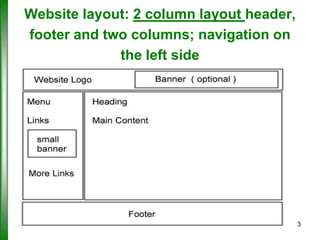
Website layout: 2 column layout header,
footer and two columns; navigation on
the left side

3
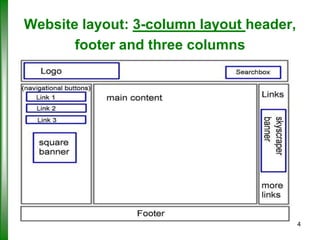
Website layout: 3-column layout header,
footer and three columns

4
Benefits of both 2 Columns
and 3-Columns layout
 2-Columns Layout:
- Large content area
- Larger pictures
- Better font choice

 3-Columns Layout:
- e-Commerce benefit by promoting their products.
- Online users focus more on the center

5
Home Page
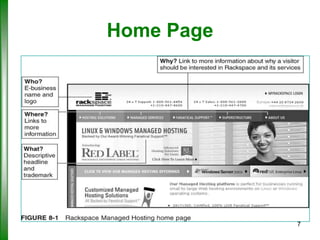
 Home page should answer basic visitor
questions:
–
–
–
–

Who are you?
What do you do?
Where can I find what I want or need?
Why should I be interested in your products or
services?

6
Home Page

7
Website organizational
structures
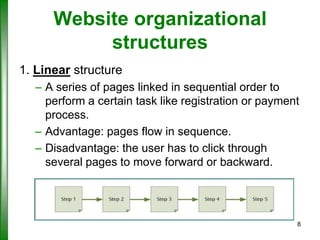
1. Linear structure
– A series of pages linked in sequential order to
perform a certain task like registration or payment
process.
– Advantage: pages flow in sequence.
– Disadvantage: the user has to click through
several pages to move forward or backward.

8
Website organizational structures
(continues)
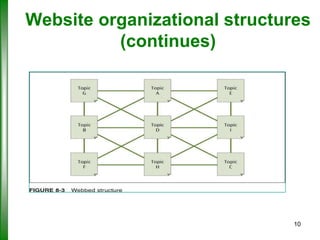
2. Webbed structure
– Pages are linked together without regard for how the
content fits logically
– Advantage: users can move quickly from page to
page
– Disadvantage: users can easily got lost within the
website

9
Website organizational structures
(continues)

10
Website organizational structures
(continues)
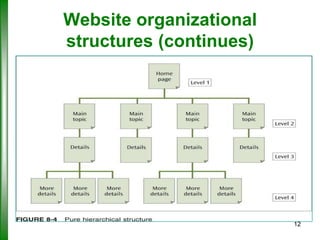
3. Pure hierarchical structure
– Similar to business organizational chart
– Information is organized in levels
– Home page at Level 1 (top-level)
– Main topic pages at Level 2
– Additional details about main topics at remaining
levels
– Advantage: site structure matches content
organization (topic oriented structure)
– Disadvantage: users can get lost with too many levels
11
Website organizational
structures (continues)

12
Web Site Organizational Structure
(continued)
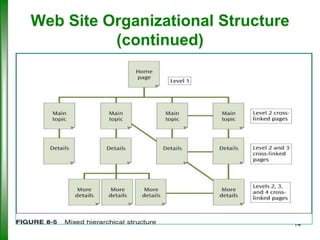
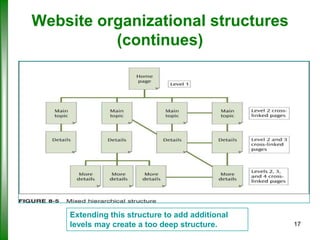
4. Mixed hierarchical structure
– Combines structured organization with crosslinked pages
– Advantage: combines the features of both
hierarchical and sequential structures
– Disadvantage: users can get lost with too many

levels

13
Web Site Organizational Structure
(continued)

14
Website organizational structures
(continues)
 Site organization
– Should enable visitors to find actionable content
quickly and easily
– Be neither too flat nor too deep
– Logical and intuitive

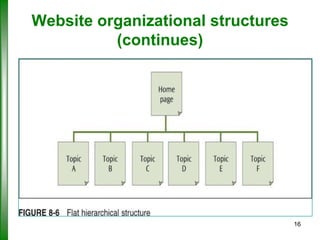
 Avoid a structure that is either too flat or too deep
– Structure that is too flat is uninteresting
– Structure that is too deep is difficult to navigate

15
Website organizational structures
(continues)

16
Website organizational structures
(continues)

Extending this structure to add additional
levels may create a too deep structure.

17
Accessibility
 Web accessibility: Designing Web pages so that Web
resources are available to people with disabilities
 W3C guidelines for accessibility
– Visual/auditory content is supported by alternative
content
– Color alone should not indicate a link
– Suitable contrast for background/foreground colors
– Simply worded text
– Navigational links are clear and consistent
– Page content is consistent across all pages
18
Usability & Consistency
 Web usability
– Designing Web pages to help all visitors
accomplish their goals at a site quickly and easily

 Consistency across all pages
– All pages should have a common “look and feel”
– Elements in same position
– Standard color scheme

19
Browser compatibility
 Browser compatibility: Different browsers
might display websites slightly different
 Make sure pages are running the same in
different browsers such as IE, Firefox, Chrome,
Safari…etc.
 Page layout
– Fixed-width pages fit in a maximized browser
window for a specific screen resolution
– Liquid design creates pages that size with the
browser window
20
Screen resolution
 Should have a mobile version of website for
mobile devices
 Screen resolution is the number of dots on the
screen.
 Popular screen resolutions include 800 x 600,
1024 x 768, and 1280 x 800

21
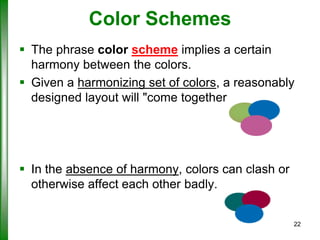
Color Schemes
 The phrase color scheme implies a certain
harmony between the colors.
 Given a harmonizing set of colors, a reasonably
designed layout will "come together.

 In the absence of harmony, colors can clash or
otherwise affect each other badly.
22
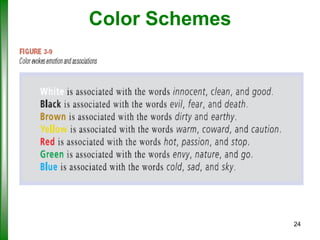
Color Schemes
 Powerful communication tool
 Wrong colors may communicate the
wrong message
 Color suggests emotion and
associations
 Adding color changes the look of
pages without adding to file size
23
Color Schemes

24
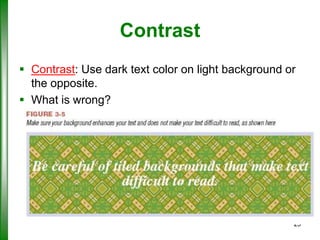
Contrast
 Contrast: Use dark text color on light background or
the opposite.
 What is wrong?

25
Content: Design Options
– Use simple, direct language avoid industry
terminology
– Use bulleted and numbered lists
– Use dark text color on light background
– Use a familiar font and at least a 12-point font size
– Check spelling and grammar, and proofread
– Less text is usually better because more content
requires more levels
– More levels add to confusion and frustration for user
– Reduce levels by providing hyperlinks (links)
– All multimedia (graphics, animation, sound, and
26
video) should complement content, not be the focus
Content: Checklist
 Make sure content always accessible
 Users do not read a Web page; they scan
it, looking for keywords/links
 First-time visitors to a Web site generally
spend less than 60 seconds on the Web
page
 Web site must capture visitor’s interest
 Text still the primary element used to
convey information; text must be readable
 Always test your color and background
combinations

27
Website navigational
structures
Characteristics of good navigation
1.
2.
3.
4.
5.

Clear text labels or icons
Easy to use
Consistent across all pages
Aligns with the meanings of the content
Attractive to the users

28
Website navigational
structures
Navigational elements (internal links)
1.
2.
3.
4.
5.
6.
7.

Embedded text links
Clickable table of contents and top-of-page links
Navigation bars
Navigation menus and tabs
Breadcrumb trail
Site map
Rollover links
29
Website navigational structures
(continues)
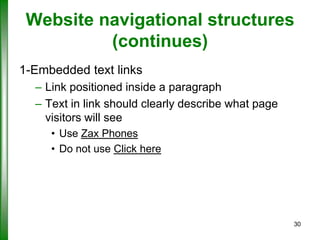
1-Embedded text links
– Link positioned inside a paragraph
– Text in link should clearly describe what page
visitors will see
• Use Zax Phones
• Do not use Click here

30
Website navigational structures
(continues)
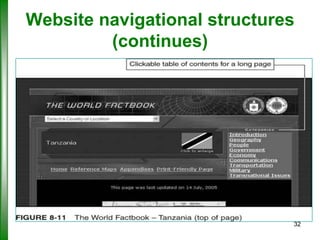
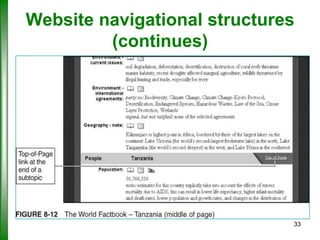
2-Clickable table of contents and top-of-page
links
– Use to navigate between topics on a long Web
page
– Allow visitors to read subtopics and return to the
top of the page without scrolling

31
Website navigational structures
(continues)

32
Website navigational structures
(continues)

33
Website navigational structures
(continues)
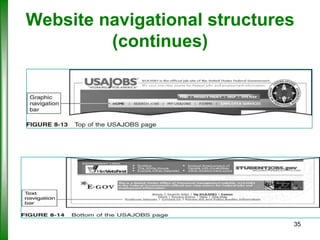
3-Navigation bars
– Navigation bar is a series of graphic or text-based
internal links
– Often found at the top or bottom of Web page

34
Website navigational structures
(continues)

35
Website navigational structures
(continues)
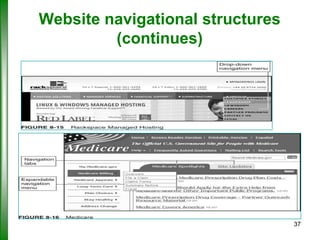
4-Navigation menus and tabs
– Navigation menu is a list of internal links
– Navigation tabs are similar to file folder tabs
– Both are used to conserve space on a page

36
Website navigational structures
(continues)

37
Website navigational structures
(continues)
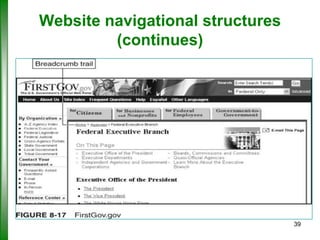
5-Breadcrumb trail
– Hierarchical navigational outline
– Provides visitor with feedback on path taken to
current page
– Use in conjunction with other navigational
elements

38
Website navigational structures
(continues)

39
Website navigational structures
(continues)
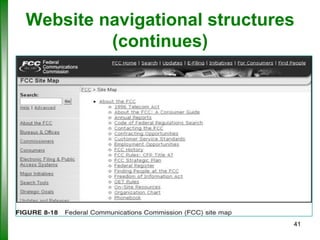
6-Site map
– Web page that shows a summary of all the linked
pages at the site

7-Rollover links
– Hidden links that appear when mouse is “rolled
over” an animated image
– Avoid rollover links

40
Website navigational structures
(continues)

41

CIS1203 Web Design Principles - Part 2

  • 1.
    Designing and Organizinga Web Site CIS1203 1
  • 2.
    Learning Objectives 1. Website layouts(slides 35) 2. Home Page (slides 67) 3. Website organizational structures (slides 817) 4. Accessibility (slide 18) 5. Usability & Consistency (slide 19) 6. Browser compatibility (slide 20) 7. Screen resolution (slide 21) 8. Color schemes (slides 22  24) 9. Contrast (slide 25) 10. Content (slides 2627) 11. Website navigational structures (slides 2841) 2
  • 3.
    Website layout: 2column layout header, footer and two columns; navigation on the left side 3
  • 4.
    Website layout: 3-columnlayout header, footer and three columns 4
  • 5.
    Benefits of both2 Columns and 3-Columns layout  2-Columns Layout: - Large content area - Larger pictures - Better font choice  3-Columns Layout: - e-Commerce benefit by promoting their products. - Online users focus more on the center 5
  • 6.
    Home Page  Homepage should answer basic visitor questions: – – – – Who are you? What do you do? Where can I find what I want or need? Why should I be interested in your products or services? 6
  • 7.
  • 8.
    Website organizational structures 1. Linearstructure – A series of pages linked in sequential order to perform a certain task like registration or payment process. – Advantage: pages flow in sequence. – Disadvantage: the user has to click through several pages to move forward or backward. 8
  • 9.
    Website organizational structures (continues) 2.Webbed structure – Pages are linked together without regard for how the content fits logically – Advantage: users can move quickly from page to page – Disadvantage: users can easily got lost within the website 9
  • 10.
  • 11.
    Website organizational structures (continues) 3.Pure hierarchical structure – Similar to business organizational chart – Information is organized in levels – Home page at Level 1 (top-level) – Main topic pages at Level 2 – Additional details about main topics at remaining levels – Advantage: site structure matches content organization (topic oriented structure) – Disadvantage: users can get lost with too many levels 11
  • 12.
  • 13.
    Web Site OrganizationalStructure (continued) 4. Mixed hierarchical structure – Combines structured organization with crosslinked pages – Advantage: combines the features of both hierarchical and sequential structures – Disadvantage: users can get lost with too many levels 13
  • 14.
    Web Site OrganizationalStructure (continued) 14
  • 15.
    Website organizational structures (continues) Site organization – Should enable visitors to find actionable content quickly and easily – Be neither too flat nor too deep – Logical and intuitive  Avoid a structure that is either too flat or too deep – Structure that is too flat is uninteresting – Structure that is too deep is difficult to navigate 15
  • 16.
  • 17.
    Website organizational structures (continues) Extendingthis structure to add additional levels may create a too deep structure. 17
  • 18.
    Accessibility  Web accessibility:Designing Web pages so that Web resources are available to people with disabilities  W3C guidelines for accessibility – Visual/auditory content is supported by alternative content – Color alone should not indicate a link – Suitable contrast for background/foreground colors – Simply worded text – Navigational links are clear and consistent – Page content is consistent across all pages 18
  • 19.
    Usability & Consistency Web usability – Designing Web pages to help all visitors accomplish their goals at a site quickly and easily  Consistency across all pages – All pages should have a common “look and feel” – Elements in same position – Standard color scheme 19
  • 20.
    Browser compatibility  Browsercompatibility: Different browsers might display websites slightly different  Make sure pages are running the same in different browsers such as IE, Firefox, Chrome, Safari…etc.  Page layout – Fixed-width pages fit in a maximized browser window for a specific screen resolution – Liquid design creates pages that size with the browser window 20
  • 21.
    Screen resolution  Shouldhave a mobile version of website for mobile devices  Screen resolution is the number of dots on the screen.  Popular screen resolutions include 800 x 600, 1024 x 768, and 1280 x 800 21
  • 22.
    Color Schemes  Thephrase color scheme implies a certain harmony between the colors.  Given a harmonizing set of colors, a reasonably designed layout will "come together.  In the absence of harmony, colors can clash or otherwise affect each other badly. 22
  • 23.
    Color Schemes  Powerfulcommunication tool  Wrong colors may communicate the wrong message  Color suggests emotion and associations  Adding color changes the look of pages without adding to file size 23
  • 24.
  • 25.
    Contrast  Contrast: Usedark text color on light background or the opposite.  What is wrong? 25
  • 26.
    Content: Design Options –Use simple, direct language avoid industry terminology – Use bulleted and numbered lists – Use dark text color on light background – Use a familiar font and at least a 12-point font size – Check spelling and grammar, and proofread – Less text is usually better because more content requires more levels – More levels add to confusion and frustration for user – Reduce levels by providing hyperlinks (links) – All multimedia (graphics, animation, sound, and 26 video) should complement content, not be the focus
  • 27.
    Content: Checklist  Makesure content always accessible  Users do not read a Web page; they scan it, looking for keywords/links  First-time visitors to a Web site generally spend less than 60 seconds on the Web page  Web site must capture visitor’s interest  Text still the primary element used to convey information; text must be readable  Always test your color and background combinations 27
  • 28.
    Website navigational structures Characteristics ofgood navigation 1. 2. 3. 4. 5. Clear text labels or icons Easy to use Consistent across all pages Aligns with the meanings of the content Attractive to the users 28
  • 29.
    Website navigational structures Navigational elements(internal links) 1. 2. 3. 4. 5. 6. 7. Embedded text links Clickable table of contents and top-of-page links Navigation bars Navigation menus and tabs Breadcrumb trail Site map Rollover links 29
  • 30.
    Website navigational structures (continues) 1-Embeddedtext links – Link positioned inside a paragraph – Text in link should clearly describe what page visitors will see • Use Zax Phones • Do not use Click here 30
  • 31.
    Website navigational structures (continues) 2-Clickabletable of contents and top-of-page links – Use to navigate between topics on a long Web page – Allow visitors to read subtopics and return to the top of the page without scrolling 31
  • 32.
  • 33.
  • 34.
    Website navigational structures (continues) 3-Navigationbars – Navigation bar is a series of graphic or text-based internal links – Often found at the top or bottom of Web page 34
  • 35.
  • 36.
    Website navigational structures (continues) 4-Navigationmenus and tabs – Navigation menu is a list of internal links – Navigation tabs are similar to file folder tabs – Both are used to conserve space on a page 36
  • 37.
  • 38.
    Website navigational structures (continues) 5-Breadcrumbtrail – Hierarchical navigational outline – Provides visitor with feedback on path taken to current page – Use in conjunction with other navigational elements 38
  • 39.
  • 40.
    Website navigational structures (continues) 6-Sitemap – Web page that shows a summary of all the linked pages at the site 7-Rollover links – Hidden links that appear when mouse is “rolled over” an animated image – Avoid rollover links 40
  • 41.