M A K E T E C H N O L O G Y W O R K F O R Y O U
E D T C W O R K S H O P S F O R T E A C H E R S
MOBILE LEARNING UNIT
WORKSHOP SERIES
Inclusive Technology
Inclusive Technology – For Whom?
 Inclusive technology can help people who have no perceived challenges,
to those who experience difficulty with a range of issues from blindness
to deafness to dyslexia and other challenges.
 Font size, colour and contrast
 Speech to text and text to speech
 Recording and replaying
Inclusive Technology VS Assistive Technology
 What is the difference between inclusive technology and assistive
technology?
 Inclusive technology makes use of technologies that are used by
everyone
 Examples: Mobile phones, iPads, laptops,
 Why is using these tools an advantage?
Benefits of inclusive technology
 If everyone has one, no one knows you are using assistive technology.
 If everyone has one, then you don’t need to buy one (or convince
someone else to buy it for you).
 If everyone has one, then you can communicate with them easily
 If everyone has one, then you can get help for it much easier
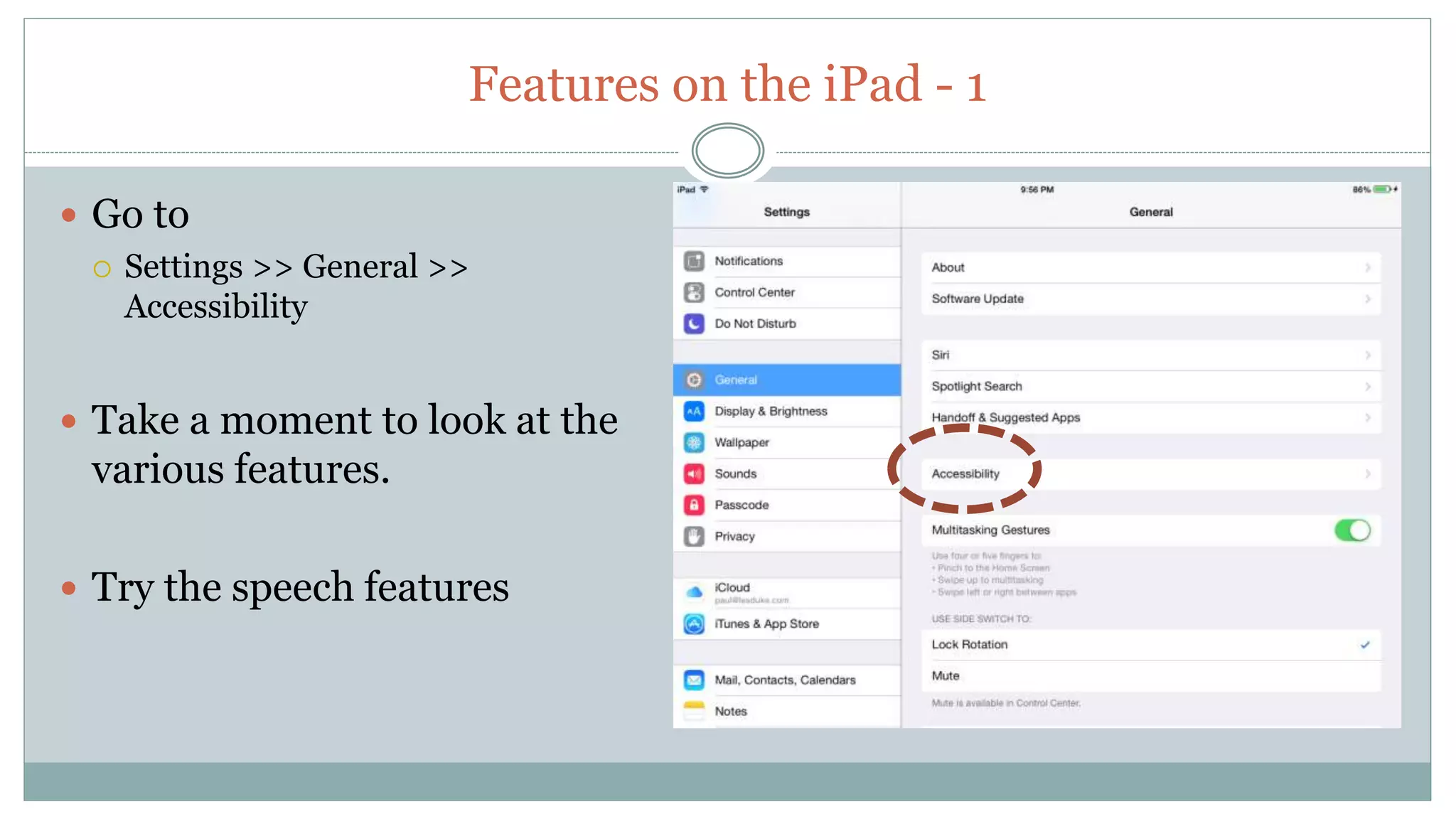
Features on the iPad - 1
 Go to
 Settings >> General >>
Accessibility
 Take a moment to look at the
various features.
 Try the speech features
Features on the iPad - 2
 Go to the “Speech” document
 Speak.

Mobile Learning Unit: Inclusive Technology

  • 1.
    M A KE T E C H N O L O G Y W O R K F O R Y O U E D T C W O R K S H O P S F O R T E A C H E R S MOBILE LEARNING UNIT WORKSHOP SERIES Inclusive Technology
  • 2.
    Inclusive Technology –For Whom?  Inclusive technology can help people who have no perceived challenges, to those who experience difficulty with a range of issues from blindness to deafness to dyslexia and other challenges.  Font size, colour and contrast  Speech to text and text to speech  Recording and replaying
  • 3.
    Inclusive Technology VSAssistive Technology  What is the difference between inclusive technology and assistive technology?  Inclusive technology makes use of technologies that are used by everyone  Examples: Mobile phones, iPads, laptops,  Why is using these tools an advantage?
  • 4.
    Benefits of inclusivetechnology  If everyone has one, no one knows you are using assistive technology.  If everyone has one, then you don’t need to buy one (or convince someone else to buy it for you).  If everyone has one, then you can communicate with them easily  If everyone has one, then you can get help for it much easier
  • 5.
    Features on theiPad - 1  Go to  Settings >> General >> Accessibility  Take a moment to look at the various features.  Try the speech features
  • 6.
    Features on theiPad - 2  Go to the “Speech” document  Speak.

Editor's Notes

  • #3 Personal work – personal sphere – manage your work and organize it Share – community of inquiry – we have to work with others – share and get / give feedback Competency – when your supervisor, students and stakeholder want to know what you are doing.
  • #4 Personal work – personal sphere – manage your work and organize it Share – community of inquiry – we have to work with others – share and get / give feedback Competency – when your supervisor, students and stakeholder want to know what you are doing.
  • #6 Show people what they want to see Reusable learning objects Edit once – update three times!
  • #7 Show people what they want to see Reusable learning objects Edit once – update three times!