Developing Curator Tool Wizards
June 6, 2018 – Portugal Workshop
I N I A V / T R U S T - P O R T O P O R T U G A L
Edwin Rojas (CIP) & Carlos Velasquez (CIP) & Pete Cyr (USDA)
GG Developers
Agenda
• General aspects for GG Wizards
• GRIN-Global Platform Architectural for CT and Wizards
• General flow to create and deploy a new Wizard
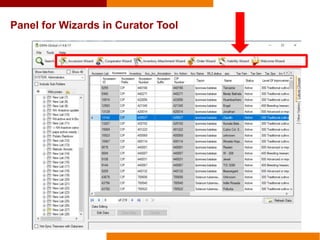
• Panel for Wizards in Curator Tool
• License terms & Copyright used for GG software
• Download & Running Curator Tool Source Code
• Prerequisites
• Projects in the GRINGlobal.Client solution
• Running the main project
• CIP Wizards (5 wizards)
• Requirements to Create GRIN-Global Wizards
• How to Create a Welcome Wizard
• Internal architectural of Wizards
• Internal architectural of the Interface
• Sequence Diagram
• Technical specifications of the Wizard project
• Questions to the Participants
• How to Create a List Comparison Wizard
• Overview and run
• Download and open
Database Server
Data tier
Web Server
Middle tier
(Business + Webservices)
GRIN-Global Platform Architectural for CT and Wizards
GG Central
Database
PC
User Interface
Curator Tool
GG
Client
Core
Wizards
Forms
Reports
GG Local
Database
GG
Server
core
GG
Webservice
ASPNET ASMX -SOAP
General flow to create and deploy a new Wizard
GitLab on Web Developer PC
GRIN-Global Server
(VS Solution in C#)
GRIN-Global Curator Tool
(VS Solution in C#)
https://gitlab.com/GRIN-Global
User PC
DLL file
Directory to copy DLL file:
GRIN-Global>GRIN-Global Curator Tool>
Wizards
.NET Framework 4.6.2
Curator Tool 1.9.8.17
184 Mb + .git = 643 Mb
Local Database
Contribution
Panel for Wizards in Curator Tool
License terms used for GRIN-Global software:
Where is the disclaimer text?
Curator Tool  Menu Help  About  Disclaimer text
License terms used for GRIN-Global software:
What is the disclaimer text?
The disclaimer text contains the 'License terms' under which USDA-ARS is
granting access to the user:
USDA grants to each Recipient of this software non-exclusive, royalty free, world-
wide, permission to use, copy, modify, publish, distribute, perform publicly and
display publicly this software.
Notice of this permission as well as the other paragraphs in this notice shall be
included in all copies or modifications of this software.
And for additional piece of software that will connect to GRIN-Global like new
Wizards you could prefer use Apache 2.0 license.
GNU license:
https://www.apache.org/licenses/LICENSE-2.0
Copyrigth sample:
Copyright © CIP 2018
Download & Running Curator Tool Source Code
Prerequisites
• Installed GRIN-Global Server Components in your PC
• Installed GRIN-Global Client Components in your PC
• Installed Visual Studio Community 2015 with C#
• Installed .NET Framework 4.6.2
• User/Developer PC must support a system type for 64-bit Operating System
• Download source code v. 1.9.8.17 from https://gitlab.com/GRIN-Global/GRIN-Global-
Curator-tool
Download & Running Curator Tool Source Code
Projects in the GRINGlobal.Client solution
Solution
P
r
o
j
e
c
t
s
Wizards
Wizards
CT Core Business Logic
Curator Tool EXE
Search Tool EXEWindows Application (2)
Class Library (11)
1. Open Visual Studio Community 2015
2. Open the solution GRINGlobal.Client.sln that was cloned from:
3. Rebuild the solution two times if errors are produced then uninstall/install four NuGet
packages for CrystalDecisions for the project ‘'GRINGlobal.Client.Common’:
1) CrystalDecisions.CrystalReports.Engine - version 1.0.0
2) CrystalDecisions.ReportSource - version 1.0.0
3) CrystalDecisions.Shared - version 1.0.0
4) CrystalDecisions.Windows.Forms - version 1.0.0
4. Verify the services for local and central database are running
5. Set as StartUp project to ‘GRINGlobal.Client.CuratorTool’
6. Click the “Start” button
Download & Running Curator Tool Source Code
Running the main project
https://gitlab.com/GRIN-Global/GRIN-Global-Curator-tool
CIP Wizards - Batch Wizard: Allow update accessions with their related information from Excel files in one single
upload process.
The most frequent uploads
CIP Wizards - List Wizard: Allow comparing two lists to match accessions, showing the results in a new list.
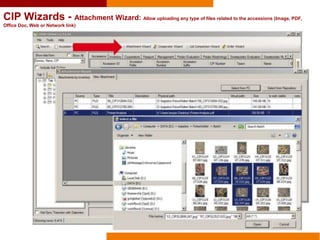
CIP Wizards - Attachment Wizard: Allow uploading any type of files related to the accessions (Image, PDF,
Office Doc, Web or Network link)
CIP Wizards - Search Wizard: Allow cross multiple filters of descriptors or traits to query accessions at the
accession level or inside subsets.
Store the
most
frequent
searches
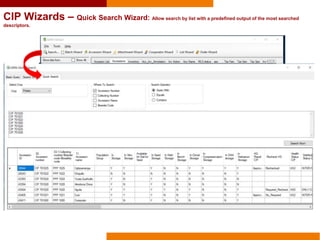
CIP Wizards – Quick Search Wizard: Allow search by list with a predefined output of the most searched
descriptors.
Requirements to create GRIN-Global Wizards
• Installed GRIN-Global Server Components in your PC
• Installed GRIN-Global Client Components in your PC
• Installed Visual Studio Community 2015 with C#
• Installed .NET Framework 4.6.2
• Developer PC must support a system type for 64-bit Operating System
• Download source code v. 1.9.8.17 from https://gitlab.com/GRIN-Global/GRIN-Global-
Curator-tool
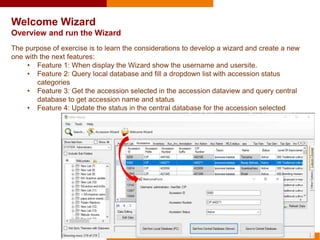
Welcome Wizard
Overview and run the Wizard
The purpose of exercise is to learn the considerations to develop a wizard and create a new
one with the next features:
• Feature 1: When display the Wizard show the username and usersite.
• Feature 2: Query local database and fill a dropdown list with accession status
categories
• Feature 3: Get the accession selected in the accession dataview and query central
database to get accession name and status
• Feature 4: Update the status in the central database for the accession selected
1. Open Visual Studio Community
2. Clone solution from
https://gitlab.com/Portugal2018/Welc
omeWizard.git
3. Open the solution
GRINGlobal.Client.sln
Welcome Wizard
Download and Open
(32 Mb)
User PC
Curator Tool
GG Local Database
SQL Express
Welcome Wizard
Internal architectural of Wizards
GG
Webservices
Wizard
GRINGlobal.Client.CuratorTool
Windows Application
GRINGlobal.Client.Common
Class library
WelcomeWizardDemo
Class Library
Interface
Wizard
Logic
HTTP
pKeys = IDs of selected rows separated by semicolon
:accessionid=; (example :ACCESSIONID=18510;18723;1258)
:inventoryid=;
:orderrequestid=;
:cooperatorid=;
:geographyid=;
:taxonomygenusid=;
:cropid=;
Interface
IGRINGlobalDataWizard
Welcome Wizard
Internal architectural of the Interface: IGRINGlobalDataWizard
pKeys
sharedUtils
Username
User Cooperator ID
Password
User Language Code
UserSite
GetLocalData
GetWebServiceData
SaveWebServiceData
BindComboboxToCodeValue
Properties
Methods
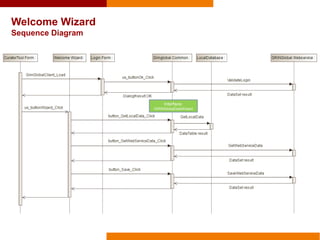
Welcome Wizard
Sequence Diagram
Interface:
IGRINGlobalDataWizard
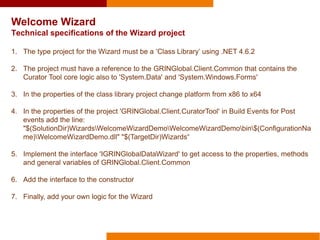
Welcome Wizard
Technical specifications of the Wizard project
1. The type project for the Wizard must be a ‘Class Library’ using .NET 4.6.2
2. The project must have a reference to the GRINGlobal.Client.Common that contains the
Curator Tool core logic also to 'System.Data' and 'System.Windows.Forms'
3. In the properties of the class library project change platform from x86 to x64
4. In the properties of the project 'GRINGlobal.Client.CuratorTool' in Build Events for Post
events add the line:
"$(SolutionDir)WizardsWelcomeWizardDemoWelcomeWizardDemobin$(ConfigurationNa
me)WelcomeWizardDemo.dll" "$(TargetDir)Wizards“
5. Implement the interface 'IGRINGlobalDataWizard' to get access to the properties, methods
and general variables of GRINGlobal.Client.Common
6. Add the interface to the constructor
7. Finally, add your own logic for the Wizard
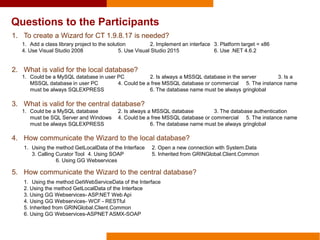
Questions to the Participants
1. To create a Wizard for CT 1.9.8.17 is needed?
2. What is valid for the local database?
3. What is valid for the central database?
4. How communicate the Wizard to the local database?
5. How communicate the Wizard to the central database?
1. Add a class library project to the solution 2. Implement an interface 3. Platform target = x86
4. Use Visual Studio 2008 5. Use Visual Studio 2015 6. Use .NET 4.6.2
1. Could be a MySQL database in user PC 2. Is always a MSSQL database in the server 3. Is a
MSSQL database in user PC 4. Could be a free MSSQL database or commercial 5. The instance name
must be always SQLEXPRESS 6. The database name must be always gringlobal
1. Could be a MySQL database 2. Is always a MSSQL database 3. The database authentication
must be SQL Server and Windows 4. Could be a free MSSQL database or commercial 5. The instance name
must be always SQLEXPRESS 6. The database name must be always gringlobal
1. Using the method GetLocalData of the Interface 2. Open a new connection with System.Data
3. Calling Curator Tool 4. Using SOAP 5. Inherited from GRINGlobal.Client.Common
6. Using GG Webservices
1. Using the method GetWebServiceData of the Interface
2. Using the method GetLocalData of the Interface
3. Using GG Webservices- ASP.NET Web Api
4. Using GG Webservices- WCF - RESTful
5. Inherited from GRINGlobal.Client.Common
6. Using GG Webservices-ASPNET ASMX-SOAP
List Comparison Wizard
Overview and run the Wizard
The purpose of this exercise is to learn the considerations to develop an advanced wizard that
allow comparing two lists to match accessions, showing the results in a new list.
1. Open Visual Studio Community
2. Clone solution from
https://gitlab.com/Portugal2018/ListComp
arisonWizard.git (38 Mb)
3. Open the solution GRINGlobal.Client.sln
List Comparison Wizard
Download and Open
The International Potato Center (known by its Spanish acronym CIP) is
a research-for-development organization with a focus on potato, sweetpotato,
and Andean roots and tubers. CIP is dedicated to delivering sustainable
science-based solutions to the pressing world issues of hunger, poverty,
gender equity, climate change and the preservation of our Earth’s fragile
biodiversity and natural resources.
www.cipotato.org
CIP is a member of CGIAR
CGIAR is a global agriculture research partnership for a food secure future. Its
science is carried out by the 15 research centers who are members of the
CGIAR Consortium in collaboration with hundreds of partner organizations.
www.cgiar.org
The United States Department of Agriculture, also known as the Agriculture
Department, is the U.S. federal executive department responsible for
developing and executing federal laws related to farming, forestry, and food.

CIP Developing Curator Tool Wizards

  • 1.
    Developing Curator ToolWizards June 6, 2018 – Portugal Workshop I N I A V / T R U S T - P O R T O P O R T U G A L Edwin Rojas (CIP) & Carlos Velasquez (CIP) & Pete Cyr (USDA) GG Developers
  • 2.
    Agenda • General aspectsfor GG Wizards • GRIN-Global Platform Architectural for CT and Wizards • General flow to create and deploy a new Wizard • Panel for Wizards in Curator Tool • License terms & Copyright used for GG software • Download & Running Curator Tool Source Code • Prerequisites • Projects in the GRINGlobal.Client solution • Running the main project • CIP Wizards (5 wizards) • Requirements to Create GRIN-Global Wizards • How to Create a Welcome Wizard • Internal architectural of Wizards • Internal architectural of the Interface • Sequence Diagram • Technical specifications of the Wizard project • Questions to the Participants • How to Create a List Comparison Wizard • Overview and run • Download and open
  • 3.
    Database Server Data tier WebServer Middle tier (Business + Webservices) GRIN-Global Platform Architectural for CT and Wizards GG Central Database PC User Interface Curator Tool GG Client Core Wizards Forms Reports GG Local Database GG Server core GG Webservice ASPNET ASMX -SOAP
  • 4.
    General flow tocreate and deploy a new Wizard GitLab on Web Developer PC GRIN-Global Server (VS Solution in C#) GRIN-Global Curator Tool (VS Solution in C#) https://gitlab.com/GRIN-Global User PC DLL file Directory to copy DLL file: GRIN-Global>GRIN-Global Curator Tool> Wizards .NET Framework 4.6.2 Curator Tool 1.9.8.17 184 Mb + .git = 643 Mb Local Database Contribution
  • 5.
    Panel for Wizardsin Curator Tool
  • 6.
    License terms usedfor GRIN-Global software: Where is the disclaimer text? Curator Tool  Menu Help  About  Disclaimer text
  • 7.
    License terms usedfor GRIN-Global software: What is the disclaimer text? The disclaimer text contains the 'License terms' under which USDA-ARS is granting access to the user: USDA grants to each Recipient of this software non-exclusive, royalty free, world- wide, permission to use, copy, modify, publish, distribute, perform publicly and display publicly this software. Notice of this permission as well as the other paragraphs in this notice shall be included in all copies or modifications of this software. And for additional piece of software that will connect to GRIN-Global like new Wizards you could prefer use Apache 2.0 license. GNU license: https://www.apache.org/licenses/LICENSE-2.0 Copyrigth sample: Copyright © CIP 2018
  • 8.
    Download & RunningCurator Tool Source Code Prerequisites • Installed GRIN-Global Server Components in your PC • Installed GRIN-Global Client Components in your PC • Installed Visual Studio Community 2015 with C# • Installed .NET Framework 4.6.2 • User/Developer PC must support a system type for 64-bit Operating System • Download source code v. 1.9.8.17 from https://gitlab.com/GRIN-Global/GRIN-Global- Curator-tool
  • 9.
    Download & RunningCurator Tool Source Code Projects in the GRINGlobal.Client solution Solution P r o j e c t s Wizards Wizards CT Core Business Logic Curator Tool EXE Search Tool EXEWindows Application (2) Class Library (11)
  • 10.
    1. Open VisualStudio Community 2015 2. Open the solution GRINGlobal.Client.sln that was cloned from: 3. Rebuild the solution two times if errors are produced then uninstall/install four NuGet packages for CrystalDecisions for the project ‘'GRINGlobal.Client.Common’: 1) CrystalDecisions.CrystalReports.Engine - version 1.0.0 2) CrystalDecisions.ReportSource - version 1.0.0 3) CrystalDecisions.Shared - version 1.0.0 4) CrystalDecisions.Windows.Forms - version 1.0.0 4. Verify the services for local and central database are running 5. Set as StartUp project to ‘GRINGlobal.Client.CuratorTool’ 6. Click the “Start” button Download & Running Curator Tool Source Code Running the main project https://gitlab.com/GRIN-Global/GRIN-Global-Curator-tool
  • 11.
    CIP Wizards -Batch Wizard: Allow update accessions with their related information from Excel files in one single upload process. The most frequent uploads
  • 12.
    CIP Wizards -List Wizard: Allow comparing two lists to match accessions, showing the results in a new list.
  • 13.
    CIP Wizards -Attachment Wizard: Allow uploading any type of files related to the accessions (Image, PDF, Office Doc, Web or Network link)
  • 14.
    CIP Wizards -Search Wizard: Allow cross multiple filters of descriptors or traits to query accessions at the accession level or inside subsets. Store the most frequent searches
  • 15.
    CIP Wizards –Quick Search Wizard: Allow search by list with a predefined output of the most searched descriptors.
  • 16.
    Requirements to createGRIN-Global Wizards • Installed GRIN-Global Server Components in your PC • Installed GRIN-Global Client Components in your PC • Installed Visual Studio Community 2015 with C# • Installed .NET Framework 4.6.2 • Developer PC must support a system type for 64-bit Operating System • Download source code v. 1.9.8.17 from https://gitlab.com/GRIN-Global/GRIN-Global- Curator-tool
  • 17.
    Welcome Wizard Overview andrun the Wizard The purpose of exercise is to learn the considerations to develop a wizard and create a new one with the next features: • Feature 1: When display the Wizard show the username and usersite. • Feature 2: Query local database and fill a dropdown list with accession status categories • Feature 3: Get the accession selected in the accession dataview and query central database to get accession name and status • Feature 4: Update the status in the central database for the accession selected
  • 18.
    1. Open VisualStudio Community 2. Clone solution from https://gitlab.com/Portugal2018/Welc omeWizard.git 3. Open the solution GRINGlobal.Client.sln Welcome Wizard Download and Open (32 Mb)
  • 19.
    User PC Curator Tool GGLocal Database SQL Express Welcome Wizard Internal architectural of Wizards GG Webservices Wizard GRINGlobal.Client.CuratorTool Windows Application GRINGlobal.Client.Common Class library WelcomeWizardDemo Class Library Interface Wizard Logic HTTP
  • 20.
    pKeys = IDsof selected rows separated by semicolon :accessionid=; (example :ACCESSIONID=18510;18723;1258) :inventoryid=; :orderrequestid=; :cooperatorid=; :geographyid=; :taxonomygenusid=; :cropid=; Interface IGRINGlobalDataWizard Welcome Wizard Internal architectural of the Interface: IGRINGlobalDataWizard pKeys sharedUtils Username User Cooperator ID Password User Language Code UserSite GetLocalData GetWebServiceData SaveWebServiceData BindComboboxToCodeValue Properties Methods
  • 21.
  • 22.
    Welcome Wizard Technical specificationsof the Wizard project 1. The type project for the Wizard must be a ‘Class Library’ using .NET 4.6.2 2. The project must have a reference to the GRINGlobal.Client.Common that contains the Curator Tool core logic also to 'System.Data' and 'System.Windows.Forms' 3. In the properties of the class library project change platform from x86 to x64 4. In the properties of the project 'GRINGlobal.Client.CuratorTool' in Build Events for Post events add the line: "$(SolutionDir)WizardsWelcomeWizardDemoWelcomeWizardDemobin$(ConfigurationNa me)WelcomeWizardDemo.dll" "$(TargetDir)Wizards“ 5. Implement the interface 'IGRINGlobalDataWizard' to get access to the properties, methods and general variables of GRINGlobal.Client.Common 6. Add the interface to the constructor 7. Finally, add your own logic for the Wizard
  • 23.
    Questions to theParticipants 1. To create a Wizard for CT 1.9.8.17 is needed? 2. What is valid for the local database? 3. What is valid for the central database? 4. How communicate the Wizard to the local database? 5. How communicate the Wizard to the central database? 1. Add a class library project to the solution 2. Implement an interface 3. Platform target = x86 4. Use Visual Studio 2008 5. Use Visual Studio 2015 6. Use .NET 4.6.2 1. Could be a MySQL database in user PC 2. Is always a MSSQL database in the server 3. Is a MSSQL database in user PC 4. Could be a free MSSQL database or commercial 5. The instance name must be always SQLEXPRESS 6. The database name must be always gringlobal 1. Could be a MySQL database 2. Is always a MSSQL database 3. The database authentication must be SQL Server and Windows 4. Could be a free MSSQL database or commercial 5. The instance name must be always SQLEXPRESS 6. The database name must be always gringlobal 1. Using the method GetLocalData of the Interface 2. Open a new connection with System.Data 3. Calling Curator Tool 4. Using SOAP 5. Inherited from GRINGlobal.Client.Common 6. Using GG Webservices 1. Using the method GetWebServiceData of the Interface 2. Using the method GetLocalData of the Interface 3. Using GG Webservices- ASP.NET Web Api 4. Using GG Webservices- WCF - RESTful 5. Inherited from GRINGlobal.Client.Common 6. Using GG Webservices-ASPNET ASMX-SOAP
  • 24.
    List Comparison Wizard Overviewand run the Wizard The purpose of this exercise is to learn the considerations to develop an advanced wizard that allow comparing two lists to match accessions, showing the results in a new list.
  • 25.
    1. Open VisualStudio Community 2. Clone solution from https://gitlab.com/Portugal2018/ListComp arisonWizard.git (38 Mb) 3. Open the solution GRINGlobal.Client.sln List Comparison Wizard Download and Open
  • 26.
    The International PotatoCenter (known by its Spanish acronym CIP) is a research-for-development organization with a focus on potato, sweetpotato, and Andean roots and tubers. CIP is dedicated to delivering sustainable science-based solutions to the pressing world issues of hunger, poverty, gender equity, climate change and the preservation of our Earth’s fragile biodiversity and natural resources. www.cipotato.org CIP is a member of CGIAR CGIAR is a global agriculture research partnership for a food secure future. Its science is carried out by the 15 research centers who are members of the CGIAR Consortium in collaboration with hundreds of partner organizations. www.cgiar.org The United States Department of Agriculture, also known as the Agriculture Department, is the U.S. federal executive department responsible for developing and executing federal laws related to farming, forestry, and food.