1 
Copyright ©2012 CollabNet, Inc. All Rights Reserved. 
CollabNet Git/Gerrit with TeamForge 
Secure, Scalable, Standards-Compliant for the Enterprise 
Johannes Nicolai 
Director of Engineering CollabNet
2 
Copyright ©2012 CollabNet, Inc. All Rights Reserved. 
Agenda 
•Introduction to Git, Gerrit and Jenkins 
•Git/Gerrit’s Place in the TeamForge Universe 
–Traceability 
–Searchability 
–Scalability 
–Security 
•Gerrit Signature Features 
–History Protection 
–Code Quality Gates 
•Q & A
3 
Copyright ©2012 CollabNet, Inc. All Rights Reserved. 
Introduction of Technologies 
•Git 
–Most popular emerging distributed SCM 
•Jenkins 
–Most popular open source Continuous Integration 
•Gerrit Code Review 
–Widely used code-review tool and Git server backend 
•CollabNet TeamForge® 
–Provides an unparalleled smooth integration of all these tools into your software development process
4 
Copyright ©2012 CollabNet, Inc. All Rights Reserved. 
•Open source distributed SCM, used notably by: 
–Linux (it was originally developed for that very purpose) 
–Eclipse foundation 
–Android (based on Gerrit Code Review) 
• Why Git? 
–All operations are local 
•Search, log, history, branching and merging 
•Offline development is possible 
–Powerful merging strategies (merge, rebase, cherry-pick) 
Git = Leading DVCS (Distributed Version Control System)
5 
Copyright ©2012 CollabNet, Inc. All Rights Reserved. 
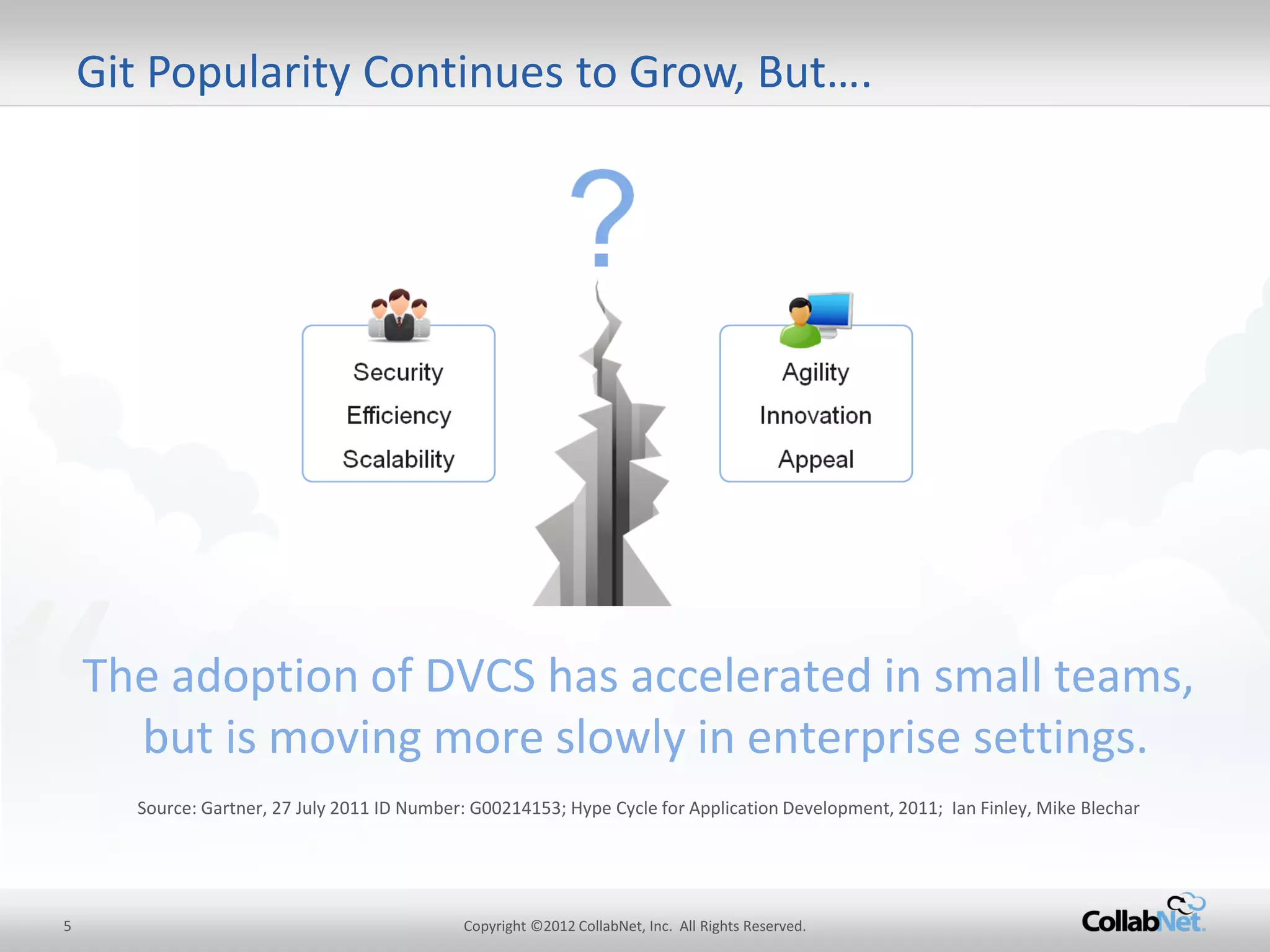
Git Popularity Continues to Grow, But…. 
“ 
The adoption of DVCS has accelerated in small teams, but is moving more slowly in enterprise settings. 
Source: Gartner, 27 July 2011 ID Number: G00214153; Hype Cycle for Application Development, 2011; Ian Finley, Mike Blechar
6 
Copyright ©2012 CollabNet, Inc. All Rights Reserved. 
•100% pure Java SSH and HTTP Git backend 
–Scalable and suitable for large Enterprises 
•Web-based and Command Line administration 
–Users and Groups 
–Project and branch security (read and write) 
•Collaboration and Code-review 
–B2B integration at code-level 
–Communicate and share code knowledge in the Team 
–Enforce workflow and code quality 
•The most successful open source code review 
–Android OS 
–Eclipse, OpenStack, Qt, CouchDB and many others 
Gerrit = (Widely Used) Git Server + Code Review Tool
7 
Copyright ©2012 CollabNet, Inc. All Rights Reserved. 
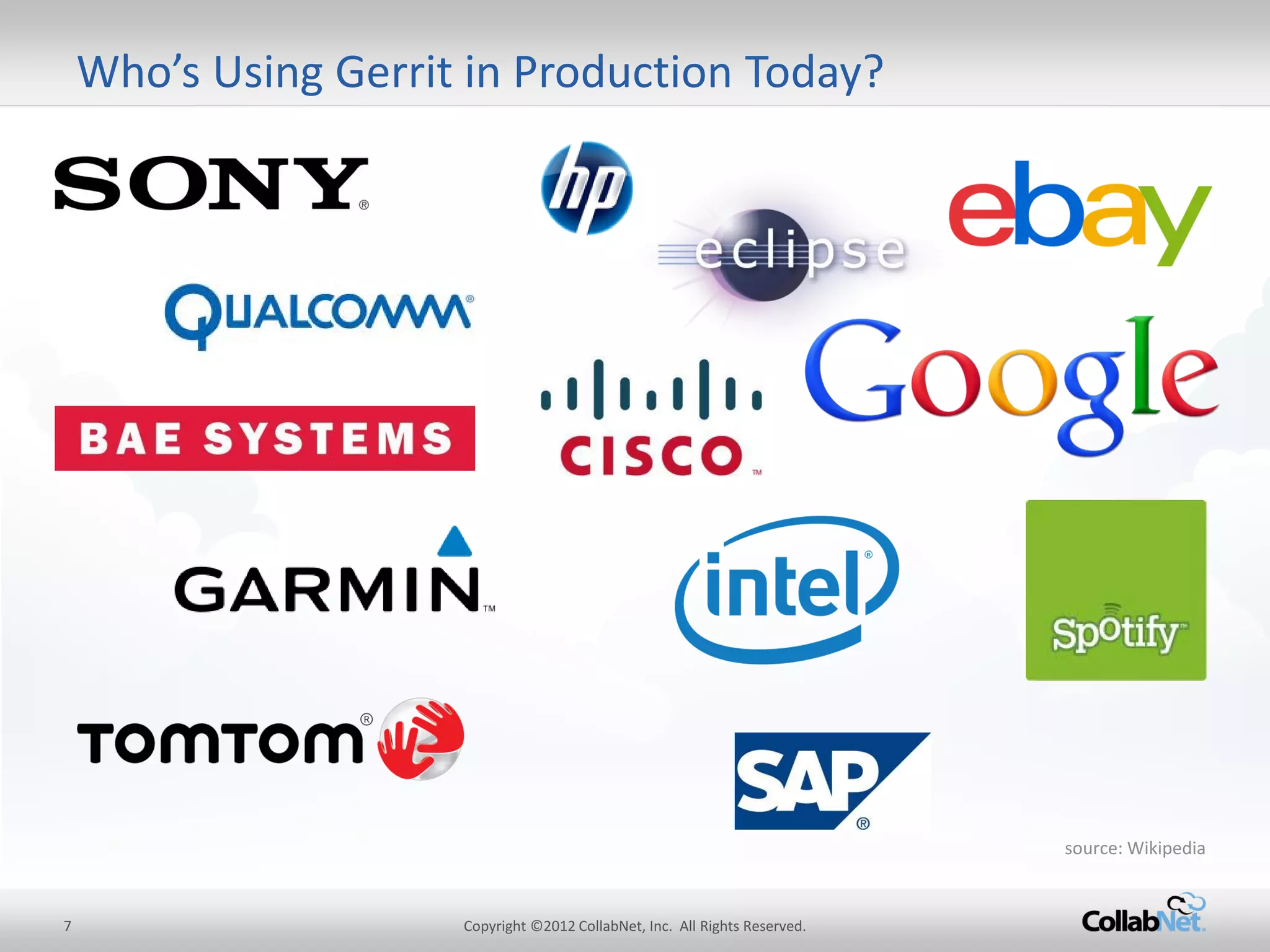
Who’s Using Gerrit in Production Today? 
source: Wikipedia
8 
Copyright ©2012 CollabNet, Inc. All Rights Reserved. 
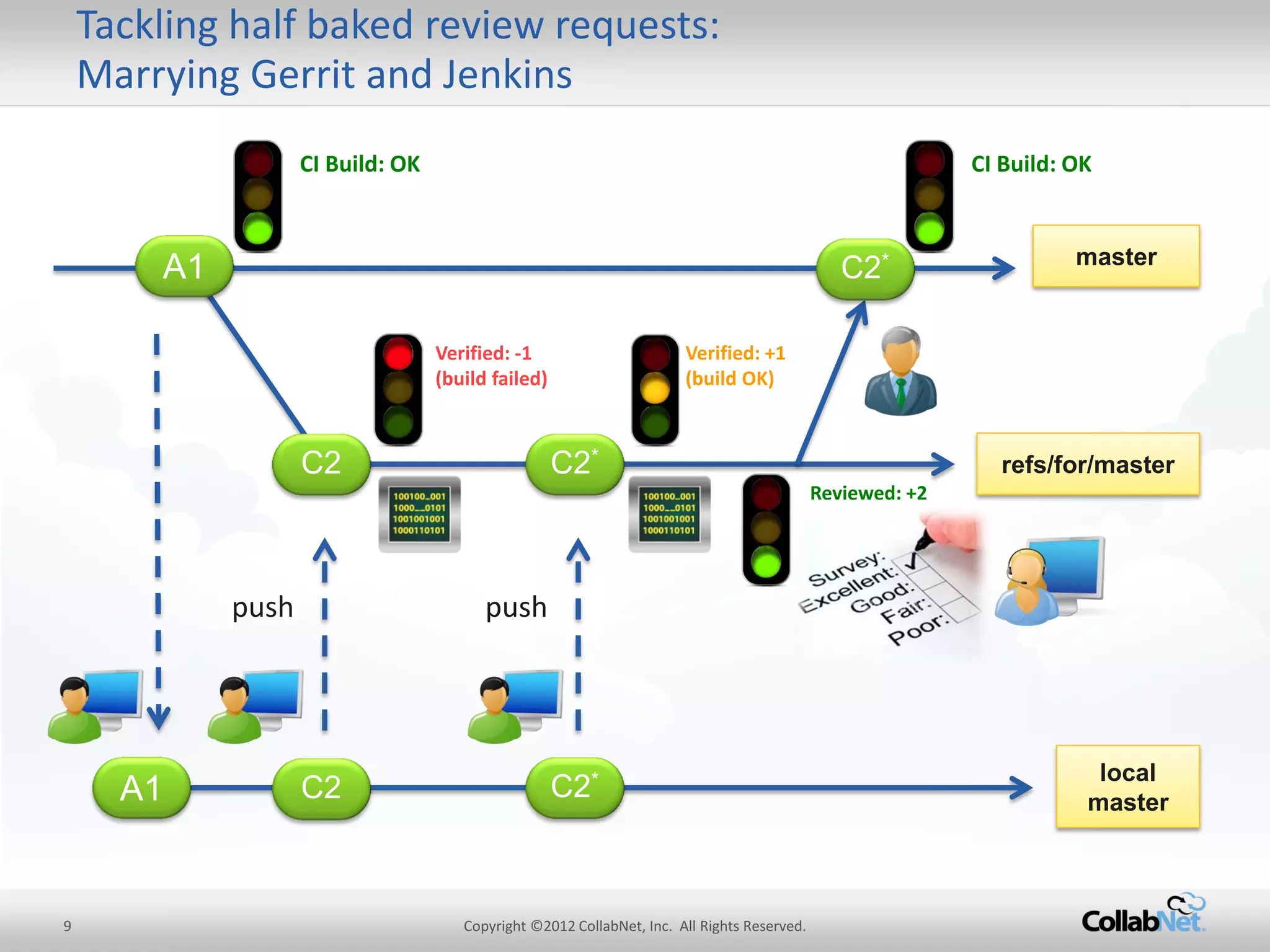
Jenkins = Most popular Open Source CI 
•Has hundreds of plugins to 
–Interact with various SCMs (Git, SVN, CVS, …) 
–Build software (ant, maven, gradle, make) 
–Run unit/integration tests (JUnit, Selenium, …) 
–Perform static code analysis (findbugs, checkstyle, PMS, Sonar, …) 
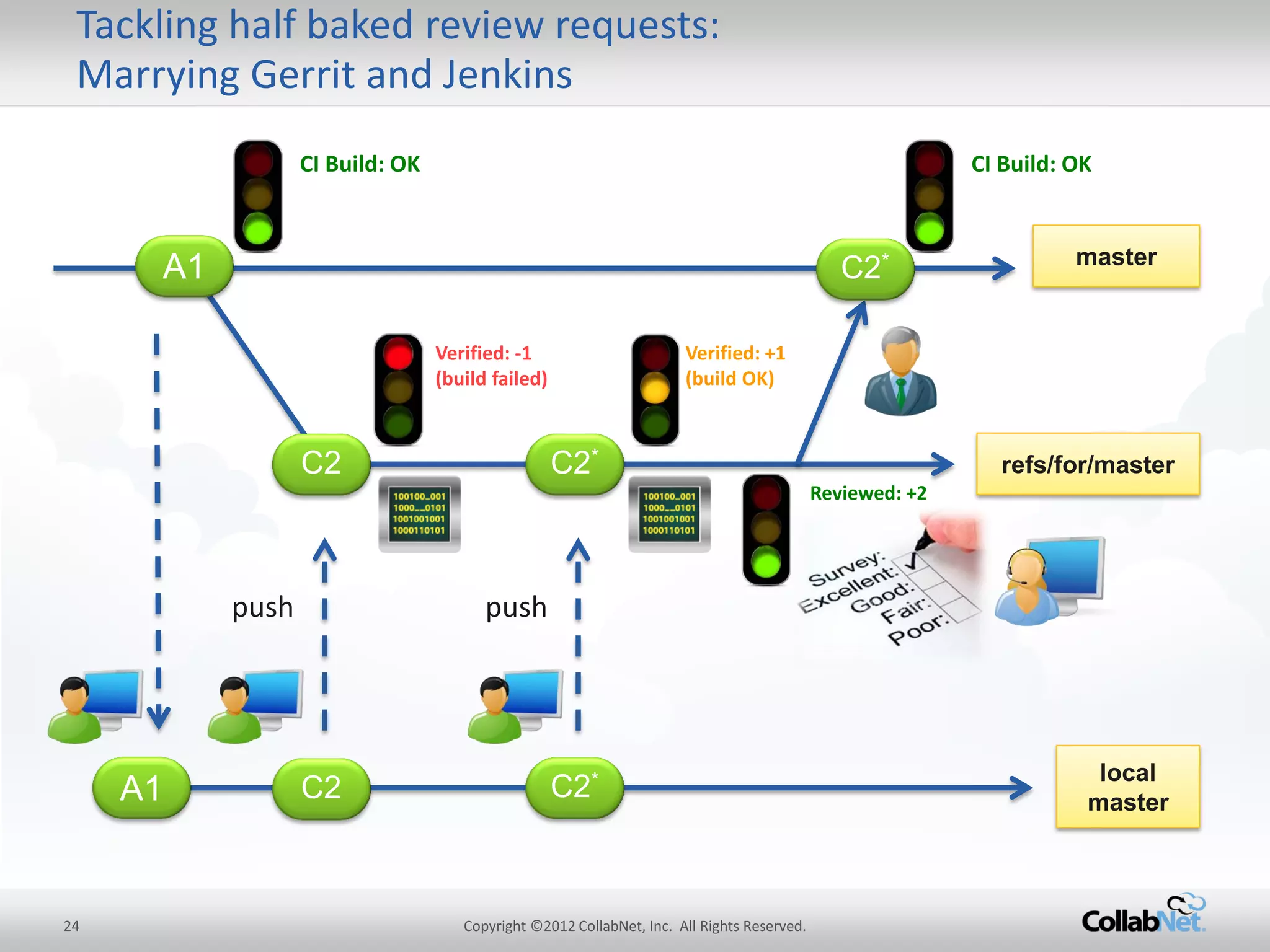
•Works brilliantly together with Gerrit over Gerrit Trigger Plugin 
–Keeps ssh connection open to learn about new review requests immediatly 
–Builds and verifies all configures quality gates (tests, coding conventions, code KPIs, you name it) 
–Sets ‘verified’ flag in review request according to result of verification build (either +1 or -1) 
–If Jenkins sets -1, then further code review isn’t possible, developer has to either re-work or abandon change
9 
Copyright ©2012 CollabNet, Inc. All Rights Reserved. 
Tackling half baked review requests: Marrying Gerrit and Jenkins 
master 
CI Build: OK 
CI Build: OK 
A1 
local master 
Verified: -1 (build failed) 
Verified: +1 (build OK) 
refs/for/master 
C2 
push 
C2 
C2* 
C2* 
push 
Reviewed: +2 
C2* 
A1
10 
Copyright ©2012 CollabNet, Inc. All Rights Reserved. 
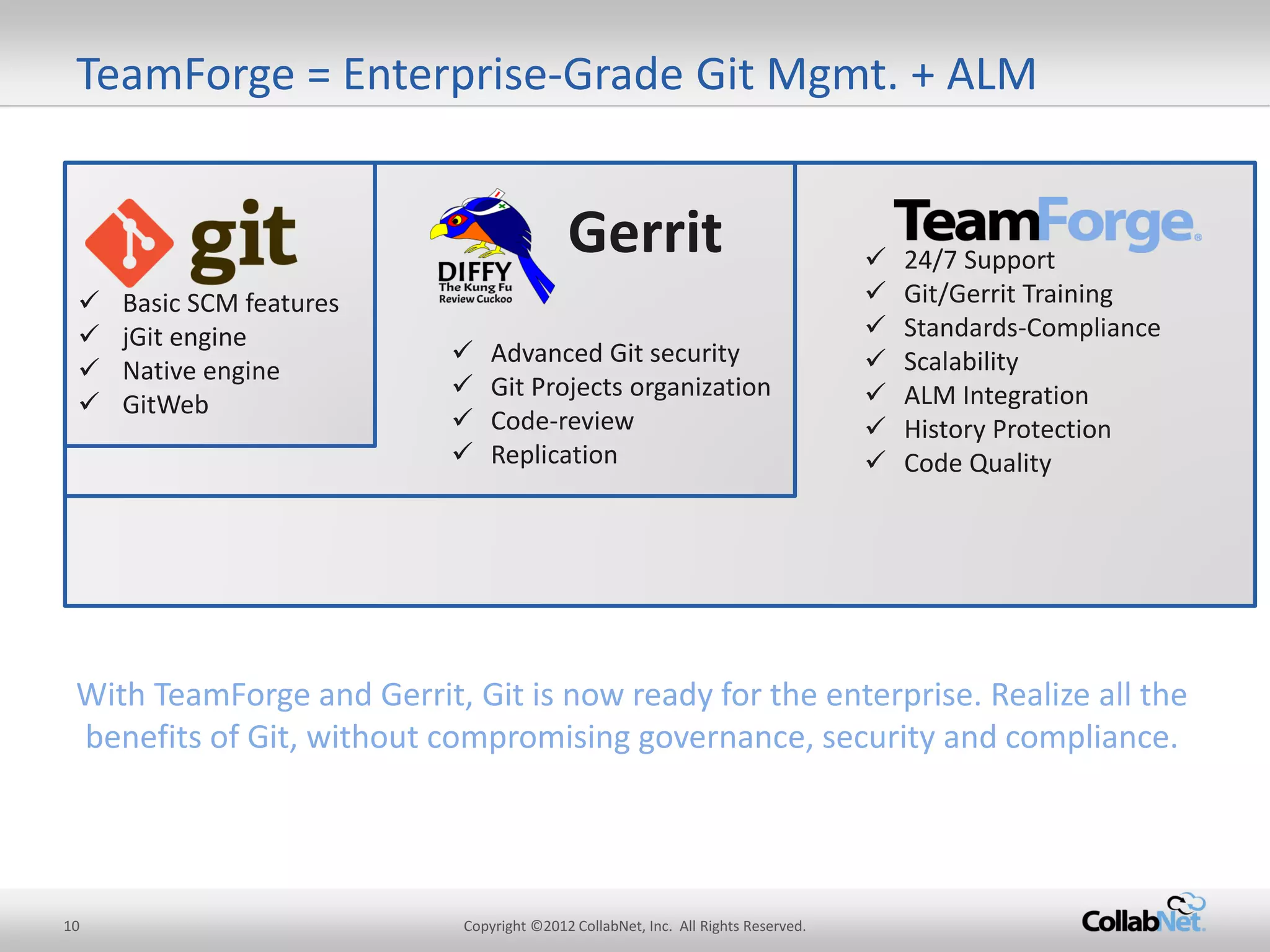
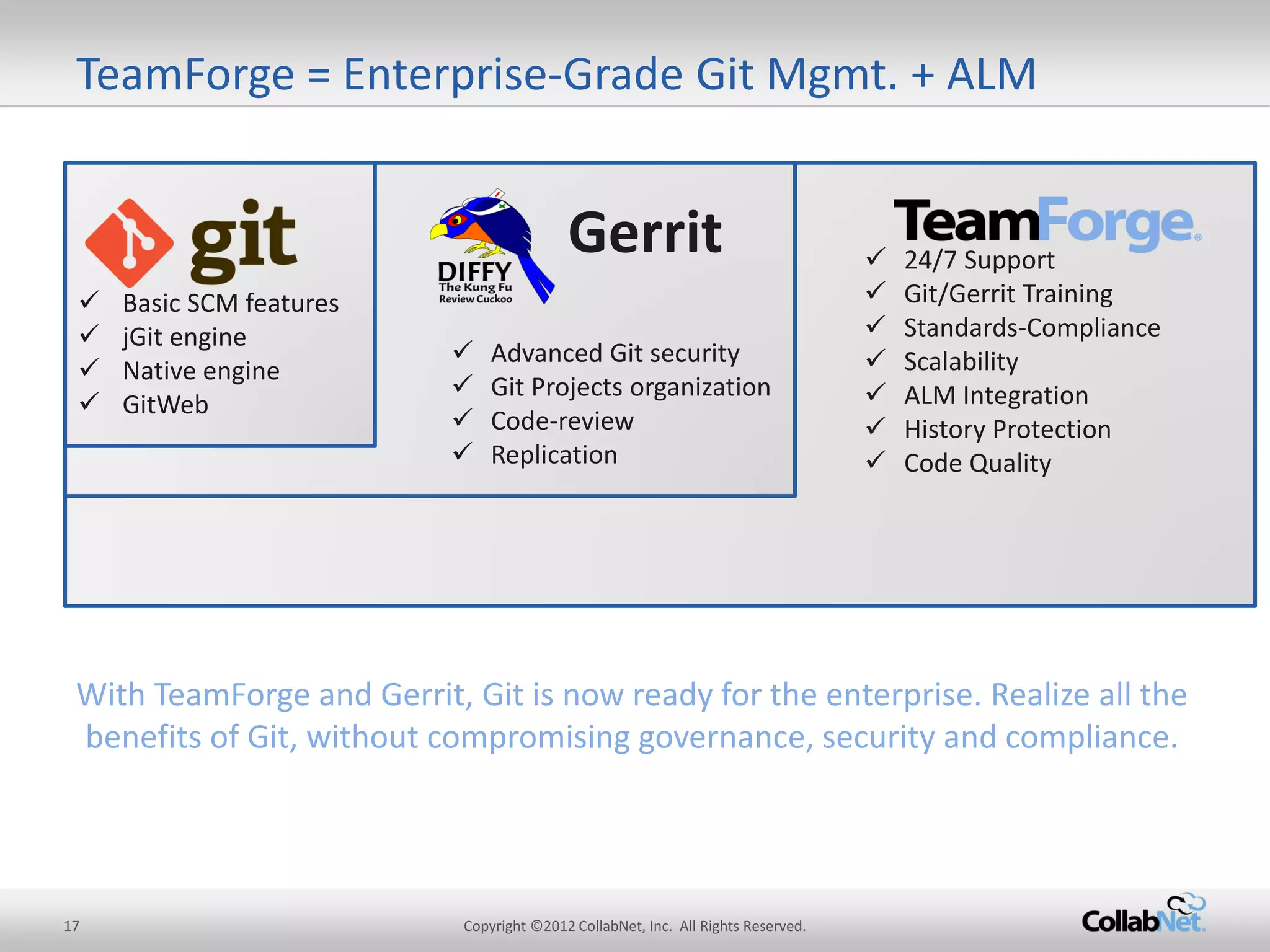
24/7 Support 
Git/Gerrit Training 
Standards-Compliance 
Scalability 
ALM Integration 
History Protection 
Code Quality 
Advanced Git security 
Git Projects organization 
Code-review 
Replication 
TeamForge = Enterprise-Grade Git Mgmt. + ALM 
Basic SCM features 
jGit engine 
Native engine 
GitWeb 
Gerrit 
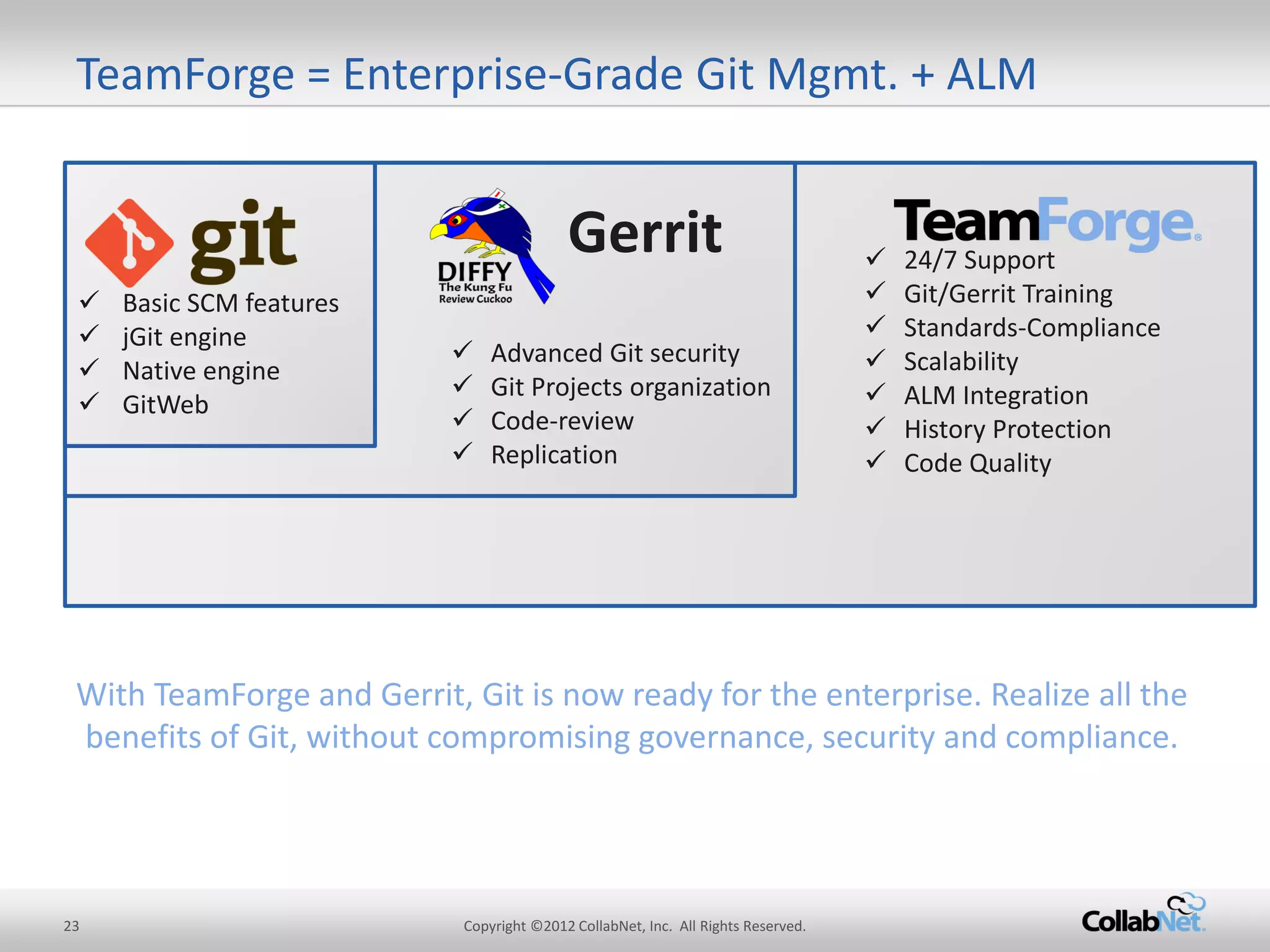
With TeamForge and Gerrit, Git is now ready for the enterprise. Realize all the benefits of Git, without compromising governance, security and compliance.
11 
Copyright ©2012 CollabNet, Inc. All Rights Reserved. 
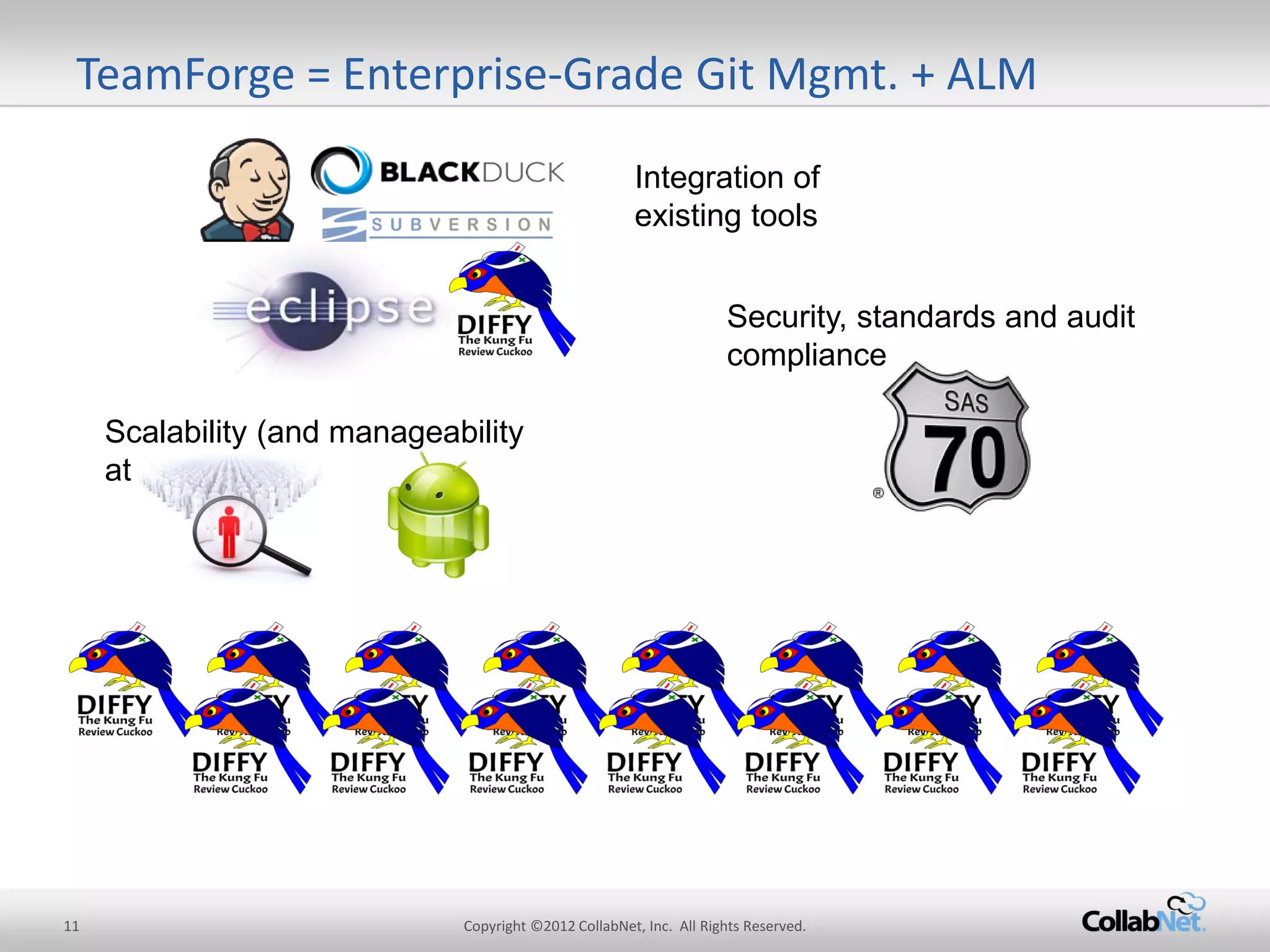
Integration of existing tools 
Security, standards and audit compliance 
Scalability (and manageability at scale) 
TeamForge = Enterprise-Grade Git Mgmt. + ALM
12 
Copyright ©2012 CollabNet, Inc. All Rights Reserved. 
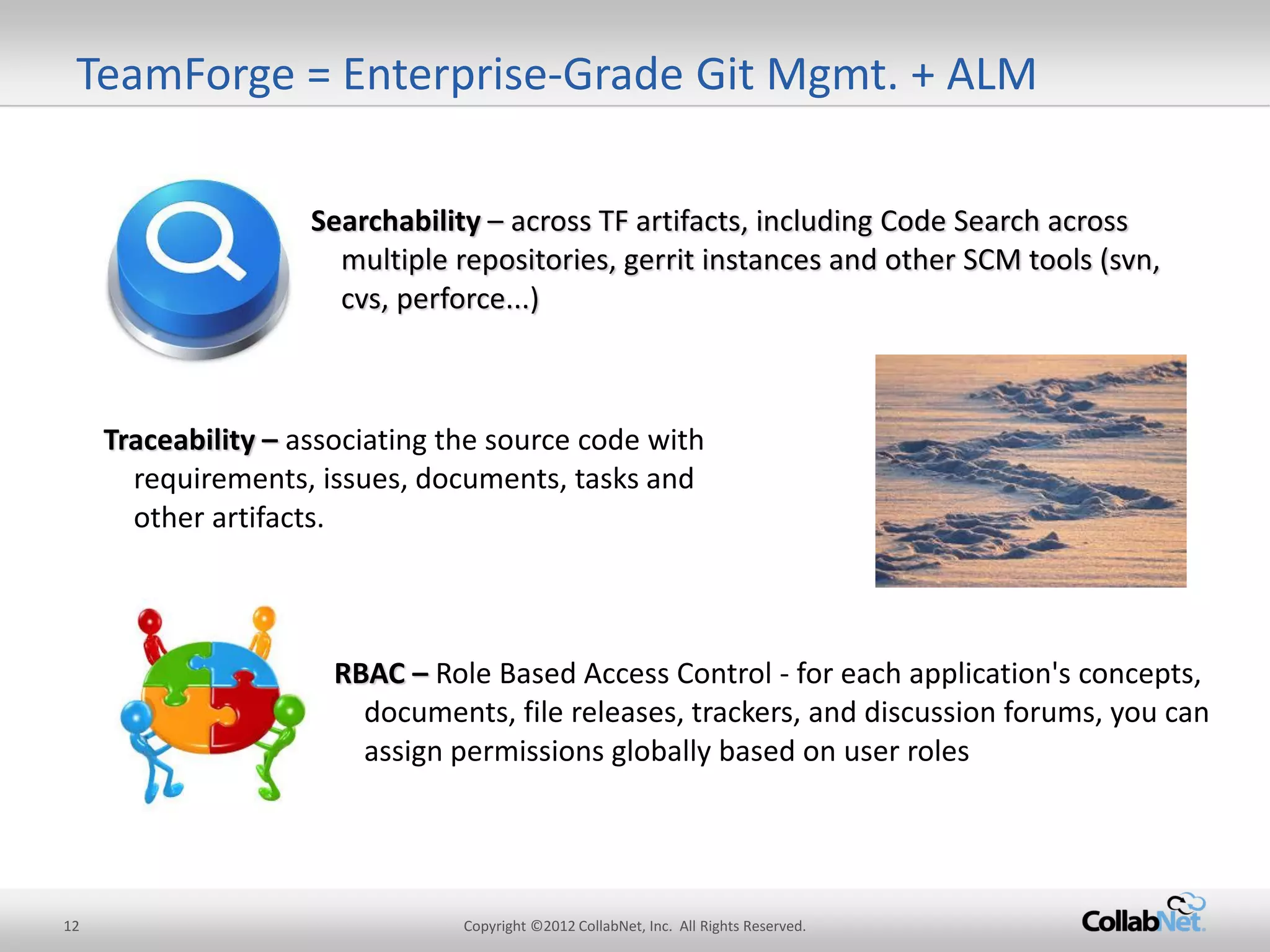
Searchability – across TF artifacts, including Code Search across multiple repositories, gerrit instances and other SCM tools (svn, cvs, perforce...) 
Traceability – associating the source code with requirements, issues, documents, tasks and other artifacts. 
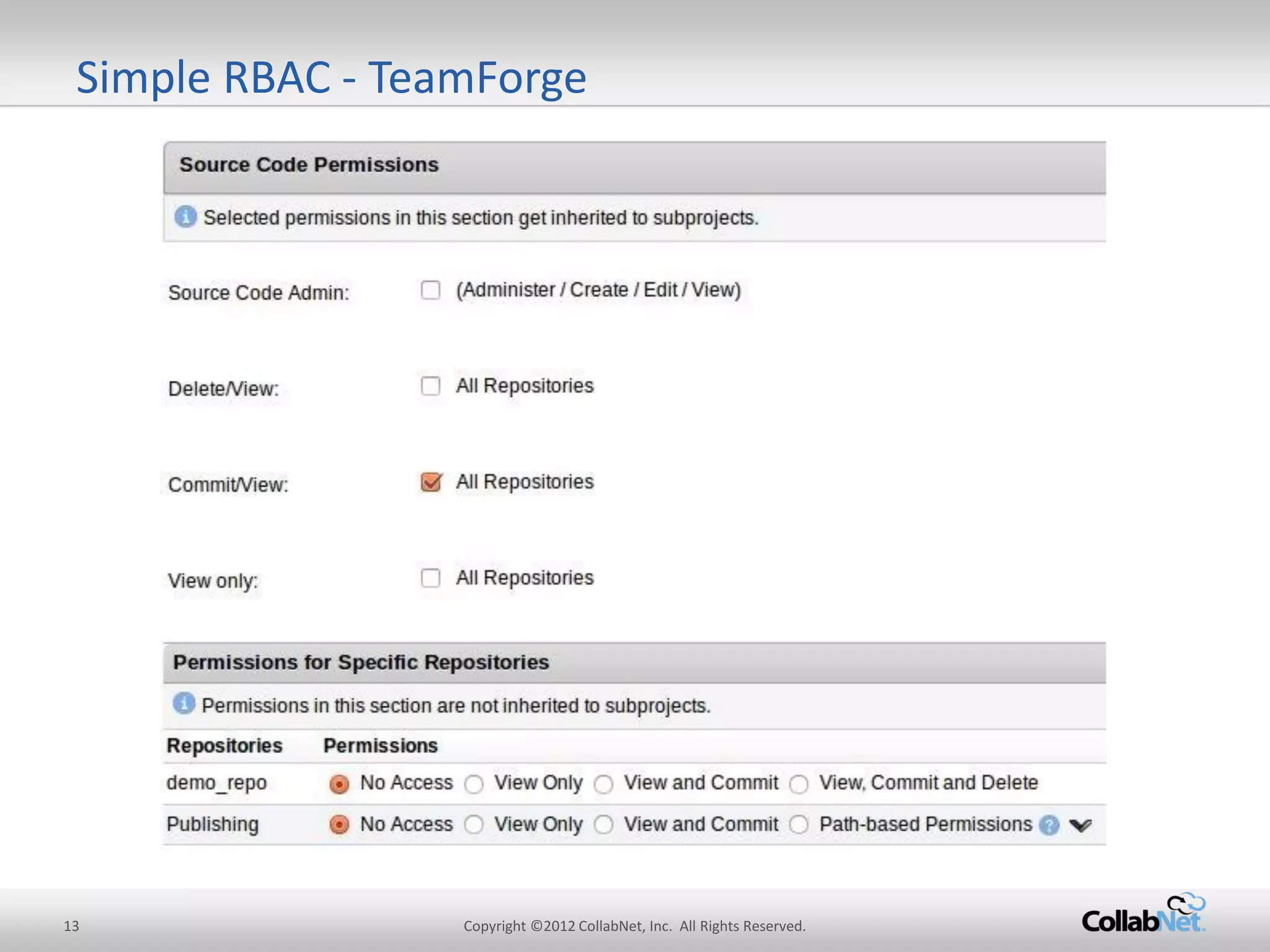
RBAC – Role Based Access Control - for each application's concepts, documents, file releases, trackers, and discussion forums, you can assign permissions globally based on user roles 
TeamForge = Enterprise-Grade Git Mgmt. + ALM
13 
Copyright ©2012 CollabNet, Inc. All Rights Reserved. 
Simple RBAC - TeamForge
14 
Copyright ©2012 CollabNet, Inc. All Rights Reserved. 
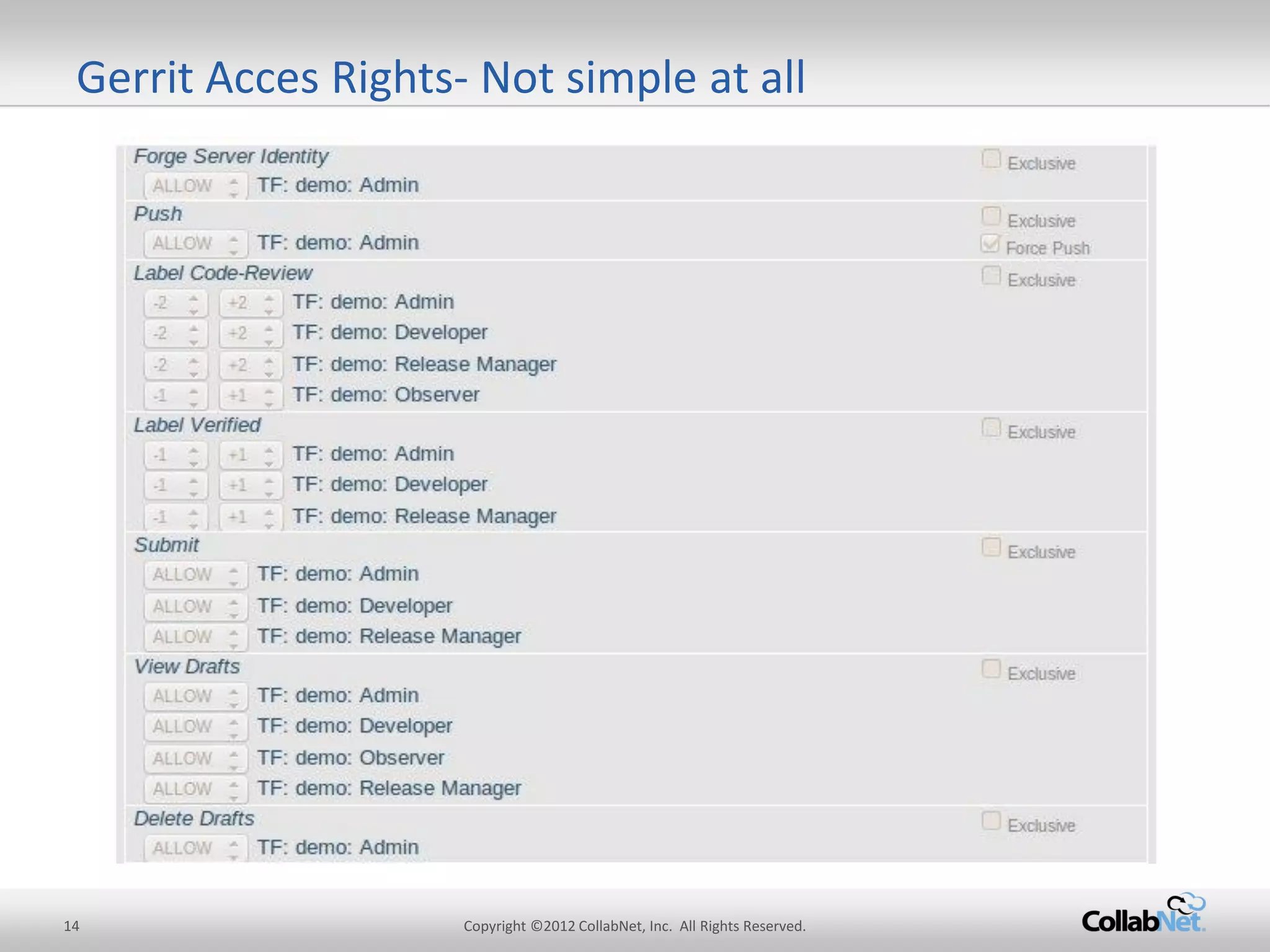
Gerrit Acces Rights- Not simple at all
15 
Copyright ©2012 CollabNet, Inc. All Rights Reserved. 
Implementation: 
Map TeamForge SCM permissions to Gerrit Access Rights. 
Provide pre-defined code review policies so anyone can start to work with Gerrit within a few steps. 
Code review policies are applied per repository. 
Motivation: 
Shield most users from Gerrit’s complexities by using pre-defined repo categories and generic TeamForge RBAC model with its SCM permissions. 
without hiding advanced features for power users 
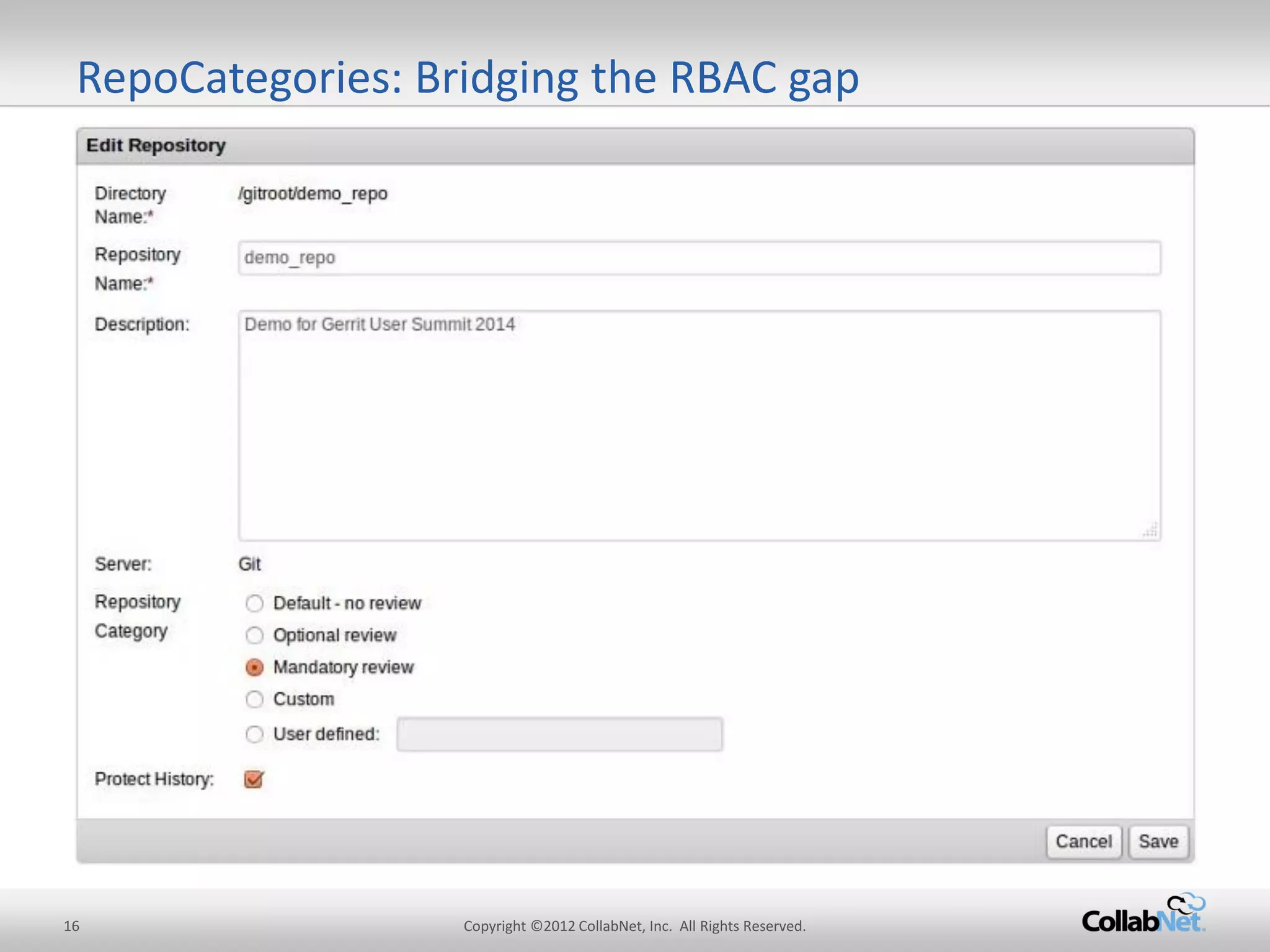
RepoCategories: Bridging the RBAC gap
16 
Copyright ©2012 CollabNet, Inc. All Rights Reserved. 
RepoCategories: Bridging the RBAC gap
17 
Copyright ©2012 CollabNet, Inc. All Rights Reserved. 
24/7 Support 
Git/Gerrit Training 
Standards-Compliance 
Scalability 
ALM Integration 
History Protection 
Code Quality 
Advanced Git security 
Git Projects organization 
Code-review 
Replication 
TeamForge = Enterprise-Grade Git Mgmt. + ALM 
Basic SCM features 
jGit engine 
Native engine 
GitWeb 
Gerrit 
With TeamForge and Gerrit, Git is now ready for the enterprise. Realize all the benefits of Git, without compromising governance, security and compliance.
18 
Copyright ©2012 CollabNet, Inc. All Rights Reserved. 
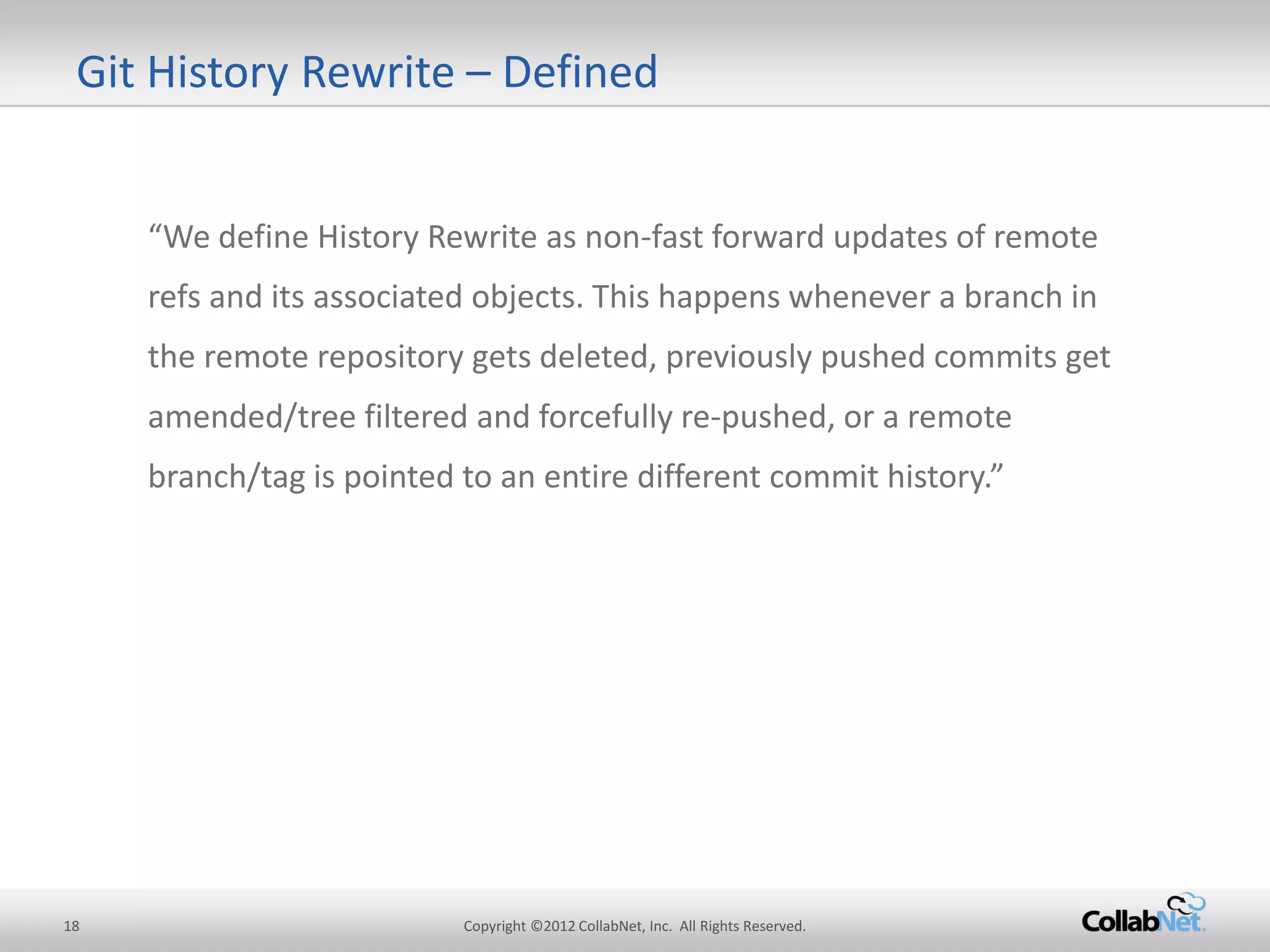
Git History Rewrite – Defined 
“We define History Rewrite as non-fast forward updates of remote refs and its associated objects. This happens whenever a branch in the remote repository gets deleted, previously pushed commits get amended/tree filtered and forcefully re-pushed, or a remote branch/tag is pointed to an entire different commit history.”
19 
Copyright ©2012 CollabNet, Inc. All Rights Reserved. 
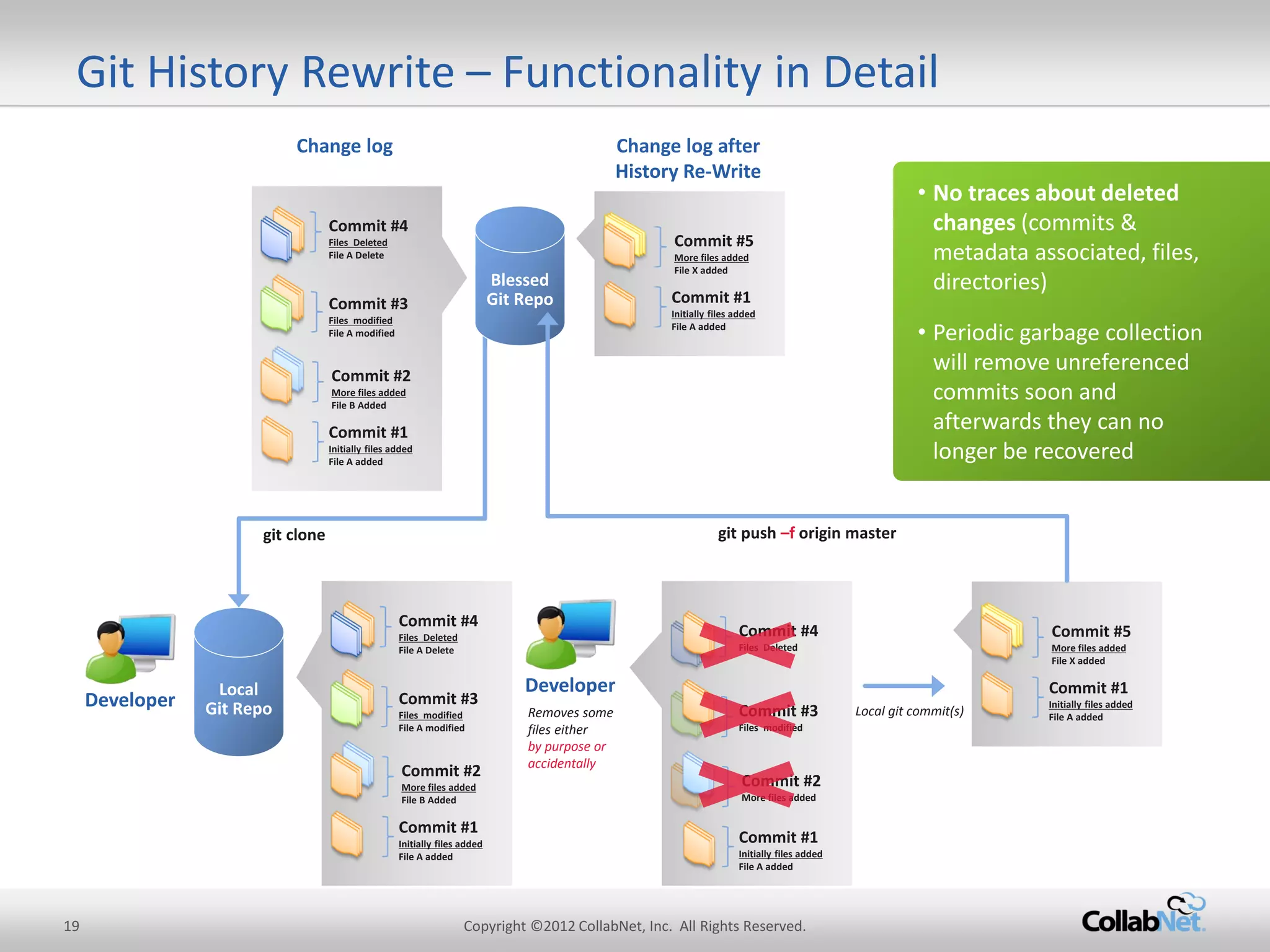
Git History Rewrite – Functionality in Detail 
Commit #1 
Initially files added 
File A added 
Commit #2 
More files added 
File B Added 
Commit #3 
Files modified 
File A modified 
Commit #4 
Files Deleted 
File A Delete 
Change log 
Change log after History Re-Write 
Commit #1 
Initially files added 
File A added 
Commit #5 
More files added 
File X added 
Commit #1 
Initially files added 
File A added 
Commit #2 
More files added 
File B Added 
Commit #3 
Files modified 
File A modified 
Commit #4 
Files Deleted 
File A Delete 
Local git commit(s) 
•No traces about deleted changes (commits & metadata associated, files, directories) 
•Periodic garbage collection will remove unreferenced commits soon and afterwards they can no longer be recovered 
Local Git Repo 
git clone 
Developer 
Commit #1 
Initially files added 
File A added 
Commit #2 
More files added 
Commit #3 
Files modified 
Commit #4 
Files Deleted 
Developer 
Removes some files either 
by purpose or accidentally 
Blessed Git Repo 
git push –f origin master 
Commit #1 
Initially files added 
File A added 
Commit #5 
More files added 
File X added
20 
Copyright ©2012 CollabNet, Inc. All Rights Reserved. 
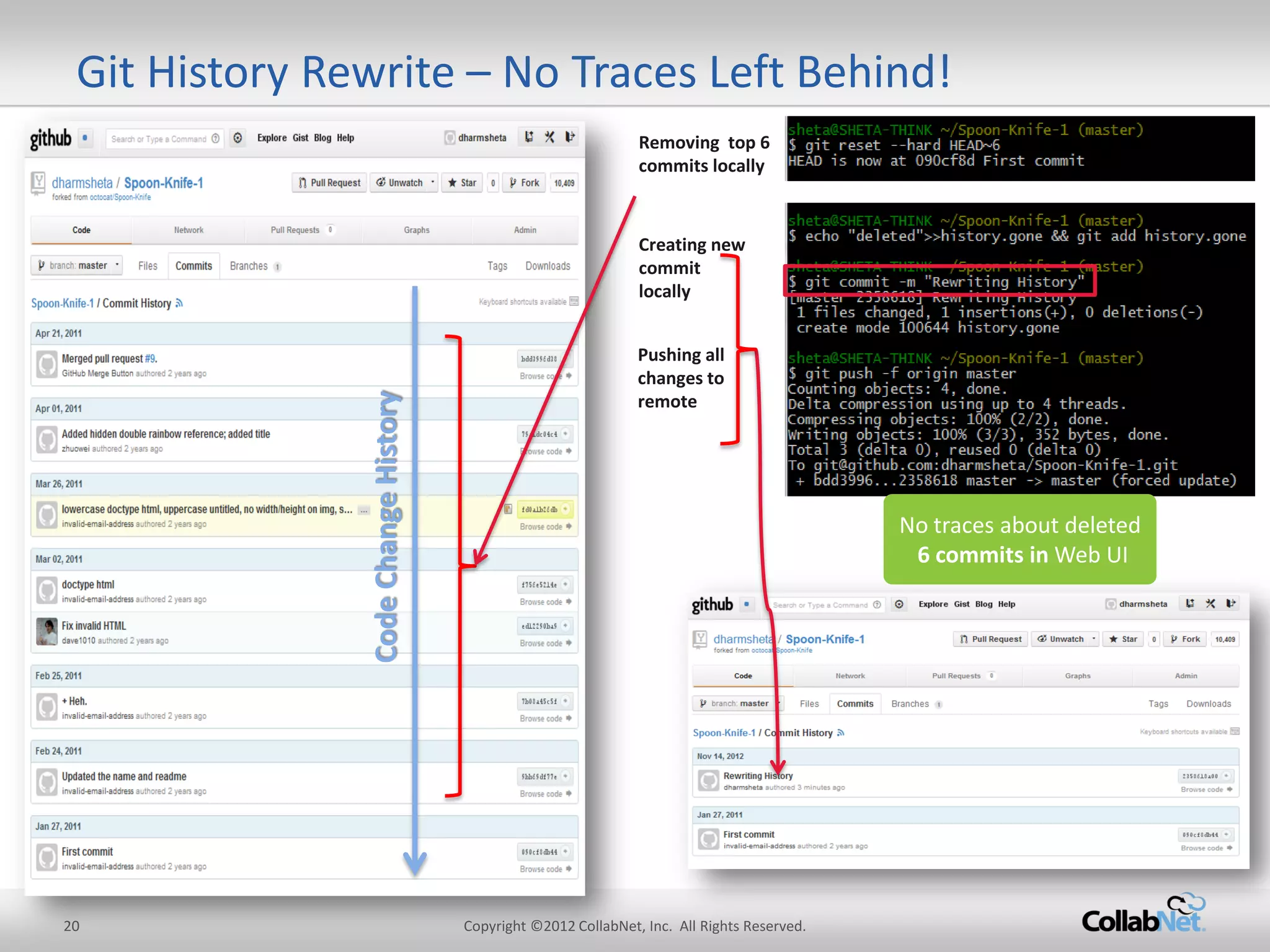
Git History Rewrite – No Traces Left Behind! 
Code Change History 
Removing top 6 commits locally 
Creating new commit locally 
Pushing all changes to remote 
No traces about deleted 6 commits in Web UI
21 
Copyright ©2012 CollabNet, Inc. All Rights Reserved. 
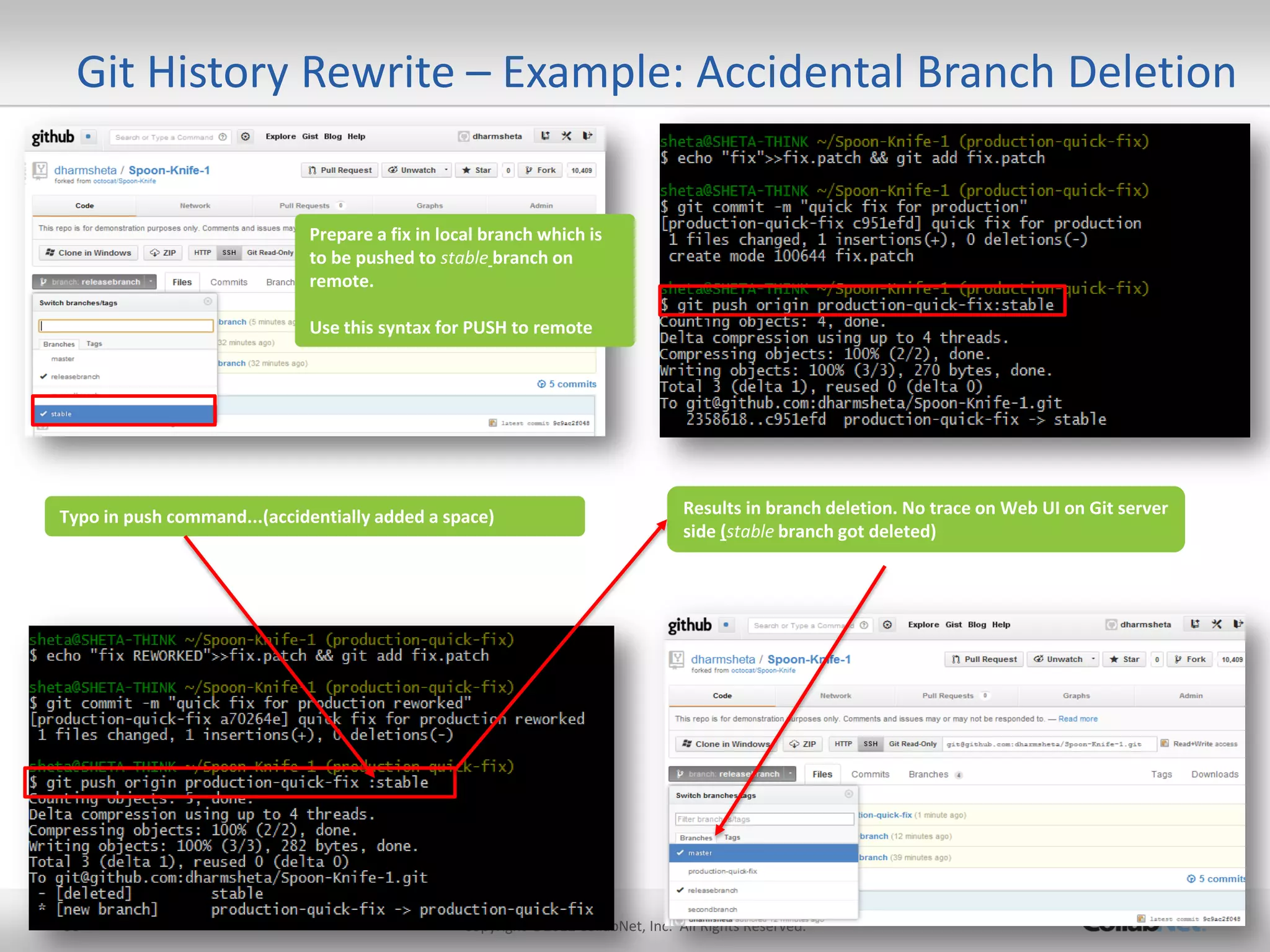
Single ‘space’ wipes entire history: 
–git push origin production-quick-fix:stable 
instead of 
–git push origin production-quick-fix :stable 
No traces left behind: 
–No alerts 
–No recovery (unless noticed quickly, via administrators) 
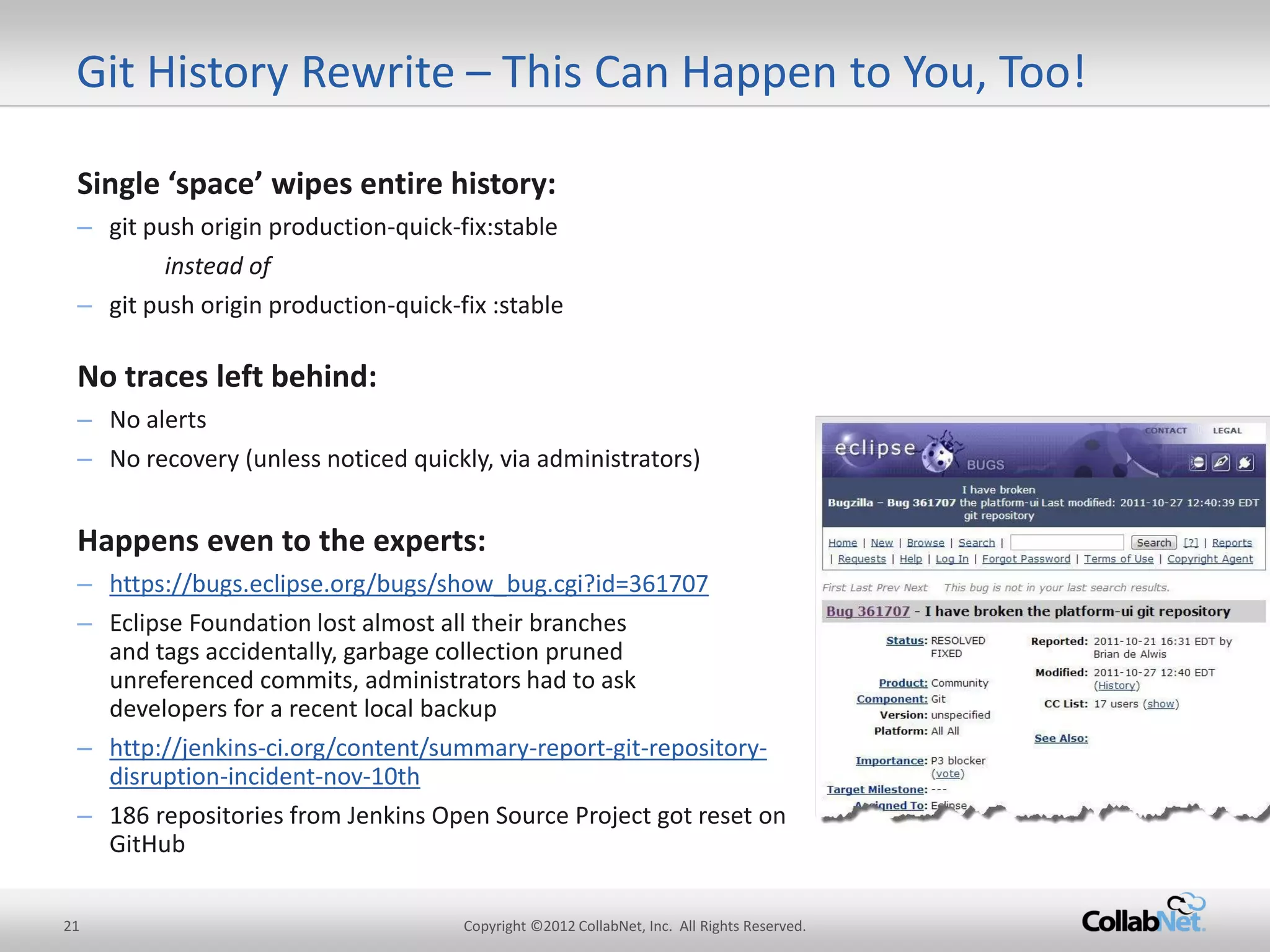
Happens even to the experts: 
–https://bugs.eclipse.org/bugs/show_bug.cgi?id=361707 
–Eclipse Foundation lost almost all their branches and tags accidentally, garbage collection pruned unreferenced commits, administrators had to ask developers for a recent local backup 
–http://jenkins-ci.org/content/summary-report-git-repository- disruption-incident-nov-10th 
–186 repositories from Jenkins Open Source Project got reset on GitHub 
Git History Rewrite – This Can Happen to You, Too!
22 
Copyright ©2012 CollabNet, Inc. All Rights Reserved. 
Introducing Git History Protection 
Commit #1 
Initially files added 
File A added 
Commit #2 
More files added 
File B Added 
Commit #3 
Files modified 
File A modified 
Commit #4 
Files Deleted 
File A Delete 
Change log 
Change log after History Re-Write 
Commit #1 
Initially files added 
File A added 
Commit #5 
More files added 
File X added 
Commit #1 
Initially files added 
File A added 
Commit #2 
More files added 
File B Added 
Commit #3 
Files modified 
File A modified 
Commit #4 
Files Deleted 
File A Delete 
Local git commit(s) 
Local Git Repo 
git clone 
Developer 
Commit #1 
Initially files added 
File A added 
Commit #2 
More files added 
Commit #3 
Files modified 
Commit #4 
Files Deleted 
Developer 
Removes some files either 
by purpose or accidentally 
Blessed Git Repo 
git push –f origin master 
Commit #1 
Initially files added 
File A added 
Commit #5 
More files added 
File X added 
TeamForge 
History Protect 
Detects 
Rewrite Event 
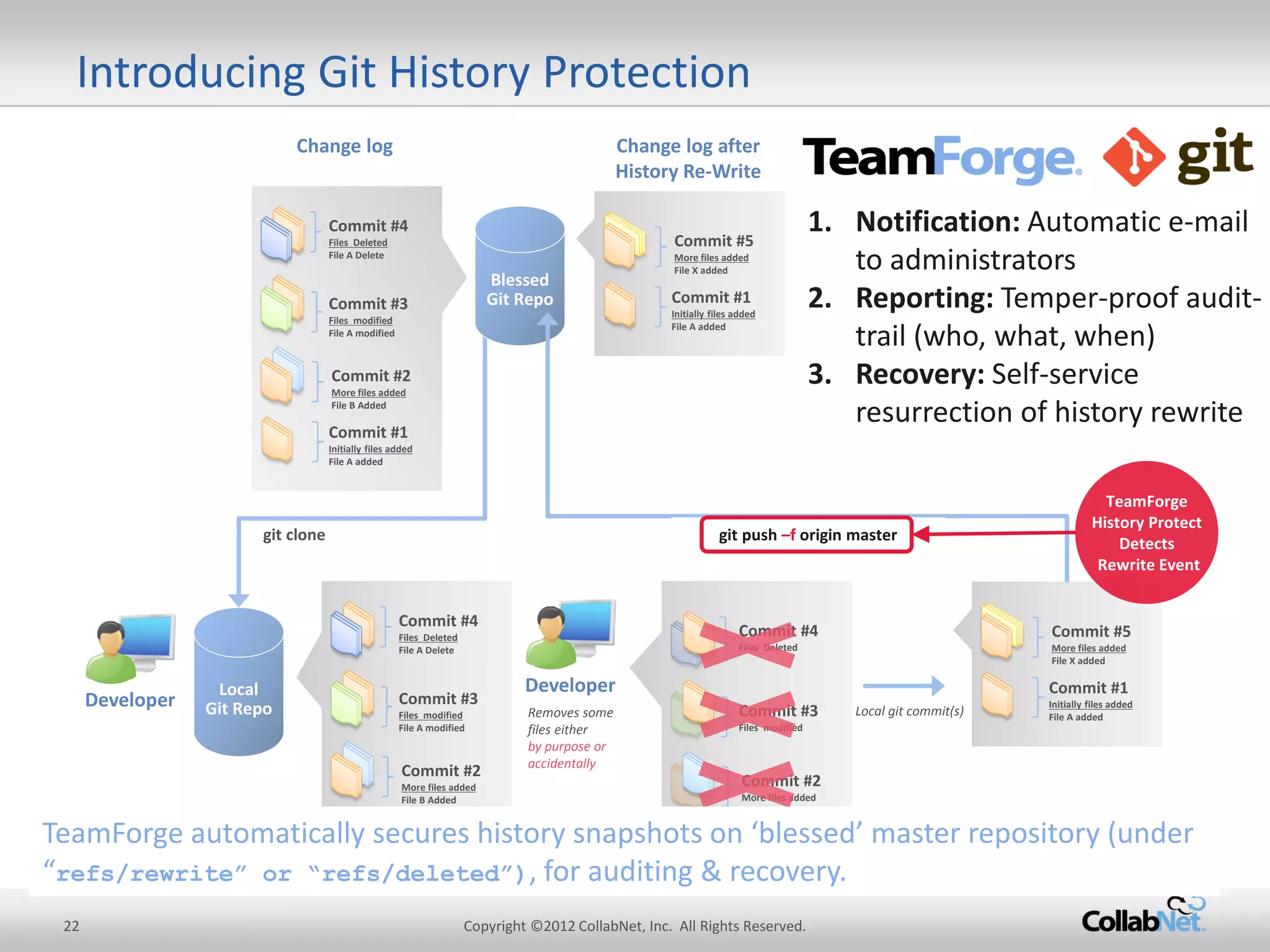
1.Notification: Automatic e-mail to administrators 
2.Reporting: Temper-proof audit- trail (who, what, when) 
3.Recovery: Self-service resurrection of history rewrite 
TeamForge automatically secures history snapshots on ‘blessed’ master repository (under “refs/rewrite” or “refs/deleted”), for auditing & recovery.
23 
Copyright ©2012 CollabNet, Inc. All Rights Reserved. 
24/7 Support 
Git/Gerrit Training 
Standards-Compliance 
Scalability 
ALM Integration 
History Protection 
Code Quality 
Advanced Git security 
Git Projects organization 
Code-review 
Replication 
TeamForge = Enterprise-Grade Git Mgmt. + ALM 
Basic SCM features 
jGit engine 
Native engine 
GitWeb 
Gerrit 
With TeamForge and Gerrit, Git is now ready for the enterprise. Realize all the benefits of Git, without compromising governance, security and compliance.
24 
Copyright ©2012 CollabNet, Inc. All Rights Reserved. 
Tackling half baked review requests: Marrying Gerrit and Jenkins 
master 
CI Build: OK 
CI Build: OK 
A1 
local master 
Verified: -1 (build failed) 
Verified: +1 (build OK) 
refs/for/master 
C2 
push 
C2 
C2* 
C2* 
push 
Reviewed: +2 
C2* 
A1
25 
Copyright ©2012 CollabNet, Inc. All Rights Reserved. 
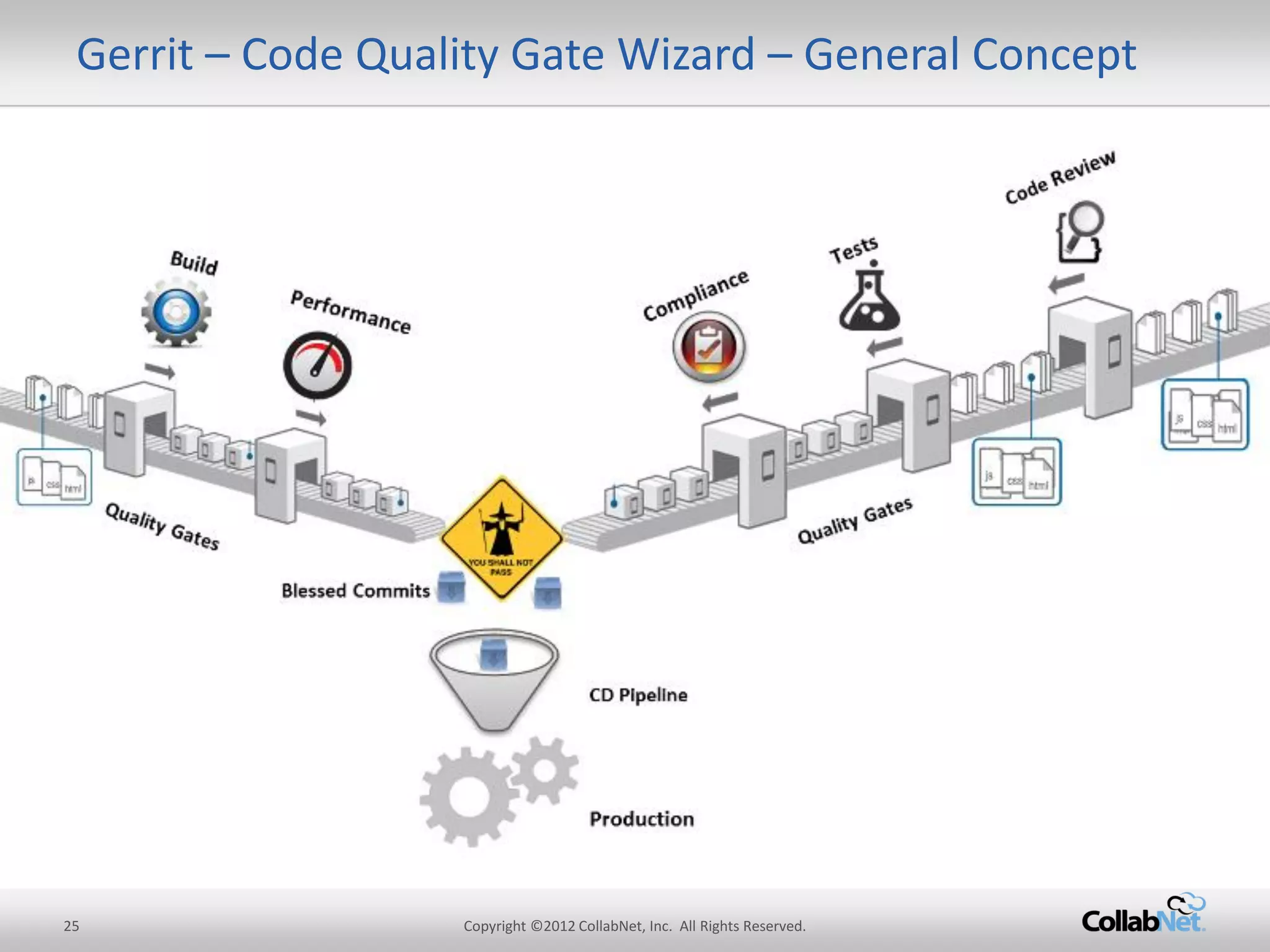
Gerrit – Code Quality Gate Wizard – General Concept
26 
Copyright ©2012 CollabNet, Inc. All Rights Reserved. 
Code Quality Gate Wizard 
Code Quality Gate Wizard for Gerrit (Gerrit 2.8+) 
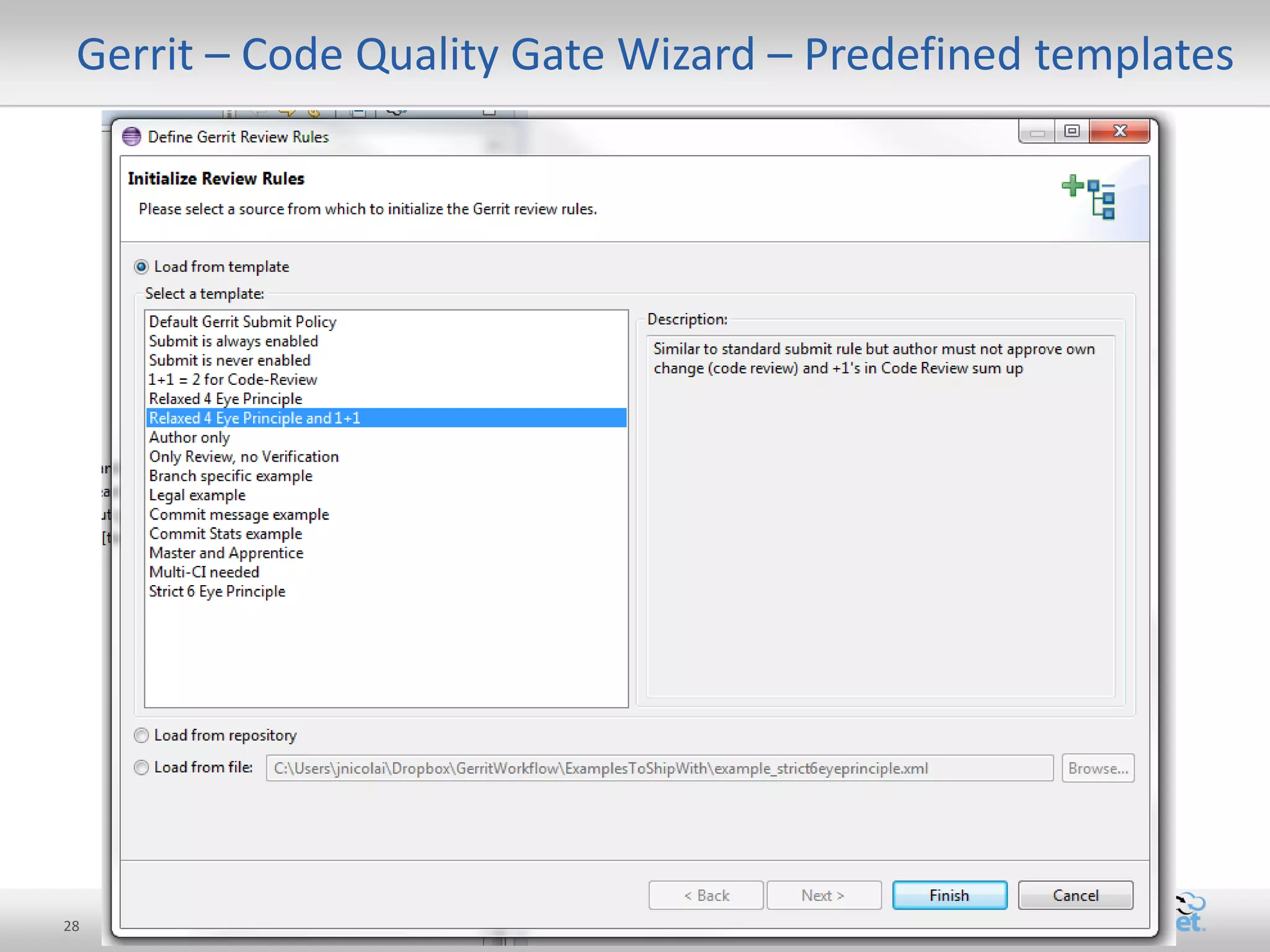
–comes with a bunch of predefined policies and lets you graphically design your own quality gates as easy as defining email filter rules. 
–Examples: 
•Four-eye peer review 
•Legal has to approve copyright file changes 
•Senior staff has to approve the work of juniors 
•Democratic feature voting 
–More details under http://blogs.collab.net/git
27 
Copyright ©2012 CollabNet, Inc. All Rights Reserved. 
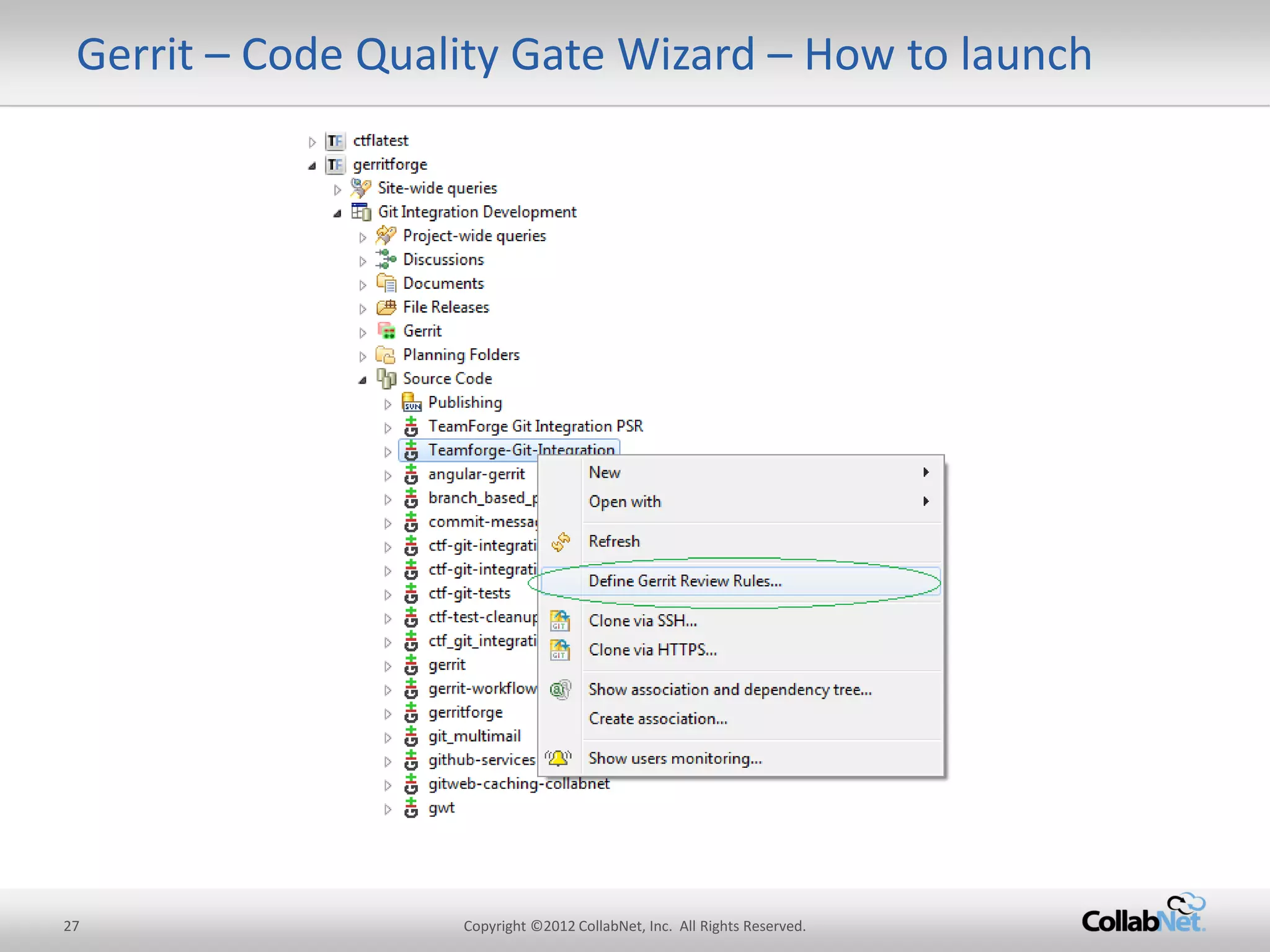
Gerrit – Code Quality Gate Wizard – How to launch
28 
Copyright ©2012 CollabNet, Inc. All Rights Reserved. 
Gerrit – Code Quality Gate Wizard – Predefined templates
29 
Copyright ©2012 CollabNet, Inc. All Rights Reserved. 
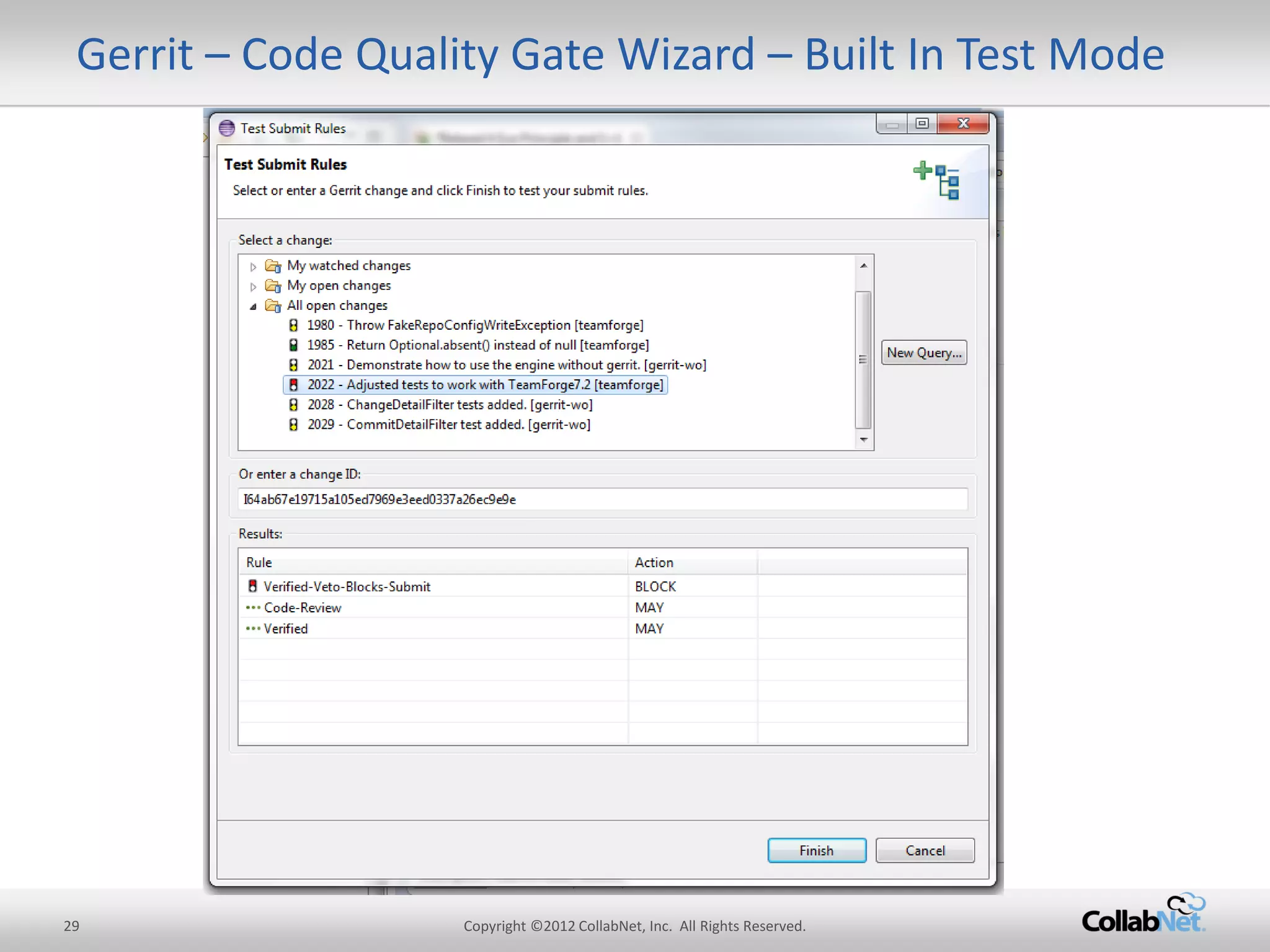
Gerrit – Code Quality Gate Wizard – Built In Test Mode
30 
Copyright ©2012 CollabNet, Inc. All Rights Reserved. 
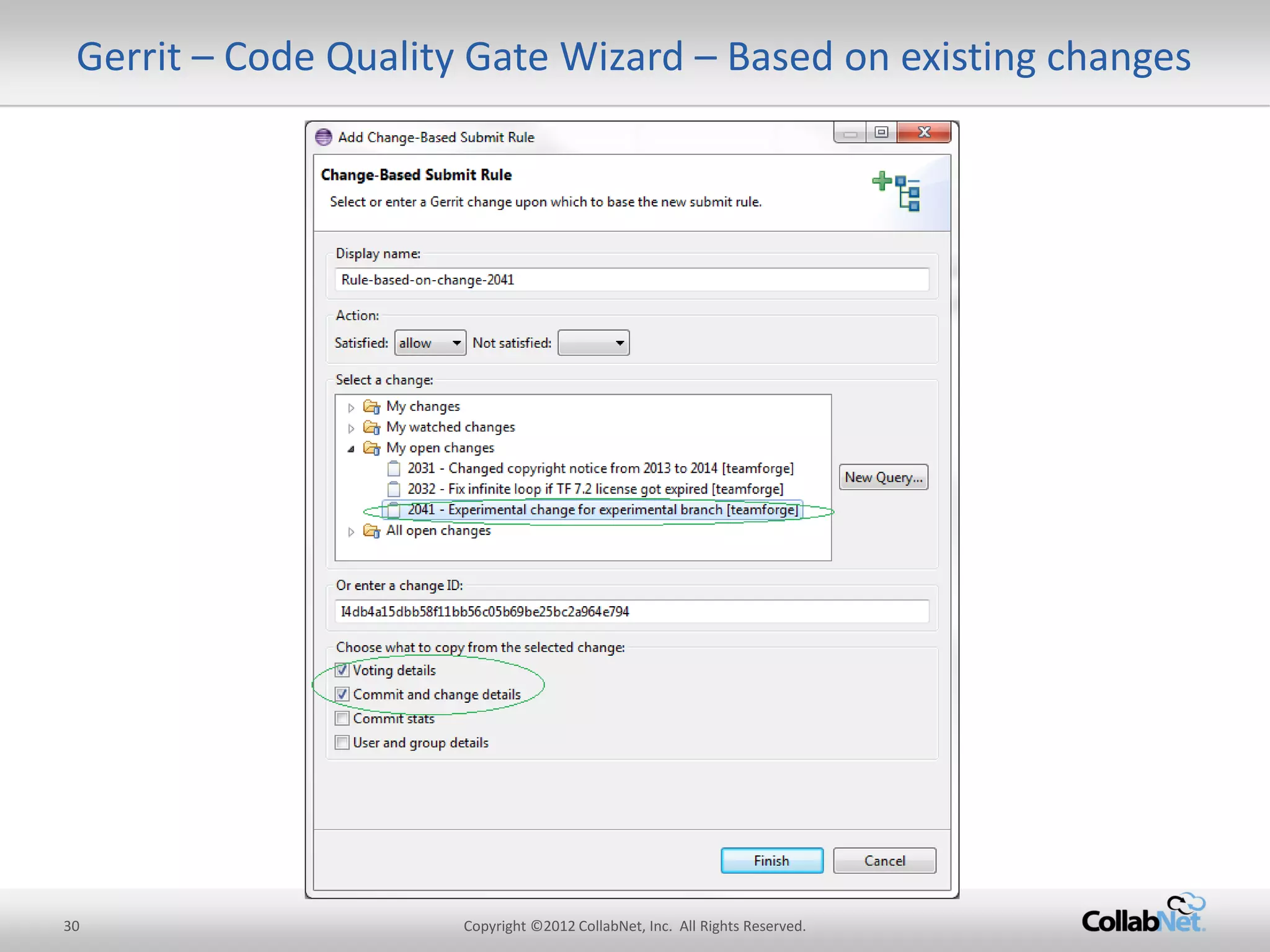
Gerrit – Code Quality Gate Wizard – Based on existing changes
31 
Copyright ©2012 CollabNet, Inc. All Rights Reserved. 
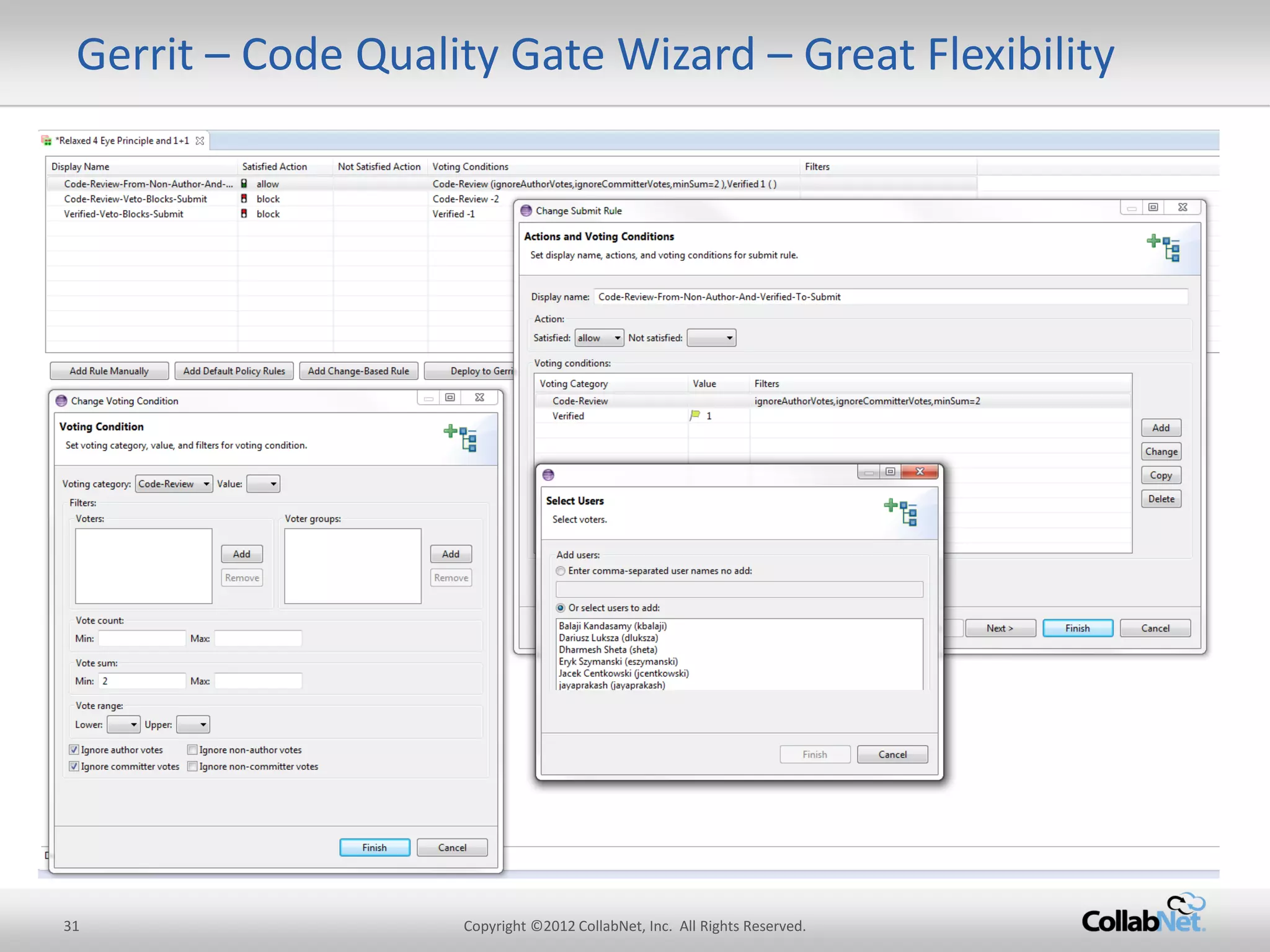
Gerrit – Code Quality Gate Wizard – Great Flexibility
32 
Copyright ©2012 CollabNet, Inc. All Rights Reserved. 
24/7 Support 
Security 
Standards-Compliance 
Scalability 
ALM Integration 
History Protection 
Code Quality 
Advanced Git security 
Git Projects organization 
Code-review 
Replication 
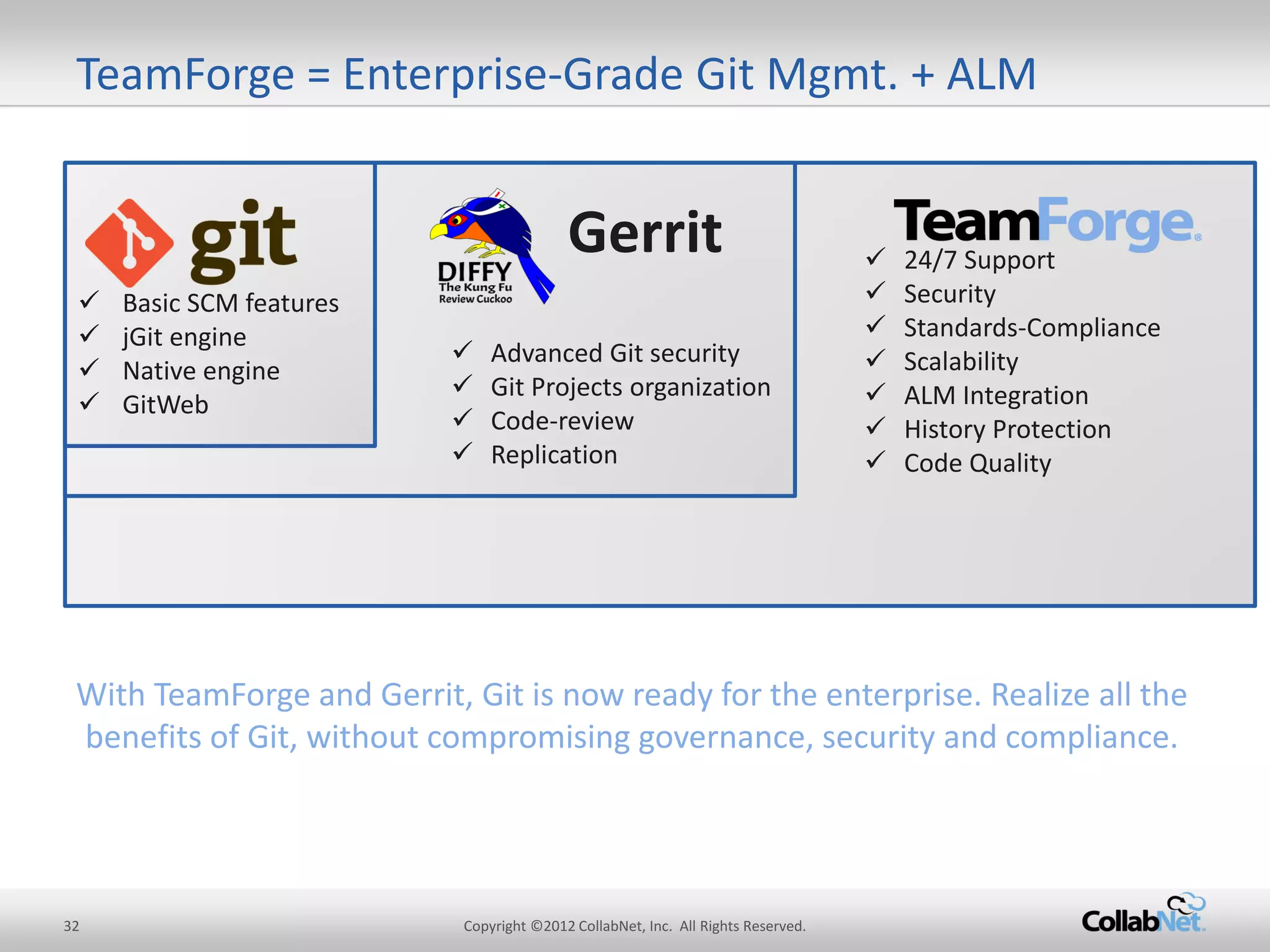
TeamForge = Enterprise-Grade Git Mgmt. + ALM 
Basic SCM features 
jGit engine 
Native engine 
GitWeb 
Gerrit 
With TeamForge and Gerrit, Git is now ready for the enterprise. Realize all the benefits of Git, without compromising governance, security and compliance.
33 
Copyright ©2012 CollabNet, Inc. All Rights Reserved. 
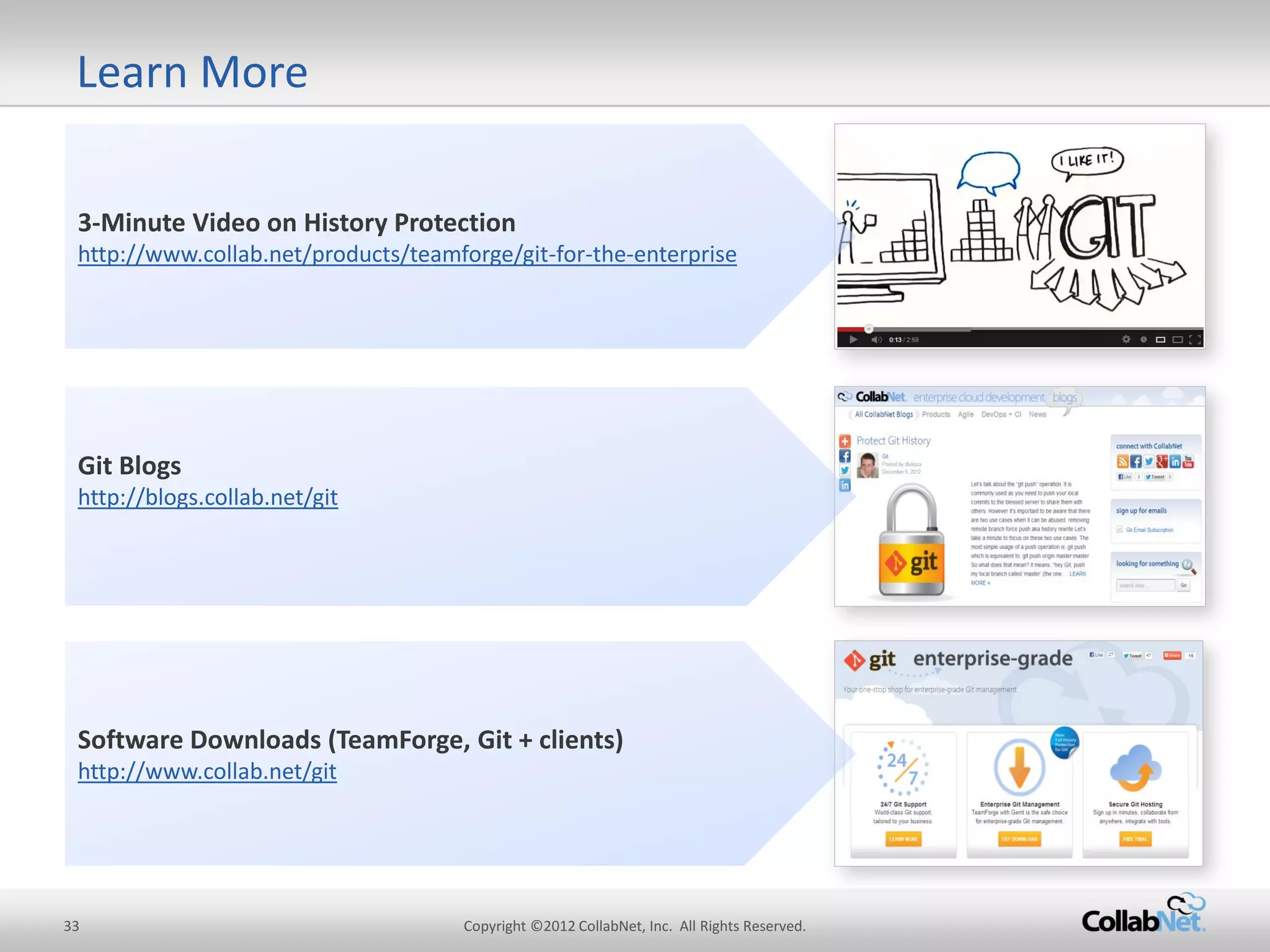
3-Minute Video on History Protection http://www.collab.net/products/teamforge/git-for-the-enterprise 
Software Downloads (TeamForge, Git + clients) http://www.collab.net/git 
Git Blogs 
http://blogs.collab.net/git 
Learn More
34 
Copyright ©2012 CollabNet, Inc. All Rights Reserved. 
Q&A
35 
Copyright ©2012 CollabNet, Inc. All Rights Reserved. 
Default: All Gerrit review features are turned off 
Mandatory Review: All code changes have to be reviewed 
Optional Review: Review feature is turned on but can be bypassed if necessary 
Custom: Access rights have to be set manually in Gerrit Web UI and will not be overridden by TeamForge 
User-defined: Possibility to define your own access rights controlled by TeamForge 
Pre defined & user-defined categories 
Feature deep dive: Simple RBAC
36 
Copyright ©2012 CollabNet, Inc. All Rights Reserved. 
Git History Rewrite – Example: Accidental Branch Deletion 
Prepare a fix in local branch which is to be pushed to stable branch on remote. 
Use this syntax for PUSH to remote 
Typo in push command...(accidentially added a space) 
Results in branch deletion. No trace on Web UI on Git server side (stable branch got deleted)
37 
Copyright ©2012 CollabNet, Inc. All Rights Reserved. 
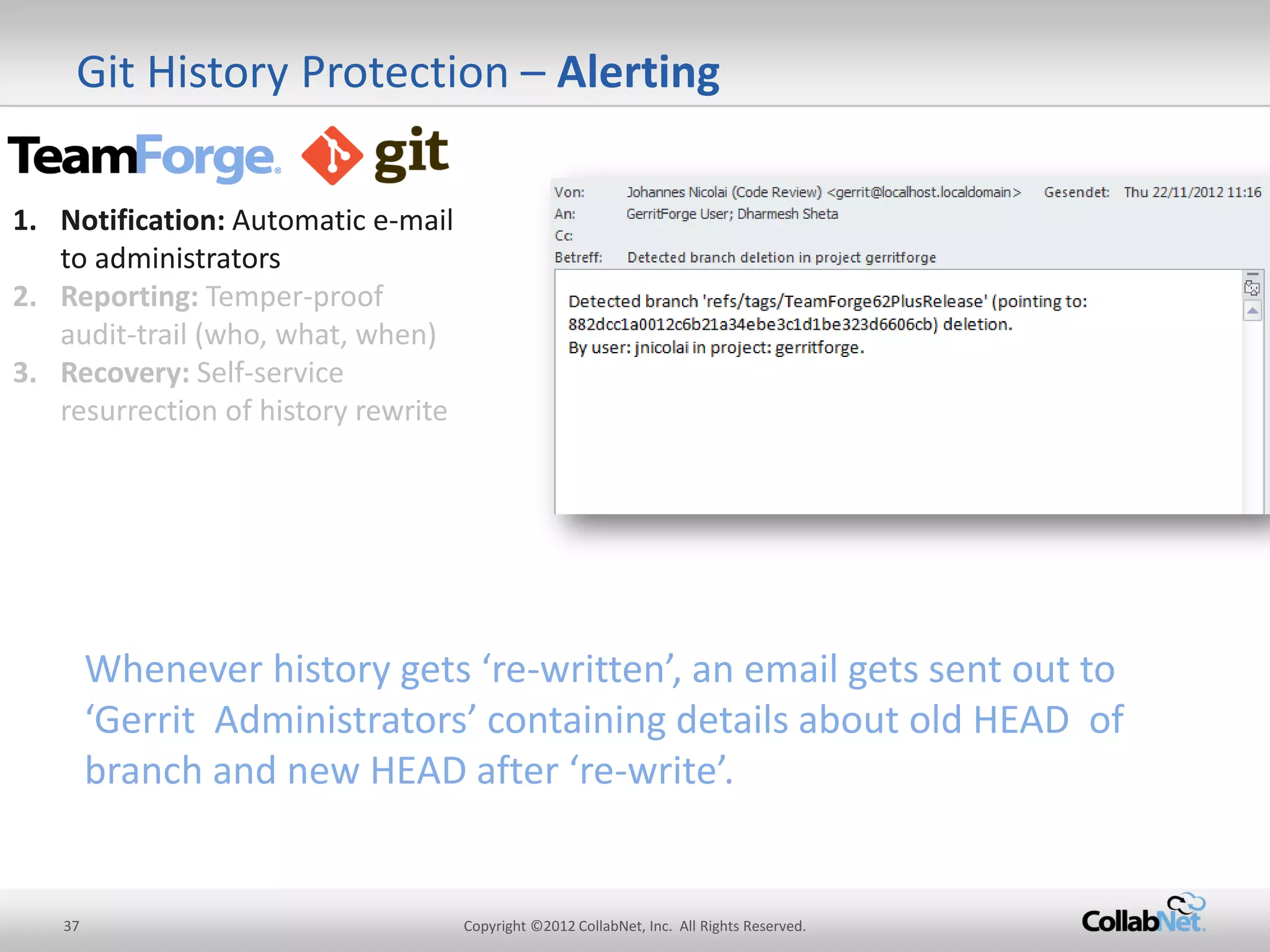
Git History Protection – Alerting 
1.Notification: Automatic e-mail to administrators 
2.Reporting: Temper-proof audit-trail (who, what, when) 
3.Recovery: Self-service resurrection of history rewrite 
Whenever history gets ‘re-written’, an email gets sent out to ‘Gerrit Administrators’ containing details about old HEAD of branch and new HEAD after ‘re-write’.
38 
Copyright ©2012 CollabNet, Inc. All Rights Reserved. 
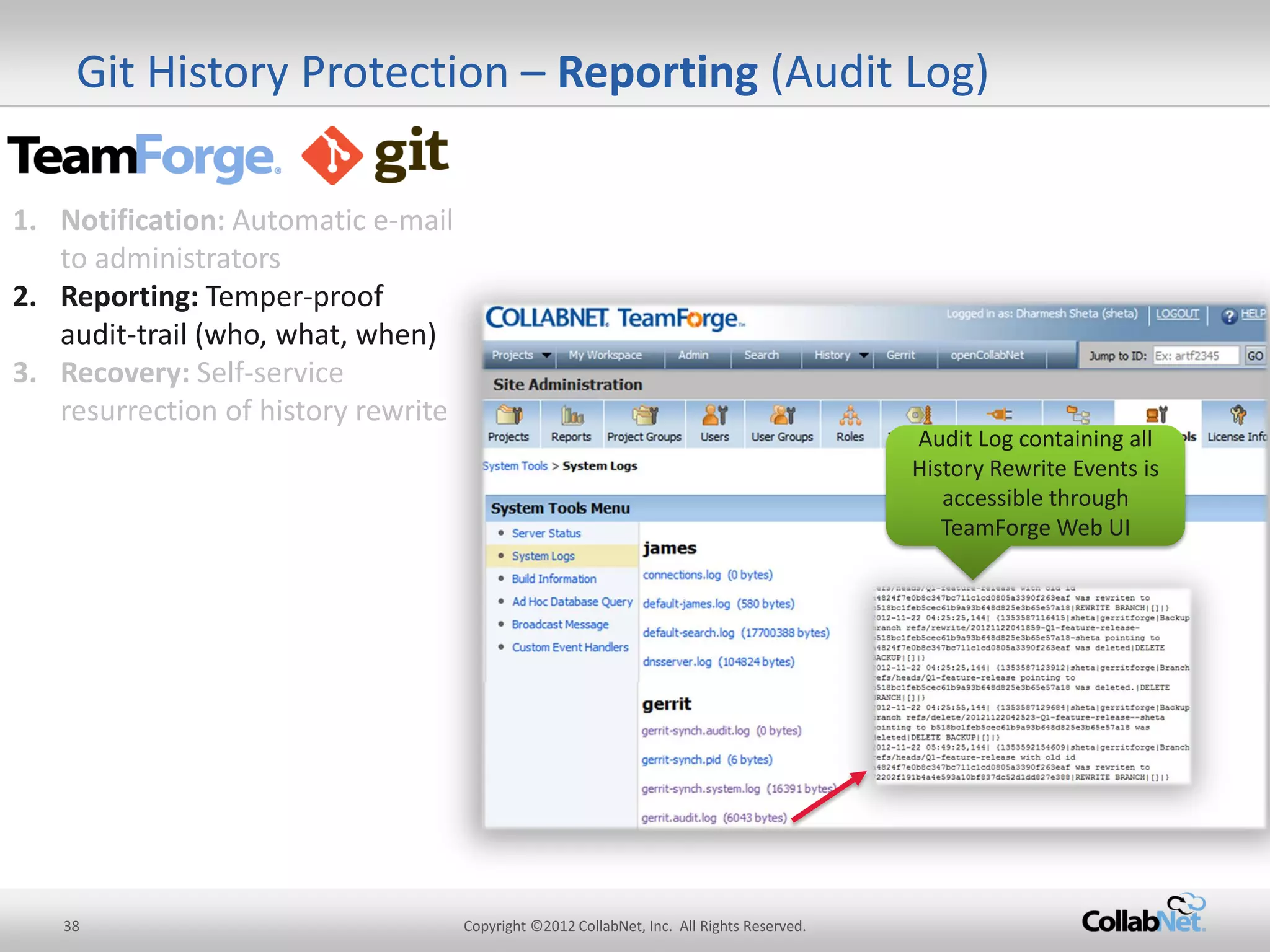
Git History Protection – Reporting (Audit Log) 
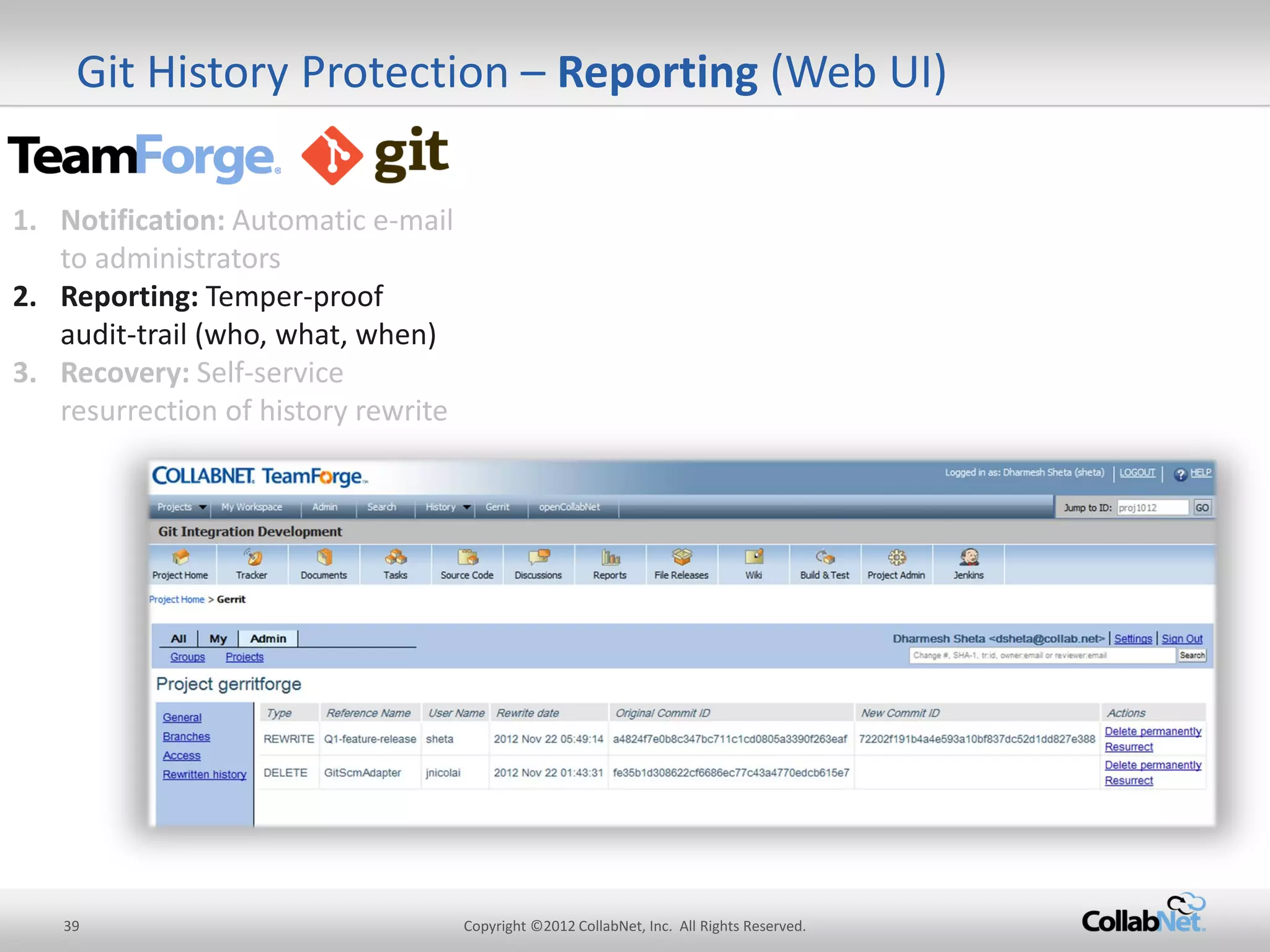
Audit Log containing all History Rewrite Events is accessible through TeamForge Web UI 
1.Notification: Automatic e-mail to administrators 
2.Reporting: Temper-proof audit-trail (who, what, when) 
3.Recovery: Self-service resurrection of history rewrite
39 
Copyright ©2012 CollabNet, Inc. All Rights Reserved. 
Git History Protection – Reporting (Web UI) 
1.Notification: Automatic e-mail to administrators 
2.Reporting: Temper-proof audit-trail (who, what, when) 
3.Recovery: Self-service resurrection of history rewrite
40 
Copyright ©2012 CollabNet, Inc. All Rights Reserved. 
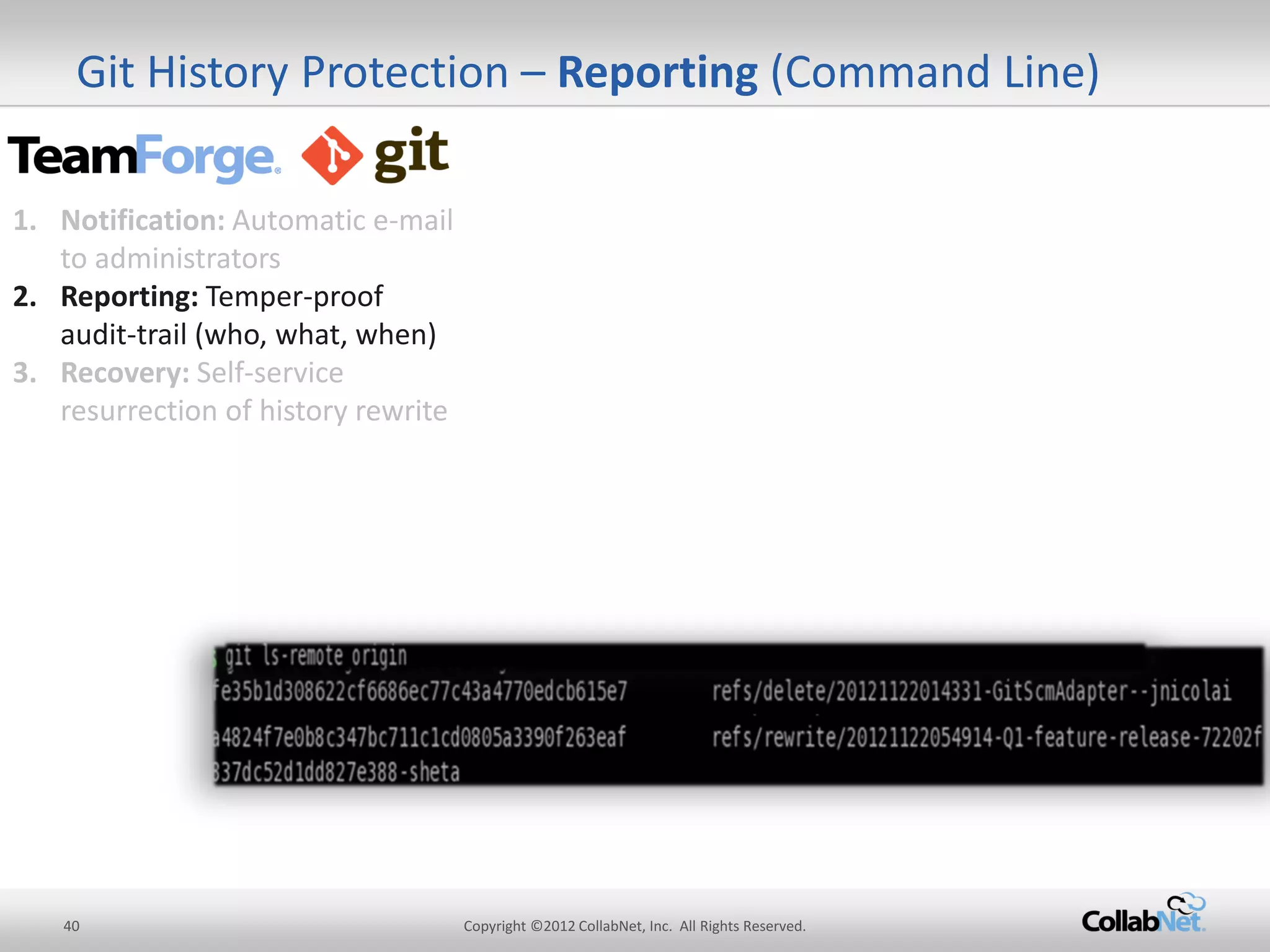
Git History Protection – Reporting (Command Line) 
1.Notification: Automatic e-mail to administrators 
2.Reporting: Temper-proof audit-trail (who, what, when) 
3.Recovery: Self-service resurrection of history rewrite
41 
Copyright ©2012 CollabNet, Inc. All Rights Reserved. 
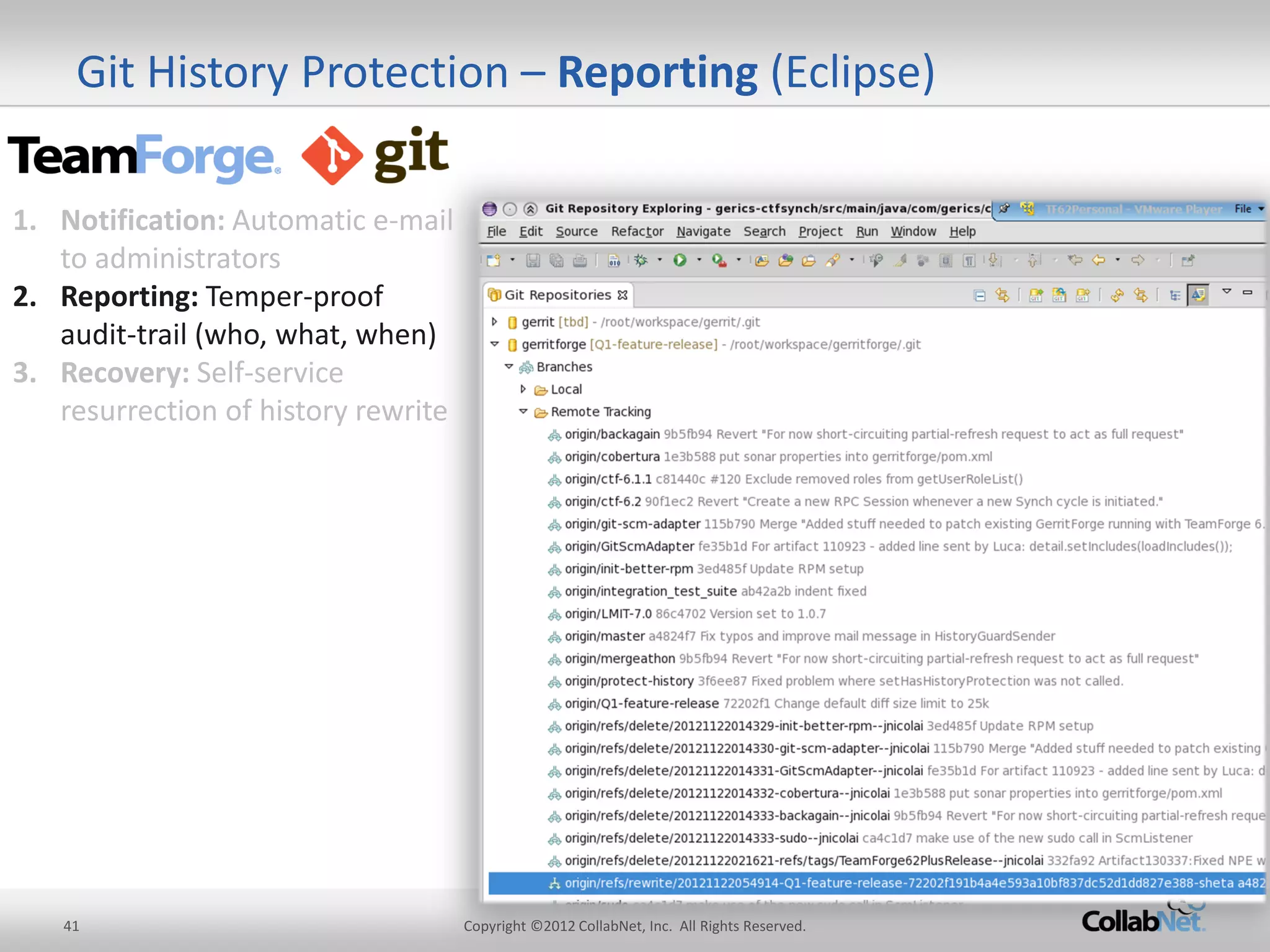
Git History Protection – Reporting (Eclipse) 
1.Notification: Automatic e-mail to administrators 
2.Reporting: Temper-proof audit-trail (who, what, when) 
3.Recovery: Self-service resurrection of history rewrite
42 
Copyright ©2012 CollabNet, Inc. All Rights Reserved. 
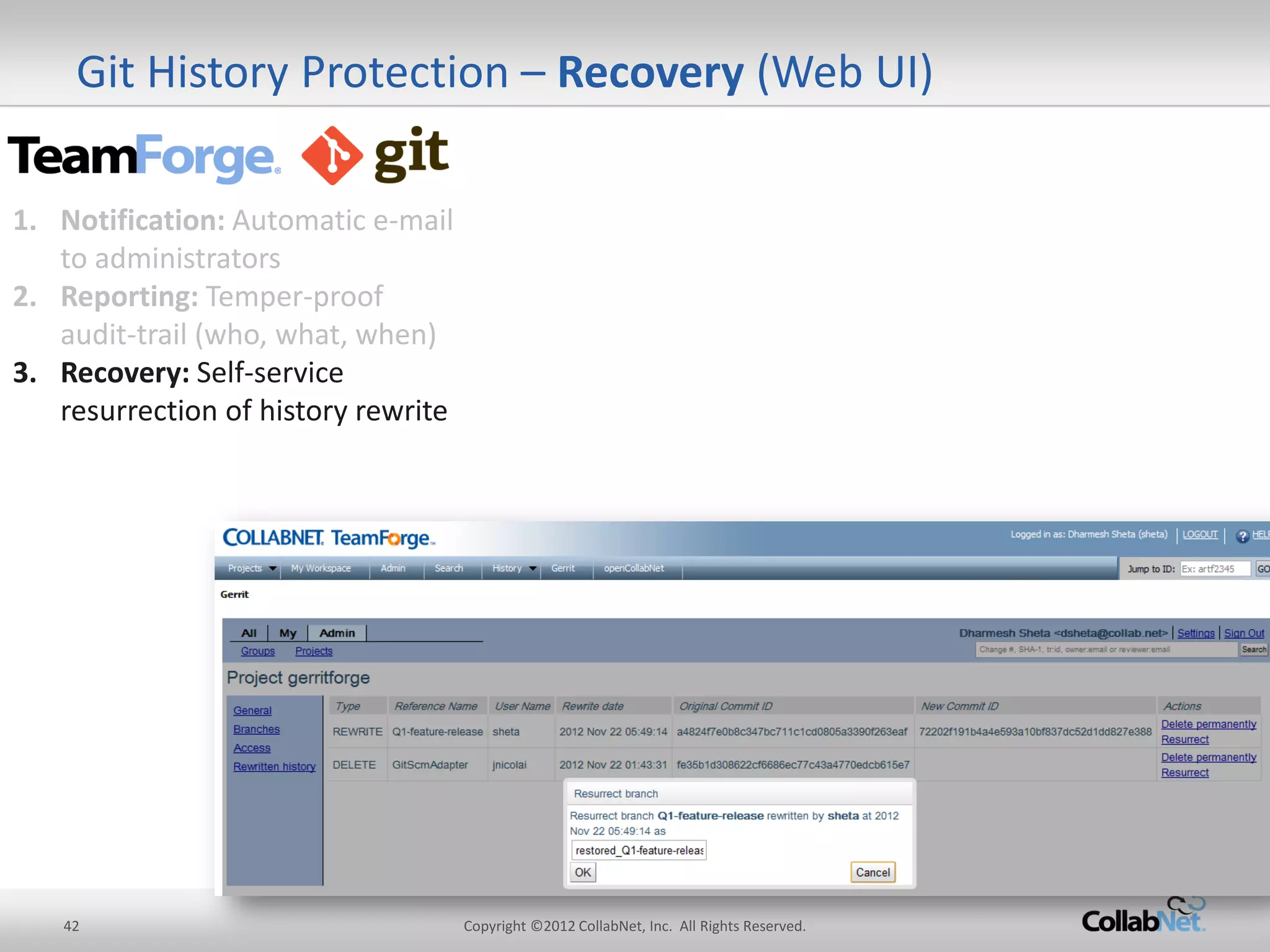
Git History Protection – Recovery (Web UI) 
1.Notification: Automatic e-mail to administrators 
2.Reporting: Temper-proof audit-trail (who, what, when) 
3.Recovery: Self-service resurrection of history rewrite
43 
Copyright ©2012 CollabNet, Inc. All Rights Reserved. 
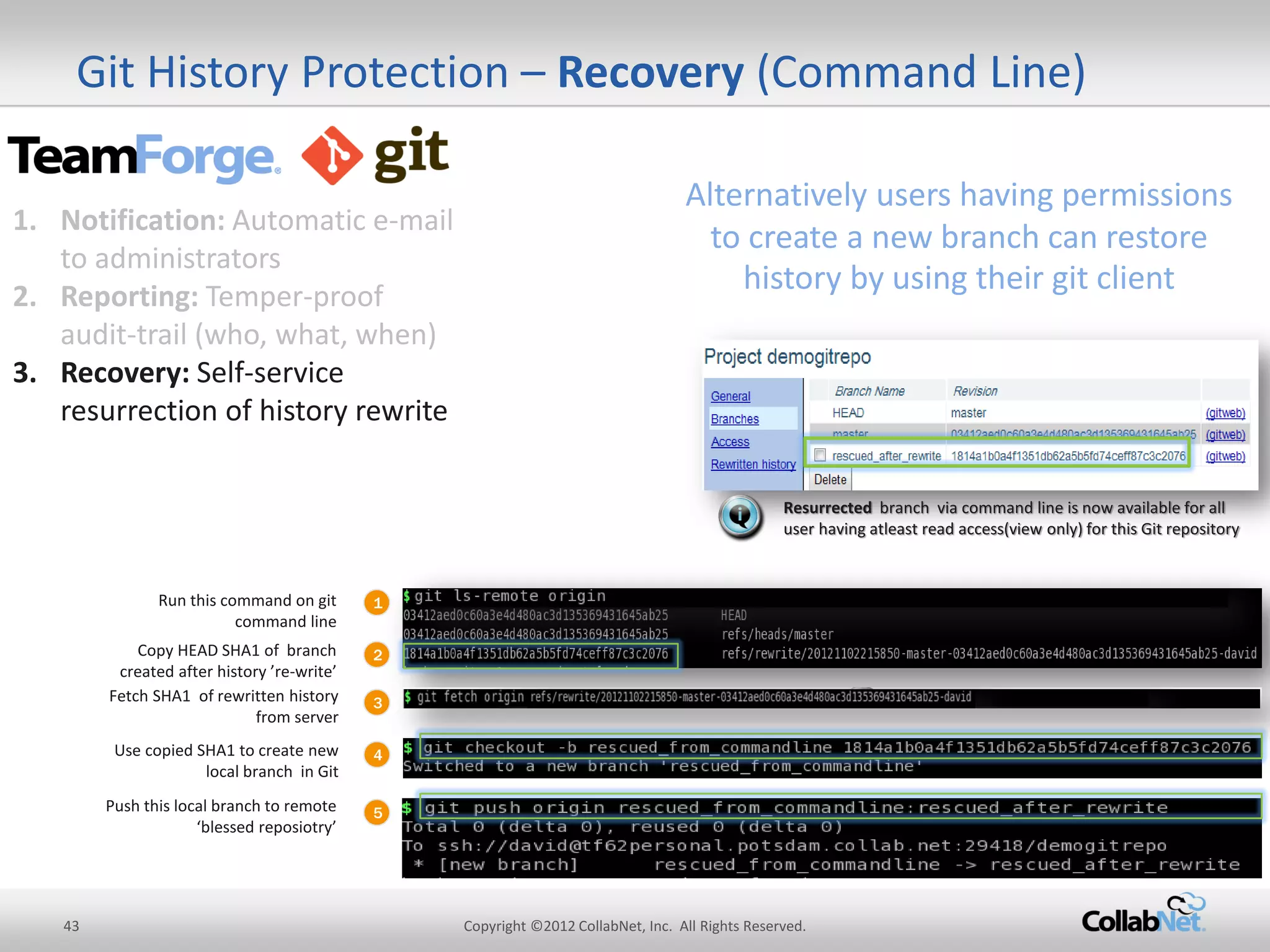
Git History Protection – Recovery (Command Line) 
1 
Run this command on git command line 
2 
Copy HEAD SHA1 of branch created after history ’re-write’ 
3 
Use copied SHA1 to create new local branch in Git 
Push this local branch to remote ‘blessed reposiotry’ 
Resurrected branch via command line is now available for all user having atleast read access(view only) for this Git repository 
Fetch SHA1 of rewritten history from server 
4 
5 
Alternatively users having permissions to create a new branch can restore history by using their git client 
1.Notification: Automatic e-mail to administrators 
2.Reporting: Temper-proof audit-trail (who, what, when) 
3.Recovery: Self-service resurrection of history rewrite
44 
Copyright ©2012 CollabNet, Inc. All Rights Reserved. 
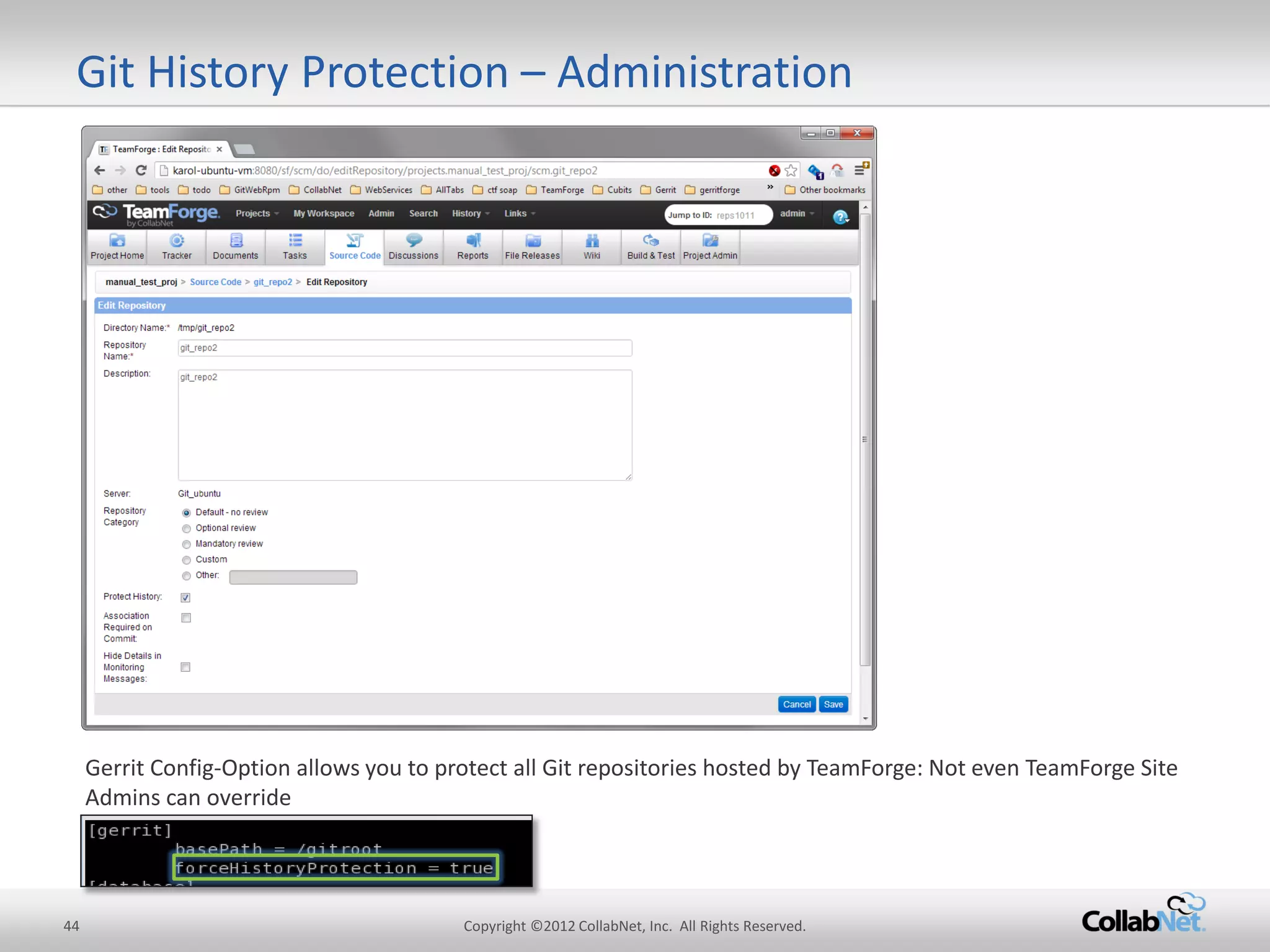
Git History Protection – Administration 
Gerrit Config-Option allows you to protect all Git repositories hosted by TeamForge: Not even TeamForge Site Admins can override
45 
Copyright ©2012 CollabNet, Inc. All Rights Reserved. 
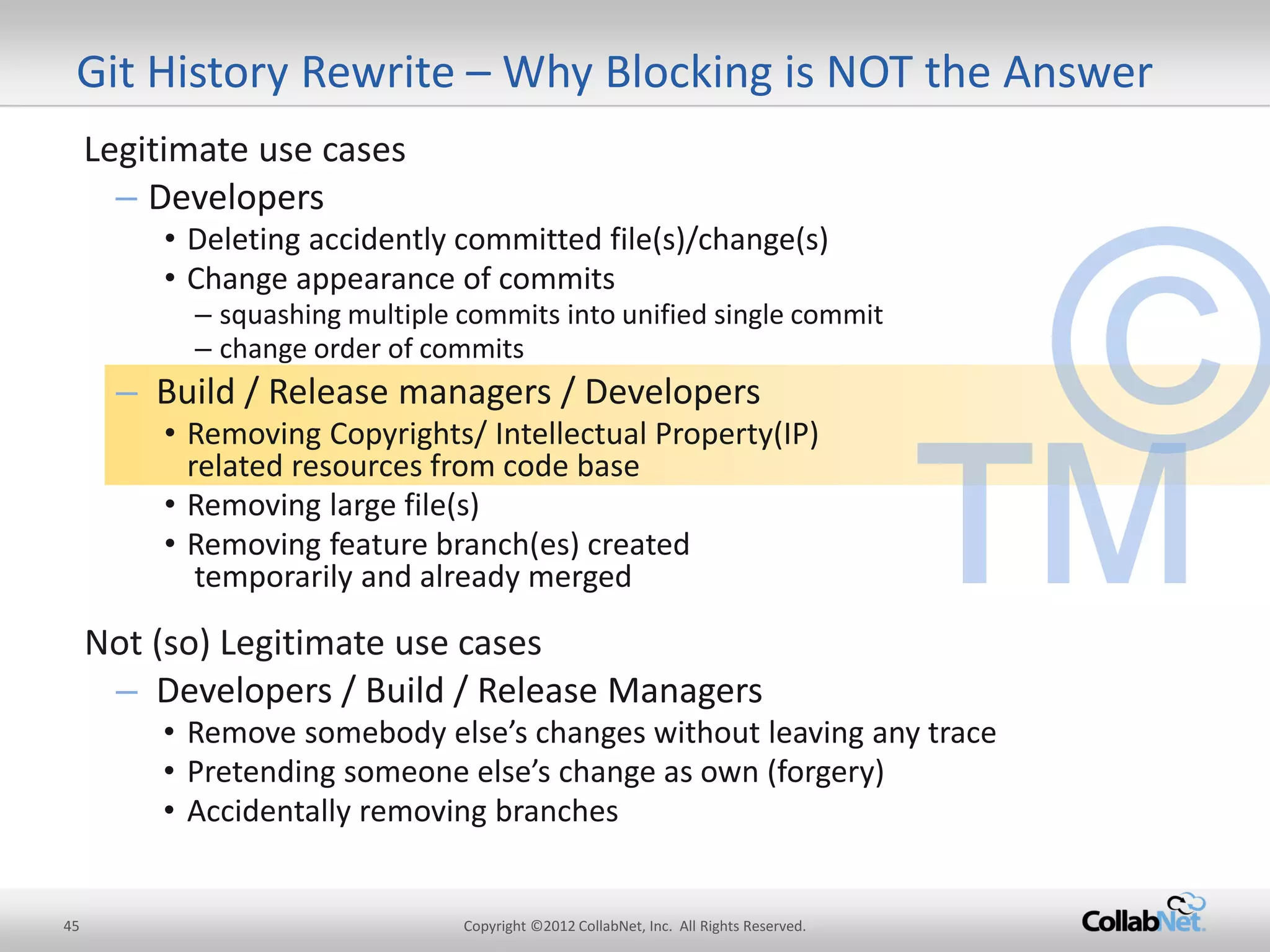
Git History Rewrite – Why Blocking is NOT the Answer 
Legitimate use cases 
–Developers 
•Deleting accidently committed file(s)/change(s) 
•Change appearance of commits 
–squashing multiple commits into unified single commit 
–change order of commits 
–Build / Release managers / Developers 
•Removing Copyrights/ Intellectual Property(IP) related resources from code base 
•Removing large file(s) 
•Removing feature branch(es) created temporarily and already merged 
Not (so) Legitimate use cases 
–Developers / Build / Release Managers 
•Remove somebody else’s changes without leaving any trace 
•Pretending someone else’s change as own (forgery) 
•Accidentally removing branches
46 
Copyright ©2012 CollabNet, Inc. All Rights Reserved. 
Git History Rewrite – Why Blocking is NOT the Answer 
Legitimate use cases 
–Developers 
•Deleting accidently committed file(s)/change(s) 
•Change appearance of commits 
–squashing multiple commits into unified single commit 
–change order of commits 
–Build / Release managers / Developers 
•Removing Copyrights/ Intellectual Property(IP) related resources from code base 
•Removing large file(s) 
•Removing feature branch(es) created temporarily and already merged 
Not (so) Legitimate use cases 
–Developers / Build / Release Managers 
•Remove somebody else’s changes without leaving any trace 
•Pretending someone else’s change as own (forgery) 
•Accidentally removing branches
47 
Copyright ©2012 CollabNet, Inc. All Rights Reserved. 
Git History Rewrite – Why Blocking is NOT the Answer 
Legitimate use cases 
–Developers 
•Deleting accidently committed file(s)/change(s) 
•Change appearance of commits 
–squashing multiple commits into unified single commit 
–change order of commits 
–Build / Release managers / Developers 
•Removing Copyrights/ Intellectual Property(IP) related resources from code base 
•Removing large file(s) 
•Removing feature branch(es) created temporarily and already merged 
Not (so) Legitimate use cases 
–Developers / Build / Release Managers 
•Remove somebody else’s changes without leaving any trace 
•Pretending someone else’s change as own (forgery) 
•Accidentally removing branches
48 
Copyright ©2012 CollabNet, Inc. All Rights Reserved. 
•TeamForge + Gerrit is a powerful foundation for Enterprise Git 
•Git History Rewrite covers branch deletions and forced pushes, two very powerful, often needed but quite dangerous operations which might lead to data loss and tampering 
•TeamForge 6.2 with Gerrit introduced History Protection 
•History protection ensures that potentially unnoticed events, such as remote branch deletions and forced pushes, are now detected and fully recoverable, any modifications to Git code and repositories are securely recorded with tamper-proof audit logs 
•Recovery is possible from a Web interface at the push of a button, and using an ordinary Git client, IT operations teams don’t have to be involved 
Git History Protection - Summary
49 
Copyright ©2012 CollabNet, Inc. All Rights Reserved. 
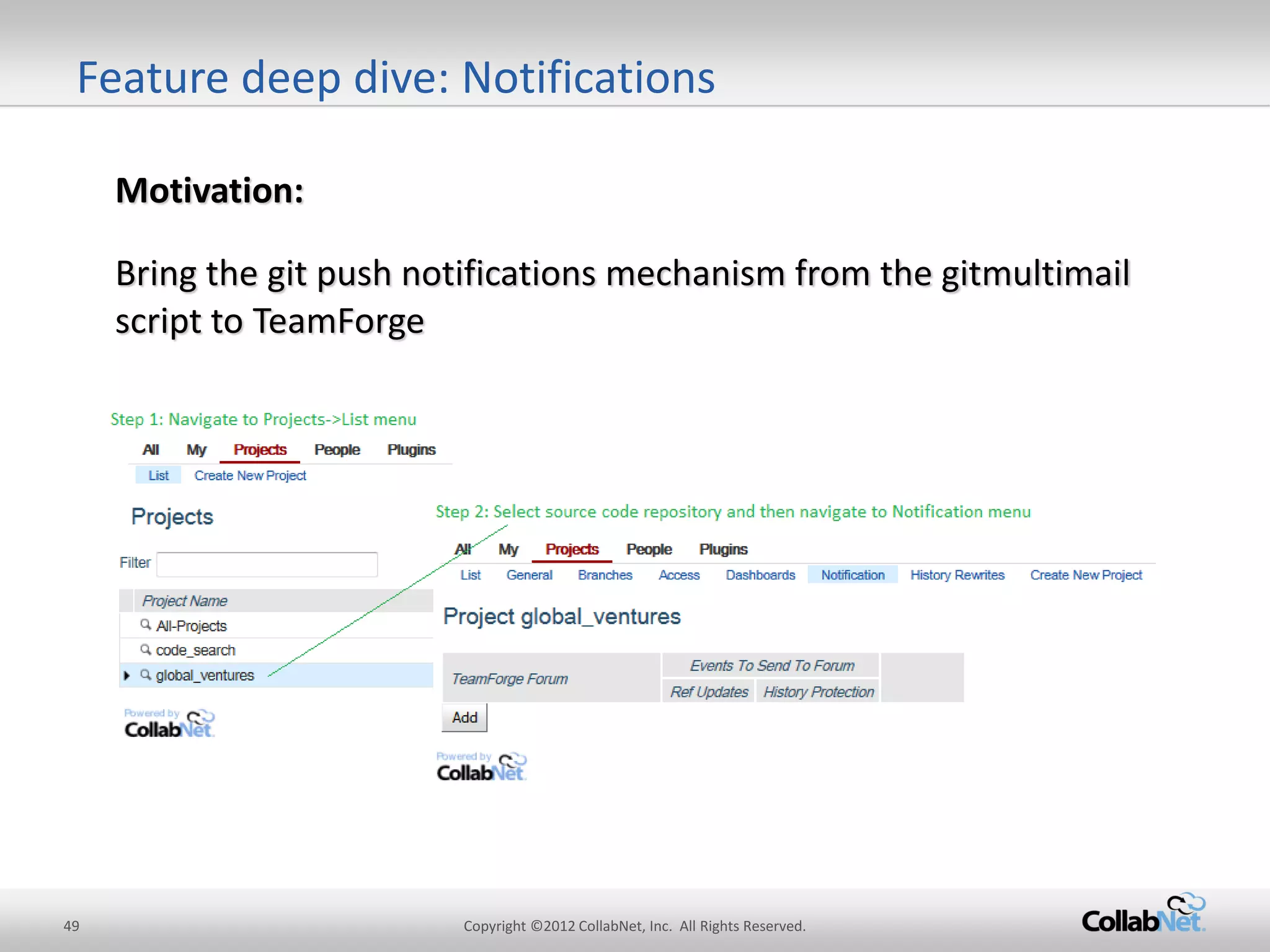
Motivation: 
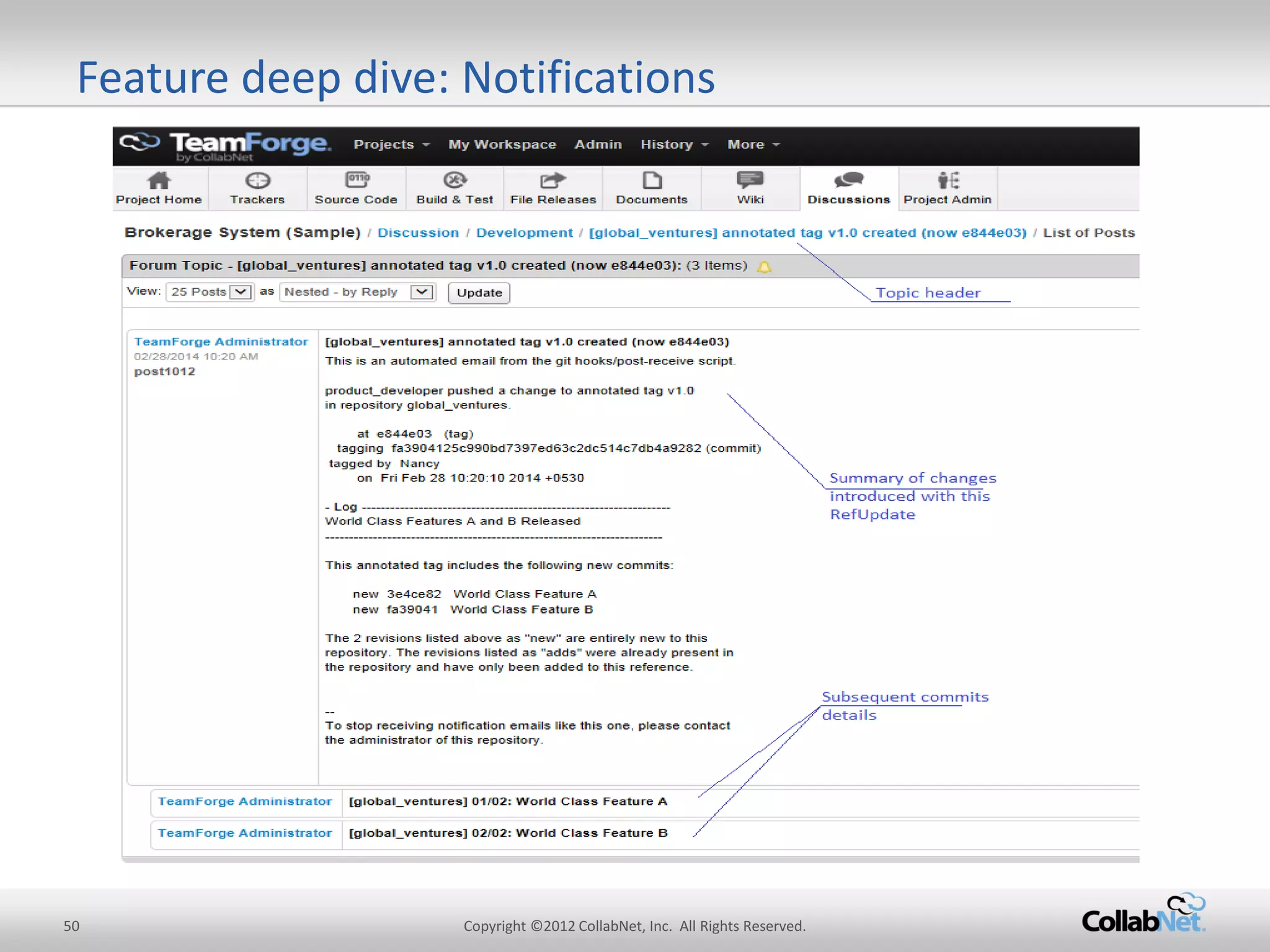
Bring the git push notifications mechanism from the gitmultimail script to TeamForge 
Feature deep dive: Notifications
50 
Copyright ©2012 CollabNet, Inc. All Rights Reserved. 
Feature deep dive: Notifications
51 
Copyright ©2012 CollabNet, Inc. All Rights Reserved. 
Appendix – History Rewrite, versus Git Reflog 
Git reflog 
TeamForge 
Git Integration with ‘History Protect’ 
Accessibility 
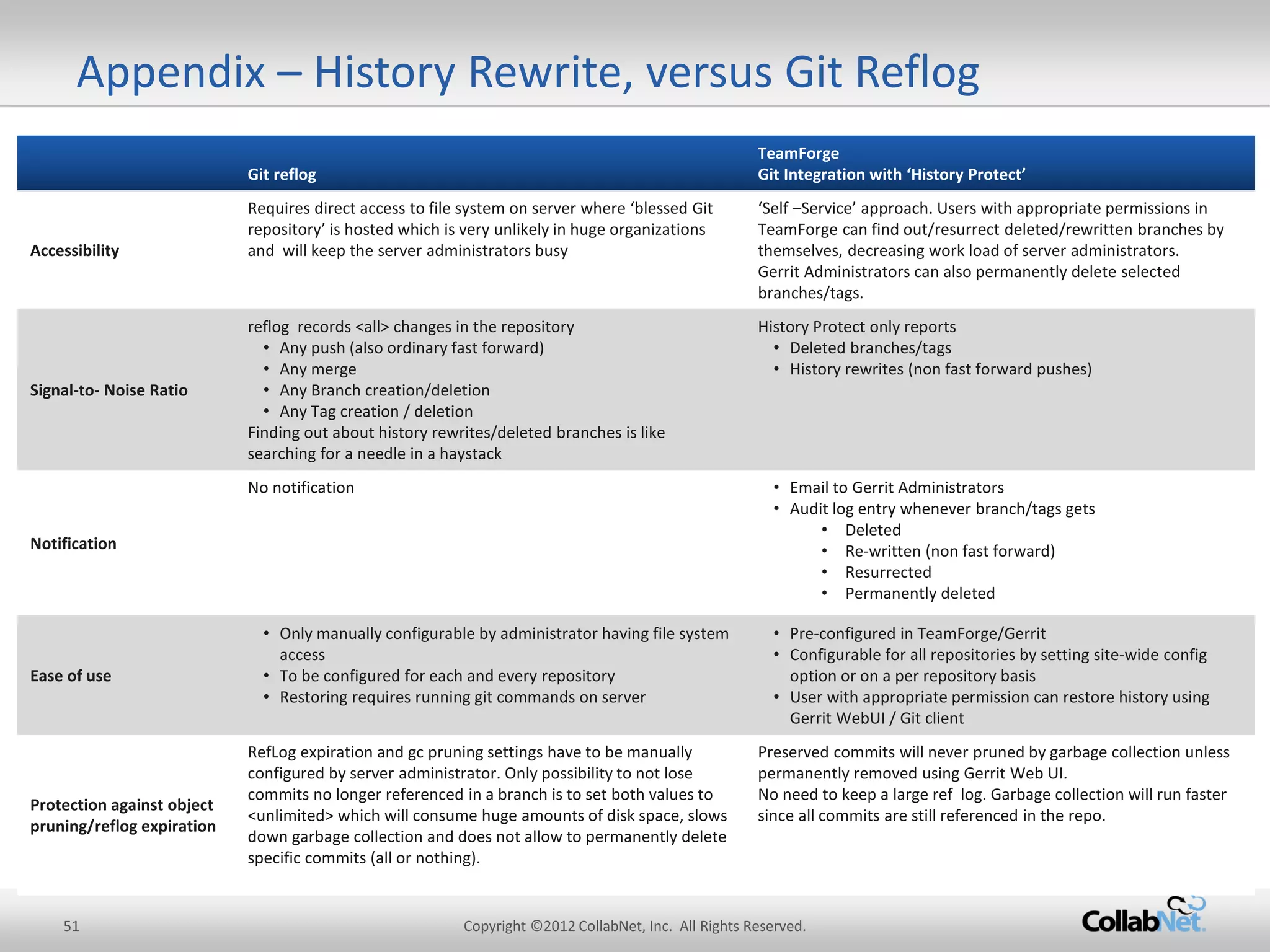
Requires direct access to file system on server where ‘blessed Git repository’ is hosted which is very unlikely in huge organizations and will keep the server administrators busy 
‘Self –Service’ approach. Users with appropriate permissions in TeamForge can find out/resurrect deleted/rewritten branches by themselves, decreasing work load of server administrators. 
Gerrit Administrators can also permanently delete selected branches/tags. 
Signal-to- Noise Ratio 
reflog records <all> changes in the repository 
•Any push (also ordinary fast forward) 
•Any merge 
•Any Branch creation/deletion 
•Any Tag creation / deletion 
Finding out about history rewrites/deleted branches is like searching for a needle in a haystack 
History Protect only reports 
•Deleted branches/tags 
•History rewrites (non fast forward pushes) 
Notification 
No notification 
•Email to Gerrit Administrators 
•Audit log entry whenever branch/tags gets 
•Deleted 
•Re-written (non fast forward) 
•Resurrected 
•Permanently deleted 
Ease of use 
•Only manually configurable by administrator having file system access 
•To be configured for each and every repository 
•Restoring requires running git commands on server 
•Pre-configured in TeamForge/Gerrit 
•Configurable for all repositories by setting site-wide config option or on a per repository basis 
•User with appropriate permission can restore history using Gerrit WebUI / Git client 
Protection against object pruning/reflog expiration 
RefLog expiration and gc pruning settings have to be manually configured by server administrator. Only possibility to not lose commits no longer referenced in a branch is to set both values to <unlimited> which will consume huge amounts of disk space, slows down garbage collection and does not allow to permanently delete specific commits (all or nothing). 
Preserved commits will never pruned by garbage collection unless permanently removed using Gerrit Web UI. 
No need to keep a large ref log. Garbage collection will run faster since all commits are still referenced in the repo.

Git/Gerrit with TeamForge

  • 1.
    1 Copyright ©2012CollabNet, Inc. All Rights Reserved. CollabNet Git/Gerrit with TeamForge Secure, Scalable, Standards-Compliant for the Enterprise Johannes Nicolai Director of Engineering CollabNet
  • 2.
    2 Copyright ©2012CollabNet, Inc. All Rights Reserved. Agenda •Introduction to Git, Gerrit and Jenkins •Git/Gerrit’s Place in the TeamForge Universe –Traceability –Searchability –Scalability –Security •Gerrit Signature Features –History Protection –Code Quality Gates •Q & A
  • 3.
    3 Copyright ©2012CollabNet, Inc. All Rights Reserved. Introduction of Technologies •Git –Most popular emerging distributed SCM •Jenkins –Most popular open source Continuous Integration •Gerrit Code Review –Widely used code-review tool and Git server backend •CollabNet TeamForge® –Provides an unparalleled smooth integration of all these tools into your software development process
  • 4.
    4 Copyright ©2012CollabNet, Inc. All Rights Reserved. •Open source distributed SCM, used notably by: –Linux (it was originally developed for that very purpose) –Eclipse foundation –Android (based on Gerrit Code Review) • Why Git? –All operations are local •Search, log, history, branching and merging •Offline development is possible –Powerful merging strategies (merge, rebase, cherry-pick) Git = Leading DVCS (Distributed Version Control System)
  • 5.
    5 Copyright ©2012CollabNet, Inc. All Rights Reserved. Git Popularity Continues to Grow, But…. “ The adoption of DVCS has accelerated in small teams, but is moving more slowly in enterprise settings. Source: Gartner, 27 July 2011 ID Number: G00214153; Hype Cycle for Application Development, 2011; Ian Finley, Mike Blechar
  • 6.
    6 Copyright ©2012CollabNet, Inc. All Rights Reserved. •100% pure Java SSH and HTTP Git backend –Scalable and suitable for large Enterprises •Web-based and Command Line administration –Users and Groups –Project and branch security (read and write) •Collaboration and Code-review –B2B integration at code-level –Communicate and share code knowledge in the Team –Enforce workflow and code quality •The most successful open source code review –Android OS –Eclipse, OpenStack, Qt, CouchDB and many others Gerrit = (Widely Used) Git Server + Code Review Tool
  • 7.
    7 Copyright ©2012CollabNet, Inc. All Rights Reserved. Who’s Using Gerrit in Production Today? source: Wikipedia
  • 8.
    8 Copyright ©2012CollabNet, Inc. All Rights Reserved. Jenkins = Most popular Open Source CI •Has hundreds of plugins to –Interact with various SCMs (Git, SVN, CVS, …) –Build software (ant, maven, gradle, make) –Run unit/integration tests (JUnit, Selenium, …) –Perform static code analysis (findbugs, checkstyle, PMS, Sonar, …) •Works brilliantly together with Gerrit over Gerrit Trigger Plugin –Keeps ssh connection open to learn about new review requests immediatly –Builds and verifies all configures quality gates (tests, coding conventions, code KPIs, you name it) –Sets ‘verified’ flag in review request according to result of verification build (either +1 or -1) –If Jenkins sets -1, then further code review isn’t possible, developer has to either re-work or abandon change
  • 9.
    9 Copyright ©2012CollabNet, Inc. All Rights Reserved. Tackling half baked review requests: Marrying Gerrit and Jenkins master CI Build: OK CI Build: OK A1 local master Verified: -1 (build failed) Verified: +1 (build OK) refs/for/master C2 push C2 C2* C2* push Reviewed: +2 C2* A1
  • 10.
    10 Copyright ©2012CollabNet, Inc. All Rights Reserved. 24/7 Support Git/Gerrit Training Standards-Compliance Scalability ALM Integration History Protection Code Quality Advanced Git security Git Projects organization Code-review Replication TeamForge = Enterprise-Grade Git Mgmt. + ALM Basic SCM features jGit engine Native engine GitWeb Gerrit With TeamForge and Gerrit, Git is now ready for the enterprise. Realize all the benefits of Git, without compromising governance, security and compliance.
  • 11.
    11 Copyright ©2012CollabNet, Inc. All Rights Reserved. Integration of existing tools Security, standards and audit compliance Scalability (and manageability at scale) TeamForge = Enterprise-Grade Git Mgmt. + ALM
  • 12.
    12 Copyright ©2012CollabNet, Inc. All Rights Reserved. Searchability – across TF artifacts, including Code Search across multiple repositories, gerrit instances and other SCM tools (svn, cvs, perforce...) Traceability – associating the source code with requirements, issues, documents, tasks and other artifacts. RBAC – Role Based Access Control - for each application's concepts, documents, file releases, trackers, and discussion forums, you can assign permissions globally based on user roles TeamForge = Enterprise-Grade Git Mgmt. + ALM
  • 13.
    13 Copyright ©2012CollabNet, Inc. All Rights Reserved. Simple RBAC - TeamForge
  • 14.
    14 Copyright ©2012CollabNet, Inc. All Rights Reserved. Gerrit Acces Rights- Not simple at all
  • 15.
    15 Copyright ©2012CollabNet, Inc. All Rights Reserved. Implementation: Map TeamForge SCM permissions to Gerrit Access Rights. Provide pre-defined code review policies so anyone can start to work with Gerrit within a few steps. Code review policies are applied per repository. Motivation: Shield most users from Gerrit’s complexities by using pre-defined repo categories and generic TeamForge RBAC model with its SCM permissions. without hiding advanced features for power users RepoCategories: Bridging the RBAC gap
  • 16.
    16 Copyright ©2012CollabNet, Inc. All Rights Reserved. RepoCategories: Bridging the RBAC gap
  • 17.
    17 Copyright ©2012CollabNet, Inc. All Rights Reserved. 24/7 Support Git/Gerrit Training Standards-Compliance Scalability ALM Integration History Protection Code Quality Advanced Git security Git Projects organization Code-review Replication TeamForge = Enterprise-Grade Git Mgmt. + ALM Basic SCM features jGit engine Native engine GitWeb Gerrit With TeamForge and Gerrit, Git is now ready for the enterprise. Realize all the benefits of Git, without compromising governance, security and compliance.
  • 18.
    18 Copyright ©2012CollabNet, Inc. All Rights Reserved. Git History Rewrite – Defined “We define History Rewrite as non-fast forward updates of remote refs and its associated objects. This happens whenever a branch in the remote repository gets deleted, previously pushed commits get amended/tree filtered and forcefully re-pushed, or a remote branch/tag is pointed to an entire different commit history.”
  • 19.
    19 Copyright ©2012CollabNet, Inc. All Rights Reserved. Git History Rewrite – Functionality in Detail Commit #1 Initially files added File A added Commit #2 More files added File B Added Commit #3 Files modified File A modified Commit #4 Files Deleted File A Delete Change log Change log after History Re-Write Commit #1 Initially files added File A added Commit #5 More files added File X added Commit #1 Initially files added File A added Commit #2 More files added File B Added Commit #3 Files modified File A modified Commit #4 Files Deleted File A Delete Local git commit(s) •No traces about deleted changes (commits & metadata associated, files, directories) •Periodic garbage collection will remove unreferenced commits soon and afterwards they can no longer be recovered Local Git Repo git clone Developer Commit #1 Initially files added File A added Commit #2 More files added Commit #3 Files modified Commit #4 Files Deleted Developer Removes some files either by purpose or accidentally Blessed Git Repo git push –f origin master Commit #1 Initially files added File A added Commit #5 More files added File X added
  • 20.
    20 Copyright ©2012CollabNet, Inc. All Rights Reserved. Git History Rewrite – No Traces Left Behind! Code Change History Removing top 6 commits locally Creating new commit locally Pushing all changes to remote No traces about deleted 6 commits in Web UI
  • 21.
    21 Copyright ©2012CollabNet, Inc. All Rights Reserved. Single ‘space’ wipes entire history: –git push origin production-quick-fix:stable instead of –git push origin production-quick-fix :stable No traces left behind: –No alerts –No recovery (unless noticed quickly, via administrators) Happens even to the experts: –https://bugs.eclipse.org/bugs/show_bug.cgi?id=361707 –Eclipse Foundation lost almost all their branches and tags accidentally, garbage collection pruned unreferenced commits, administrators had to ask developers for a recent local backup –http://jenkins-ci.org/content/summary-report-git-repository- disruption-incident-nov-10th –186 repositories from Jenkins Open Source Project got reset on GitHub Git History Rewrite – This Can Happen to You, Too!
  • 22.
    22 Copyright ©2012CollabNet, Inc. All Rights Reserved. Introducing Git History Protection Commit #1 Initially files added File A added Commit #2 More files added File B Added Commit #3 Files modified File A modified Commit #4 Files Deleted File A Delete Change log Change log after History Re-Write Commit #1 Initially files added File A added Commit #5 More files added File X added Commit #1 Initially files added File A added Commit #2 More files added File B Added Commit #3 Files modified File A modified Commit #4 Files Deleted File A Delete Local git commit(s) Local Git Repo git clone Developer Commit #1 Initially files added File A added Commit #2 More files added Commit #3 Files modified Commit #4 Files Deleted Developer Removes some files either by purpose or accidentally Blessed Git Repo git push –f origin master Commit #1 Initially files added File A added Commit #5 More files added File X added TeamForge History Protect Detects Rewrite Event 1.Notification: Automatic e-mail to administrators 2.Reporting: Temper-proof audit- trail (who, what, when) 3.Recovery: Self-service resurrection of history rewrite TeamForge automatically secures history snapshots on ‘blessed’ master repository (under “refs/rewrite” or “refs/deleted”), for auditing & recovery.
  • 23.
    23 Copyright ©2012CollabNet, Inc. All Rights Reserved. 24/7 Support Git/Gerrit Training Standards-Compliance Scalability ALM Integration History Protection Code Quality Advanced Git security Git Projects organization Code-review Replication TeamForge = Enterprise-Grade Git Mgmt. + ALM Basic SCM features jGit engine Native engine GitWeb Gerrit With TeamForge and Gerrit, Git is now ready for the enterprise. Realize all the benefits of Git, without compromising governance, security and compliance.
  • 24.
    24 Copyright ©2012CollabNet, Inc. All Rights Reserved. Tackling half baked review requests: Marrying Gerrit and Jenkins master CI Build: OK CI Build: OK A1 local master Verified: -1 (build failed) Verified: +1 (build OK) refs/for/master C2 push C2 C2* C2* push Reviewed: +2 C2* A1
  • 25.
    25 Copyright ©2012CollabNet, Inc. All Rights Reserved. Gerrit – Code Quality Gate Wizard – General Concept
  • 26.
    26 Copyright ©2012CollabNet, Inc. All Rights Reserved. Code Quality Gate Wizard Code Quality Gate Wizard for Gerrit (Gerrit 2.8+) –comes with a bunch of predefined policies and lets you graphically design your own quality gates as easy as defining email filter rules. –Examples: •Four-eye peer review •Legal has to approve copyright file changes •Senior staff has to approve the work of juniors •Democratic feature voting –More details under http://blogs.collab.net/git
  • 27.
    27 Copyright ©2012CollabNet, Inc. All Rights Reserved. Gerrit – Code Quality Gate Wizard – How to launch
  • 28.
    28 Copyright ©2012CollabNet, Inc. All Rights Reserved. Gerrit – Code Quality Gate Wizard – Predefined templates
  • 29.
    29 Copyright ©2012CollabNet, Inc. All Rights Reserved. Gerrit – Code Quality Gate Wizard – Built In Test Mode
  • 30.
    30 Copyright ©2012CollabNet, Inc. All Rights Reserved. Gerrit – Code Quality Gate Wizard – Based on existing changes
  • 31.
    31 Copyright ©2012CollabNet, Inc. All Rights Reserved. Gerrit – Code Quality Gate Wizard – Great Flexibility
  • 32.
    32 Copyright ©2012CollabNet, Inc. All Rights Reserved. 24/7 Support Security Standards-Compliance Scalability ALM Integration History Protection Code Quality Advanced Git security Git Projects organization Code-review Replication TeamForge = Enterprise-Grade Git Mgmt. + ALM Basic SCM features jGit engine Native engine GitWeb Gerrit With TeamForge and Gerrit, Git is now ready for the enterprise. Realize all the benefits of Git, without compromising governance, security and compliance.
  • 33.
    33 Copyright ©2012CollabNet, Inc. All Rights Reserved. 3-Minute Video on History Protection http://www.collab.net/products/teamforge/git-for-the-enterprise Software Downloads (TeamForge, Git + clients) http://www.collab.net/git Git Blogs http://blogs.collab.net/git Learn More
  • 34.
    34 Copyright ©2012CollabNet, Inc. All Rights Reserved. Q&A
  • 35.
    35 Copyright ©2012CollabNet, Inc. All Rights Reserved. Default: All Gerrit review features are turned off Mandatory Review: All code changes have to be reviewed Optional Review: Review feature is turned on but can be bypassed if necessary Custom: Access rights have to be set manually in Gerrit Web UI and will not be overridden by TeamForge User-defined: Possibility to define your own access rights controlled by TeamForge Pre defined & user-defined categories Feature deep dive: Simple RBAC
  • 36.
    36 Copyright ©2012CollabNet, Inc. All Rights Reserved. Git History Rewrite – Example: Accidental Branch Deletion Prepare a fix in local branch which is to be pushed to stable branch on remote. Use this syntax for PUSH to remote Typo in push command...(accidentially added a space) Results in branch deletion. No trace on Web UI on Git server side (stable branch got deleted)
  • 37.
    37 Copyright ©2012CollabNet, Inc. All Rights Reserved. Git History Protection – Alerting 1.Notification: Automatic e-mail to administrators 2.Reporting: Temper-proof audit-trail (who, what, when) 3.Recovery: Self-service resurrection of history rewrite Whenever history gets ‘re-written’, an email gets sent out to ‘Gerrit Administrators’ containing details about old HEAD of branch and new HEAD after ‘re-write’.
  • 38.
    38 Copyright ©2012CollabNet, Inc. All Rights Reserved. Git History Protection – Reporting (Audit Log) Audit Log containing all History Rewrite Events is accessible through TeamForge Web UI 1.Notification: Automatic e-mail to administrators 2.Reporting: Temper-proof audit-trail (who, what, when) 3.Recovery: Self-service resurrection of history rewrite
  • 39.
    39 Copyright ©2012CollabNet, Inc. All Rights Reserved. Git History Protection – Reporting (Web UI) 1.Notification: Automatic e-mail to administrators 2.Reporting: Temper-proof audit-trail (who, what, when) 3.Recovery: Self-service resurrection of history rewrite
  • 40.
    40 Copyright ©2012CollabNet, Inc. All Rights Reserved. Git History Protection – Reporting (Command Line) 1.Notification: Automatic e-mail to administrators 2.Reporting: Temper-proof audit-trail (who, what, when) 3.Recovery: Self-service resurrection of history rewrite
  • 41.
    41 Copyright ©2012CollabNet, Inc. All Rights Reserved. Git History Protection – Reporting (Eclipse) 1.Notification: Automatic e-mail to administrators 2.Reporting: Temper-proof audit-trail (who, what, when) 3.Recovery: Self-service resurrection of history rewrite
  • 42.
    42 Copyright ©2012CollabNet, Inc. All Rights Reserved. Git History Protection – Recovery (Web UI) 1.Notification: Automatic e-mail to administrators 2.Reporting: Temper-proof audit-trail (who, what, when) 3.Recovery: Self-service resurrection of history rewrite
  • 43.
    43 Copyright ©2012CollabNet, Inc. All Rights Reserved. Git History Protection – Recovery (Command Line) 1 Run this command on git command line 2 Copy HEAD SHA1 of branch created after history ’re-write’ 3 Use copied SHA1 to create new local branch in Git Push this local branch to remote ‘blessed reposiotry’ Resurrected branch via command line is now available for all user having atleast read access(view only) for this Git repository Fetch SHA1 of rewritten history from server 4 5 Alternatively users having permissions to create a new branch can restore history by using their git client 1.Notification: Automatic e-mail to administrators 2.Reporting: Temper-proof audit-trail (who, what, when) 3.Recovery: Self-service resurrection of history rewrite
  • 44.
    44 Copyright ©2012CollabNet, Inc. All Rights Reserved. Git History Protection – Administration Gerrit Config-Option allows you to protect all Git repositories hosted by TeamForge: Not even TeamForge Site Admins can override
  • 45.
    45 Copyright ©2012CollabNet, Inc. All Rights Reserved. Git History Rewrite – Why Blocking is NOT the Answer Legitimate use cases –Developers •Deleting accidently committed file(s)/change(s) •Change appearance of commits –squashing multiple commits into unified single commit –change order of commits –Build / Release managers / Developers •Removing Copyrights/ Intellectual Property(IP) related resources from code base •Removing large file(s) •Removing feature branch(es) created temporarily and already merged Not (so) Legitimate use cases –Developers / Build / Release Managers •Remove somebody else’s changes without leaving any trace •Pretending someone else’s change as own (forgery) •Accidentally removing branches
  • 46.
    46 Copyright ©2012CollabNet, Inc. All Rights Reserved. Git History Rewrite – Why Blocking is NOT the Answer Legitimate use cases –Developers •Deleting accidently committed file(s)/change(s) •Change appearance of commits –squashing multiple commits into unified single commit –change order of commits –Build / Release managers / Developers •Removing Copyrights/ Intellectual Property(IP) related resources from code base •Removing large file(s) •Removing feature branch(es) created temporarily and already merged Not (so) Legitimate use cases –Developers / Build / Release Managers •Remove somebody else’s changes without leaving any trace •Pretending someone else’s change as own (forgery) •Accidentally removing branches
  • 47.
    47 Copyright ©2012CollabNet, Inc. All Rights Reserved. Git History Rewrite – Why Blocking is NOT the Answer Legitimate use cases –Developers •Deleting accidently committed file(s)/change(s) •Change appearance of commits –squashing multiple commits into unified single commit –change order of commits –Build / Release managers / Developers •Removing Copyrights/ Intellectual Property(IP) related resources from code base •Removing large file(s) •Removing feature branch(es) created temporarily and already merged Not (so) Legitimate use cases –Developers / Build / Release Managers •Remove somebody else’s changes without leaving any trace •Pretending someone else’s change as own (forgery) •Accidentally removing branches
  • 48.
    48 Copyright ©2012CollabNet, Inc. All Rights Reserved. •TeamForge + Gerrit is a powerful foundation for Enterprise Git •Git History Rewrite covers branch deletions and forced pushes, two very powerful, often needed but quite dangerous operations which might lead to data loss and tampering •TeamForge 6.2 with Gerrit introduced History Protection •History protection ensures that potentially unnoticed events, such as remote branch deletions and forced pushes, are now detected and fully recoverable, any modifications to Git code and repositories are securely recorded with tamper-proof audit logs •Recovery is possible from a Web interface at the push of a button, and using an ordinary Git client, IT operations teams don’t have to be involved Git History Protection - Summary
  • 49.
    49 Copyright ©2012CollabNet, Inc. All Rights Reserved. Motivation: Bring the git push notifications mechanism from the gitmultimail script to TeamForge Feature deep dive: Notifications
  • 50.
    50 Copyright ©2012CollabNet, Inc. All Rights Reserved. Feature deep dive: Notifications
  • 51.
    51 Copyright ©2012CollabNet, Inc. All Rights Reserved. Appendix – History Rewrite, versus Git Reflog Git reflog TeamForge Git Integration with ‘History Protect’ Accessibility Requires direct access to file system on server where ‘blessed Git repository’ is hosted which is very unlikely in huge organizations and will keep the server administrators busy ‘Self –Service’ approach. Users with appropriate permissions in TeamForge can find out/resurrect deleted/rewritten branches by themselves, decreasing work load of server administrators. Gerrit Administrators can also permanently delete selected branches/tags. Signal-to- Noise Ratio reflog records <all> changes in the repository •Any push (also ordinary fast forward) •Any merge •Any Branch creation/deletion •Any Tag creation / deletion Finding out about history rewrites/deleted branches is like searching for a needle in a haystack History Protect only reports •Deleted branches/tags •History rewrites (non fast forward pushes) Notification No notification •Email to Gerrit Administrators •Audit log entry whenever branch/tags gets •Deleted •Re-written (non fast forward) •Resurrected •Permanently deleted Ease of use •Only manually configurable by administrator having file system access •To be configured for each and every repository •Restoring requires running git commands on server •Pre-configured in TeamForge/Gerrit •Configurable for all repositories by setting site-wide config option or on a per repository basis •User with appropriate permission can restore history using Gerrit WebUI / Git client Protection against object pruning/reflog expiration RefLog expiration and gc pruning settings have to be manually configured by server administrator. Only possibility to not lose commits no longer referenced in a branch is to set both values to <unlimited> which will consume huge amounts of disk space, slows down garbage collection and does not allow to permanently delete specific commits (all or nothing). Preserved commits will never pruned by garbage collection unless permanently removed using Gerrit Web UI. No need to keep a large ref log. Garbage collection will run faster since all commits are still referenced in the repo.