
DESIGN AND
MANAGEMENT
OF COMPUTER
NETWORKS
CSK
DEPARTMENT OF
INFORMATION
TECHNOLOGY
OXFORD
ENGINEERING
COLLEGE - TRICHY
UNIT - II
 It representing how users and applications use the
network. In order to develop and understand their
requirements.
 It consists
 Estimates of user session duration.
 The number of active sessions.
 Data sizes(word sizes range 16 bit, 128 bit)-size of data.
 Detailed models(Description) of user and application
behavior.
 A session Is a
 semi-permanent interactive information / or
 dialogue / or
 conversation inter change.
 Interaction between a computer and the user .
 Ex: Login History(login /logout timestamps)
 LAST ACCESS.
 Session duration:
 Average amount of time that visitors spend on the site
each time they visit.
 Ex: Total duration of all sessions (in seconds)
 Timestamps : (OCT 27.10.2014 10:00:10:10 AM)
 When a user arrives to a webpage, a session variable is
created for the user .(temp)
 All websites that allow you to show the number of
visitors use database.(webpage history)
 (visitors count)
 Ex:
 Session Expiration: Internet Login.
 TIMESTAMP(11:11:11 - 27.10.2014)
 Data sizes(size of the Bytes/bits)(Storage)- max /min
 Detailed models of user and application behavior.
 Types of the behavior:
 USER Behavior
 APPLICATION Behavior
 NETWORK Behavior
 Definition:
 Simulation modeling is the process of creating and
analyzing a digital prototype of a
physical model(equipment) to predict its performance
in the real world.
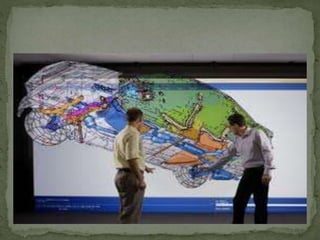
 Digital Prototyping gives conceptual design,
Engineering, Manufacturing, Departments the ability to
virtually explore a complete product before it’s built.
 Example: AutoCAD, CAM, matLAB
 Autodesk Simulation Mechanical
 Physical Prototyping is the process of making a
physical representation of an idea.
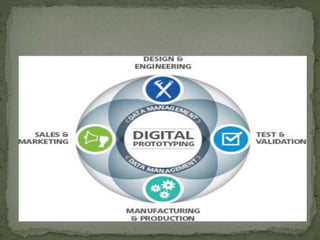
 Digital Prototyping:
 Digital Prototyping gives conceptual design,
engineering, manufacturing, and sales and marketing
departments the ability to virtually explore a complete
product
 Simulation modeling is used to help designers and
engineers understand whether, under what conditions,
and in which ways a part could fail and what loads it can
withstand.
 Developing models or simulations of user, application,
and network behavior useful in predicting, determining
or estimating requirements and data flows.
 Models can range from Easy, Simplistic, Complex and
time consuming.
 It is not a ‘physical implementation’
 Modeling and simulation are useful throughout the ANALYSIS PROCESS for
characterizing user, application, and existing network behaviors.
 Simulation modeling allows designers and engineers to avoid repeated building
of multiple physical prototypes.
 To analyze designs for new or existing parts. Before creating the physical
prototype, users can virtually investigate many digital prototypes. Using the
technique, they can:
 Optimize geometry for weight and strength(Geometry is all about shapes and
their properties. )
 Select materials that meet weight, strength, and budget requirements
 Simulate part failure and identify the loading conditions that cause them
 Assess extreme environmental conditions or loads not easily tested on physical
prototypes, such as earthquake shock load
 Verify hand calculations.
 Validate the likely safety and survival of a physical prototype before testing's
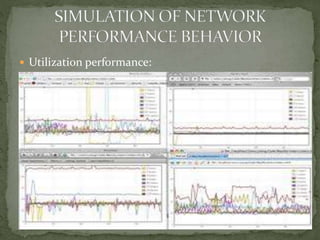
 Utilization performance:
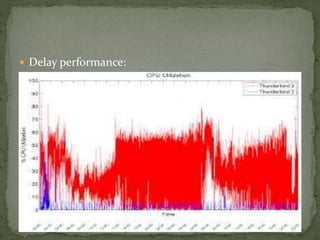
 Delay performance:
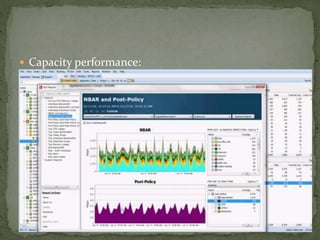
 Capacity performance:
 It is useful to understand how users of the system will
apply applications.
 Simple usage patterns can include user work times and
durations.
 Each application the total number of users.
 The frequency that a user is expected to have an
application session running.(number of sessions per
user, per day).
 How long an average application session will last(order
of minutes)
 No . of simultaneous user sessions for that application.
 It is useful to determine the behavior of application
sessions.
 It is used to modify performance requirements.
 To achieve a better estimate of performance levels you
will need for your network.
 Characterizing application behavior
 Data sizes that the application will be processing /
passing / communication across the network.
 Frequency and time duration for data to be passed
across the network.
 Traffic flow characteristics get for applications:
 Flow directions (ex: from client to server)
 Requirements for multicasting / broadcasting / unicast(walki-
talki).
(communication service)
Multicast is communication between a single sender and multiple
receivers on a network.
Broadcasting is the distribution of audio and/or video content via
any electronic mass communications medium(fm)
 Benefits of user and application behavior:
 Mission – critical(levels of importance)
 Rate – critical(transfer data rate)
 Real time(implementation)
 Interactive(how application works with user)
 High performance()
THANK YOU
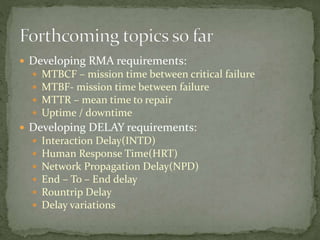
 Developing RMA requirements:
 MTBCF – mission time between critical failure
 MTBF- mission time between failure
 MTTR – mean time to repair
 Uptime / downtime
 Developing DELAY requirements:
 Interaction Delay(INTD)
 Human Response Time(HRT)
 Network Propagation Delay(NPD)
 End – To – End delay
 Rountrip Delay
 Delay variations
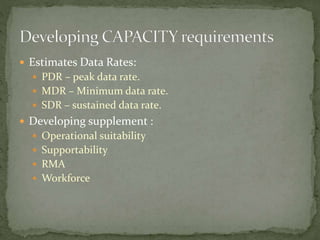
 Estimates Data Rates:
 PDR – peak data rate.
 MDR – Minimum data rate.
 SDR – sustained data rate.
 Developing supplement :
 Operational suitability
 Supportability
 RMA
 Workforce

CHARACTERIZING BEHAVIOUR

  • 1.
    DESIGN AND MANAGEMENT OF COMPUTER NETWORKS CSK DEPARTMENTOF INFORMATION TECHNOLOGY OXFORD ENGINEERING COLLEGE - TRICHY
  • 2.
  • 3.
     It representinghow users and applications use the network. In order to develop and understand their requirements.  It consists  Estimates of user session duration.  The number of active sessions.  Data sizes(word sizes range 16 bit, 128 bit)-size of data.  Detailed models(Description) of user and application behavior.
  • 4.
     A sessionIs a  semi-permanent interactive information / or  dialogue / or  conversation inter change.  Interaction between a computer and the user .  Ex: Login History(login /logout timestamps)  LAST ACCESS.
  • 5.
     Session duration: Average amount of time that visitors spend on the site each time they visit.  Ex: Total duration of all sessions (in seconds)  Timestamps : (OCT 27.10.2014 10:00:10:10 AM)
  • 6.
     When auser arrives to a webpage, a session variable is created for the user .(temp)  All websites that allow you to show the number of visitors use database.(webpage history)  (visitors count)  Ex:  Session Expiration: Internet Login.  TIMESTAMP(11:11:11 - 27.10.2014)
  • 7.
     Data sizes(sizeof the Bytes/bits)(Storage)- max /min  Detailed models of user and application behavior.  Types of the behavior:  USER Behavior  APPLICATION Behavior  NETWORK Behavior
  • 8.
     Definition:  Simulationmodeling is the process of creating and analyzing a digital prototype of a physical model(equipment) to predict its performance in the real world.  Digital Prototyping gives conceptual design, Engineering, Manufacturing, Departments the ability to virtually explore a complete product before it’s built.  Example: AutoCAD, CAM, matLAB  Autodesk Simulation Mechanical
  • 9.
     Physical Prototypingis the process of making a physical representation of an idea.  Digital Prototyping:  Digital Prototyping gives conceptual design, engineering, manufacturing, and sales and marketing departments the ability to virtually explore a complete product
  • 12.
     Simulation modelingis used to help designers and engineers understand whether, under what conditions, and in which ways a part could fail and what loads it can withstand.  Developing models or simulations of user, application, and network behavior useful in predicting, determining or estimating requirements and data flows.  Models can range from Easy, Simplistic, Complex and time consuming.  It is not a ‘physical implementation’
  • 13.
     Modeling andsimulation are useful throughout the ANALYSIS PROCESS for characterizing user, application, and existing network behaviors.  Simulation modeling allows designers and engineers to avoid repeated building of multiple physical prototypes.  To analyze designs for new or existing parts. Before creating the physical prototype, users can virtually investigate many digital prototypes. Using the technique, they can:  Optimize geometry for weight and strength(Geometry is all about shapes and their properties. )  Select materials that meet weight, strength, and budget requirements  Simulate part failure and identify the loading conditions that cause them  Assess extreme environmental conditions or loads not easily tested on physical prototypes, such as earthquake shock load  Verify hand calculations.  Validate the likely safety and survival of a physical prototype before testing's
  • 14.
  • 15.
  • 16.
  • 17.
     It isuseful to understand how users of the system will apply applications.  Simple usage patterns can include user work times and durations.  Each application the total number of users.  The frequency that a user is expected to have an application session running.(number of sessions per user, per day).  How long an average application session will last(order of minutes)  No . of simultaneous user sessions for that application.
  • 18.
     It isuseful to determine the behavior of application sessions.  It is used to modify performance requirements.  To achieve a better estimate of performance levels you will need for your network.  Characterizing application behavior  Data sizes that the application will be processing / passing / communication across the network.  Frequency and time duration for data to be passed across the network.
  • 19.
     Traffic flowcharacteristics get for applications:  Flow directions (ex: from client to server)  Requirements for multicasting / broadcasting / unicast(walki- talki). (communication service) Multicast is communication between a single sender and multiple receivers on a network. Broadcasting is the distribution of audio and/or video content via any electronic mass communications medium(fm)  Benefits of user and application behavior:  Mission – critical(levels of importance)  Rate – critical(transfer data rate)  Real time(implementation)  Interactive(how application works with user)  High performance()
  • 20.
  • 21.
     Developing RMArequirements:  MTBCF – mission time between critical failure  MTBF- mission time between failure  MTTR – mean time to repair  Uptime / downtime  Developing DELAY requirements:  Interaction Delay(INTD)  Human Response Time(HRT)  Network Propagation Delay(NPD)  End – To – End delay  Rountrip Delay  Delay variations
  • 22.
     Estimates DataRates:  PDR – peak data rate.  MDR – Minimum data rate.  SDR – sustained data rate.  Developing supplement :  Operational suitability  Supportability  RMA  Workforce