CREATION OF SIMPLE CHARACTER DEVICE DRIVER - PC
Character device driver for PC
Create simple code for character device driver:
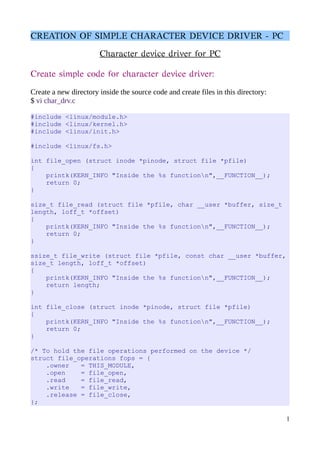
Create a new directory inside the source code and create files in this directory:
$ vi char_drv.c
#include <linux/module.h>
#include <linux/kernel.h>
#include <linux/init.h>
#include <linux/fs.h>
int file_open (struct inode *pinode, struct file *pfile)
{
printk(KERN_INFO "Inside the %s functionn",__FUNCTION__);
return 0;
}
size_t file_read (struct file *pfile, char __user *buffer, size_t
length, loff_t *offset)
{
printk(KERN_INFO "Inside the %s functionn",__FUNCTION__);
return 0;
}
ssize_t file_write (struct file *pfile, const char __user *buffer,
size_t length, loff_t *offset)
{
printk(KERN_INFO "Inside the %s functionn",__FUNCTION__);
return length;
}
int file_close (struct inode *pinode, struct file *pfile)
{
printk(KERN_INFO "Inside the %s functionn",__FUNCTION__);
return 0;
}
/* To hold the file operations performed on the device */
struct file_operations fops = {
.owner = THIS_MODULE,
.open = file_open,
.read = file_read,
.write = file_write,
.release = file_close,
};
1
CREATION OF SIMPLE CHARACTER DEVICE DRIVER - PC
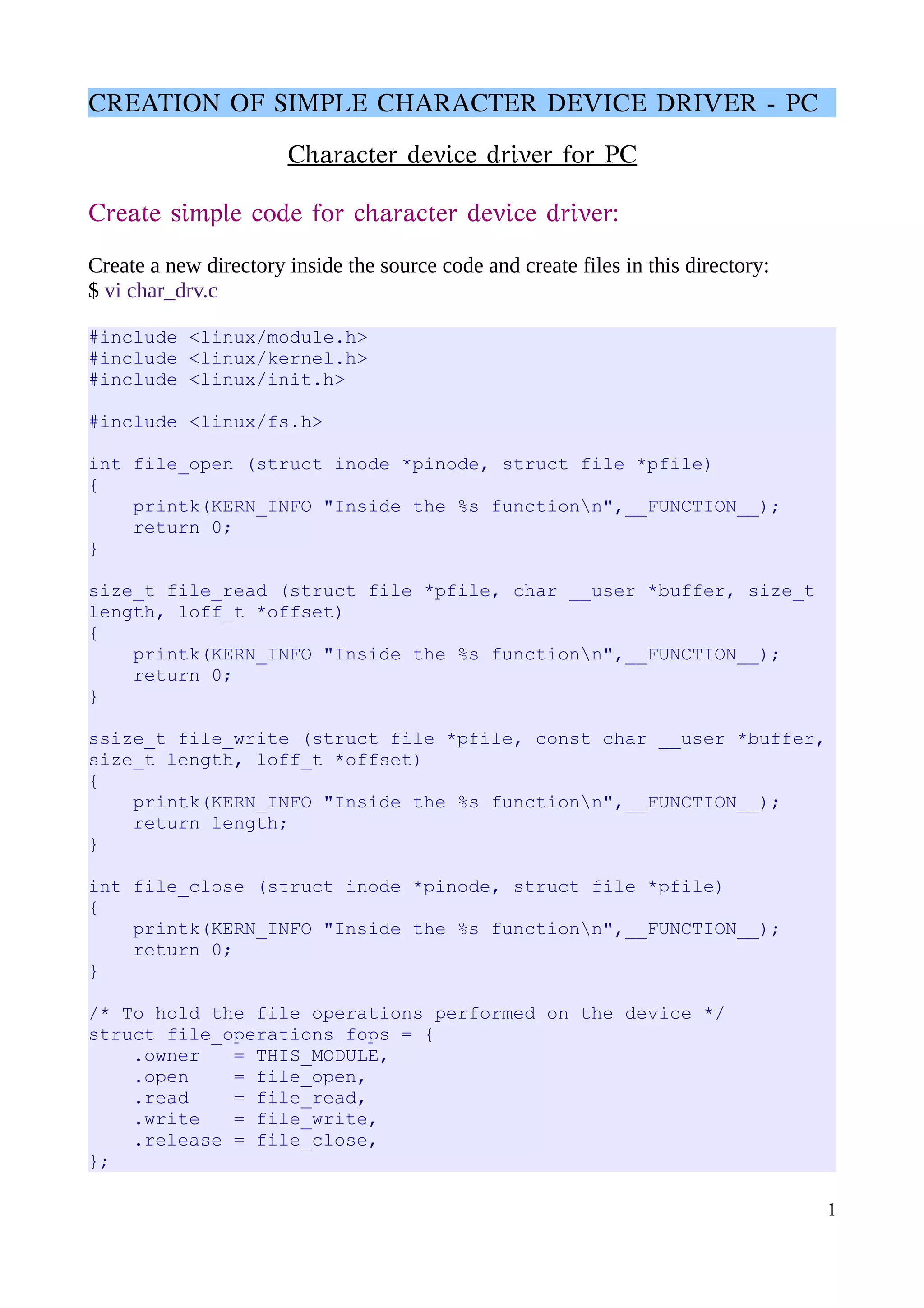
int char_drv_init(void)
{
printk(KERN_INFO "Inside the %s functionn",__FUNCTION__);
/* Register with the kernel and indicate that we are
registering character device driver */
register_chrdev(240 /* Major Number */,
"char_drv" /* Name of the driver */,
&fops /* file operations */);
return 0;
}
void char_drv_exit(void)
{
printk(KERN_INFO "Inside the %s functionn",__FUNCTION__);
/* unregister the character device driver */
unregister_chrdev(240, "char_drv");
}
module_init(char_drv_init);
module_exit(char_drv_exit);
Create Makefile:
$ vi Makefile
obj-m += char_drv.o
Building the Driver:
$ make -c /lib/modules/$(uname -r)/build M=$PWD modules
after using the above command, you get kernel object file “char_dev.ko”.
2
CREATION OF SIMPLE CHARACTER DEVICE DRIVER - PC
Inserting the char_drv module:
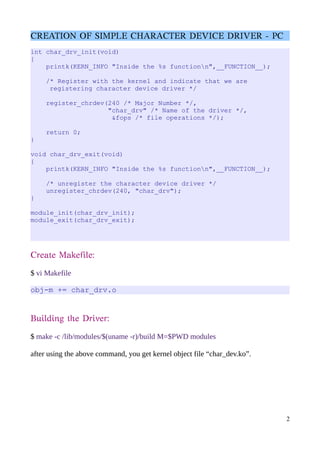
$ sudo insmod ./char_drv.ko
Now you can check the driver get loaded by using below command
$ lsmod | grep char
char_drv 12767 0
To check the major number we used for char_drv, found using the command:
$ cat /proc/devices
It will list all the character devices and block devices. First column is Major number
and second column is drivers.
240 char_drv
we sucessfully loaded our driver and is linked to the major number 240.
We are going to do device entry here:
$ sudo mknod -m 666 /dev/char_drv c 240 0
mknode ---> make node
666 ---> read/write permission
/dev/char_drv ---> name of the driver is char_drv
c ---> represent character driver
240 ---> Major Number
0 ---> Minor Number
$ ls -l /dev/char_drv
crw-rw-rw- 1 root root 240 , 0 Jun 27 15:20 /dev/char_drv
Verifying the File Operations: open, read, write, close:
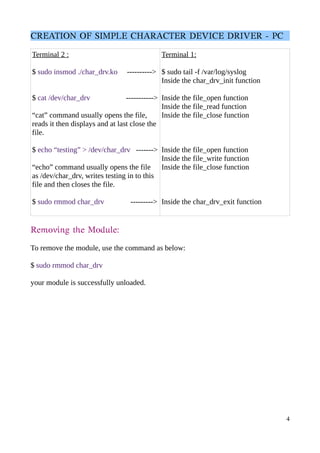
Now open two terminal namely terminal1 and terminal2.
Terminal2 – commands used to check the functions name invoked at that time which
is display in terminal1.
Terminal1 - displays the kernel messages.
3
CREATION OF SIMPLE CHARACTER DEVICE DRIVER - PC
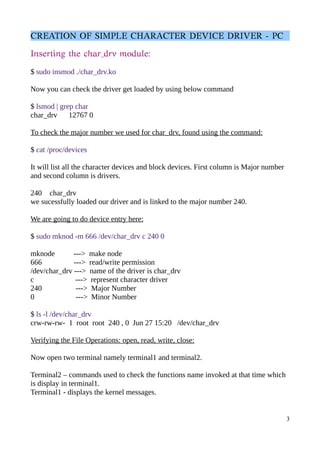
Terminal 2 :
$ sudo insmod ./char_drv.ko ---------->
$ cat /dev/char_drv ----------->
“cat” command usually opens the file,
reads it then displays and at last close the
file.
$ echo “testing” > /dev/char_drv ------->
“echo” command usually opens the file
as /dev/char_drv, writes testing in to this
file and then closes the file.
$ sudo rmmod char_drv --------->
Terminal 1:
$ sudo tail -f /var/log/syslog
Inside the char_drv_init function
Inside the file_open function
Inside the file_read function
Inside the file_close function
Inside the file_open function
Inside the file_write function
Inside the file_close function
Inside the char_drv_exit function
Removing the Module:
To remove the module, use the command as below:
$ sudo rmmod char_drv
your module is successfully unloaded.
4

Character_Device_drvier_pc

  • 1.
    CREATION OF SIMPLECHARACTER DEVICE DRIVER - PC Character device driver for PC Create simple code for character device driver: Create a new directory inside the source code and create files in this directory: $ vi char_drv.c #include <linux/module.h> #include <linux/kernel.h> #include <linux/init.h> #include <linux/fs.h> int file_open (struct inode *pinode, struct file *pfile) { printk(KERN_INFO "Inside the %s functionn",__FUNCTION__); return 0; } size_t file_read (struct file *pfile, char __user *buffer, size_t length, loff_t *offset) { printk(KERN_INFO "Inside the %s functionn",__FUNCTION__); return 0; } ssize_t file_write (struct file *pfile, const char __user *buffer, size_t length, loff_t *offset) { printk(KERN_INFO "Inside the %s functionn",__FUNCTION__); return length; } int file_close (struct inode *pinode, struct file *pfile) { printk(KERN_INFO "Inside the %s functionn",__FUNCTION__); return 0; } /* To hold the file operations performed on the device */ struct file_operations fops = { .owner = THIS_MODULE, .open = file_open, .read = file_read, .write = file_write, .release = file_close, }; 1
  • 2.
    CREATION OF SIMPLECHARACTER DEVICE DRIVER - PC int char_drv_init(void) { printk(KERN_INFO "Inside the %s functionn",__FUNCTION__); /* Register with the kernel and indicate that we are registering character device driver */ register_chrdev(240 /* Major Number */, "char_drv" /* Name of the driver */, &fops /* file operations */); return 0; } void char_drv_exit(void) { printk(KERN_INFO "Inside the %s functionn",__FUNCTION__); /* unregister the character device driver */ unregister_chrdev(240, "char_drv"); } module_init(char_drv_init); module_exit(char_drv_exit); Create Makefile: $ vi Makefile obj-m += char_drv.o Building the Driver: $ make -c /lib/modules/$(uname -r)/build M=$PWD modules after using the above command, you get kernel object file “char_dev.ko”. 2
  • 3.
    CREATION OF SIMPLECHARACTER DEVICE DRIVER - PC Inserting the char_drv module: $ sudo insmod ./char_drv.ko Now you can check the driver get loaded by using below command $ lsmod | grep char char_drv 12767 0 To check the major number we used for char_drv, found using the command: $ cat /proc/devices It will list all the character devices and block devices. First column is Major number and second column is drivers. 240 char_drv we sucessfully loaded our driver and is linked to the major number 240. We are going to do device entry here: $ sudo mknod -m 666 /dev/char_drv c 240 0 mknode ---> make node 666 ---> read/write permission /dev/char_drv ---> name of the driver is char_drv c ---> represent character driver 240 ---> Major Number 0 ---> Minor Number $ ls -l /dev/char_drv crw-rw-rw- 1 root root 240 , 0 Jun 27 15:20 /dev/char_drv Verifying the File Operations: open, read, write, close: Now open two terminal namely terminal1 and terminal2. Terminal2 – commands used to check the functions name invoked at that time which is display in terminal1. Terminal1 - displays the kernel messages. 3
  • 4.
    CREATION OF SIMPLECHARACTER DEVICE DRIVER - PC Terminal 2 : $ sudo insmod ./char_drv.ko ----------> $ cat /dev/char_drv -----------> “cat” command usually opens the file, reads it then displays and at last close the file. $ echo “testing” > /dev/char_drv -------> “echo” command usually opens the file as /dev/char_drv, writes testing in to this file and then closes the file. $ sudo rmmod char_drv ---------> Terminal 1: $ sudo tail -f /var/log/syslog Inside the char_drv_init function Inside the file_open function Inside the file_read function Inside the file_close function Inside the file_open function Inside the file_write function Inside the file_close function Inside the char_drv_exit function Removing the Module: To remove the module, use the command as below: $ sudo rmmod char_drv your module is successfully unloaded. 4