Mobile Web Framework
3.1 Install the WebApps tools
• Our HTML5 document need to include:
• The jQuery core JavaScript file
• The jQuery Mobile core JavaScript file
• The jQuery Mobile core CSS file
• The jQuery Mobile theme CSS file (optional)
Host all the files within your project
• download the latest ZIP package from
http://jquerymobile.com/download
• add the following files to your project’s root folder:
jquery-XX.js (from the jQuery core)images folder
jquery.mobile-XX_min.js
jquery.mobile-XX_min.css
• If you are creating a webapp using PhoneGap or
another offline/hybrid mechanism, it’s better to embed
the files inside your package so the webapp can work
offline.
Using a CDN
• Stands for Content Delivery Networks
• A jQuery CDN is just a public server on the
Web hosting the files for us
• The main disadvantage is that our webapp will
work only if the public CDN is online
Use the mobile WebApps architecture
WebApps Architecture
• The main unit of the framework is the page
• A page is just a div element with a specific role
• One HTML document can host one page or
many pages inside the same file
Roles
• jQuery Mobile uses standard HTML markup,
such as the div tag
• To define what the framework should do with
that div, we define a role.
• A role in the framework is defined using the
attribute data-role. For example,
• <div data-role="page">
Theming
• jQuery Mobile uses a powerful theming mechanism to
define visual appearance of the user interface
• A theme is a group of definitions for layout, styles, and
colors.
• Every theme includes a set of color swatches that we
can change anywhere in our webapp.
• Color swatches are created to have different options to
show elements.
• A color swatch is defined by a letter, from a to z. The
default theme includes swatches from a to e with the
ability to add more letters of our own.
The Page
• A typical page will be divided in three parts:
header, content, and footer.
• The only mandatory section is the content
Nagivation
• For navigation between pages, we will use
standard a (anchor) elements.
• jQuery Mobile will take them and do the magic
for us.
• different types of hyperlinks that we can make:
– Internal links to another page in the same document
(known as a multipage document)
– External links to a page in other jQuery Mobile
documents
– Absolute links to non-jQuery Mobile documents
– Mobile special links
Back Button
• If we want to add a visual “back” button at the
left of the header, we can use the
data-add- back-btn="true" attribute
on our page.
Internal Page Links
• We have already mentioned that a jQuery Mobile
document can nest multiple pages inside.
• To do that, we add multiple pages as body’s children.
We need to define a id (identification name) using
standard HTML for every page, so we can then access
them.
• To create a link to another page inside the same
document, we just need to use #<id>
• in the href attribute, where <id> is the identification
name of the target page. For example:
<a href="#next">
External Page Links
• If we don’t want to include a page inside the
same document as the first one, or if we need
to dynamically create the content.example,
using PHP or any other serverside code), we
can link to another jQuery Mobile HTML
document using standard a tags:
Absolute External Links
• Sometimes we want to link to another site or
document that does not belong to jQuery
Mobile content.
• For that purpose, we need to explicitly define
an absolute external link. We can accomplish
this by adding data-rel="external" to the a tag:
Mobile Special Links
• Remember we are creating mobile web
experiences.
• We should enhance the user’s experience by
integrating our app with the device whenever
we can.
• We can include call or send SMS actions using
URI schemes
The available transitions are:
• slide
• The default right-to-left animation.
• slideup
• Bottom-to-top animation, mostly used for modal pages.
• slidedown
• Top-to-bottom animation.
• pop
• The new page will grow from a small point in the middle to a full-screen page.
• fade
• A cross-fade animation between old and new pages.
• flip
• A 2D or 3D rotation animation. 3D is available only on some devices, such as iOS
devices.
• On other devices, such as those that are Android-based, this transition renders a
2D rotation that may not be the effect you really want.
Dialogues
• A dialog is just another way to show a page in
our webapp.
• Therefore, a dialog is not a new thing. It is just
a page with a different semantic.
• A dialog page is intended for modal messages,
lists, or information that does not have any
hierarchal relation with the page that links to
it.
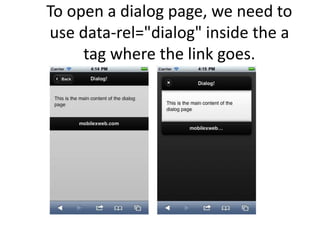
To open a dialog page, we need to
use data-rel="dialog" inside the a
tag where the link goes.
Opening Pages from Dialogs
• Dialogs can have normal links to other pages
(or absolute external links).
• When the user selects a link that points to a
different page than the opener (as we saw in
the last section), jQuery Mobile will close the
dialog, go back to the opener page, and then
open the new page as if it were hosted in the
opener.
Integrate the WebApps with the phone
Making a Call
• The preferred method is to use the tel:<phone
number> scheme (using URI scheme).
• If the user activates a call link, she will receive
a confirmation alert asking whether to place
the call, showing the full number so she can
decide.
Video and VoIP Calls
• iOS-based devices with cameras, such as
iPhone 4 and iPod Touch 4G, include a
videochat application called FaceTime.
• If you are targeting these devices, you can
create a videocall link using
facetime://<user-name-or-
number>. These links will lead to an error in
other devices:
Sending Email
• Some modern devices with browsers also have
mail applications that can react to the classic web
mailto: protocol.
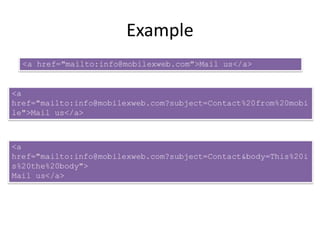
• The syntax is ?parameters. The detected
parameters can change from device to device but
generally include cc, bcc, subject, and body.
• The parameters are defined in a URL format
(key=value&key=value), and the values must be
URI-encoded.
Example
Sending SMS
• we have two possible URI schemes, sms://
and smsto://
• Unfortunately, there is no standard way to
know for sure which one is compatible with a
user’s browser.
• However, for jQuery Mobile only
smartphones, we can safely use sms://

Chapter3 mo

  • 1.
  • 2.
    3.1 Install theWebApps tools • Our HTML5 document need to include: • The jQuery core JavaScript file • The jQuery Mobile core JavaScript file • The jQuery Mobile core CSS file • The jQuery Mobile theme CSS file (optional)
  • 3.
    Host all thefiles within your project • download the latest ZIP package from http://jquerymobile.com/download • add the following files to your project’s root folder: jquery-XX.js (from the jQuery core)images folder jquery.mobile-XX_min.js jquery.mobile-XX_min.css • If you are creating a webapp using PhoneGap or another offline/hybrid mechanism, it’s better to embed the files inside your package so the webapp can work offline.
  • 4.
    Using a CDN •Stands for Content Delivery Networks • A jQuery CDN is just a public server on the Web hosting the files for us • The main disadvantage is that our webapp will work only if the public CDN is online
  • 5.
    Use the mobileWebApps architecture
  • 6.
    WebApps Architecture • Themain unit of the framework is the page • A page is just a div element with a specific role • One HTML document can host one page or many pages inside the same file
  • 7.
    Roles • jQuery Mobileuses standard HTML markup, such as the div tag • To define what the framework should do with that div, we define a role. • A role in the framework is defined using the attribute data-role. For example, • <div data-role="page">
  • 8.
    Theming • jQuery Mobileuses a powerful theming mechanism to define visual appearance of the user interface • A theme is a group of definitions for layout, styles, and colors. • Every theme includes a set of color swatches that we can change anywhere in our webapp. • Color swatches are created to have different options to show elements. • A color swatch is defined by a letter, from a to z. The default theme includes swatches from a to e with the ability to add more letters of our own.
  • 9.
    The Page • Atypical page will be divided in three parts: header, content, and footer. • The only mandatory section is the content
  • 10.
    Nagivation • For navigationbetween pages, we will use standard a (anchor) elements. • jQuery Mobile will take them and do the magic for us. • different types of hyperlinks that we can make: – Internal links to another page in the same document (known as a multipage document) – External links to a page in other jQuery Mobile documents – Absolute links to non-jQuery Mobile documents – Mobile special links
  • 11.
    Back Button • Ifwe want to add a visual “back” button at the left of the header, we can use the data-add- back-btn="true" attribute on our page.
  • 12.
    Internal Page Links •We have already mentioned that a jQuery Mobile document can nest multiple pages inside. • To do that, we add multiple pages as body’s children. We need to define a id (identification name) using standard HTML for every page, so we can then access them. • To create a link to another page inside the same document, we just need to use #<id> • in the href attribute, where <id> is the identification name of the target page. For example: <a href="#next">
  • 13.
    External Page Links •If we don’t want to include a page inside the same document as the first one, or if we need to dynamically create the content.example, using PHP or any other serverside code), we can link to another jQuery Mobile HTML document using standard a tags:
  • 14.
    Absolute External Links •Sometimes we want to link to another site or document that does not belong to jQuery Mobile content. • For that purpose, we need to explicitly define an absolute external link. We can accomplish this by adding data-rel="external" to the a tag:
  • 15.
    Mobile Special Links •Remember we are creating mobile web experiences. • We should enhance the user’s experience by integrating our app with the device whenever we can. • We can include call or send SMS actions using URI schemes
  • 16.
    The available transitionsare: • slide • The default right-to-left animation. • slideup • Bottom-to-top animation, mostly used for modal pages. • slidedown • Top-to-bottom animation. • pop • The new page will grow from a small point in the middle to a full-screen page. • fade • A cross-fade animation between old and new pages. • flip • A 2D or 3D rotation animation. 3D is available only on some devices, such as iOS devices. • On other devices, such as those that are Android-based, this transition renders a 2D rotation that may not be the effect you really want.
  • 17.
    Dialogues • A dialogis just another way to show a page in our webapp. • Therefore, a dialog is not a new thing. It is just a page with a different semantic. • A dialog page is intended for modal messages, lists, or information that does not have any hierarchal relation with the page that links to it.
  • 18.
    To open adialog page, we need to use data-rel="dialog" inside the a tag where the link goes.
  • 19.
    Opening Pages fromDialogs • Dialogs can have normal links to other pages (or absolute external links). • When the user selects a link that points to a different page than the opener (as we saw in the last section), jQuery Mobile will close the dialog, go back to the opener page, and then open the new page as if it were hosted in the opener.
  • 20.
    Integrate the WebAppswith the phone Making a Call • The preferred method is to use the tel:<phone number> scheme (using URI scheme). • If the user activates a call link, she will receive a confirmation alert asking whether to place the call, showing the full number so she can decide.
  • 21.
    Video and VoIPCalls • iOS-based devices with cameras, such as iPhone 4 and iPod Touch 4G, include a videochat application called FaceTime. • If you are targeting these devices, you can create a videocall link using facetime://<user-name-or- number>. These links will lead to an error in other devices:
  • 22.
    Sending Email • Somemodern devices with browsers also have mail applications that can react to the classic web mailto: protocol. • The syntax is ?parameters. The detected parameters can change from device to device but generally include cc, bcc, subject, and body. • The parameters are defined in a URL format (key=value&key=value), and the values must be URI-encoded.
  • 23.
  • 24.
    Sending SMS • wehave two possible URI schemes, sms:// and smsto:// • Unfortunately, there is no standard way to know for sure which one is compatible with a user’s browser. • However, for jQuery Mobile only smartphones, we can safely use sms://