Copyright © Terry Felke-Morris http://terrymorris.net
Web Development & Design
Foundations with HTML5
8th
Edition
CHAPTER 14
KEY CONCEPTS
1
Copyright © Terry Felke-Morris
Copyright © Terry Felke-Morris http://terrymorris.net
Learning Outcomes
In this chapter, you will learn how to:
◦ Describe common uses of JavaScript in web pages.
◦ Describe the purpose of the Document Object Model and list some
common events.
◦ Create a simple JavaScript using the script element and the alert() method.
◦ Use variables, operators and the if control structure.
◦ Create a basic form validation script.
◦ Describe common uses of jQuery.
◦ Describe how to obtain jQuery.
◦ Use jQuery selectors and methods.
◦ Configure an image gallery with jQuery.
◦ Describe the purpose of jQuery plugins.
2
Copyright © Terry Felke-Morris http://terrymorris.net
What is JavaScript?
Object-based scripting language
Works with the objects associated with a
Web page document
◦the window
◦the document
◦the elements
◦such as forms, images, hyperlinks, etc.
3
Copyright © Terry Felke-Morris http://terrymorris.net
What is JavaScript?
Originally developed by Netscape
◦ Named LiveScript
Netscape & Sun Microsystems Collaboration
◦LiveScript renamed JavaScript
JavaScript is NOT Java
4
Copyright © Terry Felke-Morris http://terrymorris.net
Common Uses of JavaScript
•Display a message box
•Select list navigation
•Edit and validate form information
•Create a new window with a specified size and
screen position
•Image Rollovers
•Status Messages
•Display Current Date
•Calculations
5
Copyright © Terry Felke-Morris http://terrymorris.net
Coding JavaScript
JavaScript statements can be coded on a web page
using two different techniques:
◦Place JavaScript code between <script> tags
◦Place JavaScript code as part of an event attached to an
HTML element
6
Copyright © Terry Felke-Morris http://terrymorris.net
JavaScript: Using the script
Element
The script element
◦ A container tag
◦ May be placed in either the head or the body
section of a web page
<script type="text/javascript">
<!- -
alert("Welcome to Our Site");
// - ->
</script>
7
Copyright © Terry Felke-Morris http://terrymorris.net
Checkpoint
1. Describe at least three popular uses for
JavaScript.
2. How many JavaScript code blocks can be
embedded in an HTML document?
3. Describe a method that can be used to find an
error in a JavaScript code block.
8
Copyright © Terry Felke-Morris http://terrymorris.net
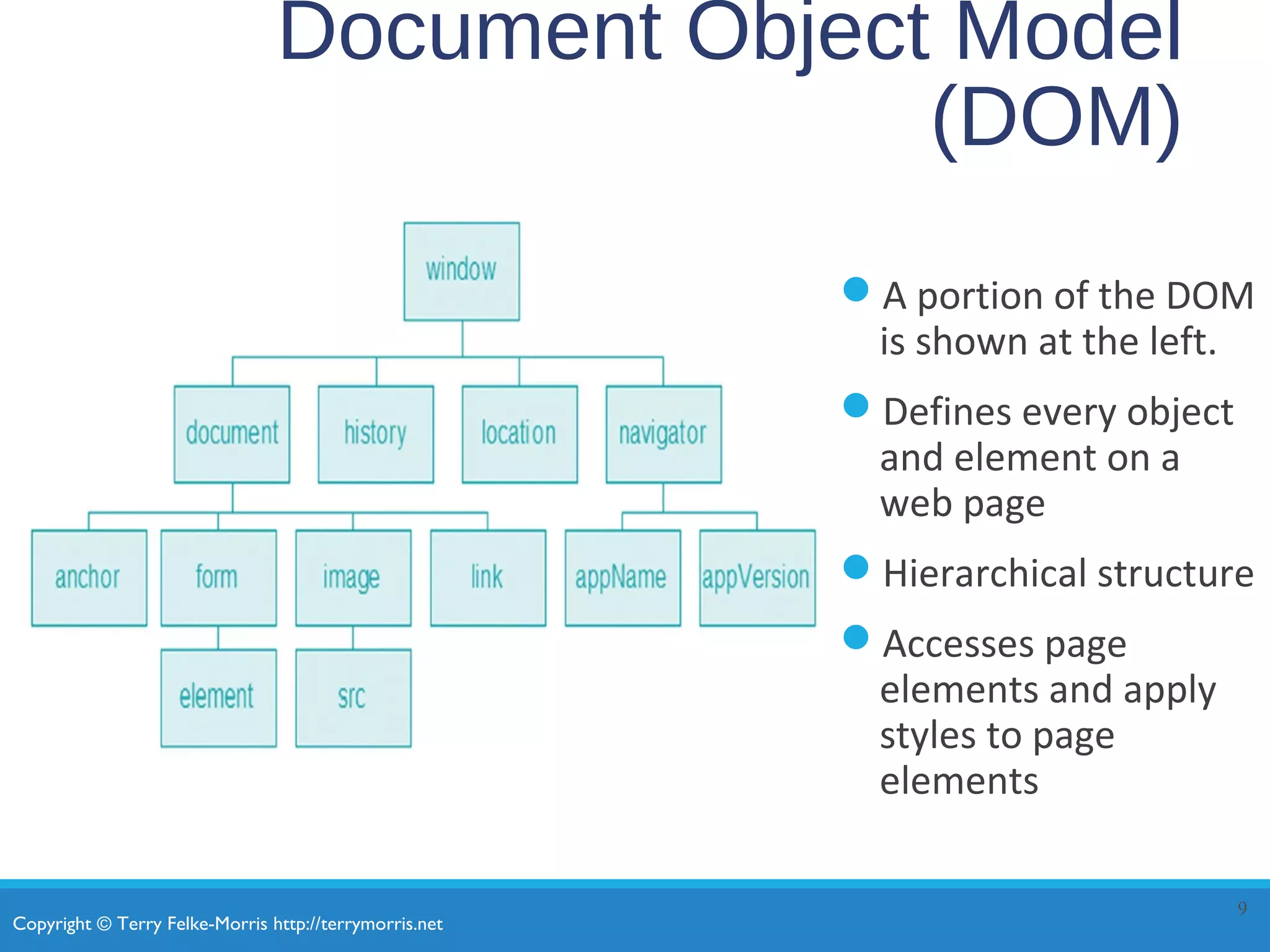
Document Object Model
(DOM)
A portion of the DOM
is shown at the left.
Defines every object
and element on a
web page
Hierarchical structure
Accesses page
elements and apply
styles to page
elements
9
Copyright © Terry Felke-Morris http://terrymorris.net
Object
An object is a thing or entity.
◦Browser window
◦Submit button
◦Web page document
10
Copyright © Terry Felke-Morris http://terrymorris.net
Property
A property is a characteristic or attribute of an
object.
◦The background color of a web page document
document.bgcolor
◦The date the web page file was last modified
document.lastmodified
◦The src file of an image object
image1.src
11
Copyright © Terry Felke-Morris http://terrymorris.net
Method
A method is an action (a verb)
◦Writing text to a web page document
document.write()
◦Submitting a form
form1.submit()
12
Copyright © Terry Felke-Morris http://terrymorris.net
JavaScript and
Events
Events:
actions taken by the web page visitor
◦ clicking (onclick),
◦ placing the mouse on an element (onmouseover),
◦ removing the mouse from an element
(onmouseout),
◦ loading the page (onload),
◦ unloading the page (onunload), etc.
13
Events
Event Event Handler
click onclick
load onload
mouseover onmouseover
mouseout onmouseout
submit onsubmit
unload onunload
14
Copyright © Terry Felke-Morris http://terrymorris.net
JavaScript and
Events
JavaScript can be configured to perform actions when
events occur.
◦The event name is coded as an attribute of an HTML tag
◦The value of the event attribute contains the JavaScript code
Example:
Display an alert box when the mouse is placed over a
hyperlink.
15
<a href="home.htm" onmouseover="alert('Click to go home')">Home</a>
Copyright © Terry Felke-Morris http://terrymorris.net
JavaScript Debugging(1)
Check the syntax of the statements
◦ Pay very close attention to upper and lower case letters, spaces, and quotations
Verify that you have saved the page with your most recent
changes
Verify that you are testing the most recent version of the page
(refresh or reload the page)
If you get an error message, use the error messages that are
displayed by the browser
◦ In Firefox: Select Tools > Error Console
16
Copyright © Terry Felke-Morris http://terrymorris.net
JavaScript Debugging(2)
Using the Firefox browser:
◦Select the top right menu icon (“Hamburger” icon)
◦Select Developer > Web Console
◦The Web Console will indicate an issue and the line number
◦This may not be exactly where the problem is
◦Sometimes the error is
one or two lines above
the indicated line number.
17
Copyright © Terry Felke-Morris http://terrymorris.net
Checkpoint
1. With respect to objects, describe the difference between
a property and a method. Feel free to use words like
“thing,” “action,” “description,” “attribute,” and so
forth.
2. What is the difference between an event and an event
handler?
3. Where are event handlers placed in the HTML
document?
18
Copyright © Terry Felke-Morris http://terrymorris.net
Variable
A variable is a placeholder for information.
The variable is stored in the computer’s memory
(RAM).
var userName;
userName = "Karen";
document.write(userName);
19
Copyright © Terry Felke-Morris http://terrymorris.net
Prompts
prompt() method
◦Displays a message and accepts a value from the user
myName = prompt(“prompt message”);
◦The value typed by the user is stored in the variable
myName
20
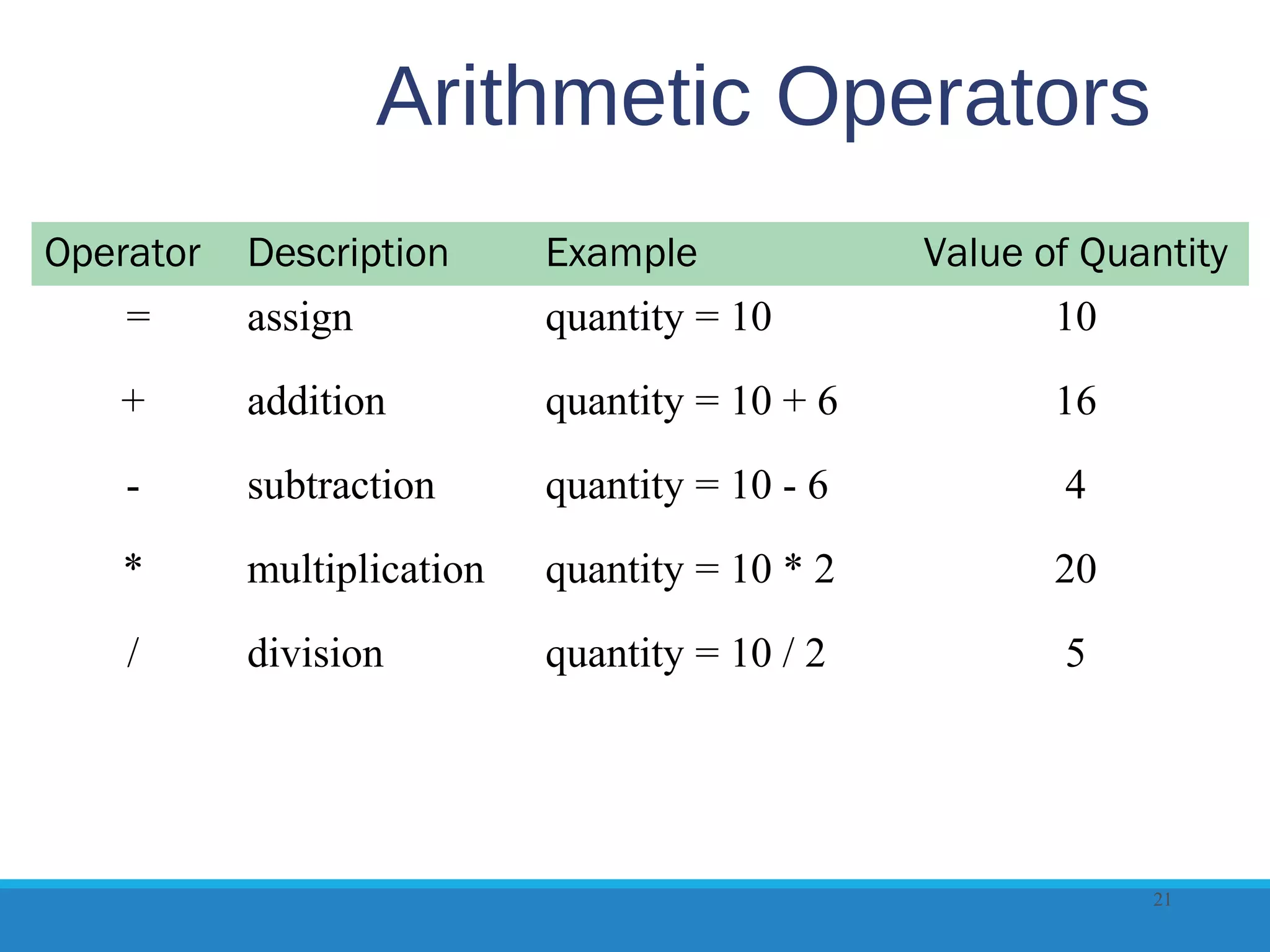
Arithmetic Operators
Operator Description Example Value of Quantity
= assign quantity = 10 10
+ addition quantity = 10 + 6 16
- subtraction quantity = 10 - 6 4
* multiplication quantity = 10 * 2 20
/ division quantity = 10 / 2 5
21
Comparison Operators
Operator Description Example Sample values of quantity
that would result in true
= = Double equals
sign
(equivalent)
“is exactly
equal to”
quantity = = 10 10
> Greater than quantity > 10 11, 12 (but not 10)
> = Greater than
or equal to
quantity > = 10 10, 11, 12
< Less than quantity < 10 8, 9 (but not 10)
< = Less than or
equal to
quantity < = 10 8, 9, 10
! = Not equal to quantity ! = 10 8, 9, 11 (but not 10)
22
Copyright © Terry Felke-Morris http://terrymorris.net
Decision Making
if (condition) {
… commands to execute if condition is true
}
else {
… commands to execute if condition is false
}
23
Copyright © Terry Felke-Morris http://terrymorris.net
Function
A function is a block of one or more JavaScript
statements with a specific purpose, which can be
run when needed.
function function_name() {
... JavaScript statements …
}
24
Copyright © Terry Felke-Morris http://terrymorris.net
Using Functions
function showAlert() {
alert("Please click OK to continue.");
}
25
Calling the Function
showAlert();
Defining the Function
Copyright © Terry Felke-Morris http://terrymorris.net
Checkpoint
1. Describe a method that can be used to gather a
piece of data such as the user’s age.
2. Write the JavaScript code to display an alert
message for users who are under 18 years old and
a different alert message for users who are 18
years or older.
3. What is a function definition?
26
Copyright © Terry Felke-Morris http://terrymorris.net
Form Validation
It is common to use JavaScript to validate form
information before submitting it to the web server.
◦Is the name entered?
◦Is the e-mail address of correct format?
◦Is the phone number in the correct format?
See Hands-on Practice 14.8
27
Copyright © Terry Felke-Morris http://terrymorris.net
Validating Form Fields
Use the "" or null to check to determine if a form
field has information
if (document.forms[0].userName.value == "" ) {
alert("Name field cannot be empty.");
return false;
} // end if
28
Copyright © Terry Felke-Morris http://terrymorris.net
JavaScript & Accessibility
Don’t expect JavaScript to always function for every
visitor
◦Some may have JavaScript disabled
◦Some may be physically unable to click a mouse
Provide a way for your site to be used if JavaScript is
not functioning
◦Plain text links
◦E-mail contact info
29
Copyright © Terry Felke-Morris http://terrymorris.net
Checkpoint
1. What is meant by the term “form data
validation”?
2. Give three examples of form data that may
require validation.
3. Should you always expect your JavaScript to
“work” – why or why not?
30
Copyright © Terry Felke-Morris http://terrymorris.net
What is jQuery?
jQuery is a free open-source JavaScript
Library
Provides interaction and dynamic effects on
web pages
Resources
◦http://jquery.com
◦http://jquery.org
31
Copyright © Terry Felke-Morris http://terrymorris.net
Common Uses of JQuery
•Dynamically manipulate the CSS properties of
elements
•Detect and react to events – such as mouse
movements
•Animate elements on a web page – such as
image slideshows
•And much more...
32
Copyright © Terry Felke-Morris http://terrymorris.net
Adding jQuery to a Web
Page
Two Options:
◦Download jQuery
◦http://jquery.com/download
◦Access jQuery via a CDN
<script src=
"http://ajax.googleapis.com/ajax/libs/jquery/1.11.3/jquery.min.js">
</script>
33
Copyright © Terry Felke-Morris http://terrymorris.net
The Ready Event
Triggered when the browser has loaded the
Document Object Model(DOM) for the web page
$(document).ready(function() {
Your JavaScript statements and other jQuery statements go here
})
34
Copyright © Terry Felke-Morris http://terrymorris.net
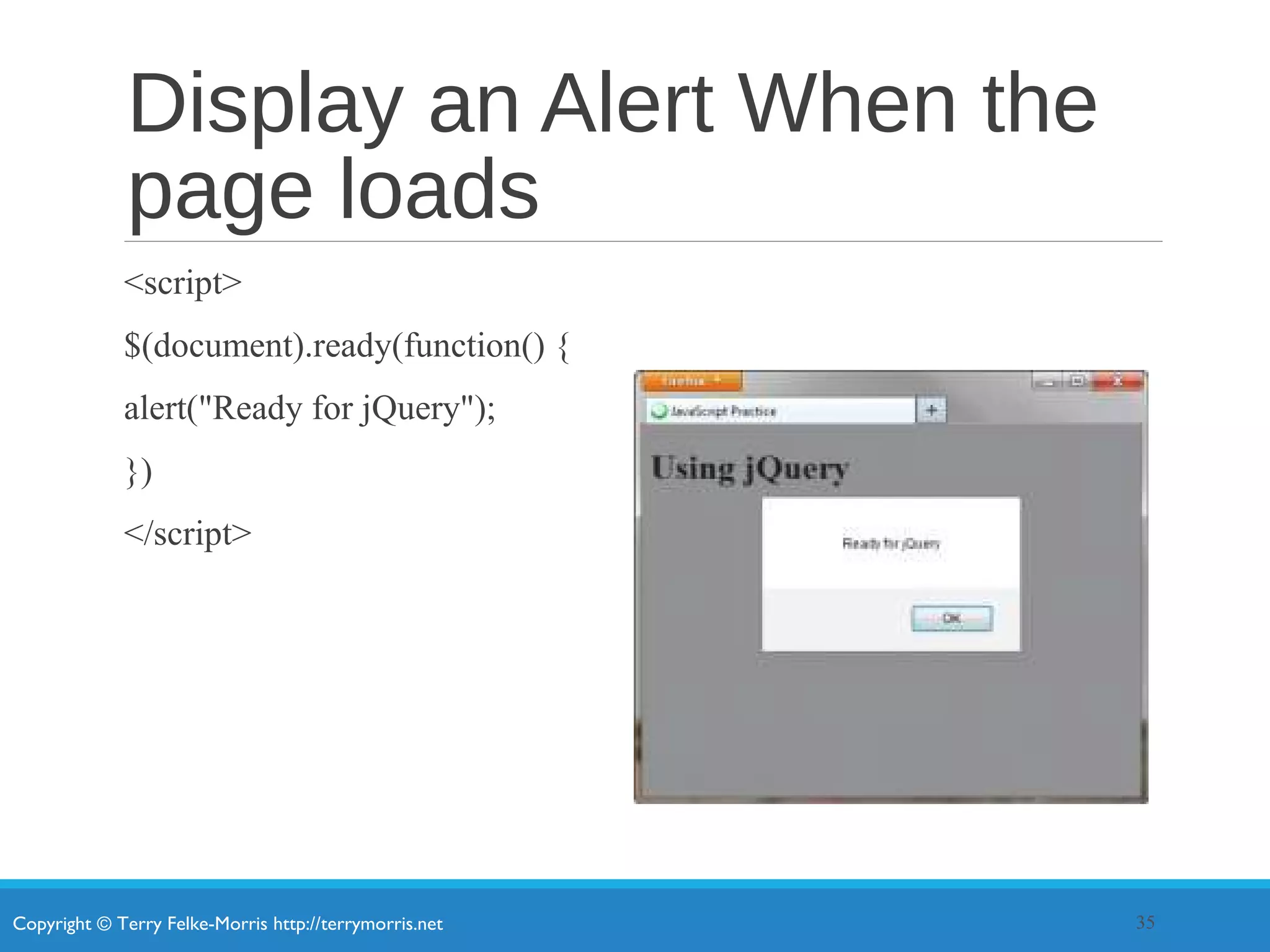
Display an Alert When the
page loads
<script>
$(document).ready(function() {
alert("Ready for jQuery");
})
</script>
35
Copyright © Terry Felke-Morris http://terrymorris.net
jQuery Selectors
A selector indicates which DOM elements jQuery will affect
http://api.jquery.com/category/selectors
Some commonly used jQuery selectors
36
Selector Purpose
$('*') wildcard – selects all elements
$('li') HTML element selector – selects all li elements
$('.myclass') Class selector – selects all elements assigned to the class named myclass
$('#myid') Id selector – selects the element assigned to the id named myid
$('nav a') HTML element selector – selects all anchor elements contained within the
nav element
$('#resources a') Id selector and HTML element selector – selects all anchor elements
contained within the id named resources
$('li:first') Positional selector that selects the first element of that type on the page
$('li:odd') Positional selector- selects every other li element on the page
Copyright © Terry Felke-Morris http://terrymorris.net
jQuery Methods
A method acts upon the DOM elements you have selected
http://api.jquery.com
Some commonly used jQuery methods
37
Method Purpose
click() Binds a jQuery event handler to the JavaScript click event
css() Sets the specified CSS property for the selected element(s
fadeToggle() Displays or hides the selected element(s) by animating their opacity
hover() Binds a jQuery event handler to the JavaScript onmouseover event
slideToggle() Displays or hides the selected element(s) with a sliding motion
toggle() Displays or hides the selected element(s)
attr() Gets or sets attributes for the selected element(s)
html() Gets or sets HTML contents for the selected element(s)
Copyright © Terry Felke-Morris http://terrymorris.net
Using the click() and CSS()
Methods
<script>
$(document).ready(function() {
$('a').click(function(){
$('li:even').css('color','#006600');
});
});
</script>
38
Copyright © Terry Felke-Morris http://terrymorris.net
Using the toggle() Method
<script>
$(document).ready(function() {
$('#more').click(function(){
$('#details').toggle();
});
});
</script>
39
Copyright © Terry Felke-Morris http://terrymorris.net
jQuery Image Gallery
<script>
$(document).ready(function(){
$('#gallery a').click(function(){
var galleryHref = $(this).attr('href');
var galleryAlt = $(this).attr('title');
$('figure img').attr({ src: galleryHref, alt: galleryAlt });
$('figcaption').html(galleryAlt);
return false;
});
});
</script>
40
Copyright © Terry Felke-Morris http://terrymorris.net
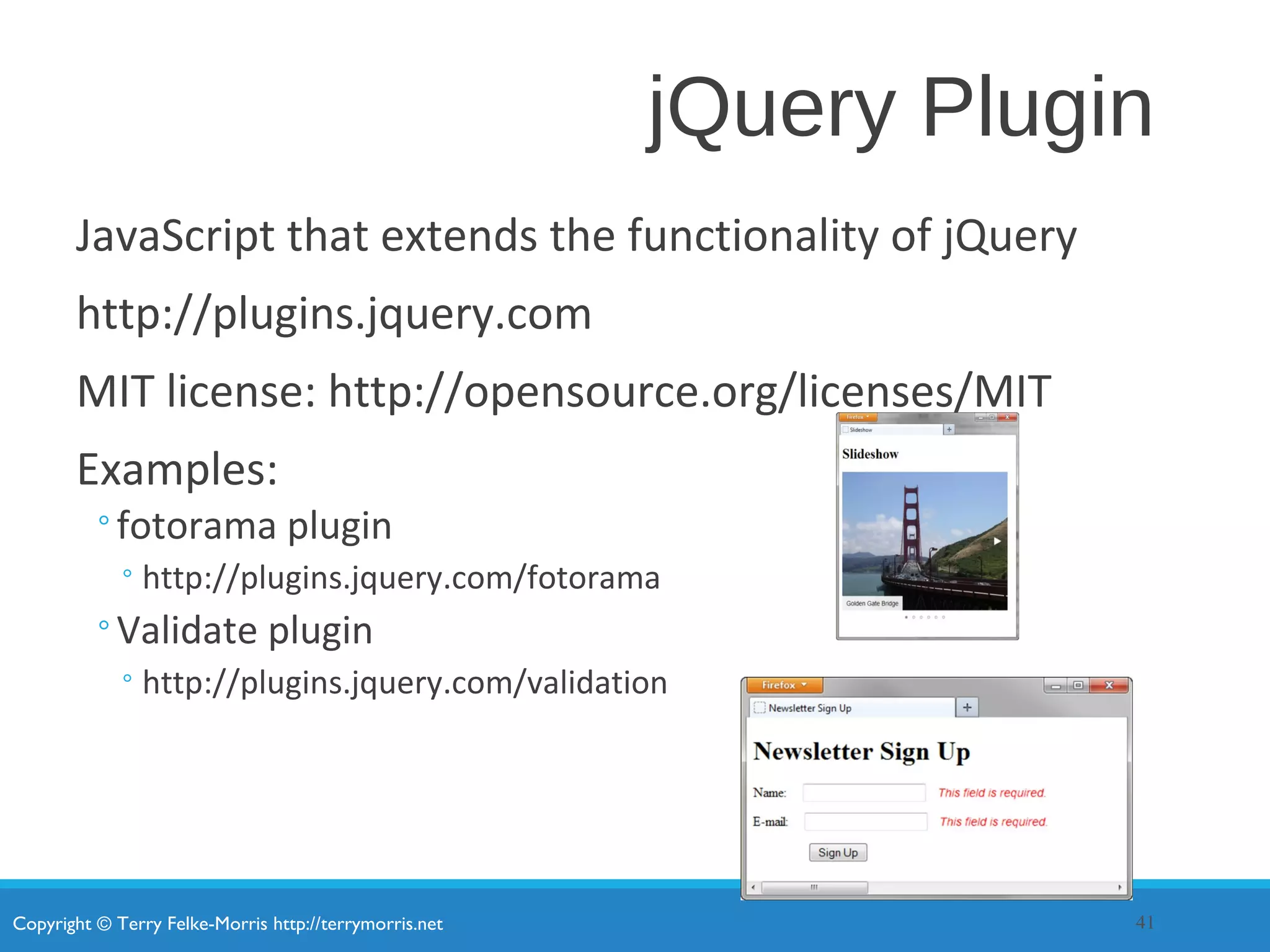
jQuery Plugin
JavaScript that extends the functionality of jQuery
http://plugins.jquery.com
MIT license: http://opensource.org/licenses/MIT
Examples:
◦fotorama plugin
◦http://plugins.jquery.com/fotorama
◦Validate plugin
◦http://plugins.jquery.com/validation
41
Copyright © Terry Felke-Morris http://terrymorris.net
Checkpoint
1. Describe the two ways the web developers can
obtain the jQuery JavaScript Library
2. Explain the purpose of the css() method.
3. Describe the purpose of the ready event.
42
Copyright © Terry Felke-Morris http://terrymorris.net
Summary
This chapter introduced the use of JavaScript and
jQuery on web pages.
43

Chapter14

  • 1.
    Copyright © TerryFelke-Morris http://terrymorris.net Web Development & Design Foundations with HTML5 8th Edition CHAPTER 14 KEY CONCEPTS 1 Copyright © Terry Felke-Morris
  • 2.
    Copyright © TerryFelke-Morris http://terrymorris.net Learning Outcomes In this chapter, you will learn how to: ◦ Describe common uses of JavaScript in web pages. ◦ Describe the purpose of the Document Object Model and list some common events. ◦ Create a simple JavaScript using the script element and the alert() method. ◦ Use variables, operators and the if control structure. ◦ Create a basic form validation script. ◦ Describe common uses of jQuery. ◦ Describe how to obtain jQuery. ◦ Use jQuery selectors and methods. ◦ Configure an image gallery with jQuery. ◦ Describe the purpose of jQuery plugins. 2
  • 3.
    Copyright © TerryFelke-Morris http://terrymorris.net What is JavaScript? Object-based scripting language Works with the objects associated with a Web page document ◦the window ◦the document ◦the elements ◦such as forms, images, hyperlinks, etc. 3
  • 4.
    Copyright © TerryFelke-Morris http://terrymorris.net What is JavaScript? Originally developed by Netscape ◦ Named LiveScript Netscape & Sun Microsystems Collaboration ◦LiveScript renamed JavaScript JavaScript is NOT Java 4
  • 5.
    Copyright © TerryFelke-Morris http://terrymorris.net Common Uses of JavaScript •Display a message box •Select list navigation •Edit and validate form information •Create a new window with a specified size and screen position •Image Rollovers •Status Messages •Display Current Date •Calculations 5
  • 6.
    Copyright © TerryFelke-Morris http://terrymorris.net Coding JavaScript JavaScript statements can be coded on a web page using two different techniques: ◦Place JavaScript code between <script> tags ◦Place JavaScript code as part of an event attached to an HTML element 6
  • 7.
    Copyright © TerryFelke-Morris http://terrymorris.net JavaScript: Using the script Element The script element ◦ A container tag ◦ May be placed in either the head or the body section of a web page <script type="text/javascript"> <!- - alert("Welcome to Our Site"); // - -> </script> 7
  • 8.
    Copyright © TerryFelke-Morris http://terrymorris.net Checkpoint 1. Describe at least three popular uses for JavaScript. 2. How many JavaScript code blocks can be embedded in an HTML document? 3. Describe a method that can be used to find an error in a JavaScript code block. 8
  • 9.
    Copyright © TerryFelke-Morris http://terrymorris.net Document Object Model (DOM) A portion of the DOM is shown at the left. Defines every object and element on a web page Hierarchical structure Accesses page elements and apply styles to page elements 9
  • 10.
    Copyright © TerryFelke-Morris http://terrymorris.net Object An object is a thing or entity. ◦Browser window ◦Submit button ◦Web page document 10
  • 11.
    Copyright © TerryFelke-Morris http://terrymorris.net Property A property is a characteristic or attribute of an object. ◦The background color of a web page document document.bgcolor ◦The date the web page file was last modified document.lastmodified ◦The src file of an image object image1.src 11
  • 12.
    Copyright © TerryFelke-Morris http://terrymorris.net Method A method is an action (a verb) ◦Writing text to a web page document document.write() ◦Submitting a form form1.submit() 12
  • 13.
    Copyright © TerryFelke-Morris http://terrymorris.net JavaScript and Events Events: actions taken by the web page visitor ◦ clicking (onclick), ◦ placing the mouse on an element (onmouseover), ◦ removing the mouse from an element (onmouseout), ◦ loading the page (onload), ◦ unloading the page (onunload), etc. 13
  • 14.
    Events Event Event Handler clickonclick load onload mouseover onmouseover mouseout onmouseout submit onsubmit unload onunload 14
  • 15.
    Copyright © TerryFelke-Morris http://terrymorris.net JavaScript and Events JavaScript can be configured to perform actions when events occur. ◦The event name is coded as an attribute of an HTML tag ◦The value of the event attribute contains the JavaScript code Example: Display an alert box when the mouse is placed over a hyperlink. 15 <a href="home.htm" onmouseover="alert('Click to go home')">Home</a>
  • 16.
    Copyright © TerryFelke-Morris http://terrymorris.net JavaScript Debugging(1) Check the syntax of the statements ◦ Pay very close attention to upper and lower case letters, spaces, and quotations Verify that you have saved the page with your most recent changes Verify that you are testing the most recent version of the page (refresh or reload the page) If you get an error message, use the error messages that are displayed by the browser ◦ In Firefox: Select Tools > Error Console 16
  • 17.
    Copyright © TerryFelke-Morris http://terrymorris.net JavaScript Debugging(2) Using the Firefox browser: ◦Select the top right menu icon (“Hamburger” icon) ◦Select Developer > Web Console ◦The Web Console will indicate an issue and the line number ◦This may not be exactly where the problem is ◦Sometimes the error is one or two lines above the indicated line number. 17
  • 18.
    Copyright © TerryFelke-Morris http://terrymorris.net Checkpoint 1. With respect to objects, describe the difference between a property and a method. Feel free to use words like “thing,” “action,” “description,” “attribute,” and so forth. 2. What is the difference between an event and an event handler? 3. Where are event handlers placed in the HTML document? 18
  • 19.
    Copyright © TerryFelke-Morris http://terrymorris.net Variable A variable is a placeholder for information. The variable is stored in the computer’s memory (RAM). var userName; userName = "Karen"; document.write(userName); 19
  • 20.
    Copyright © TerryFelke-Morris http://terrymorris.net Prompts prompt() method ◦Displays a message and accepts a value from the user myName = prompt(“prompt message”); ◦The value typed by the user is stored in the variable myName 20
  • 21.
    Arithmetic Operators Operator DescriptionExample Value of Quantity = assign quantity = 10 10 + addition quantity = 10 + 6 16 - subtraction quantity = 10 - 6 4 * multiplication quantity = 10 * 2 20 / division quantity = 10 / 2 5 21
  • 22.
    Comparison Operators Operator DescriptionExample Sample values of quantity that would result in true = = Double equals sign (equivalent) “is exactly equal to” quantity = = 10 10 > Greater than quantity > 10 11, 12 (but not 10) > = Greater than or equal to quantity > = 10 10, 11, 12 < Less than quantity < 10 8, 9 (but not 10) < = Less than or equal to quantity < = 10 8, 9, 10 ! = Not equal to quantity ! = 10 8, 9, 11 (but not 10) 22
  • 23.
    Copyright © TerryFelke-Morris http://terrymorris.net Decision Making if (condition) { … commands to execute if condition is true } else { … commands to execute if condition is false } 23
  • 24.
    Copyright © TerryFelke-Morris http://terrymorris.net Function A function is a block of one or more JavaScript statements with a specific purpose, which can be run when needed. function function_name() { ... JavaScript statements … } 24
  • 25.
    Copyright © TerryFelke-Morris http://terrymorris.net Using Functions function showAlert() { alert("Please click OK to continue."); } 25 Calling the Function showAlert(); Defining the Function
  • 26.
    Copyright © TerryFelke-Morris http://terrymorris.net Checkpoint 1. Describe a method that can be used to gather a piece of data such as the user’s age. 2. Write the JavaScript code to display an alert message for users who are under 18 years old and a different alert message for users who are 18 years or older. 3. What is a function definition? 26
  • 27.
    Copyright © TerryFelke-Morris http://terrymorris.net Form Validation It is common to use JavaScript to validate form information before submitting it to the web server. ◦Is the name entered? ◦Is the e-mail address of correct format? ◦Is the phone number in the correct format? See Hands-on Practice 14.8 27
  • 28.
    Copyright © TerryFelke-Morris http://terrymorris.net Validating Form Fields Use the "" or null to check to determine if a form field has information if (document.forms[0].userName.value == "" ) { alert("Name field cannot be empty."); return false; } // end if 28
  • 29.
    Copyright © TerryFelke-Morris http://terrymorris.net JavaScript & Accessibility Don’t expect JavaScript to always function for every visitor ◦Some may have JavaScript disabled ◦Some may be physically unable to click a mouse Provide a way for your site to be used if JavaScript is not functioning ◦Plain text links ◦E-mail contact info 29
  • 30.
    Copyright © TerryFelke-Morris http://terrymorris.net Checkpoint 1. What is meant by the term “form data validation”? 2. Give three examples of form data that may require validation. 3. Should you always expect your JavaScript to “work” – why or why not? 30
  • 31.
    Copyright © TerryFelke-Morris http://terrymorris.net What is jQuery? jQuery is a free open-source JavaScript Library Provides interaction and dynamic effects on web pages Resources ◦http://jquery.com ◦http://jquery.org 31
  • 32.
    Copyright © TerryFelke-Morris http://terrymorris.net Common Uses of JQuery •Dynamically manipulate the CSS properties of elements •Detect and react to events – such as mouse movements •Animate elements on a web page – such as image slideshows •And much more... 32
  • 33.
    Copyright © TerryFelke-Morris http://terrymorris.net Adding jQuery to a Web Page Two Options: ◦Download jQuery ◦http://jquery.com/download ◦Access jQuery via a CDN <script src= "http://ajax.googleapis.com/ajax/libs/jquery/1.11.3/jquery.min.js"> </script> 33
  • 34.
    Copyright © TerryFelke-Morris http://terrymorris.net The Ready Event Triggered when the browser has loaded the Document Object Model(DOM) for the web page $(document).ready(function() { Your JavaScript statements and other jQuery statements go here }) 34
  • 35.
    Copyright © TerryFelke-Morris http://terrymorris.net Display an Alert When the page loads <script> $(document).ready(function() { alert("Ready for jQuery"); }) </script> 35
  • 36.
    Copyright © TerryFelke-Morris http://terrymorris.net jQuery Selectors A selector indicates which DOM elements jQuery will affect http://api.jquery.com/category/selectors Some commonly used jQuery selectors 36 Selector Purpose $('*') wildcard – selects all elements $('li') HTML element selector – selects all li elements $('.myclass') Class selector – selects all elements assigned to the class named myclass $('#myid') Id selector – selects the element assigned to the id named myid $('nav a') HTML element selector – selects all anchor elements contained within the nav element $('#resources a') Id selector and HTML element selector – selects all anchor elements contained within the id named resources $('li:first') Positional selector that selects the first element of that type on the page $('li:odd') Positional selector- selects every other li element on the page
  • 37.
    Copyright © TerryFelke-Morris http://terrymorris.net jQuery Methods A method acts upon the DOM elements you have selected http://api.jquery.com Some commonly used jQuery methods 37 Method Purpose click() Binds a jQuery event handler to the JavaScript click event css() Sets the specified CSS property for the selected element(s fadeToggle() Displays or hides the selected element(s) by animating their opacity hover() Binds a jQuery event handler to the JavaScript onmouseover event slideToggle() Displays or hides the selected element(s) with a sliding motion toggle() Displays or hides the selected element(s) attr() Gets or sets attributes for the selected element(s) html() Gets or sets HTML contents for the selected element(s)
  • 38.
    Copyright © TerryFelke-Morris http://terrymorris.net Using the click() and CSS() Methods <script> $(document).ready(function() { $('a').click(function(){ $('li:even').css('color','#006600'); }); }); </script> 38
  • 39.
    Copyright © TerryFelke-Morris http://terrymorris.net Using the toggle() Method <script> $(document).ready(function() { $('#more').click(function(){ $('#details').toggle(); }); }); </script> 39
  • 40.
    Copyright © TerryFelke-Morris http://terrymorris.net jQuery Image Gallery <script> $(document).ready(function(){ $('#gallery a').click(function(){ var galleryHref = $(this).attr('href'); var galleryAlt = $(this).attr('title'); $('figure img').attr({ src: galleryHref, alt: galleryAlt }); $('figcaption').html(galleryAlt); return false; }); }); </script> 40
  • 41.
    Copyright © TerryFelke-Morris http://terrymorris.net jQuery Plugin JavaScript that extends the functionality of jQuery http://plugins.jquery.com MIT license: http://opensource.org/licenses/MIT Examples: ◦fotorama plugin ◦http://plugins.jquery.com/fotorama ◦Validate plugin ◦http://plugins.jquery.com/validation 41
  • 42.
    Copyright © TerryFelke-Morris http://terrymorris.net Checkpoint 1. Describe the two ways the web developers can obtain the jQuery JavaScript Library 2. Explain the purpose of the css() method. 3. Describe the purpose of the ready event. 42
  • 43.
    Copyright © TerryFelke-Morris http://terrymorris.net Summary This chapter introduced the use of JavaScript and jQuery on web pages. 43