HTML 5
    A Primer by The Digital Gunslingers

                                          Intro To HTML5


Tuesday, April 20, 2010
What is HTML?

    ✤    HTML is a formatting language used to build websites.

    ✤    HTML stands for HyperText Markup Language.

    ✤    HTML uses tags to indicate areas of content.

    ✤    HTML in concert with CSS (cascading style sheets) are what most of the web is made
         of.

    ✤    There are different tags for different uses: Structural, Presentational, and Hypertext.

    ✤    There are many iterations of the previous standard: XHTML, SGML-based HTML,
         strict, transitional, and frameset.


Tuesday, April 20, 2010
Source: http://www.flickr.com/photos/daniello/422213306/


    What Does a
    Tag Look Like?
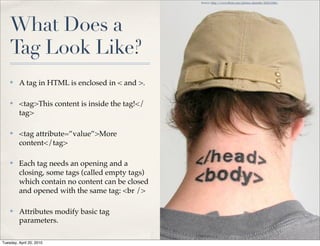
    ✤    A tag in HTML is enclosed in < and >.

    ✤    <tag>This content is inside the tag!</
         tag>

    ✤    <tag attribute=”value”>More
         content</tag>

    ✤    Each tag needs an opening and a
         closing, some tags (called empty tags)
         which contain no content can be closed
         and opened with the same tag: <br />

    ✤    Attributes modify basic tag
         parameters.

Tuesday, April 20, 2010
Types of Tags

    ✤    Structural: <h1> <h2> <p> <div> <img> <table>

          ✤    These build out the structure of your site.

    ✤    Presentational: <strong> <em> (most others have been deprecated)

          ✤    These add to the appearance of text.

    ✤    Hypertext: <a>

          ✤    These create links to other documents or areas in the same document.

    ✤    Tags can be: normal (must close), empty (can open + close), or void (must not close)


Tuesday, April 20, 2010
The Old: HTML 4.01/XHTML 1.1


    ✤    The HTML 4.01 or XHTML 1.1 standards will still work, HTML 5 is
         backwards compatible.

    ✤    With transitional styling, you could improperly nest tags, you didn’t
         have to close tags, and so on.

    ✤    In short, it was utter chaos unless you opted for XHTML 1.1 strict.


Tuesday, April 20, 2010
The New: HTML 5

    ✤    Cool new tags: article, aside, audio, canvas, command, footer, header,
         nav, output, progress, ruby, source, time, video

    ✤    You must nest tags.

    ✤    You must end tags.

    ✤    Beware typos.

    ✤    Tags are not case sensitive, but you should use lowercase.


Tuesday, April 20, 2010
Source: http://www.flickr.com/photos/mananetwork/1112209349/


    Old vs New
    HTML5 vs XHTML 1.1/HTML 4.01

    Intro To HTML5


Tuesday, April 20, 2010
From HTML4 to HTML5

    ✤    Depreciated: acronym, applet, basefont, big, center, dir, font, frame,
         frameset, isindex, noframes, s, strike, tt, u

    ✤    Forms now can: Put, Delete, Get, Post

    ✤    Attributes: <a> - ping, <meta> - charset, <script> - async

    ✤    New form controls: dates and times, email, url, search

    ✤    Inline SVG <svg> and MathML <math>


Tuesday, April 20, 2010
The Header, Footer, and Nav Tags


    ✤    <header> , <nav> , and <footer> replace <div> tags traditionally used
         for the same purpose.

    ✤    I suspect this will be a *huge* component of SEO in the near future.


Tuesday, April 20, 2010
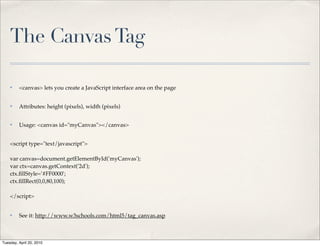
The Canvas Tag

    ✤    <canvas> lets you create a JavaScript interface area on the page


    ✤    Attributes: height (pixels), width (pixels)


    ✤    Usage: <canvas id="myCanvas"></canvas>


    <script type="text/javascript">

    var canvas=document.getElementById('myCanvas');
    var ctx=canvas.getContext('2d');
    ctx.fillStyle='#FF0000';
    ctx.fillRect(0,0,80,100);

    </script>


    ✤    See it: http://www.w3schools.com/html5/tag_canvas.asp


Tuesday, April 20, 2010
The Video Tag


    ✤    <video>

    ✤    Attributes: autoplay (autoplay), controls (controls), height (pixels),
         loop (loop), preload (preload), src (url), width (pixels)

    ✤    Usage: <video src="movie.ogg" controls="controls">Your browser
         does not support the audio element.</video>

    ✤    See it: http://www.w3schools.com/html5/tag_video.asp


Tuesday, April 20, 2010
The Audio Tag


    ✤    <audio>

    ✤    Attributes: autoplay (autoplay), controls (controls), preload (preload),
         src (url)

    ✤    Usage: <audio src="horse.ogg" controls="controls">Your browser
         does not support the audio element.</audio>

    ✤    See it: http://www.w3schools.com/html5/tag_audio.asp


Tuesday, April 20, 2010
Source: http://www.flickr.com/photos/eelkedekker/3166324179/


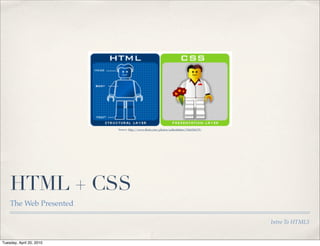
    HTML + CSS
    The Web Presented

                                                                                        Intro To HTML5


Tuesday, April 20, 2010
Simple CSS Styling


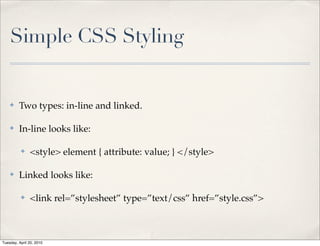
    ✤    Two types: in-line and linked.

    ✤    In-line looks like:

          ✤    <style> element { attribute: value; } </style>

    ✤    Linked looks like:

          ✤    <link rel=”stylesheet” type=”text/css” href=”style.css”>


Tuesday, April 20, 2010
Basic CSS Commands

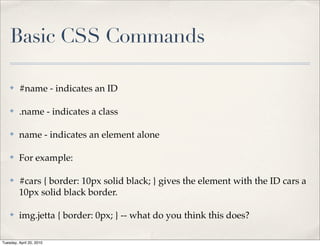
    ✤    #name - indicates an ID

    ✤    .name - indicates a class

    ✤    name - indicates an element alone

    ✤    For example:

    ✤    #cars { border: 10px solid black; } gives the element with the ID cars a
         10px solid black border.

    ✤    img.jetta { border: 0px; } -- what do you think this does?

Tuesday, April 20, 2010
Common CSS Attributes

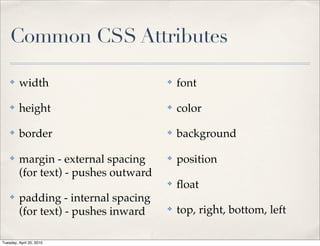
    ✤    width                         ✤   font

    ✤    height                        ✤   color

    ✤    border                        ✤   background

    ✤    margin - external spacing     ✤   position
         (for text) - pushes outward
                                       ✤   float
    ✤    padding - internal spacing
         (for text) - pushes inward    ✤   top, right, bottom, left

Tuesday, April 20, 2010
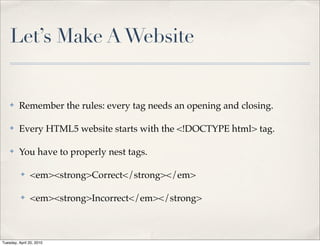
Let’s Make A Website


    ✤    Remember the rules: every tag needs an opening and closing.

    ✤    Every HTML5 website starts with the <!DOCTYPE html> tag.

    ✤    You have to properly nest tags.

          ✤    <em><strong>Correct</strong></em>

          ✤    <em><strong>Incorrect</em></strong>


Tuesday, April 20, 2010
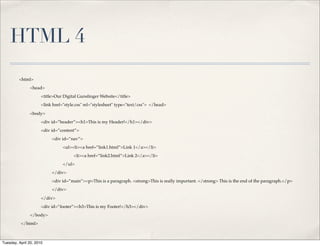
HTML 4
         <html>
               <head>
                      <title>Our Digital Gunslinger Website</title>
                      <link href="style.css" rel="stylesheet" type="text/css"> </head>

               <body>
                      <div id=”header”><h1>This is my Header!</h1></div>
                      <div id=”content”>
                           <div id=”nav”>
                                 <ul><li><a href=”link1.html”>Link 1</a></li>
                                      <li><a href=”link2.html”>Link 2</a></li>
                                 </ul>
                           </div>
                           <div id=”main”><p>This is a paragraph. <strong>This is really important. </strong> This is the end of the paragraph.</p>
                           </div>

                      </div>
                      <div id=”footer”><h3>This is my Footer!</h3></div>
               </body>
          </html>


Tuesday, April 20, 2010
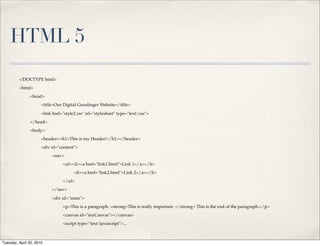
HTML 5
         <!DOCTYPE html>
         <html>
               <head>
                      <title>Our Digital Gunslinger Website</title>

                      <link href="style2.css" rel="stylesheet" type="text/css">
               </head>
               <body>
                      <header><h1>This is my Header!</h1></header>
                      <div id="content">
                           <nav>
                                 <ul><li><a href="link1.html">Link 1</a></li>
                                       <li><a href="link2.html">Link 2</a></li>
                                 </ul>
                           </nav>

                           <div id="main">
                                 <p>This is a paragraph. <strong>This is really important. </strong> This is the end of the paragraph.</p>
                                 <canvas id="myCanvas"></canvas>
                                 <script type="text/javascript">...


Tuesday, April 20, 2010
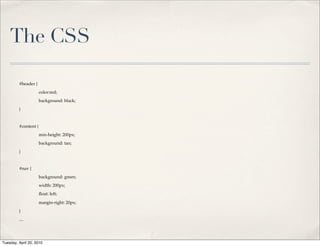
The CSS

         #header {
         !            color:red;
         !            background: black;
         }


         #content {
         !            min-height: 200px;
         !            background: tan;
         }


         #nav {
         !            background: green;
         !            width: 200px;
         !            float: left;

         !            margin-right: 20px;
         }
         ....


Tuesday, April 20, 2010
Let’s See It In Action


    ✤    Go To: http://bit.ly/DGsHTML5 to download the files we’re using.

    ✤    ... HTML5 doesn’t render 100% correctly in FireFox yet.


Tuesday, April 20, 2010
Thanks +
    Resources
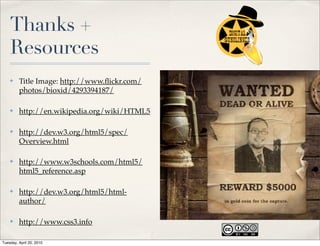
    ✤    Title Image: http://www.flickr.com/
         photos/bioxid/4293394187/

    ✤    http://en.wikipedia.org/wiki/HTML5

    ✤    http://dev.w3.org/html5/spec/
         Overview.html

    ✤    http://www.w3schools.com/html5/
         html5_reference.asp

    ✤    http://dev.w3.org/html5/html-
         author/

    ✤    http://www.css3.info

Tuesday, April 20, 2010

A Primer on HTML 5 - By Nick Armstrong

  • 1.
    HTML 5 A Primer by The Digital Gunslingers Intro To HTML5 Tuesday, April 20, 2010
  • 2.
    What is HTML? ✤ HTML is a formatting language used to build websites. ✤ HTML stands for HyperText Markup Language. ✤ HTML uses tags to indicate areas of content. ✤ HTML in concert with CSS (cascading style sheets) are what most of the web is made of. ✤ There are different tags for different uses: Structural, Presentational, and Hypertext. ✤ There are many iterations of the previous standard: XHTML, SGML-based HTML, strict, transitional, and frameset. Tuesday, April 20, 2010
  • 3.
    Source: http://www.flickr.com/photos/daniello/422213306/ What Does a Tag Look Like? ✤ A tag in HTML is enclosed in < and >. ✤ <tag>This content is inside the tag!</ tag> ✤ <tag attribute=”value”>More content</tag> ✤ Each tag needs an opening and a closing, some tags (called empty tags) which contain no content can be closed and opened with the same tag: <br /> ✤ Attributes modify basic tag parameters. Tuesday, April 20, 2010
  • 4.
    Types of Tags ✤ Structural: <h1> <h2> <p> <div> <img> <table> ✤ These build out the structure of your site. ✤ Presentational: <strong> <em> (most others have been deprecated) ✤ These add to the appearance of text. ✤ Hypertext: <a> ✤ These create links to other documents or areas in the same document. ✤ Tags can be: normal (must close), empty (can open + close), or void (must not close) Tuesday, April 20, 2010
  • 5.
    The Old: HTML4.01/XHTML 1.1 ✤ The HTML 4.01 or XHTML 1.1 standards will still work, HTML 5 is backwards compatible. ✤ With transitional styling, you could improperly nest tags, you didn’t have to close tags, and so on. ✤ In short, it was utter chaos unless you opted for XHTML 1.1 strict. Tuesday, April 20, 2010
  • 6.
    The New: HTML5 ✤ Cool new tags: article, aside, audio, canvas, command, footer, header, nav, output, progress, ruby, source, time, video ✤ You must nest tags. ✤ You must end tags. ✤ Beware typos. ✤ Tags are not case sensitive, but you should use lowercase. Tuesday, April 20, 2010
  • 7.
    Source: http://www.flickr.com/photos/mananetwork/1112209349/ Old vs New HTML5 vs XHTML 1.1/HTML 4.01 Intro To HTML5 Tuesday, April 20, 2010
  • 8.
    From HTML4 toHTML5 ✤ Depreciated: acronym, applet, basefont, big, center, dir, font, frame, frameset, isindex, noframes, s, strike, tt, u ✤ Forms now can: Put, Delete, Get, Post ✤ Attributes: <a> - ping, <meta> - charset, <script> - async ✤ New form controls: dates and times, email, url, search ✤ Inline SVG <svg> and MathML <math> Tuesday, April 20, 2010
  • 9.
    The Header, Footer,and Nav Tags ✤ <header> , <nav> , and <footer> replace <div> tags traditionally used for the same purpose. ✤ I suspect this will be a *huge* component of SEO in the near future. Tuesday, April 20, 2010
  • 10.
    The Canvas Tag ✤ <canvas> lets you create a JavaScript interface area on the page ✤ Attributes: height (pixels), width (pixels) ✤ Usage: <canvas id="myCanvas"></canvas> <script type="text/javascript"> var canvas=document.getElementById('myCanvas'); var ctx=canvas.getContext('2d'); ctx.fillStyle='#FF0000'; ctx.fillRect(0,0,80,100); </script> ✤ See it: http://www.w3schools.com/html5/tag_canvas.asp Tuesday, April 20, 2010
  • 11.
    The Video Tag ✤ <video> ✤ Attributes: autoplay (autoplay), controls (controls), height (pixels), loop (loop), preload (preload), src (url), width (pixels) ✤ Usage: <video src="movie.ogg" controls="controls">Your browser does not support the audio element.</video> ✤ See it: http://www.w3schools.com/html5/tag_video.asp Tuesday, April 20, 2010
  • 12.
    The Audio Tag ✤ <audio> ✤ Attributes: autoplay (autoplay), controls (controls), preload (preload), src (url) ✤ Usage: <audio src="horse.ogg" controls="controls">Your browser does not support the audio element.</audio> ✤ See it: http://www.w3schools.com/html5/tag_audio.asp Tuesday, April 20, 2010
  • 13.
    Source: http://www.flickr.com/photos/eelkedekker/3166324179/ HTML + CSS The Web Presented Intro To HTML5 Tuesday, April 20, 2010
  • 14.
    Simple CSS Styling ✤ Two types: in-line and linked. ✤ In-line looks like: ✤ <style> element { attribute: value; } </style> ✤ Linked looks like: ✤ <link rel=”stylesheet” type=”text/css” href=”style.css”> Tuesday, April 20, 2010
  • 15.
    Basic CSS Commands ✤ #name - indicates an ID ✤ .name - indicates a class ✤ name - indicates an element alone ✤ For example: ✤ #cars { border: 10px solid black; } gives the element with the ID cars a 10px solid black border. ✤ img.jetta { border: 0px; } -- what do you think this does? Tuesday, April 20, 2010
  • 16.
    Common CSS Attributes ✤ width ✤ font ✤ height ✤ color ✤ border ✤ background ✤ margin - external spacing ✤ position (for text) - pushes outward ✤ float ✤ padding - internal spacing (for text) - pushes inward ✤ top, right, bottom, left Tuesday, April 20, 2010
  • 17.
    Let’s Make AWebsite ✤ Remember the rules: every tag needs an opening and closing. ✤ Every HTML5 website starts with the <!DOCTYPE html> tag. ✤ You have to properly nest tags. ✤ <em><strong>Correct</strong></em> ✤ <em><strong>Incorrect</em></strong> Tuesday, April 20, 2010
  • 18.
    HTML 4 <html> <head> <title>Our Digital Gunslinger Website</title> <link href="style.css" rel="stylesheet" type="text/css"> </head> <body> <div id=”header”><h1>This is my Header!</h1></div> <div id=”content”> <div id=”nav”> <ul><li><a href=”link1.html”>Link 1</a></li> <li><a href=”link2.html”>Link 2</a></li> </ul> </div> <div id=”main”><p>This is a paragraph. <strong>This is really important. </strong> This is the end of the paragraph.</p> </div> </div> <div id=”footer”><h3>This is my Footer!</h3></div> </body> </html> Tuesday, April 20, 2010
  • 19.
    HTML 5 <!DOCTYPE html> <html> <head> <title>Our Digital Gunslinger Website</title> <link href="style2.css" rel="stylesheet" type="text/css"> </head> <body> <header><h1>This is my Header!</h1></header> <div id="content"> <nav> <ul><li><a href="link1.html">Link 1</a></li> <li><a href="link2.html">Link 2</a></li> </ul> </nav> <div id="main"> <p>This is a paragraph. <strong>This is really important. </strong> This is the end of the paragraph.</p> <canvas id="myCanvas"></canvas> <script type="text/javascript">... Tuesday, April 20, 2010
  • 20.
    The CSS #header { ! color:red; ! background: black; } #content { ! min-height: 200px; ! background: tan; } #nav { ! background: green; ! width: 200px; ! float: left; ! margin-right: 20px; } .... Tuesday, April 20, 2010
  • 21.
    Let’s See ItIn Action ✤ Go To: http://bit.ly/DGsHTML5 to download the files we’re using. ✤ ... HTML5 doesn’t render 100% correctly in FireFox yet. Tuesday, April 20, 2010
  • 22.
    Thanks + Resources ✤ Title Image: http://www.flickr.com/ photos/bioxid/4293394187/ ✤ http://en.wikipedia.org/wiki/HTML5 ✤ http://dev.w3.org/html5/spec/ Overview.html ✤ http://www.w3schools.com/html5/ html5_reference.asp ✤ http://dev.w3.org/html5/html- author/ ✤ http://www.css3.info Tuesday, April 20, 2010