Copyright © Terry Felke-Morris http://terrymorris.net
Web Development & Design
Foundations with HTML5
8th
Edition
CHAPTER 10
KEY CONCEPTS
1
Copyright © Terry Felke-Morris http://terrymorris.net
Learning Outcomes
In this chapter, you will learn how to ...
◦Describe the skills, functions, and job roles needed for a successful
web project development
◦Utilize the stages in the standard System Development Life Cycle
◦Identify other common system development methodologies
◦Apply the System Development Life Cycle to web development
projects
◦Describe the activities in the Conceptualization, Analysis, Design,
Production, Testing, Launch, Maintenance, and Evaluation stages of a
website project. Compare the goals of the website to the results as
part of the Evaluation phase
◦Find the right web host provider for your website
◦Choose a domain name for your website
2
Copyright © Terry Felke-Morris http://terrymorris.net
Skills and Functions Needed for
a Successful Large-Scale Project
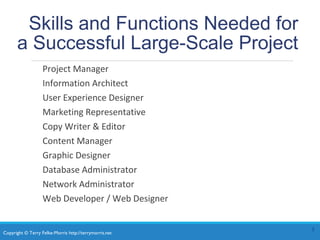
Project Manager
Information Architect
User Experience Designer
Marketing Representative
Copy Writer & Editor
Content Manager
Graphic Designer
Database Administrator
Network Administrator
Web Developer / Web Designer
3
Copyright © Terry Felke-Morris http://terrymorris.net
Skills and Functions Needed for
a Successful Small Project
The skills and functions are essentially the same as on
a large project
Each person may wear many “hats” and juggle their
job roles
◦Example: The web designer may also be the graphic
designer.
Some job roles may be outsourced
◦Most Common:
An external web site provider is used so there is less (if any)
need for a Network Administrator.
4
Copyright © Terry Felke-Morris http://terrymorris.net
Project Staffing Criteria
Finding the right people to work on a project is crucial
◦ Consider:
 work experience
 portfolio
 formal education
 industry certifications
Alternative:
Outsource all or portions of the project to a web
design/development firm
5
Copyright © Terry Felke-Morris http://terrymorris.net
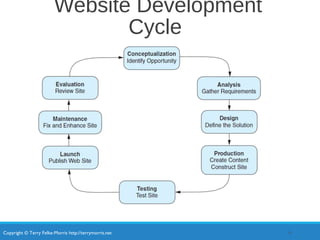
Website Development
Cycle
6
Copyright © Terry Felke-Morris http://terrymorris.net
Web Development:
Conceptualization
Determine the intended audience
Determine the goals or mission of the web
site
◦ Short-term goals
◦ Long-term goals
◦ Develop measurable objectives such as:
 Number of visitors
 Percent of product sales
7
Copyright © Terry Felke-Morris http://terrymorris.net
Web Development:
Analysis
Determine the following:
◦ information topics
◦ functionality requirements (high-level)
 Determine “what” a site will do – not “how” it will do it
◦ environmental requirements
◦ content requirements
If a redesign, compare the old approach with the new
approach
Review competitor’s sites
Estimate costs
◦ Cost/Benefit analysis
8
Copyright © Terry Felke-Morris http://terrymorris.net
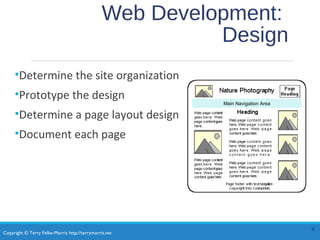
Web Development:
Design
•Determine the site organization
•Prototype the design
•Determine a page layout design
•Document each page
9
Main Navigation Area
Copyright © Terry Felke-Morris http://terrymorris.net
Web Development:
Production
•Choose a web authoring tool
•Organize your site files
•Develop and individually test components
•Add content
10
Copyright © Terry Felke-Morris http://terrymorris.net
Web Development: Testing
•Test on different web browsers and browser versions
•Test with different screen resolutions
•Test using different bandwidths
•Test from another location
•Test, Test, Test
11
Copyright © Terry Felke-Morris http://terrymorris.net
Web Development:
Types of Testing
Automated Testing Tools and Validation
◦Automated Testing (Link checkers, etc.)
◦W3C HTML and CSS validation tests
Usability Testing
◦Testing how actual web page visitors use a web site
◦Can be done at almost any stage of development
◦Early – use paper and sketches of pages
◦Design – use prototype
◦Production & Testing – use actual pages
12
Copyright © Terry Felke-Morris http://terrymorris.net
Web Development:
Approval & Launch
User or Client Testing
◦Client will test site before giving official approval for site
launch
Approval & Launch
◦Obtain sign-off form or email from client
◦Upload files to web server
◦Create backup copies of files
◦TEST THE WEB SITE AGAIN AFTER UPLOAD!
13
Copyright © Terry Felke-Morris http://terrymorris.net
Web Development:
Maintenance
Maintenance – the never-ending task…
◦Enhancements to site
◦Fixes to site
◦New areas added to site
A new opportunity or issue is identified and
another loop through the development process
begins.
14
Copyright © Terry Felke-Morris http://terrymorris.net
Web Development:
Evaluation
•Re-visit the goals, objectives, and mission of
the website
•Determine how closely they are being met
•Develop a plan to better meet the goals,
objectives and mission
15
Copyright © Terry Felke-Morris http://terrymorris.net
Checkpoint
1. Describe the role of the project manager.
2. Explain why so many different roles are
needed on a large-scale web project.
3. List three different techniques used to test a
website. Describe each technique in one or
two sentences.
16
Copyright © Terry Felke-Morris http://terrymorris.net
Domain Names
Establishes a web presence for your
business or organization
◦New Business
◦choose domain name while selecting company name
◦Established Business
◦choose a domain name that relates to your established
business presence
17
Copyright © Terry Felke-Morris http://terrymorris.net
Choosing a Domain Name
Describe your business
Be brief, if possible
Avoid hyphens
TLD (top level domain name)
◦ .com, .net, .biz, .us, .mobi and others
◦ .org for non-profits
Brainstorm potential keywords
Avoid trademarked words or phrases
Know the territory (use Google!)
Verify Availability
18
Copyright © Terry Felke-Morris http://terrymorris.net
Registering a Domain
Name
There are many domain name registrars, including
◦ http://register.com
◦ http://networksolutions.com
◦ http://godaddy.com
Visit Registrar, choose name, pay
Private registration – additional fee but personal
information is kept private and out of the WHOIS
database
19
Copyright © Terry Felke-Morris http://terrymorris.net
Web Hosting
Some organizations administer a web server
in-house and host their own website.
Many companies use a web host provider.
◦A good web hosting service will provide a robust, reliable
home for your website.
◦A poor web hosting service will be the source of
problems and complaints.
◦Do not use free web hosting for a commercial website.
20
Copyright © Terry Felke-Morris http://terrymorris.net
Types of Web Hosting(1)
Hosting Needs: Small to Medium Website
◦Virtual Hosting
◦The web host provider's server is divided into a number of virtual
domains and multiple websites are set up on the same computer.
◦Consider:
◦Future growth and scalability of web host
◦Operating System
◦Types of server-side processing supported
◦Bandwidth of Internet connection
◦Both local and national web host providers
◦Guaranteed uptime – service level agreement (SLA)
◦Technical support
21
Copyright © Terry Felke-Morris http://terrymorris.net
Types of Web Hosting(2)
Hosting Needs: Large to Enterprise Website
◦Dedicated web Server
◦Co-located web Server
◦Consider:
◦National web host providers
◦Guaranteed uptime – service level agreement (SLA)
◦Bandwidth of Internet connection
◦Technical Support
22
Copyright © Terry Felke-Morris http://terrymorris.net
Dedicated Web Server
◦The exclusive use of a rented computer and
connection to the Internet that is housed in the web
hosting company's premises.
◦The server can usually be configured and operated
remotely from the client company or you can pay
the web host provider to administer it for you.
23
Copyright © Terry Felke-Morris http://terrymorris.net
Co-Located Web Server
◦A computer that your organization has purchased and
configured.
◦Your organization effectively rents space at the web host
provider's location.
◦Your server is kept and connected to the Internet at their
location.
◦Your organization administers this computer.
Copyright © Terry Felke-Morris http://terrymorris.net
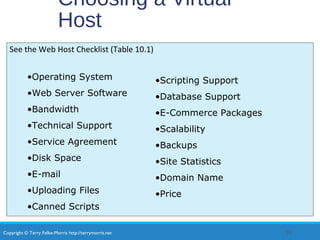
Choosing a Virtual
Host
See the Web Host Checklist (Table 10.1)
25
•Operating System
•Web Server Software
•Bandwidth
•Technical Support
•Service Agreement
•Disk Space
•E-mail
•Uploading Files
•Canned Scripts
•Scripting Support
•Database Support
•E-Commerce Packages
•Scalability
•Backups
•Site Statistics
•Domain Name
•Price
Copyright © Terry Felke-Morris http://terrymorris.net
Checkpoint 10.2
1. Describe the type of web host that
would meet the needs of a small
company for their initial web presence.
2. Describe the difference between a
dedicated web server and a co-located
web server.
3. Explain why price is not the most
important consideration when
choosing a web host.
26
Copyright © Terry Felke-Morris http://terrymorris.net
Summary
This chapter introduced you to the system
development life cycle and its application to web
development projects.
The job roles related to website development
were also discussed.
An introduction to selecting a domain name and
a web host was provided.
27

Chapter10

  • 1.
    Copyright © TerryFelke-Morris http://terrymorris.net Web Development & Design Foundations with HTML5 8th Edition CHAPTER 10 KEY CONCEPTS 1
  • 2.
    Copyright © TerryFelke-Morris http://terrymorris.net Learning Outcomes In this chapter, you will learn how to ... ◦Describe the skills, functions, and job roles needed for a successful web project development ◦Utilize the stages in the standard System Development Life Cycle ◦Identify other common system development methodologies ◦Apply the System Development Life Cycle to web development projects ◦Describe the activities in the Conceptualization, Analysis, Design, Production, Testing, Launch, Maintenance, and Evaluation stages of a website project. Compare the goals of the website to the results as part of the Evaluation phase ◦Find the right web host provider for your website ◦Choose a domain name for your website 2
  • 3.
    Copyright © TerryFelke-Morris http://terrymorris.net Skills and Functions Needed for a Successful Large-Scale Project Project Manager Information Architect User Experience Designer Marketing Representative Copy Writer & Editor Content Manager Graphic Designer Database Administrator Network Administrator Web Developer / Web Designer 3
  • 4.
    Copyright © TerryFelke-Morris http://terrymorris.net Skills and Functions Needed for a Successful Small Project The skills and functions are essentially the same as on a large project Each person may wear many “hats” and juggle their job roles ◦Example: The web designer may also be the graphic designer. Some job roles may be outsourced ◦Most Common: An external web site provider is used so there is less (if any) need for a Network Administrator. 4
  • 5.
    Copyright © TerryFelke-Morris http://terrymorris.net Project Staffing Criteria Finding the right people to work on a project is crucial ◦ Consider:  work experience  portfolio  formal education  industry certifications Alternative: Outsource all or portions of the project to a web design/development firm 5
  • 6.
    Copyright © TerryFelke-Morris http://terrymorris.net Website Development Cycle 6
  • 7.
    Copyright © TerryFelke-Morris http://terrymorris.net Web Development: Conceptualization Determine the intended audience Determine the goals or mission of the web site ◦ Short-term goals ◦ Long-term goals ◦ Develop measurable objectives such as:  Number of visitors  Percent of product sales 7
  • 8.
    Copyright © TerryFelke-Morris http://terrymorris.net Web Development: Analysis Determine the following: ◦ information topics ◦ functionality requirements (high-level)  Determine “what” a site will do – not “how” it will do it ◦ environmental requirements ◦ content requirements If a redesign, compare the old approach with the new approach Review competitor’s sites Estimate costs ◦ Cost/Benefit analysis 8
  • 9.
    Copyright © TerryFelke-Morris http://terrymorris.net Web Development: Design •Determine the site organization •Prototype the design •Determine a page layout design •Document each page 9 Main Navigation Area
  • 10.
    Copyright © TerryFelke-Morris http://terrymorris.net Web Development: Production •Choose a web authoring tool •Organize your site files •Develop and individually test components •Add content 10
  • 11.
    Copyright © TerryFelke-Morris http://terrymorris.net Web Development: Testing •Test on different web browsers and browser versions •Test with different screen resolutions •Test using different bandwidths •Test from another location •Test, Test, Test 11
  • 12.
    Copyright © TerryFelke-Morris http://terrymorris.net Web Development: Types of Testing Automated Testing Tools and Validation ◦Automated Testing (Link checkers, etc.) ◦W3C HTML and CSS validation tests Usability Testing ◦Testing how actual web page visitors use a web site ◦Can be done at almost any stage of development ◦Early – use paper and sketches of pages ◦Design – use prototype ◦Production & Testing – use actual pages 12
  • 13.
    Copyright © TerryFelke-Morris http://terrymorris.net Web Development: Approval & Launch User or Client Testing ◦Client will test site before giving official approval for site launch Approval & Launch ◦Obtain sign-off form or email from client ◦Upload files to web server ◦Create backup copies of files ◦TEST THE WEB SITE AGAIN AFTER UPLOAD! 13
  • 14.
    Copyright © TerryFelke-Morris http://terrymorris.net Web Development: Maintenance Maintenance – the never-ending task… ◦Enhancements to site ◦Fixes to site ◦New areas added to site A new opportunity or issue is identified and another loop through the development process begins. 14
  • 15.
    Copyright © TerryFelke-Morris http://terrymorris.net Web Development: Evaluation •Re-visit the goals, objectives, and mission of the website •Determine how closely they are being met •Develop a plan to better meet the goals, objectives and mission 15
  • 16.
    Copyright © TerryFelke-Morris http://terrymorris.net Checkpoint 1. Describe the role of the project manager. 2. Explain why so many different roles are needed on a large-scale web project. 3. List three different techniques used to test a website. Describe each technique in one or two sentences. 16
  • 17.
    Copyright © TerryFelke-Morris http://terrymorris.net Domain Names Establishes a web presence for your business or organization ◦New Business ◦choose domain name while selecting company name ◦Established Business ◦choose a domain name that relates to your established business presence 17
  • 18.
    Copyright © TerryFelke-Morris http://terrymorris.net Choosing a Domain Name Describe your business Be brief, if possible Avoid hyphens TLD (top level domain name) ◦ .com, .net, .biz, .us, .mobi and others ◦ .org for non-profits Brainstorm potential keywords Avoid trademarked words or phrases Know the territory (use Google!) Verify Availability 18
  • 19.
    Copyright © TerryFelke-Morris http://terrymorris.net Registering a Domain Name There are many domain name registrars, including ◦ http://register.com ◦ http://networksolutions.com ◦ http://godaddy.com Visit Registrar, choose name, pay Private registration – additional fee but personal information is kept private and out of the WHOIS database 19
  • 20.
    Copyright © TerryFelke-Morris http://terrymorris.net Web Hosting Some organizations administer a web server in-house and host their own website. Many companies use a web host provider. ◦A good web hosting service will provide a robust, reliable home for your website. ◦A poor web hosting service will be the source of problems and complaints. ◦Do not use free web hosting for a commercial website. 20
  • 21.
    Copyright © TerryFelke-Morris http://terrymorris.net Types of Web Hosting(1) Hosting Needs: Small to Medium Website ◦Virtual Hosting ◦The web host provider's server is divided into a number of virtual domains and multiple websites are set up on the same computer. ◦Consider: ◦Future growth and scalability of web host ◦Operating System ◦Types of server-side processing supported ◦Bandwidth of Internet connection ◦Both local and national web host providers ◦Guaranteed uptime – service level agreement (SLA) ◦Technical support 21
  • 22.
    Copyright © TerryFelke-Morris http://terrymorris.net Types of Web Hosting(2) Hosting Needs: Large to Enterprise Website ◦Dedicated web Server ◦Co-located web Server ◦Consider: ◦National web host providers ◦Guaranteed uptime – service level agreement (SLA) ◦Bandwidth of Internet connection ◦Technical Support 22
  • 23.
    Copyright © TerryFelke-Morris http://terrymorris.net Dedicated Web Server Dedicated Web Server ◦The exclusive use of a rented computer and connection to the Internet that is housed in the web hosting company's premises. ◦The server can usually be configured and operated remotely from the client company or you can pay the web host provider to administer it for you. 23
  • 24.
    Copyright © TerryFelke-Morris http://terrymorris.net Co-Located Web Server Co-Located Web Server ◦A computer that your organization has purchased and configured. ◦Your organization effectively rents space at the web host provider's location. ◦Your server is kept and connected to the Internet at their location. ◦Your organization administers this computer.
  • 25.
    Copyright © TerryFelke-Morris http://terrymorris.net Choosing a Virtual Host See the Web Host Checklist (Table 10.1) 25 •Operating System •Web Server Software •Bandwidth •Technical Support •Service Agreement •Disk Space •E-mail •Uploading Files •Canned Scripts •Scripting Support •Database Support •E-Commerce Packages •Scalability •Backups •Site Statistics •Domain Name •Price
  • 26.
    Copyright © TerryFelke-Morris http://terrymorris.net Checkpoint 10.2 1. Describe the type of web host that would meet the needs of a small company for their initial web presence. 2. Describe the difference between a dedicated web server and a co-located web server. 3. Explain why price is not the most important consideration when choosing a web host. 26
  • 27.
    Copyright © TerryFelke-Morris http://terrymorris.net Summary This chapter introduced you to the system development life cycle and its application to web development projects. The job roles related to website development were also discussed. An introduction to selecting a domain name and a web host was provided. 27