Chapter 1
1.1. Introduction to Software Development
1.2. SDLC
1.3. Software Development Principles
 https://www.codemahal.com/tutorials/
4/13/2021 1
1.1. Introduction to Software Development
• Before you have a workable software, it is a good idea
that you have to follow the software development process.
• If the software you want to build is small, you may not
need to follow it but if the software is large that you need
to spend a lot of resources(time, money, human) to
complete it, you need to have a careful plan.
• Otherwise you may take risks to lose a lot of resources
because your software can not be an acceptable solution
for your customers.
4/13/2021 2
cont'd
• Software development is a multi steps process that
involve understanding problems to be solved, designing
the solution, coding the software, and testing the software
product.
4/13/2021 3
1.1.1.General steps of SD
1. Requirements Gathering
– Determines the requirements that the product must address.
2. Feasibility Study
– Determines whether it is possible - technically, economically, legally or
organizationally- to build a certain software.
3. Domain Analysis:
– Discovers the meaning of requirements within the context,
– Discovers concepts within the domain that are related to the problem and can
affect the solution, (banking, healthcare, insurance, education, accounting…)
– Possibly discovers the consequences of the solution on the problem domain.
4/13/2021 4
1.1.1.General steps of SD>>cont'd
4. Analysis
– Analyzing the requirements to build a conceptual model of the
product.
5. Design
– Transforms the “what” into “how”.
– Design itself consists of several distinct activities which are
logical .
4/13/2021 5
1.1.1.General steps of SD>>cont'd
6. Implementation (coding)
– Turns the blueprints of design into an actual product.
– Programming is usually the most important component of this
activity, but it is not the only one.
– paradiams : OOP,Event driven, functional, procedural,
structural ect.
4/13/2021 6
1.1.1.General steps of SD>>cont'd
7. Testing and Quality Control
–Verifies that the product functions according to
specifications.
4/13/2021 7
1.1.1.General steps of SD>>cont'd
8. Deployment and Training
– This activity consists of ensuring the correct installation on the
target platform,user training, creating help files and user
manuals, setting up of Web sites to guide users, packaging, etc.
9. Maintenance
– Solving problems that may emerge after the deployment of the
software, or changes in the environment.
4/13/2021 8
Example
• For example, to develop a sofware that can calculate the
parking fee of a public parking lot, how do you go about
doing this?
4/13/2021 9
Example>> Understanding the problem
• The first step you will do is understanding the problem. If you don't
understand the problem to be solved, how can you solve the
problem?
• Therefore, a good software building is started with a good
understanding of the problem.
• To understand the problem you need to read the requirements
statement carefully.
• After you understand the problem, you should clarify you
understanding with the users and system analysts by asking
questions to confirm your understandings.
4/13/2021 10
Example >>(questions )
• For example, after reading the requirements statement, you
should ask several questions to clarify:
• How the parking fee is calculated?
• Can the parking fee vary depending types of vehicles and time?
• Do they motivate vehicles owners to park for a long time or for
short time?
• Are there different rates for different types of vehicles?
• When vehicles should enter or exit the parking lot?
4/13/2021 11
Example >> Developing the solution
• After you make clarifications regarding your
understandings of the problem, you are going about to
create a solution to the problem.
• To solve the problem, there are three tools that you can
use--Structure Chart, Pseudo-code, and Flowchart.
4/13/2021 12
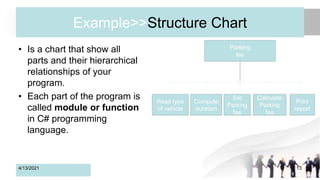
Example>>Structure Chart
• Is a chart that show all
parts and their hierarchical
relationships of your
program.
• Each part of the program is
called module or function
in C# programming
language.
4/13/2021 13
Parking
fee
Set
Parking
fee
Read type
of vehicle
Compute
duration
Calculate
Parking
fee
Print
report
Example >>Pseudo-code
• Pseudo-code is part of language.
• It is used to describe the detail of algorithms.
• This requires the steps to accomplish the program.
• Pseudo-code can be a road map for coding the program.
4/13/2021 14
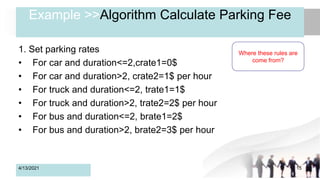
Example >>Algorithm Calculate Parking Fee
1. Set parking rates
• For car and duration<=2,crate1=0$
• For car and duration>2, crate2=1$ per hour
• For truck and duration<=2, trate1=1$
• For truck and duration>2, trate2=2$ per hour
• For bus and duration<=2, brate1=2$
• For bus and duration>2, brate2=3$ per hour
4/13/2021 15
Where these rules are
come from?
Example >>cont'd
2.Read type of vehicle
• c or C for car
• b or B for bus
• t or T for truck
4/13/2021 16
Inputs/Data
Example >>cont'd
3.Computer parking duration
• Read time in and time out
• If time out<time in, then prompt the user to enter again.
• Computer duration=time out-time in
• Return duration
4/13/2021 17
Hndling
Errors
Example >>cont'd
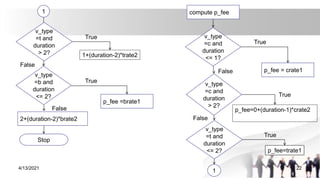
4.Calculate parking fee
• If v_type=c & duration<=1 then p_fee=crate1
• If v_type=c & duration>1 then p_fee=0+(duration-1)*crate2
• If v_type=t & duration<=2 then p_fee=trate1
• If v_type=t & duration>2 then p_fee=1+(duration-2)*trate2
• If v_type=b & duration<=2 then p_fee=brate1
• If v_type=b & duration>2 then p_fee=2+(duration-2)*brate2
• Return
4/13/2021 18
Example >>cont'd
5.Print report: type of vehicle, duration, and parking fee.
4/13/2021 19
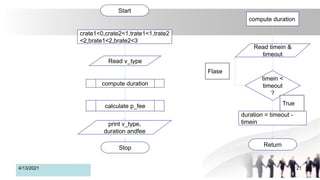
Example >>Flowchart
Flowchart is another way to show the detail steps of the
algorithm. In stead of showing the detail using logic
language(pseudo-code) the flowchart uses graphical
symbols.
4/13/2021 20
4/13/2021 21
Start
crate1<0,crate2<1,trate1<1,trate2
<2,brate1<2,brate2<3
Read v_type
compute duration
calculate p_fee
print v_type,
duration andfee
Stop
compute duration
Read timein &
timeout
timein <
timeout
?
duration = timeout -
timein
Return
True
Flase
4/13/2021 22
compute p_fee
v_type
=c and
duration
<= 1?
p_fee = crate1
v_type
=c and
duration
> 2?
v_type
=t and
duration
<= 2?
v_type
=b and
duration
<= 2?
p_fee =brate1
2+(duration-2)*brate2
Stop
1
1
1+(duration-2)*trate2
p_fee=trate1
p_fee=0+(duration-1)*crate2
v_type
=t and
duration
> 2?
True
False
True
False
True
True
False
True
False
Example >> Coding the program
• Now, it is the time to write code.
• To code your program, you can use one or the
combination of of computer programming languages that
you are familiar with.
• The purpose of this example is to help you understand the
software development process.
4/13/2021 23
Example >> Testing the program
• After you complete writing code for your program, you need test it to see
whether all parts of your program work well together.
• There are two types of testing the program--Blackbox test and Writebox test.
• The Blackbox test is conducted by people who do not know what really are
in your program. The Blackbox test plan need to be prepared based on the
requirements.
• The Whitebox test that is conducted by people who know what really are in
your system. If you are the programmer, one of your responsibilities is to
conduct this test.
4/13/2021 24
1.2. SDLC
• SDLC provides overall framework for managing systems
development process.
• Two main approaches to SDLC
– Predictive approach : assumes project can be planned out in
advance.
– Adaptive approach : more flexible, assumes project cannot be
planned out in advance.
All projects use some variation of SDLC
4/13/2021 25
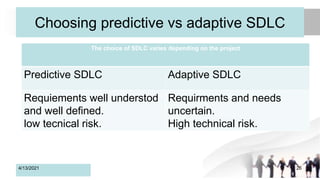
Choosing predictive vs adaptive SDLC
4/13/2021 26
The choice of SDLC varies depending on the project
Predictive SDLC Adaptive SDLC
Requiements well understod
and well defined.
low tecnical risk.
Requirments and needs
uncertain.
High technical risk.
What are Methodologies?
• Comprehensive guidelines to follow for
completing every SDLC activity.
• Collection of models, tools, and
techniques.
4/13/2021 27
What Are Models?
• Representation of an important aspect of
real world, but not the same as real thing
• Abstraction used to separate out aspect
• Diagrams and charts
• Project planning and budgeting aids
4/13/2021 28
Some Models Used in System
Development
4/13/2021
• some models used to
manage the development
process
– PERT chart
– Gant chart
29
• some models of system
compoments:
– flowchart
– Data flow diagram
– Entity relationship diagram
– structure chart
– use case diagram
– class diagram
– sequence diagram
What Are Tools?
• Software support that helps create models or other
required project components
• Range from simple drawing programs to complex CASE
tools to project management software.
– Drawing
– Text editor
– IDE
– DBMS
4/13/2021 30
What Are Techniques?
• Collection of guidelines that help analysts complete a
system development activity or task.
• Can be step-by-step instructions or just general advice.
– strategic planning techniques
– project management technices
– data modeling technices
– user interview technices
– Relationa database design techniques
– OOAD techniques.
4/13/2021 31
1.2.1. Software Development Approaches
• Show how the various tasks related to software development can
be organized.
• Typical approaches or paradigms encountered in software
development include: Classical waterfall, Iterative, prototype, RAD,
Agile, V-model and spiral as described below.
• The incremental development approach typically forms the basis
for software development within the larger systems-level of
Evolutionary Acquisition (EA).
4/13/2021 32
SD Approaches
• These above software development appraches are very important
which are mostly used for various software development projects.
• Moreover, all these methodologies work well in certain projects
depending upon the nature of the project.
• It often happens that one methodology that is suited for a particular
project may not be suited for another project.
• Moreover, none of these methodologies are foolproof as each has its
own pros and cons. So, software developers must have information
about all these methodologies before selecting any of these
development methods for their software development projects.
4/13/2021 33
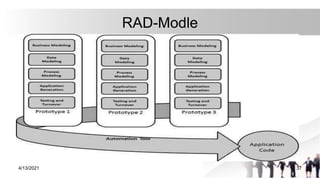
Approach>> Rapid Application Development (RAD)
• RAD is an effective methodology to provide much quicker
development and higher-quality results than those achieved with
the other software development methodologies.
• It is designed in such a way that, it easily take the maximum
advantages of the software development.
• The main objective of this methodology is to accelerate the entire
software development process.
• The goal is easily achievable because it allows active user
participation in the development process.
4/13/2021 34
Advantages of the RAD model
• Rapid Application development model helps to reduce the
risk and required efforts on the part of the software
developer.
• This model also helps client’s to take quick reviews for the
project.
• This methodology encourages customer feedback which
always provides improvement scope for any software
development project.
4/13/2021 35
Disadvantages RAD model
• This model depends on the strong team and individual
performances for clearly identifying the exact requirement of the
business.
• It only works on systems that can be modularized can be built
using this methodology.
• This approach demands highly skilled developers and designer’s
team which may not be possible for every organization.
• This method is not applicable for the developer to use in small
budget projects as a cost of modeling and automated code
generation is very high.
4/13/2021 36
RAD-Modle
4/13/2021 37
1.3. SD principles
• What method to be use ?
• or select best method stuited to the project.
• “ principles of software development,
a vocabulary for characterizing and understanding the
constraints under which software is being written”.
• evaluating and comparing various development practices.
4/13/2021 38
principles>>con't
• One analogy that we have found useful in thinking about
software development is a comparison to the application
of algorithms in programming.
4/13/2021 39
Terminologies
>>teminologies related to principles :
• A principle is a comprehensive and fundamental law,
doctrine, or assumption.
• Principles may be universal, or they may apply only to
certain types of projects.
4/13/2021 40
terminology >>con't
• A problem is something that can get in the way of rapidly
developing high quality software that meets customer
needs, while having fun doing it.
4/13/2021 41
terminology>>con't
• A practice is a way of acting or working so as to avoid or
to alleviate problems (the term practice rather than
process, because it's more explicitly captures the notion
of how things are actually done as opposed to how
someone thinks they should be done).
4/13/2021 42
terminology>>con't
• An implementation is a specific way of following a
practice, and reflects a level of specificity that is most
appropriate to a given software project.
4/13/2021 43
Good principle
• A good principle is predictive, broadly applicable, and
can easily be related to prior experience.
• Together, a set of principles provide a context for a
software project and help guide the choice of appropriate
practices.
• Often, problems can be understood in reference to a
small set of principles and can be solved, minimized, or
avoided by following certain practices in accordance with
those principles.
4/13/2021 44
Good principles>>con't
• Approaches to software development (or software
engineering) tend to focus on practices and
implementations, rather than on problems and principles.
4/13/2021 45
Some principles
• Principle of Group Overhead Communication overhead grows faster
than linearly with group size (perhaps quadratically).
• Principle of Ramp-Up Slowdown Adding people to a project
produces a temporary slowdown as those people learn about the
project, and the work is re-distributed. This is a much larger effect than
Group Overhead.
• Principle of Intellectual Focus Developing software is an intellectual
activity that requires focus. There is a limit to the length of time for
which a person can stay focused.
• Principle of Clear Statement A clear and concise statement of user
needs generally results in the development of better software.
4/13/2021 46
con't
• Principle of System Dependability The degree of confidence in
the reliability of a software system should be proportional to the
cost of its failure and the required repair.
• Principle of Real Use Understanding the needs of users and
validating that those needs have been met is best done with a real
implementation of the software and real users.
4/13/2021 47
Competing Principles
• The principles of Clear Statement and Real Use
provide competing viewpoints; the former says that
to build good software you need a clear
understanding of the problem, whereas the latter
says that you generally can’t get a clear
understanding until the software is in use.
• This pair of competing principles as so central to
software development.
4/13/2021 48
Competing Principles >>con't
• Most approaches to software development are driven by at least one
of these two principles. Some of the earlier methodologies, such as
the Waterfall Model , can be seen as drawing heavily on the Clear
Statement principle. In the Waterfall Model, distinct stages follow in
succession.
• In such a staged approach, detailed specifications of what the
software should do are created prior to beginning the technical
design or coding.
• The goal is to avoid wasted effort in designing, developing and
testing something that is not clearly understood.
4/13/2021 49
Competing Principles >>con't
• The Real Use principle suggests that this is because
requirements gathered before a system is built will be less
accurate than those gathered once it is available for use.
• This has led to many modifications of the Waterfall Model
including the Spiral Model and modified waterfalls with
overlapping stages of requirements, design and coding .
• These modifications still follow distinct stages of
requirements analysis, product design, technical design, etc.,
but there is now feedback and refinement in each stag.
4/13/2021 50
Competing Principles >>con't
• Applying such staged methodologies, however, still generally
results in a large investment of effort before any usable software
is built.
• On an enterprise software project it can be a year or longer from
initial requirements to usable software.
• This runs counter to the Real Use principle: it is difficult to justify
extensive effort by a substantial size team without validation from
real users using a production system.
• Rapid prototyping and rapid development approaches to software
development arose in order to address this problem by quickly
and repeatedly validating that software meets the perceived
needs.
4/13/2021 51
Competing Principles >>con't
• However, rapid development methodologies often do not
put much emphasis on the Clear Statement principle,
instead using reactive approaches where user feedback
from prototypes and beta tests is incorporated into both
the software design and implementation.
4/13/2021 52
Competing Principles >>con't
• Rapid development methodologies have been used
quite successfully with the release of “beta” or
“preview” versions of software to thousands, and in
some cases millions, of users.
• However, a lack of attention to the Clear Statement
principle can still be problematic, as such software
is often unwieldy in size or can have many complex
features that are confusing to users.
4/13/2021 53
Competing Principles >>con't
• Some methodologies are explicitly aimed at balancing the
competing principles of Clear Statement and Real Use.
• These approaches are often referred to as iterative or
incremental delivery, where the idea is to build a small but
key subset of the desired functionality, get that in front of
users as quickly as possible, and then add to it.
• Extreme Programming, is an example of one such
methodology
4/13/2021 54
Example of SDLC Approaches
• Here we briefly consider the principles
articulated by
–Extreme Programming,
–Agile Methodologies and
–Personal Software Process, in order to better
illustrate what we do and do not consider to be
general principles of software development
4/13/2021 55
XP principles
1. Get rapid feedback.
2. Assume simplicity.
3. Incremental change.
4. Embrace change.
5. Do quality work
4/13/2021 56
Agile Principles
1. Interactive, face-to-face communication is the cheapest and fastest
channel for exchanging information.
2. Excess methodology weight is costly.
3. Larger teams need heavier methodologies.
4. Greater ceremony is appropriate for projects with greater criticality.
5. Increasing feedback and communication lowers the need for
intermediate deliverables.
6. Discipline, skills, and understanding counter process, formality, and
documentation.
7. Efficiency is expendable in non-bottleneck activities.
4/13/2021 57
PSP principles
1. Every engineer is different; to be most effective, engineers must plan
their work and they must base their plans on their own personal data.
2. To consistently improve their performance, engineers must personally
use well-defined and measured processes.
3. To produce quality products, engineers must feel personally
responsible for the quality of their products. Superior products are not
produced by mistake; engineers must strive to do quality work.
4. It costs less to find and fix defects earlier in a process than later.
5. It is more efficient to prevent defects than to find and fix them.
6. The right way is always the fastest and cheapest way to do a job.
4/13/2021 58
Summary of Principles
• principles are doctrine.
• principles are different in different approaches.
• so, the best principle will be decided by the organization.
4/13/2021 59
4/13/2021 60

Chapter one

  • 1.
    Chapter 1 1.1. Introductionto Software Development 1.2. SDLC 1.3. Software Development Principles  https://www.codemahal.com/tutorials/ 4/13/2021 1
  • 2.
    1.1. Introduction toSoftware Development • Before you have a workable software, it is a good idea that you have to follow the software development process. • If the software you want to build is small, you may not need to follow it but if the software is large that you need to spend a lot of resources(time, money, human) to complete it, you need to have a careful plan. • Otherwise you may take risks to lose a lot of resources because your software can not be an acceptable solution for your customers. 4/13/2021 2
  • 3.
    cont'd • Software developmentis a multi steps process that involve understanding problems to be solved, designing the solution, coding the software, and testing the software product. 4/13/2021 3
  • 4.
    1.1.1.General steps ofSD 1. Requirements Gathering – Determines the requirements that the product must address. 2. Feasibility Study – Determines whether it is possible - technically, economically, legally or organizationally- to build a certain software. 3. Domain Analysis: – Discovers the meaning of requirements within the context, – Discovers concepts within the domain that are related to the problem and can affect the solution, (banking, healthcare, insurance, education, accounting…) – Possibly discovers the consequences of the solution on the problem domain. 4/13/2021 4
  • 5.
    1.1.1.General steps ofSD>>cont'd 4. Analysis – Analyzing the requirements to build a conceptual model of the product. 5. Design – Transforms the “what” into “how”. – Design itself consists of several distinct activities which are logical . 4/13/2021 5
  • 6.
    1.1.1.General steps ofSD>>cont'd 6. Implementation (coding) – Turns the blueprints of design into an actual product. – Programming is usually the most important component of this activity, but it is not the only one. – paradiams : OOP,Event driven, functional, procedural, structural ect. 4/13/2021 6
  • 7.
    1.1.1.General steps ofSD>>cont'd 7. Testing and Quality Control –Verifies that the product functions according to specifications. 4/13/2021 7
  • 8.
    1.1.1.General steps ofSD>>cont'd 8. Deployment and Training – This activity consists of ensuring the correct installation on the target platform,user training, creating help files and user manuals, setting up of Web sites to guide users, packaging, etc. 9. Maintenance – Solving problems that may emerge after the deployment of the software, or changes in the environment. 4/13/2021 8
  • 9.
    Example • For example,to develop a sofware that can calculate the parking fee of a public parking lot, how do you go about doing this? 4/13/2021 9
  • 10.
    Example>> Understanding theproblem • The first step you will do is understanding the problem. If you don't understand the problem to be solved, how can you solve the problem? • Therefore, a good software building is started with a good understanding of the problem. • To understand the problem you need to read the requirements statement carefully. • After you understand the problem, you should clarify you understanding with the users and system analysts by asking questions to confirm your understandings. 4/13/2021 10
  • 11.
    Example >>(questions ) •For example, after reading the requirements statement, you should ask several questions to clarify: • How the parking fee is calculated? • Can the parking fee vary depending types of vehicles and time? • Do they motivate vehicles owners to park for a long time or for short time? • Are there different rates for different types of vehicles? • When vehicles should enter or exit the parking lot? 4/13/2021 11
  • 12.
    Example >> Developingthe solution • After you make clarifications regarding your understandings of the problem, you are going about to create a solution to the problem. • To solve the problem, there are three tools that you can use--Structure Chart, Pseudo-code, and Flowchart. 4/13/2021 12
  • 13.
    Example>>Structure Chart • Isa chart that show all parts and their hierarchical relationships of your program. • Each part of the program is called module or function in C# programming language. 4/13/2021 13 Parking fee Set Parking fee Read type of vehicle Compute duration Calculate Parking fee Print report
  • 14.
    Example >>Pseudo-code • Pseudo-codeis part of language. • It is used to describe the detail of algorithms. • This requires the steps to accomplish the program. • Pseudo-code can be a road map for coding the program. 4/13/2021 14
  • 15.
    Example >>Algorithm CalculateParking Fee 1. Set parking rates • For car and duration<=2,crate1=0$ • For car and duration>2, crate2=1$ per hour • For truck and duration<=2, trate1=1$ • For truck and duration>2, trate2=2$ per hour • For bus and duration<=2, brate1=2$ • For bus and duration>2, brate2=3$ per hour 4/13/2021 15 Where these rules are come from?
  • 16.
    Example >>cont'd 2.Read typeof vehicle • c or C for car • b or B for bus • t or T for truck 4/13/2021 16 Inputs/Data
  • 17.
    Example >>cont'd 3.Computer parkingduration • Read time in and time out • If time out<time in, then prompt the user to enter again. • Computer duration=time out-time in • Return duration 4/13/2021 17 Hndling Errors
  • 18.
    Example >>cont'd 4.Calculate parkingfee • If v_type=c & duration<=1 then p_fee=crate1 • If v_type=c & duration>1 then p_fee=0+(duration-1)*crate2 • If v_type=t & duration<=2 then p_fee=trate1 • If v_type=t & duration>2 then p_fee=1+(duration-2)*trate2 • If v_type=b & duration<=2 then p_fee=brate1 • If v_type=b & duration>2 then p_fee=2+(duration-2)*brate2 • Return 4/13/2021 18
  • 19.
    Example >>cont'd 5.Print report:type of vehicle, duration, and parking fee. 4/13/2021 19
  • 20.
    Example >>Flowchart Flowchart isanother way to show the detail steps of the algorithm. In stead of showing the detail using logic language(pseudo-code) the flowchart uses graphical symbols. 4/13/2021 20
  • 21.
    4/13/2021 21 Start crate1<0,crate2<1,trate1<1,trate2 <2,brate1<2,brate2<3 Read v_type computeduration calculate p_fee print v_type, duration andfee Stop compute duration Read timein & timeout timein < timeout ? duration = timeout - timein Return True Flase
  • 22.
    4/13/2021 22 compute p_fee v_type =cand duration <= 1? p_fee = crate1 v_type =c and duration > 2? v_type =t and duration <= 2? v_type =b and duration <= 2? p_fee =brate1 2+(duration-2)*brate2 Stop 1 1 1+(duration-2)*trate2 p_fee=trate1 p_fee=0+(duration-1)*crate2 v_type =t and duration > 2? True False True False True True False True False
  • 23.
    Example >> Codingthe program • Now, it is the time to write code. • To code your program, you can use one or the combination of of computer programming languages that you are familiar with. • The purpose of this example is to help you understand the software development process. 4/13/2021 23
  • 24.
    Example >> Testingthe program • After you complete writing code for your program, you need test it to see whether all parts of your program work well together. • There are two types of testing the program--Blackbox test and Writebox test. • The Blackbox test is conducted by people who do not know what really are in your program. The Blackbox test plan need to be prepared based on the requirements. • The Whitebox test that is conducted by people who know what really are in your system. If you are the programmer, one of your responsibilities is to conduct this test. 4/13/2021 24
  • 25.
    1.2. SDLC • SDLCprovides overall framework for managing systems development process. • Two main approaches to SDLC – Predictive approach : assumes project can be planned out in advance. – Adaptive approach : more flexible, assumes project cannot be planned out in advance. All projects use some variation of SDLC 4/13/2021 25
  • 26.
    Choosing predictive vsadaptive SDLC 4/13/2021 26 The choice of SDLC varies depending on the project Predictive SDLC Adaptive SDLC Requiements well understod and well defined. low tecnical risk. Requirments and needs uncertain. High technical risk.
  • 27.
    What are Methodologies? •Comprehensive guidelines to follow for completing every SDLC activity. • Collection of models, tools, and techniques. 4/13/2021 27
  • 28.
    What Are Models? •Representation of an important aspect of real world, but not the same as real thing • Abstraction used to separate out aspect • Diagrams and charts • Project planning and budgeting aids 4/13/2021 28
  • 29.
    Some Models Usedin System Development 4/13/2021 • some models used to manage the development process – PERT chart – Gant chart 29 • some models of system compoments: – flowchart – Data flow diagram – Entity relationship diagram – structure chart – use case diagram – class diagram – sequence diagram
  • 30.
    What Are Tools? •Software support that helps create models or other required project components • Range from simple drawing programs to complex CASE tools to project management software. – Drawing – Text editor – IDE – DBMS 4/13/2021 30
  • 31.
    What Are Techniques? •Collection of guidelines that help analysts complete a system development activity or task. • Can be step-by-step instructions or just general advice. – strategic planning techniques – project management technices – data modeling technices – user interview technices – Relationa database design techniques – OOAD techniques. 4/13/2021 31
  • 32.
    1.2.1. Software DevelopmentApproaches • Show how the various tasks related to software development can be organized. • Typical approaches or paradigms encountered in software development include: Classical waterfall, Iterative, prototype, RAD, Agile, V-model and spiral as described below. • The incremental development approach typically forms the basis for software development within the larger systems-level of Evolutionary Acquisition (EA). 4/13/2021 32
  • 33.
    SD Approaches • Theseabove software development appraches are very important which are mostly used for various software development projects. • Moreover, all these methodologies work well in certain projects depending upon the nature of the project. • It often happens that one methodology that is suited for a particular project may not be suited for another project. • Moreover, none of these methodologies are foolproof as each has its own pros and cons. So, software developers must have information about all these methodologies before selecting any of these development methods for their software development projects. 4/13/2021 33
  • 34.
    Approach>> Rapid ApplicationDevelopment (RAD) • RAD is an effective methodology to provide much quicker development and higher-quality results than those achieved with the other software development methodologies. • It is designed in such a way that, it easily take the maximum advantages of the software development. • The main objective of this methodology is to accelerate the entire software development process. • The goal is easily achievable because it allows active user participation in the development process. 4/13/2021 34
  • 35.
    Advantages of theRAD model • Rapid Application development model helps to reduce the risk and required efforts on the part of the software developer. • This model also helps client’s to take quick reviews for the project. • This methodology encourages customer feedback which always provides improvement scope for any software development project. 4/13/2021 35
  • 36.
    Disadvantages RAD model •This model depends on the strong team and individual performances for clearly identifying the exact requirement of the business. • It only works on systems that can be modularized can be built using this methodology. • This approach demands highly skilled developers and designer’s team which may not be possible for every organization. • This method is not applicable for the developer to use in small budget projects as a cost of modeling and automated code generation is very high. 4/13/2021 36
  • 37.
  • 38.
    1.3. SD principles •What method to be use ? • or select best method stuited to the project. • “ principles of software development, a vocabulary for characterizing and understanding the constraints under which software is being written”. • evaluating and comparing various development practices. 4/13/2021 38
  • 39.
    principles>>con't • One analogythat we have found useful in thinking about software development is a comparison to the application of algorithms in programming. 4/13/2021 39
  • 40.
    Terminologies >>teminologies related toprinciples : • A principle is a comprehensive and fundamental law, doctrine, or assumption. • Principles may be universal, or they may apply only to certain types of projects. 4/13/2021 40
  • 41.
    terminology >>con't • Aproblem is something that can get in the way of rapidly developing high quality software that meets customer needs, while having fun doing it. 4/13/2021 41
  • 42.
    terminology>>con't • A practiceis a way of acting or working so as to avoid or to alleviate problems (the term practice rather than process, because it's more explicitly captures the notion of how things are actually done as opposed to how someone thinks they should be done). 4/13/2021 42
  • 43.
    terminology>>con't • An implementationis a specific way of following a practice, and reflects a level of specificity that is most appropriate to a given software project. 4/13/2021 43
  • 44.
    Good principle • Agood principle is predictive, broadly applicable, and can easily be related to prior experience. • Together, a set of principles provide a context for a software project and help guide the choice of appropriate practices. • Often, problems can be understood in reference to a small set of principles and can be solved, minimized, or avoided by following certain practices in accordance with those principles. 4/13/2021 44
  • 45.
    Good principles>>con't • Approachesto software development (or software engineering) tend to focus on practices and implementations, rather than on problems and principles. 4/13/2021 45
  • 46.
    Some principles • Principleof Group Overhead Communication overhead grows faster than linearly with group size (perhaps quadratically). • Principle of Ramp-Up Slowdown Adding people to a project produces a temporary slowdown as those people learn about the project, and the work is re-distributed. This is a much larger effect than Group Overhead. • Principle of Intellectual Focus Developing software is an intellectual activity that requires focus. There is a limit to the length of time for which a person can stay focused. • Principle of Clear Statement A clear and concise statement of user needs generally results in the development of better software. 4/13/2021 46
  • 47.
    con't • Principle ofSystem Dependability The degree of confidence in the reliability of a software system should be proportional to the cost of its failure and the required repair. • Principle of Real Use Understanding the needs of users and validating that those needs have been met is best done with a real implementation of the software and real users. 4/13/2021 47
  • 48.
    Competing Principles • Theprinciples of Clear Statement and Real Use provide competing viewpoints; the former says that to build good software you need a clear understanding of the problem, whereas the latter says that you generally can’t get a clear understanding until the software is in use. • This pair of competing principles as so central to software development. 4/13/2021 48
  • 49.
    Competing Principles >>con't •Most approaches to software development are driven by at least one of these two principles. Some of the earlier methodologies, such as the Waterfall Model , can be seen as drawing heavily on the Clear Statement principle. In the Waterfall Model, distinct stages follow in succession. • In such a staged approach, detailed specifications of what the software should do are created prior to beginning the technical design or coding. • The goal is to avoid wasted effort in designing, developing and testing something that is not clearly understood. 4/13/2021 49
  • 50.
    Competing Principles >>con't •The Real Use principle suggests that this is because requirements gathered before a system is built will be less accurate than those gathered once it is available for use. • This has led to many modifications of the Waterfall Model including the Spiral Model and modified waterfalls with overlapping stages of requirements, design and coding . • These modifications still follow distinct stages of requirements analysis, product design, technical design, etc., but there is now feedback and refinement in each stag. 4/13/2021 50
  • 51.
    Competing Principles >>con't •Applying such staged methodologies, however, still generally results in a large investment of effort before any usable software is built. • On an enterprise software project it can be a year or longer from initial requirements to usable software. • This runs counter to the Real Use principle: it is difficult to justify extensive effort by a substantial size team without validation from real users using a production system. • Rapid prototyping and rapid development approaches to software development arose in order to address this problem by quickly and repeatedly validating that software meets the perceived needs. 4/13/2021 51
  • 52.
    Competing Principles >>con't •However, rapid development methodologies often do not put much emphasis on the Clear Statement principle, instead using reactive approaches where user feedback from prototypes and beta tests is incorporated into both the software design and implementation. 4/13/2021 52
  • 53.
    Competing Principles >>con't •Rapid development methodologies have been used quite successfully with the release of “beta” or “preview” versions of software to thousands, and in some cases millions, of users. • However, a lack of attention to the Clear Statement principle can still be problematic, as such software is often unwieldy in size or can have many complex features that are confusing to users. 4/13/2021 53
  • 54.
    Competing Principles >>con't •Some methodologies are explicitly aimed at balancing the competing principles of Clear Statement and Real Use. • These approaches are often referred to as iterative or incremental delivery, where the idea is to build a small but key subset of the desired functionality, get that in front of users as quickly as possible, and then add to it. • Extreme Programming, is an example of one such methodology 4/13/2021 54
  • 55.
    Example of SDLCApproaches • Here we briefly consider the principles articulated by –Extreme Programming, –Agile Methodologies and –Personal Software Process, in order to better illustrate what we do and do not consider to be general principles of software development 4/13/2021 55
  • 56.
    XP principles 1. Getrapid feedback. 2. Assume simplicity. 3. Incremental change. 4. Embrace change. 5. Do quality work 4/13/2021 56
  • 57.
    Agile Principles 1. Interactive,face-to-face communication is the cheapest and fastest channel for exchanging information. 2. Excess methodology weight is costly. 3. Larger teams need heavier methodologies. 4. Greater ceremony is appropriate for projects with greater criticality. 5. Increasing feedback and communication lowers the need for intermediate deliverables. 6. Discipline, skills, and understanding counter process, formality, and documentation. 7. Efficiency is expendable in non-bottleneck activities. 4/13/2021 57
  • 58.
    PSP principles 1. Everyengineer is different; to be most effective, engineers must plan their work and they must base their plans on their own personal data. 2. To consistently improve their performance, engineers must personally use well-defined and measured processes. 3. To produce quality products, engineers must feel personally responsible for the quality of their products. Superior products are not produced by mistake; engineers must strive to do quality work. 4. It costs less to find and fix defects earlier in a process than later. 5. It is more efficient to prevent defects than to find and fix them. 6. The right way is always the fastest and cheapest way to do a job. 4/13/2021 58
  • 59.
    Summary of Principles •principles are doctrine. • principles are different in different approaches. • so, the best principle will be decided by the organization. 4/13/2021 59
  • 60.