Chapter 2 Basics in Java Programming
13-04-2021 Introduction to Java and OO Concepts 2
Outline of this chapter
 Structure of java Program
 Variable types and identifiers
 Lexical Components of Java Tokens
 Constants and Data Types
 Overview of Java statements
 if statement
 switch statement
 for loop
 while, do…. while loop
 break and continue Keywords
13-04-2021 Introduction to Java and OO Concepts 3
 Java is a pure object-oriented language, and hence
everything is written within a class block. The structure
of a java program is:

 Structure of java Program
[Documentation] --------- suggested
[package statement] ------ optional
[import statements] ------ optional
[interface statements] ------ optional
[class definitions] ------ optional
[main-method class] ------ Essential
13-04-2021 Introduction to Java and OO Concepts 4
Creating, Compiling and Running a Java Program
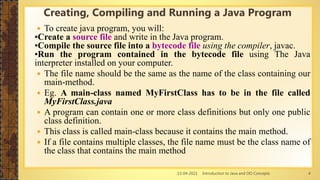
 To create java program, you will:
•Create a source file and write in the Java program.
•Compile the source file into a bytecode file using the compiler, javac.
•Run the program contained in the bytecode file using The Java
interpreter installed on your computer.
 The file name should be the same as the name of the class containing our
main-method.
 Eg. A main-class named MyFirstClass has to be in the file called
MyFirstClass.java
 A program can contain one or more class definitions but only one public
class definition.
 This class is called main-class because it contains the main method.
 If a file contains multiple classes, the file name must be the class name of
the class that contains the main method
13-04-2021 Introduction to Java and OO Concepts 5
 Open notepad and add the code as above.
 Save the file as: MyFirstJavaProgram.java.
 Open a command prompt window and go to the directory where you saved the
class. Assume it's C:.
Programming paradigms
public class MyFirstJavaProgram
{ public static void main(String []args)
{ System.out.println("Hello World");
}
}
C : > javac MyFirstJavaProgram.java
C : > java MyFirstJavaProgram
Hello World
13-04-2021 Introduction to Java and OO Concepts 6
About Java programs, it is very important to keep in mind the following points.
 Case Sensitivity -Java is case sensitive, which means identifier Hello and hello
would have different meaning in Java.
• Class Names - For all class names the first letter should be in Upper Case.
Example: class MyFirstJavaProgram
• Method Names - All method names should start with a Lower Case letter.
Example: public void myMethodName()
• Program File Name - Name of the program file should exactly match the class
name.
Example: Assume 'MyFirstJavaProgram' is the class name. Then the file should be
saved as 'MyFirstJavaProgram.java'
public static void main(String args[]) - Java program processing starts from the
main() method which is a mandatory part of every Java program.
13-04-2021 Introduction to Java and OO Concepts 7
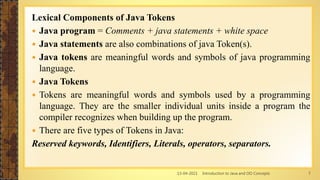
Lexical Components of Java Tokens
 Java program = Comments + java statements + white space
 Java statements are also combinations of java Token(s).
 Java tokens are meaningful words and symbols of java programming
language.
 Java Tokens
 Tokens are meaningful words and symbols used by a programming
language. They are the smaller individual units inside a program the
compiler recognizes when building up the program.
 There are five types of Tokens in Java:
Reserved keywords, Identifiers, Literals, operators, separators.
13-04-2021 Introduction to Java and OO Concepts 8
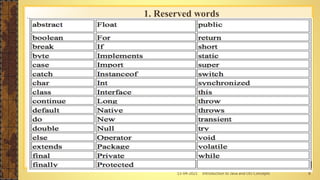
1. Reserved words
13-04-2021 Introduction to Java and OO Concepts 9
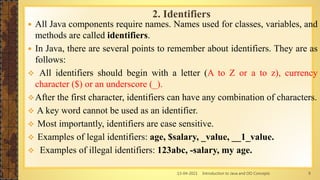
 All Java components require names. Names used for classes, variables, and
methods are called identifiers.
 In Java, there are several points to remember about identifiers. They are as
follows:
 All identifiers should begin with a letter (A to Z or a to z), currency
character ($) or an underscore (_).
After the first character, identifiers can have any combination of characters.
 A key word cannot be used as an identifier.
 Most importantly, identifiers are case sensitive.
 Examples of legal identifiers: age, $salary, _value, __1_value.
 Examples of illegal identifiers: 123abc, -salary, my age.
2. Identifiers
13-04-2021 Introduction to Java and OO Concepts 10
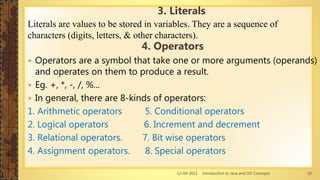
Literals are values to be stored in variables. They are a sequence of
characters (digits, letters, & other characters).
4. Operators
 Operators are a symbol that take one or more arguments (operands)
and operates on them to produce a result.
 Eg. +, *, -, /, %...
 In general, there are 8-kinds of operators:
1. Arithmetic operators 5. Conditional operators
2. Logical operators 6. Increment and decrement
3. Relational operators. 7. Bit wise operators
4. Assignment operators. 8. Special operators
3. Literals
13-04-2021 Introduction to Java and OO Concepts 11
 Separators are symbols used to indicate where groups of codes are
divided and arranged. They define the shape and function of our code.
Some of them are:
5. separators
Name Symbol
Parenthesis ( )
braces { }
brackets [ ]
semicolon ;
comma ,
period .
13-04-2021 Introduction to Java and OO Concepts 12
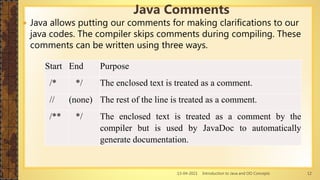
 Java allows putting our comments for making clarifications to our
java codes. The compiler skips comments during compiling. These
comments can be written using three ways.
Java Comments
Start End Purpose
/* */ The enclosed text is treated as a comment.
// (none) The rest of the line is treated as a comment.
/** */ The enclosed text is treated as a comment by the
compiler but is used by JavaDoc to automatically
generate documentation.
13-04-2021 Introduction to Java and OO Concepts 13
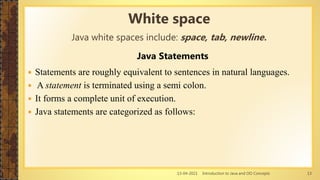
Java Statements
 Statements are roughly equivalent to sentences in natural languages.
 A statement is terminated using a semi colon.
 It forms a complete unit of execution.
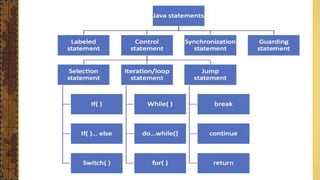
 Java statements are categorized as follows:
White space
Java white spaces include: space, tab, newline.
13-04-2021 Introduction to Java and OO Concepts 14
The basic concepts of OOP
13-04-2021 Introduction to Java and OO Concepts 15
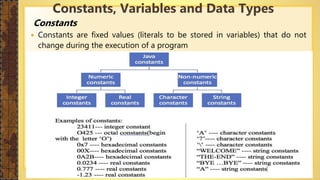
Constants
 Constants are fixed values (literals to be stored in variables) that do not
change during the execution of a program
Constants, Variables and Data Types
13-04-2021 Introduction to Java and OO Concepts 16
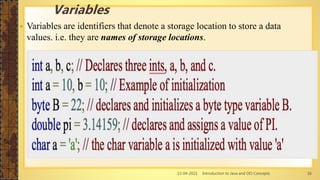
 Variables are identifiers that denote a storage location to store a data
values. i.e. they are names of storage locations.
Variables
13-04-2021 Introduction to Java and OO Concepts 17
 Data type means “item type to be stored in memory”.
 They are used to identify
 amount of memory size that should be assigned to a given data/item
 kinds of operations that could be made on the item.
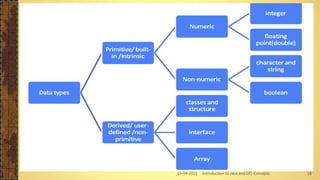
 Based on java programming language, data types are categorized as
primitive/built-in and derived/user-defined.
Data types
13-04-2021 Introduction to Java and OO Concepts 18
13-04-2021 Introduction to Java and OO Concepts 19
 An operator performs a function on one, two, or three
operands.
 An operator that requires one operand is called a unary
operator.
 The unary operators support either prefix or postfix notation.
 Prefix notation means that the operator appears before its
operand.
 Postfix notation means that the operator appears after its
operand
operator operand; //prefix notation operand
operand operator; //postfix notation
Operators
13-04-2021 Introduction to Java and OO Concepts 20
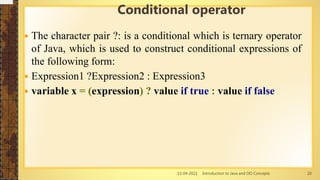
 The character pair ?: is a conditional which is ternary operator
of Java, which is used to construct conditional expressions of
the following form:
 Expression1 ?Expression2 : Expression3
 variable x = (expression) ? value if true : value if false
Conditional operator
13-04-2021 Introduction to Java and OO Concepts 21
public class Test {
public static void main(String args[])
{
int a , b;
a = 10;
b = (a == 1) ? 20: 30;
System.out.println( "Value of b is : " + b );
b = (a == 10) ? 20: 30;
System.out.println( "Value of b is : " + b );
}
}
Example of Conditional operator
Value of b is : 30
Value of b is : 20
13-04-2021 Introduction to Java and OO Concepts 22
 There are two types of decision making statements
in Java. They are:
 if statements
 switch statements
Java selection statements
13-04-2021 Introduction to Java and OO Concepts 23
if statements
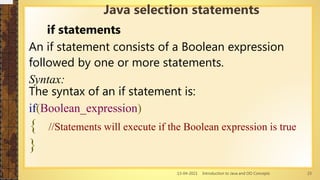
An if statement consists of a Boolean expression
followed by one or more statements.
Syntax:
The syntax of an if statement is:
if(Boolean_expression)
{ //Statements will execute if the Boolean expression is true
}
Java selection statements
13-04-2021 Introduction to Java and OO Concepts 24
Example of if statements
public class Test {
public static void main(String args[]){
int x = 10;
if( x < 20 ){
System.out.print("This is if statement");
} }}
Java selection statements
13-04-2021 Introduction to Java and OO Concepts 25
The if...else Statement:
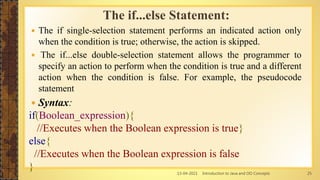
 The if single-selection statement performs an indicated action only
when the condition is true; otherwise, the action is skipped.
 The if...else double-selection statement allows the programmer to
specify an action to perform when the condition is true and a different
action when the condition is false. For example, the pseudocode
statement
 Syntax:
if(Boolean_expression){
//Executes when the Boolean expression is true}
else{
//Executes when the Boolean expression is false
}
13-04-2021 Introduction to Java and OO Concepts 26
public class Test {
public static void main(String
args[]){
Float grade;
if ( grade >= 60 )
{
System.out.println( "Passed" );
}
else
{
System.out.println( "Failed" );
}}}
Example of The if...else Statement:
public class Test {
public static void main(String args[]){
int x = 30;
if( x < 20 ){
System.out.print("This is if
statement");
}
else{
System.out.print("This is else
statement");
} }}
13-04-2021 Introduction to Java and OO Concepts 27
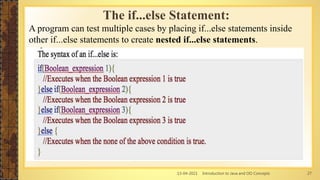
The if...else Statement:
A program can test multiple cases by placing if...else statements inside
other if...else statements to create nested if...else statements.
13-04-2021 Introduction to Java and OO Concepts 28
For example, the following
pseudocode represents a nested
if...else write java program
If student’s grade is greater than or
equal to 90 Print “A”
else
If student’s grade is greater than or
equal to 80
Print “B” else
If student’s grade is greater than or
equal to 70 Print “C”
else
If student’s grade is greater than or
equal to 60
Print “D” else
Print “F”
Example of if…else if…else
public class Test {
public static void main(String args[]){
int x = 30;
if( x == 10 ){
System.out.print("Value of X is 10");
}else if( x == 20 ){
System.out.print("Value of X is 20");
}
else if( x == 30 ){
System.out.print("Value of X is 30");
}
else{
System.out.print("This is else
statement");
} }}
Value of X is 30
13-04-2021 Introduction to Java and OO Concepts 29
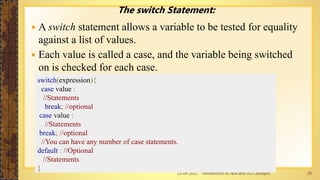
The switch Statement:
 A switch statement allows a variable to be tested for equality
against a list of values.
 Each value is called a case, and the variable being switched
on is checked for each case.
switch(expression){
case value :
//Statements
break; //optional
case value :
//Statements
break; //optional
//You can have any number of case statements.
default : //Optional
//Statements
}
13-04-2021 Introduction to Java and OO Concepts 30
public class Test {
public static void main(String args[]){
char grade = 'C';
switch(grade) {
case 'A' :
System.out.println("Excellent!");
break;
case 'B' :
case 'C' :
System.out.println("Well done");
break; case 'D' :
System.out.println("You passed");
case 'F' :
System.out.println("Better try again");
break; default :
System.out.println("Invalid grade");
System.out.println("Your grade is " + grade);
}}}
Well doneYour
grade is a C
Example of Switch program
Write a java switch program
that compute the 5 arithmetic
operator (+,-,*,/ and %)
13-04-2021 Introduction to Java and OO Concepts 31
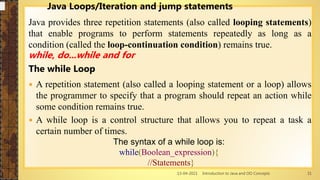
Java Loops/Iteration and jump statements
Java provides three repetition statements (also called looping statements)
that enable programs to perform statements repeatedly as long as a
condition (called the loop-continuation condition) remains true.
while, do...while and for
The while Loop
 A repetition statement (also called a looping statement or a loop) allows
the programmer to specify that a program should repeat an action while
some condition remains true.
 A while loop is a control structure that allows you to repeat a task a
certain number of times.
The syntax of a while loop is:
while(Boolean_expression){
//Statements}
13-04-2021 Introduction to Java and OO Concepts 32
public class Test {
public static void main(String args[]) {
int x = 10;
while( x < 20 ) {
System.out.print("value of x : " + x );
x++;
System.out.print("n");
} }}
Example of while loop
value of x : 10
value of x : 11
value of x : 12
value of x : 13
value of x : 14
value of x : 15
value of x : 16
value of x : 17
value of x : 18
value of x : 19
Write a program that display a number start from 0 to 10 using
while loop and revers order?
13-04-2021 Introduction to Java and OO Concepts 33
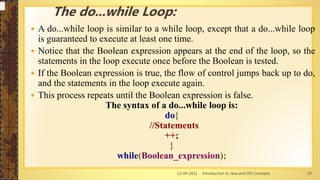
 A do...while loop is similar to a while loop, except that a do...while loop
is guaranteed to execute at least one time.
 Notice that the Boolean expression appears at the end of the loop, so the
statements in the loop execute once before the Boolean is tested.
 If the Boolean expression is true, the flow of control jumps back up to do,
and the statements in the loop execute again.
 This process repeats until the Boolean expression is false.
The syntax of a do...while loop is:
do{
//Statements
++;
}
while(Boolean_expression);
The do...while Loop:
13-04-2021 Introduction to Java and OO Concepts 34
Example of do… while loop
public class Test {
public static void main(String args[]){
int x = 10;
do{
System.out.print("value of x : " + x );
x++; System.out.print("n");
}while( x < 20 );
}
}
Write a program that display a number start from 0 to 10 using
do… while loop and revers order?
13-04-2021 Introduction to Java and OO Concepts 35
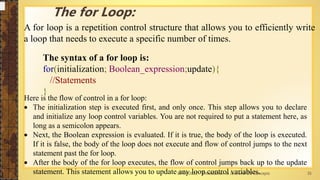
The for Loop:
A for loop is a repetition control structure that allows you to efficiently write
a loop that needs to execute a specific number of times.
The syntax of a for loop is:
for(initialization; Boolean_expression;update){
//Statements
}
Here is the flow of control in a for loop:
 The initialization step is executed first, and only once. This step allows you to declare
and initialize any loop control variables. You are not required to put a statement here, as
long as a semicolon appears.
 Next, the Boolean expression is evaluated. If it is true, the body of the loop is executed.
If it is false, the body of the loop does not execute and flow of control jumps to the next
statement past the for loop.
 After the body of the for loop executes, the flow of control jumps back up to the update
statement. This statement allows you to update any loop control variables.
13-04-2021 Introduction to Java and OO Concepts 36
Example of for loop
Write a program that display a number start from 0 to 10 using
do… while loop and revers order?
public class Test {
public static void main(String args[]) {
for(int x = 10; x < 20; x = x++) {
System.out.print("value of x : " + x );
System.out.print("n");
} }}
13-04-2021 Introduction to Java and OO Concepts 37
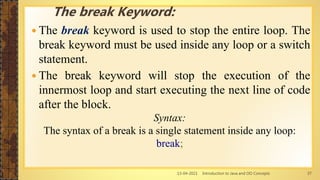
 The break keyword is used to stop the entire loop. The
break keyword must be used inside any loop or a switch
statement.
 The break keyword will stop the execution of the
innermost loop and start executing the next line of code
after the block.
Syntax:
The syntax of a break is a single statement inside any loop:
break;
The break Keyword:
13-04-2021 Introduction to Java and OO Concepts 38
public class Test {
public static void main(String args[]) {
int [] numbers = {10, 20, 30, 40, 50};
for(int x : numbers ) {
if( x == 30 ) {
break;
}
System.out.print( x );
System.out.print("n");
} }}
This would produce the following result:
10
20
13-04-2021 Introduction to Java and OO Concepts 39
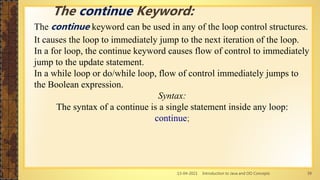
The continue keyword can be used in any of the loop control structures.
It causes the loop to immediately jump to the next iteration of the loop.
In a for loop, the continue keyword causes flow of control to immediately
jump to the update statement.
In a while loop or do/while loop, flow of control immediately jumps to
the Boolean expression.
Syntax:
The syntax of a continue is a single statement inside any loop:
continue;
The continue Keyword:
13-04-2021 Introduction to Java and OO Concepts 40
Example:
public class Test {
public static void main(String args[]) {
int [] numbers = {10, 20, 30, 40, 50};
for(int x : numbers ) {
if( x == 30 ) {
continue;
}
System.out.print( x );
System.out.print("n");
}
}
}
The continue Keyword:
13-04-2021 Introduction to Java and OO Concepts 41

Chapter 2

  • 1.
    Chapter 2 Basicsin Java Programming
  • 2.
    13-04-2021 Introduction toJava and OO Concepts 2 Outline of this chapter  Structure of java Program  Variable types and identifiers  Lexical Components of Java Tokens  Constants and Data Types  Overview of Java statements  if statement  switch statement  for loop  while, do…. while loop  break and continue Keywords
  • 3.
    13-04-2021 Introduction toJava and OO Concepts 3  Java is a pure object-oriented language, and hence everything is written within a class block. The structure of a java program is:   Structure of java Program [Documentation] --------- suggested [package statement] ------ optional [import statements] ------ optional [interface statements] ------ optional [class definitions] ------ optional [main-method class] ------ Essential
  • 4.
    13-04-2021 Introduction toJava and OO Concepts 4 Creating, Compiling and Running a Java Program  To create java program, you will: •Create a source file and write in the Java program. •Compile the source file into a bytecode file using the compiler, javac. •Run the program contained in the bytecode file using The Java interpreter installed on your computer.  The file name should be the same as the name of the class containing our main-method.  Eg. A main-class named MyFirstClass has to be in the file called MyFirstClass.java  A program can contain one or more class definitions but only one public class definition.  This class is called main-class because it contains the main method.  If a file contains multiple classes, the file name must be the class name of the class that contains the main method
  • 5.
    13-04-2021 Introduction toJava and OO Concepts 5  Open notepad and add the code as above.  Save the file as: MyFirstJavaProgram.java.  Open a command prompt window and go to the directory where you saved the class. Assume it's C:. Programming paradigms public class MyFirstJavaProgram { public static void main(String []args) { System.out.println("Hello World"); } } C : > javac MyFirstJavaProgram.java C : > java MyFirstJavaProgram Hello World
  • 6.
    13-04-2021 Introduction toJava and OO Concepts 6 About Java programs, it is very important to keep in mind the following points.  Case Sensitivity -Java is case sensitive, which means identifier Hello and hello would have different meaning in Java. • Class Names - For all class names the first letter should be in Upper Case. Example: class MyFirstJavaProgram • Method Names - All method names should start with a Lower Case letter. Example: public void myMethodName() • Program File Name - Name of the program file should exactly match the class name. Example: Assume 'MyFirstJavaProgram' is the class name. Then the file should be saved as 'MyFirstJavaProgram.java' public static void main(String args[]) - Java program processing starts from the main() method which is a mandatory part of every Java program.
  • 7.
    13-04-2021 Introduction toJava and OO Concepts 7 Lexical Components of Java Tokens  Java program = Comments + java statements + white space  Java statements are also combinations of java Token(s).  Java tokens are meaningful words and symbols of java programming language.  Java Tokens  Tokens are meaningful words and symbols used by a programming language. They are the smaller individual units inside a program the compiler recognizes when building up the program.  There are five types of Tokens in Java: Reserved keywords, Identifiers, Literals, operators, separators.
  • 8.
    13-04-2021 Introduction toJava and OO Concepts 8 1. Reserved words
  • 9.
    13-04-2021 Introduction toJava and OO Concepts 9  All Java components require names. Names used for classes, variables, and methods are called identifiers.  In Java, there are several points to remember about identifiers. They are as follows:  All identifiers should begin with a letter (A to Z or a to z), currency character ($) or an underscore (_). After the first character, identifiers can have any combination of characters.  A key word cannot be used as an identifier.  Most importantly, identifiers are case sensitive.  Examples of legal identifiers: age, $salary, _value, __1_value.  Examples of illegal identifiers: 123abc, -salary, my age. 2. Identifiers
  • 10.
    13-04-2021 Introduction toJava and OO Concepts 10 Literals are values to be stored in variables. They are a sequence of characters (digits, letters, & other characters). 4. Operators  Operators are a symbol that take one or more arguments (operands) and operates on them to produce a result.  Eg. +, *, -, /, %...  In general, there are 8-kinds of operators: 1. Arithmetic operators 5. Conditional operators 2. Logical operators 6. Increment and decrement 3. Relational operators. 7. Bit wise operators 4. Assignment operators. 8. Special operators 3. Literals
  • 11.
    13-04-2021 Introduction toJava and OO Concepts 11  Separators are symbols used to indicate where groups of codes are divided and arranged. They define the shape and function of our code. Some of them are: 5. separators Name Symbol Parenthesis ( ) braces { } brackets [ ] semicolon ; comma , period .
  • 12.
    13-04-2021 Introduction toJava and OO Concepts 12  Java allows putting our comments for making clarifications to our java codes. The compiler skips comments during compiling. These comments can be written using three ways. Java Comments Start End Purpose /* */ The enclosed text is treated as a comment. // (none) The rest of the line is treated as a comment. /** */ The enclosed text is treated as a comment by the compiler but is used by JavaDoc to automatically generate documentation.
  • 13.
    13-04-2021 Introduction toJava and OO Concepts 13 Java Statements  Statements are roughly equivalent to sentences in natural languages.  A statement is terminated using a semi colon.  It forms a complete unit of execution.  Java statements are categorized as follows: White space Java white spaces include: space, tab, newline.
  • 14.
    13-04-2021 Introduction toJava and OO Concepts 14 The basic concepts of OOP
  • 15.
    13-04-2021 Introduction toJava and OO Concepts 15 Constants  Constants are fixed values (literals to be stored in variables) that do not change during the execution of a program Constants, Variables and Data Types
  • 16.
    13-04-2021 Introduction toJava and OO Concepts 16  Variables are identifiers that denote a storage location to store a data values. i.e. they are names of storage locations. Variables
  • 17.
    13-04-2021 Introduction toJava and OO Concepts 17  Data type means “item type to be stored in memory”.  They are used to identify  amount of memory size that should be assigned to a given data/item  kinds of operations that could be made on the item.  Based on java programming language, data types are categorized as primitive/built-in and derived/user-defined. Data types
  • 18.
    13-04-2021 Introduction toJava and OO Concepts 18
  • 19.
    13-04-2021 Introduction toJava and OO Concepts 19  An operator performs a function on one, two, or three operands.  An operator that requires one operand is called a unary operator.  The unary operators support either prefix or postfix notation.  Prefix notation means that the operator appears before its operand.  Postfix notation means that the operator appears after its operand operator operand; //prefix notation operand operand operator; //postfix notation Operators
  • 20.
    13-04-2021 Introduction toJava and OO Concepts 20  The character pair ?: is a conditional which is ternary operator of Java, which is used to construct conditional expressions of the following form:  Expression1 ?Expression2 : Expression3  variable x = (expression) ? value if true : value if false Conditional operator
  • 21.
    13-04-2021 Introduction toJava and OO Concepts 21 public class Test { public static void main(String args[]) { int a , b; a = 10; b = (a == 1) ? 20: 30; System.out.println( "Value of b is : " + b ); b = (a == 10) ? 20: 30; System.out.println( "Value of b is : " + b ); } } Example of Conditional operator Value of b is : 30 Value of b is : 20
  • 22.
    13-04-2021 Introduction toJava and OO Concepts 22  There are two types of decision making statements in Java. They are:  if statements  switch statements Java selection statements
  • 23.
    13-04-2021 Introduction toJava and OO Concepts 23 if statements An if statement consists of a Boolean expression followed by one or more statements. Syntax: The syntax of an if statement is: if(Boolean_expression) { //Statements will execute if the Boolean expression is true } Java selection statements
  • 24.
    13-04-2021 Introduction toJava and OO Concepts 24 Example of if statements public class Test { public static void main(String args[]){ int x = 10; if( x < 20 ){ System.out.print("This is if statement"); } }} Java selection statements
  • 25.
    13-04-2021 Introduction toJava and OO Concepts 25 The if...else Statement:  The if single-selection statement performs an indicated action only when the condition is true; otherwise, the action is skipped.  The if...else double-selection statement allows the programmer to specify an action to perform when the condition is true and a different action when the condition is false. For example, the pseudocode statement  Syntax: if(Boolean_expression){ //Executes when the Boolean expression is true} else{ //Executes when the Boolean expression is false }
  • 26.
    13-04-2021 Introduction toJava and OO Concepts 26 public class Test { public static void main(String args[]){ Float grade; if ( grade >= 60 ) { System.out.println( "Passed" ); } else { System.out.println( "Failed" ); }}} Example of The if...else Statement: public class Test { public static void main(String args[]){ int x = 30; if( x < 20 ){ System.out.print("This is if statement"); } else{ System.out.print("This is else statement"); } }}
  • 27.
    13-04-2021 Introduction toJava and OO Concepts 27 The if...else Statement: A program can test multiple cases by placing if...else statements inside other if...else statements to create nested if...else statements.
  • 28.
    13-04-2021 Introduction toJava and OO Concepts 28 For example, the following pseudocode represents a nested if...else write java program If student’s grade is greater than or equal to 90 Print “A” else If student’s grade is greater than or equal to 80 Print “B” else If student’s grade is greater than or equal to 70 Print “C” else If student’s grade is greater than or equal to 60 Print “D” else Print “F” Example of if…else if…else public class Test { public static void main(String args[]){ int x = 30; if( x == 10 ){ System.out.print("Value of X is 10"); }else if( x == 20 ){ System.out.print("Value of X is 20"); } else if( x == 30 ){ System.out.print("Value of X is 30"); } else{ System.out.print("This is else statement"); } }} Value of X is 30
  • 29.
    13-04-2021 Introduction toJava and OO Concepts 29 The switch Statement:  A switch statement allows a variable to be tested for equality against a list of values.  Each value is called a case, and the variable being switched on is checked for each case. switch(expression){ case value : //Statements break; //optional case value : //Statements break; //optional //You can have any number of case statements. default : //Optional //Statements }
  • 30.
    13-04-2021 Introduction toJava and OO Concepts 30 public class Test { public static void main(String args[]){ char grade = 'C'; switch(grade) { case 'A' : System.out.println("Excellent!"); break; case 'B' : case 'C' : System.out.println("Well done"); break; case 'D' : System.out.println("You passed"); case 'F' : System.out.println("Better try again"); break; default : System.out.println("Invalid grade"); System.out.println("Your grade is " + grade); }}} Well doneYour grade is a C Example of Switch program Write a java switch program that compute the 5 arithmetic operator (+,-,*,/ and %)
  • 31.
    13-04-2021 Introduction toJava and OO Concepts 31 Java Loops/Iteration and jump statements Java provides three repetition statements (also called looping statements) that enable programs to perform statements repeatedly as long as a condition (called the loop-continuation condition) remains true. while, do...while and for The while Loop  A repetition statement (also called a looping statement or a loop) allows the programmer to specify that a program should repeat an action while some condition remains true.  A while loop is a control structure that allows you to repeat a task a certain number of times. The syntax of a while loop is: while(Boolean_expression){ //Statements}
  • 32.
    13-04-2021 Introduction toJava and OO Concepts 32 public class Test { public static void main(String args[]) { int x = 10; while( x < 20 ) { System.out.print("value of x : " + x ); x++; System.out.print("n"); } }} Example of while loop value of x : 10 value of x : 11 value of x : 12 value of x : 13 value of x : 14 value of x : 15 value of x : 16 value of x : 17 value of x : 18 value of x : 19 Write a program that display a number start from 0 to 10 using while loop and revers order?
  • 33.
    13-04-2021 Introduction toJava and OO Concepts 33  A do...while loop is similar to a while loop, except that a do...while loop is guaranteed to execute at least one time.  Notice that the Boolean expression appears at the end of the loop, so the statements in the loop execute once before the Boolean is tested.  If the Boolean expression is true, the flow of control jumps back up to do, and the statements in the loop execute again.  This process repeats until the Boolean expression is false. The syntax of a do...while loop is: do{ //Statements ++; } while(Boolean_expression); The do...while Loop:
  • 34.
    13-04-2021 Introduction toJava and OO Concepts 34 Example of do… while loop public class Test { public static void main(String args[]){ int x = 10; do{ System.out.print("value of x : " + x ); x++; System.out.print("n"); }while( x < 20 ); } } Write a program that display a number start from 0 to 10 using do… while loop and revers order?
  • 35.
    13-04-2021 Introduction toJava and OO Concepts 35 The for Loop: A for loop is a repetition control structure that allows you to efficiently write a loop that needs to execute a specific number of times. The syntax of a for loop is: for(initialization; Boolean_expression;update){ //Statements } Here is the flow of control in a for loop:  The initialization step is executed first, and only once. This step allows you to declare and initialize any loop control variables. You are not required to put a statement here, as long as a semicolon appears.  Next, the Boolean expression is evaluated. If it is true, the body of the loop is executed. If it is false, the body of the loop does not execute and flow of control jumps to the next statement past the for loop.  After the body of the for loop executes, the flow of control jumps back up to the update statement. This statement allows you to update any loop control variables.
  • 36.
    13-04-2021 Introduction toJava and OO Concepts 36 Example of for loop Write a program that display a number start from 0 to 10 using do… while loop and revers order? public class Test { public static void main(String args[]) { for(int x = 10; x < 20; x = x++) { System.out.print("value of x : " + x ); System.out.print("n"); } }}
  • 37.
    13-04-2021 Introduction toJava and OO Concepts 37  The break keyword is used to stop the entire loop. The break keyword must be used inside any loop or a switch statement.  The break keyword will stop the execution of the innermost loop and start executing the next line of code after the block. Syntax: The syntax of a break is a single statement inside any loop: break; The break Keyword:
  • 38.
    13-04-2021 Introduction toJava and OO Concepts 38 public class Test { public static void main(String args[]) { int [] numbers = {10, 20, 30, 40, 50}; for(int x : numbers ) { if( x == 30 ) { break; } System.out.print( x ); System.out.print("n"); } }} This would produce the following result: 10 20
  • 39.
    13-04-2021 Introduction toJava and OO Concepts 39 The continue keyword can be used in any of the loop control structures. It causes the loop to immediately jump to the next iteration of the loop. In a for loop, the continue keyword causes flow of control to immediately jump to the update statement. In a while loop or do/while loop, flow of control immediately jumps to the Boolean expression. Syntax: The syntax of a continue is a single statement inside any loop: continue; The continue Keyword:
  • 40.
    13-04-2021 Introduction toJava and OO Concepts 40 Example: public class Test { public static void main(String args[]) { int [] numbers = {10, 20, 30, 40, 50}; for(int x : numbers ) { if( x == 30 ) { continue; } System.out.print( x ); System.out.print("n"); } } } The continue Keyword:
  • 41.
    13-04-2021 Introduction toJava and OO Concepts 41