What is Software?
Softwareis a set of instructions (called programs) that tells the computer what to do.
🔹 Hardware is the physical part (like CPU, keyboard).
🔹 Software is the invisible part – the programs that run on hardware.
Examples of software:
● WhatsApp
● Microsoft Word
● YouTube App
● Operating Systems (like Windows, Android)
4.
What is SoftwareEngineering?
Software Engineering is the method of building software in a systematic, well-planned, and error-free
way.
🔹 It follows step-by-step rules.
🔹 It makes software faster, cheaper, and more reliable.
🔹 It helps manage big team projects.
5.
If I askyou to build an app like Zomato, where will you start? Coding?
Testing? Logo design?
6.
What is SDLC?
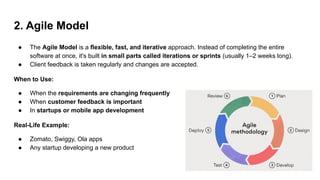
●The Software Development Life Cycle (SDLC) is a step-by-step framework used to develop
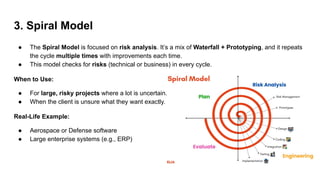
software in an organized way.
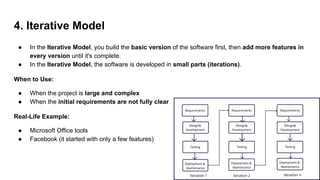
● It helps software teams to plan, design, build, test, and maintain high-quality software.
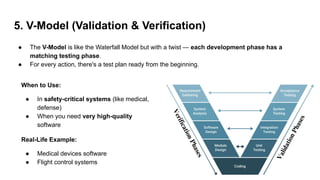
✅ Why do we need SDLC?
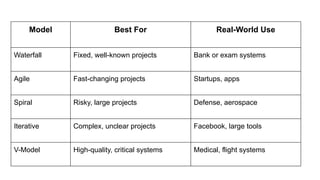
● It ensures that the software is developed correctly, with clear goals and customer needs in
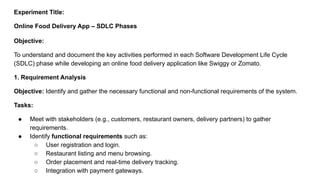
mind.
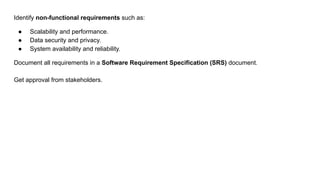
● It helps complete the project on time, within budget, and with good quality.
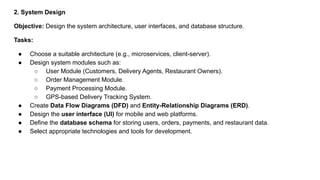
● Every phase of development is carefully planned and executed, so teams don’t miss important
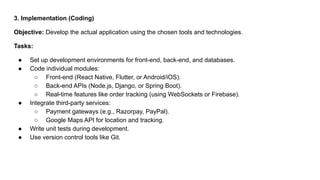
steps.
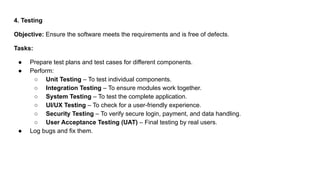
7.
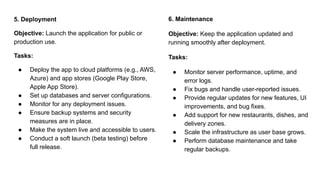
International Standard forSDLC
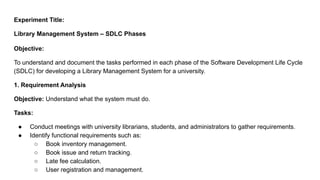
ISO/IEC 12207
● ISO/IEC 12207 is a global standard that defines all the important activities required to
develop and maintain software.
● It tells companies what steps to follow to make sure their software meets international quality
standards.
SEPT (Software Engineering Process Technology Company)
● SEPT is a company that helps software teams follow the right standards for software
development.
● They help the software industry understand and apply ISO/IEC 12207, especially when quality and
reliability are important.
8.
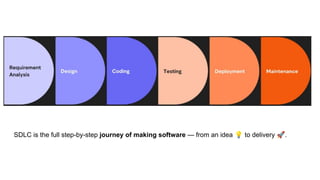
SDLC is thefull step-by-step journey of making software — from an idea 💡 to delivery 🚀.
9.
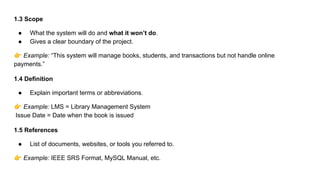
Phase 1: Planning& Requirement Analysis
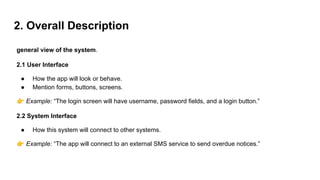
● It is the first and most important phase in the SDLC.
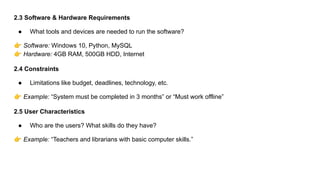
● This is where we find out what exactly the customer wants in the software.
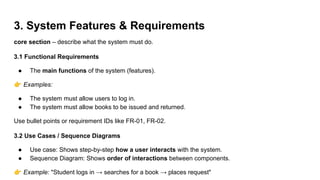
Who does it?
● Done by senior team members (Project Manager, Business Analyst)
● They take input from:
○ Stakeholders (clients, users, management)
○ SMEs (Subject Matter Experts) or Domain Experts (people who understand the
business/industry)
10.
What happens inthis phase?
1. Planning for the project starts.
2. The team understands:
○ What needs to be built
○ Why it is needed
○ What challenges might come
3. The team also plans:
○ How to ensure quality
○ How to handle risks
11.
Types of Requirements
1.Business Requirements
These are the high-level goals of the business.
Example: "The company wants an online system to manage student attendance."
2. Stakeholder Requirements
These are needs from the point of view of people involved, like customers, users, or the admin.
Example: "The admin should be able to add or remove student data."
12.
3. Solution Requirements
Theseare technical details of how the software will work.
a. Functional Requirements
What the software should do.
Example: "Students should be able to log in and view their attendance."
b. Non-Functional Requirements
How the software should perform — related to speed, security, usability, etc.
Example: "The system should load in less than 3 seconds."
4. Transition Requirements
These are requirements needed when moving from an old system to a new one.
Example: "All previous attendance data should be imported into the new system."
13.
Phase 2: DefiningRequirements
What Happens After Requirement Analysis?
Once you’ve collected and understood the requirements, the next step is to define them clearly and
properly document them so that the development team knows exactly what to build.
What is an SRS Document?
● SRS stands for Software Requirement Specification.
● It is a written agreement between the development team and the client that clearly states all
the features and functions the software will have.a
14.
Phase 3: Designingthe Software
What is Software Design?
● Software design means planning how the system will work technically, before we start
coding.
● It acts like a blueprint for developers — just like an architect creates a blueprint before building
a house.
From SRS to DDS
● Once the SRS (Software Requirement Specification) is ready, the next step is to convert those
requirements into a design.
● This is done by preparing a document called DDS (Design Document Specification).
15.
What does DDSinclude?
● Design architecture (how different modules or components of the system will interact)
● Database design
● User interface layout
● Technology stack (what tools, languages, frameworks will be used)
● System flow diagrams or UML diagrams (like class diagram, DFD, etc.)
16.
Phase 4: Developingthe Software
● This is the stage where the actual coding begins.
● All the planning, requirement gathering, and design work comes to life — the developers write
the program based on the DDS (Design Document Specification).
What do developers do here?
● They write source code using the programming language(s) decided in the design.
● The code is built exactly as per the design, step-by-step.
● Developers may work in teams (front-end, back-end, database, etc.).
17.
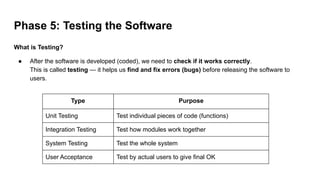
Phase 5: Testingthe Software
What is Testing?
● After the software is developed (coded), we need to check if it works correctly.
This is called testing — it helps us find and fix errors (bugs) before releasing the software to
users.
Type Purpose
Unit Testing Test individual pieces of code (functions)
Integration Testing Test how modules work together
System Testing Test the whole system
User Acceptance Test by actual users to give final OK
18.
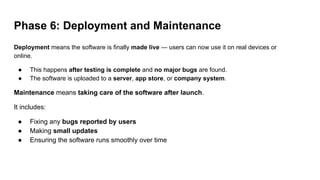
Phase 6: Deploymentand Maintenance
Deployment means the software is finally made live — users can now use it on real devices or
online.
● This happens after testing is complete and no major bugs are found.
● The software is uploaded to a server, app store, or company system.
Maintenance means taking care of the software after launch.
It includes:
● Fixing any bugs reported by users
● Making small updates
● Ensuring the software runs smoothly over time
19.
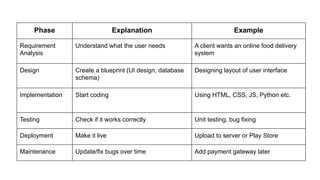
Phase Explanation Example
Requirement
Analysis
Understandwhat the user needs A client wants an online food delivery
system
Design Create a blueprint (UI design, database
schema)
Designing layout of user interface
Implementation Start coding Using HTML, CSS, JS, Python etc.
Testing Check if it works correctly Unit testing, bug fixing
Deployment Make it live Upload to server or Play Store
Maintenance Update/fix bugs over time Add payment gateway later
20.
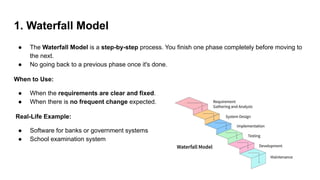
1. Waterfall Model
●The Waterfall Model is a step-by-step process. You finish one phase completely before moving to
the next.
● No going back to a previous phase once it's done.
When to Use:
● When the requirements are clear and fixed.
● When there is no frequent change expected.
Real-Life Example:
● Software for banks or government systems
● School examination system
21.
2. Agile Model
●The Agile Model is a flexible, fast, and iterative approach. Instead of completing the entire
software at once, it's built in small parts called iterations or sprints (usually 1–2 weeks long).
● Client feedback is taken regularly and changes are accepted.
When to Use:
● When the requirements are changing frequently
● When customer feedback is important
● In startups or mobile app development
Real-Life Example:
● Zomato, Swiggy, Ola apps
● Any startup developing a new product
22.
3. Spiral Model
●The Spiral Model is focused on risk analysis. It’s a mix of Waterfall + Prototyping, and it repeats
the cycle multiple times with improvements each time.
● This model checks for risks (technical or business) in every cycle.
When to Use:
● For large, risky projects where a lot is uncertain.
● When the client is unsure what they want exactly.
Real-Life Example:
● Aerospace or Defense software
● Large enterprise systems (e.g., ERP)
23.
4. Iterative Model
●In the Iterative Model, you build the basic version of the software first, then add more features in
every version until it's complete.
● In the Iterative Model, the software is developed in small parts (iterations).
When to Use:
● When the project is large and complex
● When the initial requirements are not fully clear
Real-Life Example:
● Microsoft Office tools
● Facebook (it started with only a few features)
24.
5. V-Model (Validation& Verification)
● The V-Model is like the Waterfall Model but with a twist — each development phase has a
matching testing phase.
● For every action, there's a test plan ready from the beginning.
When to Use:
● In safety-critical systems (like medical,
defense)
● When you need very high-quality
software
Real-Life Example:
● Medical devices software
● Flight control systems
25.
Model Best ForReal-World Use
Waterfall Fixed, well-known projects Bank or exam systems
Agile Fast-changing projects Startups, apps
Spiral Risky, large projects Defense, aerospace
Iterative Complex, unclear projects Facebook, large tools
V-Model High-quality, critical systems Medical, flight systems
26.
Experiment Title:
Online FoodDelivery App – SDLC Phases
Objective:
To understand and document the key activities performed in each Software Development Life Cycle
(SDLC) phase while developing an online food delivery application like Swiggy or Zomato.
1. Requirement Analysis
Objective: Identify and gather the necessary functional and non-functional requirements of the system.
Tasks:
● Meet with stakeholders (e.g., customers, restaurant owners, delivery partners) to gather
requirements.
● Identify functional requirements such as:
○ User registration and login.
○ Restaurant listing and menu browsing.
○ Order placement and real-time delivery tracking.
○ Integration with payment gateways.
27.
Identify non-functional requirementssuch as:
● Scalability and performance.
● Data security and privacy.
● System availability and reliability.
Document all requirements in a Software Requirement Specification (SRS) document.
Get approval from stakeholders.
28.
2. System Design
Objective:Design the system architecture, user interfaces, and database structure.
Tasks:
● Choose a suitable architecture (e.g., microservices, client-server).
● Design system modules such as:
○ User Module (Customers, Delivery Agents, Restaurant Owners).
○ Order Management Module.
○ Payment Processing Module.
○ GPS-based Delivery Tracking System.
● Create Data Flow Diagrams (DFD) and Entity-Relationship Diagrams (ERD).
● Design the user interface (UI) for mobile and web platforms.
● Define the database schema for storing users, orders, payments, and restaurant data.
● Select appropriate technologies and tools for development.
29.
3. Implementation (Coding)
Objective:Develop the actual application using the chosen tools and technologies.
Tasks:
● Set up development environments for front-end, back-end, and databases.
● Code individual modules:
○ Front-end (React Native, Flutter, or Android/iOS).
○ Back-end APIs (Node.js, Django, or Spring Boot).
○ Real-time features like order tracking (using WebSockets or Firebase).
● Integrate third-party services:
○ Payment gateways (e.g., Razorpay, PayPal).
○ Google Maps API for location and tracking.
● Write unit tests during development.
● Use version control tools like Git.
30.
4. Testing
Objective: Ensurethe software meets the requirements and is free of defects.
Tasks:
● Prepare test plans and test cases for different components.
● Perform:
○ Unit Testing – To test individual components.
○ Integration Testing – To ensure modules work together.
○ System Testing – To test the complete application.
○ UI/UX Testing – To check for a user-friendly experience.
○ Security Testing – To verify secure login, payment, and data handling.
○ User Acceptance Testing (UAT) – Final testing by real users.
● Log bugs and fix them.
31.
5. Deployment
Objective: Launchthe application for public or
production use.
Tasks:
● Deploy the app to cloud platforms (e.g., AWS,
Azure) and app stores (Google Play Store,
Apple App Store).
● Set up databases and server configurations.
● Monitor for any deployment issues.
● Ensure backup systems and security
measures are in place.
● Make the system live and accessible to users.
● Conduct a soft launch (beta testing) before
full release.
6. Maintenance
Objective: Keep the application updated and
running smoothly after deployment.
Tasks:
● Monitor server performance, uptime, and
error logs.
● Fix bugs and handle user-reported issues.
● Provide regular updates for new features, UI
improvements, and bug fixes.
● Add support for new restaurants, dishes, and
delivery zones.
● Scale the infrastructure as user base grows.
● Perform database maintenance and take
regular backups.
32.
Experiment Title:
Library ManagementSystem – SDLC Phases
Objective:
To understand and document the tasks performed in each phase of the Software Development Life Cycle
(SDLC) for developing a Library Management System for a university.
1. Requirement Analysis
Objective: Understand what the system must do.
Tasks:
● Conduct meetings with university librarians, students, and administrators to gather requirements.
● Identify functional requirements such as:
○ Book inventory management.
○ Book issue and return tracking.
○ Late fee calculation.
○ User registration and management.
33.
● Identify non-functionalrequirements such as:
○ System performance.
○ Security and access control.
○ Usability and reliability.
● Document the requirements in a Software Requirement Specification (SRS) document.
● Get approval from stakeholders on the final set of requirements.
2. System Design
Objective: Plan how the system will be built.
Tasks:
● Design the overall architecture of the system (e.g., client-server, web-based).
● Create Data Flow Diagrams (DFD) and Entity-Relationship Diagrams (ERD).
● Design the database schema for storing books, users, transactions, and fines.
● Define user interface (UI) layouts and navigation flow.
● Decide on the technology stack (e.g., programming languages, frameworks, database).
● Prepare detailed design documents for developers.
34.
3. Implementation (Coding)
Objective:Convert design into working software.
Tasks:
● Set up the development environment.
● Code modules such as:
○ Book catalog and search.
○ Book issue and return system.
○ Fine calculation system.
○ User registration and login.
● Implement backend logic and connect it with the database.
● Develop the front-end interface for users and administrators.
● Follow coding standards and practices.
● Conduct unit testing during development.
35.
4. Testing
Objective: Ensurethe system works as intended.
Tasks:
● Prepare test cases based on requirements.
● Perform different levels of testing:
○ Unit Testing – Test individual modules.
○ Integration Testing – Test data flow between modules.
○ System Testing – Test the entire application as a whole.
○ User Acceptance Testing (UAT) – Get feedback from real users.
● Identify and fix bugs.
● Validate that all requirements have been met.
36.
5. Deployment
Objective: Makethe system live and available for use.
Tasks:
● Set up the system on the university’s server or cloud platform.
● Configure the database and application.
● Perform final checks and optimizations.
● Train librarians and staff on using the system.
● Deploy the application for use by students and staff.
● Ensure proper data backup and security measures.
37.
6. Maintenance
Objective: Keepthe system running smoothly post-deployment.
Tasks:
● Monitor system performance and usage.
● Fix bugs and issues reported by users.
● Add new features as per evolving university needs.
● Perform regular system updates and security patches.
● Provide technical support to users.
● Take regular data backups and ensure system availability.
Today, we’ll learnhow to write clear requirements for any software. This is
called an SRS. It's the first step before designing or coding.
40.
What is SRS?
SRSstands for Software Requirements Specification. It is a document that tells:
● What the software will do (Functional)
● How it should behave (Behavior)
● What qualities it must have (Non-functional like speed, security)
“It’s not a casual note. It’s an official document reviewed by clients and approved before coding starts.”
41.
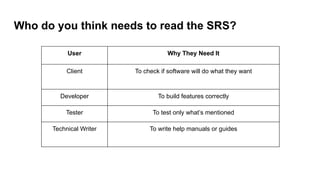
Who do youthink needs to read the SRS?
User Why They Need It
Client To check if software will do what they want
Developer To build features correctly
Tester To test only what’s mentioned
Technical Writer To write help manuals or guides
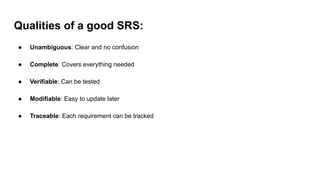
42.
Qualities of agood SRS:
● Unambiguous: Clear and no confusion
● Complete: Covers everything needed
● Verifiable: Can be tested
● Modifiable: Easy to update later
● Traceable: Each requirement can be tracked
43.
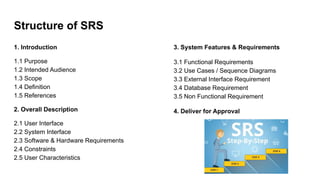
Structure of SRS
1.Introduction
1.1 Purpose
1.2 Intended Audience
1.3 Scope
1.4 Definition
1.5 References
2. Overall Description
2.1 User Interface
2.2 System Interface
2.3 Software & Hardware Requirements
2.4 Constraints
2.5 User Characteristics
3. System Features & Requirements
3.1 Functional Requirements
3.2 Use Cases / Sequence Diagrams
3.3 External Interface Requirement
3.4 Database Requirement
3.5 Non Functional Requirement
4. Deliver for Approval
44.
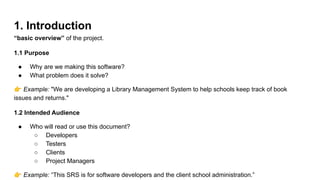
1. Introduction
“basic overview”of the project.
1.1 Purpose
● Why are we making this software?
● What problem does it solve?
👉 Example: "We are developing a Library Management System to help schools keep track of book
issues and returns."
1.2 Intended Audience
● Who will read or use this document?
○ Developers
○ Testers
○ Clients
○ Project Managers
👉 Example: “This SRS is for software developers and the client school administration.”
45.
1.3 Scope
● Whatthe system will do and what it won’t do.
● Gives a clear boundary of the project.
👉 Example: “This system will manage books, students, and transactions but not handle online
payments.”
1.4 Definition
● Explain important terms or abbreviations.
👉 Example: LMS = Library Management System
Issue Date = Date when the book is issued
1.5 References
● List of documents, websites, or tools you referred to.
👉 Example: IEEE SRS Format, MySQL Manual, etc.
46.
2. Overall Description
generalview of the system.
2.1 User Interface
● How the app will look or behave.
● Mention forms, buttons, screens.
👉 Example: “The login screen will have username, password fields, and a login button.”
2.2 System Interface
● How this system will connect to other systems.
👉 Example: “The app will connect to an external SMS service to send overdue notices.”
47.
2.3 Software &Hardware Requirements
● What tools and devices are needed to run the software?
👉 Software: Windows 10, Python, MySQL
👉 Hardware: 4GB RAM, 500GB HDD, Internet
2.4 Constraints
● Limitations like budget, deadlines, technology, etc.
👉 Example: “System must be completed in 3 months” or “Must work offline”
2.5 User Characteristics
● Who are the users? What skills do they have?
👉 Example: “Teachers and librarians with basic computer skills.”
48.
3. System Features& Requirements
core section – describe what the system must do.
3.1 Functional Requirements
● The main functions of the system (features).
👉 Examples:
● The system must allow users to log in.
● The system must allow books to be issued and returned.
Use bullet points or requirement IDs like FR-01, FR-02.
3.2 Use Cases / Sequence Diagrams
● Use case: Shows step-by-step how a user interacts with the system.
● Sequence Diagram: Shows order of interactions between components.
👉 Example: "Student logs in → searches for a book → places request"
49.
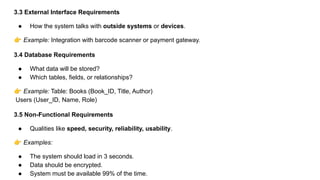
3.3 External InterfaceRequirements
● How the system talks with outside systems or devices.
👉 Example: Integration with barcode scanner or payment gateway.
3.4 Database Requirements
● What data will be stored?
● Which tables, fields, or relationships?
👉 Example: Table: Books (Book_ID, Title, Author)
Users (User_ID, Name, Role)
3.5 Non-Functional Requirements
● Qualities like speed, security, reliability, usability.
👉 Examples:
● The system should load in 3 seconds.
● Data should be encrypted.
● System must be available 99% of the time.
50.
4. Deliver forApproval
● This section is for signing off by the client or stakeholders.
● Final confirmation before starting development.
👉 Example: “Client signs to approve the document so developers can begin.”
51.
Activity
Write the SRSfor the “online library management system”.
Write the SRS for the “Online Attendance System”.

![SOFTWARE ENGINEERING SEM 4 [Read-Only] [Read-Only] (3).pptx](https://cdn.slidesharecdn.com/ss_thumbnails/softwareengineeringsem4read-onlyread-only3-251216044811-dd17b10d-thumbnail.jpg?width=640&height=640&fit=bounds)


