Introducing Structures
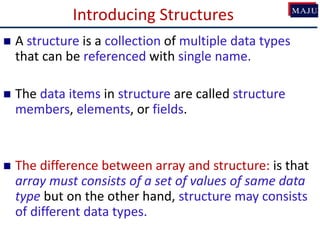
Astructure is a collection of multiple data types
that can be referenced with single name.
The data items in structure are called structure
members, elements, or fields.
The difference between array and structure: is that
array must consists of a set of values of same data
type but on the other hand, structure may consists
of different data types.
3.
Introducing Structures
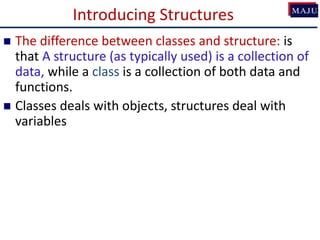
Thedifference between classes and structure: is
that A structure (as typically used) is a collection of
data, while a class is a collection of both data and
functions.
Classes deals with objects, structures deal with
variables
4.
Defining the Structure
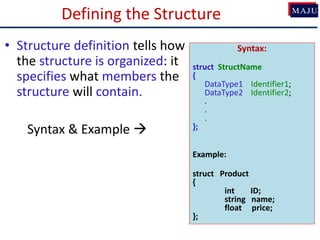
•Structure definition tells how
the structure is organized: it
specifies what members the
structure will contain.
Syntax & Example
Syntax:
struct StructName
{
DataType1 Identifier1;
DataType2 Identifier2;
.
.
.
};
Example:
struct Product
{
int ID;
string name;
float price;
};
Declaring a Structurevariable
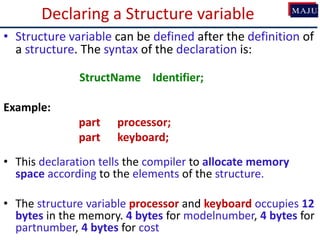
• Structure variable can be defined after the definition of
a structure. The syntax of the declaration is:
StructName Identifier;
Example:
part processor;
part keyboard;
• This declaration tells the compiler to allocate memory
space according to the elements of the structure.
• The structure variable processor and keyboard occupies 12
bytes in the memory. 4 bytes for modelnumber, 4 bytes for
partnumber, 4 bytes for cost
7.
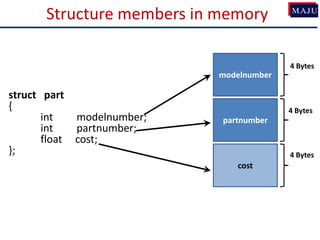
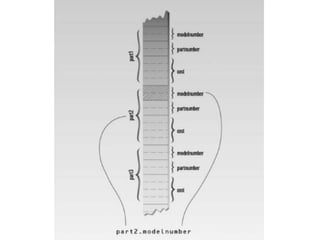
Structure members inmemory
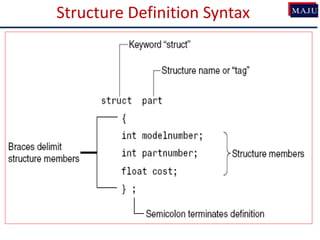
struct part
{
int modelnumber;
int partnumber;
float cost;
};
modelnumber
partnumber
cost
4 Bytes
4 Bytes
4 Bytes
8.
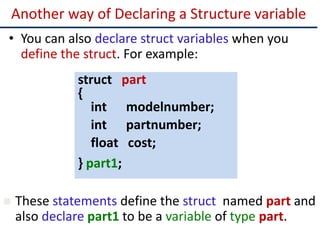
Another way ofDeclaring a Structure variable
• You can also declare struct variables when you
define the struct. For example:
struct part
{
int modelnumber;
int partnumber;
float cost;
} part1;
These statements define the struct named part and
also declare part1 to be a variable of type part.
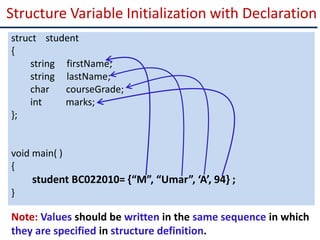
Structure Variable Initializationwith Declaration
Note: Values should be written in the same sequence in which
they are specified in structure definition.
struct student
{
string firstName;
string lastName;
char courseGrade;
int marks;
};
void main( )
{
student BC022010= {“M”, “Umar”, ‘A’, 94} ;
}
12.
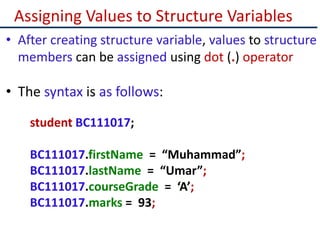
Assigning Values toStructure Variables
• After creating structure variable, values to structure
members can be assigned using dot (.) operator
• The syntax is as follows:
student BC111017;
BC111017.firstName = “Muhammad”;
BC111017.lastName = “Umar”;
BC111017.courseGrade = ‘A’;
BC111017.marks = 93;
13.
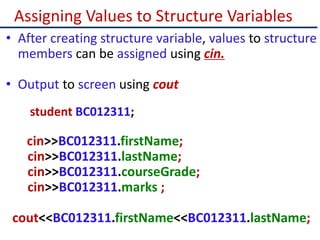
Assigning Values toStructure Variables
• After creating structure variable, values to structure
members can be assigned using cin.
• Output to screen using cout
student BC012311;
cin>>BC012311.firstName;
cin>>BC012311.lastName;
cin>>BC012311.courseGrade;
cin>>BC012311.marks ;
cout<<BC012311.firstName<<BC012311.lastName;
14.
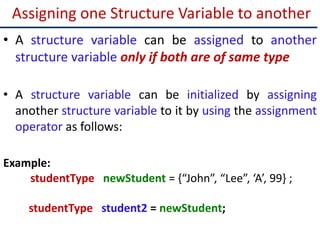
Assigning one StructureVariable to another
• A structure variable can be assigned to another
structure variable only if both are of same type
• A structure variable can be initialized by assigning
another structure variable to it by using the assignment
operator as follows:
Example:
studentType newStudent = {“John”, “Lee”, ‘A’, 99} ;
studentType student2 = newStudent;
15.
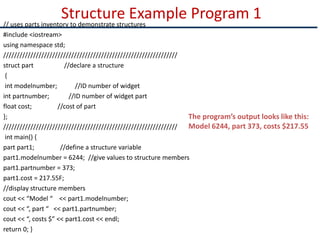
Structure Example Program1
// uses parts inventory to demonstrate structures
#include <iostream>
using namespace std;
////////////////////////////////////////////////////////////////
struct part //declare a structure
{
int modelnumber; //ID number of widget
int partnumber; //ID number of widget part
float cost; //cost of part
};
////////////////////////////////////////////////////////////////
int main() {
part part1; //define a structure variable
part1.modelnumber = 6244; //give values to structure members
part1.partnumber = 373;
part1.cost = 217.55F;
//display structure members
cout << “Model “ << part1.modelnumber;
cout << “, part “ << part1.partnumber;
cout << “, costs $” << part1.cost << endl;
return 0; }
The program’s output looks like this:
Model 6244, part 373, costs $217.55
16.
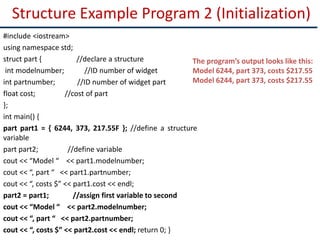
Structure Example Program2 (Initialization)
#include <iostream>
using namespace std;
struct part { //declare a structure
int modelnumber; //ID number of widget
int partnumber; //ID number of widget part
float cost; //cost of part
};
int main() {
part part1 = { 6244, 373, 217.55F }; //define a structure
variable
part part2; //define variable
cout << “Model “ << part1.modelnumber;
cout << “, part “ << part1.partnumber;
cout << “, costs $” << part1.cost << endl;
part2 = part1; //assign first variable to second
cout << “Model “ << part2.modelnumber;
cout << “, part “ << part2.partnumber;
cout << “, costs $” << part2.cost << endl; return 0; }
The program’s output looks like this:
Model 6244, part 373, costs $217.55
Model 6244, part 373, costs $217.55
18.
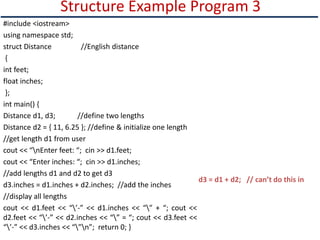
Structure Example Program3
#include <iostream>
using namespace std;
struct Distance //English distance
{
int feet;
float inches;
};
int main() {
Distance d1, d3; //define two lengths
Distance d2 = { 11, 6.25 }; //define & initialize one length
//get length d1 from user
cout << “nEnter feet: “; cin >> d1.feet;
cout << “Enter inches: “; cin >> d1.inches;
//add lengths d1 and d2 to get d3
d3.inches = d1.inches + d2.inches; //add the inches
//display all lengths
cout << d1.feet << “’-” << d1.inches << “” + “; cout <<
d2.feet << “’-” << d2.inches << “” = “; cout << d3.feet <<
“’-” << d3.inches << “”n”; return 0; }
d3 = d1 + d2; // can’t do this in
19.
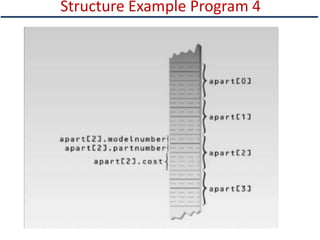
Array of Structures
•An array can also be created of user-defined type such as:
structure.
• An array of structure is a type of array in which each element
contains a complete structure.
struct Book
{
int ID;
int Pages;
float Price;
};
Book MAJULibrary[100]; // declaration of array of structures
MAJULibrary[0]
ID Pages Price
…
MAJULibrary[1]
ID Pages Price
MAJULibrary[99]
ID Pages Price
20.
Initialization of Arrayof Structures
struct Book
{
int ID;
int Pages;
float Price;
};
Book b[3]; // declaration of array of structures
• Initializing can be at the time of declaration
Book b[3] = {{1,275,70},{2,600,90},{3,786,100}};
• Or can be assigned values using cin:
cin>>b[0].ID ;
cin>>b[0].Pages;
cin>>b[0].Price;
21.
Array as Memberof Structures
• A structure may also contain arrays as members.
struct Student
{
int RollNo;
float Marks[3];
};
• Initialization can be done at time of declaration:
Student S = {1, {70.0, 90.0, 97.0} };
22.
Array as Memberof Structures
• Or it can be assigned values later in the program:
Student S;
S.RollNo = 1;
S.Marks[0] = 70.0;
S.Marks[1] = 90.0;
S.Marks[2] = 97.0;
• Or user can use cin to get input directly:
cin>>S.RollNo;
cin>>S.Marks[0];
cin>>S.Marks[1];
cin>>S.Marks[2];
23.
Structure Example Program4
#include <iostream>
using namespace std;
struct part {
int modelnumber;
int partnumber;
float cost; };
int main() {
part apart[4]; //define array of structures
for(int i=0; i<4; i++){//get values
cout << “Enter model number: “;
cin >> apart[i].modelnumber;
cout << “Enter part number: “;
cin >> apart[i].partnumber;
cout << “Enter cost: “;
cin >> apart[i].cost;
cout << endl; }
cout << endl;
for(int i=0; i<4; i++) //show values
{
cout << “Model “ << apart[i].modelnumbe
cout << “ Part “ << apart[i].partnumber;
cout << “ Cost “ << apart[i].cost << endl;
}
return 0; }
24.
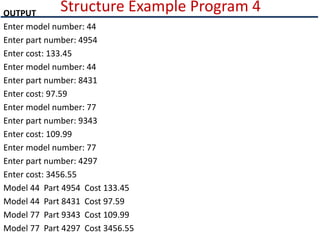
Structure Example Program4
OUTPUT
Enter model number: 44
Enter part number: 4954
Enter cost: 133.45
Enter model number: 44
Enter part number: 8431
Enter cost: 97.59
Enter model number: 77
Enter part number: 9343
Enter cost: 109.99
Enter model number: 77
Enter part number: 4297
Enter cost: 3456.55
Model 44 Part 4954 Cost 133.45
Model 44 Part 8431 Cost 97.59
Model 77 Part 9343 Cost 109.99
Model 77 Part 4297 Cost 3456.55
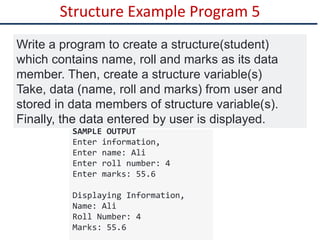
Structure Example Program5
Write a program to create a structure(student)
which contains name, roll and marks as its data
member. Then, create a structure variable(s)
Take, data (name, roll and marks) from user and
stored in data members of structure variable(s).
Finally, the data entered by user is displayed.
SAMPLE OUTPUT
Enter information,
Enter name: Ali
Enter roll number: 4
Enter marks: 55.6
Displaying Information,
Name: Ali
Roll Number: 4
Marks: 55.6
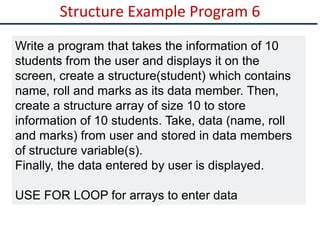
Structure Example Program6
Write a program that takes the information of 10
students from the user and displays it on the
screen, create a structure(student) which contains
name, roll and marks as its data member. Then,
create a structure array of size 10 to store
information of 10 students. Take, data (name, roll
and marks) from user and stored in data members
of structure variable(s).
Finally, the data entered by user is displayed.
USE FOR LOOP for arrays to enter data
29.
Structure Example Program6
#include <iostream>
using namespace std;
struct student
{
char name[50];
int roll;
float marks;
};
int main() {
student s[20];
cout << "Enter information of students: " << endl;
// storing information
for(int i = 0; i < 20; ++i){
cout << "Enter name: ";
cin >> s[i].name;
cout << "Enter Roll: ";
cin >> s[i].roll;
cout << "Enter marks: ";
cin >> s[i].marks;
cout << endl; }
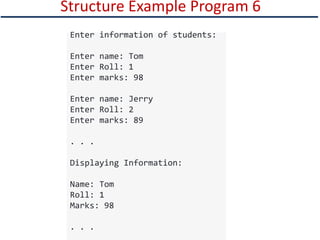
Structure Example Program6
Enter information of students:
Enter name: Tom
Enter Roll: 1
Enter marks: 98
Enter name: Jerry
Enter Roll: 2
Enter marks: 89
. . .
Displaying Information:
Name: Tom
Roll: 1
Marks: 98
. . .
32.
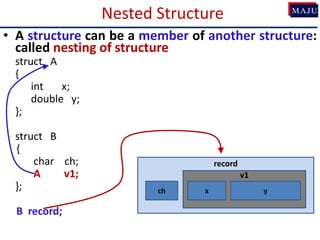
Nested Structure
• Astructure can be a member of another structure:
called nesting of structure
struct A
{
int x;
double y;
};
struct B
{
char ch;
A v1;
};
B record;
record
v1
x
ch y
33.
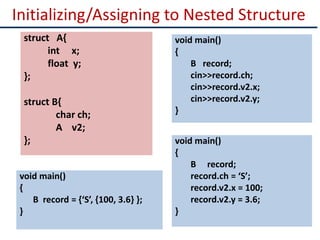
Initializing/Assigning to NestedStructure
struct A{
int x;
float y;
};
struct B{
char ch;
A v2;
};
void main()
{
B record;
cin>>record.ch;
cin>>record.v2.x;
cin>>record.v2.y;
}
void main()
{
B record = {‘S’, {100, 3.6} };
}
void main()
{
B record;
record.ch = ‘S’;
record.v2.x = 100;
record.v2.y = 3.6;
}
34.
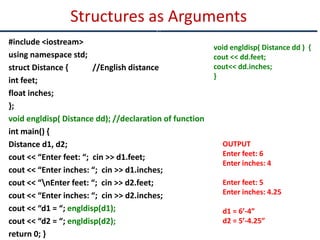
#include <iostream>
using namespacestd;
struct Distance { //English distance
int feet;
float inches;
};
void engldisp( Distance dd); //declaration of function
int main() {
Distance d1, d2;
cout << “Enter feet: “; cin >> d1.feet;
cout << “Enter inches: “; cin >> d1.inches;
cout << “nEnter feet: “; cin >> d2.feet;
cout << “Enter inches: “; cin >> d2.inches;
cout << “d1 = “; engldisp(d1);
cout << “d2 = “; engldisp(d2);
return 0; }
Structures as Arguments
c
void engldisp( Distance dd ) {
cout << dd.feet;
cout<< dd.inches;
}
OUTPUT
Enter feet: 6
Enter inches: 4
Enter feet: 5
Enter inches: 4.25
d1 = 6’-4”
d2 = 5’-4.25”
35.
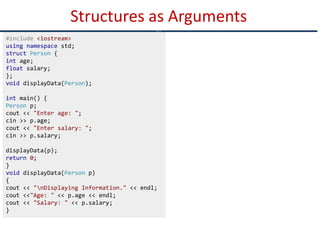
Structures as Arguments
c
#include<iostream>
using namespace std;
struct Person {
int age;
float salary;
};
void displayData(Person);
int main() {
Person p;
cout << "Enter age: ";
cin >> p.age;
cout << "Enter salary: ";
cin >> p.salary;
displayData(p);
return 0;
}
void displayData(Person p)
{
cout << "nDisplaying Information." << endl;
cout <<"Age: " << p.age << endl;
cout << "Salary: " << p.salary;
}
36.
Accessing Structures withPointers
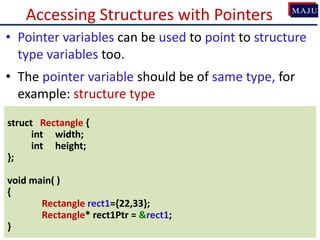
• Pointer variables can be used to point to structure
type variables too.
• The pointer variable should be of same type, for
example: structure type
struct Rectangle {
int width;
int height;
};
void main( )
{
Rectangle rect1={22,33};
Rectangle* rect1Ptr = &rect1;
}
37.
Accessing Structures withPointers
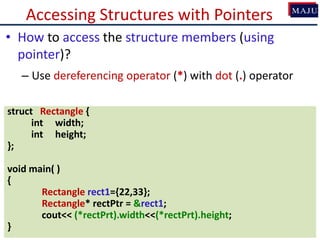
• How to access the structure members (using
pointer)?
– Use dereferencing operator (*) with dot (.) operator
struct Rectangle {
int width;
int height;
};
void main( )
{
Rectangle rect1={22,33};
Rectangle* rectPtr = &rect1;
cout<< (*rectPrt).width<<(*rectPrt).height;
}
38.
Accessing Structures withPointers
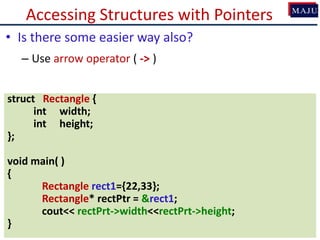
• Is there some easier way also?
– Use arrow operator ( -> )
struct Rectangle {
int width;
int height;
};
void main( )
{
Rectangle rect1={22,33};
Rectangle* rectPtr = &rect1;
cout<< rectPrt->width<<rectPrt->height;
}
39.
Class Exercises(1) –Find Errors
• Find errors:
struct
{
int x;
float y;
};
struct values
{
char name[20];
int age;
}
40.
Class Exercises(2) –Find Errors
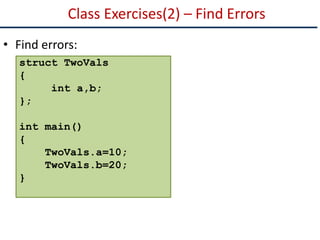
• Find errors:
struct TwoVals
{
int a,b;
};
int main()
{
TwoVals.a=10;
TwoVals.b=20;
}
41.
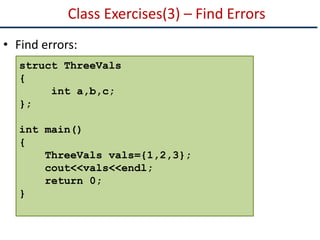
Class Exercises(3) –Find Errors
• Find errors:
struct ThreeVals
{
int a,b,c;
};
int main()
{
ThreeVals vals={1,2,3};
cout<<vals<<endl;
return 0;
}
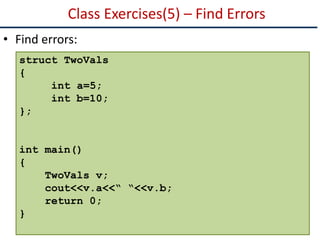
Class Exercises(5) –Find Errors
• Find errors:
struct TwoVals
{
int a=5;
int b=10;
};
int main()
{
TwoVals v;
cout<<v.a<<“ “<<v.b;
return 0;
}
44.
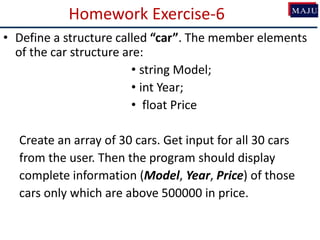
Homework Exercise-6
• Definea structure called “car”. The member elements
of the car structure are:
• string Model;
• int Year;
• float Price
Create an array of 30 cars. Get input for all 30 cars
from the user. Then the program should display
complete information (Model, Year, Price) of those
cars only which are above 500000 in price.
45.
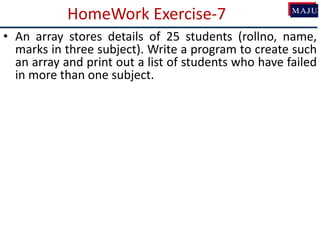
HomeWork Exercise-7
• Anarray stores details of 25 students (rollno, name,
marks in three subject). Write a program to create such
an array and print out a list of students who have failed
in more than one subject.
46.
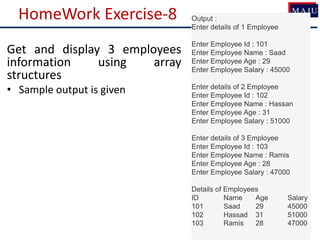
HomeWork Exercise-8 Output:
Enter details of 1 Employee
Enter Employee Id : 101
Enter Employee Name : Saad
Enter Employee Age : 29
Enter Employee Salary : 45000
Enter details of 2 Employee
Enter Employee Id : 102
Enter Employee Name : Hassan
Enter Employee Age : 31
Enter Employee Salary : 51000
Enter details of 3 Employee
Enter Employee Id : 103
Enter Employee Name : Ramis
Enter Employee Age : 28
Enter Employee Salary : 47000
Details of Employees
ID Name Age Salary
101 Saad 29 45000
102 Hassad 31 51000
103 Ramis 28 47000
Get and display 3 employees
information using array
structures
• Sample output is given
47.
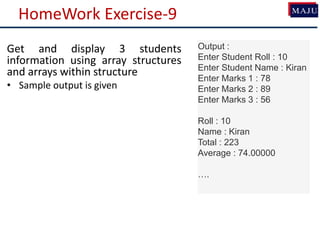
HomeWork Exercise-9
Get anddisplay 3 students
information using array structures
and arrays within structure
• Sample output is given
Output :
Enter Student Roll : 10
Enter Student Name : Kiran
Enter Marks 1 : 78
Enter Marks 2 : 89
Enter Marks 3 : 56
Roll : 10
Name : Kiran
Total : 223
Average : 74.00000
….

![Array of Structures
• An array can also be created of user-defined type such as:
structure.
• An array of structure is a type of array in which each element
contains a complete structure.
struct Book
{
int ID;
int Pages;
float Price;
};
Book MAJULibrary[100]; // declaration of array of structures
MAJULibrary[0]
ID Pages Price
…
MAJULibrary[1]
ID Pages Price
MAJULibrary[99]
ID Pages Price](https://image.slidesharecdn.com/12structures-231217085803-3545f129/85/12Structures-pptx-19-320.jpg)
![Initialization of Array of Structures
struct Book
{
int ID;
int Pages;
float Price;
};
Book b[3]; // declaration of array of structures
• Initializing can be at the time of declaration
Book b[3] = {{1,275,70},{2,600,90},{3,786,100}};
• Or can be assigned values using cin:
cin>>b[0].ID ;
cin>>b[0].Pages;
cin>>b[0].Price;](https://image.slidesharecdn.com/12structures-231217085803-3545f129/85/12Structures-pptx-20-320.jpg)
![Array as Member of Structures
• A structure may also contain arrays as members.
struct Student
{
int RollNo;
float Marks[3];
};
• Initialization can be done at time of declaration:
Student S = {1, {70.0, 90.0, 97.0} };](https://image.slidesharecdn.com/12structures-231217085803-3545f129/85/12Structures-pptx-21-320.jpg)
![Array as Member of Structures
• Or it can be assigned values later in the program:
Student S;
S.RollNo = 1;
S.Marks[0] = 70.0;
S.Marks[1] = 90.0;
S.Marks[2] = 97.0;
• Or user can use cin to get input directly:
cin>>S.RollNo;
cin>>S.Marks[0];
cin>>S.Marks[1];
cin>>S.Marks[2];](https://image.slidesharecdn.com/12structures-231217085803-3545f129/85/12Structures-pptx-22-320.jpg)
![Structure Example Program 4
#include <iostream>
using namespace std;
struct part {
int modelnumber;
int partnumber;
float cost; };
int main() {
part apart[4]; //define array of structures
for(int i=0; i<4; i++){//get values
cout << “Enter model number: “;
cin >> apart[i].modelnumber;
cout << “Enter part number: “;
cin >> apart[i].partnumber;
cout << “Enter cost: “;
cin >> apart[i].cost;
cout << endl; }
cout << endl;
for(int i=0; i<4; i++) //show values
{
cout << “Model “ << apart[i].modelnumbe
cout << “ Part “ << apart[i].partnumber;
cout << “ Cost “ << apart[i].cost << endl;
}
return 0; }](https://image.slidesharecdn.com/12structures-231217085803-3545f129/85/12Structures-pptx-23-320.jpg)
![Structure Example Program 5
#include <iostream>
using namespace std;
struct student
{
char name[50];
int roll;
float marks;
};
int main() {
student s;
cout << "Enter information," << endl;
cout << "Enter name: ";
cin >> s.name;
cout << "Enter roll number: ";
cin >> s.roll;
cout << "Enter marks: ";
cin >> s.marks;
cout << "nDisplaying Information," << endl;
cout << "Name: " << s.name << endl;
cout << "Roll: " << s.roll << endl;
cout << "Marks: " << s.marks << endl;](https://image.slidesharecdn.com/12structures-231217085803-3545f129/85/12Structures-pptx-27-320.jpg)
![Structure Example Program 6
#include <iostream>
using namespace std;
struct student
{
char name[50];
int roll;
float marks;
};
int main() {
student s[20];
cout << "Enter information of students: " << endl;
// storing information
for(int i = 0; i < 20; ++i){
cout << "Enter name: ";
cin >> s[i].name;
cout << "Enter Roll: ";
cin >> s[i].roll;
cout << "Enter marks: ";
cin >> s[i].marks;
cout << endl; }](https://image.slidesharecdn.com/12structures-231217085803-3545f129/85/12Structures-pptx-29-320.jpg)
![Structure Example Program 6
cout << "Displaying Information: " << endl;
// Displaying information
for(int i = 0; i < 20; ++i)
{
cout << "nRoll number: " << i+1 << endl;
cout << "Name: " << s[i].name << endl;
cout << "nRoll number: " << s[i].roll << endl;
cout << "Marks: " << s[i].marks << endl;
}
return 0;
}](https://image.slidesharecdn.com/12structures-231217085803-3545f129/85/12Structures-pptx-30-320.jpg)
![Class Exercises(1) – Find Errors
• Find errors:
struct
{
int x;
float y;
};
struct values
{
char name[20];
int age;
}](https://image.slidesharecdn.com/12structures-231217085803-3545f129/85/12Structures-pptx-39-320.jpg)
![Class Exercises(4) – Find Errors
• Find errors:
struct names
{
char first[20];
char last[20];
};
int main()
{
names customer = {“Muhammad”, “Ali”};
cout<<names.first<<endl;
cout<<names.last<<endl;
return 0;
}](https://image.slidesharecdn.com/12structures-231217085803-3545f129/85/12Structures-pptx-42-320.jpg)