Process Level Parallelism
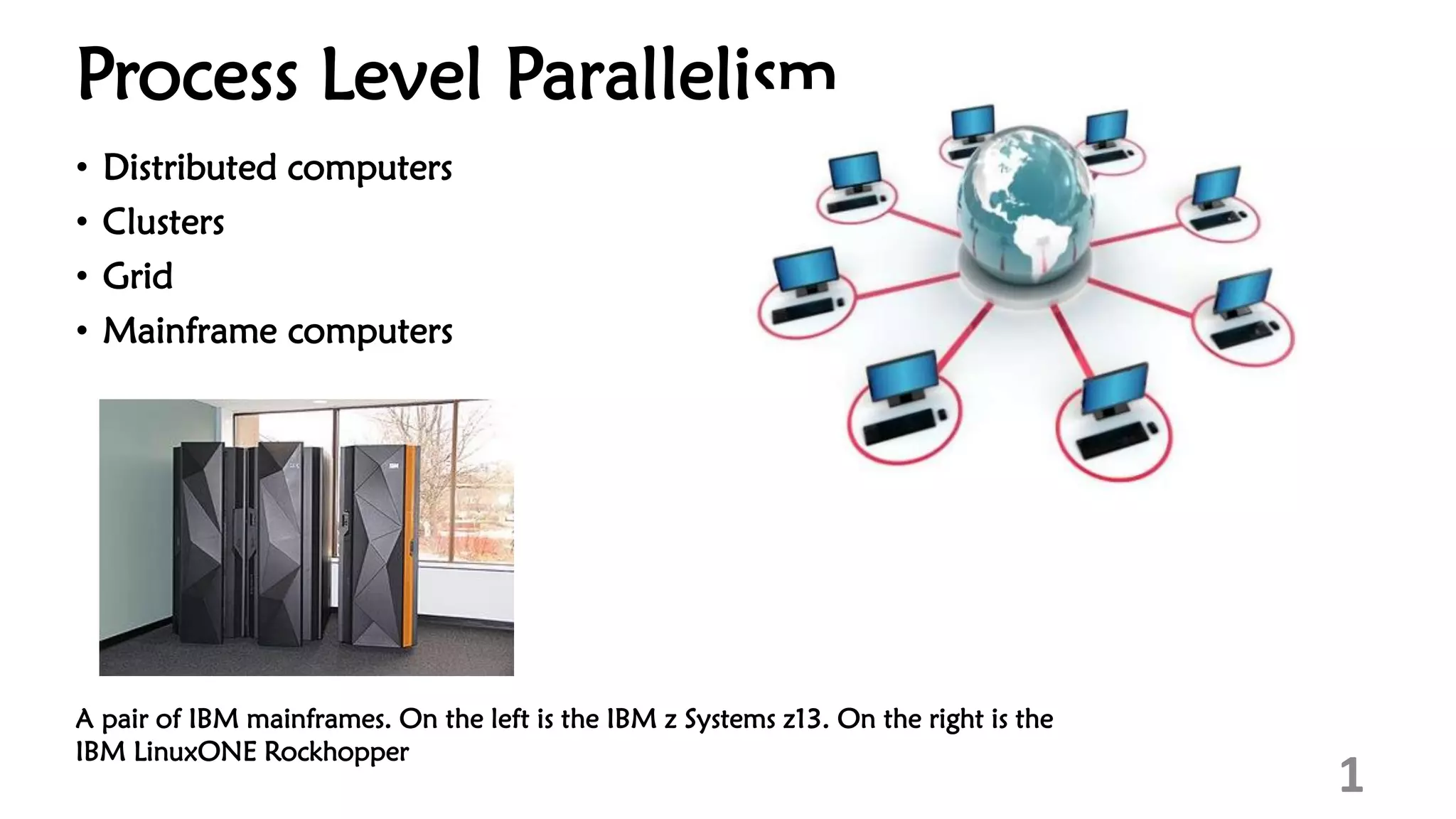
• Distributed computers
• Clusters
• Grid
• Mainframe computers
1
A pair of IBM mainframes. On the left is the IBM z Systems z13. On the right is the
IBM LinuxONE Rockhopper
Distributed computing
• A distributed computer (also known as a distributed memory multiprocessor)
is a distributed memory computer system in which the processing elements
are connected by a network
• Distributed computers are highly scalable
• The terms "concurrent computing", "parallel computing", and "distributed
computing" have a lot of overlap, and no clear distinction exists between
them
• The same system may be characterized both as "parallel" and "distributed";
• The processors in a typical distributed system run concurrently in parallel
2
Examples of distributed systems
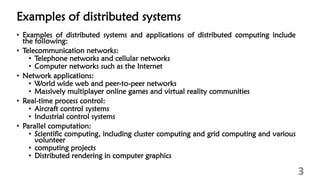
• Examples of distributed systems and applications of distributed computing include
the following:
• Telecommunication networks:
• Telephone networks and cellular networks
• Computer networks such as the Internet
• Network applications:
• World wide web and peer-to-peer networks
• Massively multiplayer online games and virtual reality communities
• Real-time process control:
• Aircraft control systems
• Industrial control systems
• Parallel computation:
• Scientific computing, including cluster computing and grid computing and various
volunteer
• computing projects
• Distributed rendering in computer graphics
3
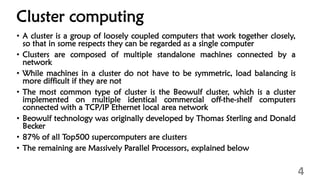
Cluster computing
• A cluster is a group of loosely coupled computers that work together closely,
so that in some respects they can be regarded as a single computer
• Clusters are composed of multiple standalone machines connected by a
network
• While machines in a cluster do not have to be symmetric, load balancing is
more difficult if they are not
• The most common type of cluster is the Beowulf cluster, which is a cluster
implemented on multiple identical commercial off-the-shelf computers
connected with a TCP/IP Ethernet local area network
• Beowulf technology was originally developed by Thomas Sterling and Donald
Becker
• 87% of all Top500 supercomputers are clusters
• The remaining are Massively Parallel Processors, explained below
4
Contd…
• Because grid computing systems (described below) can easily handle
embarrassingly parallel problems
• Modern clusters are typically designed to handle more difficult problems
• problems that require nodes to share intermediate results with each other
more often
• This requires a high bandwidth and, more importantly, a low-latency
interconnection network
• Many historic and current supercomputers use customized high-performance
network hardware specifically designed for cluster computing, such as the
Cray Gemini network
• As of 2014, most current supercomputers use some off-the-shelf standard
network hardware, often Myrinet, InfiniBand, or Gigabit Ethernet
5
Massively parallel computing
• Main article: Massively parallel (computing)
• A cabinet from IBM's Blue Gene/L massively parallel supercomputer
• A massively parallel processor (MPP) is a single computer with many
networked processors
• MPPs have many of the same characteristics as clusters, but MPPs have
specialized interconnect networks (whereas clusters use commodity hardware
for networking)
• MPPs also tend to be larger than clusters, typically having "far more" than 100
processors
• In an MPP
, "each CPU contains its own memory and copy of the operating
system and application
• Each subsystem communicates with the others via a high-speed interconnect
• IBM's Blue Gene/L, the fifth fastest supercomputer in the world according to
the June 2009 TOP500 ranking, is MPP 6
Grid computing
7
• Multiple independent computing clusters which act like a “grid” because they
are composed of resource nodes not located within a single administrative
domain
• The creation of a “virtual supercomputer” by using spare computing resources
within an organization
Grid computing
• Grid computing is the most distributed form of parallel computing
• It makes use of computers communicating over the Internet to work on a
given problem
• Because of the low bandwidth and extremely high latency available on the
Internet, distributed computing typically deals only with embarrassingly
parallel problems
• Many distributed computing applications have been created, of which
SETI@home and Folding@home are the best-known examples
• Most grid computing applications use middleware (software that sits between
the operating system and the application to manage network resources and
standardize the software interface)
• The most common distributed computing middleware is the Berkeley Open
Infrastructure for Network Computing (BOINC)
• Often, distributed computing software makes use of "spare cycles", performing
computations at times when a computer is idling
8
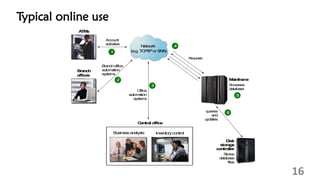
What is mainframe?
• Businesses use mainframes to host:
• commercial databases,
• transaction servers, and
• applications that require a greater degree of security and availability
• growing workload from Mobile and Cloud
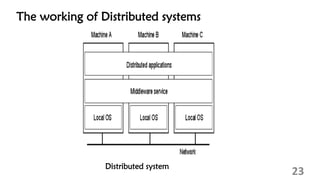
• A distributed system is one in which hardware or software components
located at networked computers communicate and coordinate their actions
only by message passing
• In the term distributed computing, the word distributed means spread out
across space
• Thus, distributed computing is an activity performed on a distributed system
• These networked computers may be in the same room, same campus, same
country, or in different country
9
Mainframe computer
• A mainframe computer, informally called a mainframe or big iron is a
computer used primarily by large organizations for critical applications, bulk
data processing (such as the census and industry and consumer statistics,
enterprise resource planning, and large-scale transaction processing)
• A mainframe computer is larger and has more processing power than some
other classes of computers, such as minicomputers, servers, workstations, and
personal computers
• Most large-scale computer-system architectures were established in the 1960s,
but they continue to evolve
• Mainframe computers are often used as servers
• The term mainframe derived from the large cabinet, called a main frame, that
houses the central processing unit and main memory of early computers Later,
the term mainframe was used to distinguish high-end commercial computers
from less powerful machines
10
Mainframe characteristics
• Centralized control of resources
• HW and operating systems share disk access
• A STYLE of operation -2 tier computing (logic and data on host)
• Thousands of simultaneous I/O operations
• Clustering technologies
• Data and resource sharing capabilities
11
The Size/Capacity of Mainframes
• A Sample Single System Configuration:
• 8 TPF (OS) Images
• Mainframe box with 12 CPUs (I-streams) and
• 32 GB of memory
• shared database of 2,500 Disks with 40 Disk control units
• 2 tape robots used primarily for logging
• Some configuration numbers for that configuration
• 2 million real I/Os per second to Disk during peak hours
• over 100,000 transactions per second during peak hours
• 3,380,000,000 (3.38 billion) transactions in 24 hours
• CPU capacity complex to execute over 68 billion instructions per second
(68,000 MIPS)
12
Availability
• An installation quote:
• "It has been 4,567 days since the last customer visible outage."
• It is now eight months later so the count is now
• over 13 years without a customer visible outage.
13
Mainframe facts
• Mainframes in our midst
• Hidden from the public eye – background servers
• Who uses mainframes?
• Most Fortune 1000 companies use a mainframe environment
• 60% of all data available on the Internet is stored on mainframe
computers
• Why mainframes?
• Large-scale transaction processing
• Thousands of transactions per second
• Support thousands of users and application programs
• Simultaneously accessing
• Terabytes of information in databases
• Large-bandwidth communications
14
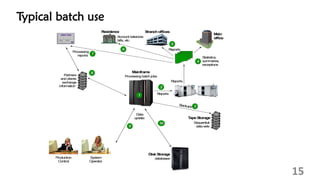
Typical batch use
15
DiskStorage
databases
T
apeStorage
Sequential
datasets
Partners
and clients
exchange
inform
ation
Reports
Backups
Data
update
Reports
Statistics,
sum
maries,
exceptions
Residence
M
ain
office
Branchoffices
Account balances
bills, etc
Processing
reports
M
ainfram
e
Processingbatchjobs
4
4
5
5
Reports
2
2
10
10
1
1
8
8
6
6
3
3
CREDITCARD
1234 5678 9012
1234 5678 9012
VA
LIDFROM GOO
DTHRU
XX/XX/XX XX/XX/XX
PA
ULFISCHER
XX/XX/XX XX/XX/XX
PA
ULFISCHER
7
7
9
9
System
Operator
Production
Control
Typical online use
16
D
isk
sto
rag
e
co
n
tro
ller
S
to
re
s
d
ata
b
ase
file
s
q
u
e
rie
s
a
n
d
u
p
d
ate
s
A
cco
u
n
t
a
ctivitie
s
O
ffice
a
u
to
m
a
tio
n
syste
m
s
M
ain
fram
e
A
cce
sse
s
d
a
tab
a
se
R
e
q
u
e
sts
A
T
M
s
B
ran
ch
o
ffices
B
usinessanalysts Inventorycontrol
B
ran
choffice
a
uto
m
a
tion
system
s
N
etw
ork
(e.g. T
C
P
/IPor S
N
A
)
5
5
6
6
3
3
2
2
4
4
1
1
C
en
tral o
ffice
To sum up
• The New Mainframe:
• Plays a central role in the daily operations of the world’s largest organizations
• Is known for its reliability, security, and enormous processing capabilities.
• Is designed for processing large scale workloads, with thousands of users, and
concurrent transactions
• Is managed by highly skilled technical support staff.
• Runs a variety of operating systems.
17
Design
• Modern mainframe design is characterized less by raw computational speed
and more by:
• Redundant internal engineering resulting in high reliability and security
• Extensive input-output ("I/O") facilities with the ability to offload to separate
engines Strict backward compatibility with older software
• High hardware and computational utilization rates through virtualization to
support massive throughput
• Hot-swapping of hardware, such as processors and memory
• Their high stability and reliability enable these machines to run uninterrupted
for very long periods of time, with mean time between failures (MTBF)
measured in decades.
18
Contd…
• Mainframes have high availability, one of the primary reasons for their
longevity, since they are typically used in applications where downtime
would be costly or catastrophic
• The term reliability, availability and serviceability (RAS) is a defining
characteristic of mainframe computers
• Proper planning and implementation are required to realize these features
• In addition, mainframes are more secure than other computer types:
• The NIST vulnerabilities database, US-CERT, rates traditional mainframes such
as IBM Z (previously called z Systems, System z and zSeries), Unisys Dorado
and Unisys Libra as among the most secure with vulnerabilities in the low
single digits as compared with thousands for Windows, UNIX, and Linux
19
Contd …
• Software upgrades usually require setting up the operating system or portions
thereof, and are non-disruptive only when using virtualizing facilities such as
IBM z/OS and Parallel Sysplex, or
• Unisys XPCL, which support workload sharing so that one system can take
over another's application while it is being refreshed
• In the late 1950s, mainframes had only a rudimentary interactive interface
(the console) and used sets of punched cards, paper tape, or magnetic tape to
transfer data and programs
• They operated in batch mode to support back office functions such as payroll
and customer billing, most of which were based on repeated tape-based
sorting and merging operations followed by line printing to preprinted
continuous stationery
• When interactive user terminals were introduced, they were used almost
exclusively for applications (e.g. airline booking) rather than program
development
20
Contd …
• Typewriter and Teletype devices were common control consoles for system
operators through the early 1970s, although ultimately supplanted by
keyboard/display devices
• By the early 1970s, many mainframes acquired interactive user terminals
operating as timesharing computers, supporting hundreds of users
simultaneously along with batch processing
• Users gained access through keyboard/typewriter terminals and specialized
text terminal CRT displays with integral keyboards, or later from personal
computers equipped with terminal emulation software
• By the 1980s, many mainframes supported graphic display terminals, and
terminal emulation, but not graphical user interfaces
• This form of end-user computing became obsolete in the 1990s due to the
advent of personal computers provided with GUIs
21
Contd …
• After 2000, modern mainframes partially or entirely phased out classic "green
screen" and color display terminal access for end-users in favour of Web-style
user interfaces
• The infrastructure requirements were drastically reduced during the mid-
1990s, when CMOS mainframe designs replaced the older bipolar technology
• IBM claimed that its newer mainframes reduced data center energy costs for
power and cooling, and reduced physical space requirements compared to
server farms
22
The working of Distributed systems
23
Distributed system
Differences from supercomputers
• A supercomputer is a computer at the leading edge of data processing
capability, with respect to calculation speed
• Supercomputers are used for scientific and engineering problems (high-
performance computing) which crunch numbers and data, while mainframes
focus on transaction processing
• The differences are:
• Mainframes are built to be reliable for transaction processing (measured by
TPC-metrics; not used or helpful for most supercomputing applications) as it is
commonly understood in the business world
• The commercial exchange of goods, services, or money
• Typical transaction, as defined by the Transaction Processing Performance
Council, updates a database system for inventory control (goods), airline
reservations (services), or banking (money) by adding a record
24
Contd …
• A transaction may refer to a set of operations including disk read/writes,
operating system calls, or some form of data transfer from one subsystem to
another which is not measured by the processing speed of the CPU
• Transaction processing is not exclusive to mainframes but is also used by
microprocessor-based servers and online networks
• Supercomputer performance is measured in floating point operations per
second (FLOPS) or in traversed edges per second or TEPS metrics that are not
very meaningful for mainframe applications, while mainframes are sometimes
measured in millions of instructions per second (MIPS), although the
definition depends on the instruction mix measured
• Examples of integer operations measured by MIPS include adding numbers
together, checking values or moving data around in memory (while moving
information to and from storage, so-called I/O is most helpful for
mainframes; and within memory, only helping indirectly)
25
Contd …
• Floating point operations are mostly addition, subtraction, and multiplication
(of binary floating point in supercomputers; measured by FLOPS) with
enough digits of precision to model continuous phenomena such as weather
prediction and nuclear simulations (only recently standardized decimal
floating point, not used in supercomputers, are appropriate for monetary
values such as those useful for mainframe applications)
• In terms of computational speed, supercomputers are more powerful
• Mainframes and supercomputers cannot always be clearly distinguished; up
until the early 1990s, many supercomputers were based on a mainframe
architecture with supercomputing extensions
• An example of such a system is the HITAC S-3800, which was instruction-set
compatible with IBM System/370 mainframes, and could run the Hitachi
VOS3 operating system (a fork of IBM MVS)
26
Contd …
• The S-3800 therefore can be seen as being both simultaneously a
supercomputer and also an IBM-compatible mainframe
• In 2007, an amalgamation of the different technologies and architectures for
supercomputers and mainframes has led to the so-called game frame
• Defining characteristics of main frames are
• Reliability
• Availability
• Serviceability
27

Chapter 5(2).pdf

  • 1.
    Process Level Parallelism •Distributed computers • Clusters • Grid • Mainframe computers 1 A pair of IBM mainframes. On the left is the IBM z Systems z13. On the right is the IBM LinuxONE Rockhopper
  • 2.
    Distributed computing • Adistributed computer (also known as a distributed memory multiprocessor) is a distributed memory computer system in which the processing elements are connected by a network • Distributed computers are highly scalable • The terms "concurrent computing", "parallel computing", and "distributed computing" have a lot of overlap, and no clear distinction exists between them • The same system may be characterized both as "parallel" and "distributed"; • The processors in a typical distributed system run concurrently in parallel 2
  • 3.
    Examples of distributedsystems • Examples of distributed systems and applications of distributed computing include the following: • Telecommunication networks: • Telephone networks and cellular networks • Computer networks such as the Internet • Network applications: • World wide web and peer-to-peer networks • Massively multiplayer online games and virtual reality communities • Real-time process control: • Aircraft control systems • Industrial control systems • Parallel computation: • Scientific computing, including cluster computing and grid computing and various volunteer • computing projects • Distributed rendering in computer graphics 3
  • 4.
    Cluster computing • Acluster is a group of loosely coupled computers that work together closely, so that in some respects they can be regarded as a single computer • Clusters are composed of multiple standalone machines connected by a network • While machines in a cluster do not have to be symmetric, load balancing is more difficult if they are not • The most common type of cluster is the Beowulf cluster, which is a cluster implemented on multiple identical commercial off-the-shelf computers connected with a TCP/IP Ethernet local area network • Beowulf technology was originally developed by Thomas Sterling and Donald Becker • 87% of all Top500 supercomputers are clusters • The remaining are Massively Parallel Processors, explained below 4
  • 5.
    Contd… • Because gridcomputing systems (described below) can easily handle embarrassingly parallel problems • Modern clusters are typically designed to handle more difficult problems • problems that require nodes to share intermediate results with each other more often • This requires a high bandwidth and, more importantly, a low-latency interconnection network • Many historic and current supercomputers use customized high-performance network hardware specifically designed for cluster computing, such as the Cray Gemini network • As of 2014, most current supercomputers use some off-the-shelf standard network hardware, often Myrinet, InfiniBand, or Gigabit Ethernet 5
  • 6.
    Massively parallel computing •Main article: Massively parallel (computing) • A cabinet from IBM's Blue Gene/L massively parallel supercomputer • A massively parallel processor (MPP) is a single computer with many networked processors • MPPs have many of the same characteristics as clusters, but MPPs have specialized interconnect networks (whereas clusters use commodity hardware for networking) • MPPs also tend to be larger than clusters, typically having "far more" than 100 processors • In an MPP , "each CPU contains its own memory and copy of the operating system and application • Each subsystem communicates with the others via a high-speed interconnect • IBM's Blue Gene/L, the fifth fastest supercomputer in the world according to the June 2009 TOP500 ranking, is MPP 6
  • 7.
    Grid computing 7 • Multipleindependent computing clusters which act like a “grid” because they are composed of resource nodes not located within a single administrative domain • The creation of a “virtual supercomputer” by using spare computing resources within an organization
  • 8.
    Grid computing • Gridcomputing is the most distributed form of parallel computing • It makes use of computers communicating over the Internet to work on a given problem • Because of the low bandwidth and extremely high latency available on the Internet, distributed computing typically deals only with embarrassingly parallel problems • Many distributed computing applications have been created, of which SETI@home and Folding@home are the best-known examples • Most grid computing applications use middleware (software that sits between the operating system and the application to manage network resources and standardize the software interface) • The most common distributed computing middleware is the Berkeley Open Infrastructure for Network Computing (BOINC) • Often, distributed computing software makes use of "spare cycles", performing computations at times when a computer is idling 8
  • 9.
    What is mainframe? •Businesses use mainframes to host: • commercial databases, • transaction servers, and • applications that require a greater degree of security and availability • growing workload from Mobile and Cloud • A distributed system is one in which hardware or software components located at networked computers communicate and coordinate their actions only by message passing • In the term distributed computing, the word distributed means spread out across space • Thus, distributed computing is an activity performed on a distributed system • These networked computers may be in the same room, same campus, same country, or in different country 9
  • 10.
    Mainframe computer • Amainframe computer, informally called a mainframe or big iron is a computer used primarily by large organizations for critical applications, bulk data processing (such as the census and industry and consumer statistics, enterprise resource planning, and large-scale transaction processing) • A mainframe computer is larger and has more processing power than some other classes of computers, such as minicomputers, servers, workstations, and personal computers • Most large-scale computer-system architectures were established in the 1960s, but they continue to evolve • Mainframe computers are often used as servers • The term mainframe derived from the large cabinet, called a main frame, that houses the central processing unit and main memory of early computers Later, the term mainframe was used to distinguish high-end commercial computers from less powerful machines 10
  • 11.
    Mainframe characteristics • Centralizedcontrol of resources • HW and operating systems share disk access • A STYLE of operation -2 tier computing (logic and data on host) • Thousands of simultaneous I/O operations • Clustering technologies • Data and resource sharing capabilities 11
  • 12.
    The Size/Capacity ofMainframes • A Sample Single System Configuration: • 8 TPF (OS) Images • Mainframe box with 12 CPUs (I-streams) and • 32 GB of memory • shared database of 2,500 Disks with 40 Disk control units • 2 tape robots used primarily for logging • Some configuration numbers for that configuration • 2 million real I/Os per second to Disk during peak hours • over 100,000 transactions per second during peak hours • 3,380,000,000 (3.38 billion) transactions in 24 hours • CPU capacity complex to execute over 68 billion instructions per second (68,000 MIPS) 12
  • 13.
    Availability • An installationquote: • "It has been 4,567 days since the last customer visible outage." • It is now eight months later so the count is now • over 13 years without a customer visible outage. 13
  • 14.
    Mainframe facts • Mainframesin our midst • Hidden from the public eye – background servers • Who uses mainframes? • Most Fortune 1000 companies use a mainframe environment • 60% of all data available on the Internet is stored on mainframe computers • Why mainframes? • Large-scale transaction processing • Thousands of transactions per second • Support thousands of users and application programs • Simultaneously accessing • Terabytes of information in databases • Large-bandwidth communications 14
  • 15.
    Typical batch use 15 DiskStorage databases T apeStorage Sequential datasets Partners andclients exchange inform ation Reports Backups Data update Reports Statistics, sum maries, exceptions Residence M ain office Branchoffices Account balances bills, etc Processing reports M ainfram e Processingbatchjobs 4 4 5 5 Reports 2 2 10 10 1 1 8 8 6 6 3 3 CREDITCARD 1234 5678 9012 1234 5678 9012 VA LIDFROM GOO DTHRU XX/XX/XX XX/XX/XX PA ULFISCHER XX/XX/XX XX/XX/XX PA ULFISCHER 7 7 9 9 System Operator Production Control
  • 16.
  • 17.
    To sum up •The New Mainframe: • Plays a central role in the daily operations of the world’s largest organizations • Is known for its reliability, security, and enormous processing capabilities. • Is designed for processing large scale workloads, with thousands of users, and concurrent transactions • Is managed by highly skilled technical support staff. • Runs a variety of operating systems. 17
  • 18.
    Design • Modern mainframedesign is characterized less by raw computational speed and more by: • Redundant internal engineering resulting in high reliability and security • Extensive input-output ("I/O") facilities with the ability to offload to separate engines Strict backward compatibility with older software • High hardware and computational utilization rates through virtualization to support massive throughput • Hot-swapping of hardware, such as processors and memory • Their high stability and reliability enable these machines to run uninterrupted for very long periods of time, with mean time between failures (MTBF) measured in decades. 18
  • 19.
    Contd… • Mainframes havehigh availability, one of the primary reasons for their longevity, since they are typically used in applications where downtime would be costly or catastrophic • The term reliability, availability and serviceability (RAS) is a defining characteristic of mainframe computers • Proper planning and implementation are required to realize these features • In addition, mainframes are more secure than other computer types: • The NIST vulnerabilities database, US-CERT, rates traditional mainframes such as IBM Z (previously called z Systems, System z and zSeries), Unisys Dorado and Unisys Libra as among the most secure with vulnerabilities in the low single digits as compared with thousands for Windows, UNIX, and Linux 19
  • 20.
    Contd … • Softwareupgrades usually require setting up the operating system or portions thereof, and are non-disruptive only when using virtualizing facilities such as IBM z/OS and Parallel Sysplex, or • Unisys XPCL, which support workload sharing so that one system can take over another's application while it is being refreshed • In the late 1950s, mainframes had only a rudimentary interactive interface (the console) and used sets of punched cards, paper tape, or magnetic tape to transfer data and programs • They operated in batch mode to support back office functions such as payroll and customer billing, most of which were based on repeated tape-based sorting and merging operations followed by line printing to preprinted continuous stationery • When interactive user terminals were introduced, they were used almost exclusively for applications (e.g. airline booking) rather than program development 20
  • 21.
    Contd … • Typewriterand Teletype devices were common control consoles for system operators through the early 1970s, although ultimately supplanted by keyboard/display devices • By the early 1970s, many mainframes acquired interactive user terminals operating as timesharing computers, supporting hundreds of users simultaneously along with batch processing • Users gained access through keyboard/typewriter terminals and specialized text terminal CRT displays with integral keyboards, or later from personal computers equipped with terminal emulation software • By the 1980s, many mainframes supported graphic display terminals, and terminal emulation, but not graphical user interfaces • This form of end-user computing became obsolete in the 1990s due to the advent of personal computers provided with GUIs 21
  • 22.
    Contd … • After2000, modern mainframes partially or entirely phased out classic "green screen" and color display terminal access for end-users in favour of Web-style user interfaces • The infrastructure requirements were drastically reduced during the mid- 1990s, when CMOS mainframe designs replaced the older bipolar technology • IBM claimed that its newer mainframes reduced data center energy costs for power and cooling, and reduced physical space requirements compared to server farms 22
  • 23.
    The working ofDistributed systems 23 Distributed system
  • 24.
    Differences from supercomputers •A supercomputer is a computer at the leading edge of data processing capability, with respect to calculation speed • Supercomputers are used for scientific and engineering problems (high- performance computing) which crunch numbers and data, while mainframes focus on transaction processing • The differences are: • Mainframes are built to be reliable for transaction processing (measured by TPC-metrics; not used or helpful for most supercomputing applications) as it is commonly understood in the business world • The commercial exchange of goods, services, or money • Typical transaction, as defined by the Transaction Processing Performance Council, updates a database system for inventory control (goods), airline reservations (services), or banking (money) by adding a record 24
  • 25.
    Contd … • Atransaction may refer to a set of operations including disk read/writes, operating system calls, or some form of data transfer from one subsystem to another which is not measured by the processing speed of the CPU • Transaction processing is not exclusive to mainframes but is also used by microprocessor-based servers and online networks • Supercomputer performance is measured in floating point operations per second (FLOPS) or in traversed edges per second or TEPS metrics that are not very meaningful for mainframe applications, while mainframes are sometimes measured in millions of instructions per second (MIPS), although the definition depends on the instruction mix measured • Examples of integer operations measured by MIPS include adding numbers together, checking values or moving data around in memory (while moving information to and from storage, so-called I/O is most helpful for mainframes; and within memory, only helping indirectly) 25
  • 26.
    Contd … • Floatingpoint operations are mostly addition, subtraction, and multiplication (of binary floating point in supercomputers; measured by FLOPS) with enough digits of precision to model continuous phenomena such as weather prediction and nuclear simulations (only recently standardized decimal floating point, not used in supercomputers, are appropriate for monetary values such as those useful for mainframe applications) • In terms of computational speed, supercomputers are more powerful • Mainframes and supercomputers cannot always be clearly distinguished; up until the early 1990s, many supercomputers were based on a mainframe architecture with supercomputing extensions • An example of such a system is the HITAC S-3800, which was instruction-set compatible with IBM System/370 mainframes, and could run the Hitachi VOS3 operating system (a fork of IBM MVS) 26
  • 27.
    Contd … • TheS-3800 therefore can be seen as being both simultaneously a supercomputer and also an IBM-compatible mainframe • In 2007, an amalgamation of the different technologies and architectures for supercomputers and mainframes has led to the so-called game frame • Defining characteristics of main frames are • Reliability • Availability • Serviceability 27