ITC4344:
Cloud Computing
Lecture 3
Department of Information Technology
Bayero University, Kano
Cloud Computing
Technologies
Technologies that help in realization of
cloud computing
 There are five main technology that help in realization of cloud computing
 These technologies are :
 Distributed systems (Mainframes , Clusters and
Grid computing )
 Virtualization,
 Web 2.0,
 Service orientation,
 Utility computing
1. Distributed System
 Clouds are essentially large distributed computing
facilities that make available their services to third
parties on demand. As a reference, we consider the
characterization of a distributed system proposed by
Tanenbaum et al.
 “A distributed system is a collection of independent computers
that appears to its users as a single coherent system.”
1. Distributed System
 The primary purpose of distributed systems is to share
resources and utilize them better.
 This is true in the case of cloud computing, where this
concept is taken to the extreme and resources
(infrastructure, runtime environments, and services) are
rented to users.
 one of the driving factors of cloud computing has been the
availability of the large computing facilities of IT giants
(Amazon, Google) that found that offering their computing
capabilities as a service provided opportunities to better
utilize their infrastructure
1. Distributed System
 Distributed systems often exhibit other properties such as
heterogeneity, openness, scalability, transparency,
concurrency, continuous availability, and independent
failures.
 To some extent these also characterize clouds, especially
in the context of scalability, concurrency, and continuous
availability.
1. Distributed System
 Three Major Milestone that have led to Cloud Computing
 Mainframe Computing
 Cluster Computing
 Grid Computing
Mainframes
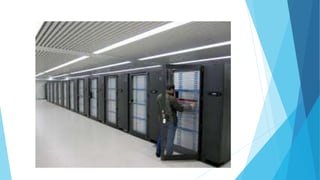
 These were the first examples of large computational facilities
leveraging multiple processing units.
 Mainframes were powerful, highly reliable computers specialized
for large data movement and massive input/output (I/O)
operations.
 They were mostly used by large organizations for bulk data
processing tasks such as online transactions, enterprise resource
planning, and other operations involving the processing of
significant amounts of data
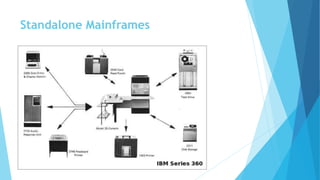
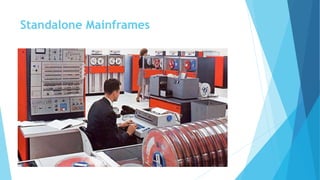
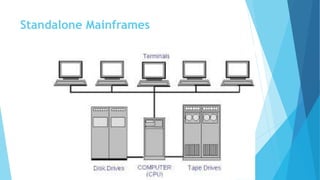
Standalone Mainframes
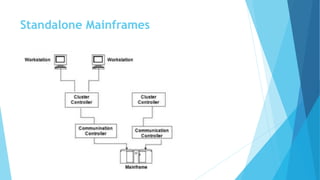
 The 1970s was the era of standalone mainframes.
 In that era, a given terminal could have access only to the host upstream
from it.
 To make use of applications that resided on another host, a user either
needed a different terminal or had the pleasure of working with a variety of
cables under his or her desk, changing the connections as needed.
Standalone Mainframes
Networked Mainframes
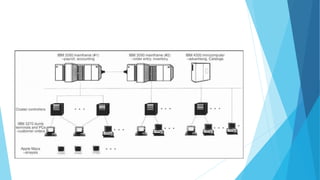
 A major change occurred in the early 1980s
 People began networking the mainframes.
 This was called multi-domain networking, and it enabled one terminal device
on a desktop to access numerous hosts that were networked together.
Mainframes
 Even though mainframes cannot be considered distributed systems, they
offered large computational power by using multiple processors, which were
presented as a single entity to users
 One of the most attractive features of mainframes was the ability to be highly
reliable computers that were “always on” and capable of tolerating failures
transparently
 No system shutdown was required to replace failed components, and the
system could work without interruption.
 The main frame era collapse with advent of fast and inexpensive
microprocessors
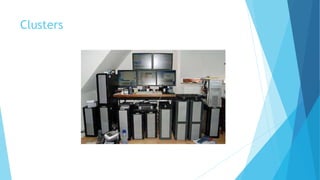
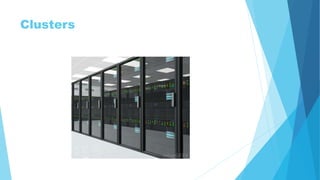
Clusters
 Cluster computing started as a low-cost alternative to the use of mainframes
and supercomputers.
 The technology advancement that created faster and more powerful
mainframes and supercomputers eventually generated an increased
availability of cheap commodity machines as a side effect
 These machines could then be connected by a high-bandwidth network and
controlled by specific software tools that manage them as a single system.
Clusters
 Starting in the 1980s, clusters become the standard technology for parallel
and high-performance computing.
 They were cheaper than mainframes and made high-performance computing
available to a large number of groups, including universities and small
research labs
 One of the attractive features of clusters was that the computational power
of commodity machines could be leveraged to solve problems that were
previously manageable only on expensive supercomputers.
 Moreover, clusters could be easily extended if more computational power was
required.
What is a Beowulf Cluster?
 A Beowulf system is a collection of personal computers constructed from
commodity-off-the-shelf hardware components interconnected with a system-
area-network and configured to operate as a single unit, parallel computing
platform (e.g., MPI), using an open-source network operating system such as
LINUX.
 Main components:
 PCs running LINUX OS
 Inter-node connection with Ethernet,
 Gigabit, Myrinet, InfiniBand, etc.
 MPI (message passing interface)
Clusters
Clusters
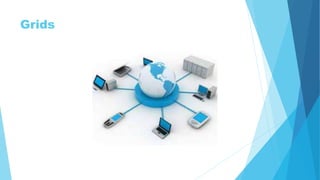
Grids
 Grid computing appeared in the early 1990s as an evolution of cluster
computing
 Grid computing enables aggregation of distributed resources and
transparently access to them.
 It proposed a new approach to access large computational power, huge
storage facilities, and a variety of services.
 Most production grids such as TeraGrid and EGEE seek to share compute and
storage resources distributed across different administrative domains, with
their main focus being speeding up a broad range of scientific applications,
such as climate modeling, drug design, and protein analysis.
Grids
 Users can “consume” resources in the same way as they use other utilities
such as power, gas, and water.
 Grids was initially developed as aggregations of geographically dispersed
clusters by means of Internet connections
 These clusters belonged to different organizations, and arrangements were
made among them to share the computational power
 Different from a “large cluster,” a computing grid was a dynamic aggregation
of heterogeneous computing nodes, and its scale was nationwide or even
worldwide.
Grids
Reason for spread of Grid
 Several developments made possible the diffusion of computing grids:
 Clusters became quite common resources
 They were often underutilized;
 New problems were requiring computational power that went beyond the
capability of single clusters
 The improvements in networking and the diffusion of the Internet made possible
long-distance, high-bandwidth connectivity.
Grid Computing Cont.
 Cloud computing is often considered the successor of grid computing. In
reality, it embodies aspects of all these three major technologies.
 Clouds are characterized by the fact of having virtually infinite capacity,
being tolerant to failures, and being always on, as in the case of mainframes.
 In many cases, the computing nodes that form the infrastructure of
computing clouds are commodity machines, as in the case of clusters.
 The services made available by a cloud vendor are consumed on a pay-per-use
basis, and clouds fully implement the utility vision introduced by grid
computing.
2. Virtualization
 Virtualization is another core technology for cloud computing.
 It encompasses a collection of solutions allowing the abstraction of some of
the fundamental elements for computing, such as hard-ware, runtime
environments, storage, and networking.
 virtualization has become a fundamental element of cloud computing e.g
solutions that provide IT infrastructure on demand.
 Virtualization is essentially a technology that allows creation of different
computing environments.
 These environments are called virtual because they simulate the interface
that is expected by a guest. The most common example of virtualization is
hardware virtualization.
2. Virtualization
 Hardware virtualization allows the coexistence of different software stacks on
top of the same hardware.
 These stacks are contained inside virtual machine instances, which operate in
complete isolation from each other.
 High-performance servers can host several virtual machine instances, thus
creating the opportunity to have a customized software stack on demand.
 This is the base technology that enables cloud computing solutions to deliver
virtual servers on demand, such as Amazon EC2, RightScale, VMware vCloud, and
others.
 Together with hardware virtualization, storage and network virtualization
complete the range of technologies for the emulation of IT infrastructure.
3. Web 2.0
 The Web is the primary interface through which cloud computing delivers its
services.
 At present, the Web encompasses a set of technologies
and services that facilitate interactive information sharing, collaboration, user-
centered design, and application composition.
 This evolution has transformed the Web into a rich platform for application
development and is known as Web 2.0.
 This term captures a new way in which developers architect applications and
deliver services through the Internet and provides new experience for users of
these applications and services.
3. Web 2.0
 Web 2.0 brings interactivity and flexibility into Web pages, providing enhanced
user experience by gaining Web-based access to all the functions.
 These capabilities are obtained by integrating a
collection of standards and technologies such as XML, Asynchronous JavaScript
and XML (AJAX), Web Services, and others.
 Examples of Web 2.0 applications are Google Documents, Google Maps, Flickr,
Facebook, Twitter, YouTube, de.li.cious, Blogger, and Wikipedia.
 In particular, social networking Websites take the
biggest advantage of Web 2.0.
4. Service orientation
 Service orientation is the core reference model for cloud computing
systems.
 This approach adopts the concept of services as the main building blocks
of application and system development.
 Service-oriented computing (SOC) supports the development of rapid,
low-cost, flexible, interoperable, and evolvable applications and systems
4. Service orientation
 A service is an abstraction representing a self-describing and platform-
agnostic component that can perform any function
 anything from a simple function to a complex business process.
 Virtually any piece of code that performs a task can be turned into a service
and expose its functionalities through a network-accessible protocol.
 Service-oriented computing introduces and diffuses two important concepts,
which are also fundamental to cloud computing:
 Quality of Service (QoS) and
 Software-as-a-Service (SaaS).
5. Utility-oriented computing
 Utility computing is a vision of computing that defines a service-provisioning model
for compute services in which resources such as storage, compute power,
applications, and infrastructure are packaged and offered on a pay-per-use basis.
 The idea of providing computing as a utility like natural gas, water, power, and
telephone connection has a long history but has become a reality today with the
advent of cloud computing.
???
 What is Fog Computing?
 Why Fog Computing?
 Identify and describe the technologies that enabled Fog computing
ITC4344_3_Cloud Computing Technologies.pptx

  • 1.
    ITC4344: Cloud Computing Lecture 3 Departmentof Information Technology Bayero University, Kano Cloud Computing Technologies
  • 2.
    Technologies that helpin realization of cloud computing  There are five main technology that help in realization of cloud computing  These technologies are :  Distributed systems (Mainframes , Clusters and Grid computing )  Virtualization,  Web 2.0,  Service orientation,  Utility computing
  • 3.
    1. Distributed System Clouds are essentially large distributed computing facilities that make available their services to third parties on demand. As a reference, we consider the characterization of a distributed system proposed by Tanenbaum et al.  “A distributed system is a collection of independent computers that appears to its users as a single coherent system.”
  • 4.
    1. Distributed System The primary purpose of distributed systems is to share resources and utilize them better.  This is true in the case of cloud computing, where this concept is taken to the extreme and resources (infrastructure, runtime environments, and services) are rented to users.  one of the driving factors of cloud computing has been the availability of the large computing facilities of IT giants (Amazon, Google) that found that offering their computing capabilities as a service provided opportunities to better utilize their infrastructure
  • 5.
    1. Distributed System Distributed systems often exhibit other properties such as heterogeneity, openness, scalability, transparency, concurrency, continuous availability, and independent failures.  To some extent these also characterize clouds, especially in the context of scalability, concurrency, and continuous availability.
  • 6.
    1. Distributed System Three Major Milestone that have led to Cloud Computing  Mainframe Computing  Cluster Computing  Grid Computing
  • 8.
    Mainframes  These werethe first examples of large computational facilities leveraging multiple processing units.  Mainframes were powerful, highly reliable computers specialized for large data movement and massive input/output (I/O) operations.  They were mostly used by large organizations for bulk data processing tasks such as online transactions, enterprise resource planning, and other operations involving the processing of significant amounts of data
  • 9.
  • 10.
  • 11.
    Standalone Mainframes  The1970s was the era of standalone mainframes.  In that era, a given terminal could have access only to the host upstream from it.  To make use of applications that resided on another host, a user either needed a different terminal or had the pleasure of working with a variety of cables under his or her desk, changing the connections as needed.
  • 12.
  • 13.
  • 14.
    Networked Mainframes  Amajor change occurred in the early 1980s  People began networking the mainframes.  This was called multi-domain networking, and it enabled one terminal device on a desktop to access numerous hosts that were networked together.
  • 17.
    Mainframes  Even thoughmainframes cannot be considered distributed systems, they offered large computational power by using multiple processors, which were presented as a single entity to users  One of the most attractive features of mainframes was the ability to be highly reliable computers that were “always on” and capable of tolerating failures transparently  No system shutdown was required to replace failed components, and the system could work without interruption.  The main frame era collapse with advent of fast and inexpensive microprocessors
  • 18.
    Clusters  Cluster computingstarted as a low-cost alternative to the use of mainframes and supercomputers.  The technology advancement that created faster and more powerful mainframes and supercomputers eventually generated an increased availability of cheap commodity machines as a side effect  These machines could then be connected by a high-bandwidth network and controlled by specific software tools that manage them as a single system.
  • 19.
    Clusters  Starting inthe 1980s, clusters become the standard technology for parallel and high-performance computing.  They were cheaper than mainframes and made high-performance computing available to a large number of groups, including universities and small research labs  One of the attractive features of clusters was that the computational power of commodity machines could be leveraged to solve problems that were previously manageable only on expensive supercomputers.  Moreover, clusters could be easily extended if more computational power was required.
  • 20.
    What is aBeowulf Cluster?  A Beowulf system is a collection of personal computers constructed from commodity-off-the-shelf hardware components interconnected with a system- area-network and configured to operate as a single unit, parallel computing platform (e.g., MPI), using an open-source network operating system such as LINUX.  Main components:  PCs running LINUX OS  Inter-node connection with Ethernet,  Gigabit, Myrinet, InfiniBand, etc.  MPI (message passing interface)
  • 21.
  • 22.
  • 23.
    Grids  Grid computingappeared in the early 1990s as an evolution of cluster computing  Grid computing enables aggregation of distributed resources and transparently access to them.  It proposed a new approach to access large computational power, huge storage facilities, and a variety of services.  Most production grids such as TeraGrid and EGEE seek to share compute and storage resources distributed across different administrative domains, with their main focus being speeding up a broad range of scientific applications, such as climate modeling, drug design, and protein analysis.
  • 24.
    Grids  Users can“consume” resources in the same way as they use other utilities such as power, gas, and water.  Grids was initially developed as aggregations of geographically dispersed clusters by means of Internet connections  These clusters belonged to different organizations, and arrangements were made among them to share the computational power  Different from a “large cluster,” a computing grid was a dynamic aggregation of heterogeneous computing nodes, and its scale was nationwide or even worldwide.
  • 25.
  • 26.
    Reason for spreadof Grid  Several developments made possible the diffusion of computing grids:  Clusters became quite common resources  They were often underutilized;  New problems were requiring computational power that went beyond the capability of single clusters  The improvements in networking and the diffusion of the Internet made possible long-distance, high-bandwidth connectivity.
  • 27.
    Grid Computing Cont. Cloud computing is often considered the successor of grid computing. In reality, it embodies aspects of all these three major technologies.  Clouds are characterized by the fact of having virtually infinite capacity, being tolerant to failures, and being always on, as in the case of mainframes.  In many cases, the computing nodes that form the infrastructure of computing clouds are commodity machines, as in the case of clusters.  The services made available by a cloud vendor are consumed on a pay-per-use basis, and clouds fully implement the utility vision introduced by grid computing.
  • 28.
    2. Virtualization  Virtualizationis another core technology for cloud computing.  It encompasses a collection of solutions allowing the abstraction of some of the fundamental elements for computing, such as hard-ware, runtime environments, storage, and networking.  virtualization has become a fundamental element of cloud computing e.g solutions that provide IT infrastructure on demand.  Virtualization is essentially a technology that allows creation of different computing environments.  These environments are called virtual because they simulate the interface that is expected by a guest. The most common example of virtualization is hardware virtualization.
  • 29.
    2. Virtualization  Hardwarevirtualization allows the coexistence of different software stacks on top of the same hardware.  These stacks are contained inside virtual machine instances, which operate in complete isolation from each other.  High-performance servers can host several virtual machine instances, thus creating the opportunity to have a customized software stack on demand.  This is the base technology that enables cloud computing solutions to deliver virtual servers on demand, such as Amazon EC2, RightScale, VMware vCloud, and others.  Together with hardware virtualization, storage and network virtualization complete the range of technologies for the emulation of IT infrastructure.
  • 30.
    3. Web 2.0 The Web is the primary interface through which cloud computing delivers its services.  At present, the Web encompasses a set of technologies and services that facilitate interactive information sharing, collaboration, user- centered design, and application composition.  This evolution has transformed the Web into a rich platform for application development and is known as Web 2.0.  This term captures a new way in which developers architect applications and deliver services through the Internet and provides new experience for users of these applications and services.
  • 31.
    3. Web 2.0 Web 2.0 brings interactivity and flexibility into Web pages, providing enhanced user experience by gaining Web-based access to all the functions.  These capabilities are obtained by integrating a collection of standards and technologies such as XML, Asynchronous JavaScript and XML (AJAX), Web Services, and others.  Examples of Web 2.0 applications are Google Documents, Google Maps, Flickr, Facebook, Twitter, YouTube, de.li.cious, Blogger, and Wikipedia.  In particular, social networking Websites take the biggest advantage of Web 2.0.
  • 32.
    4. Service orientation Service orientation is the core reference model for cloud computing systems.  This approach adopts the concept of services as the main building blocks of application and system development.  Service-oriented computing (SOC) supports the development of rapid, low-cost, flexible, interoperable, and evolvable applications and systems
  • 33.
    4. Service orientation A service is an abstraction representing a self-describing and platform- agnostic component that can perform any function  anything from a simple function to a complex business process.  Virtually any piece of code that performs a task can be turned into a service and expose its functionalities through a network-accessible protocol.  Service-oriented computing introduces and diffuses two important concepts, which are also fundamental to cloud computing:  Quality of Service (QoS) and  Software-as-a-Service (SaaS).
  • 34.
    5. Utility-oriented computing Utility computing is a vision of computing that defines a service-provisioning model for compute services in which resources such as storage, compute power, applications, and infrastructure are packaged and offered on a pay-per-use basis.  The idea of providing computing as a utility like natural gas, water, power, and telephone connection has a long history but has become a reality today with the advent of cloud computing.
  • 35.
    ???  What isFog Computing?  Why Fog Computing?  Identify and describe the technologies that enabled Fog computing