CHAPTER 5
                    PROGRAMMING
    1.0 BASIC PROGRAMMING CONCEPTS

1.1 Definition of program and programming language
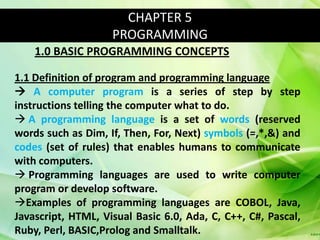
 A computer program is a series of step by step
instructions telling the computer what to do.
 A programming language is a set of words (reserved
words such as Dim, If, Then, For, Next) symbols (=,*,&) and
codes (set of rules) that enables humans to communicate
with computers.
 Programming languages are used to write computer
program or develop software.
Examples of programming languages are COBOL, Java,
Javascript, HTML, Visual Basic 6.0, Ada, C, C++, C#, Pascal,
Ruby, Perl, BASIC,Prolog and Smalltalk.
1.2 Levels and generation of programming laguages

LOW LEVEL PROGRAMMING LANGUAGES

Low-level programming languages designed for a particular
complete and reflecting its internal machine code; low-
level languages are therefore often described as machine-
oriented languages that closer to the hardware.
Low-level programming language
 Generation                  Explanation                   Examples
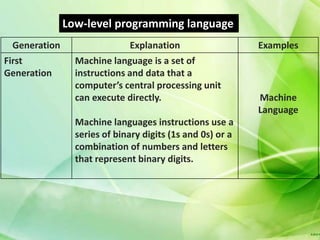
First           Machine language is a set of
Generation      instructions and data that a
                computer’s central processing unit
                can execute directly.                      Machine
                                                           Language
                Machine languages instructions use a
                series of binary digits (1s and 0s) or a
                combination of numbers and letters
                that represent binary digits.
Low-level programming language
 Generation                  Explanation                  Examples
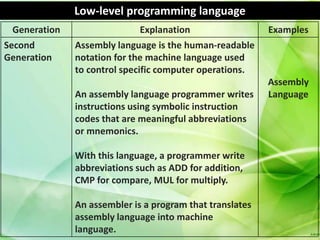
Second        Assembly language is the human-readable
Generation    notation for the machine language used
              to control specific computer operations.
                                                          Assembly
              An assembly language programmer writes      Language
              instructions using symbolic instruction
              codes that are meaningful abbreviations
              or mnemonics.

              With this language, a programmer write
              abbreviations such as ADD for addition,
              CMP for compare, MUL for multiply.

              An assembler is a program that translates
              assembly language into machine
              language.
1.2 Levels and generation of programming laguages

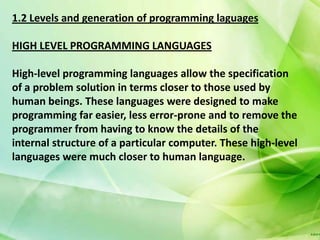
HIGH LEVEL PROGRAMMING LANGUAGES

High-level programming languages allow the specification
of a problem solution in terms closer to those used by
human beings. These languages were designed to make
programming far easier, less error-prone and to remove the
programmer from having to know the details of the
internal structure of a particular computer. These high-level
languages were much closer to human language.
High-level programming language
 Generation                 Explanation                  Examples
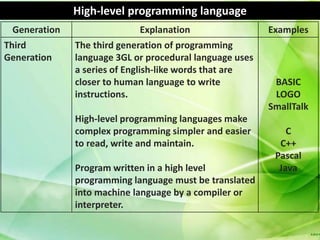
Third         The third generation of programming
Generation    language 3GL or procedural language uses
              a series of English-like words that are
              closer to human language to write           BASIC
              instructions.                               LOGO
                                                         SmallTalk
              High-level programming languages make
              complex programming simpler and easier         C
              to read, write and maintain.                 C++
                                                          Pascal
              Program written in a high level              Java
              programming language must be translated
              into machine language by a compiler or
              interpreter.
High-level programming language

 Generation                  Explanation                   Examples
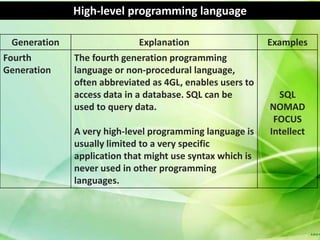
Fourth        The fourth generation programming
Generation    language or non-procedural language,
              often abbreviated as 4GL, enables users to
              access data in a database. SQL can be          SQL
              used to query data.                          NOMAD
                                                            FOCUS
              A very high-level programming language is    Intellect
              usually limited to a very specific
              application that might use syntax which is
              never used in other programming
              languages.
High-level programming language

 Generation                 Explanation                   Examples
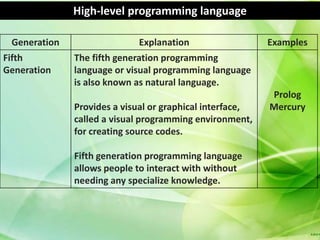
Fifth         The fifth generation programming
Generation    language or visual programming language
              is also known as natural language.
                                                          Prolog
              Provides a visual or graphical interface,   Mercury
              called a visual programming environment,
              for creating source codes.

              Fifth generation programming language
              allows people to interact with without
              needing any specialize knowledge.
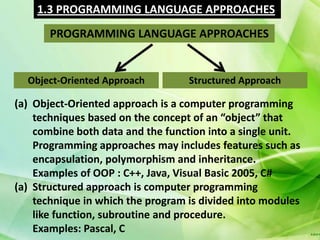
1.3 PROGRAMMING LANGUAGE APPROACHES
       PROGRAMMING LANGUAGE APPROACHES


  Object-Oriented Approach         Structured Approach

(a) Object-Oriented approach is a computer programming
    techniques based on the concept of an “object” that
    combine both data and the function into a single unit.
    Programming approaches may includes features such as
    encapsulation, polymorphism and inheritance.
    Examples of OOP : C++, Java, Visual Basic 2005, C#
(a) Structured approach is computer programming
    technique in which the program is divided into modules
    like function, subroutine and procedure.
    Examples: Pascal, C
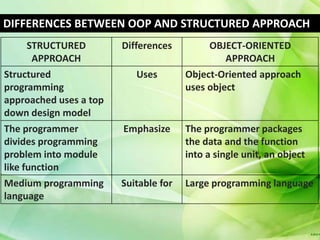
DIFFERENCES BETWEEN OOP AND STRUCTURED APPROACH
      STRUCTURED        Differences         OBJECT-ORIENTED
       APPROACH                                 APPROACH
Structured                 Uses        Object-Oriented approach
programming                            uses object
approached uses a top
down design model
The programmer          Emphasize      The programmer packages
divides programming                    the data and the function
problem into module                    into a single unit, an object
like function
Medium programming      Suitable for   Large programming language
language
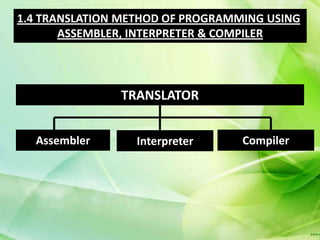
1.4 TRANSLATION METHOD OF PROGRAMMING USING
       ASSEMBLER, INTERPRETER & COMPILER


               TRANSLATOR


  Assembler       Interpreter     Compiler
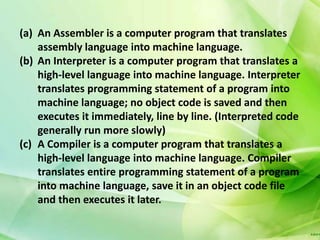
(a) An Assembler is a computer program that translates
    assembly language into machine language.
(b) An Interpreter is a computer program that translates a
    high-level language into machine language. Interpreter
    translates programming statement of a program into
    machine language; no object code is saved and then
    executes it immediately, line by line. (Interpreted code
    generally run more slowly)
(c) A Compiler is a computer program that translates a
    high-level language into machine language. Compiler
    translates entire programming statement of a program
    into machine language, save it in an object code file
    and then executes it later.
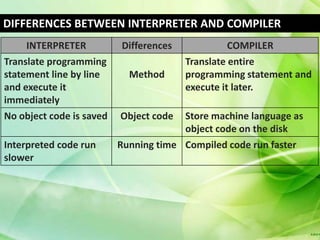
DIFFERENCES BETWEEN INTERPRETER AND COMPILER
     INTERPRETER          Differences             COMPILER
Translate programming                   Translate entire
statement line by line      Method      programming statement and
and execute it                          execute it later.
immediately
No object code is saved   Object code   Store machine language as
                                        object code on the disk
Interpreted code run      Running time Compiled code run faster
slower
(a) An Assembler is a computer program that translates
    assembly language into machine language.
(b) An Interpreter is a computer program that translates a
    high-level language into machine language. Interpreter
    translates programming statement of a program into
    machine language; no object code is saved and then
    executes it immediately, line by line. (Interpreted code
    generally run more slowly)
(c) A Compiler is a computer program that translates a
    high-level language into machine language. Compiler
    translates entire programming statement of a program
    into machine language, save it in an object code file
    and then executes it later.
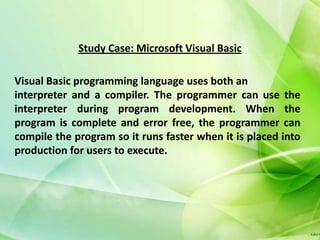
Study Case: Microsoft Visual Basic

Visual Basic programming language uses both an
interpreter and a compiler. The programmer can use the
interpreter during program development. When the
program is complete and error free, the programmer can
compile the program so it runs faster when it is placed into
production for users to execute.
1.5 BASIC ELEMENTS IN PROGRAMMING
                        (A) CONSTANT
                         (B) VARIABLE
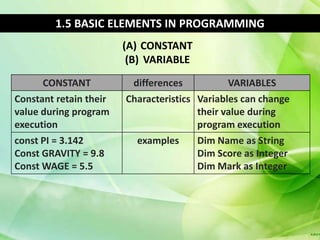
      CONSTANT           differences           VARIABLES
Constant retain their   Characteristics Variables can change
value during program                    their value during
execution                               program execution
const PI = 3.142          examples      Dim Name as String
Const GRAVITY = 9.8                     Dim Score as Integer
Const WAGE = 5.5                        Dim Mark as Integer
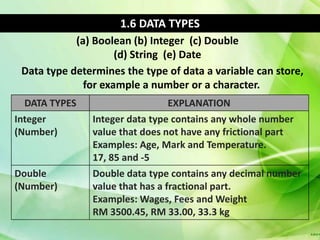
1.6 DATA TYPES
            (a) Boolean (b) Integer (c) Double
                     (d) String (e) Date
 Data type determines the type of data a variable can store,
              for example a number or a character.
  DATA TYPES                     EXPLANATION
Integer        Integer data type contains any whole number
(Number)       value that does not have any frictional part
               Examples: Age, Mark and Temperature.
               17, 85 and -5
Double         Double data type contains any decimal number
(Number)       value that has a fractional part.
               Examples: Wages, Fees and Weight
               RM 3500.45, RM 33.00, 33.3 kg
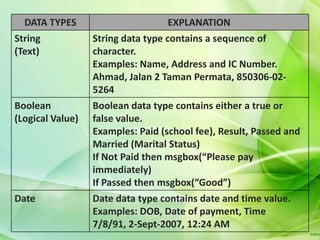
DATA TYPES                        EXPLANATION
String            String data type contains a sequence of
(Text)            character.
                  Examples: Name, Address and IC Number.
                  Ahmad, Jalan 2 Taman Permata, 850306-02-
                  5264
Boolean           Boolean data type contains either a true or
(Logical Value)   false value.
                  Examples: Paid (school fee), Result, Passed and
                  Married (Marital Status)
                  If Not Paid then msgbox(“Please pay
                  immediately)
                  If Passed then msgbox(“Good”)
Date              Date data type contains date and time value.
                  Examples: DOB, Date of payment, Time
                  7/8/91, 2-Sept-2007, 12:24 AM
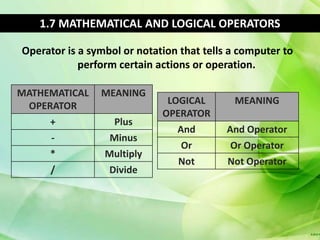
1.7 MATHEMATICAL AND LOGICAL OPERATORS

Operator is a symbol or notation that tells a computer to
            perform certain actions or operation.

MATHEMATICAL    MEANING
 OPERATOR                     LOGICAL       MEANING
                             OPERATOR
     +             Plus
                                And        And Operator
     -            Minus
                                 Or         Or Operator
     *           Multiply
                                Not        Not Operator
      /           Divide
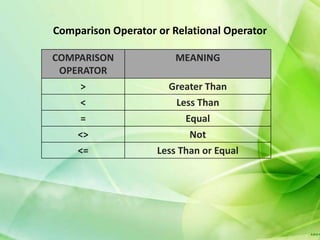
Comparison Operator or Relational Operator

COMPARISON              MEANING
 OPERATOR
     >                Greater Than
     <                 Less Than
     =                   Equal
    <>                     Not
    <=              Less Than or Equal
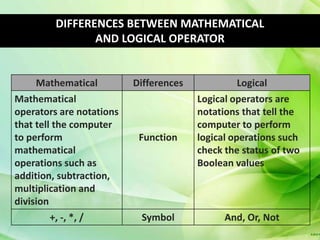
DIFFERENCES BETWEEN MATHEMATICAL
                AND LOGICAL OPERATOR


     Mathematical         Differences             Logical
Mathematical                            Logical operators are
operators are notations                 notations that tell the
that tell the computer                  computer to perform
to perform                 Function     logical operations such
mathematical                            check the status of two
operations such as                      Boolean values
addition, subtraction,
multiplication and
division
       +, -, *, /          Symbol             And, Or, Not
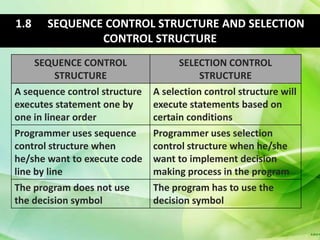
1.8    SEQUENCE CONTROL STRUCTURE AND SELECTION
               CONTROL STRUCTURE
     SEQUENCE CONTROL                SELECTION CONTROL
          STRUCTURE                       STRUCTURE
A sequence control structure   A selection control structure will
executes statement one by      execute statements based on
one in linear order            certain conditions
Programmer uses sequence       Programmer uses selection
control structure when         control structure when he/she
he/she want to execute code    want to implement decision
line by line                   making process in the program
The program does not use       The program has to use the
the decision symbol            decision symbol
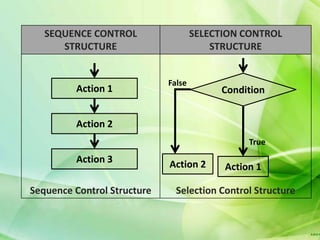
SEQUENCE CONTROL                  SELECTION CONTROL
      STRUCTURE                          STRUCTURE


                             False
         Action 1                         Condition


         Action 2
                                                True
         Action 3            Action 2      Action 1

Sequence Control Structure     Selection Control Structure
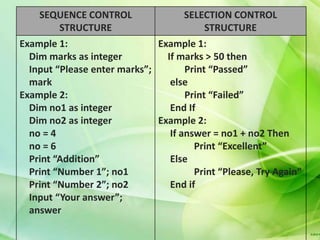
SEQUENCE CONTROL                 SELECTION CONTROL
       STRUCTURE                         STRUCTURE
Example 1:                    Example 1:
  Dim marks as integer          If marks > 50 then
  Input “Please enter marks”;        Print “Passed”
  mark                           else
Example 2:                           Print “Failed”
  Dim no1 as integer             End If
  Dim no2 as integer          Example 2:
  no = 4                         If answer = no1 + no2 Then
  no = 6                               Print “Excellent”
  Print “Addition”               Else
  Print “Number 1”; no1                Print “Please, Try Again”
  Print “Number 2”; no2          End if
  Input “Your answer”;
  answer
1.9 FLOW CHART

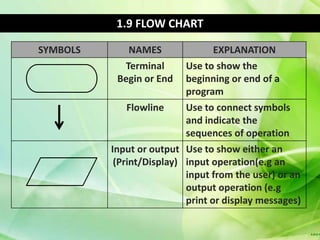
SYMBOLS      NAMES              EXPLANATION
            Terminal      Use to show the
           Begin or End   beginning or end of a
                          program
             Flowline     Use to connect symbols
                          and indicate the
                          sequences of operation
          Input or output Use to show either an
           (Print/Display) input operation(e.g an
                           input from the user) or an
                           output operation (e.g
                           print or display messages)
1.9 FLOW CHART

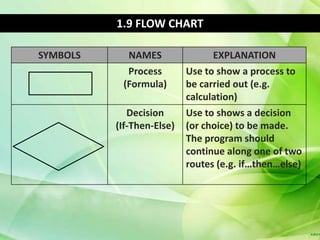
SYMBOLS     NAMES                EXPLANATION
            Process        Use to show a process to
           (Formula)       be carried out (e.g.
                           calculation)
             Decision      Use to shows a decision
          (If-Then-Else)   (or choice) to be made.
                           The program should
                           continue along one of two
                           routes (e.g. if…then…else)
1.9 FLOW CHART
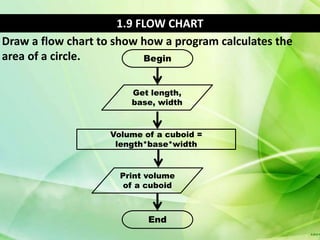
Draw a flow chart to show how a program calculates the
area of a circle.          Begin


                        Get length,
                        base, width


                    Volume of a cuboid =
                     length*base*width


                      Print volume
                       of a cuboid


                            End
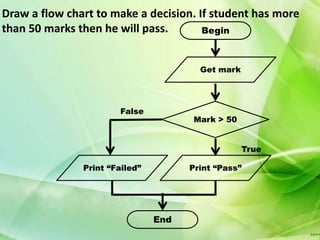
Draw a flow chart to make a decision. If student has more
than 50 marks then he will pass.       Begin


                                        Get mark


                       False
                                      Mark > 50


                                                   True

               Print “Failed”         Print “Pass”


                                End
1.10 PSEUDO CODES
•Pseudo codes is text only sentences that describe the logic
and program flow of a computer program.
•Pseudo code assembles plain English.
•It usually does not have any specific programming language
syntax and grammar.
•Pseudo code is directly linked to the computer codes
because each pseudo code statement can often be
converted into the programming language virtually line by
line.
•There are no set of rules for writing pseudo code.
•A programmer can have his or her personalized pseudo
code.
•He or she must use consistent language and syntax in the
pseudo code, so that he or she can understand it at a later
stage.
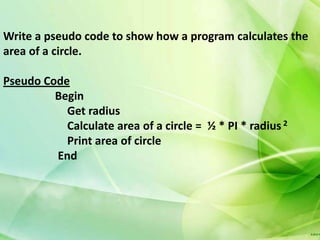
Write a pseudo code to show how a program calculates the
area of a circle.

Pseudo Code
         Begin
           Get radius
           Calculate area of a circle = ½ * PI * radius 2
           Print area of circle
         End
Draw a flow chart to make a decision. If student has more
than 50 marks then he will pass.


Pseudo Code
         Begin
           Get marks
           If mark > 50 Then
                 Print “Passed”
           Else
                 Print “Failed”
           End If
         End
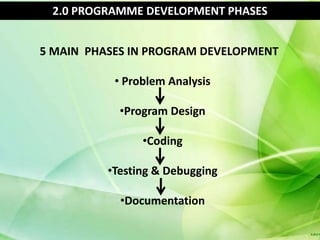
2.0 PROGRAMME DEVELOPMENT PHASES


5 MAIN PHASES IN PROGRAM DEVELOPMENT

           • Problem Analysis

            •Program Design

                •Coding

          •Testing & Debugging

            •Documentation
PROBLEM ANALYSIS


1. Identify input, processing, output and data
   component
2. Refer to book and website
3. Ask expert
4. Meet with system analyst and users
PROGRAM DESIGN

1. Divide all program activities into program
   modules
2. Create solution algorithm for each program
   modules (logic structure)
3. Describe the flow or steps of a program with
   English statement. (pseudo code)
4. Create a pictorial diagram of the logical
   sequence of a program (flowchart)
5. Design/Draw user interface
CODING


1. Coding a program involves translating the
   solution algorithm into programming
   language usually on paper.
2. Typing the code into the computer using
   programming language such as Pascal, C++
   and Visual Basic.
TESTING AND DEBUGGING

Several methods have been devised for finding
and removing logic error and syntax error.
1. Manually testing with sample data
2. The program is run through a computer,
   using a translator program. Before the
   program will run, it must be free of syntax
   errors. Such errors will be identified by the
   translator.
3. Testing by a select group of potential users.
   Potential users try out the program and
   provide feedback.
DOCUMENTATION

Documentation is important for people who may involve
with the program in the future.

Programmers: As time passes, even the creator of the
original program may not remember much about it. Other
programmers wishing to update and modify it (program
maintenance)
DOCUMENTATION

Activity:
1. Produce a description of the program, layouts of the
   input and output records and a program listing.
2. Produce a problem definition, flow chart and pseudo
   code.
3. Write comments with the program code(internal
   documentation). These comments explain the
   program’s purpose of the code statements within the
   program.
4. Write a document for a novice users that explains how
   to use or operate the program (write a user guide).

Chapter 5

  • 1.
    CHAPTER 5 PROGRAMMING 1.0 BASIC PROGRAMMING CONCEPTS 1.1 Definition of program and programming language  A computer program is a series of step by step instructions telling the computer what to do.  A programming language is a set of words (reserved words such as Dim, If, Then, For, Next) symbols (=,*,&) and codes (set of rules) that enables humans to communicate with computers.  Programming languages are used to write computer program or develop software. Examples of programming languages are COBOL, Java, Javascript, HTML, Visual Basic 6.0, Ada, C, C++, C#, Pascal, Ruby, Perl, BASIC,Prolog and Smalltalk.
  • 2.
    1.2 Levels andgeneration of programming laguages LOW LEVEL PROGRAMMING LANGUAGES Low-level programming languages designed for a particular complete and reflecting its internal machine code; low- level languages are therefore often described as machine- oriented languages that closer to the hardware.
  • 3.
    Low-level programming language Generation Explanation Examples First Machine language is a set of Generation instructions and data that a computer’s central processing unit can execute directly. Machine Language Machine languages instructions use a series of binary digits (1s and 0s) or a combination of numbers and letters that represent binary digits.
  • 4.
    Low-level programming language Generation Explanation Examples Second Assembly language is the human-readable Generation notation for the machine language used to control specific computer operations. Assembly An assembly language programmer writes Language instructions using symbolic instruction codes that are meaningful abbreviations or mnemonics. With this language, a programmer write abbreviations such as ADD for addition, CMP for compare, MUL for multiply. An assembler is a program that translates assembly language into machine language.
  • 5.
    1.2 Levels andgeneration of programming laguages HIGH LEVEL PROGRAMMING LANGUAGES High-level programming languages allow the specification of a problem solution in terms closer to those used by human beings. These languages were designed to make programming far easier, less error-prone and to remove the programmer from having to know the details of the internal structure of a particular computer. These high-level languages were much closer to human language.
  • 6.
    High-level programming language Generation Explanation Examples Third The third generation of programming Generation language 3GL or procedural language uses a series of English-like words that are closer to human language to write BASIC instructions. LOGO SmallTalk High-level programming languages make complex programming simpler and easier C to read, write and maintain. C++ Pascal Program written in a high level Java programming language must be translated into machine language by a compiler or interpreter.
  • 7.
    High-level programming language Generation Explanation Examples Fourth The fourth generation programming Generation language or non-procedural language, often abbreviated as 4GL, enables users to access data in a database. SQL can be SQL used to query data. NOMAD FOCUS A very high-level programming language is Intellect usually limited to a very specific application that might use syntax which is never used in other programming languages.
  • 8.
    High-level programming language Generation Explanation Examples Fifth The fifth generation programming Generation language or visual programming language is also known as natural language. Prolog Provides a visual or graphical interface, Mercury called a visual programming environment, for creating source codes. Fifth generation programming language allows people to interact with without needing any specialize knowledge.
  • 9.
    1.3 PROGRAMMING LANGUAGEAPPROACHES PROGRAMMING LANGUAGE APPROACHES Object-Oriented Approach Structured Approach (a) Object-Oriented approach is a computer programming techniques based on the concept of an “object” that combine both data and the function into a single unit. Programming approaches may includes features such as encapsulation, polymorphism and inheritance. Examples of OOP : C++, Java, Visual Basic 2005, C# (a) Structured approach is computer programming technique in which the program is divided into modules like function, subroutine and procedure. Examples: Pascal, C
  • 10.
    DIFFERENCES BETWEEN OOPAND STRUCTURED APPROACH STRUCTURED Differences OBJECT-ORIENTED APPROACH APPROACH Structured Uses Object-Oriented approach programming uses object approached uses a top down design model The programmer Emphasize The programmer packages divides programming the data and the function problem into module into a single unit, an object like function Medium programming Suitable for Large programming language language
  • 11.
    1.4 TRANSLATION METHODOF PROGRAMMING USING ASSEMBLER, INTERPRETER & COMPILER TRANSLATOR Assembler Interpreter Compiler
  • 12.
    (a) An Assembleris a computer program that translates assembly language into machine language. (b) An Interpreter is a computer program that translates a high-level language into machine language. Interpreter translates programming statement of a program into machine language; no object code is saved and then executes it immediately, line by line. (Interpreted code generally run more slowly) (c) A Compiler is a computer program that translates a high-level language into machine language. Compiler translates entire programming statement of a program into machine language, save it in an object code file and then executes it later.
  • 13.
    DIFFERENCES BETWEEN INTERPRETERAND COMPILER INTERPRETER Differences COMPILER Translate programming Translate entire statement line by line Method programming statement and and execute it execute it later. immediately No object code is saved Object code Store machine language as object code on the disk Interpreted code run Running time Compiled code run faster slower
  • 14.
    (a) An Assembleris a computer program that translates assembly language into machine language. (b) An Interpreter is a computer program that translates a high-level language into machine language. Interpreter translates programming statement of a program into machine language; no object code is saved and then executes it immediately, line by line. (Interpreted code generally run more slowly) (c) A Compiler is a computer program that translates a high-level language into machine language. Compiler translates entire programming statement of a program into machine language, save it in an object code file and then executes it later.
  • 15.
    Study Case: MicrosoftVisual Basic Visual Basic programming language uses both an interpreter and a compiler. The programmer can use the interpreter during program development. When the program is complete and error free, the programmer can compile the program so it runs faster when it is placed into production for users to execute.
  • 16.
    1.5 BASIC ELEMENTSIN PROGRAMMING (A) CONSTANT (B) VARIABLE CONSTANT differences VARIABLES Constant retain their Characteristics Variables can change value during program their value during execution program execution const PI = 3.142 examples Dim Name as String Const GRAVITY = 9.8 Dim Score as Integer Const WAGE = 5.5 Dim Mark as Integer
  • 17.
    1.6 DATA TYPES (a) Boolean (b) Integer (c) Double (d) String (e) Date Data type determines the type of data a variable can store, for example a number or a character. DATA TYPES EXPLANATION Integer Integer data type contains any whole number (Number) value that does not have any frictional part Examples: Age, Mark and Temperature. 17, 85 and -5 Double Double data type contains any decimal number (Number) value that has a fractional part. Examples: Wages, Fees and Weight RM 3500.45, RM 33.00, 33.3 kg
  • 18.
    DATA TYPES EXPLANATION String String data type contains a sequence of (Text) character. Examples: Name, Address and IC Number. Ahmad, Jalan 2 Taman Permata, 850306-02- 5264 Boolean Boolean data type contains either a true or (Logical Value) false value. Examples: Paid (school fee), Result, Passed and Married (Marital Status) If Not Paid then msgbox(“Please pay immediately) If Passed then msgbox(“Good”) Date Date data type contains date and time value. Examples: DOB, Date of payment, Time 7/8/91, 2-Sept-2007, 12:24 AM
  • 19.
    1.7 MATHEMATICAL ANDLOGICAL OPERATORS Operator is a symbol or notation that tells a computer to perform certain actions or operation. MATHEMATICAL MEANING OPERATOR LOGICAL MEANING OPERATOR + Plus And And Operator - Minus Or Or Operator * Multiply Not Not Operator / Divide
  • 20.
    Comparison Operator orRelational Operator COMPARISON MEANING OPERATOR > Greater Than < Less Than = Equal <> Not <= Less Than or Equal
  • 21.
    DIFFERENCES BETWEEN MATHEMATICAL AND LOGICAL OPERATOR Mathematical Differences Logical Mathematical Logical operators are operators are notations notations that tell the that tell the computer computer to perform to perform Function logical operations such mathematical check the status of two operations such as Boolean values addition, subtraction, multiplication and division +, -, *, / Symbol And, Or, Not
  • 22.
    1.8 SEQUENCE CONTROL STRUCTURE AND SELECTION CONTROL STRUCTURE SEQUENCE CONTROL SELECTION CONTROL STRUCTURE STRUCTURE A sequence control structure A selection control structure will executes statement one by execute statements based on one in linear order certain conditions Programmer uses sequence Programmer uses selection control structure when control structure when he/she he/she want to execute code want to implement decision line by line making process in the program The program does not use The program has to use the the decision symbol decision symbol
  • 23.
    SEQUENCE CONTROL SELECTION CONTROL STRUCTURE STRUCTURE False Action 1 Condition Action 2 True Action 3 Action 2 Action 1 Sequence Control Structure Selection Control Structure
  • 24.
    SEQUENCE CONTROL SELECTION CONTROL STRUCTURE STRUCTURE Example 1: Example 1: Dim marks as integer If marks > 50 then Input “Please enter marks”; Print “Passed” mark else Example 2: Print “Failed” Dim no1 as integer End If Dim no2 as integer Example 2: no = 4 If answer = no1 + no2 Then no = 6 Print “Excellent” Print “Addition” Else Print “Number 1”; no1 Print “Please, Try Again” Print “Number 2”; no2 End if Input “Your answer”; answer
  • 25.
    1.9 FLOW CHART SYMBOLS NAMES EXPLANATION Terminal Use to show the Begin or End beginning or end of a program Flowline Use to connect symbols and indicate the sequences of operation Input or output Use to show either an (Print/Display) input operation(e.g an input from the user) or an output operation (e.g print or display messages)
  • 26.
    1.9 FLOW CHART SYMBOLS NAMES EXPLANATION Process Use to show a process to (Formula) be carried out (e.g. calculation) Decision Use to shows a decision (If-Then-Else) (or choice) to be made. The program should continue along one of two routes (e.g. if…then…else)
  • 27.
    1.9 FLOW CHART Drawa flow chart to show how a program calculates the area of a circle. Begin Get length, base, width Volume of a cuboid = length*base*width Print volume of a cuboid End
  • 28.
    Draw a flowchart to make a decision. If student has more than 50 marks then he will pass. Begin Get mark False Mark > 50 True Print “Failed” Print “Pass” End
  • 29.
    1.10 PSEUDO CODES •Pseudocodes is text only sentences that describe the logic and program flow of a computer program. •Pseudo code assembles plain English. •It usually does not have any specific programming language syntax and grammar. •Pseudo code is directly linked to the computer codes because each pseudo code statement can often be converted into the programming language virtually line by line. •There are no set of rules for writing pseudo code. •A programmer can have his or her personalized pseudo code. •He or she must use consistent language and syntax in the pseudo code, so that he or she can understand it at a later stage.
  • 30.
    Write a pseudocode to show how a program calculates the area of a circle. Pseudo Code Begin Get radius Calculate area of a circle = ½ * PI * radius 2 Print area of circle End
  • 31.
    Draw a flowchart to make a decision. If student has more than 50 marks then he will pass. Pseudo Code Begin Get marks If mark > 50 Then Print “Passed” Else Print “Failed” End If End
  • 32.
    2.0 PROGRAMME DEVELOPMENTPHASES 5 MAIN PHASES IN PROGRAM DEVELOPMENT • Problem Analysis •Program Design •Coding •Testing & Debugging •Documentation
  • 33.
    PROBLEM ANALYSIS 1. Identifyinput, processing, output and data component 2. Refer to book and website 3. Ask expert 4. Meet with system analyst and users
  • 34.
    PROGRAM DESIGN 1. Divideall program activities into program modules 2. Create solution algorithm for each program modules (logic structure) 3. Describe the flow or steps of a program with English statement. (pseudo code) 4. Create a pictorial diagram of the logical sequence of a program (flowchart) 5. Design/Draw user interface
  • 35.
    CODING 1. Coding aprogram involves translating the solution algorithm into programming language usually on paper. 2. Typing the code into the computer using programming language such as Pascal, C++ and Visual Basic.
  • 36.
    TESTING AND DEBUGGING Severalmethods have been devised for finding and removing logic error and syntax error. 1. Manually testing with sample data 2. The program is run through a computer, using a translator program. Before the program will run, it must be free of syntax errors. Such errors will be identified by the translator. 3. Testing by a select group of potential users. Potential users try out the program and provide feedback.
  • 37.
    DOCUMENTATION Documentation is importantfor people who may involve with the program in the future. Programmers: As time passes, even the creator of the original program may not remember much about it. Other programmers wishing to update and modify it (program maintenance)
  • 38.
    DOCUMENTATION Activity: 1. Produce adescription of the program, layouts of the input and output records and a program listing. 2. Produce a problem definition, flow chart and pseudo code. 3. Write comments with the program code(internal documentation). These comments explain the program’s purpose of the code statements within the program. 4. Write a document for a novice users that explains how to use or operate the program (write a user guide).