Chapter 3
Computer Hardware
Brief History about Computing
• Blaise Pascal
• Gottfried Wilhelm von Leibniz
• Joseph Jacquard
• Charles Babbage
• Herman Hollerith
• Vacuum tube
• ENIAC
• UNIVAC
• Transistor –late 1950s
• Integrated Circuit – 1958, Jack Kilby
Types of Computer Systems
• Micro computers
– Computer terminals, network terminals, Information
appliances
• Midrange systems
– High-end servers, network servers, webservers
• Mainframe systems
– Data-mining, seismic data, flight simulation, superservers
for client/server networks
– Supercomputer – science, engineering, business
applications, government research agencies, large
universities, military defense, computational cosmology
• Distributed or Grid Computing
Computer Peripherals
• “The right peripherals can make all the
difference in your computing experience”
• Human-Computer Interface and its business
application
• Peripherals are all the input, output and
secondary storage devices that are part of
computer system
– And are directly or indirectly connected to the
CPU
– Online devices
Computer Peripherals
Input Technologies
• Devices used for entering data and commands
directly and easily into the CPU
• No need to manually write down data on a
physical or paper source
• Natural User Interface
– Advanced input devices like handwriting
recognition devices, voice recognition
technologies have enabled Natural User Interface
Computer Peripherals
Input Technologies
• Pointing devices makes better use of GUI
– Mouse
– Trackball
– Touchpad
– Pointing stick/Track point
– Touchscreen
• Pen-Based Computing
– Systems can use pen written script to convert
them to text quickly
– Stylus can be used over the screen or a touchpad
– Digital Signatures by Fedex
Computer Peripherals
Input Technologies
• Speech Recognition Systems
– Non-typist, people with disabilities and business
travelers make frequent use of it
– Used to input data in natural way
– Used for giving command or navigating the system
– Voice response to hear voice messages or type
texts while driving
Computer Peripherals
Input Technologies
• Optical Scanning
– Devices read text or graphics and convert them
into digital format and digital input
– Document Management – desktop scanner
– Optical Character Recognition
• Optical scanning technology that reads code and
characters on merchandize tags (UPC), product
labels, credit card receipts, airline tickets
– Used in receiving the purchases to update
Inventory management system
• Wireless handheld scanners
Computer Peripherals
Input Technologies
• Optical Scanning
– Scans checks and deposit anywhere
• Biometric thumb scanner to make payments
• Other input technologies
– Magnetic strip
– Smart Card
– Digital camera
– MICR
Computer Peripherals
Output Technologies
• Video Output
– High quality vs low quality
– Ergonomic built
• Printed output
– Sales invoices, payroll checks, bank statements
– Thermal printers for KOT orders, management
of queue
– Laser printer, multi-function printers
Computer Peripherals
Storage Trade-Offs
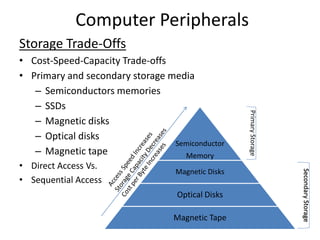
• Cost-Speed-Capacity Trade-offs
• Primary and secondary storage media
– Semiconductors memories
– SSDs
– Magnetic disks
– Optical disks
– Magnetic tape
• Direct Access Vs.
• Sequential Access
Semiconductor
Memory
Magnetic Disks
Optical Disks
Magnetic Tape
PrimaryStorage
SecondaryStorage
Computer Peripherals
Semiconductor Memory
• RAM vs. ROM
• RAID (Redundant Arrays of Independent Disks)
• SAN (Storage Area Network)
RFID (Radio Frequency Identification)
• A system for tagging and identifying mobile objects
• Efficient and Faster SCM
• Item Level Inventory Tracking
• Access Control
• Laundry Management
• Interactive Grocery Shopping With RFID
• RFID enabled parking system
• RFID issues

Chapter 3 computer hardware

  • 1.
  • 2.
    Brief History aboutComputing • Blaise Pascal • Gottfried Wilhelm von Leibniz • Joseph Jacquard • Charles Babbage • Herman Hollerith • Vacuum tube • ENIAC • UNIVAC • Transistor –late 1950s • Integrated Circuit – 1958, Jack Kilby
  • 3.
    Types of ComputerSystems • Micro computers – Computer terminals, network terminals, Information appliances • Midrange systems – High-end servers, network servers, webservers • Mainframe systems – Data-mining, seismic data, flight simulation, superservers for client/server networks – Supercomputer – science, engineering, business applications, government research agencies, large universities, military defense, computational cosmology • Distributed or Grid Computing
  • 4.
    Computer Peripherals • “Theright peripherals can make all the difference in your computing experience” • Human-Computer Interface and its business application • Peripherals are all the input, output and secondary storage devices that are part of computer system – And are directly or indirectly connected to the CPU – Online devices
  • 5.
    Computer Peripherals Input Technologies •Devices used for entering data and commands directly and easily into the CPU • No need to manually write down data on a physical or paper source • Natural User Interface – Advanced input devices like handwriting recognition devices, voice recognition technologies have enabled Natural User Interface
  • 6.
    Computer Peripherals Input Technologies •Pointing devices makes better use of GUI – Mouse – Trackball – Touchpad – Pointing stick/Track point – Touchscreen • Pen-Based Computing – Systems can use pen written script to convert them to text quickly – Stylus can be used over the screen or a touchpad – Digital Signatures by Fedex
  • 7.
    Computer Peripherals Input Technologies •Speech Recognition Systems – Non-typist, people with disabilities and business travelers make frequent use of it – Used to input data in natural way – Used for giving command or navigating the system – Voice response to hear voice messages or type texts while driving
  • 8.
    Computer Peripherals Input Technologies •Optical Scanning – Devices read text or graphics and convert them into digital format and digital input – Document Management – desktop scanner – Optical Character Recognition • Optical scanning technology that reads code and characters on merchandize tags (UPC), product labels, credit card receipts, airline tickets – Used in receiving the purchases to update Inventory management system • Wireless handheld scanners
  • 9.
    Computer Peripherals Input Technologies •Optical Scanning – Scans checks and deposit anywhere • Biometric thumb scanner to make payments • Other input technologies – Magnetic strip – Smart Card – Digital camera – MICR
  • 10.
    Computer Peripherals Output Technologies •Video Output – High quality vs low quality – Ergonomic built • Printed output – Sales invoices, payroll checks, bank statements – Thermal printers for KOT orders, management of queue – Laser printer, multi-function printers
  • 11.
    Computer Peripherals Storage Trade-Offs •Cost-Speed-Capacity Trade-offs • Primary and secondary storage media – Semiconductors memories – SSDs – Magnetic disks – Optical disks – Magnetic tape • Direct Access Vs. • Sequential Access Semiconductor Memory Magnetic Disks Optical Disks Magnetic Tape PrimaryStorage SecondaryStorage
  • 12.
    Computer Peripherals Semiconductor Memory •RAM vs. ROM • RAID (Redundant Arrays of Independent Disks) • SAN (Storage Area Network) RFID (Radio Frequency Identification) • A system for tagging and identifying mobile objects • Efficient and Faster SCM • Item Level Inventory Tracking • Access Control • Laundry Management • Interactive Grocery Shopping With RFID • RFID enabled parking system • RFID issues