Communication Lines
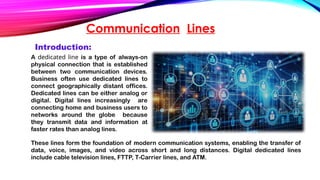
A dedicatedline is a type of always-on
physical connection that is established
between two communication devices.
Business often use dedicated lines to
connect geographically distant offices.
Dedicated lines can be either analog or
digital. Digital lines increasingly are
connecting home and business users to
networks around the globe because
they transmit data and information at
faster rates than analog lines.
Introduction:
These lines form the foundation of modern communication systems, enabling the transfer of
data, voice, images, and video across short and long distances. Digital dedicated lines
include cable television lines, FTTP, T-Carrier lines, and ATM.
6.
Uses of Communicationlines:
Telecommunication
Data Transmission
Broadcasting
Control System
Transportation and
Navigation
Military and Security
7.
Cable:
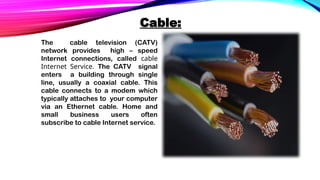
The cable television(CATV)
network provides high – speed
Internet connections, called cable
Internet Service. The CATV signal
enters a building through single
line, usually a coaxial cable. This
cable connects to a modem which
typically attaches to your computer
via an Ethernet cable. Home and
small business users often
subscribe to cable Internet service.
8.
DSL:
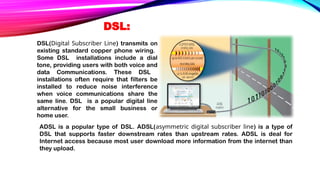
DSL(Digital Subscriber Line)transmits on
existing standard copper phone wiring.
Some DSL installations include a dial
tone, providing users with both voice and
data Communications. These DSL
installations often require that filters be
installed to reduce noise interference
when voice communications share the
same line. DSL is a popular digital line
alternative for the small business or
home user.
ADSL is a popular type of DSL. ADSL(asymmetric digital subscriber line) is a type of
DSL that supports faster downstream rates than upstream rates. ADSL is deal for
Internet access because most user download more information from the internet than
they upload.
9.
Which is betterchoice, DSL or cable internet
service.
Each has its own advantages. DSL uses a line that is not shared with other
users in neighborhood. With cable internet service, by contrast, users might
share the node with up to hundreds of other cable Internet users.
Simultaneous access by many users can cause the cable Internet service to
slow down. Cable Internet Service, however, has widespread availability and
usually has faster transmission rates.
10.
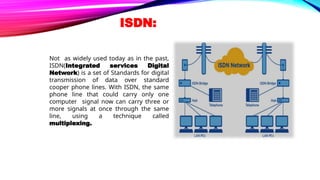
ISDN:
Not as widelyused today as in the past,
ISDN(Integrated services Digital
Network) is a set of Standards for digital
transmission of data over standard
cooper phone lines. With ISDN, the same
phone line that could carry only one
computer signal now can carry three or
more signals at once through the same
line, using a technique called
multiplexing.
FTTP:
FTTP, which standsfor Fiber to the Premises, uses
fiber-optic cable to provide extremely high-speed
Internet access to a user’s physical permanent
location.
• FTTH (Fiber to the Home) provides home users with
Internet access via fiber-optic cable.
• FTTB (Fiber to the Building) refers to small
businesses that use fiber-optic cables to access the
Internet. With FTTP service, an optical terminal at
your location receives the signals and transfers them
to a router connected to a computer. As the cost
of installing fiber decreases, more homes and
businesses are expected to choose FTTP.
13.
T-Carrier Lines:
A T-carrierline is any of several types of long-distance digital phone
lines that carry multiple signals over a single communications line.
Whereas a standard phone line carries only one signal, digital T-
carrier lines use multiplexing so that multiple signals share the line. T-
carrier lines provide very fast data transfer rates. Only medium to
large companies usually can afford the investment in T-carrier lines
because these lines are so expensive. The most popular T-carrier line
is the T1 line. Businesses often use T1 lines to connect to the Internet.
Home and small business users purchase fractional T1, in which they
share a connection to the T1 line with other users. Fractional T1 is
slower than a dedicated T1 line, but it also is less expensive. Users
who do not have other high-speed Internet access in their areas
can opt for fractional T1. With fractional T1 lines, the data transfer
rates become slower as additional users are added.
A T3 line is equal in speed to 28 T1 lines. T3 lines are quite expensive. Main users of T3
lines include large corporations, phone companies, and ISPs connecting to the Internet
backbone. The Internet backbone itself also uses T3 lines
14.
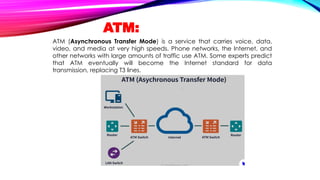
ATM:
ATM (Asynchronous TransferMode) is a service that carries voice, data,
video, and media at very high speeds. Phone networks, the Internet, and
other networks with large amounts of traffic use ATM. Some experts predict
that ATM eventually will become the Internet standard for data
transmission, replacing T3 lines.
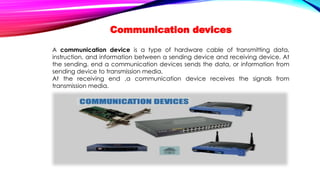
Communication devices
A communicationdevice is a type of hardware cable of transmitting data,
instruction, and information between a sending device and receiving device. At
the sending, end a communication devices sends the data, or information from
sending device to transmission media.
At the receiving end ,a communication device receives the signals from
transmission media.
18.
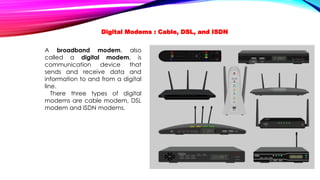
A broadband modem,also
called a digital modem, is
communication device that
sends and receive data and
information to and from a digital
line.
There three types of digital
modems are cable modem, DSL
modem and ISDN modems.
Digital Modems : Cable, DSL, and ISDN
19.
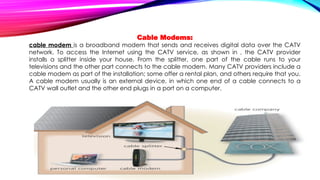
Cable Modems:
cable modemis a broadband modem that sends and receives digital data over the CATV
network. To access the Internet using the CATV service, as shown in , the CATV provider
installs a splitter inside your house. From the splitter, one part of the cable runs to your
televisions and the other part connects to the cable modem. Many CATV providers include a
cable modem as part of the installation; some offer a rental plan, and others require that you.
A cable modem usually is an external device, in which one end of a cable connects to a
CATV wall outlet and the other end plugs in a port on a computer.
20.
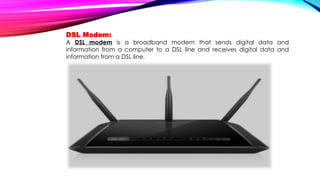
DSL Modem:
A DSLmodem is a broadband modem that sends digital data and
information from a computer to a DSL line and receives digital data and
information from a DSL line.
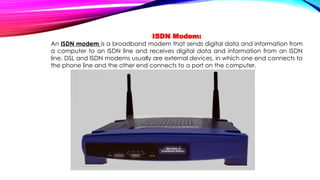
21.
ISDN Modem:
An ISDNmodem is a broadband modem that sends digital data and information from
a computer to an ISDN line and receives digital data and information from an ISDN
line. DSL and ISDN modems usually are external devices, in which one end connects to
the phone line and the other end connects to a port on the computer.
22.
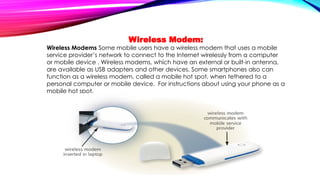
Wireless Modem:
Wireless ModemsSome mobile users have a wireless modem that uses a mobile
service provider’s network to connect to the Internet wirelessly from a computer
or mobile device . Wireless modems, which have an external or built-in antenna,
are available as USB adapters and other devices. Some smartphones also can
function as a wireless modem, called a mobile hot spot, when tethered to a
personal computer or mobile device. For instructions about using your phone as a
mobile hot spot.
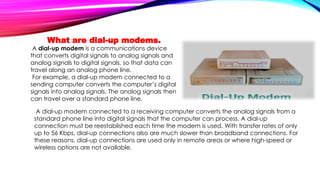
23.
What are dial-upmodems.
A dial-up modem is a communications device
that converts digital signals to analog signals and
analog signals to digital signals, so that data can
travel along an analog phone line.
For example, a dial-up modem connected to a
sending computer converts the computer’s digital
signals into analog signals. The analog signals then
can travel over a standard phone line.
A dial-up modem connected to a receiving computer converts the analog signals from a
standard phone line into digital signals that the computer can process. A dial-up
connection must be reestablished each time the modem is used. With transfer rates of only
up to 56 Kbps, dial-up connections also are much slower than broadband connections. For
these reasons, dial-up connections are used only in remote areas or where high-speed or
wireless options are not available.
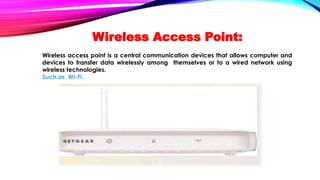
Wireless Access Point:
Wirelessaccess point is a central communication devices that allows computer and
devices to transfer data wirelessly among themselves or to a wired network using
wireless technologies.
Such as Wi-Fi .
26.
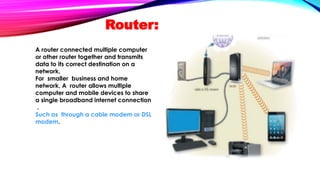
Router:
A router connectedmultiple computer
or other router together and transmits
data to its correct destination on a
network.
For smaller business and home
network, A router allows multiple
computer and mobile devices to share
a single broadband internet connection
.
Such as through a cable modem or DSL
modem.
27.
Although a routermay be able to connect more than 200 wired and/or
wireless computers and mobile devices, the
performance of the router may decline as you add connections. Some
mobile service providers limit the number of
connections to their mobile broadband wireless routers.
How many connections can a router support.
28.
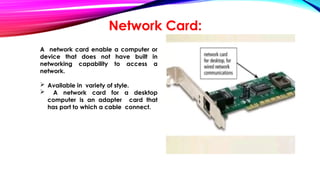
Network Card:
A networkcard enable a computer or
device that does not have built in
networking capability to access a
network.
Available in variety of style.
A network card for a desktop
computer is an adapter card that
has port to which a cable connect.
29.
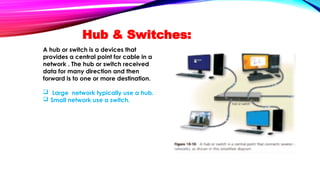
A hub orswitch is a devices that
provides a central point for cable in a
network . The hub or switch received
data for many direction and then
forward is to one or more destination.
Large network typically use a hub.
Small network use a switch.
Hub & Switches:
TRANSMISSION MEDIA:
Transmission mediaconsist of materials or substances capable of carrying one or more
communications signals.
Broadband:
Broadband media transmit multiple signals simultaneously.
Bandwidth:
The amount of data, instruction, and information that can travel over transmission media
sometime is called bandwidth.
For transmission of text only , a lower bandwidth is acceptable.
For transmission of music , graphics, 3-D games is higher bandwidth acceptable.
Home Network:
Many home users connect multiple computers and devices together in a
home network.
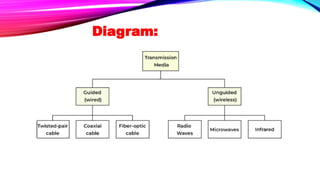
Physical Transmission media:
Physicaltransmission media use wire , cable and other tangible material to send
communication signals. These wires and cables typically are used underground or
between buildings.
Types :
Twisted- pair cable
coaxial cable
fiber optics cable
34.
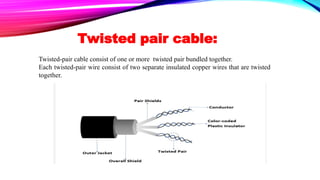
Twisted pair cable:
Twisted-paircable consist of one or more twisted pair bundled together.
Each twisted-pair wire consist of two separate insulated copper wires that are twisted
together.
35.
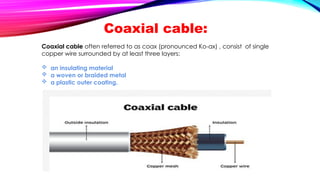
Coaxial cable:
Coaxial cableoften referred to as coax (pronounced Ko-ax) , consist of single
copper wire surrounded by at least three layers:
an insulating material
a woven or braided metal
a plastic outer coating.
36.
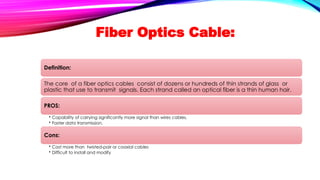
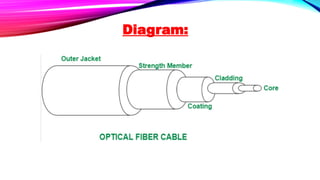
Fiber Optics Cable:
Definition:
Thecore of a fiber optics cables consist of dozens or hundreds of thin strands of glass or
plastic that use to transmit signals. Each strand called an optical fiber is a thin human hair.
PROS:
• Capability of carrying significantly more signal than wires cables.
• Faster data transmission.
Cons:
• Cost more than twisted-pair or coaxial cables
• Difficult to install and modify


![AICT Presentation Group Member
Name Topic
Haroon Ahmad Communication Lines [ Cable, DSL,
ISDN]
Saad Ijaz Communication Lines [FTTP, T- Carriers,
ATM]
Ahmad Hassan Communication Devices[Digital
Modems, Wireless Modems]
Esha Razzaq Communication Devices[Wireless
access point, routers, Network Card,
Hub and switches]
Mahnoor Fatima Home networks, Transmission media,
Physical transmission media[twisted
pair cable, coaxial cable, fiber optics
cable]](https://image.slidesharecdn.com/aictpresentation-250517123624-f0b248ff/85/Chapter-10-discovering-computers-Communication-Lines-3-320.jpg)