MULTIMEDIA COMMUNICATION
Dr. DATTATHREYA GUJJAR. S
MULTIMEDIA COMMUNICATION
Course Objectives:
This course will enable students to:
• Gain fundamental knowledge in understanding the basics of different multimedia
networks and applications.
• Understand digitization principle techniques required to analyze different media types.
• Analyze compression techniques required to compress text and image and gain
knowledge of DMS.
• Analyze compression techniques required to compress audio and video.
• Gain fundamental knowledge about multimedia communication across different
networks.
Module 1
Multimedia Communications :
Introduction,
Multimedia information representation,
multimedia networks,
multimedia applications,
Application and networking terminology.
(Chap 1 of Text 1)
Text Books:
Fred Halsall, “Multimedia Communications”, Pearson education, 2001 ISBN - 9788131709948.
K. R. Rao, Zoran S. Bojkovic, Dragorad A. Milovanovic, “Multimedia Communication Systems”,
Pearson education, 2004. ISBN -9788120321458
Reference Book :
Raifsteinmetz, Klara Nahrstedt, “Multimedia: Computing, Communications and Applications”,
Pearson education, 2002. ISBN -9788177584417
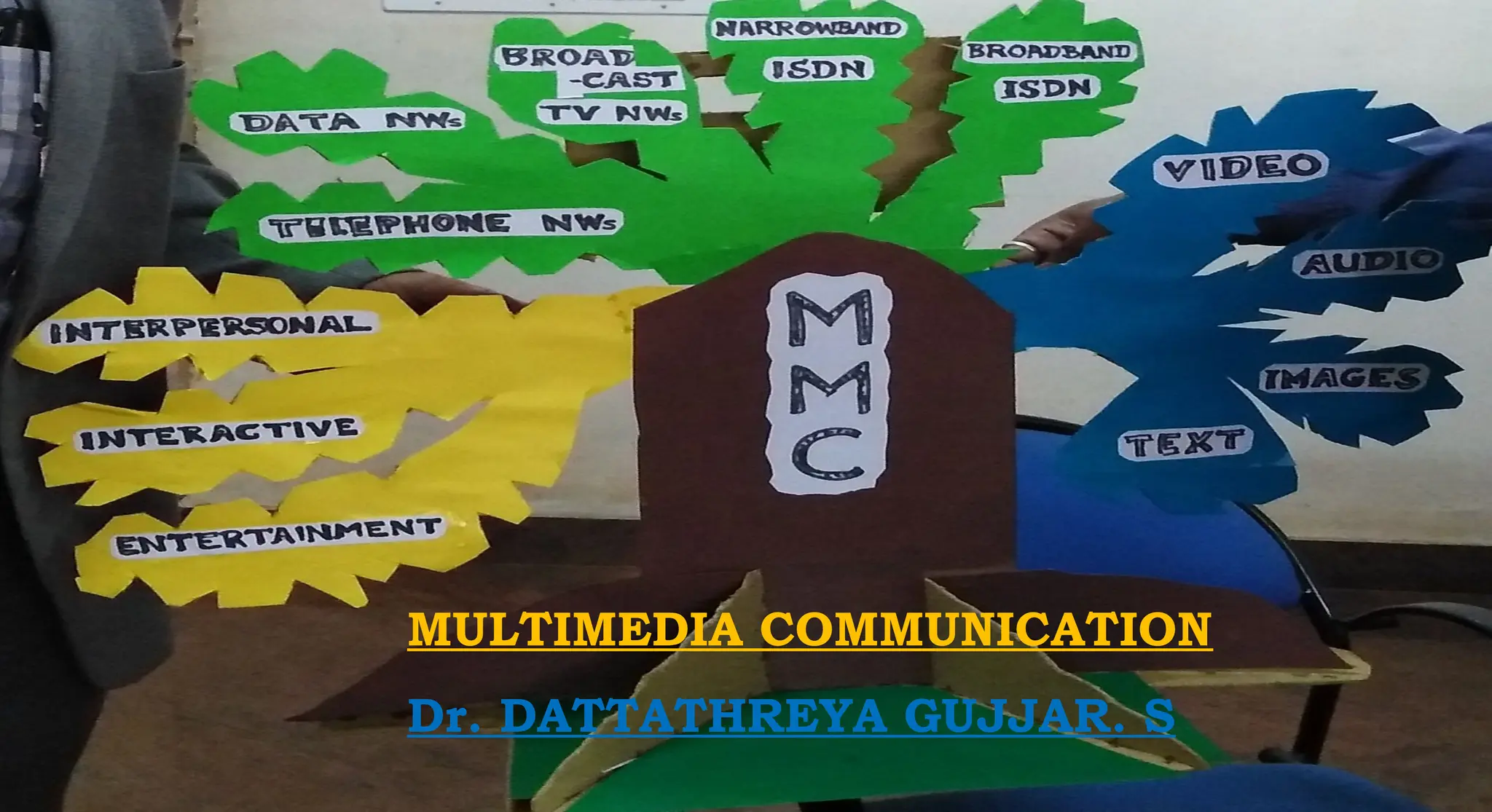
Multimedia Communication
• The term multimedia is used to indicate that the information / data being transferred over
the network.
• MMC includes arrange of applications and networking infrastructures.
Different Media Types -
• Text:
• Images:
• Audio:
• Video:
Text: Includes both
Unformatted Text- Comprising strings of characters from a limited character set
Formatted Text- Comprises strings as used for the structuring, access, and presentation
of electronic documents.
Multimedia Communication
• Images: Includes
Computer Generated Image - comprising lines, curves, circles, and
Digitized Images of documents and pictures.
• Audio: Includes both
Low-fidelity speech - as used in telephony and
High-fidelity speech - stereo phonic music as used with compact discs.
• Video: Includes
Short sequences of moving images (also known as video clips)
Complete movies/films.
Communication may be in-terms of either :
Person-to-Person communications
Person-to-System communications
Person-to-Person - communicates using suitable Terminal Equipment (TE)
Person-to-System communications:
• Person interacts with the system(Server) using suitable Digital device like workstation
or multimedia personal computer (PC), located either in homes or offices.
• Server containing a collection of files or documents-each comprising digitized text,
images, audio and video information.
• User interacts with the server by means of a suitable selection device connected to the Set-
top box (STB) associated with a television or modem used with the computers.
Networking infrastructure : provided using a number of different types of network
Networks: Two types
1: PSTN (Public Switched Telephone Network) or GSTN (General Switched Telephone N/W)
• Designed initially to provide the basic switched telephone service but due to the
Advances in DSP H/W and associated S/W, provides a range of more advanced services
involving- text, images and video.
2: Data network:
• Initially to support basic data applications- e-mail, file transfers, and others now support
a much richer set of applications-which involve images, audio, and video.
• Designed from the out set to provide multimedia communication services.
Ex : ATM networks.
Multimedia Information Representation:
Applications involving Text and Images - comprise blocks of digital data units.
Text data –
• A block of characters with each character represented by - fixed number of Binary digits (bits) or
Codeword.
Image data –
• Comprises a 2-D block of pixels (picture elements) with each pixel represented by a fixed number of
bits.
• Applications involving
Text and Images: comprise the short request for a file.
Ex.: file contents being returned, the duration of the overall transaction is relatively short.
Audio and Video Signals:
Can vary continuously with time as the amplitude of the speech, audio or video signal varies.
•Ex.: Typical telephone conversation can last for several minutes and Movie (comprising audio and
video) can last for a number of hours.
Digitization of an audio signal:
• Produces a digital signal with amplitude of the signal varies continuously with time and is
of relatively high bit rate(64 kbps),
• Measured by bps (bits per second).
• Applications involving audio can be of a long duration: this bit rate must be sustained
for an equally long time period.
Digitization of video signal:
• Same as audio signals but, with much higher bit rates and longer time durations
• Compression techniques are used to support applications with very high bit rates
Digitization of - An audio signal and video signal
Compression: Lossy and Lossy less
• It's a technique applied to the digitized signals to reduce the resulting bit rate to a level
which can be supported by various networks.
Compression - to text and images:
• To reduce the time delay between a requests being made for some information and the
information becoming available on the screen of a computers or over others.
Multimedia Networks:
• 5 basic types of communication networks are used to provide multimedia communication
services:
 Telephone networks.
 Data networks.
 Broadcast television networks.
 Integrated services digital networks.
 Broadband multiservice networks.
1. Telephone networks:
• Public Switched Telephone network (PSTNs) has been in existence for many years and have
gone through many changes over the time.
• Designed to provide a Basic switched telephone service, with the initiation of the other
network types has become known as POTS (Plain Old Telephone Service).
• 'Switched': term is used to indicate that the subscriber can make a call to any other
telephone that is connected to the total network.
• Initially - such networks spanned within a single country, later telephone networks of
different countries were interconnected, now provide an international switched service.
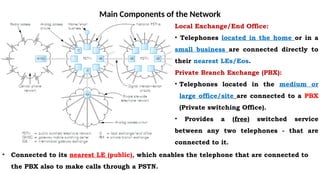
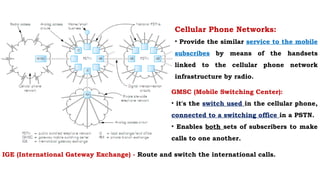
Main Components of the Network
Local Exchange/End Office:
• Telephones located in the home or in a
small business are connected directly to
their nearest LEs/Eos.
Private Branch Exchange (PBX):
• Telephones located in the medium or
large office/site are connected to a PBX
(Private switching Office).
• Provides a (free) switched service
between any two telephones - that are
connected to it.
• Connected to its nearest LE (public), which enables the telephone that are connected to
the PBX also to make calls through a PSTN.
Cellular Phone Networks:
• Provide the similar service to the mobile
subscribes by means of the handsets
linked to the cellular phone network
infrastructure by radio.
IGE (International Gateway Exchange) - Route and switch the international calls.
GMSC (Mobile Switching Center):
• it's the switch used in the cellular phone,
connected to a switching office in a PSTN.
• Enables both sets of subscribers to make
calls to one another.
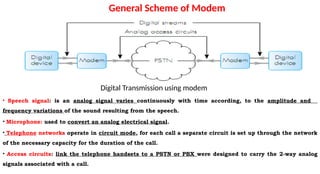
• Speech signal: is an analog signal varies continuously with time according, to the amplitude and
frequency variations of the sound resulting from the speech.
• Microphone: used to convert an analog electrical signal.
• Telephone networks operate in circuit mode, for each call a separate circuit is set up through the network
of the necessary capacity for the duration of the call.
• Access circuits: link the telephone handsets to a PSTN or PBX were designed to carry the 2-way analog
signals associated with a call.
Digital Transmission using modem
General Scheme of Modem
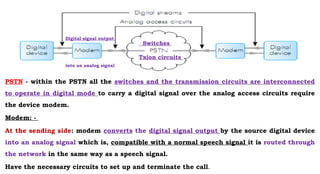
PSTN - within the PSTN all the switches and the transmission circuits are interconnected
to operate in digital mode to carry a digital signal over the analog access circuits require
the device modem.
Modem: -
At the sending side: modem converts the digital signal output by the source digital device
into an analog signal which is, compatible with a normal speech signal it is routed through
the network in the same way as a speech signal.
Have the necessary circuits to set up and terminate the call.
Switches
Txion circuits
Digital signal output
into an analog signal
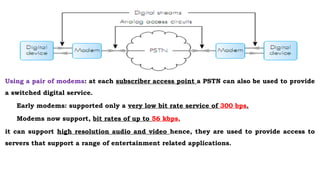
Using a pair of modems: at each subscriber access point a PSTN can also be used to provide
a switched digital service.
Early modems: supported only a very low bit rate service of 300 bps.
Modems now support, bit rates of up to 56 kbps,
it can support high resolution audio and video hence, they are used to provide access to
servers that support a range of entertainment related applications.
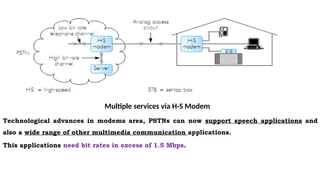
Technological advances in modems area, PSTNs can now support speech applications and
also a wide range of other multimedia communication applications.
This applications need bit rates in excess of 1.5 Mbps.
Multiple services via H-S Modem
2. Data networks:
Designed to provide basic data communication services such as e-mail and general file transfers.
User equipments - Two widely deployed types of data networks:
1. X.25 network
2. Internet.
X.25 network: operational mode is restricted to relatively low bit rate data applications. Hence, not
suitable for most multimedia applications.
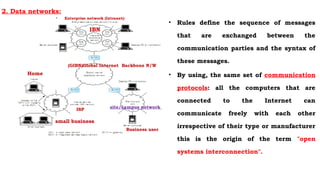
Internet: Made up of a vast collection of interconnected networks all of which operate using the
same set of communication protocols.
Communication protocol: an agreed set of rules that are adhered to by all communicating parties
for the exchange of information.
• Rules define the sequence of messages
that are exchanged between the
communication parties and the syntax of
these messages.
• By using, the same set of communication
protocols: all the computers that are
connected to the Internet can
communicate freely with each other
irrespective of their type or manufacturer
this is the origin of the term "open
systems interconnection".
Home
ISP
(GIBN)Global Internet Backbone N/W
IBN
small business
Business user
site/campus network
• Enterprise network (Intranet):
2. Data networks:
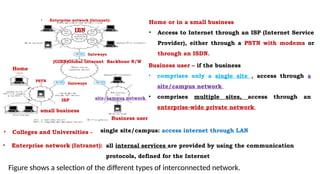
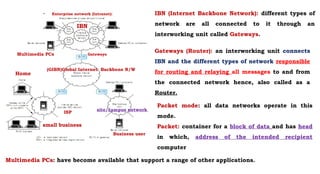
Figure shows a selection of the different types of interconnected network.
Home or in a small business
• Access to Internet through an ISP (Internet Service
Provider), either through a PSTN with modems or
through an ISDN.
Business user – if the business
• comprises only a single site , access through a
site/campus network
• comprises multiple sites, access through an
enterprise-wide private network
• Colleges and Universities -
• Enterprise network (Intranet):
single site/campus: access internet through LAN
all internal services are provided by using the communication
protocols, defined for the Internet
Home
ISP
(GIBN)Global Internet Backbone N/W
IBN
small business
Business user
site/campus network
• Enterprise network (Intranet):
Gateways
Gateways
PSTN
IBN (Internet Backbone Network): different types of
network are all connected to it through an
interworking unit called Gateways.
Home
ISP
(GIBN)Global Internet Backbone N/W
IBN
small business
Business user
site/campus network
• Enterprise network (Intranet):
Gateways
Gateways (Router): an interworking unit connects
IBN and the different types of network responsible
for routing and relaying all messages to and from
the connected network hence, also called as a
Router.
Packet mode: all data networks operate in this
mode.
Packet: container for a block of data and has head
in which, address of the intended recipient
computer
Multimedia PCs: have become available that support a range of other applications.
Multimedia PCs
Packet-mode networks and the Internet in particular:
support general data communication applications and also a range of other multimedia
communication applications involving speech, audio, and video currently.
Ex.: with the addition of microphone and a pair of speakers with sound card and associated software
to digitize the speech PCs now are used to support telephony and other speech-related applications.
Higher bit rate transmission circuits are used to represent speech, audio and video in a digital form,
and routing nodes are available, with more efficient algorithms.
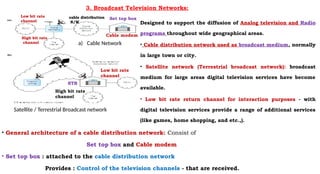
Designed to support the diffusion of Analog television and Radio
programs throughout wide geographical areas.
• Cable distribution network used as broadcast medium, normally
in large town or city.
• Satellite network (Terrestrial broadcast network): broadcast
medium for large areas digital television services have become
available.
• Low bit rate return channel for interaction purposes - with
digital television services provide a range of additional services
(like games, home shopping, and etc.,).
3. Broadcast Television Networks:
a) Cable Network
Satellite / Terrestrial Broadcast network
• General architecture of a cable distribution network: Consist of
Set top box and Cable modem
• Set top box : attached to the cable distribution network
Provides : Control of the television channels - that are received.
Set top box
cable distribution
N/W
cable distribution
N/W
Low bit rate
channel
Low bit rate
channel
High bit rate
channel
Cable modem
STB
High bit rate
channel
3. Broadcast Television Networks:
a) Cable Network
Satellite / Terrestrial Broadcast network
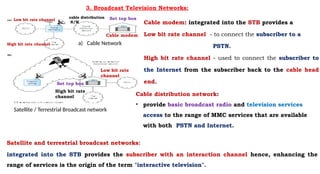
Cable modem: integrated into the STB provides a
Low bit rate channel - to connect the subscriber to a
PSTN.
High bit rate channel - used to connect the subscriber to
the Internet from the subscriber back to the cable head
end.
Set top box
cable distribution
N/W
Low bit rate channel
High bit rate channel
Cable distribution network:
• provide basic broadcast radio and television services
access to the range of MMC services that are available
with both PSTN and Internet.
Satellite and terrestrial broadcast networks:
integrated into the STB provides the subscriber with an interaction channel hence, enhancing the
range of services is the origin of the term "interactive television".
Low bit rate
channel
High bit rate
channel
Cable modem
Set top box
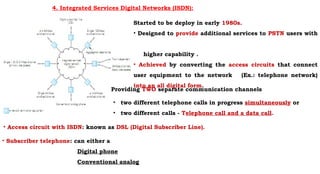
4. Integrated Services Digital Networks (ISDN):
Started to be deploy in early 1980s.
• Designed to provide additional services to PSTN users with
higher capability .
• Achieved by converting the access circuits that connect
user equipment to the network (Ex.: telephone network)
into an all digital form.
• two different telephone calls in progress simultaneously or
• two different calls - Telephone call and a data call.
Providing TWO separate communication channels
• Access circuit with ISDN: known as DSL (Digital Subscriber Line).
• Subscriber telephone: can either a
Digital phone
Conventional analog
• Digital phone:
Electronics ckts are used to convert the Analog voice and call setup signals into a Digital form and
integrated into the phone handset.
• Analog phone:
Electronics ckts are used to convert the Analog voice and call setup signals into a digital form ,
making the digital mode of operation of the network transparent to the subscriber phone.
• Digitization of a telephone - quality Analog speech signal - produces a constant bit rate binary
stream of 64kpbs.
BRI (Basic Rate Access or Basic DSL of ISDN): support two 64kbps channels which can be used either
independently (as they were intended) or as a single combined 128kbps channel.
• PRI (Primary Rate Access): single higher bit rate channel of either 1.5 or 2 Mbps is used.
More flexible way of obtaining a switched 128kbps service and a single switched channel supports
(p * 64kbps), where p=1,2,3,4...30
Design of ISDN:
• Two channels were intended for two different calls require 2 separate circuits to be set up
through the switching network independently hence, to synchronize 2 separate 64kbps bit
streams into a single 128kbps stream requires an additional box of electronics to perform
the aggregation function.
• ISDN can support a range of multimedia applications
• Due to the relatively high cost of digitizing the access circuits:
• Cost of the services associated with an ISDN is higher than the equivalent service
provided by a PSTN.
Designed 1980s for PSTN to support a wide range of MMC applications
Broadband: have bit rates in excess of the maximum bit rate of 2Mbps, 30X64 kbps provided
by an ISDN.
• B-ISDN (Broadband Integrated Services Digital Networks):
Alternate names for broadband multiservice networks since, designed to be an
enhanced ISDN.
• N-ISDN (Narrowband Integrated Services Digital Networks): alternate name for ISDN.
B-ISDN: when in first technology associated with the digitization of the video signal an
ISD could not support services that included video.
Number of the basic design features associated with the B-ISDN: have been used as the basis
of other broadband multiservice networks.
Ex.: A multiservice network implies that the network must support multiple services.
5. Broadband multiservice networks:
To have this flexibility:
• All the different media types associated with a particular application are first converted in the source
equipment into a digital form.
• These to be integrated together.
• Resulting binary stream is divided into multiple fixed-size packets called cells.
Information streams: of this type provides a more flexible way of both transmitting and switching the
multimedia information associated with a the different types of application.
Ex.: Transmission terms in: cells relating to the different applications can be integrated together more
flexibly.
Use of fixed-sized cells: means the switching of cells can be carried out much faster than, if variable-length
packets were used.
Different multimedia applications generate cell streams of different rates: this mode of operation in rate
of transfer of cells through the network also varies hence, the name: ATM (Asynchronous Transfer Mode)
ATM networks (Broadband multiservice networks) - alternate name: Cell-Switching Networks.
Ex.: ATM LANs - span a single site, ATM MANs – span large town or city.
Being used as a high-speed backbone network to interconnect a number of LANs distributed around a large
town or city.
Note: Two of the LANs are ATM LANs and other two are simply higher-speed versions of older data only LANs.
To have this flexibility:
• All the different media types associated with a particular application are first converted in the
source equipment into a digital form.
• These to be integrated together.
• Resulting binary stream is divided into multiple fixed-size packets called cells.
Information streams: provides a more flexible way of both transmitting and switching the
multimedia information associated with a the different types of application.
Use of fixed-sized cells: means the switching of cells can be carried out much faster than, if variable-
length packets were used.
Different multimedia applications generate cell streams of different rates: rate of transfer of cells
through the network also varies hence, the name: ATM (Asynchronous Transfer Mode)
ATM networks (Broadband multiservice networks) - alternate name: Cell-Switching Networks.
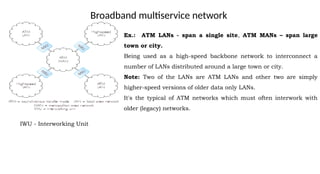
Broadband multiservice network
Ex.: ATM LANs - span a single site, ATM MANs – span large
town or city.
Being used as a high-speed backbone network to interconnect a
number of LANs distributed around a large town or city.
Note: Two of the LANs are ATM LANs and other two are simply
higher-speed versions of older data only LANs.
It's the typical of ATM networks which must often interwork with
older (legacy) networks.
IWU - Interworking Unit
Multimedia Applications:
Major categories of multimedia applications:
Interpersonal communications.
Interactive applications over the Internet.
Entertainment applications.
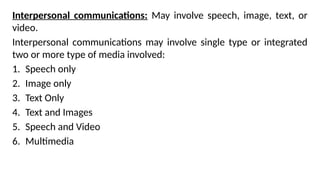
Interpersonal communications: May involve speech, image, text, or video.
Interpersonal communications may involve single type or integrated two or more type of media
involved:
1. Speech only
2. Image only
3. Text Only
4. Text and Images
5. Speech and Video
6. Multimedia
Interpersonal communications: May involve speech, image, text, or
video.
Interpersonal communications may involve single type or integrated
two or more type of media involved:
1. Speech only
2. Image only
3. Text Only
4. Text and Images
5. Speech and Video
6. Multimedia
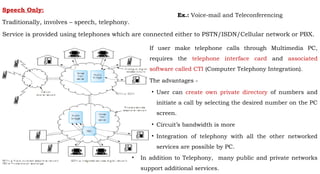
Speech Only:
Traditionally, involves – speech, telephony.
Service is provided using telephones which are connected either to PSTN/ISDN/Cellular network or PBX.
If user make telephone calls through Multimedia PC,
requires the telephone interface card and associated
software called CTI (Computer Telephony Integration).
The advantages -
• User can create own private directory of numbers and
initiate a call by selecting the desired number on the PC
screen.
• Circuit’s bandwidth is more
• Integration of telephony with all the other networked
services are possible by PC.
• In addition to Telephony, many public and private networks
support additional services.
Ex.: Voice-mail and Teleconferencing
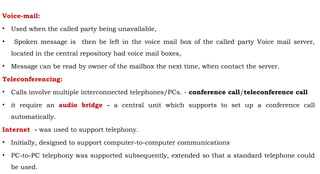
Voice-mail:
• Used when the called party being unavailable,
• Spoken message is then be left in the voice mail box of the called party Voice mail server,
located in the central repository had voice mail boxes,
• Message can be read by owner of the mailbox the next time, when contact the server.
Teleconferencing:
• Calls involve multiple interconnected telephones/PCs. - conference call/teleconference call
• it require an audio bridge - a central unit which supports to set up a conference call
automatically.
Internet - was used to support telephony.
• Initially, designed to support computer-to-computer communications
• PC-to-PC telephony was supported subsequently, extended so that a standard telephone could
be used.
PC-to-PC telephone call:
Standard addresses are used to identify individual computers connected to the internet are
used same way as for a data transfer application.
Internet:
Operates in the packet mode
Both PCs must have the necessary H/W and S/W to convert the speech signal from the
microphone into packets on input and back again prior to output to the speakers.
Thus Telephony over the Internet is called the Internet Protocol (IP), Voice over IP (VoIP).
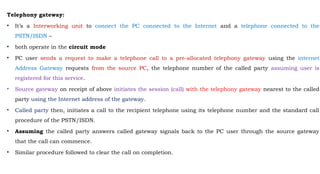
Telephony gateway:
• It’s a Interworking unit to connect the PC connected to the Internet and a telephone connected to the
PSTN/ISDN –
• both operate in the circuit mode
• PC user sends a request to make a telephone call to a pre-allocated telephony gateway using the internet
Address Gateway requests from the source PC, the telephone number of the called party assuming user is
registered for this service.
• Source gateway on receipt of above initiates the session (call) with the telephony gateway nearest to the called
party using the Internet address of the gateway.
• Called party then, initiates a call to the recipient telephone using its telephone number and the standard call
procedure of the PSTN/ISDN.
• Assuming the called party answers called gateway signals back to the PC user through the source gateway
that the call can commence.
• Similar procedure followed to clear the call on completion.
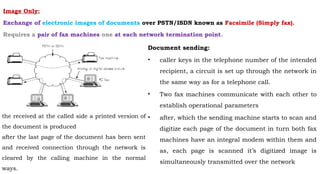
Image Only:
Exchange of electronic images of documents over PSTN/ISDN known as Facsimile (Simply fax).
Requires a pair of fax machines one at each network termination point.
Document sending:
• caller keys in the telephone number of the intended
recipient, a circuit is set up through the network in
the same way as for a telephone call.
• Two fax machines communicate with each other to
establish operational parameters
• after, which the sending machine starts to scan and
digitize each page of the document in turn both fax
machines have an integral modem within them and
as, each page is scanned it’s digitized image is
simultaneously transmitted over the network
the received at the called side a printed version of
the document is produced
after the last page of the document has been sent
and received connection through the network is
cleared by the calling machine in the normal
ways.
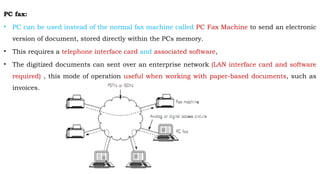
PC fax:
• PC can be used instead of the normal fax machine called PC Fax Machine to send an electronic
version of document, stored directly within the PCs memory.
• This requires a telephone interface card and associated software,
• The digitized documents can sent over an enterprise network (LAN interface card and software
required) , this mode of operation useful when working with paper-based documents, such as
invoices.
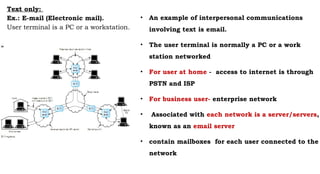
Text only:
Ex.: E-mail (Electronic mail).
User terminal is a PC or a workstation.
• An example of interpersonal communications
involving text is email.
• The user terminal is normally a PC or a work
station networked
• For user at home - access to internet is through
PSTN and ISP
• For business user- enterprise network
• Associated with each network is a server/servers,
known as an email server
• contain mailboxes for each user connected to the
network
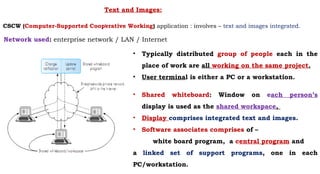
Text and Images:
.
• Typically distributed group of people each in the
place of work are all working on the same project.
• User terminal is either a PC or a workstation.
• Shared whiteboard: Window on each person’s
display is used as the shared workspace,
• Display comprises integrated text and images.
• Software associates comprises of –
white board program, a central program and
a linked set of support programs, one in each
PC/workstation.
Network used: enterprise network / LAN / Internet
CSCW (Computer-Supported Cooperative Working) application : involves – text and images integrated.
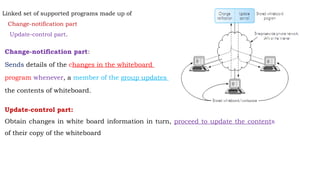
Change-notification part:
Sends details of the changes in the whiteboard
program whenever, a member of the group updates
the contents of whiteboard.
Update-control part:
Obtain changes in white board information in turn, proceed to update the contents
of their copy of the whiteboard
Linked set of supported programs made up of
Change-notification part
Update-control part.
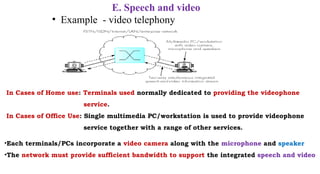
E. Speech and video
• Example - video telephony
•Each terminals/PCs incorporate a video camera along with the microphone and speaker
•The network must provide sufficient bandwidth to support the integrated speech and video
In Cases of Home use: Terminals used normally dedicated to providing the videophone
service.
In Cases of Office Use: Single multimedia PC/workstation is used to provide videophone
service together with a range of other services.
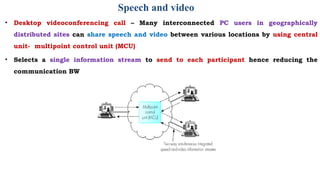
Speech and video
• Desktop videoconferencing call – Many interconnected PC users in geographically
distributed sites can share speech and video between various locations by using central
unit- multipoint control unit (MCU)
• Selects a single information stream to send to each participant hence reducing the
communication BW
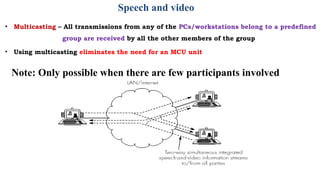
Speech and video
• Multicasting – All transmissions from any of the PCs/workstations belong to a predefined
group are received by all the other members of the group
• Using multicasting eliminates the need for an MCU unit
Note: Only possible when there are few participants involved
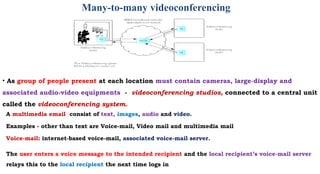
Many-to-many videoconferencing
• As group of people present at each location must contain cameras, large-display and
associated audio-video equipments - videoconferencing studios, connected to a central unit
called the videoconferencing system.
A multimedia email consist of text, images, audio and video.
Examples - other than text are Voice-mail, Video mail and multimedia mail
Voice-mail: internet-based voice-mail, associated voice-mail server.
The user enters a voice message to the intended recipient and the local recipient’s voice-mail server
relays this to the local recipient the next time logs in
2. Interactive applications over the Internet
• Anchor – The optional linkage points within documents are defined by the creator of the document
and are known as anchors.
• Hypertext – Web documents comprising only text are created using hypertext
•Hypermedia – Web documents comprising multimedia (Video, Sound) are created using hypermedia
• Browser – The client function that is used to explore the total contents of the web
• Applications such as homeshopping, homebanking, etc.. the user may want to pass on
information back to the server.
• This information might contain credit card details and personal details and hence a
rigorous security procedure needs to be in place
• This type of two way process is known as interactive application over the Web.
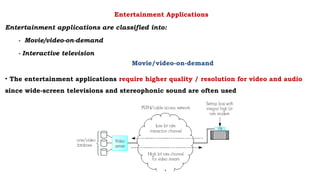
Entertainment Applications
Entertainment applications are classified into:
- Movie/video-on-demand
- Interactive television
Movie/video-on-demand
• The entertainment applications require higher quality / resolution for video and audio
since wide-screen televisions and stereophonic sound are often used
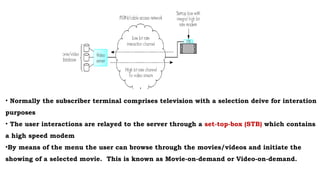
• Normally the subscriber terminal comprises television with a selection deive for interation
purposes
• The user interactions are relayed to the server through a set-top-box (STB) which contains
a high speed modem
•By means of the menu the user can browse through the movies/videos and initiate the
showing of a selected movie. This is known as Movie-on-demand or Video-on-demand.
Movie/video-on-demand
Key features of MOD
- Subscriber can initiate the showing of a movie from a library of movies at any time of
the day or night
Issues associated with MOD
- The server must be capable of playing out simultaneously a large number of video
streams equal to the number of subscribers at any one time
- This will require high speed information flow from the server (multi-movies + multi-
copies)
Movie/video-on-demand
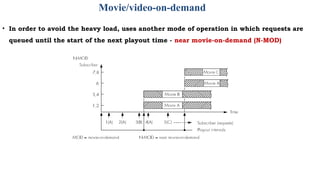
• In order to avoid the heavy load, uses another mode of operation in which requests are
queued until the start of the next playout time - near movie-on-demand (N-MOD)
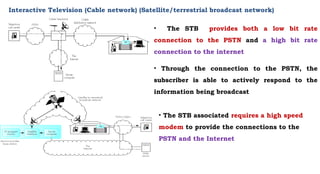
Interactive Television (Cable network) (Satellite/terrestrial broadcast network)
• The STB provides both a low bit rate
connection to the PSTN and a high bit rate
connection to the internet
• Through the connection to the PSTN, the
subscriber is able to actively respond to the
information being broadcast
• The STB associated requires a high speed
modem to provide the connections to the
PSTN and the Internet
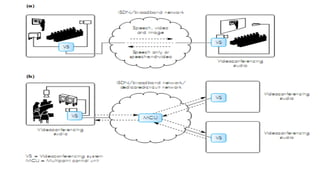
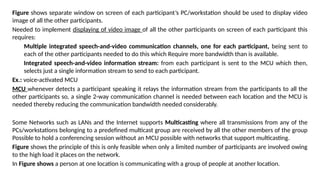
Figure shows separate window on screen of each participant’s PC/workstation should be used to display video
image of all the other participants.
Needed to implement displaying of video image of all the other participants on screen of each participant this
requires:
Multiple integrated speech-and-video communication channels, one for each participant, being sent to
each of the other participants needed to do this which Require more bandwidth than is available.
Integrated speech-and-video information stream: from each participant is sent to the MCU which then,
selects just a single information stream to send to each participant.
Ex.: voice-activated MCU
MCU whenever detects a participant speaking it relays the information stream from the participants to all the
other participants so, a single 2-way communication channel is needed between each location and the MCU is
needed thereby reducing the communication bandwidth needed considerably.
Some Networks such as LANs and the Internet supports Multicasting where all transmissions from any of the
PCs/workstations belonging to a predefined multicast group are received by all the other members of the group
Possible to hold a conferencing session without an MCU possible with networks that support multicasting.
Figure shows the principle of this is only feasible when only a limited number of participants are involved owing
to the high load it places on the network.
In Figure shows a person at one location is communicating with a group of people at another location.
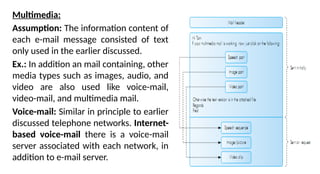
Multimedia:
Assumption: The information content of
each e-mail message consisted of text
only used in the earlier discussed.
Ex.: In addition an mail containing, other
media types such as images, audio, and
video are also used like voice-mail,
video-mail, and multimedia mail.
Voice-mail: Similar in principle to earlier
discussed telephone networks. Internet-
based voice-mail there is a voice-mail
server associated with each network, in
addition to e-mail server.
User first enters the voice message addressed to the intended recipient local voice-mail server
then, relays this to the server associated with the intended recipient’s network stored voice
message is then, played out the next time the recipient accesses voice-mailbox.
Same mode of operation is used for video-mail except, the mail message comprises an
integrated speech-and video sequence.
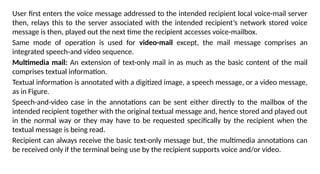
Multimedia mail: An extension of text-only mail in as much as the basic content of the mail
comprises textual information.
Textual information is annotated with a digitized image, a speech message, or a video message,
as in Figure.
Speech-and-video case in the annotations can be sent either directly to the mailbox of the
intended recipient together with the original textual message and, hence stored and played out
in the normal way or they may have to be requested specifically by the recipient when the
textual message is being read.
Recipient can always receive the basic text-only message but, the multimedia annotations can
be received only if the terminal being use by the recipient supports voice and/or video.
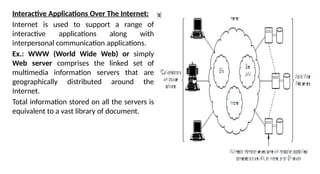
Interactive Applications Over The Internet:
Internet is used to support a range of
interactive applications along with
interpersonal communication applications.
Ex.: WWW (World Wide Web) or simply
Web server comprises the linked set of
multimedia information servers that are
geographically distributed around the
Internet.
Total information stored on all the servers is
equivalent to a vast library of document.
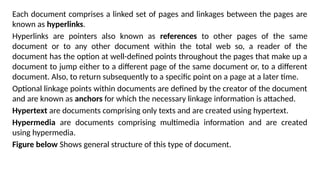
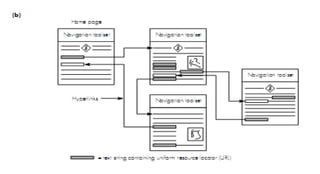
Each document comprises a linked set of pages and linkages between the pages are
known as hyperlinks.
Hyperlinks are pointers also known as references to other pages of the same
document or to any other document within the total web so, a reader of the
document has the option at well-defined points throughout the pages that make up a
document to jump either to a different page of the same document or, to a different
document. Also, to return subsequently to a specific point on a page at a later time.
Optional linkage points within documents are defined by the creator of the document
and are known as anchors for which the necessary linkage information is attached.
Hypertext are documents comprising only texts and are created using hypertext.
Hypermedia are documents comprising multimedia information and are created
using hypermedia.
Figure below Shows general structure of this type of document.
There is no central authority for the introduction of new documents into the web. On side in anyone create a new document providing
the server has been allocated an Internet address, and make hyperlink references from it to any other document on the web.
URL (Uniform Resource Locator) is a Document’s unique address which identifies both location of the server on the Internet, where the
first page of the document is stored and also the file reference on the server.
Home page is the First page of the document all the hyperlinks on this and other pages have similar URLs associated with them physical
location of a page is transparent, to the user and in theory can be located anywhere on the web.
A Standard format is used for writing documents is known as HTML (Hyper Text Markup Language) and is also used for writing client
software to explore the total contents of the web, i.e., the contents of the linked information on all the web servers.
A Browser is a Client function and there are number of user-friendly browsers available to explore visited servers and to open up a
dialog with a particular server at the click of the mouse. Once the desired document has been located, the user simply clicks on an
anchor point within a page of the document to activate the linkage information stored at that point Possible to return to the previous
anchor at any time.
With the hypertext document: Anchor is usually, an underlined word or phrase.
With the hypermedia document: Anchor is usually, an icon of an appropriate shape.
Ex.: Loudspeaker for a sound annotation for a video camera for a video clip.
In Some applications client simply wishes to browse through the information stored at a particular site. Ex.: Browsing through sales
literature, product information, application notes periodicals, newspapers, and so on. In general, no charge for accessing this
information however, access to books, journals, and similar documents may be by subscriptions only.
Teleshopping (home shopping)/ Telebanking (home banking) applications: A client may wish not only to browse through the
information at a site but also to initiate an additional transaction Server must provide additional transaction processing support for,
say, ordering and purchasing since, this will also often involve financial transaction, more rigorous security procedures are required for
access and authentication purposes.
Entertainment Applications:
Entertainment applications can be of 2 types:
Movie/video-on-demand
Interactive television
Movie/Video-On-Demand:
• The video and audio associated with entertainment applications must be of a much higher
quality/resolution. Since, wide-screen televisions and stereophonic sound are often used.
• Digitized movie/video with sound requires a minimum channel bit rate (bandwidth) of
1.5Mbps. Hence, network used to support this application, must be either a PSTN with a
high bit rate modem or a cable network of this type.
• For PSTN: high bit rate channel provided by the modem used only over the access circuit
and provides additional services to the other switched services that the PSTN supports.
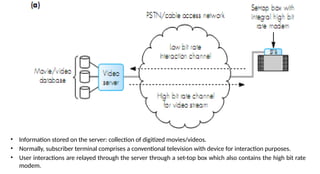
• Information stored on the server: collection of digitized movies/videos.
• Normally, subscriber terminal comprises a conventional television with device for interaction purposes.
• User interactions are relayed through the server through a set-top box which also contains the high bit rate
modem.
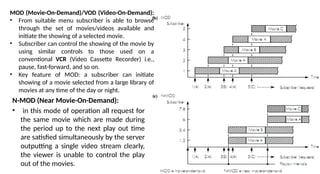
N-MOD (Near Movie-On-Demand):
• in this mode of operation all request for
the same movie which are made during
the period up to the next play out time
are satisfied simultaneously by the server
outputting a single video stream clearly,
the viewer is unable to control the play
out of the movies.
MOD (Movie-On-Demand)/VOD (Video-On-Demand):
• From suitable menu subscriber is able to browse
through the set of movies/videos available and
initiate the showing of a selected movie.
• Subscriber can control the showing of the movie by
using similar controls to those used on a
conventional VCR (Video Cassette Recorder) i.e.,
pause, fast-forward, and so on.
• Key feature of MOD: a subscriber can initiate
showing of a movie selected from a large library of
movies at any time of the day or night.
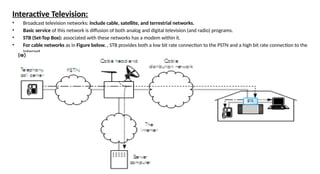
Interactive Television:
• Broadcast television networks: include cable, satellite, and terrestrial networks.
• Basic service of this network is diffusion of both analog and digital television (and radio) programs.
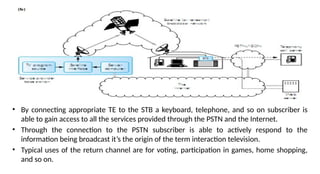
• STB (Set-Top Box): associated with these networks has a modem within it.
• For cable networks as in Figure below. , STB provides both a low bit rate connection to the PSTN and a high bit rate connection to the
Internet.
• By connecting appropriate TE to the STB a keyboard, telephone, and so on subscriber is
able to gain access to all the services provided through the PSTN and the Internet.
• Through the connection to the PSTN subscriber is able to actively respond to the
information being broadcast it’s the origin of the term interaction television.
• Typical uses of the return channel are for voting, participation in games, home shopping,
and so on.
Continuous media case:
• Information stream is generated by the source continuously in a time dependent way.
• Passed directly to the destination as it is generated, and at the destination, the
information stream is played out directly as it is received operation mode of which is
called streaming.
• Continuous media generated in a time-dependent way is called Real-time media.
• Continuous media with the bit rate of the communication channel that is used must
be compatible with the rate the source media is being generated.
• Ex.: Media types that guarantee continuous streams of information in real time are
audio and video.
• Bit rate of source information stream can be either CBR (Constant Bit Rate)/ VBR
(Variable Bit Rate).
• Audio: Ex.: Digitized audio stream is generated at a constant bit rate which is
determined by the frequency. The audio waveform is sampled and the number of bits
that are used to digitize each sample.
• Video: Ex.: Individual pictures/frames that make up the video are generated at a
constant rate after compression amount of information associated with each frame
varies in general, information stream associated with compressed video is
generated at fixed time intervals but the resulting bit rate is variable.
Block mode media:
Source information comprises single block of information that is created in a time independent way.
Ex.: block of text representing an e-mail or computer program a 2-D matrix of pixel values that
represents an image and so on.
Block mode media created in a time-independent way often stored at the source in say, a file
Downloading when it is requested block of information is transferred across the network to the
destination where it is again stored and subsequently output/displayed at a time determined by the
requesting application program.
Bit rate of the communications channel need not be constant but, such that, when a block is
requested.
RTD (Round-Trip Delay): delay between the request being made and the contents of the block being
output at the destination is within an acceptable time interval - RTD – for HCI (Human-Computer
Interface): can be no more than a few seconds.
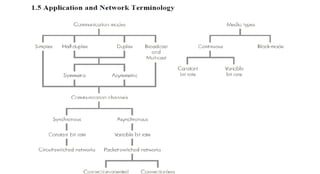
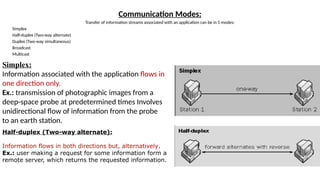
Communication Modes:
Transfer of information streams associated with an application can be in 5 modes:
Simplex
Half-duplex (Two-way alternate)
Duplex (Two-way simultaneous)
Broadcast
Multicast
Simplex:
Information associated with the application flows in
one direction only.
Ex.: transmission of photographic images from a
deep-space probe at predetermined times Involves
unidirectional flow of information from the probe
to an earth station.
Half-duplex (Two-way alternate):
Information flows in both directions but, alternatively.
Ex.: user making a request for some information form a
remote server, which returns the requested information.
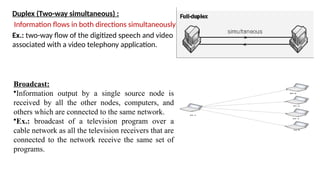
Duplex (Two-way simultaneous) :
Information flows in both directions simultaneously.
Ex.: two-way flow of the digitized speech and video
associated with a video telephony application.
Broadcast:
•Information output by a single source node is
received by all the other nodes, computers, and
others which are connected to the same network.
•Ex.: broadcast of a television program over a
cable network as all the television receivers that are
connected to the network receive the same set of
programs.
Multicast:
Similar to broadcast except, information output by the source is received by only a specific subset of the nodes that are
connected to the network (multicast group).
Ex.: video conferencing involving a predefined group of terminals/computers connected to a network exchanging integrated
speech and video streams.
In half-duplex and duplex communications the bit rate associated with the flow of information in each direction can be same or
different.
Rate associated, with the flow of information in each direction is equal then is called as Symmetric.
Rate associated, with the flow of information in each direction is unequal then is called as Asymmetric.
Ex.: Video telephone call: involves exchange of integrated digitized speech and video stream both direction simultaneously so,
symmetric duplex communications channel is required.
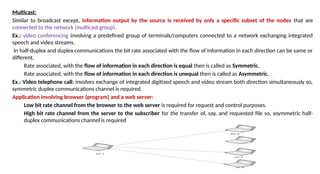
Application involving browser (program) and a web server:
Low bit rate channel from the browser to the web server is required for request and control purposes.
High bit rate channel from the server to the subscriber for the transfer of, say, and requested file so, asymmetric half-
duplex communications channel is required
Network Types:
Types of information stream associated with the different media types
are:
Continuous mode
Block mode
There are TWO types of communications channel associated with the
various network types they are:
Circuit-mode: operates in a time-dependent way, also called as Synchronous
communications channel as it provides a constant bit rate service at a
specified rate.
Packet-mode: operates in a time-varying way, also called as Asynchronous
communications channel provides a variable bit rate service - actual rate is
determined by the variable transfer rate of packets across the network.
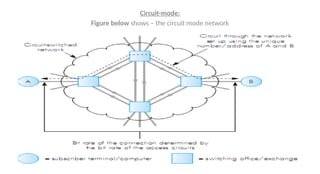
Circuit-mode:
Figure below shows – the circuit mode network
Circuit-switched networks comprise an interconnected set of switching offices/exchanges for which the subscriber
terminals/computers are connected.
Prior sending information source set up a connection through the network.
Each subscriber terminal/computer has a unique network-wide number/address associated with it.
To make a call source first enters the number/address of the intended communication partner Local switching
office/exchange uses this to set up a connection through the network to the switching office/exchange to which
destination is connected.
Assuming destination is free and ready to receive a call a message is returned to the source indicating that it can
start to transfer/exchange information. After all the information has been transferred/exchanged either the
source or the destination requests for the connection to be cleared.
Bit rate associated with the connection is fixed and, determined by the bit rate that is used over the access
circuits that connect the source and destination terminal/computer to the network signaling messages associated
with the setting up and clearing of a connection.
Call/connection setup delay is the time delay while a connection is being established.
Ex.: PSTN and ISDN.
PSTN: call setup delay can range from a fraction of a second for a local call through to several seconds for an
international call.
ISDN: delay ranges from tens of milliseconds through to several hundred milliseconds.
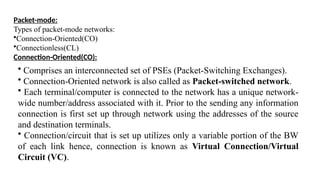
Packet-mode:
Types of packet-mode networks:
•Connection-Oriented(CO)
•Connectionless(CL)
Connection-Oriented(CO):
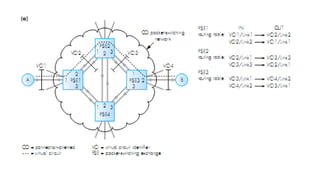
• Comprises an interconnected set of PSEs (Packet-Switching Exchanges).
• Connection-Oriented network is also called as Packet-switched network.
• Each terminal/computer is connected to the network has a unique network-
wide number/address associated with it. Prior to the sending any information
connection is first set up through network using the addresses of the source
and destination terminals.
• Connection/circuit that is set up utilizes only a variable portion of the BW
of each link hence, connection is known as Virtual Connection/Virtual
Circuit (VC).
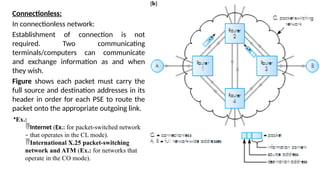
Connectionless:
In connectionless network:
Establishment of connection is not
required. Two communicating
terminals/computers can communicate
and exchange information as and when
they wish.
Figure shows each packet must carry the
full source and destination addresses in its
header in order for each PSE to route the
packet onto the appropriate outgoing link.
•Ex.:
Internet (Ex.: for packet-switched network
– that operates in the CL mode).
International X.25 packet-switching
network and ATM (Ex.: for networks that
operate in the CO mode).
Multipoint Conferencing:
• Features in many interpersonal applications including audio and video
conferencing, data sharing, and computer supported cooperative working.
• These involve exchange of information between 3 or more
terminals/computers.
• Multipoint conferencing is implemented in one of following ways:
Centralized mode
Decentralized mode
Hybrid mode
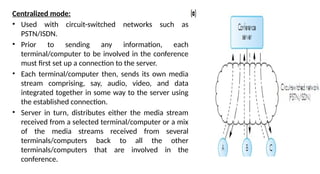
Centralized mode:
• Used with circuit-switched networks such as
PSTN/ISDN.
• Prior to sending any information, each
terminal/computer to be involved in the conference
must first set up a connection to the server.
• Each terminal/computer then, sends its own media
stream comprising, say, audio, video, and data
integrated together in some way to the server using
the established connection.
• Server in turn, distributes either the media stream
received from a selected terminal/computer or a mix
of the media streams received from several
terminals/computers back to all the other
terminals/computers that are involved in the
conference.
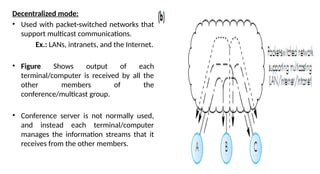
Decentralized mode:
• Used with packet-switched networks that
support multicast communications.
Ex.: LANs, intranets, and the Internet.
• Figure Shows output of each
terminal/computer is received by all the
other members of the
conference/multicast group.
• Conference server is not normally used,
and instead each terminal/computer
manages the information streams that it
receives from the other members.
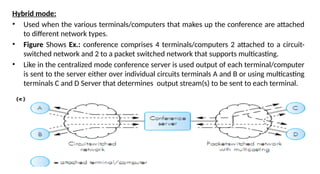
Hybrid mode:
• Used when the various terminals/computers that makes up the conference are attached
to different network types.
• Figure Shows Ex.: conference comprises 4 terminals/computers 2 attached to a circuit-
switched network and 2 to a packet switched network that supports multicasting.
• Like in the centralized mode conference server is used output of each terminal/computer
is sent to the server either over individual circuits terminals A and B or using multicasting
terminals C and D Server that determines output stream(s) to be sent to each terminal.
Types of conferencing based on media Type:
• Data conferencing
• Audio conferencing
• Video conferencing
• Multimedia conferencing
• Data conferencing: Involves data only.
Ex.: include data sharing and computer-supported cooperative working.
• Audio conferencing: Involves audio (speech) only.
• Video conferencing: Involves speech and video synchronized and integrated together.
• Multimedia conferencing: integration of Audio, video, and Data.
Network QoS -
Definition: “Operational parameters associated with a communications channel through a network
collectively determine the suitability of the channel in relation to its use for a particular application”.
• QoS parameters are different for circuit-switched and packet-switched networks.
Circuit-Switched Network:
QoS parameters associated with a constant bit rate channel that is set up through a Circuit-switched
network are
• Bit rate
• Mean bit error rate
• Transmission delay
Bit rate: - It is a synonym for data transfer rate
• It is the number of bits that pass a given point in a telecommunication network in a
given amount of time(usually a second).
• Measured in some multiple of bits per second.
Mean BER (Mean Bit Error Rate) of a channel:
• Probability of a bit being corrupted during its transmission across the channel in a
defined time interval.
• For constant bit rate channel:
The probability of a bit being corrupted in a defined number of bits
Mean BER of 10-3
means, on average for every 1000 bits that are transmitted, 1 of
these bits is corrupt.
• The occurrence of bit errors is relatively infrequent their presence is acceptable
• It is imperative that no residual bit errors are present in the received information.
Ex.:
• If the application involves speech then, an occasional bit error will go unnoticed.
• If the application involves transfer of financial information, the received
information contains no errors
• in this application, prior to transmission the source information is normally divided
into blocks the maximum size of which is determined by the mean BER of the
communications channel.
• Ex.: if mean BER is 10-3
- number of bits in a block must be considerably < 1000,
otherwise, on an average every block will contain an error and will be discarded.
• Normally bit errors occur randomly hence, even with a block size of (say 100 bits)
blocks may still contain an error but, the probability of this occurring is considerably
less.
• In general,
BER probability is P,
Number of bits in a block is N,
Probability of a block containing a bit error is PB.
• Assuming: random errors: PB=1-(1-P)N
which approximates to NxP if, NxP<1.
• In practice, both circuit-switched and packet-switched provide unreliable service (best-
try or best-effort service).
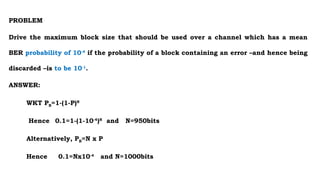
PROBLEM
Drive the maximum block size that should be used over a channel which has a mean
BER probability of 10-4
if the probability of a block containing an error –and hence being
discarded –is to be 10-1
.
ANSWER:
WKT PB=1-(1-P)N
Hence 0.1=1-(1-10-4
)N
and N=950bits
Alternatively, PB=N x P
Hence 0.1=Nx10-4
and N=1000bits
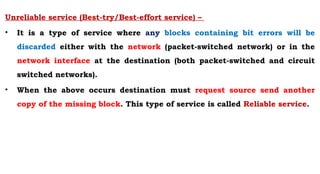
Unreliable service (Best-try/Best-effort service) –
• It is a type of service where any blocks containing bit errors will be
discarded either with the network (packet-switched network) or in the
network interface at the destination (both packet-switched and circuit
switched networks).
• When the above occurs destination must request source send another
copy of the missing block. This type of service is called Reliable service.
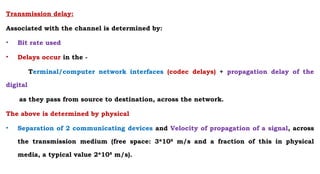
Transmission delay:
Associated with the channel is determined by:
• Bit rate used
• Delays occur in the -
Terminal/computer network interfaces (codec delays) + propagation delay of the
digital
as they pass from source to destination, across the network.
The above is determined by physical
• Separation of 2 communicating devices and Velocity of propagation of a signal, across
the transmission medium (free space: 3*108
m/s and a fraction of this in physical
media, a typical value 2*108
m/s).
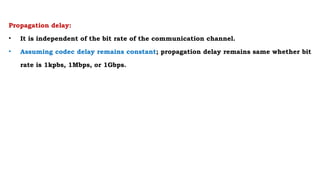
Propagation delay:
• It is independent of the bit rate of the communication channel.
• Assuming codec delay remains constant; propagation delay remains same whether bit
rate is 1kpbs, 1Mbps, or 1Gbps.
Packet-switched network(PKTs N/W):
QoS parameters – associated with a PKS N/W include
Maximum packet size
Mean packet transfer rate
Mean packet error rate
Mean packet transfer delay
Worst-case jitter
Transmission delay
• The rate of packets transfer across the network influenced strongly by bit rate of the
interconnecting links due to, variable store-and-forward delays in each PSE/router.
• Actual rate of transfer of packets across the network is also variable.
Mean packet transfer rate:
Measure of the average number of packets transferred across the network/second
coupling with packet size being used determines equivalent mean bit rate of the
channel.
Mean PER (Mean Packet Error Rate):
• Probability of a received packet containing one or more bit errors, same as block error rate,
associated with a PKTS N/W.
• Thus related to both maximum packet size and worst-case BER of the transmission links which
interconnects PSEs/routers that make up the network.
Mean packet transfer delay:
Summation of the mean store-and-forward delay that a packet experiences in each
PSE/router which, it encounters along a route.
• Jitter: Worst-case variation in the mean packet transfer delay.
• Transmission delay:
Codec delay, in each of the two-communicating computers and Signal propagation delay.
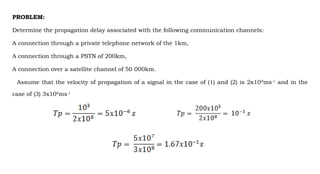
PROBLEM:
Determine the propagation delay associated with the following communication channels:
A connection through a private telephone network of the 1km,
A connection through a PSTN of 200km,
A connection over a satellite channel of 50 000km.
Assume that the velocity of propagation of a signal in the case of (1) and (2) is 2x10⁸
ms-1
and in the
case of (3) 3x10⁸
ms-1
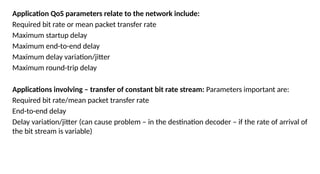
Application QoS parameters relate to the network include:
Required bit rate or mean packet transfer rate
Maximum startup delay
Maximum end-to-end delay
Maximum delay variation/jitter
Maximum round-trip delay
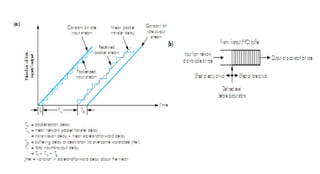
Applications involving – transfer of constant bit rate stream: Parameters important are:
Required bit rate/mean packet transfer rate
End-to-end delay
Delay variation/jitter (can cause problem – in the destination decoder – if the rate of arrival of
the bit stream is variable)
PROBLEM:
A packet-switch network with a worst-case jitter of 10ms is to be used for a number of applications each of which involves a
constant bit rate information stream. Determine the minimum amount of memory that is required at the destination and a
suitable packet size for each of the following input bit rate. It can be assumed that the main packet transfer network
exceeds the equivalent input bit rate in each case.
(1) 64kbps
(2) 256kbps
(3) 1.5Mbps
ANSWER:
(1) At 64kbps, 10ms=640bits
Hence chose a packet size of, say, 800 bits with a FIFO buffer of 1600 bits -2 packet –and start play out of the bitstream after
the first packet has been received.
(2) At 256kbps, 10ms=2560 bits
Hence chose a packet size of, say, 2800 bits with a FIFO buffer of 4800 bits.
(3) AT 1.5Mbps, 10ms=15000 bits
Hence choose a packet size of, say, 16000 bits with a FIFO buffer of 32000 bits.
NOTICE: that if the computed packet size exceeds the network maximum packet size, then the equivalent number of packet
must be sent before play out starts for example, if the maximum network packet size was 800 bits , then for case (3) above
play out would not start until two packets have received and the FIFO buffer should hold four packets.

Multi Media Communicationch module1.pptx

  • 1.
  • 2.
    MULTIMEDIA COMMUNICATION Course Objectives: Thiscourse will enable students to: • Gain fundamental knowledge in understanding the basics of different multimedia networks and applications. • Understand digitization principle techniques required to analyze different media types. • Analyze compression techniques required to compress text and image and gain knowledge of DMS. • Analyze compression techniques required to compress audio and video. • Gain fundamental knowledge about multimedia communication across different networks.
  • 3.
    Module 1 Multimedia Communications: Introduction, Multimedia information representation, multimedia networks, multimedia applications, Application and networking terminology. (Chap 1 of Text 1) Text Books: Fred Halsall, “Multimedia Communications”, Pearson education, 2001 ISBN - 9788131709948. K. R. Rao, Zoran S. Bojkovic, Dragorad A. Milovanovic, “Multimedia Communication Systems”, Pearson education, 2004. ISBN -9788120321458 Reference Book : Raifsteinmetz, Klara Nahrstedt, “Multimedia: Computing, Communications and Applications”, Pearson education, 2002. ISBN -9788177584417
  • 4.
    Multimedia Communication • Theterm multimedia is used to indicate that the information / data being transferred over the network. • MMC includes arrange of applications and networking infrastructures. Different Media Types - • Text: • Images: • Audio: • Video: Text: Includes both Unformatted Text- Comprising strings of characters from a limited character set Formatted Text- Comprises strings as used for the structuring, access, and presentation of electronic documents.
  • 5.
    Multimedia Communication • Images:Includes Computer Generated Image - comprising lines, curves, circles, and Digitized Images of documents and pictures. • Audio: Includes both Low-fidelity speech - as used in telephony and High-fidelity speech - stereo phonic music as used with compact discs. • Video: Includes Short sequences of moving images (also known as video clips) Complete movies/films.
  • 6.
    Communication may bein-terms of either : Person-to-Person communications Person-to-System communications Person-to-Person - communicates using suitable Terminal Equipment (TE) Person-to-System communications: • Person interacts with the system(Server) using suitable Digital device like workstation or multimedia personal computer (PC), located either in homes or offices. • Server containing a collection of files or documents-each comprising digitized text, images, audio and video information. • User interacts with the server by means of a suitable selection device connected to the Set- top box (STB) associated with a television or modem used with the computers.
  • 7.
    Networking infrastructure :provided using a number of different types of network Networks: Two types 1: PSTN (Public Switched Telephone Network) or GSTN (General Switched Telephone N/W) • Designed initially to provide the basic switched telephone service but due to the Advances in DSP H/W and associated S/W, provides a range of more advanced services involving- text, images and video. 2: Data network: • Initially to support basic data applications- e-mail, file transfers, and others now support a much richer set of applications-which involve images, audio, and video. • Designed from the out set to provide multimedia communication services. Ex : ATM networks.
  • 8.
    Multimedia Information Representation: Applicationsinvolving Text and Images - comprise blocks of digital data units. Text data – • A block of characters with each character represented by - fixed number of Binary digits (bits) or Codeword. Image data – • Comprises a 2-D block of pixels (picture elements) with each pixel represented by a fixed number of bits. • Applications involving Text and Images: comprise the short request for a file. Ex.: file contents being returned, the duration of the overall transaction is relatively short. Audio and Video Signals: Can vary continuously with time as the amplitude of the speech, audio or video signal varies. •Ex.: Typical telephone conversation can last for several minutes and Movie (comprising audio and video) can last for a number of hours.
  • 9.
    Digitization of anaudio signal: • Produces a digital signal with amplitude of the signal varies continuously with time and is of relatively high bit rate(64 kbps), • Measured by bps (bits per second). • Applications involving audio can be of a long duration: this bit rate must be sustained for an equally long time period. Digitization of video signal: • Same as audio signals but, with much higher bit rates and longer time durations • Compression techniques are used to support applications with very high bit rates Digitization of - An audio signal and video signal
  • 10.
    Compression: Lossy andLossy less • It's a technique applied to the digitized signals to reduce the resulting bit rate to a level which can be supported by various networks. Compression - to text and images: • To reduce the time delay between a requests being made for some information and the information becoming available on the screen of a computers or over others.
  • 11.
    Multimedia Networks: • 5basic types of communication networks are used to provide multimedia communication services:  Telephone networks.  Data networks.  Broadcast television networks.  Integrated services digital networks.  Broadband multiservice networks.
  • 12.
    1. Telephone networks: •Public Switched Telephone network (PSTNs) has been in existence for many years and have gone through many changes over the time. • Designed to provide a Basic switched telephone service, with the initiation of the other network types has become known as POTS (Plain Old Telephone Service). • 'Switched': term is used to indicate that the subscriber can make a call to any other telephone that is connected to the total network. • Initially - such networks spanned within a single country, later telephone networks of different countries were interconnected, now provide an international switched service.
  • 13.
    Main Components ofthe Network Local Exchange/End Office: • Telephones located in the home or in a small business are connected directly to their nearest LEs/Eos. Private Branch Exchange (PBX): • Telephones located in the medium or large office/site are connected to a PBX (Private switching Office). • Provides a (free) switched service between any two telephones - that are connected to it. • Connected to its nearest LE (public), which enables the telephone that are connected to the PBX also to make calls through a PSTN.
  • 14.
    Cellular Phone Networks: •Provide the similar service to the mobile subscribes by means of the handsets linked to the cellular phone network infrastructure by radio. IGE (International Gateway Exchange) - Route and switch the international calls. GMSC (Mobile Switching Center): • it's the switch used in the cellular phone, connected to a switching office in a PSTN. • Enables both sets of subscribers to make calls to one another.
  • 15.
    • Speech signal:is an analog signal varies continuously with time according, to the amplitude and frequency variations of the sound resulting from the speech. • Microphone: used to convert an analog electrical signal. • Telephone networks operate in circuit mode, for each call a separate circuit is set up through the network of the necessary capacity for the duration of the call. • Access circuits: link the telephone handsets to a PSTN or PBX were designed to carry the 2-way analog signals associated with a call. Digital Transmission using modem General Scheme of Modem
  • 16.
    PSTN - withinthe PSTN all the switches and the transmission circuits are interconnected to operate in digital mode to carry a digital signal over the analog access circuits require the device modem. Modem: - At the sending side: modem converts the digital signal output by the source digital device into an analog signal which is, compatible with a normal speech signal it is routed through the network in the same way as a speech signal. Have the necessary circuits to set up and terminate the call. Switches Txion circuits Digital signal output into an analog signal
  • 17.
    Using a pairof modems: at each subscriber access point a PSTN can also be used to provide a switched digital service. Early modems: supported only a very low bit rate service of 300 bps. Modems now support, bit rates of up to 56 kbps, it can support high resolution audio and video hence, they are used to provide access to servers that support a range of entertainment related applications.
  • 18.
    Technological advances inmodems area, PSTNs can now support speech applications and also a wide range of other multimedia communication applications. This applications need bit rates in excess of 1.5 Mbps. Multiple services via H-S Modem
  • 19.
    2. Data networks: Designedto provide basic data communication services such as e-mail and general file transfers. User equipments - Two widely deployed types of data networks: 1. X.25 network 2. Internet. X.25 network: operational mode is restricted to relatively low bit rate data applications. Hence, not suitable for most multimedia applications. Internet: Made up of a vast collection of interconnected networks all of which operate using the same set of communication protocols. Communication protocol: an agreed set of rules that are adhered to by all communicating parties for the exchange of information.
  • 20.
    • Rules definethe sequence of messages that are exchanged between the communication parties and the syntax of these messages. • By using, the same set of communication protocols: all the computers that are connected to the Internet can communicate freely with each other irrespective of their type or manufacturer this is the origin of the term "open systems interconnection". Home ISP (GIBN)Global Internet Backbone N/W IBN small business Business user site/campus network • Enterprise network (Intranet): 2. Data networks:
  • 21.
    Figure shows aselection of the different types of interconnected network. Home or in a small business • Access to Internet through an ISP (Internet Service Provider), either through a PSTN with modems or through an ISDN. Business user – if the business • comprises only a single site , access through a site/campus network • comprises multiple sites, access through an enterprise-wide private network • Colleges and Universities - • Enterprise network (Intranet): single site/campus: access internet through LAN all internal services are provided by using the communication protocols, defined for the Internet Home ISP (GIBN)Global Internet Backbone N/W IBN small business Business user site/campus network • Enterprise network (Intranet): Gateways Gateways PSTN
  • 22.
    IBN (Internet BackboneNetwork): different types of network are all connected to it through an interworking unit called Gateways. Home ISP (GIBN)Global Internet Backbone N/W IBN small business Business user site/campus network • Enterprise network (Intranet): Gateways Gateways (Router): an interworking unit connects IBN and the different types of network responsible for routing and relaying all messages to and from the connected network hence, also called as a Router. Packet mode: all data networks operate in this mode. Packet: container for a block of data and has head in which, address of the intended recipient computer Multimedia PCs: have become available that support a range of other applications. Multimedia PCs
  • 23.
    Packet-mode networks andthe Internet in particular: support general data communication applications and also a range of other multimedia communication applications involving speech, audio, and video currently. Ex.: with the addition of microphone and a pair of speakers with sound card and associated software to digitize the speech PCs now are used to support telephony and other speech-related applications. Higher bit rate transmission circuits are used to represent speech, audio and video in a digital form, and routing nodes are available, with more efficient algorithms.
  • 24.
    Designed to supportthe diffusion of Analog television and Radio programs throughout wide geographical areas. • Cable distribution network used as broadcast medium, normally in large town or city. • Satellite network (Terrestrial broadcast network): broadcast medium for large areas digital television services have become available. • Low bit rate return channel for interaction purposes - with digital television services provide a range of additional services (like games, home shopping, and etc.,). 3. Broadcast Television Networks: a) Cable Network Satellite / Terrestrial Broadcast network • General architecture of a cable distribution network: Consist of Set top box and Cable modem • Set top box : attached to the cable distribution network Provides : Control of the television channels - that are received. Set top box cable distribution N/W cable distribution N/W Low bit rate channel Low bit rate channel High bit rate channel Cable modem STB High bit rate channel
  • 25.
    3. Broadcast TelevisionNetworks: a) Cable Network Satellite / Terrestrial Broadcast network Cable modem: integrated into the STB provides a Low bit rate channel - to connect the subscriber to a PSTN. High bit rate channel - used to connect the subscriber to the Internet from the subscriber back to the cable head end. Set top box cable distribution N/W Low bit rate channel High bit rate channel Cable distribution network: • provide basic broadcast radio and television services access to the range of MMC services that are available with both PSTN and Internet. Satellite and terrestrial broadcast networks: integrated into the STB provides the subscriber with an interaction channel hence, enhancing the range of services is the origin of the term "interactive television". Low bit rate channel High bit rate channel Cable modem Set top box
  • 26.
    4. Integrated ServicesDigital Networks (ISDN): Started to be deploy in early 1980s. • Designed to provide additional services to PSTN users with higher capability . • Achieved by converting the access circuits that connect user equipment to the network (Ex.: telephone network) into an all digital form. • two different telephone calls in progress simultaneously or • two different calls - Telephone call and a data call. Providing TWO separate communication channels • Access circuit with ISDN: known as DSL (Digital Subscriber Line). • Subscriber telephone: can either a Digital phone Conventional analog
  • 27.
    • Digital phone: Electronicsckts are used to convert the Analog voice and call setup signals into a Digital form and integrated into the phone handset. • Analog phone: Electronics ckts are used to convert the Analog voice and call setup signals into a digital form , making the digital mode of operation of the network transparent to the subscriber phone. • Digitization of a telephone - quality Analog speech signal - produces a constant bit rate binary stream of 64kpbs. BRI (Basic Rate Access or Basic DSL of ISDN): support two 64kbps channels which can be used either independently (as they were intended) or as a single combined 128kbps channel. • PRI (Primary Rate Access): single higher bit rate channel of either 1.5 or 2 Mbps is used. More flexible way of obtaining a switched 128kbps service and a single switched channel supports (p * 64kbps), where p=1,2,3,4...30
  • 28.
    Design of ISDN: •Two channels were intended for two different calls require 2 separate circuits to be set up through the switching network independently hence, to synchronize 2 separate 64kbps bit streams into a single 128kbps stream requires an additional box of electronics to perform the aggregation function. • ISDN can support a range of multimedia applications • Due to the relatively high cost of digitizing the access circuits: • Cost of the services associated with an ISDN is higher than the equivalent service provided by a PSTN.
  • 29.
    Designed 1980s forPSTN to support a wide range of MMC applications Broadband: have bit rates in excess of the maximum bit rate of 2Mbps, 30X64 kbps provided by an ISDN. • B-ISDN (Broadband Integrated Services Digital Networks): Alternate names for broadband multiservice networks since, designed to be an enhanced ISDN. • N-ISDN (Narrowband Integrated Services Digital Networks): alternate name for ISDN. B-ISDN: when in first technology associated with the digitization of the video signal an ISD could not support services that included video. Number of the basic design features associated with the B-ISDN: have been used as the basis of other broadband multiservice networks. Ex.: A multiservice network implies that the network must support multiple services. 5. Broadband multiservice networks:
  • 30.
    To have thisflexibility: • All the different media types associated with a particular application are first converted in the source equipment into a digital form. • These to be integrated together. • Resulting binary stream is divided into multiple fixed-size packets called cells. Information streams: of this type provides a more flexible way of both transmitting and switching the multimedia information associated with a the different types of application. Ex.: Transmission terms in: cells relating to the different applications can be integrated together more flexibly. Use of fixed-sized cells: means the switching of cells can be carried out much faster than, if variable-length packets were used. Different multimedia applications generate cell streams of different rates: this mode of operation in rate of transfer of cells through the network also varies hence, the name: ATM (Asynchronous Transfer Mode) ATM networks (Broadband multiservice networks) - alternate name: Cell-Switching Networks. Ex.: ATM LANs - span a single site, ATM MANs – span large town or city. Being used as a high-speed backbone network to interconnect a number of LANs distributed around a large town or city. Note: Two of the LANs are ATM LANs and other two are simply higher-speed versions of older data only LANs.
  • 31.
    To have thisflexibility: • All the different media types associated with a particular application are first converted in the source equipment into a digital form. • These to be integrated together. • Resulting binary stream is divided into multiple fixed-size packets called cells. Information streams: provides a more flexible way of both transmitting and switching the multimedia information associated with a the different types of application. Use of fixed-sized cells: means the switching of cells can be carried out much faster than, if variable- length packets were used. Different multimedia applications generate cell streams of different rates: rate of transfer of cells through the network also varies hence, the name: ATM (Asynchronous Transfer Mode) ATM networks (Broadband multiservice networks) - alternate name: Cell-Switching Networks.
  • 32.
    Broadband multiservice network Ex.:ATM LANs - span a single site, ATM MANs – span large town or city. Being used as a high-speed backbone network to interconnect a number of LANs distributed around a large town or city. Note: Two of the LANs are ATM LANs and other two are simply higher-speed versions of older data only LANs. It's the typical of ATM networks which must often interwork with older (legacy) networks. IWU - Interworking Unit
  • 33.
    Multimedia Applications: Major categoriesof multimedia applications: Interpersonal communications. Interactive applications over the Internet. Entertainment applications. Interpersonal communications: May involve speech, image, text, or video. Interpersonal communications may involve single type or integrated two or more type of media involved: 1. Speech only 2. Image only 3. Text Only 4. Text and Images 5. Speech and Video 6. Multimedia
  • 34.
    Interpersonal communications: Mayinvolve speech, image, text, or video. Interpersonal communications may involve single type or integrated two or more type of media involved: 1. Speech only 2. Image only 3. Text Only 4. Text and Images 5. Speech and Video 6. Multimedia
  • 35.
    Speech Only: Traditionally, involves– speech, telephony. Service is provided using telephones which are connected either to PSTN/ISDN/Cellular network or PBX. If user make telephone calls through Multimedia PC, requires the telephone interface card and associated software called CTI (Computer Telephony Integration). The advantages - • User can create own private directory of numbers and initiate a call by selecting the desired number on the PC screen. • Circuit’s bandwidth is more • Integration of telephony with all the other networked services are possible by PC. • In addition to Telephony, many public and private networks support additional services. Ex.: Voice-mail and Teleconferencing
  • 36.
    Voice-mail: • Used whenthe called party being unavailable, • Spoken message is then be left in the voice mail box of the called party Voice mail server, located in the central repository had voice mail boxes, • Message can be read by owner of the mailbox the next time, when contact the server. Teleconferencing: • Calls involve multiple interconnected telephones/PCs. - conference call/teleconference call • it require an audio bridge - a central unit which supports to set up a conference call automatically. Internet - was used to support telephony. • Initially, designed to support computer-to-computer communications • PC-to-PC telephony was supported subsequently, extended so that a standard telephone could be used.
  • 38.
    PC-to-PC telephone call: Standardaddresses are used to identify individual computers connected to the internet are used same way as for a data transfer application. Internet: Operates in the packet mode Both PCs must have the necessary H/W and S/W to convert the speech signal from the microphone into packets on input and back again prior to output to the speakers. Thus Telephony over the Internet is called the Internet Protocol (IP), Voice over IP (VoIP).
  • 39.
    Telephony gateway: • It’sa Interworking unit to connect the PC connected to the Internet and a telephone connected to the PSTN/ISDN – • both operate in the circuit mode • PC user sends a request to make a telephone call to a pre-allocated telephony gateway using the internet Address Gateway requests from the source PC, the telephone number of the called party assuming user is registered for this service. • Source gateway on receipt of above initiates the session (call) with the telephony gateway nearest to the called party using the Internet address of the gateway. • Called party then, initiates a call to the recipient telephone using its telephone number and the standard call procedure of the PSTN/ISDN. • Assuming the called party answers called gateway signals back to the PC user through the source gateway that the call can commence. • Similar procedure followed to clear the call on completion.
  • 40.
    Image Only: Exchange ofelectronic images of documents over PSTN/ISDN known as Facsimile (Simply fax). Requires a pair of fax machines one at each network termination point. Document sending: • caller keys in the telephone number of the intended recipient, a circuit is set up through the network in the same way as for a telephone call. • Two fax machines communicate with each other to establish operational parameters • after, which the sending machine starts to scan and digitize each page of the document in turn both fax machines have an integral modem within them and as, each page is scanned it’s digitized image is simultaneously transmitted over the network the received at the called side a printed version of the document is produced after the last page of the document has been sent and received connection through the network is cleared by the calling machine in the normal ways.
  • 41.
    PC fax: • PCcan be used instead of the normal fax machine called PC Fax Machine to send an electronic version of document, stored directly within the PCs memory. • This requires a telephone interface card and associated software, • The digitized documents can sent over an enterprise network (LAN interface card and software required) , this mode of operation useful when working with paper-based documents, such as invoices.
  • 42.
    Text only: Ex.: E-mail(Electronic mail). User terminal is a PC or a workstation. • An example of interpersonal communications involving text is email. • The user terminal is normally a PC or a work station networked • For user at home - access to internet is through PSTN and ISP • For business user- enterprise network • Associated with each network is a server/servers, known as an email server • contain mailboxes for each user connected to the network
  • 43.
    Text and Images: . •Typically distributed group of people each in the place of work are all working on the same project. • User terminal is either a PC or a workstation. • Shared whiteboard: Window on each person’s display is used as the shared workspace, • Display comprises integrated text and images. • Software associates comprises of – white board program, a central program and a linked set of support programs, one in each PC/workstation. Network used: enterprise network / LAN / Internet CSCW (Computer-Supported Cooperative Working) application : involves – text and images integrated.
  • 44.
    Change-notification part: Sends detailsof the changes in the whiteboard program whenever, a member of the group updates the contents of whiteboard. Update-control part: Obtain changes in white board information in turn, proceed to update the contents of their copy of the whiteboard Linked set of supported programs made up of Change-notification part Update-control part.
  • 45.
    E. Speech andvideo • Example - video telephony •Each terminals/PCs incorporate a video camera along with the microphone and speaker •The network must provide sufficient bandwidth to support the integrated speech and video In Cases of Home use: Terminals used normally dedicated to providing the videophone service. In Cases of Office Use: Single multimedia PC/workstation is used to provide videophone service together with a range of other services.
  • 46.
    Speech and video •Desktop videoconferencing call – Many interconnected PC users in geographically distributed sites can share speech and video between various locations by using central unit- multipoint control unit (MCU) • Selects a single information stream to send to each participant hence reducing the communication BW
  • 47.
    Speech and video •Multicasting – All transmissions from any of the PCs/workstations belong to a predefined group are received by all the other members of the group • Using multicasting eliminates the need for an MCU unit Note: Only possible when there are few participants involved
  • 48.
    Many-to-many videoconferencing • Asgroup of people present at each location must contain cameras, large-display and associated audio-video equipments - videoconferencing studios, connected to a central unit called the videoconferencing system. A multimedia email consist of text, images, audio and video. Examples - other than text are Voice-mail, Video mail and multimedia mail Voice-mail: internet-based voice-mail, associated voice-mail server. The user enters a voice message to the intended recipient and the local recipient’s voice-mail server relays this to the local recipient the next time logs in
  • 49.
    2. Interactive applicationsover the Internet • Anchor – The optional linkage points within documents are defined by the creator of the document and are known as anchors. • Hypertext – Web documents comprising only text are created using hypertext •Hypermedia – Web documents comprising multimedia (Video, Sound) are created using hypermedia • Browser – The client function that is used to explore the total contents of the web • Applications such as homeshopping, homebanking, etc.. the user may want to pass on information back to the server. • This information might contain credit card details and personal details and hence a rigorous security procedure needs to be in place • This type of two way process is known as interactive application over the Web.
  • 50.
    Entertainment Applications Entertainment applicationsare classified into: - Movie/video-on-demand - Interactive television Movie/video-on-demand • The entertainment applications require higher quality / resolution for video and audio since wide-screen televisions and stereophonic sound are often used
  • 51.
    • Normally thesubscriber terminal comprises television with a selection deive for interation purposes • The user interactions are relayed to the server through a set-top-box (STB) which contains a high speed modem •By means of the menu the user can browse through the movies/videos and initiate the showing of a selected movie. This is known as Movie-on-demand or Video-on-demand.
  • 52.
    Movie/video-on-demand Key features ofMOD - Subscriber can initiate the showing of a movie from a library of movies at any time of the day or night Issues associated with MOD - The server must be capable of playing out simultaneously a large number of video streams equal to the number of subscribers at any one time - This will require high speed information flow from the server (multi-movies + multi- copies)
  • 53.
    Movie/video-on-demand • In orderto avoid the heavy load, uses another mode of operation in which requests are queued until the start of the next playout time - near movie-on-demand (N-MOD)
  • 54.
    Interactive Television (Cablenetwork) (Satellite/terrestrial broadcast network) • The STB provides both a low bit rate connection to the PSTN and a high bit rate connection to the internet • Through the connection to the PSTN, the subscriber is able to actively respond to the information being broadcast • The STB associated requires a high speed modem to provide the connections to the PSTN and the Internet
  • 56.
    Figure shows separatewindow on screen of each participant’s PC/workstation should be used to display video image of all the other participants. Needed to implement displaying of video image of all the other participants on screen of each participant this requires: Multiple integrated speech-and-video communication channels, one for each participant, being sent to each of the other participants needed to do this which Require more bandwidth than is available. Integrated speech-and-video information stream: from each participant is sent to the MCU which then, selects just a single information stream to send to each participant. Ex.: voice-activated MCU MCU whenever detects a participant speaking it relays the information stream from the participants to all the other participants so, a single 2-way communication channel is needed between each location and the MCU is needed thereby reducing the communication bandwidth needed considerably. Some Networks such as LANs and the Internet supports Multicasting where all transmissions from any of the PCs/workstations belonging to a predefined multicast group are received by all the other members of the group Possible to hold a conferencing session without an MCU possible with networks that support multicasting. Figure shows the principle of this is only feasible when only a limited number of participants are involved owing to the high load it places on the network. In Figure shows a person at one location is communicating with a group of people at another location.
  • 57.
    Multimedia: Assumption: The informationcontent of each e-mail message consisted of text only used in the earlier discussed. Ex.: In addition an mail containing, other media types such as images, audio, and video are also used like voice-mail, video-mail, and multimedia mail. Voice-mail: Similar in principle to earlier discussed telephone networks. Internet- based voice-mail there is a voice-mail server associated with each network, in addition to e-mail server.
  • 58.
    User first entersthe voice message addressed to the intended recipient local voice-mail server then, relays this to the server associated with the intended recipient’s network stored voice message is then, played out the next time the recipient accesses voice-mailbox. Same mode of operation is used for video-mail except, the mail message comprises an integrated speech-and video sequence. Multimedia mail: An extension of text-only mail in as much as the basic content of the mail comprises textual information. Textual information is annotated with a digitized image, a speech message, or a video message, as in Figure. Speech-and-video case in the annotations can be sent either directly to the mailbox of the intended recipient together with the original textual message and, hence stored and played out in the normal way or they may have to be requested specifically by the recipient when the textual message is being read. Recipient can always receive the basic text-only message but, the multimedia annotations can be received only if the terminal being use by the recipient supports voice and/or video.
  • 59.
    Interactive Applications OverThe Internet: Internet is used to support a range of interactive applications along with interpersonal communication applications. Ex.: WWW (World Wide Web) or simply Web server comprises the linked set of multimedia information servers that are geographically distributed around the Internet. Total information stored on all the servers is equivalent to a vast library of document.
  • 60.
    Each document comprisesa linked set of pages and linkages between the pages are known as hyperlinks. Hyperlinks are pointers also known as references to other pages of the same document or to any other document within the total web so, a reader of the document has the option at well-defined points throughout the pages that make up a document to jump either to a different page of the same document or, to a different document. Also, to return subsequently to a specific point on a page at a later time. Optional linkage points within documents are defined by the creator of the document and are known as anchors for which the necessary linkage information is attached. Hypertext are documents comprising only texts and are created using hypertext. Hypermedia are documents comprising multimedia information and are created using hypermedia. Figure below Shows general structure of this type of document.
  • 62.
    There is nocentral authority for the introduction of new documents into the web. On side in anyone create a new document providing the server has been allocated an Internet address, and make hyperlink references from it to any other document on the web. URL (Uniform Resource Locator) is a Document’s unique address which identifies both location of the server on the Internet, where the first page of the document is stored and also the file reference on the server. Home page is the First page of the document all the hyperlinks on this and other pages have similar URLs associated with them physical location of a page is transparent, to the user and in theory can be located anywhere on the web. A Standard format is used for writing documents is known as HTML (Hyper Text Markup Language) and is also used for writing client software to explore the total contents of the web, i.e., the contents of the linked information on all the web servers. A Browser is a Client function and there are number of user-friendly browsers available to explore visited servers and to open up a dialog with a particular server at the click of the mouse. Once the desired document has been located, the user simply clicks on an anchor point within a page of the document to activate the linkage information stored at that point Possible to return to the previous anchor at any time. With the hypertext document: Anchor is usually, an underlined word or phrase. With the hypermedia document: Anchor is usually, an icon of an appropriate shape. Ex.: Loudspeaker for a sound annotation for a video camera for a video clip. In Some applications client simply wishes to browse through the information stored at a particular site. Ex.: Browsing through sales literature, product information, application notes periodicals, newspapers, and so on. In general, no charge for accessing this information however, access to books, journals, and similar documents may be by subscriptions only. Teleshopping (home shopping)/ Telebanking (home banking) applications: A client may wish not only to browse through the information at a site but also to initiate an additional transaction Server must provide additional transaction processing support for, say, ordering and purchasing since, this will also often involve financial transaction, more rigorous security procedures are required for access and authentication purposes.
  • 63.
    Entertainment Applications: Entertainment applicationscan be of 2 types: Movie/video-on-demand Interactive television Movie/Video-On-Demand: • The video and audio associated with entertainment applications must be of a much higher quality/resolution. Since, wide-screen televisions and stereophonic sound are often used. • Digitized movie/video with sound requires a minimum channel bit rate (bandwidth) of 1.5Mbps. Hence, network used to support this application, must be either a PSTN with a high bit rate modem or a cable network of this type. • For PSTN: high bit rate channel provided by the modem used only over the access circuit and provides additional services to the other switched services that the PSTN supports.
  • 64.
    • Information storedon the server: collection of digitized movies/videos. • Normally, subscriber terminal comprises a conventional television with device for interaction purposes. • User interactions are relayed through the server through a set-top box which also contains the high bit rate modem.
  • 65.
    N-MOD (Near Movie-On-Demand): •in this mode of operation all request for the same movie which are made during the period up to the next play out time are satisfied simultaneously by the server outputting a single video stream clearly, the viewer is unable to control the play out of the movies. MOD (Movie-On-Demand)/VOD (Video-On-Demand): • From suitable menu subscriber is able to browse through the set of movies/videos available and initiate the showing of a selected movie. • Subscriber can control the showing of the movie by using similar controls to those used on a conventional VCR (Video Cassette Recorder) i.e., pause, fast-forward, and so on. • Key feature of MOD: a subscriber can initiate showing of a movie selected from a large library of movies at any time of the day or night.
  • 66.
    Interactive Television: • Broadcasttelevision networks: include cable, satellite, and terrestrial networks. • Basic service of this network is diffusion of both analog and digital television (and radio) programs. • STB (Set-Top Box): associated with these networks has a modem within it. • For cable networks as in Figure below. , STB provides both a low bit rate connection to the PSTN and a high bit rate connection to the Internet.
  • 67.
    • By connectingappropriate TE to the STB a keyboard, telephone, and so on subscriber is able to gain access to all the services provided through the PSTN and the Internet. • Through the connection to the PSTN subscriber is able to actively respond to the information being broadcast it’s the origin of the term interaction television. • Typical uses of the return channel are for voting, participation in games, home shopping, and so on.
  • 69.
    Continuous media case: •Information stream is generated by the source continuously in a time dependent way. • Passed directly to the destination as it is generated, and at the destination, the information stream is played out directly as it is received operation mode of which is called streaming. • Continuous media generated in a time-dependent way is called Real-time media. • Continuous media with the bit rate of the communication channel that is used must be compatible with the rate the source media is being generated. • Ex.: Media types that guarantee continuous streams of information in real time are audio and video. • Bit rate of source information stream can be either CBR (Constant Bit Rate)/ VBR (Variable Bit Rate). • Audio: Ex.: Digitized audio stream is generated at a constant bit rate which is determined by the frequency. The audio waveform is sampled and the number of bits that are used to digitize each sample. • Video: Ex.: Individual pictures/frames that make up the video are generated at a constant rate after compression amount of information associated with each frame varies in general, information stream associated with compressed video is generated at fixed time intervals but the resulting bit rate is variable.
  • 70.
    Block mode media: Sourceinformation comprises single block of information that is created in a time independent way. Ex.: block of text representing an e-mail or computer program a 2-D matrix of pixel values that represents an image and so on. Block mode media created in a time-independent way often stored at the source in say, a file Downloading when it is requested block of information is transferred across the network to the destination where it is again stored and subsequently output/displayed at a time determined by the requesting application program. Bit rate of the communications channel need not be constant but, such that, when a block is requested. RTD (Round-Trip Delay): delay between the request being made and the contents of the block being output at the destination is within an acceptable time interval - RTD – for HCI (Human-Computer Interface): can be no more than a few seconds.
  • 71.
    Communication Modes: Transfer ofinformation streams associated with an application can be in 5 modes: Simplex Half-duplex (Two-way alternate) Duplex (Two-way simultaneous) Broadcast Multicast Simplex: Information associated with the application flows in one direction only. Ex.: transmission of photographic images from a deep-space probe at predetermined times Involves unidirectional flow of information from the probe to an earth station. Half-duplex (Two-way alternate): Information flows in both directions but, alternatively. Ex.: user making a request for some information form a remote server, which returns the requested information.
  • 72.
    Duplex (Two-way simultaneous): Information flows in both directions simultaneously. Ex.: two-way flow of the digitized speech and video associated with a video telephony application. Broadcast: •Information output by a single source node is received by all the other nodes, computers, and others which are connected to the same network. •Ex.: broadcast of a television program over a cable network as all the television receivers that are connected to the network receive the same set of programs.
  • 73.
    Multicast: Similar to broadcastexcept, information output by the source is received by only a specific subset of the nodes that are connected to the network (multicast group). Ex.: video conferencing involving a predefined group of terminals/computers connected to a network exchanging integrated speech and video streams. In half-duplex and duplex communications the bit rate associated with the flow of information in each direction can be same or different. Rate associated, with the flow of information in each direction is equal then is called as Symmetric. Rate associated, with the flow of information in each direction is unequal then is called as Asymmetric. Ex.: Video telephone call: involves exchange of integrated digitized speech and video stream both direction simultaneously so, symmetric duplex communications channel is required. Application involving browser (program) and a web server: Low bit rate channel from the browser to the web server is required for request and control purposes. High bit rate channel from the server to the subscriber for the transfer of, say, and requested file so, asymmetric half- duplex communications channel is required
  • 74.
    Network Types: Types ofinformation stream associated with the different media types are: Continuous mode Block mode There are TWO types of communications channel associated with the various network types they are: Circuit-mode: operates in a time-dependent way, also called as Synchronous communications channel as it provides a constant bit rate service at a specified rate. Packet-mode: operates in a time-varying way, also called as Asynchronous communications channel provides a variable bit rate service - actual rate is determined by the variable transfer rate of packets across the network.
  • 75.
    Circuit-mode: Figure below shows– the circuit mode network
  • 76.
    Circuit-switched networks comprisean interconnected set of switching offices/exchanges for which the subscriber terminals/computers are connected. Prior sending information source set up a connection through the network. Each subscriber terminal/computer has a unique network-wide number/address associated with it. To make a call source first enters the number/address of the intended communication partner Local switching office/exchange uses this to set up a connection through the network to the switching office/exchange to which destination is connected. Assuming destination is free and ready to receive a call a message is returned to the source indicating that it can start to transfer/exchange information. After all the information has been transferred/exchanged either the source or the destination requests for the connection to be cleared. Bit rate associated with the connection is fixed and, determined by the bit rate that is used over the access circuits that connect the source and destination terminal/computer to the network signaling messages associated with the setting up and clearing of a connection. Call/connection setup delay is the time delay while a connection is being established. Ex.: PSTN and ISDN. PSTN: call setup delay can range from a fraction of a second for a local call through to several seconds for an international call. ISDN: delay ranges from tens of milliseconds through to several hundred milliseconds.
  • 77.
    Packet-mode: Types of packet-modenetworks: •Connection-Oriented(CO) •Connectionless(CL) Connection-Oriented(CO): • Comprises an interconnected set of PSEs (Packet-Switching Exchanges). • Connection-Oriented network is also called as Packet-switched network. • Each terminal/computer is connected to the network has a unique network- wide number/address associated with it. Prior to the sending any information connection is first set up through network using the addresses of the source and destination terminals. • Connection/circuit that is set up utilizes only a variable portion of the BW of each link hence, connection is known as Virtual Connection/Virtual Circuit (VC).
  • 79.
    Connectionless: In connectionless network: Establishmentof connection is not required. Two communicating terminals/computers can communicate and exchange information as and when they wish. Figure shows each packet must carry the full source and destination addresses in its header in order for each PSE to route the packet onto the appropriate outgoing link. •Ex.: Internet (Ex.: for packet-switched network – that operates in the CL mode). International X.25 packet-switching network and ATM (Ex.: for networks that operate in the CO mode).
  • 80.
    Multipoint Conferencing: • Featuresin many interpersonal applications including audio and video conferencing, data sharing, and computer supported cooperative working. • These involve exchange of information between 3 or more terminals/computers. • Multipoint conferencing is implemented in one of following ways: Centralized mode Decentralized mode Hybrid mode
  • 81.
    Centralized mode: • Usedwith circuit-switched networks such as PSTN/ISDN. • Prior to sending any information, each terminal/computer to be involved in the conference must first set up a connection to the server. • Each terminal/computer then, sends its own media stream comprising, say, audio, video, and data integrated together in some way to the server using the established connection. • Server in turn, distributes either the media stream received from a selected terminal/computer or a mix of the media streams received from several terminals/computers back to all the other terminals/computers that are involved in the conference.
  • 82.
    Decentralized mode: • Usedwith packet-switched networks that support multicast communications. Ex.: LANs, intranets, and the Internet. • Figure Shows output of each terminal/computer is received by all the other members of the conference/multicast group. • Conference server is not normally used, and instead each terminal/computer manages the information streams that it receives from the other members.
  • 83.
    Hybrid mode: • Usedwhen the various terminals/computers that makes up the conference are attached to different network types. • Figure Shows Ex.: conference comprises 4 terminals/computers 2 attached to a circuit- switched network and 2 to a packet switched network that supports multicasting. • Like in the centralized mode conference server is used output of each terminal/computer is sent to the server either over individual circuits terminals A and B or using multicasting terminals C and D Server that determines output stream(s) to be sent to each terminal.
  • 84.
    Types of conferencingbased on media Type: • Data conferencing • Audio conferencing • Video conferencing • Multimedia conferencing • Data conferencing: Involves data only. Ex.: include data sharing and computer-supported cooperative working. • Audio conferencing: Involves audio (speech) only. • Video conferencing: Involves speech and video synchronized and integrated together. • Multimedia conferencing: integration of Audio, video, and Data.
  • 85.
    Network QoS - Definition:“Operational parameters associated with a communications channel through a network collectively determine the suitability of the channel in relation to its use for a particular application”. • QoS parameters are different for circuit-switched and packet-switched networks. Circuit-Switched Network: QoS parameters associated with a constant bit rate channel that is set up through a Circuit-switched network are • Bit rate • Mean bit error rate • Transmission delay
  • 86.
    Bit rate: -It is a synonym for data transfer rate • It is the number of bits that pass a given point in a telecommunication network in a given amount of time(usually a second). • Measured in some multiple of bits per second. Mean BER (Mean Bit Error Rate) of a channel: • Probability of a bit being corrupted during its transmission across the channel in a defined time interval. • For constant bit rate channel: The probability of a bit being corrupted in a defined number of bits Mean BER of 10-3 means, on average for every 1000 bits that are transmitted, 1 of these bits is corrupt.
  • 87.
    • The occurrenceof bit errors is relatively infrequent their presence is acceptable • It is imperative that no residual bit errors are present in the received information. Ex.: • If the application involves speech then, an occasional bit error will go unnoticed. • If the application involves transfer of financial information, the received information contains no errors • in this application, prior to transmission the source information is normally divided into blocks the maximum size of which is determined by the mean BER of the communications channel. • Ex.: if mean BER is 10-3 - number of bits in a block must be considerably < 1000, otherwise, on an average every block will contain an error and will be discarded.
  • 88.
    • Normally biterrors occur randomly hence, even with a block size of (say 100 bits) blocks may still contain an error but, the probability of this occurring is considerably less. • In general, BER probability is P, Number of bits in a block is N, Probability of a block containing a bit error is PB. • Assuming: random errors: PB=1-(1-P)N which approximates to NxP if, NxP<1. • In practice, both circuit-switched and packet-switched provide unreliable service (best- try or best-effort service).
  • 89.
    PROBLEM Drive the maximumblock size that should be used over a channel which has a mean BER probability of 10-4 if the probability of a block containing an error –and hence being discarded –is to be 10-1 . ANSWER: WKT PB=1-(1-P)N Hence 0.1=1-(1-10-4 )N and N=950bits Alternatively, PB=N x P Hence 0.1=Nx10-4 and N=1000bits
  • 90.
    Unreliable service (Best-try/Best-effortservice) – • It is a type of service where any blocks containing bit errors will be discarded either with the network (packet-switched network) or in the network interface at the destination (both packet-switched and circuit switched networks). • When the above occurs destination must request source send another copy of the missing block. This type of service is called Reliable service.
  • 91.
    Transmission delay: Associated withthe channel is determined by: • Bit rate used • Delays occur in the - Terminal/computer network interfaces (codec delays) + propagation delay of the digital as they pass from source to destination, across the network. The above is determined by physical • Separation of 2 communicating devices and Velocity of propagation of a signal, across the transmission medium (free space: 3*108 m/s and a fraction of this in physical media, a typical value 2*108 m/s).
  • 92.
    Propagation delay: • Itis independent of the bit rate of the communication channel. • Assuming codec delay remains constant; propagation delay remains same whether bit rate is 1kpbs, 1Mbps, or 1Gbps.
  • 93.
    Packet-switched network(PKTs N/W): QoSparameters – associated with a PKS N/W include Maximum packet size Mean packet transfer rate Mean packet error rate Mean packet transfer delay Worst-case jitter Transmission delay • The rate of packets transfer across the network influenced strongly by bit rate of the interconnecting links due to, variable store-and-forward delays in each PSE/router. • Actual rate of transfer of packets across the network is also variable.
  • 94.
    Mean packet transferrate: Measure of the average number of packets transferred across the network/second coupling with packet size being used determines equivalent mean bit rate of the channel. Mean PER (Mean Packet Error Rate): • Probability of a received packet containing one or more bit errors, same as block error rate, associated with a PKTS N/W. • Thus related to both maximum packet size and worst-case BER of the transmission links which interconnects PSEs/routers that make up the network. Mean packet transfer delay: Summation of the mean store-and-forward delay that a packet experiences in each PSE/router which, it encounters along a route.
  • 95.
    • Jitter: Worst-casevariation in the mean packet transfer delay. • Transmission delay: Codec delay, in each of the two-communicating computers and Signal propagation delay.
  • 96.
    PROBLEM: Determine the propagationdelay associated with the following communication channels: A connection through a private telephone network of the 1km, A connection through a PSTN of 200km, A connection over a satellite channel of 50 000km. Assume that the velocity of propagation of a signal in the case of (1) and (2) is 2x10⁸ ms-1 and in the case of (3) 3x10⁸ ms-1
  • 97.
    Application QoS parametersrelate to the network include: Required bit rate or mean packet transfer rate Maximum startup delay Maximum end-to-end delay Maximum delay variation/jitter Maximum round-trip delay Applications involving – transfer of constant bit rate stream: Parameters important are: Required bit rate/mean packet transfer rate End-to-end delay Delay variation/jitter (can cause problem – in the destination decoder – if the rate of arrival of the bit stream is variable)
  • 99.
    PROBLEM: A packet-switch networkwith a worst-case jitter of 10ms is to be used for a number of applications each of which involves a constant bit rate information stream. Determine the minimum amount of memory that is required at the destination and a suitable packet size for each of the following input bit rate. It can be assumed that the main packet transfer network exceeds the equivalent input bit rate in each case. (1) 64kbps (2) 256kbps (3) 1.5Mbps ANSWER: (1) At 64kbps, 10ms=640bits Hence chose a packet size of, say, 800 bits with a FIFO buffer of 1600 bits -2 packet –and start play out of the bitstream after the first packet has been received. (2) At 256kbps, 10ms=2560 bits Hence chose a packet size of, say, 2800 bits with a FIFO buffer of 4800 bits. (3) AT 1.5Mbps, 10ms=15000 bits Hence choose a packet size of, say, 16000 bits with a FIFO buffer of 32000 bits. NOTICE: that if the computed packet size exceeds the network maximum packet size, then the equivalent number of packet must be sent before play out starts for example, if the maximum network packet size was 800 bits , then for case (3) above play out would not start until two packets have received and the FIFO buffer should hold four packets.