Chapter 8
Algorithms
Understand the concept of an algorithm.Understand the concept of an algorithm.
Define and use the three constructs for developingDefine and use the three constructs for developing
algorithms: sequence, decision, and repetition.algorithms: sequence, decision, and repetition.
Understand and use three tools to represent algorithms:Understand and use three tools to represent algorithms:
flowchart, pseudocode, and structure chart.flowchart, pseudocode, and structure chart.
After reading this chapter, the reader shouldAfter reading this chapter, the reader should
be able to:be able to:
OOBJECTIVESBJECTIVES
Understand the concept of modularity and subalgorithms.Understand the concept of modularity and subalgorithms.
List and comprehend common algorithms.List and comprehend common algorithms.
CONCEPTCONCEPT
8.18.1
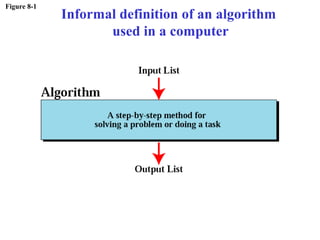
Figure 8-1
Informal definition of an algorithm
used in a computer
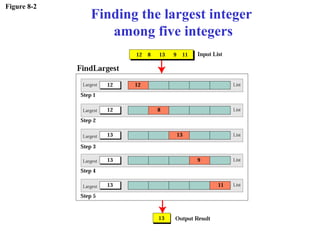
Figure 8-2
Finding the largest integer
among five integers
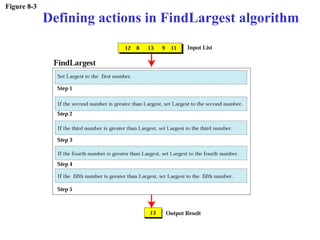
Figure 8-3
Defining actions in FindLargest algorithm
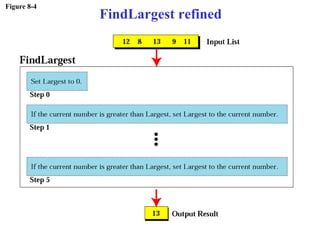
Figure 8-4
FindLargest refined
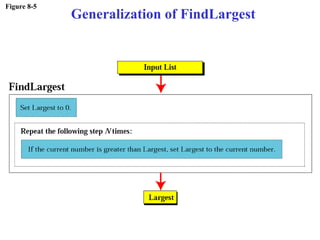
Figure 8-5
Generalization of FindLargest
THREE CONSTRUCTSTHREE CONSTRUCTS
8.28.2
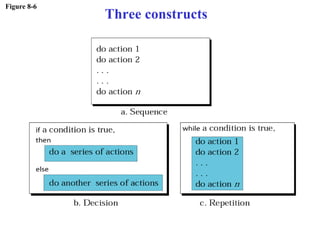
Figure 8-6
Three constructs
ALGORITHMALGORITHM
REPRESENTATIONREPRESENTATION
8.38.3
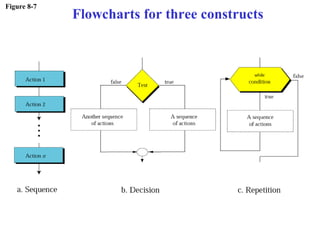
Figure 8-7
Flowcharts for three constructs
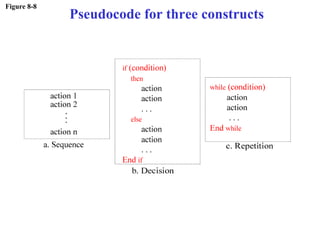
Figure 8-8
Pseudocode for three constructs
Example 1Example 1
Write an algorithm in pseudocode that finds
the average of two numbers
SolutionSolution
See Algorithm 8.1 on the next slide.
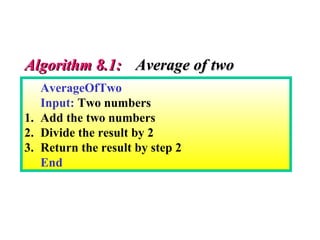
AverageOfTwo
Input: Two numbers
1. Add the two numbers
2. Divide the result by 2
3. Return the result by step 2
End
Algorithm 8.1:Algorithm 8.1: Average of twoAverage of two
Example 2Example 2
Write an algorithm to change a numeric
grade to a pass/no pass grade.
SolutionSolution
See Algorithm 8.2 on the next slide.
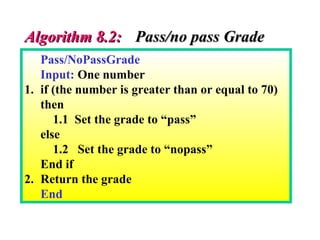
Pass/NoPassGrade
Input: One number
1. if (the number is greater than or equal to 70)
then
1.1 Set the grade to “pass”
else
1.2 Set the grade to “nopass”
End if
2. Return the grade
End
Algorithm 8.2:Algorithm 8.2: Pass/no pass GradePass/no pass Grade
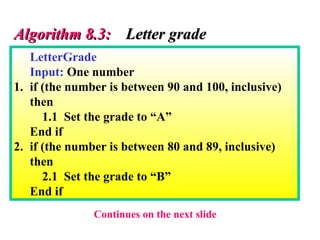
Example 3Example 3
Write an algorithm to change a numeric
grade to a letter grade.
SolutionSolution
See Algorithm 8.3 on the next slide.
LetterGrade
Input: One number
1. if (the number is between 90 and 100, inclusive)
then
1.1 Set the grade to “A”
End if
2. if (the number is between 80 and 89, inclusive)
then
2.1 Set the grade to “B”
End if
Algorithm 8.3:Algorithm 8.3: Letter gradeLetter grade
Continues on the next slide
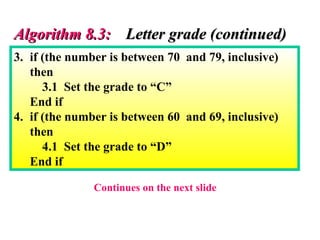
3. if (the number is between 70 and 79, inclusive)
then
3.1 Set the grade to “C”
End if
4. if (the number is between 60 and 69, inclusive)
then
4.1 Set the grade to “D”
End if
Algorithm 8.3:Algorithm 8.3: Letter grade (continued)Letter grade (continued)
Continues on the next slide
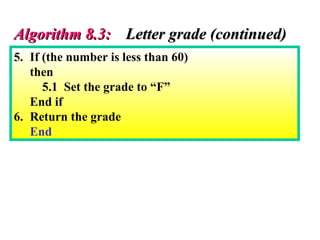
5. If (the number is less than 60)
then
5.1 Set the grade to “F”
End if
6. Return the grade
End
Algorithm 8.3:Algorithm 8.3: Letter grade (continued)Letter grade (continued)
Example 4Example 4
Write an algorithm to find the largest of a set
of numbers. You do not know the number of
numbers.
SolutionSolution
See Algorithm 8.4 on the next slide.
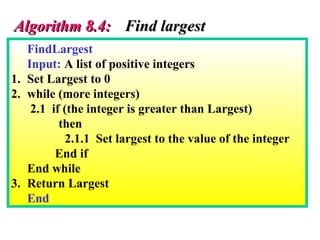
FindLargest
Input: A list of positive integers
1. Set Largest to 0
2. while (more integers)
2.1 if (the integer is greater than Largest)
then
2.1.1 Set largest to the value of the integer
End if
End while
3. Return Largest
End
Algorithm 8.4:Algorithm 8.4: Find largestFind largest
Example 5Example 5
Write an algorithm to find the largest of
1000 numbers.
SolutionSolution
See Algorithm 8.5 on the next slide.
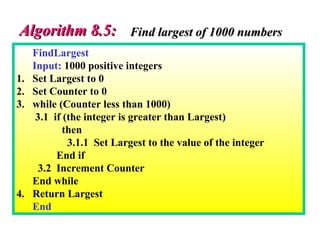
FindLargest
Input: 1000 positive integers
1. Set Largest to 0
2. Set Counter to 0
3. while (Counter less than 1000)
3.1 if (the integer is greater than Largest)
then
3.1.1 Set Largest to the value of the integer
End if
3.2 Increment Counter
End while
4. Return Largest
End
Algorithm 8.5:Algorithm 8.5: Find largest of 1000 numbersFind largest of 1000 numbers
MORE FORMA DEFINITIONMORE FORMA DEFINITION
•Ordered setOrdered set
•Unambiguous stepsUnambiguous steps
•EffectivenessEffectiveness
•TerminationTermination
8.48.4
SUBALGORITHMSSUBALGORITHMS
8.58.5
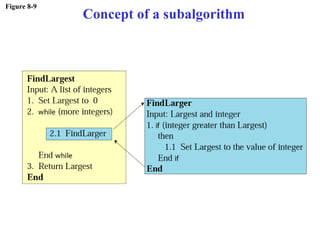
Figure 8-9
Concept of a subalgorithm
FindLargest
Input: A list of positive integers
1. Set Largest to 0
2. while (more integers)
2.1 FindLarger
End while
3. Return Largest
End
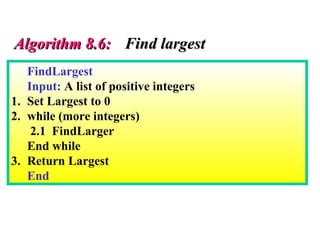
Algorithm 8.6:Algorithm 8.6: Find largestFind largest
FindLarger
Input: Largest and current integer
1. if (the integer is greater than Largest)
then
1.1 Set Largest to the value of the integer
End if
End
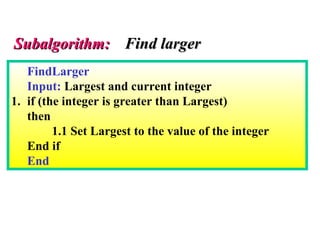
Subalgorithm:Subalgorithm: Find largerFind larger
BASICBASIC
ALGORITHMSALGORITHMS
8.68.6
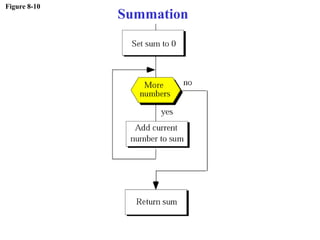
Figure 8-10
Summation
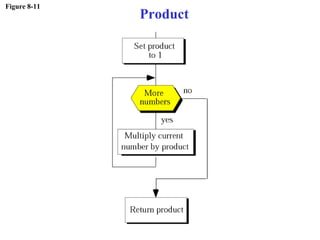
Figure 8-11
Product
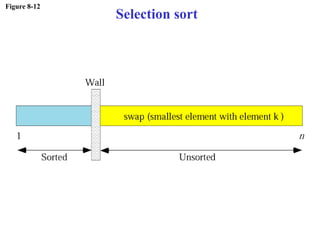
Figure 8-12
Selection sort
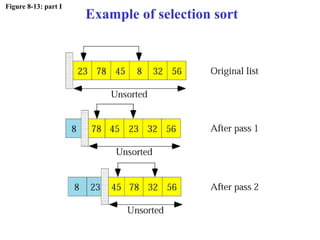
Figure 8-13: part I
Example of selection sort
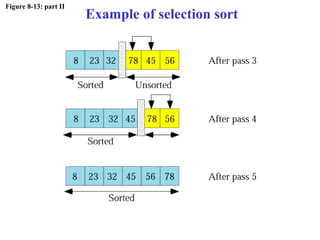
Figure 8-13: part II
Example of selection sort
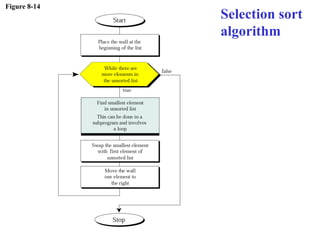
Figure 8-14
Selection sort
algorithm
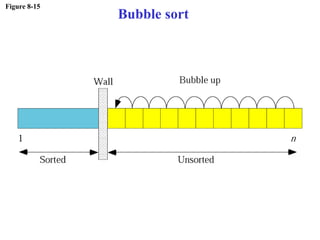
Figure 8-15
Bubble sort
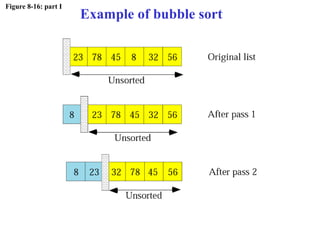
Figure 8-16: part I
Example of bubble sort
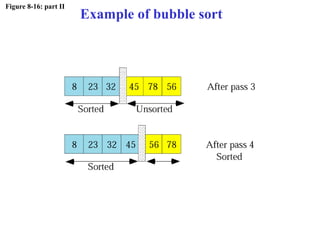
Figure 8-16: part II
Example of bubble sort
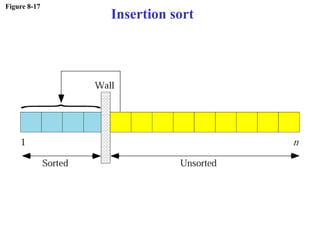
Figure 8-17
Insertion sort
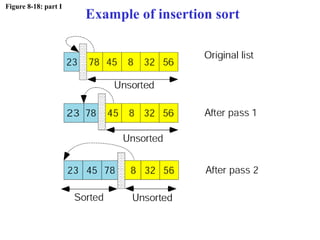
Figure 8-18: part I
Example of insertion sort
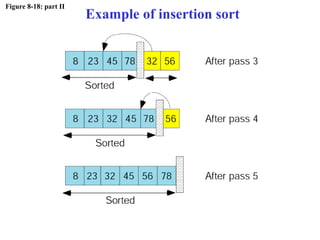
Figure 8-18: part II
Example of insertion sort
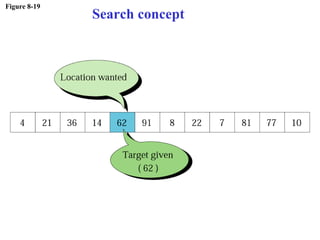
Figure 8-19
Search concept
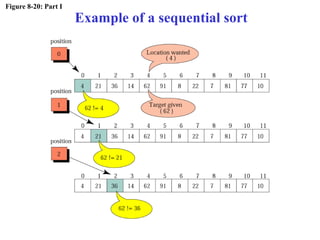
Figure 8-20: Part I
Example of a sequential sort
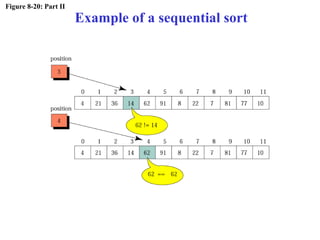
Figure 8-20: Part II
Example of a sequential sort
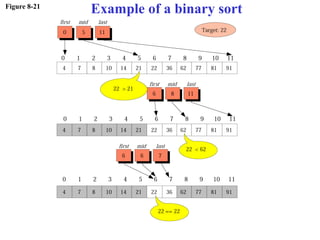
Figure 8-21
Example of a binary sort
RECURSIONRECURSION
8.18.1
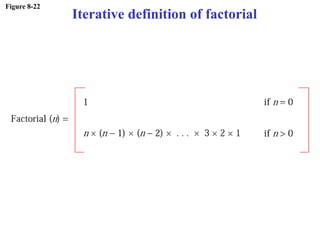
Figure 8-22
Iterative definition of factorial
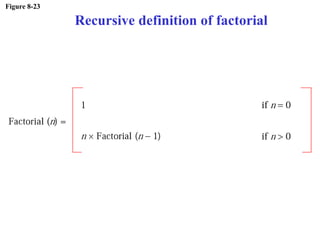
Figure 8-23
Recursive definition of factorial
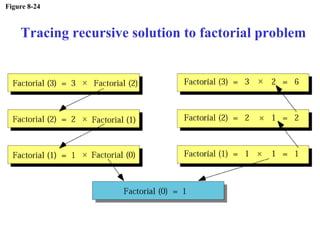
Figure 8-24
Tracing recursive solution to factorial problem
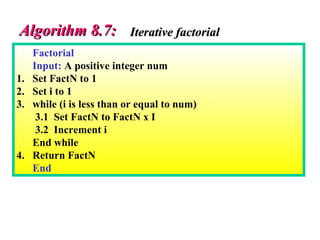
Factorial
Input: A positive integer num
1. Set FactN to 1
2. Set i to 1
3. while (i is less than or equal to num)
3.1 Set FactN to FactN x I
3.2 Increment i
End while
4. Return FactN
End
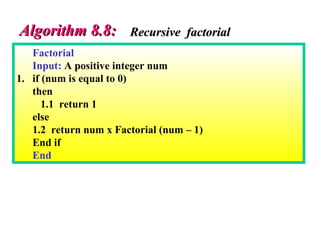
Algorithm 8.7:Algorithm 8.7: Iterative factorialIterative factorial
Factorial
Input: A positive integer num
1. if (num is equal to 0)
then
1.1 return 1
else
1.2 return num x Factorial (num – 1)
End if
End
Algorithm 8.8:Algorithm 8.8: Recursive factorialRecursive factorial

Chap08