SC, Chen
Ch2 C Fundamentals
Study Note of K. N. King(2008) ‘C Programming: A Modern Approach, 2nd Edition’
Ch2 C Fundamentals
2.1 Writing a Simple Program
2.2 The General Form of A Simple Program
2.3 Comments
2.4 Variables and Assignment
2.5 Reading Input
2.6 Defining Names for Constants
2.7 Identifies
2.8 Layout of a C Program
• Introduce several basic concepts in C
2.1 Writing a Simple Program
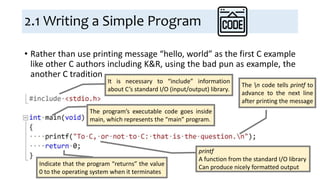
• Rather than use printing message “hello, world” as the first C example
like other C authors including K&R, using the bad pun as example, the
another C tradition
It is necessary to “include” information
about C’s standard I/O (input/output) library.
The program’s executable code goes inside
main, which represents the “main” program.
printf
A function from the standard I/O library
Can produce nicely formatted output
The n code tells printf to
advance to the next line
after printing the message
Indicate that the program “returns” the value
0 to the operating system when it terminates
2.1 Writing a Simple Program:
Compiling and Linking (1/2)
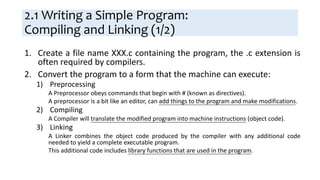
1. Create a file name XXX.c containing the program, the .c extension is
often required by compilers.
2. Convert the program to a form that the machine can execute:
1) Preprocessing
A Preprocessor obeys commands that begin with # (known as directives).
A preprocessor is a bit like an editor, can add things to the program and make modifications.
2) Compiling
A Compiler will translate the modified program into machine instructions (object code).
3) Linking
A Linker combines the object code produced by the compiler with any additional code
needed to yield a complete executable program.
This additional code includes library functions that are used in the program.
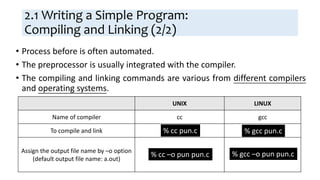
UNIX LINUX
Name of compiler cc gcc
To compile and link
Assign the output file name by –o option
(default output file name: a.out)
2.1 Writing a Simple Program:
Compiling and Linking (2/2)
• Process before is often automated.
• The preprocessor is usually integrated with the compiler.
• The compiling and linking commands are various from different compilers
and operating systems.
% cc –o pun pun.c
% cc pun.c % gcc pun.c
% gcc –o pun pun.c
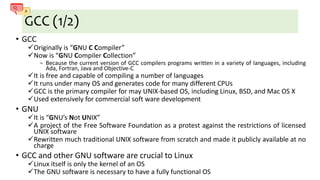
GCC (1/2)
• GCC
Originally is “GNU C Compiler”
Now is “GNU Compiler Collection”
− Because the current version of GCC compilers programs written in a variety of languages, including
Ada, Fortran, Java and Objective-C
It is free and capable of compiling a number of languages
It runs under many OS and generates code for many different CPUs
GCC is the primary compiler for may UNIX-based OS, including Linux, BSD, and Mac OS X
Used extensively for commercial soft ware development
• GNU
It is “GNU’s Not UNIX”
A project of the Free Software Foundation as a protest against the restrictions of licensed
UNIX software
Rewritten much traditional UNIX software from scratch and made it publicly available at no
charge
• GCC and other GNU software are crucial to Linux
Linux itself is only the kernel of an OS
The GNU software is necessary to have a fully functional OS
GCC (2/2)
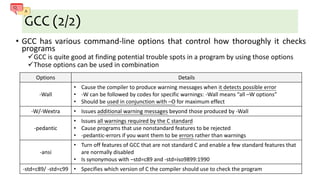
• GCC has various command-line options that control how thoroughly it checks
programs
GCC is quite good at finding potential trouble spots in a program by using those options
Those options can be used in combination
Options Details
-Wall
• Cause the compiler to produce warning messages when it detects possible error
• -W can be followed by codes for specific warnings: -Wall means “all –W options”
• Should be used in conjunction with –O for maximum effect
-W/-Wextra • Issues additional warning messages beyond those produced by -Wall
-pedantic
• Issues all warnings required by the C standard
• Cause programs that use nonstandard features to be rejected
• -pedantic-errors if you want them to be errors rather than warnings
-ansi
• Turn off features of GCC that are not standard C and enable a few standard features that
are normally disabled
• Is synonymous with –std=c89 and -std=iso9899:1990
-std=c89/ -std=c99 • Specifies which version of C the compiler should use to check the program
2.1 Writing a Simple Program:
Integrated Development Environments
• Besides use of a “command-line” compiler, we can also use an
integrated development environment (IDE)
• IDE is a software package that allows us to edit, compile, link,
execute, and even debug a program without leaving the environment
• The components of an IDE are designed to work together
When the compiler detects an error in a program, it can arrange for the editor
to highlight the line that contains the errors.
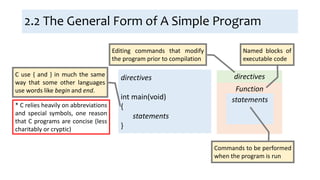
2.2 The General Form of A Simple Program
directives
int main(void)
{
statements
}
C use { and } in much the same
way that some other languages
use words like begin and end.
* C relies heavily on abbreviations
and special symbols, one reason
that C programs are concise (less
charitably or cryptic)
directives
Function
statements
Editing commands that modify
the program prior to compilation
Named blocks of
executable code
Commands to be performed
when the program is run
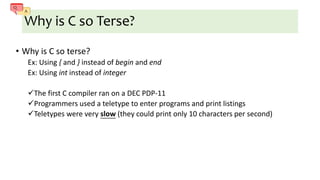
Why is C so Terse?
• Why is C so terse?
Ex: Using { and } instead of begin and end
Ex: Using int instead of integer
The first C compiler ran on a DEC PDP-11
Programmers used a teletype to enter programs and print listings
Teletypes were very slow (they could print only 10 characters per second)
2.2 The General Form of A Simple Program:
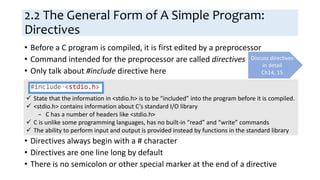
Directives
• Before a C program is compiled, it is first edited by a preprocessor
• Command intended for the preprocessor are called directives
• Only talk about #include directive here
• Directives always begin with a # character
• Directives are one line long by default
• There is no semicolon or other special marker at the end of a directive
Discuss directives
in detail
Ch14, 15
 State that the information in <stdio.h> is to be “included” into the program before it is compiled.
 <stdio.h> contains information about C’s standard I/O library
− C has a number of headers like <stdio.h>
 C is unlike some programming languages, has no built-in “read” and “write” commands
 The ability to perform input and output is provided instead by functions in the standard library
2.2 The General Form of A Simple Program:
Functions (1/2)
• Functions are like “procedure” or “subroutines” in other programming
languages.
1. Written by the programmer
2. Provided as part of the C implementation: library functions
• The term “function” comes from mathematics
A function is a rule for computing a value when given one or more arguments
• C use the term “function” more loosely
A function is simply a series of statements that have been grouped together
and given a name
Some functions compute a value; some don’t
− A function that computes a value uses the return statement to specify what value it
“returns”
2.2 The General Form of A Simple Program:
Functions (2/2)
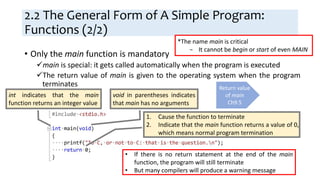
• Only the main function is mandatory
main is special: it gets called automatically when the program is executed
The return value of main is given to the operating system when the program
terminates
int indicates that the main
function returns an integer value
void in parentheses indicates
that main has no arguments
1. Cause the function to terminate
2. Indicate that the main function returns a value of 0,
which means normal program termination
Return value
of main
Ch9.5
• If there is no return statement at the end of the main
function, the program will still terminate
• But many compilers will produce a warning message
*The name main is critical
− It cannot be begin or start of even MAIN
Return Value of main Function
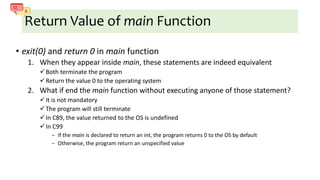
• exit(0) and return 0 in main function
1. When they appear inside main, these statements are indeed equivalent
Both terminate the program
Return the value 0 to the operating system
2. What if end the main function without executing anyone of those statement?
It is not mandatory
The program will still terminate
In C89, the value returned to the OS is undefined
In C99
− If the main is declared to return an int, the program returns 0 to the OS by default
− Otherwise, the program return an unspecified value
2.2 The General Form of A Simple Program:
Statements
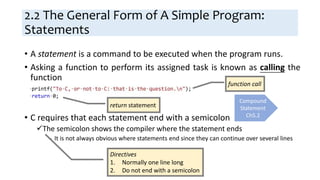
• A statement is a command to be executed when the program runs.
• Asking a function to perform its assigned task is known as calling the
function
• C requires that each statement end with a semicolon
The semicolon shows the compiler where the statement ends
− It is not always obvious where statements end since they can continue over several lines
function call
return statement
Compound
Statement
Ch5.2
Directives
1. Normally one line long
2. Do not end with a semicolon
2.2 The General Form of A Simple Program:
Printing String
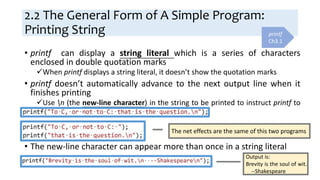
• printf can display a string literal which is a series of characters
enclosed in double quotation marks
When printf displays a string literal, it doesn’t show the quotation marks
• printf doesn’t automatically advance to the next output line when it
finishes printing
Use n (the new-line character) in the string to be printed to instruct printf to
advance one line
• The new-line character can appear more than once in a string literal
printf
Ch3.1
The net effects are the same of this two programs
Output is:
Brevity is the soul of wit.
--Shakespeare
2.3 Comments (1/5)
• Every program should contain identifying information for documentation
The program name
The data written
The author
The purpose of the program
And so forth
• This information is placed in comments
• Comments may appear almost anywhere in a program, either on
separate lines or on the same lines as other program text.
2.3 Comments (2/5)
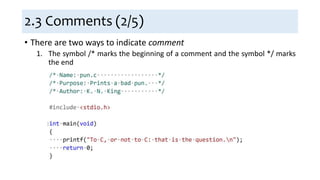
• There are two ways to indicate comment
1. The symbol /* marks the beginning of a comment and the symbol */ marks
the end
2.3 Comments (3/5)
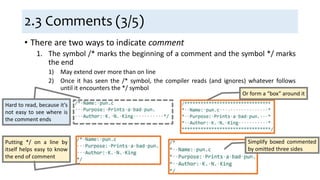
• There are two ways to indicate comment
1. The symbol /* marks the beginning of a comment and the symbol */ marks
the end
1) May extend over more than on line
2) Once it has seen the /* symbol, the compiler reads (and ignores) whatever follows
until it encounters the */ symbol
Hard to read, because it’s
not easy to see where is
the comment ends
Putting */ on a line by
itself helps easy to know
the end of comment
Or form a “box” around it
Simplify boxed commented
by omitted three sides
2.3 Comments (4/5)
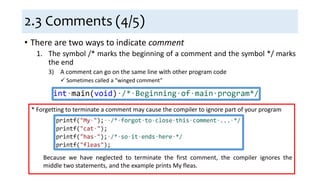
• There are two ways to indicate comment
1. The symbol /* marks the beginning of a comment and the symbol */ marks
the end
3) A comment can go on the same line with other program code
 Sometimes called a “winged comment”
* Forgetting to terminate a comment may cause the compiler to ignore part of your program
Because we have neglected to terminate the first comment, the compiler ignores the
middle two statements, and the example prints My fleas.
2.3 Comments (5/5)
• There are two ways to indicate comment
1. The symbol /* marks the beginning of a comment and the symbol */ marks
the end
1) May extend over more than on line
2) Once it has seen the /* symbol, the compiler reads (and ignores) whatever follows
until it encounters the */ symbol
3) A comment can go on the same line with other program code
− Sometimes called a “winged comment”
2. The symbol // marks the beginning of a comment, and ends automatically
at the end of a line
− Supported after C99
− Advantages:
1) There is no chance that an unterminated comment will accidentally consume part of a
program
2) Multiline comments stand out better
Comments
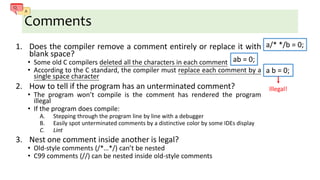
1. Does the compiler remove a comment entirely or replace it with
blank space?
• Some old C compilers deleted all the characters in each comment
• According to the C standard, the compiler must replace each comment by a
single space character
2. How to tell if the program has an unterminated comment?
• The program won’t compile is the comment has rendered the program
illegal
• If the program does compile:
A. Stepping through the program line by line with a debugger
B. Easily spot unterminated comments by a distinctive color by some IDEs display
C. Lint
3. Nest one comment inside another is legal?
• Old-style comments (/*…*/) can’t be nested
• C99 comments (//) can be nested inside old-style comments
a/* */b = 0;
ab = 0;
a b = 0;
Illegal!
2.4 Variables and Assignment
• Most programs need to perform a series of calculations before
producing output, and thus need a way to store data temporarily
during program execution
• These storage locations are called variables in C
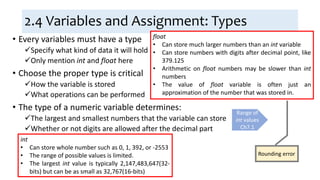
2.4 Variables and Assignment: Types
• Every variables must have a type
Specify what kind of data it will hold
Only mention int and float here
• Choose the proper type is critical
How the variable is stored
What operations can be performed
• The type of a numeric variable determines:
The largest and smallest numbers that the variable can store
Whether or not digits are allowed after the decimal part
Range of
int values
Ch7.1
int
• Can store whole number such as 0, 1, 392, or -2553
• The range of possible values is limited.
• The largest int value is typically 2,147,483,647(32-
bits) but can be as small as 32,767(16-bits)
float
• Can store much larger numbers than an int variable
• Can store numbers with digits after decimal point, like
379.125
• Arithmetic on float numbers may be slower than int
numbers
• The value of float variable is often just an
approximation of the number that was stored in.
Rounding error
float
• Short for “floating-point”
Floating Point
− A technique for storing numbers in which the decimal point “floats”.
Stored in two parts
1. The fraction (or mantissa)
2. The exponent
Some programming languages call this type real instead of float
• Here is functions/blocks in general:
• In C99, declarations don’t have to
come before statements
• Do not take advantage of this rule for
compatibility with older compilers
• But it’s common in C++ and Java
programs
2.4 Variables and Assignment: Declarations
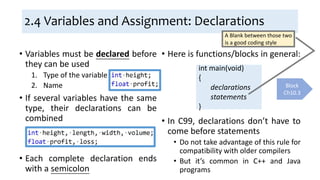
• Variables must be declared before
they can be used
1. Type of the variable
2. Name
• If several variables have the same
type, their declarations can be
combined
• Each complete declaration ends
with a semicolon
int main(void)
{
declarations
statements
}
Block
Ch10.3
A Blank between those two
is a good coding style
2.4 Variables and Assignment: Assignment
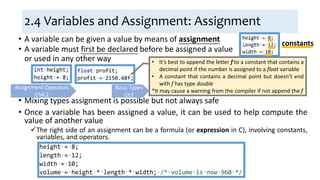
• A variable can be given a value by means of assignment
• Mixing types assignment is possible but not always safe
• Once a variable has been assigned a value, it can be used to help compute the
value of another value
The right side of an assignment can be a formula (or expression in C), involving constants,
variables, and operators.
• It’s best to append the letter f to a constant that contains a
decimal point if the number is assigned to a float variable
• A constant that contains a decimal point but doesn’t end
with f has type double
*It may cause a warning from the compiler if not append the f
Assignment Operators
Ch4.2
constants
• A variable must first be declared before be assigned a value
or used in any other way
Basic Types
Ch7
2.4 Variables and Assignment:
Printing the Value of a Variable
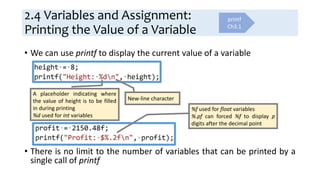
• We can use printf to display the current value of a variable
• There is no limit to the number of variables that can be printed by a
single call of printf
A placeholder indicating where
the value of height is to be filled
in during printing
%d used for int variables
New-line character
%f used for float variables
%.pf can forced %f to display p
digits after the decimal point
printf
Ch3.1
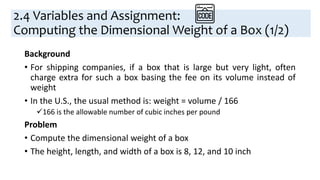
Background
• For shipping companies, if a box that is large but very light, often
charge extra for such a box basing the fee on its volume instead of
weight
• In the U.S., the usual method is: weight = volume / 166
166 is the allowable number of cubic inches per pound
Problem
• Compute the dimensional weight of a box
• The height, length, and width of a box is 8, 12, and 10 inch
2.4 Variables and Assignment:
Computing the Dimensional Weight of a Box (1/2)
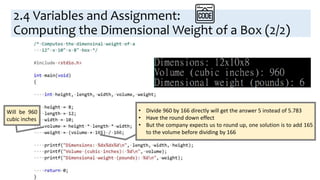
Will be 960
cubic inches
• Divide 960 by 166 directly will get the answer 5 instead of 5.783
• Have the round down effect
• But the company expects us to round up, one solution is to add 165
to the volume before dividing by 166
2.4 Variables and Assignment:
Computing the Dimensional Weight of a Box (2/2)
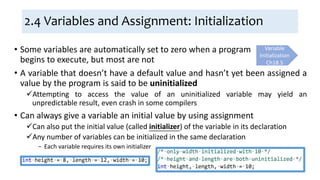
2.4 Variables and Assignment: Initialization
• A variable that doesn’t have a default value and hasn’t yet been assigned a
value by the program is said to be uninitialized
Attempting to access the value of an uninitialized variable may yield an
unpredictable result, even crash in some compilers
• Can always give a variable an initial value by using assignment
Can also put the initial value (called initializer) of the variable in its declaration
Any number of variables can be initialized in the same declaration
− Each variable requires its own initializer
Variable
Initialization
Ch18.5
• Some variables are automatically set to zero when a program
begins to execute, but most are not
2.4 Variables and Assignment:
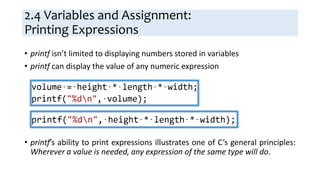
Printing Expressions
• printf isn’t limited to displaying numbers stored in variables
• printf can display the value of any numeric expression
• printf’s ability to print expressions illustrates one of C’s general principles:
Wherever a value is needed, any expression of the same type will do.
2.5 Reading Input
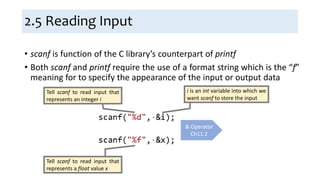
• scanf is function of the C library’s counterpart of printf
• Both scanf and printf require the use of a format string which is the “f”
meaning for to specify the appearance of the input or output data
& Operator
Ch11.2
Tell scanf to read input that
represents an integer i
i is an int variable into which we
want scanf to store the input
Tell scanf to read input that
represents a float value x
2.5 Reading Input:
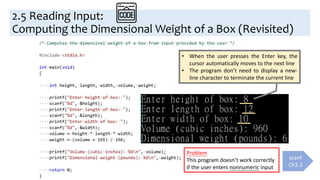
Computing the Dimensional Weight of a Box (Revisited)
• When the user presses the Enter key, the
cursor automatically moves to the next line
• The program don’t need to display a new-
line character to terminate the current line
Problem
This program doesn’t work correctly
if the user enters nonnumeric input
scanf
Ch3.2
2.6 Defining Names for Constants
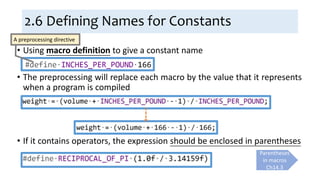
• Using macro definition to give a constant name
• The preprocessing will replace each macro by the value that it represents
when a program is compiled
• If it contains operators, the expression should be enclosed in parentheses
A preprocessing directive
Parentheses
in macros
Ch14.3
2.6 Defining Names for Constants
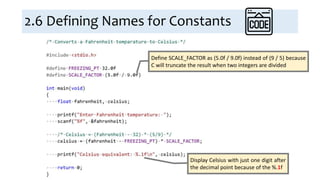
Define SCALE_FACTOR as (5.0f / 9.0f) instead of (9 / 5) because
C will truncate the result when two integers are divided
Display Celsius with just one digit after
the decimal point because of the %.1f
2.7 Identifiers
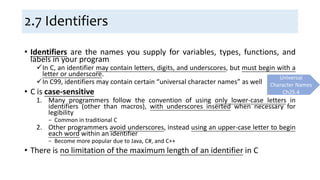
• Identifiers are the names you supply for variables, types, functions, and
labels in your program
In C, an identifier may contain letters, digits, and underscores, but must begin with a
letter or underscore.
In C99, identifiers may contain certain “universal character names” as well
• C is case-sensitive
1. Many programmers follow the convention of using only lower-case letters in
identifiers (other than macros), with underscores inserted when necessary for
legibility
− Common in traditional C
2. Other programmers avoid underscores, instead using an upper-case letter to begin
each word within an identifier
− Become more popular due to Java, C#, and C++
• There is no limitation of the maximum length of an identifier in C
Universal
Character Names
Ch25.4
No Limit on the Length of an Identifier?
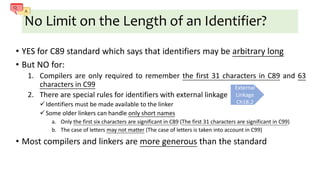
• YES for C89 standard which says that identifiers may be arbitrary long
• But NO for:
1. Compilers are only required to remember the first 31 characters in C89 and 63
characters in C99
2. There are special rules for identifiers with external linkage
Identifiers must be made available to the linker
Some older linkers can handle only short names
a. Only the first six characters are significant in C89 (The first 31 characters are significant in C99)
b. The case of letters may not matter (The case of letters is taken into account in C99)
• Most compilers and linkers are more generous than the standard
External
Linkage
Ch18.2
2.7 Identifiers: Keywords
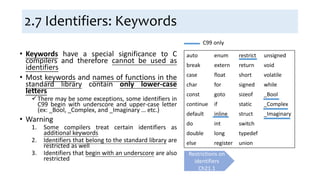
• Keywords have a special significance to C
compilers and therefore cannot be used as
identifiers
• Most keywords and names of functions in the
standard library contain only lower-case
letters
There may be some exceptions, some identifiers in
C99 begin with underscore and upper-case letter
(ex: _Bool, _Complex, and _Imaginary … etc.)
• Warning
1. Some compilers treat certain identifiers as
additional keywords
2. Identifiers that belong to the standard library are
restricted as well
3. Identifiers that begin with an underscore are also
restricted
auto enum restrict unsigned
break extern return void
case float short volatile
char for signed while
const goto sizeof _Bool
continue if static _Complex
default inline struct _Imaginary
do int switch
double long typedef
else register union
C99 only
Restrictions on
identifiers
Ch21.1
2.8 Layout of a C Program (1/5)
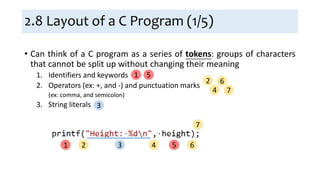
• Can think of a C program as a series of tokens: groups of characters
that cannot be split up without changing their meaning
1. Identifiers and keywords
2. Operators (ex: +, and -) and punctuation marks
(ex: comma, and semicolon)
3. String literals
1 532 4 6
7
1 5
3
2
4
6
7
2.8 Layout of a C Program (2/5)
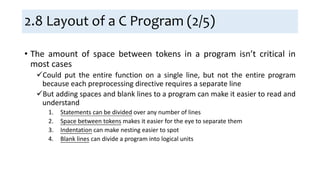
• The amount of space between tokens in a program isn’t critical in
most cases
Could put the entire function on a single line, but not the entire program
because each preprocessing directive requires a separate line
But adding spaces and blank lines to a program can make it easier to read and
understand
1. Statements can be divided over any number of lines
2. Space between tokens makes it easier for the eye to separate them
3. Indentation can make nesting easier to spot
4. Blank lines can divide a program into logical units
2.8 Layout of a C Program (3/5)
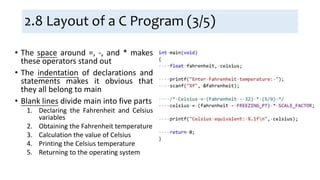
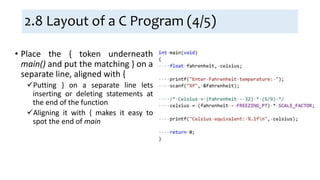
• The space around =, -, and * makes
these operators stand out
• The indentation of declarations and
statements makes it obvious that
they all belong to main
• Blank lines divide main into five parts
1. Declaring the Fahrenheit and Celsius
variables
2. Obtaining the Fahrenheit temperature
3. Calculation the value of Celsius
4. Printing the Celsius temperature
5. Returning to the operating system
2.8 Layout of a C Program (4/5)
• Place the { token underneath
main() and put the matching } on a
separate line, aligned with {
Putting } on a separate line lets
inserting or deleting statements at
the end of the function
Aligning it with { makes it easy to
spot the end of main
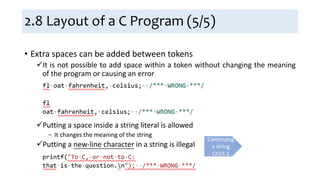
• Extra spaces can be added between tokens
It is not possible to add space within a token without changing the meaning
of the program or causing an error
Putting a space inside a string literal is allowed
− It changes the meaning of the string
Putting a new-line character in a string is illegal
2.8 Layout of a C Program (5/5)
Continuing
a string
Ch13.1

Ch2 C Fundamentals

  • 1.
    SC, Chen Ch2 CFundamentals Study Note of K. N. King(2008) ‘C Programming: A Modern Approach, 2nd Edition’
  • 2.
    Ch2 C Fundamentals 2.1Writing a Simple Program 2.2 The General Form of A Simple Program 2.3 Comments 2.4 Variables and Assignment 2.5 Reading Input 2.6 Defining Names for Constants 2.7 Identifies 2.8 Layout of a C Program • Introduce several basic concepts in C
  • 3.
    2.1 Writing aSimple Program • Rather than use printing message “hello, world” as the first C example like other C authors including K&R, using the bad pun as example, the another C tradition It is necessary to “include” information about C’s standard I/O (input/output) library. The program’s executable code goes inside main, which represents the “main” program. printf A function from the standard I/O library Can produce nicely formatted output The n code tells printf to advance to the next line after printing the message Indicate that the program “returns” the value 0 to the operating system when it terminates
  • 4.
    2.1 Writing aSimple Program: Compiling and Linking (1/2) 1. Create a file name XXX.c containing the program, the .c extension is often required by compilers. 2. Convert the program to a form that the machine can execute: 1) Preprocessing A Preprocessor obeys commands that begin with # (known as directives). A preprocessor is a bit like an editor, can add things to the program and make modifications. 2) Compiling A Compiler will translate the modified program into machine instructions (object code). 3) Linking A Linker combines the object code produced by the compiler with any additional code needed to yield a complete executable program. This additional code includes library functions that are used in the program.
  • 5.
    UNIX LINUX Name ofcompiler cc gcc To compile and link Assign the output file name by –o option (default output file name: a.out) 2.1 Writing a Simple Program: Compiling and Linking (2/2) • Process before is often automated. • The preprocessor is usually integrated with the compiler. • The compiling and linking commands are various from different compilers and operating systems. % cc –o pun pun.c % cc pun.c % gcc pun.c % gcc –o pun pun.c
  • 6.
    GCC (1/2) • GCC Originallyis “GNU C Compiler” Now is “GNU Compiler Collection” − Because the current version of GCC compilers programs written in a variety of languages, including Ada, Fortran, Java and Objective-C It is free and capable of compiling a number of languages It runs under many OS and generates code for many different CPUs GCC is the primary compiler for may UNIX-based OS, including Linux, BSD, and Mac OS X Used extensively for commercial soft ware development • GNU It is “GNU’s Not UNIX” A project of the Free Software Foundation as a protest against the restrictions of licensed UNIX software Rewritten much traditional UNIX software from scratch and made it publicly available at no charge • GCC and other GNU software are crucial to Linux Linux itself is only the kernel of an OS The GNU software is necessary to have a fully functional OS
  • 7.
    GCC (2/2) • GCChas various command-line options that control how thoroughly it checks programs GCC is quite good at finding potential trouble spots in a program by using those options Those options can be used in combination Options Details -Wall • Cause the compiler to produce warning messages when it detects possible error • -W can be followed by codes for specific warnings: -Wall means “all –W options” • Should be used in conjunction with –O for maximum effect -W/-Wextra • Issues additional warning messages beyond those produced by -Wall -pedantic • Issues all warnings required by the C standard • Cause programs that use nonstandard features to be rejected • -pedantic-errors if you want them to be errors rather than warnings -ansi • Turn off features of GCC that are not standard C and enable a few standard features that are normally disabled • Is synonymous with –std=c89 and -std=iso9899:1990 -std=c89/ -std=c99 • Specifies which version of C the compiler should use to check the program
  • 8.
    2.1 Writing aSimple Program: Integrated Development Environments • Besides use of a “command-line” compiler, we can also use an integrated development environment (IDE) • IDE is a software package that allows us to edit, compile, link, execute, and even debug a program without leaving the environment • The components of an IDE are designed to work together When the compiler detects an error in a program, it can arrange for the editor to highlight the line that contains the errors.
  • 9.
    2.2 The GeneralForm of A Simple Program directives int main(void) { statements } C use { and } in much the same way that some other languages use words like begin and end. * C relies heavily on abbreviations and special symbols, one reason that C programs are concise (less charitably or cryptic) directives Function statements Editing commands that modify the program prior to compilation Named blocks of executable code Commands to be performed when the program is run
  • 10.
    Why is Cso Terse? • Why is C so terse? Ex: Using { and } instead of begin and end Ex: Using int instead of integer The first C compiler ran on a DEC PDP-11 Programmers used a teletype to enter programs and print listings Teletypes were very slow (they could print only 10 characters per second)
  • 11.
    2.2 The GeneralForm of A Simple Program: Directives • Before a C program is compiled, it is first edited by a preprocessor • Command intended for the preprocessor are called directives • Only talk about #include directive here • Directives always begin with a # character • Directives are one line long by default • There is no semicolon or other special marker at the end of a directive Discuss directives in detail Ch14, 15  State that the information in <stdio.h> is to be “included” into the program before it is compiled.  <stdio.h> contains information about C’s standard I/O library − C has a number of headers like <stdio.h>  C is unlike some programming languages, has no built-in “read” and “write” commands  The ability to perform input and output is provided instead by functions in the standard library
  • 12.
    2.2 The GeneralForm of A Simple Program: Functions (1/2) • Functions are like “procedure” or “subroutines” in other programming languages. 1. Written by the programmer 2. Provided as part of the C implementation: library functions • The term “function” comes from mathematics A function is a rule for computing a value when given one or more arguments • C use the term “function” more loosely A function is simply a series of statements that have been grouped together and given a name Some functions compute a value; some don’t − A function that computes a value uses the return statement to specify what value it “returns”
  • 13.
    2.2 The GeneralForm of A Simple Program: Functions (2/2) • Only the main function is mandatory main is special: it gets called automatically when the program is executed The return value of main is given to the operating system when the program terminates int indicates that the main function returns an integer value void in parentheses indicates that main has no arguments 1. Cause the function to terminate 2. Indicate that the main function returns a value of 0, which means normal program termination Return value of main Ch9.5 • If there is no return statement at the end of the main function, the program will still terminate • But many compilers will produce a warning message *The name main is critical − It cannot be begin or start of even MAIN
  • 14.
    Return Value ofmain Function • exit(0) and return 0 in main function 1. When they appear inside main, these statements are indeed equivalent Both terminate the program Return the value 0 to the operating system 2. What if end the main function without executing anyone of those statement? It is not mandatory The program will still terminate In C89, the value returned to the OS is undefined In C99 − If the main is declared to return an int, the program returns 0 to the OS by default − Otherwise, the program return an unspecified value
  • 15.
    2.2 The GeneralForm of A Simple Program: Statements • A statement is a command to be executed when the program runs. • Asking a function to perform its assigned task is known as calling the function • C requires that each statement end with a semicolon The semicolon shows the compiler where the statement ends − It is not always obvious where statements end since they can continue over several lines function call return statement Compound Statement Ch5.2 Directives 1. Normally one line long 2. Do not end with a semicolon
  • 16.
    2.2 The GeneralForm of A Simple Program: Printing String • printf can display a string literal which is a series of characters enclosed in double quotation marks When printf displays a string literal, it doesn’t show the quotation marks • printf doesn’t automatically advance to the next output line when it finishes printing Use n (the new-line character) in the string to be printed to instruct printf to advance one line • The new-line character can appear more than once in a string literal printf Ch3.1 The net effects are the same of this two programs Output is: Brevity is the soul of wit. --Shakespeare
  • 17.
    2.3 Comments (1/5) •Every program should contain identifying information for documentation The program name The data written The author The purpose of the program And so forth • This information is placed in comments • Comments may appear almost anywhere in a program, either on separate lines or on the same lines as other program text.
  • 18.
    2.3 Comments (2/5) •There are two ways to indicate comment 1. The symbol /* marks the beginning of a comment and the symbol */ marks the end
  • 19.
    2.3 Comments (3/5) •There are two ways to indicate comment 1. The symbol /* marks the beginning of a comment and the symbol */ marks the end 1) May extend over more than on line 2) Once it has seen the /* symbol, the compiler reads (and ignores) whatever follows until it encounters the */ symbol Hard to read, because it’s not easy to see where is the comment ends Putting */ on a line by itself helps easy to know the end of comment Or form a “box” around it Simplify boxed commented by omitted three sides
  • 20.
    2.3 Comments (4/5) •There are two ways to indicate comment 1. The symbol /* marks the beginning of a comment and the symbol */ marks the end 3) A comment can go on the same line with other program code  Sometimes called a “winged comment” * Forgetting to terminate a comment may cause the compiler to ignore part of your program Because we have neglected to terminate the first comment, the compiler ignores the middle two statements, and the example prints My fleas.
  • 21.
    2.3 Comments (5/5) •There are two ways to indicate comment 1. The symbol /* marks the beginning of a comment and the symbol */ marks the end 1) May extend over more than on line 2) Once it has seen the /* symbol, the compiler reads (and ignores) whatever follows until it encounters the */ symbol 3) A comment can go on the same line with other program code − Sometimes called a “winged comment” 2. The symbol // marks the beginning of a comment, and ends automatically at the end of a line − Supported after C99 − Advantages: 1) There is no chance that an unterminated comment will accidentally consume part of a program 2) Multiline comments stand out better
  • 22.
    Comments 1. Does thecompiler remove a comment entirely or replace it with blank space? • Some old C compilers deleted all the characters in each comment • According to the C standard, the compiler must replace each comment by a single space character 2. How to tell if the program has an unterminated comment? • The program won’t compile is the comment has rendered the program illegal • If the program does compile: A. Stepping through the program line by line with a debugger B. Easily spot unterminated comments by a distinctive color by some IDEs display C. Lint 3. Nest one comment inside another is legal? • Old-style comments (/*…*/) can’t be nested • C99 comments (//) can be nested inside old-style comments a/* */b = 0; ab = 0; a b = 0; Illegal!
  • 23.
    2.4 Variables andAssignment • Most programs need to perform a series of calculations before producing output, and thus need a way to store data temporarily during program execution • These storage locations are called variables in C
  • 24.
    2.4 Variables andAssignment: Types • Every variables must have a type Specify what kind of data it will hold Only mention int and float here • Choose the proper type is critical How the variable is stored What operations can be performed • The type of a numeric variable determines: The largest and smallest numbers that the variable can store Whether or not digits are allowed after the decimal part Range of int values Ch7.1 int • Can store whole number such as 0, 1, 392, or -2553 • The range of possible values is limited. • The largest int value is typically 2,147,483,647(32- bits) but can be as small as 32,767(16-bits) float • Can store much larger numbers than an int variable • Can store numbers with digits after decimal point, like 379.125 • Arithmetic on float numbers may be slower than int numbers • The value of float variable is often just an approximation of the number that was stored in. Rounding error
  • 25.
    float • Short for“floating-point” Floating Point − A technique for storing numbers in which the decimal point “floats”. Stored in two parts 1. The fraction (or mantissa) 2. The exponent Some programming languages call this type real instead of float
  • 26.
    • Here isfunctions/blocks in general: • In C99, declarations don’t have to come before statements • Do not take advantage of this rule for compatibility with older compilers • But it’s common in C++ and Java programs 2.4 Variables and Assignment: Declarations • Variables must be declared before they can be used 1. Type of the variable 2. Name • If several variables have the same type, their declarations can be combined • Each complete declaration ends with a semicolon int main(void) { declarations statements } Block Ch10.3 A Blank between those two is a good coding style
  • 27.
    2.4 Variables andAssignment: Assignment • A variable can be given a value by means of assignment • Mixing types assignment is possible but not always safe • Once a variable has been assigned a value, it can be used to help compute the value of another value The right side of an assignment can be a formula (or expression in C), involving constants, variables, and operators. • It’s best to append the letter f to a constant that contains a decimal point if the number is assigned to a float variable • A constant that contains a decimal point but doesn’t end with f has type double *It may cause a warning from the compiler if not append the f Assignment Operators Ch4.2 constants • A variable must first be declared before be assigned a value or used in any other way Basic Types Ch7
  • 28.
    2.4 Variables andAssignment: Printing the Value of a Variable • We can use printf to display the current value of a variable • There is no limit to the number of variables that can be printed by a single call of printf A placeholder indicating where the value of height is to be filled in during printing %d used for int variables New-line character %f used for float variables %.pf can forced %f to display p digits after the decimal point printf Ch3.1
  • 29.
    Background • For shippingcompanies, if a box that is large but very light, often charge extra for such a box basing the fee on its volume instead of weight • In the U.S., the usual method is: weight = volume / 166 166 is the allowable number of cubic inches per pound Problem • Compute the dimensional weight of a box • The height, length, and width of a box is 8, 12, and 10 inch 2.4 Variables and Assignment: Computing the Dimensional Weight of a Box (1/2)
  • 30.
    Will be 960 cubicinches • Divide 960 by 166 directly will get the answer 5 instead of 5.783 • Have the round down effect • But the company expects us to round up, one solution is to add 165 to the volume before dividing by 166 2.4 Variables and Assignment: Computing the Dimensional Weight of a Box (2/2)
  • 31.
    2.4 Variables andAssignment: Initialization • A variable that doesn’t have a default value and hasn’t yet been assigned a value by the program is said to be uninitialized Attempting to access the value of an uninitialized variable may yield an unpredictable result, even crash in some compilers • Can always give a variable an initial value by using assignment Can also put the initial value (called initializer) of the variable in its declaration Any number of variables can be initialized in the same declaration − Each variable requires its own initializer Variable Initialization Ch18.5 • Some variables are automatically set to zero when a program begins to execute, but most are not
  • 32.
    2.4 Variables andAssignment: Printing Expressions • printf isn’t limited to displaying numbers stored in variables • printf can display the value of any numeric expression • printf’s ability to print expressions illustrates one of C’s general principles: Wherever a value is needed, any expression of the same type will do.
  • 33.
    2.5 Reading Input •scanf is function of the C library’s counterpart of printf • Both scanf and printf require the use of a format string which is the “f” meaning for to specify the appearance of the input or output data & Operator Ch11.2 Tell scanf to read input that represents an integer i i is an int variable into which we want scanf to store the input Tell scanf to read input that represents a float value x
  • 34.
    2.5 Reading Input: Computingthe Dimensional Weight of a Box (Revisited) • When the user presses the Enter key, the cursor automatically moves to the next line • The program don’t need to display a new- line character to terminate the current line Problem This program doesn’t work correctly if the user enters nonnumeric input scanf Ch3.2
  • 35.
    2.6 Defining Namesfor Constants • Using macro definition to give a constant name • The preprocessing will replace each macro by the value that it represents when a program is compiled • If it contains operators, the expression should be enclosed in parentheses A preprocessing directive Parentheses in macros Ch14.3
  • 36.
    2.6 Defining Namesfor Constants Define SCALE_FACTOR as (5.0f / 9.0f) instead of (9 / 5) because C will truncate the result when two integers are divided Display Celsius with just one digit after the decimal point because of the %.1f
  • 37.
    2.7 Identifiers • Identifiersare the names you supply for variables, types, functions, and labels in your program In C, an identifier may contain letters, digits, and underscores, but must begin with a letter or underscore. In C99, identifiers may contain certain “universal character names” as well • C is case-sensitive 1. Many programmers follow the convention of using only lower-case letters in identifiers (other than macros), with underscores inserted when necessary for legibility − Common in traditional C 2. Other programmers avoid underscores, instead using an upper-case letter to begin each word within an identifier − Become more popular due to Java, C#, and C++ • There is no limitation of the maximum length of an identifier in C Universal Character Names Ch25.4
  • 38.
    No Limit onthe Length of an Identifier? • YES for C89 standard which says that identifiers may be arbitrary long • But NO for: 1. Compilers are only required to remember the first 31 characters in C89 and 63 characters in C99 2. There are special rules for identifiers with external linkage Identifiers must be made available to the linker Some older linkers can handle only short names a. Only the first six characters are significant in C89 (The first 31 characters are significant in C99) b. The case of letters may not matter (The case of letters is taken into account in C99) • Most compilers and linkers are more generous than the standard External Linkage Ch18.2
  • 39.
    2.7 Identifiers: Keywords •Keywords have a special significance to C compilers and therefore cannot be used as identifiers • Most keywords and names of functions in the standard library contain only lower-case letters There may be some exceptions, some identifiers in C99 begin with underscore and upper-case letter (ex: _Bool, _Complex, and _Imaginary … etc.) • Warning 1. Some compilers treat certain identifiers as additional keywords 2. Identifiers that belong to the standard library are restricted as well 3. Identifiers that begin with an underscore are also restricted auto enum restrict unsigned break extern return void case float short volatile char for signed while const goto sizeof _Bool continue if static _Complex default inline struct _Imaginary do int switch double long typedef else register union C99 only Restrictions on identifiers Ch21.1
  • 40.
    2.8 Layout ofa C Program (1/5) • Can think of a C program as a series of tokens: groups of characters that cannot be split up without changing their meaning 1. Identifiers and keywords 2. Operators (ex: +, and -) and punctuation marks (ex: comma, and semicolon) 3. String literals 1 532 4 6 7 1 5 3 2 4 6 7
  • 41.
    2.8 Layout ofa C Program (2/5) • The amount of space between tokens in a program isn’t critical in most cases Could put the entire function on a single line, but not the entire program because each preprocessing directive requires a separate line But adding spaces and blank lines to a program can make it easier to read and understand 1. Statements can be divided over any number of lines 2. Space between tokens makes it easier for the eye to separate them 3. Indentation can make nesting easier to spot 4. Blank lines can divide a program into logical units
  • 42.
    2.8 Layout ofa C Program (3/5) • The space around =, -, and * makes these operators stand out • The indentation of declarations and statements makes it obvious that they all belong to main • Blank lines divide main into five parts 1. Declaring the Fahrenheit and Celsius variables 2. Obtaining the Fahrenheit temperature 3. Calculation the value of Celsius 4. Printing the Celsius temperature 5. Returning to the operating system
  • 43.
    2.8 Layout ofa C Program (4/5) • Place the { token underneath main() and put the matching } on a separate line, aligned with { Putting } on a separate line lets inserting or deleting statements at the end of the function Aligning it with { makes it easy to spot the end of main
  • 44.
    • Extra spacescan be added between tokens It is not possible to add space within a token without changing the meaning of the program or causing an error Putting a space inside a string literal is allowed − It changes the meaning of the string Putting a new-line character in a string is illegal 2.8 Layout of a C Program (5/5) Continuing a string Ch13.1

Editor's Notes

  • #10 Concise [kənˋsaɪs] 簡潔 Charitably 寬厚 Cryptic 神秘
  • #12 Concise [kənˋsaɪs] 簡潔 Charitably 寬厚 Cryptic 神秘
  • #13 Concise [kənˋsaɪs] 簡潔 Charitably 寬厚 Cryptic 神秘
  • #14 Concise [kənˋsaɪs] 簡潔 Charitably 寬厚 Cryptic 神秘
  • #16 Concise [kənˋsaɪs] 簡潔 Charitably 寬厚 Cryptic 神秘
  • #17 Concise [kənˋsaɪs] 簡潔 Charitably 寬厚 Cryptic 神秘
  • #25 Actual 0.1 Stored 0.100000001490116119384765625 Stored(book) 0.09999999999999987 ??? Binary 00111101110011001100110011001101 Sign Exponent(8-bit) Fraction(23-bit) * * * * * * * * * *********************** 31 23 0