Knowledge Institute of Technology, Salem-637504
(Affiliated to Anna University, Chennai)
(Accredited by NAAC, NBA)
(An Autonomous Institution)
Department of Information Technology
SYLLABUS
Course Code BE23GE307 Course Name PROBLEM SOLVING USING C PROGRAMMING
Year I Semester I Class IT B
Name of the Faculty Mr. J.MURUGESAN, Assistant Professor /IT Dept IT
UNIT–2 BASICS OF C PROGRAMMING 9 Hours
Introduction: Features(L2) - Structure of C Programming(L2) - Compiling(L2) - Executing and Debugging(L3) -
Character Set(L2) - Tokens: (Keywords – Identifiers – Constants – Strings – Operators- Special Symbols) (L2) -
Data Types(L2). Expression(L2) - Precedence and Associativity(L3) - Evaluating Expression(L2) - Type
Conversion(L2) - Input and Output: Unformatted Input and Output(L2) - Formatted Input and Output(L2) -
Control Flow Statements: Sequence(L3) - Selection(L3) -Looping(L3) - Jumping Statements(L3) 1
 Programming is an increasingly important skill, whether you aspire to a career in software development, or in other
fields.
 First in the specialization Introduction to Programming in C, but its lessons extend to any language you might want to
learn, because programming is fundamentally about figuring out how to solve a class of problems and writing the
algorithm, a clear set of steps to solve any problem in its class.
 you will learn how to develop an algorithm, then progress to reading code and understanding how programming
concepts relate to algorithms.
1.Why we study the programming Concept in our curriculum syllabus?
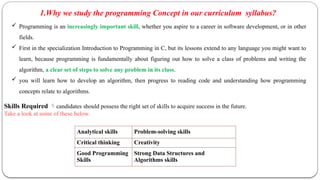
Analytical skills Problem-solving skills
Critical thinking Creativity
Good Programming
Skills
Strong Data Structures and
Algorithms skills
Skills Required candidates should possess the right set of skills to acquire success in the future.
Take a look at some of these below.
What is C?
A language written by Brian Kernighan and Dennis
Ritchie. This was to be the language that UNIX was
written in to become the first "portable" language
In recent years C has been used as a general-purpose language
because of its popularity with programmers.
Why use C?
 Mainly because it produces code that runs nearly as fast as code written in assembly
language.
Some examples of the use of C might be:
 Operating Systems
 Language Compilers
 Assemblers
 Text Editors
 Print Spoolers
 Network Drivers
 Modern Programs
 Data Bases
 Language Interpreters
 Utilities
Mainly because of the portability that writing
standard C programs can offer
History
 In 1960, ALGOL was found by International group of computer users.
COBOL was found for commercial application usage. FORTRAN was
found for scientific applications.
 In 1967, a single language which can program all possible applications,
Basic Combined Programming Language (BCPL) was developed by Martin
Richards at Cambridge University.
 In 1970, a language called B was developed by Ken Thompson at AT & T’s
Bell Labs.
History
 In 1972, Dennis Ritchie at Bell Labs developed a language with some additional
features of BPCL and B called C.
 In 1978 the publication of The C Programming Language by Kernighan &
Ritchie caused a revolution in the computing world.
 In 1983, the American National Standards Institute (ANSI) established a committee
to provide a modern, comprehensive definition of C. The resulting definition, the
ANSI standard, or "ANSI C", was completed late 1988.
Features of C Language :
7
 Simple
 Machine Independent or Portable
 Mid-level programming language
 Structured programming language
 Rich Library
 Memory Management
 Fast Speed
 Pointers
 Recursion
 Extensible
8
1. C is a simple language with structured problem-solving, a rich set of library
functions, and various data types.
2. C is machine-independent and portable, allowing programs to run on
different machines with minimal machine-specific modifications.
3. C is a mid-level programming language, combining low-level and high-
level language features, making it suitable for system programming.
4. C is a structured programming language, promoting modularity through
functions and enhancing code organization and reusability.
5. C offers a rich standard library with built-in functions for various tasks,
simplifying common operations in programming.
9
6. Memory Management: C supports dynamic memory allocation, enabling
efficient memory usage and freeing allocated memory with the free() function.
7. Speed: C is known for its speed due to a minimal number of built-in functions,
resulting in faster compilation and execution times.
8. Pointers: C provides robust pointer support, allowing direct memory interaction
for various purposes, including data structures, functions, arrays, and more.
9. Recursion: C supports recursion, allowing functions to call themselves,
promoting code reusability and facilitating backtracking approaches.
10.Extensible: C is an extensible language, making it easy to incorporate new
features and libraries to adapt to changing requirements and integrate with
other tools and languages.
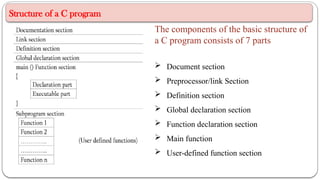
Structure of a C program
The components of the basic structure of
a C program consists of 7 parts
 Document section
 Preprocessor/link Section
 Definition section
 Global declaration section
 Function declaration section
 Main function
 User-defined function section
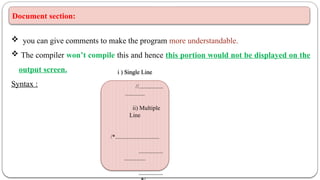
Document section:
 you can give comments to make the program more understandable.
 The compiler won’t compile this and hence this portion would not be displayed on the
output screen.
Syntax :
i ) Single Line
//................
.............
ii) Multiple
Line
/*.............................
................
..............
................
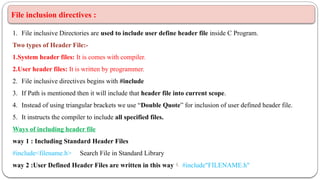
File inclusion directives :
1. File inclusive Directories are used to include user define header file inside C Program.
Two types of Header File:-
1.System header files: It is comes with compiler.
2.User header files: It is written by programmer.
2. File inclusive directives begins with #include
3. If Path is mentioned then it will include that header file into current scope.
4. Instead of using triangular brackets we use “Double Quote” for inclusion of user defined header file.
5. It instructs the compiler to include all specified files.
Ways of including header file
way 1 : Including Standard Header Files
#include<filename.h> Search File in Standard Library
way 2 :User Defined Header Files are written in this way #include"FILENAME.h"
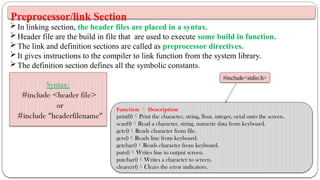
WHAT IS A HEADER FILE?
 All the header file have a '.h' an extension that contains C function declaration
 Header files are imported into C program with the help of preprocessor
#include statement
VARIOUS SYSTEM HEADER FILES:
Preprocessor/link Section
In linking section, the header files are placed in a syntax.
Header file are the build in file that are used to execute some build in function.
The link and definition sections are called as preprocessor directives.
It gives instructions to the compiler to link function from the system library.
The definition section defines all the symbolic constants.
Syntax:
#include <header file>
or
#include "headerfilename"
#include<stdio.h>
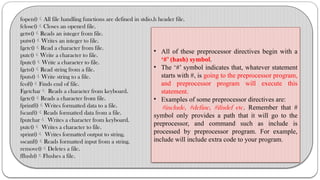
Function  Description
printf()Print the character, string, float, integer, octal onto the screen.
scanf()Read a character, string, numeric data from keyboard.
getc()Reads character from file.
gets()Reads line from keyboard.
getchar()Reads character from keyboard.
puts()Writes line to output screen.
putchar()Writes a character to screen.
clearerr()Clears the error indicators.
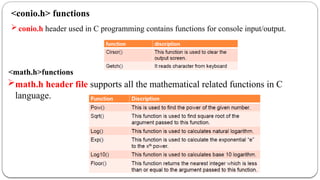
fopen()All file handling functions are defined in stdio.h header file.
fclose()Closes an opened file.
getw()Reads an integer from file.
putw()Writes an integer to file.
fgetc()Read a character from file.
putc()Write a character to file.
fputc()Write a character to file.
fgets()Read string from a file.
fputs()Write string to a file.
feof()Finds end of file.
Fgetchar Reads a character from keyboard.
fgetc()Reads a character from file.
fprintf()Writes formatted data to a file.
fscanf()Reads formatted data from a file.
fputchar Writes a character from keyboard.
putc() Writes a character to file.
sprint() Writes formatted output to string.
sscanf()Reads formatted input from a string.
remove()Deletes a file.
fflush()Flushes a file.
• All of these preprocessor directives begin with a
‘#’ (hash) symbol.
• The ‘#’ symbol indicates that, whatever statement
starts with #, is going to the preprocessor program,
and preprocessor program will execute this
statement.
• Examples of some preprocessor directives are:
#include, #define, #ifndef etc. Remember that #
symbol only provides a path that it will go to the
preprocessor, and command such as include is
processed by preprocessor program. For example,
include will include extra code to your program.
conio.h header used in C programming contains functions for console input/output.
<math.h>functions
math.h header file supports all the mathematical related functions in C
language.
<conio.h> functions
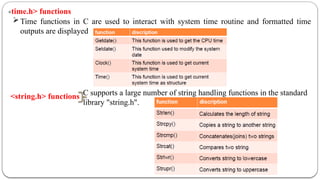
<time.h> functions
Time functions in C are used to interact with system time routine and formatted time
outputs are displayed
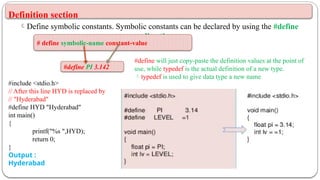
<string.h> functions C supports a large number of string handling functions in the standard
library "string.h".
Definition section
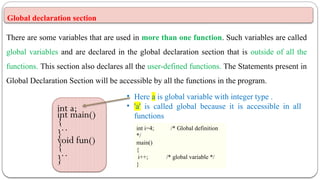
Define symbolic constants. Symbolic constants can be declared by using the #define
directive.
#define PI 3.142
# define symbolic-name constant-value
#define will just copy-paste the definition values at the point of
use, while typedef is the actual definition of a new type.
typedef is used to give data type a new name
#include <stdio.h>
// After this line HYD is replaced by
// "Hyderabad"
#define HYD "Hyderabad"
int main()
{
printf("%s ",HYD);
return 0;
}
Output :
Hyderabad
Global declaration section
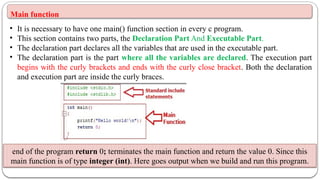
There are some variables that are used in more than one function. Such variables are called
global variables and are declared in the global declaration section that is outside of all the
functions. This section also declares all the user-defined functions. The Statements present in
Global Declaration Section will be accessible by all the functions in the program.
int a;
int main()
{
…
}
void fun()
{
…
}
• Here a is global variable with integer type .
• 'a' is called global because it is accessible in all
functions
int i=4; /* Global definition
*/
main()
{
i++; /* global variable */
}
Main function
• It is necessary to have one main() function section in every c program.
• This section contains two parts, the Declaration Part And Executable Part.
• The declaration part declares all the variables that are used in the executable part.
• The declaration part is the part where all the variables are declared. The execution part
begins with the curly brackets and ends with the curly close bracket. Both the declaration
and execution part are inside the curly braces.
end of the program return 0; terminates the main function and return the value 0. Since this
main function is of type integer (int). Here goes output when we build and run this program.
User-defined function section
All the user-defined functions are defined in this section of the program.
The subprogram section contains all the user-defined functions that are used to
perform a specific task.
These user-defined functions are called in the main function.
User-defined functions are generally placed just after the main() function,
although they may appear in any order.
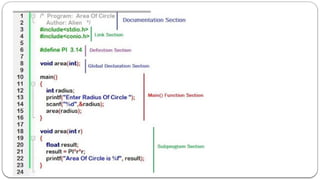
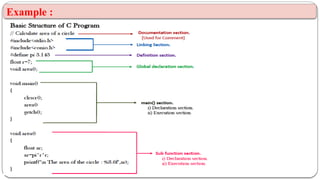
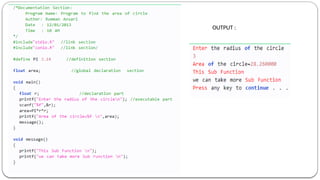
Example :
OUTPUT :
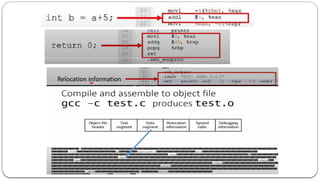
Compiling (L2)
25
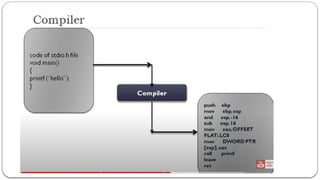
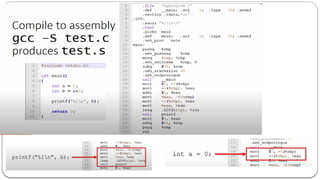
1. Compilation Process in C:
• Compilation is the process of converting human-readable C code into machine-readable
code.
• It checks the syntax and semantics of the C code for errors and warnings.
• It's a prerequisite before executing a C program.
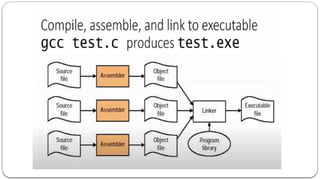
2.Four Steps in Compilation:
Pre-processing: Handles tasks like including header files and macro expansion.
Compiling: Translates the code into assembly language or an intermediate representation.
Assembling: Converts assembly code into machine code and generates object files.
Linking: Combines object files and necessary library files to create an executable program and
resolves references.
26
Translation Analogy: Compiling is similar to a translator facilitating
communication between individuals who speak different languages, allowing
code written in a human-readable language (C) to be understood by the
machine.
Syntax and Semantics Check: The compiler checks the C code for:
- Syntax errors to ensure compliance with language rules.
- Semantic errors to detect logical mistakes in the code.
Execution: Once the compilation process is successful and an executable file is
generated, the C program can be run on a machine, and the program's output is
displayed on the screen.
27
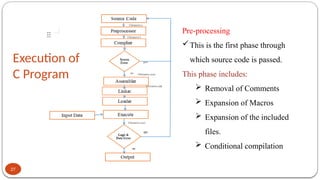
Execution of
C Program
Pre-processing
This is the first phase through
which source code is passed.
This phase includes:
 Removal of Comments
 Expansion of Macros
 Expansion of the included
files.
 Conditional compilation
28
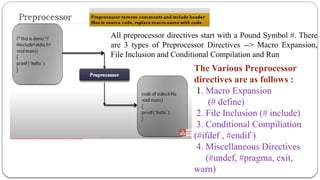
All preprocessor directives start with a Pound Symbol #. There
are 3 types of Preprocessor Directives --> Macro Expansion,
File Inclusion and Conditional Compilation and Run
The Various Preprocessor
directives are as follows :
1. Macro Expansion
(# define)
2. File Inclusion (# include)
3. Conditional Compiliation
(#ifdef , #endif )
4. Miscellaneous Directives
(#undef, #pragma, exit,
warn)
 A Preprocessor is a program that processes our source program
before it is passed to the complier.
The Preprocessor works on the source code and creates “expanded
source code”
The preprocessor offers several features called Preprocessor
directives.
Each of theses preprocessor directives begin with a # symbol.
The directives can be placed anywhere in a program but most often
placed at the beginning of the program, before the function
definitions.
35
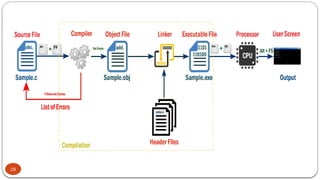
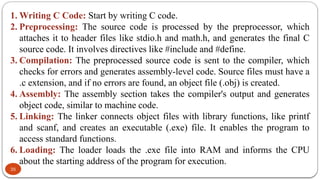
1. Writing C Code: Start by writing C code.
2. Preprocessing: The source code is processed by the preprocessor, which
attaches it to header files like stdio.h and math.h, and generates the final C
source code. It involves directives like #include and #define.
3. Compilation: The preprocessed source code is sent to the compiler, which
checks for errors and generates assembly-level code. Source files must have a
.c extension, and if no errors are found, an object file (.obj) is created.
4. Assembly: The assembly section takes the compiler's output and generates
object code, similar to machine code.
5. Linking: The linker connects object files with library functions, like printf
and scanf, and creates an executable (.exe) file. It enables the program to
access standard functions.
6. Loading: The loader loads the .exe file into RAM and informs the CPU
about the starting address of the program for execution.
36
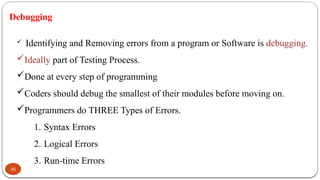
Debugging
 Identifying and Removing errors from a program or Software is debugging.
Ideally part of Testing Process.
Done at every step of programming
Coders should debug the smallest of their modules before moving on.
Programmers do THREE Types of Errors.
1. Syntax Errors
2. Logical Errors
3. Run-time Errors
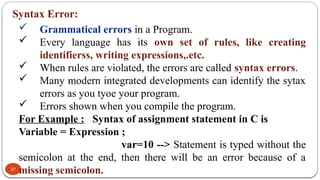
Syntax Error:
37
 Grammatical errors in a Program.
 Every language has its own set of rules, like creating
identifierss, writing expressions,.etc.
 When rules are violated, the errors are called syntax errors.
 Many modern integrated developments can identify the sytax
errors as you tyoe your program.
 Errors shown when you compile the program.
For Example : Syntax of assignment statement in C is
Variable = Expression ;
var=10 --> Statement is typed without the
semicolon at the end, then there will be an error because of a
missing semicolon.
Semantic Error / Logical Error :
 Logical Error occur during coding process.
 Statement will compile and run correctly, But not give the
desired output as the logic is not correct.
 Logical errors cannot be detected by any program.
 Has to be identified by the programmer herself when
the desired output is not achieved.
38
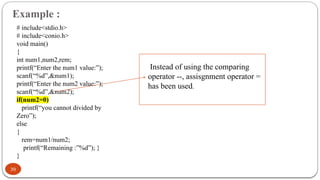
Example :
39
# include<stdio.h>
# include<conio.h>
void main()
{
int num1,num2,rem;
printf(“Enter the num1 value:”);
scanf(“%d”,&num1);
printf(“Enter the num2 value:”);
scanf(“%d”,&num2);
if(num2=0)
printf(“you cannot divided by
Zero”);
else
{
rem=num1/num2;
printf(“Remaining :”%d”); }
}
Instead of using the comparing
operator --, assisgnment operator =
has been used.
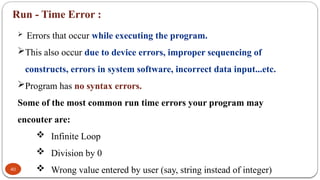
Run - Time Error :
40
 Errors that occur while executing the program.
This also occur due to device errors, improper sequencing of
constructs, errors in system software, incorrect data input...etc.
Program has no syntax errors.
Some of the most common run time errors your program may
encouter are:
 Infinite Loop
 Division by 0
 Wrong value entered by user (say, string instead of integer)
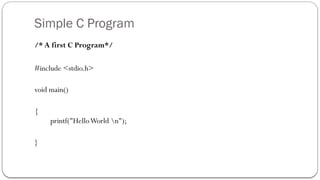
Simple C Program
/* A first C Program*/
#include <stdio.h>
void main()
{
printf("HelloWorld n");
}
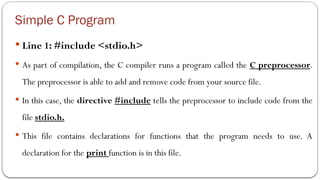
Simple C Program
 Line 1: #include <stdio.h>
 As part of compilation, the C compiler runs a program called the C preprocessor.
The preprocessor is able to add and remove code from your source file.
 In this case, the directive #include tells the preprocessor to include code from the
file stdio.h.
 This file contains declarations for functions that the program needs to use. A
declaration for the print function is in this file.
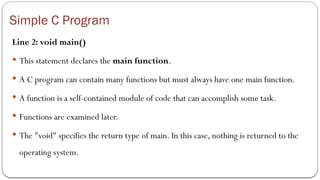
Simple C Program
Line 2: void main()
 This statement declares the main function.
 A C program can contain many functions but must always have one main function.
 A function is a self-contained module of code that can accomplish some task.
 Functions are examined later.
 The "void" specifies the return type of main. In this case, nothing is returned to the
operating system.
Simple C Program
Line 3: {
 This opening bracket denotes the start of the program.
Simple C Program
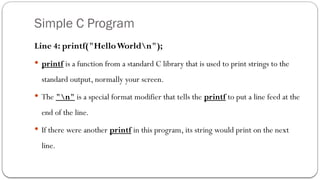
Line 4: printf("HelloWorldn");
 printf is a function from a standard C library that is used to print strings to the
standard output, normally your screen.
 The "n" is a special format modifier that tells the printf to put a line feed at the
end of the line.
 If there were another printf in this program, its string would print on the next
line.
Simple C Program
Line 5: }
 This closing bracket denotes the end of the program.
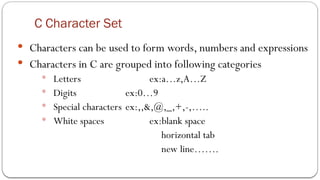
C Character Set
 Characters can be used to form words, numbers and expressions
 Characters in C are grouped into following categories
 Letters ex:a…z,A…Z
 Digits ex:0…9
 Special characters ex:,,&,@,_,+,-,…..
 White spaces ex:blank space
horizontal tab
new line…….
C Tokens
 In a passage of text, individual words and punctuation marks are called
tokens
 In a C source program, the basic element recognized by the compiler is the
"token."
 CTokens are
Keywords - int, float, while
Identifiers - sum, main
Constants - 100, -55.5
Strings - “ABC”,“Hello”
Operators - +, -, *, /, ++
Special symbols - {, },[, ]
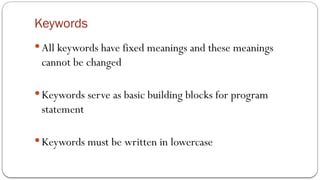
Keywords
 All keywords have fixed meanings and these meanings
cannot be changed
 Keywords serve as basic building blocks for program
statement
 Keywords must be written in lowercase
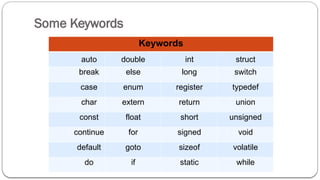
Some Keywords
Keywords
auto double int struct
break else long switch
case enum register typedef
char extern return union
const float short unsigned
continue for signed void
default goto sizeof volatile
do if static while
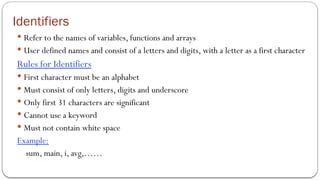
Identifiers
 Refer to the names of variables, functions and arrays
 User defined names and consist of a letters and digits, with a letter as a first character
Rules for Identifiers
 First character must be an alphabet
 Must consist of only letters, digits and underscore
 Only first 31 characters are significant
 Cannot use a keyword
 Must not contain white space
Example:
sum, main, i, avg,……
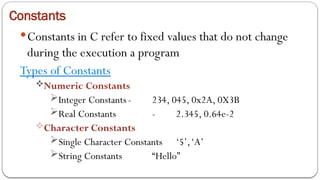
Constants
Constants in C refer to fixed values that do not change
during the execution a program
Types of Constants
Numeric Constants
Integer Constants - 234, 045, 0x2A, 0X3B
Real Constants - 2.345, 0.64e-2
Character Constants
Single Character Constants ‘5’,‘A’
String Constants “Hello”
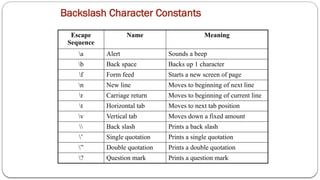
Backslash Character Constants
Escape
Sequence
Name Meaning
a Alert Sounds a beep
b Back space Backs up 1 character
f Form feed Starts a new screen of page
n New line Moves to beginning of next line
r Carriage return Moves to beginning of current line
t Horizontal tab Moves to next tab position
v Vertical tab Moves down a fixed amount
 Back slash Prints a back slash
’ Single quotation Prints a single quotation
” Double quotation Prints a double quotation
? Question mark Prints a question mark
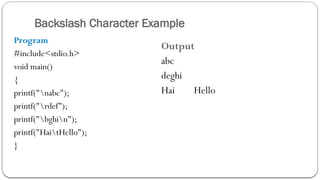
Backslash Character Example
Program
#include<stdio.h>
void main()
{
printf("nabc");
printf("rdef");
printf("bghin");
printf("HaitHello");
}
Output
abc
deghi
Hai Hello
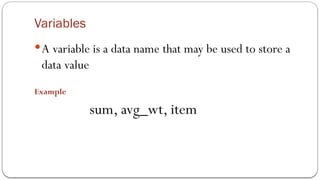
Variables
A variable is a data name that may be used to store a
data value
Example
sum, avg_wt, item
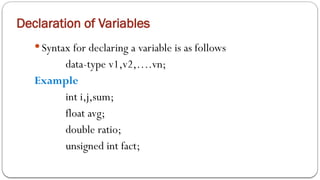
Declaration of Variables
 Syntax for declaring a variable is as follows
data-type v1,v2,….vn;
Example
int i,j,sum;
float avg;
double ratio;
unsigned int fact;
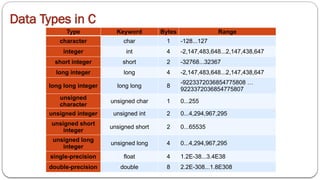
Data Types in C
Type Keyword Bytes Range
character char 1 -128...127
integer int 4 -2,147,483,648...2,147,438,647
short integer short 2 -32768...32367
long integer long 4 -2,147,483,648...2,147,438,647
long long integer long long 8
-9223372036854775808 …
9223372036854775807
unsigned
character
unsigned char 1 0...255
unsigned integer unsigned int 2 0...4,294,967,295
unsigned short
integer
unsigned short 2 0...65535
unsigned long
integer
unsigned long 4 0...4,294,967,295
single-precision float 4 1.2E-38...3.4E38
double-precision double 8 2.2E-308...1.8E308
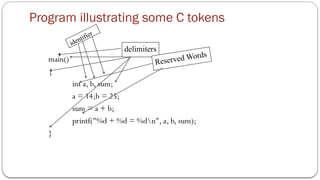
Program illustrating some C tokens
main()
{
int a, b, sum;
a = 14;b = 25;
sum = a + b;
printf("%d + %d = %dn", a, b, sum);
}
identifier
delimiters
Reserved Words
Operators
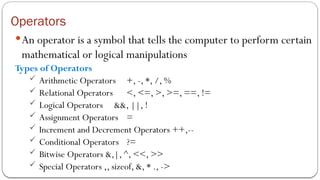
An operator is a symbol that tells the computer to perform certain
mathematical or logical manipulations
Types of Operators
 Arithmetic Operators +, -, *, /, %
 Relational Operators <, <=, >, >=, ==, !=
 Logical Operators &&, ||, !
 Assignment Operators =
 Increment and Decrement Operators ++,--
 Conditional Operators ?=
 Bitwise Operators &,|, ^, <<, >>
 Special Operators ,, sizeof, &, * ., ->
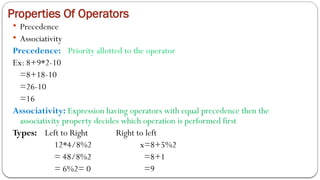
Properties Of Operators
 Precedence
 Associativity
Precedence: Priority allotted to the operator
Ex: 8+9*2-10
=8+18-10
=26-10
=16
Associativity: Expression having operators with equal precedence then the
associativity property decides which operation is performed first
Types: Left to Right Right to left
12*4/8%2 x=8+5%2
= 48/8%2 =8+1
= 6%2= 0 =9
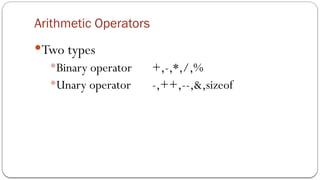
Arithmetic Operators
Two types
Binary operator +,-,*,/,%
Unary operator -,++,--,&,sizeof
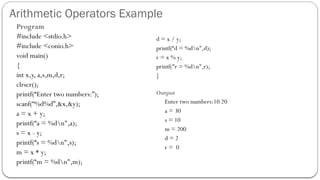
Arithmetic Operators Example
Program
#include <stdio.h>
#include <conio.h>
void main()
{
int x,y, a,s,m,d,r;
clrscr();
printf(“Enter two numbers:”);
scanf(“%d%d”,&x,&y);
a = x + y;
printf(“a = %dn",a);
s = x - y;
printf(“s = %dn",s);
m = x * y;
printf(“m = %dn",m);
d = x / y;
printf(“d = %dn",d);
r = x % y;
printf("r = %dn",r);
}
Output
Enter two numbers:10 20
a = 30
s = 10
m = 200
d = 2
r = 0
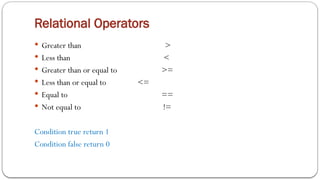
Relational Operators
 Greater than >
 Less than <
 Greater than or equal to >=
 Less than or equal to <=
 Equal to ==
 Not equal to !=
Condition true return 1
Condition false return 0
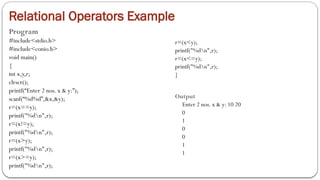
Relational Operators Example
Program
#include<stdio.h>
#include<conio.h>
void main()
{
int x,y,r;
clrscr();
printf(“Enter 2 nos. x & y:”);
scanf(“%d%d”,&x,&y);
r=(x==y);
printf("%dn",r);
r=(x!=y);
printf("%dn",r);
r=(x>y);
printf("%dn",r);
r=(x>=y);
printf("%dn",r);
r=(x<y);
printf("%dn",r);
r=(x<=y);
printf("%dn",r);
}
Output
Enter 2 nos. x & y: 10 20
0
1
0
0
1
1
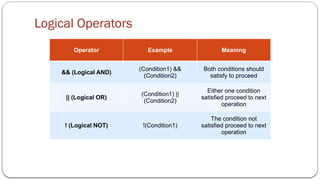
Logical Operators
Operator Example Meaning
&& (Logical AND)
(Condition1) &&
(Condition2)
Both conditions should
satisfy to proceed
|| (Logical OR)
(Condition1) ||
(Condition2)
Either one condition
satisfied proceed to next
operation
! (Logical NOT) !(Condition1)
The condition not
satisfied proceed to next
operation
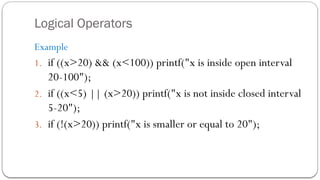
Logical Operators
Example
1. if ((x>20) && (x<100)) printf("x is inside open interval
20-100");
2. if ((x<5) || (x>20)) printf("x is not inside closed interval
5-20");
3. if (!(x>20)) printf("x is smaller or equal to 20");
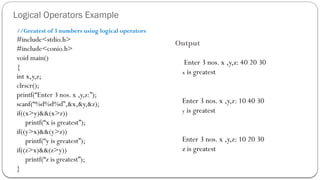
Logical Operators Example
//Greatest of 3 numbers using logical operators
#include<stdio.h>
#include<conio.h>
void main()
{
int x,y,z;
clrscr();
printf(“Enter 3 nos. x ,y,z:”);
scanf(“%d%d%d”,&x,&y,&z);
if((x>y)&&(x>z))
printf(“x is greatest”);
if((y>x)&&(y>z))
printf(“y is greatest”);
if((z>x)&&(z>y))
printf(“z is greatest”);
}
Output
Enter 3 nos. x ,y,z: 40 20 30
x is greatest
Enter 3 nos. x ,y,z: 10 40 30
y is greatest
Enter 3 nos. x ,y,z: 10 20 30
z is greatest
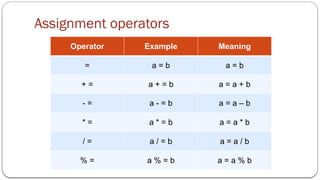
Assignment operators
Operator Example Meaning
= a = b a = b
+ = a + = b a = a + b
- = a - = b a = a – b
* = a * = b a = a * b
/ = a / = b a = a / b
% = a % = b a = a % b
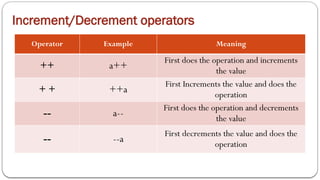
Increment/Decrement operators
Operator Example Meaning
++ a++
First does the operation and increments
the value
+ + ++a
First Increments the value and does the
operation
-- a--
First does the operation and decrements
the value
-- --a
First decrements the value and does the
operation
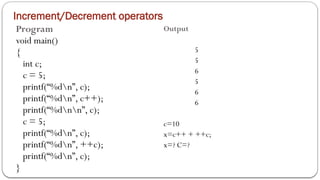
Increment/Decrement operators
Program
void main()
{
int c;
c = 5;
printf(“%dn”, c);
printf(“%dn”, c++);
printf(“%dnn”, c);
c = 5;
printf(“%dn”, c);
printf(“%dn”, ++c);
printf(“%dn”, c);
}
Output
5
5
6
5
6
6
c=10
x=c++ + ++c;
x=? C=?
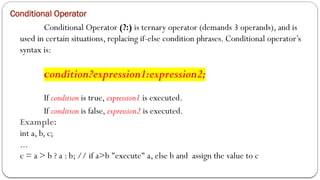
Conditional Operator
Conditional Operator (?:) is ternary operator (demands 3 operands), and is
used in certain situations, replacing if-else condition phrases. Conditional operator’s
syntax is:
condition?expression1:expression2;
If condition is true, expression1 is executed.
If condition is false, expression2 is executed.
Example:
int a, b, c;
...
c = a > b ? a : b; // if a>b "execute" a, else b and assign the value to c
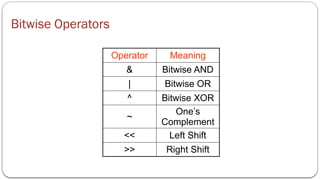
Bitwise Operators
Operator Meaning
& Bitwise AND
| Bitwise OR
^ Bitwise XOR
~
One’s
Complement
<< Left Shift
>> Right Shift
Bitwise Operators Example
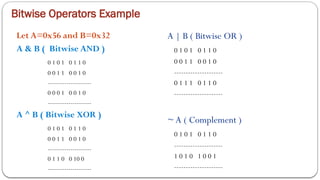
Let A=0x56 and B=0x32
A & B ( Bitwise AND )
0 1 0 1 0 1 1 0
0 0 1 1 0 0 1 0
---------------------
0 0 0 1 0 0 1 0
---------------------
A ^ B ( Bitwise XOR )
0 1 0 1 0 1 1 0
0 0 1 1 0 0 1 0
---------------------
0 1 1 0 0 10 0
---------------------
A | B ( Bitwise OR )
0 1 0 1 0 1 1 0
0 0 1 1 0 0 1 0
---------------------
0 1 1 1 0 1 1 0
---------------------
~ A ( Complement )
0 1 0 1 0 1 1 0
---------------------
1 0 1 0 1 0 0 1
---------------------
Bitwise Operators Example
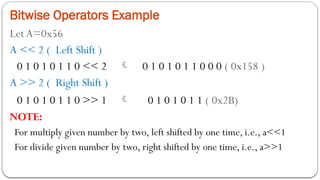
LetA=0x56
A << 2 ( Left Shift )
0 1 0 1 0 1 1 0 << 2  0 1 0 1 0 1 1 0 0 0 ( 0x158 )
A >> 2 ( Right Shift )
0 1 0 1 0 1 1 0 >> 1  0 1 0 1 0 1 1 ( 0x2B)
NOTE:
For multiply given number by two, left shifted by one time, i.e., a<<1
For divide given number by two, right shifted by one time, i.e., a>>1
Bitwise Operators Example
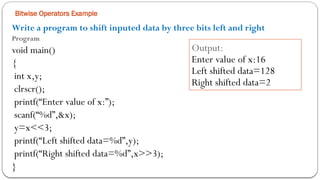
Write a program to shift inputed data by three bits left and right
Program
void main()
{
int x,y;
clrscr();
printf(“Enter value of x:”);
scanf(“%d”,&x);
y=x<<3;
printf(“Left shifted data=%d”,y);
printf(“Right shifted data=%d”,x>>3);
}
Output:
Enter value of x:16
Left shifted data=128
Right shifted data=2
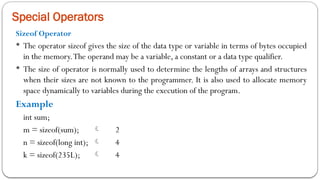
Special Operators
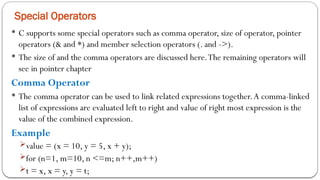
 C supports some special operators such as comma operator, size of operator, pointer
operators (& and *) and member selection operators (. and ->).
 The size of and the comma operators are discussed here.The remaining operators will
see in pointer chapter
Comma Operator
 The comma operator can be used to link related expressions together.A comma-linked
list of expressions are evaluated left to right and value of right most expression is the
value of the combined expression.
Example
value = (x = 10, y = 5, x + y);
for (n=1, m=10, n <=m; n++,m++)
t = x, x = y, y = t;
Special Operators
Sizeof Operator
 The operator sizeof gives the size of the data type or variable in terms of bytes occupied
in the memory.The operand may be a variable, a constant or a data type qualifier.
 The size of operator is normally used to determine the lengths of arrays and structures
when their sizes are not known to the programmer. It is also used to allocate memory
space dynamically to variables during the execution of the program.
Example
int sum;
m = sizeof(sum);  2
n = sizeof(long int);  4
k = sizeof(235L);  4
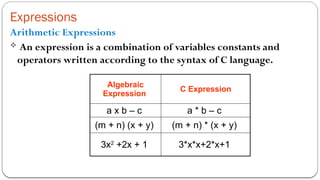
Expressions
Arithmetic Expressions
 An expression is a combination of variables constants and
operators written according to the syntax of C language.
Algebraic
Expression
C Expression
a x b – c a * b – c
(m + n) (x + y) (m + n) * (x + y)
3x2
+2x + 1 3*x*x+2*x+1
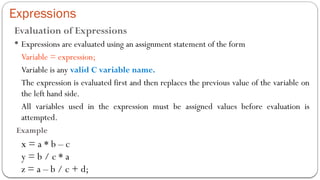
Expressions
Evaluation of Expressions
 Expressions are evaluated using an assignment statement of the form
Variable = expression;
Variable is any valid C variable name.
The expression is evaluated first and then replaces the previous value of the variable on
the left hand side.
All variables used in the expression must be assigned values before evaluation is
attempted.
Example
x = a * b – c
y = b / c * a
z = a – b / c + d;
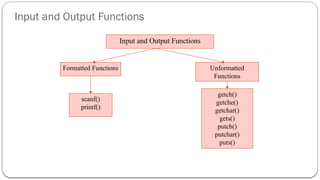
Input and Output Functions
Unformatted
Functions
Formatted Functions
scanf()
printf()
getch()
getche()
getchar()
gets()
putch()
putchar()
puts()
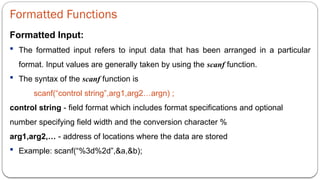
Formatted Functions
Formatted Input:
 The formatted input refers to input data that has been arranged in a particular
format. Input values are generally taken by using the scanf function.
 The syntax of the scanf function is
scanf(“control string”,arg1,arg2…argn) ;
control string - field format which includes format specifications and optional
number specifying field width and the conversion character %
arg1,arg2,… - address of locations where the data are stored
 Example: scanf(“%3d%2d”,&a,&b);
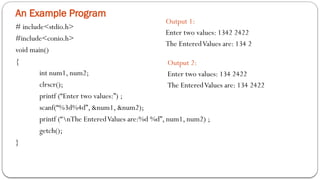
An Example Program
# include<stdio.h>
#include<conio.h>
void main()
{
int num1, num2;
clrscr();
printf (“Enter two values:”) ;
scanf(“%3d%4d”, &num1, &num2);
printf (“nThe EnteredValues are:%d %d”, num1, num2) ;
getch();
}
Output 1:
Enter two values: 1342 2422
The EnteredValues are: 134 2
Output 2:
Enter two values: 134 2422
The EnteredValues are: 134 2422
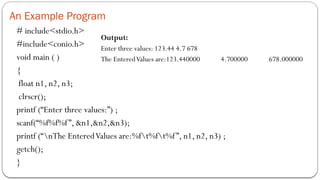
An Example Program
# include<stdio.h>
#include<conio.h>
void main ( )
{
float n1, n2, n3;
clrscr();
printf (“Enter three values:”) ;
scanf(“%f%f%f”, &n1,&n2,&n3);
printf (“nThe EnteredValues are:%ft%ft%f”, n1, n2, n3) ;
getch();
}
Output:
Enter three values: 123.44 4.7 678
The EnteredValues are:123.440000 4.700000 678.000000
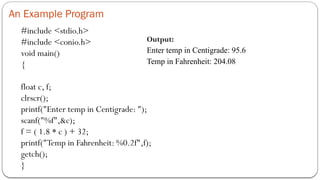
An Example Program
#include <stdio.h>
#include <conio.h>
void main()
{
float c, f;
clrscr();
printf("Enter temp in Centigrade: ");
scanf("%f",&c);
f = ( 1.8 * c ) + 32;
printf("Temp in Fahrenheit: %0.2f",f);
getch();
}
Output:
Enter temp in Centigrade: 95.6
Temp in Fahrenheit: 204.08
An Example Program
# include<stdio.h>
#include<conio.h>
void main ( )
{
char s1[10],s2[10];
clrscr();
printf (“Enter two strings:”) ;
scanf(“%3s%2s”,s1,s2);
printf (“nThe EnteredValues are:%st%s”,s1,s2) ;
getch();
}
Output:
Enter two strings : hello world
The EnteredValues are:hel lo
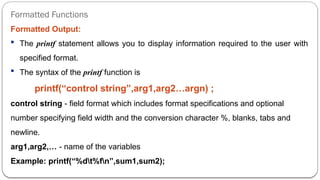
Formatted Functions
Formatted Output:
 The printf statement allows you to display information required to the user with
specified format.
 The syntax of the printf function is
printf(“control string”,arg1,arg2…argn) ;
control string - field format which includes format specifications and optional
number specifying field width and the conversion character %, blanks, tabs and
newline.
arg1,arg2,… - name of the variables
Example: printf(“%dt%fn”,sum1,sum2);
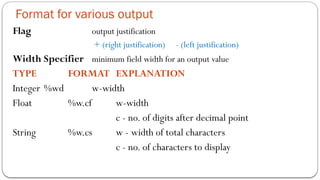
Format for various output
Flag output justification
+ (right justification) - (left justification)
Width Specifier minimum field width for an output value
TYPE FORMAT EXPLANATION
Integer %wd w-width
Float %w.cf w-width
c - no. of digits after decimal point
String %w.cs w - width of total characters
c - no. of characters to display
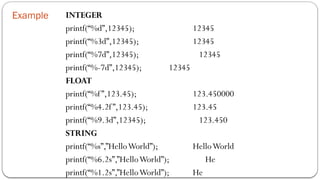
Example INTEGER
printf(“%d”,12345); 12345
printf(“%3d”,12345); 12345
printf(“%7d”,12345); 12345
printf(“%-7d”,12345); 12345
FLOAT
printf(“%f”,123.45); 123.450000
printf(“%4.2f”,123.45); 123.45
printf(“%9.3d”,12345); 123.450
STRING
printf(“%s”,”HelloWorld”); HelloWorld
printf(“%6.2s”,”HelloWorld”); He
printf(“%1.2s”,”HelloWorld”); He
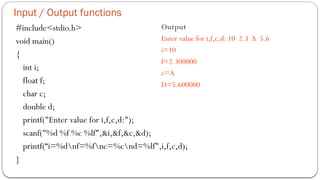
Input / Output functions
#include<stdio.h>
void main()
{
int i;
float f;
char c;
double d;
printf("Enter value for i,f,c,d:");
scanf("%d %f %c %lf",&i,&f,&c,&d);
printf(“i=%dnf=%fnc=%cnd=%lf",i,f,c,d);
}
Output
Enter value for i,f,c,d: 10 2.3 A 5.6
i=10
f=2.300000
c=A
D=5.600000
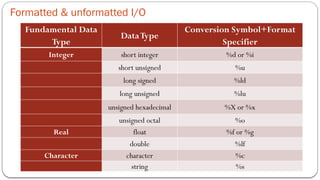
Formatted & unformatted I/O
Fundamental Data
Type
DataType
Conversion Symbol+Format
Specifier
Integer short integer %d or %i
short unsigned %u
long signed %ld
long unsigned %lu
unsigned hexadecimal %X or %x
unsigned octal %o
Real float %f or %g
double %lf
Character character %c
string %s
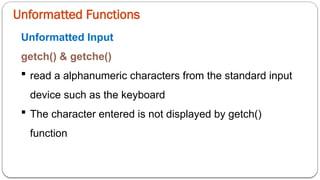
Unformatted Functions
Unformatted Input
getch() & getche()
 read a alphanumeric characters from the standard input
device such as the keyboard
 The character entered is not displayed by getch()
function
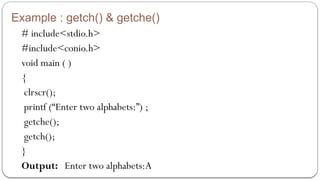
Example : getch() & getche()
# include<stdio.h>
#include<conio.h>
void main ( )
{
clrscr();
printf (“Enter two alphabets:”) ;
getche();
getch();
}
Output: Enter two alphabets:A
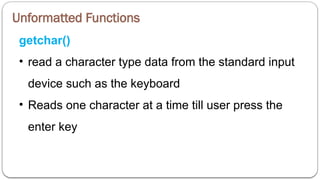
Unformatted Functions
getchar()
• read a character type data from the standard input
device such as the keyboard
• Reads one character at a time till user press the
enter key
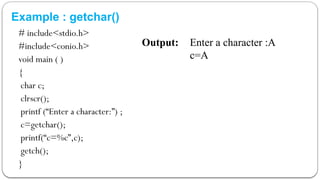
Example : getchar()
# include<stdio.h>
#include<conio.h>
void main ( )
{
char c;
clrscr();
printf (“Enter a character:”) ;
c=getchar();
printf(“c=%c”,c);
getch();
}
Output: Enter a character :A
c=A
Unformatted Functions
gets()
• read a string from the standard input device such as
the keyboard until user press the enter key
Example : gets()
# include<stdio.h>
#include<conio.h>
void main ( )
{
char str[10];
clrscr();
printf (“Enter a string:”) ;
gets(str);
printf(“String=%s”,str);
getch();
}
Output: Enter a string :Hello
String=Hello
Unformatted Functions
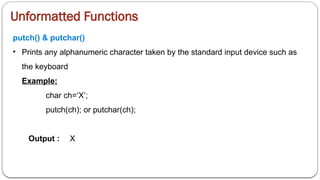
putch() & putchar()
• Prints any alphanumeric character taken by the standard input device such as
the keyboard
Example:
char ch=‘X’;
putch(ch); or putchar(ch);
Output : X
Unformatted Functions
puts()
• prints the string or character array
Example : puts()
# include<stdio.h>
#include<conio.h>
void main ( )
{
char str[10];
clrscr();
printf (“Enter a string:”) ;
gets(str);
printf (“Entered string:”) ;
puts(str);
getch();
}
Output: Enter a string :Hello
Entered string:Hello
Decision Making - Branching
Decision making statements are used to skip or to execute a group of statements based
on the result of some condition.
The decision making statements are,
−simple if statement
−if…else statement
−nested if
−switch statement
These statements are also called branching statements
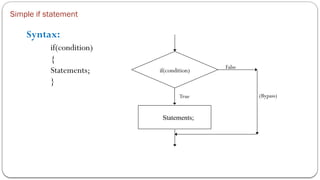
Simple if statement
Syntax:
if(condition)
{
Statements;
}
if(condition)
Statements;
False
True (Bypass)
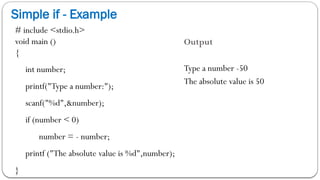
Simple if - Example
# include <stdio.h>
void main ()
{
int number;
printf("Type a number:");
scanf("%d",&number);
if (number < 0)
number = - number;
printf ("The absolute value is %d",number);
}
Output
Type a number -50
The absolute value is 50
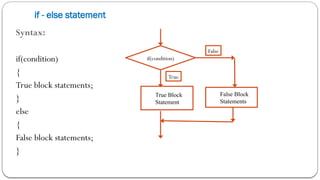
if - else statement
Syntax:
if(condition)
{
True block statements;
}
else
{
False block statements;
}
if(condition)
True Block
Statement
False
True
False Block
Statements
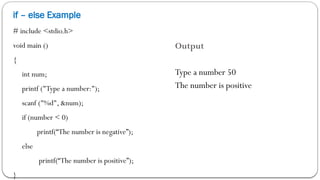
if – else Example
# include <stdio.h>
void main ()
{
int num;
printf ("Type a number:");
scanf ("%d", &num);
if (number < 0)
printf(“The number is negative”);
else
printf(“The number is positive”);
}
Output
Type a number 50
The number is positive
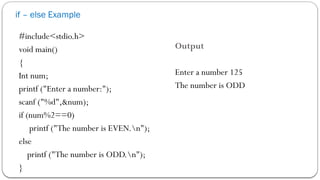
if – else Example
#include<stdio.h>
void main()
{
Int num;
printf ("Enter a number:");
scanf ("%d",&num);
if (num%2==0)
printf ("The number is EVEN.n");
else
printf ("The number is ODD.n");
}
Output
Enter a number 125
The number is ODD
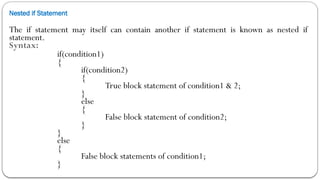
Nested if Statement
The if statement may itself can contain another if statement is known as nested if
statement.
Syntax:
if(condition1)
{
if(condition2)
{
True block statement of condition1 & 2;
}
else
{
False block statement of condition2;
}
}
else
{
False block statements of condition1;
}
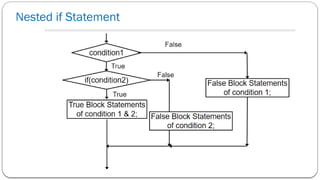
Nested if Statement
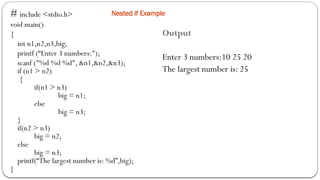
Nested if Example
# include <stdio.h>
void main()
{
int n1,n2,n3,big;
printf (“Enter 3 numbers:");
scanf ("%d %d %d", &n1,&n2,&n3);
if (n1 > n2)
{
if(n1 > n3)
big = n1;
else
big = n3;
}
if(n2 > n3)
big = n2;
else
big = n3;
printf(“The largest number is: %d”,big);
}
Output
Enter 3 numbers:10 25 20
The largest number is: 25
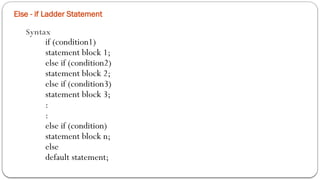
Else - if Ladder Statement
Syntax
if (condition1)
statement block 1;
else if (condition2)
statement block 2;
else if (condition3)
statement block 3;
:
:
else if (condition)
statement block n;
else
default statement;
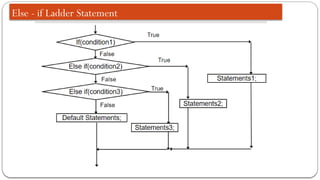
Else - if Ladder Statement
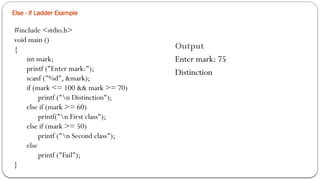
Else - if Ladder Example
#include <stdio.h>
void main ()
{
int mark;
printf ("Enter mark:");
scanf ("%d", &mark);
if (mark <= 100 && mark >= 70)
printf ("n Distinction");
else if (mark >= 60)
printf("n First class");
else if (mark >= 50)
printf ("n Second class");
else
printf ("Fail");
}
Output
Enter mark: 75
Distinction
Switch Statement
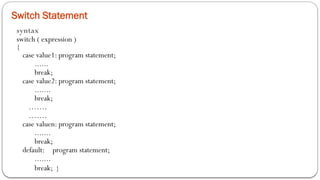
syntax
switch ( expression )
{
case value1: program statement;
......
break;
case value2: program statement;
.......
break;
…….
…….
case valuen: program statement;
.......
break;
default: program statement;
.......
break; }
Switch Statement
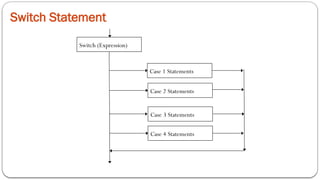
Switch (Expression)
Case 1 Statements
Case 2 Statements
Case 3 Statements
Case 4 Statements
Switch Statement Example
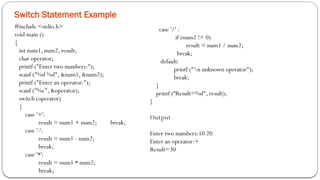
#include <stdio.h>
void main ()
{
int num1, num2, result;
char operator;
printf ("Enter two numbers:");
scanf ("%d %d", &num1, &num2);
printf ("Enter an operator:");
scanf ("%c", &operator);
switch (operator)
{
case '+':
result = num1 + num2; break;
case '-':
result = num1 - num2;
break;
case '*':
result = num1 * num2;
break;
case '/' :
if (num2 != 0)
result = num1 / num2;
break;
default:
printf ("n unknown operator");
break;
}
printf (“Result=%d", result);
}
Output
Enter two numbers:10 20
Enter an operator:+
Result=30
Switch Statement Example
#include<stdio.h>
#include<conio.h>
#include<string.h>
void main()
{
char st[100];
int i,count=0;
clrscr();
printf("Enter line of text:");
gets(st);
for(i=0;st[i]!='0';i++)
{
switch(st[i])
{
case 'a': count++;
break;
case 'e': count++;
break;
case 'i': count++;
break;
case 'o': count++;
break;
case 'u': count++;
break;
}
}
printf("n Number of vowels: %d",count);
getch();
}
Output
Enter line of text: Hello World
Number of vowels: 3
goto statement
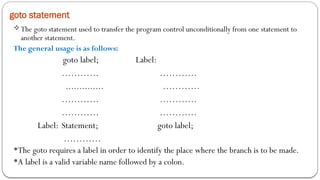
The goto statement used to transfer the program control unconditionally from one statement to
another statement.
The general usage is as follows:
goto label; Label:
………… …………
.............. …………
………… …………
………… …………
Label: Statement; goto label;
…………
The goto requires a label in order to identify the place where the branch is to be made.
A label is a valid variable name followed by a colon.
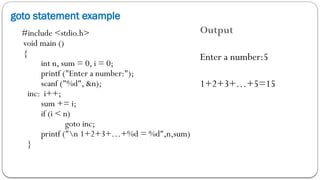
goto statement example
#include <stdio.h>
void main ()
{
int n, sum = 0, i = 0;
printf ("Enter a number:");
scanf ("%d", &n);
inc: i++;
sum += i;
if (i < n)
goto inc;
printf ("n 1+2+3+…+%d = %d",n,sum)
}
Output
Enter a number:5
1+2+3+…+5=15
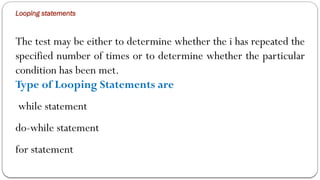
Looping statements
The test may be either to determine whether the i has repeated the
specified number of times or to determine whether the particular
condition has been met.
Type of Looping Statements are
while statement
do-while statement
for statement
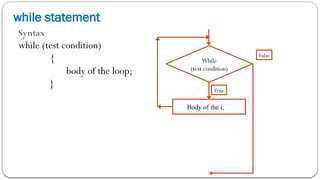
while statement
Syntax
while (test condition)
{
body of the loop;
}
While
(test condition)
Body of the i;
False
True
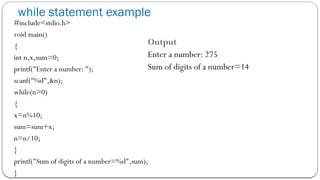
while statement example
#include<stdio.h>
void main()
{
int n,x,sum=0;
printf("Enter a number: ");
scanf("%d",&n);
while(n>0)
{
x=n%10;
sum=sum+x;
n=n/10;
}
printf("Sum of digits of a number=%d",sum);
}
Output
Enter a number: 275
Sum of digits of a number=14
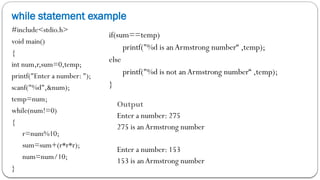
while statement example
#include<stdio.h>
void main()
{
int num,r,sum=0,temp;
printf("Enter a number: ");
scanf("%d",&num);
temp=num;
while(num!=0)
{
r=num%10;
sum=sum+(r*r*r);
num=num/10;
}
if(sum==temp)
printf("%d is anArmstrong number“ ,temp);
else
printf("%d is not anArmstrong number“ ,temp);
}
Output
Enter a number: 275
275 is anArmstrong number
Enter a number: 153
153 is anArmstrong number
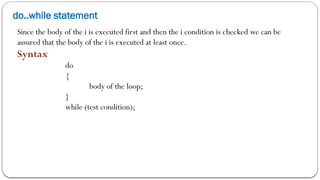
do..while statement
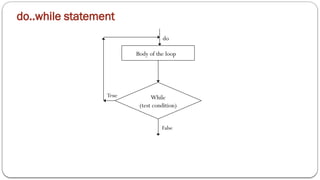
Since the body of the i is executed first and then the i condition is checked we can be
assured that the body of the i is executed at least once.
Syntax
do
{
body of the loop;
}
while (test condition);
do..while statement
While
(test condition)
Body of the loop
False
True
do
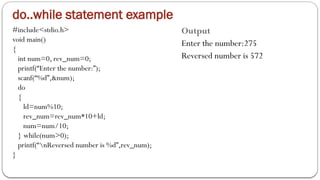
do..while statement example
#include<stdio.h>
void main()
{
int num=0, rev_num=0;
printf(“Enter the number:”);
scanf(“%d”,&num);
do
{
ld=num%10;
rev_num=rev_num*10+ld;
num=num/10;
} while(num>0);
printf(“nReversed number is %d”,rev_num);
}
Output
Enter the number:275
Reversed number is 572
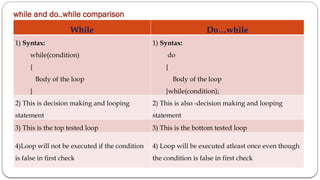
while and do..while comparison
While Do…while
1) Syntax:
while(condition)
{
Body of the loop
}
1) Syntax:
do
{
Body of the loop
}while(condition);
2) This is decision making and looping
statement
2) This is also -decision making and looping
statement
3) This is the top tested loop 3) This is the bottom tested loop
4)Loop will not be executed if the condition
is false in first check
4) Loop will be executed atleast once even though
the condition is false in first check
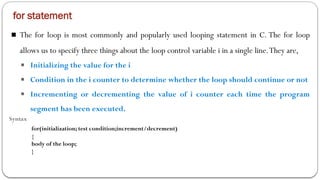
for statement
■ The for loop is most commonly and popularly used looping statement in C. The for loop
allows us to specify three things about the loop control variable i in a single line.They are,
■ Initializing the value for the i
■ Condition in the i counter to determine whether the loop should continue or not
■ Incrementing or decrementing the value of i counter each time the program
segment has been executed.
Syntax
for(initialization; test condition;increment/decrement)
{
body of the loop;
}
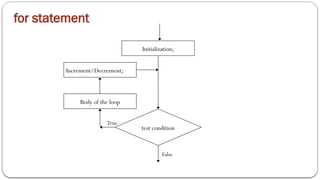
for statement
test condition
Initialization;
False
True
Increment/Decrement;
Body of the loop
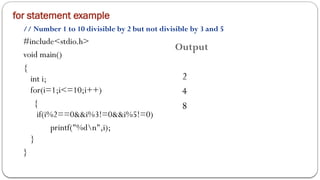
for statement example
// Number 1 to 10 divisible by 2 but not divisible by 3 and 5
#include<stdio.h>
void main()
{
int i;
for(i=1;i<=10;i++)
{
if(i%2==0&&i%3!=0&&i%5!=0)
printf("%dn",i);
}
}
Output
2
4
8
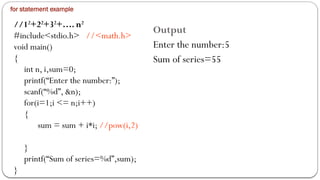
for statement example
//12
+22
+32
+…. n2
#include<stdio.h> //<math.h>
void main()
{
int n, i,sum=0;
printf(“Enter the number:”);
scanf(“%d”, &n);
for(i=1;i <= n;i++)
{
sum = sum + i*i; //pow(i,2)
}
printf(“Sum of series=%d”,sum);
}
Output
Enter the number:5
Sum of series=55
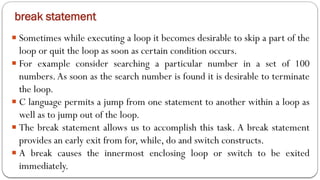
break statement
■ Sometimes while executing a loop it becomes desirable to skip a part of the
loop or quit the loop as soon as certain condition occurs.
■ For example consider searching a particular number in a set of 100
numbers.As soon as the search number is found it is desirable to terminate
the loop.
■ C language permits a jump from one statement to another within a loop as
well as to jump out of the loop.
■ The break statement allows us to accomplish this task. A break statement
provides an early exit from for, while, do and switch constructs.
■ A break causes the innermost enclosing loop or switch to be exited
immediately.
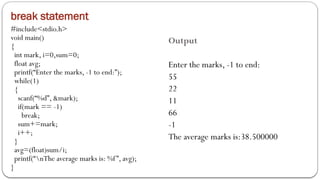
break statement
#include<stdio.h>
void main()
{
int mark, i=0,sum=0;
float avg;
printf(“Enter the marks, -1 to end:”);
while(1)
{
scanf(“%d”, &mark);
if(mark == -1)
break;
sum+=mark;
i++;
}
avg=(float)sum/i;
printf(“nThe average marks is: %f”, avg);
}
Output
Enter the marks, -1 to end:
55
22
11
66
-1
The average marks is:38.500000
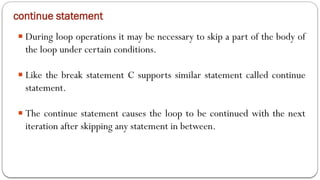
continue statement
■ During loop operations it may be necessary to skip a part of the body of
the loop under certain conditions.
■ Like the break statement C supports similar statement called continue
statement.
■ The continue statement causes the loop to be continued with the next
iteration after skipping any statement in between.
continue statement
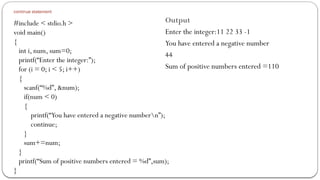
#include < stdio.h >
void main()
{
int i, num, sum=0;
printf(“Enter the integer:”);
for (i = 0; i < 5; i++)
{
scanf(“%d”, &num);
if(num < 0)
{
printf(“You have entered a negative numbern”);
continue;
}
sum+=num;
}
printf(“Sum of positive numbers entered = %d”,sum);
}
Output
Enter the integer:11 22 33 -1
You have entered a negative number
44
Sum of positive numbers entered =110
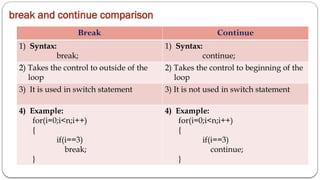
break and continue comparison
Break Continue
1) Syntax:
break;
1) Syntax:
continue;
2) Takes the control to outside of the
loop
2) Takes the control to beginning of the
loop
3) It is used in switch statement 3) It is not used in switch statement
4) Example:
for(i=0;i<n;i++)
{
if(i==3)
break;
}
4) Example:
for(i=0;i<n;i++)
{
if(i==3)
continue;
}

computer networksssssssssssssssssssssssssssss.pptx

  • 1.
    Knowledge Institute ofTechnology, Salem-637504 (Affiliated to Anna University, Chennai) (Accredited by NAAC, NBA) (An Autonomous Institution) Department of Information Technology SYLLABUS Course Code BE23GE307 Course Name PROBLEM SOLVING USING C PROGRAMMING Year I Semester I Class IT B Name of the Faculty Mr. J.MURUGESAN, Assistant Professor /IT Dept IT UNIT–2 BASICS OF C PROGRAMMING 9 Hours Introduction: Features(L2) - Structure of C Programming(L2) - Compiling(L2) - Executing and Debugging(L3) - Character Set(L2) - Tokens: (Keywords – Identifiers – Constants – Strings – Operators- Special Symbols) (L2) - Data Types(L2). Expression(L2) - Precedence and Associativity(L3) - Evaluating Expression(L2) - Type Conversion(L2) - Input and Output: Unformatted Input and Output(L2) - Formatted Input and Output(L2) - Control Flow Statements: Sequence(L3) - Selection(L3) -Looping(L3) - Jumping Statements(L3) 1
  • 2.
     Programming isan increasingly important skill, whether you aspire to a career in software development, or in other fields.  First in the specialization Introduction to Programming in C, but its lessons extend to any language you might want to learn, because programming is fundamentally about figuring out how to solve a class of problems and writing the algorithm, a clear set of steps to solve any problem in its class.  you will learn how to develop an algorithm, then progress to reading code and understanding how programming concepts relate to algorithms. 1.Why we study the programming Concept in our curriculum syllabus? Analytical skills Problem-solving skills Critical thinking Creativity Good Programming Skills Strong Data Structures and Algorithms skills Skills Required candidates should possess the right set of skills to acquire success in the future. Take a look at some of these below.
  • 3.
    What is C? Alanguage written by Brian Kernighan and Dennis Ritchie. This was to be the language that UNIX was written in to become the first "portable" language In recent years C has been used as a general-purpose language because of its popularity with programmers.
  • 4.
    Why use C? Mainly because it produces code that runs nearly as fast as code written in assembly language. Some examples of the use of C might be:  Operating Systems  Language Compilers  Assemblers  Text Editors  Print Spoolers  Network Drivers  Modern Programs  Data Bases  Language Interpreters  Utilities Mainly because of the portability that writing standard C programs can offer
  • 5.
    History  In 1960,ALGOL was found by International group of computer users. COBOL was found for commercial application usage. FORTRAN was found for scientific applications.  In 1967, a single language which can program all possible applications, Basic Combined Programming Language (BCPL) was developed by Martin Richards at Cambridge University.  In 1970, a language called B was developed by Ken Thompson at AT & T’s Bell Labs.
  • 6.
    History  In 1972,Dennis Ritchie at Bell Labs developed a language with some additional features of BPCL and B called C.  In 1978 the publication of The C Programming Language by Kernighan & Ritchie caused a revolution in the computing world.  In 1983, the American National Standards Institute (ANSI) established a committee to provide a modern, comprehensive definition of C. The resulting definition, the ANSI standard, or "ANSI C", was completed late 1988.
  • 7.
    Features of CLanguage : 7  Simple  Machine Independent or Portable  Mid-level programming language  Structured programming language  Rich Library  Memory Management  Fast Speed  Pointers  Recursion  Extensible
  • 8.
    8 1. C isa simple language with structured problem-solving, a rich set of library functions, and various data types. 2. C is machine-independent and portable, allowing programs to run on different machines with minimal machine-specific modifications. 3. C is a mid-level programming language, combining low-level and high- level language features, making it suitable for system programming. 4. C is a structured programming language, promoting modularity through functions and enhancing code organization and reusability. 5. C offers a rich standard library with built-in functions for various tasks, simplifying common operations in programming.
  • 9.
    9 6. Memory Management:C supports dynamic memory allocation, enabling efficient memory usage and freeing allocated memory with the free() function. 7. Speed: C is known for its speed due to a minimal number of built-in functions, resulting in faster compilation and execution times. 8. Pointers: C provides robust pointer support, allowing direct memory interaction for various purposes, including data structures, functions, arrays, and more. 9. Recursion: C supports recursion, allowing functions to call themselves, promoting code reusability and facilitating backtracking approaches. 10.Extensible: C is an extensible language, making it easy to incorporate new features and libraries to adapt to changing requirements and integrate with other tools and languages.
  • 10.
    Structure of aC program The components of the basic structure of a C program consists of 7 parts  Document section  Preprocessor/link Section  Definition section  Global declaration section  Function declaration section  Main function  User-defined function section
  • 11.
    Document section:  youcan give comments to make the program more understandable.  The compiler won’t compile this and hence this portion would not be displayed on the output screen. Syntax : i ) Single Line //................ ............. ii) Multiple Line /*............................. ................ .............. ................
  • 12.
    File inclusion directives: 1. File inclusive Directories are used to include user define header file inside C Program. Two types of Header File:- 1.System header files: It is comes with compiler. 2.User header files: It is written by programmer. 2. File inclusive directives begins with #include 3. If Path is mentioned then it will include that header file into current scope. 4. Instead of using triangular brackets we use “Double Quote” for inclusion of user defined header file. 5. It instructs the compiler to include all specified files. Ways of including header file way 1 : Including Standard Header Files #include<filename.h> Search File in Standard Library way 2 :User Defined Header Files are written in this way #include"FILENAME.h"
  • 13.
    WHAT IS AHEADER FILE?  All the header file have a '.h' an extension that contains C function declaration  Header files are imported into C program with the help of preprocessor #include statement VARIOUS SYSTEM HEADER FILES:
  • 14.
    Preprocessor/link Section In linkingsection, the header files are placed in a syntax. Header file are the build in file that are used to execute some build in function. The link and definition sections are called as preprocessor directives. It gives instructions to the compiler to link function from the system library. The definition section defines all the symbolic constants. Syntax: #include <header file> or #include "headerfilename" #include<stdio.h> Function  Description printf()Print the character, string, float, integer, octal onto the screen. scanf()Read a character, string, numeric data from keyboard. getc()Reads character from file. gets()Reads line from keyboard. getchar()Reads character from keyboard. puts()Writes line to output screen. putchar()Writes a character to screen. clearerr()Clears the error indicators.
  • 15.
    fopen()All file handlingfunctions are defined in stdio.h header file. fclose()Closes an opened file. getw()Reads an integer from file. putw()Writes an integer to file. fgetc()Read a character from file. putc()Write a character to file. fputc()Write a character to file. fgets()Read string from a file. fputs()Write string to a file. feof()Finds end of file. Fgetchar Reads a character from keyboard. fgetc()Reads a character from file. fprintf()Writes formatted data to a file. fscanf()Reads formatted data from a file. fputchar Writes a character from keyboard. putc() Writes a character to file. sprint() Writes formatted output to string. sscanf()Reads formatted input from a string. remove()Deletes a file. fflush()Flushes a file. • All of these preprocessor directives begin with a ‘#’ (hash) symbol. • The ‘#’ symbol indicates that, whatever statement starts with #, is going to the preprocessor program, and preprocessor program will execute this statement. • Examples of some preprocessor directives are: #include, #define, #ifndef etc. Remember that # symbol only provides a path that it will go to the preprocessor, and command such as include is processed by preprocessor program. For example, include will include extra code to your program.
  • 16.
    conio.h header usedin C programming contains functions for console input/output. <math.h>functions math.h header file supports all the mathematical related functions in C language. <conio.h> functions
  • 17.
    <time.h> functions Time functionsin C are used to interact with system time routine and formatted time outputs are displayed <string.h> functions C supports a large number of string handling functions in the standard library "string.h".
  • 18.
    Definition section Define symbolicconstants. Symbolic constants can be declared by using the #define directive. #define PI 3.142 # define symbolic-name constant-value #define will just copy-paste the definition values at the point of use, while typedef is the actual definition of a new type. typedef is used to give data type a new name #include <stdio.h> // After this line HYD is replaced by // "Hyderabad" #define HYD "Hyderabad" int main() { printf("%s ",HYD); return 0; } Output : Hyderabad
  • 19.
    Global declaration section Thereare some variables that are used in more than one function. Such variables are called global variables and are declared in the global declaration section that is outside of all the functions. This section also declares all the user-defined functions. The Statements present in Global Declaration Section will be accessible by all the functions in the program. int a; int main() { … } void fun() { … } • Here a is global variable with integer type . • 'a' is called global because it is accessible in all functions int i=4; /* Global definition */ main() { i++; /* global variable */ }
  • 20.
    Main function • Itis necessary to have one main() function section in every c program. • This section contains two parts, the Declaration Part And Executable Part. • The declaration part declares all the variables that are used in the executable part. • The declaration part is the part where all the variables are declared. The execution part begins with the curly brackets and ends with the curly close bracket. Both the declaration and execution part are inside the curly braces. end of the program return 0; terminates the main function and return the value 0. Since this main function is of type integer (int). Here goes output when we build and run this program.
  • 21.
    User-defined function section Allthe user-defined functions are defined in this section of the program. The subprogram section contains all the user-defined functions that are used to perform a specific task. These user-defined functions are called in the main function. User-defined functions are generally placed just after the main() function, although they may appear in any order.
  • 23.
  • 24.
  • 25.
    Compiling (L2) 25 1. CompilationProcess in C: • Compilation is the process of converting human-readable C code into machine-readable code. • It checks the syntax and semantics of the C code for errors and warnings. • It's a prerequisite before executing a C program. 2.Four Steps in Compilation: Pre-processing: Handles tasks like including header files and macro expansion. Compiling: Translates the code into assembly language or an intermediate representation. Assembling: Converts assembly code into machine code and generates object files. Linking: Combines object files and necessary library files to create an executable program and resolves references.
  • 26.
    26 Translation Analogy: Compilingis similar to a translator facilitating communication between individuals who speak different languages, allowing code written in a human-readable language (C) to be understood by the machine. Syntax and Semantics Check: The compiler checks the C code for: - Syntax errors to ensure compliance with language rules. - Semantic errors to detect logical mistakes in the code. Execution: Once the compilation process is successful and an executable file is generated, the C program can be run on a machine, and the program's output is displayed on the screen.
  • 27.
    27 Execution of C Program Pre-processing Thisis the first phase through which source code is passed. This phase includes:  Removal of Comments  Expansion of Macros  Expansion of the included files.  Conditional compilation
  • 28.
  • 29.
    All preprocessor directivesstart with a Pound Symbol #. There are 3 types of Preprocessor Directives --> Macro Expansion, File Inclusion and Conditional Compilation and Run The Various Preprocessor directives are as follows : 1. Macro Expansion (# define) 2. File Inclusion (# include) 3. Conditional Compiliation (#ifdef , #endif ) 4. Miscellaneous Directives (#undef, #pragma, exit, warn)
  • 30.
     A Preprocessoris a program that processes our source program before it is passed to the complier. The Preprocessor works on the source code and creates “expanded source code” The preprocessor offers several features called Preprocessor directives. Each of theses preprocessor directives begin with a # symbol. The directives can be placed anywhere in a program but most often placed at the beginning of the program, before the function definitions.
  • 35.
    35 1. Writing CCode: Start by writing C code. 2. Preprocessing: The source code is processed by the preprocessor, which attaches it to header files like stdio.h and math.h, and generates the final C source code. It involves directives like #include and #define. 3. Compilation: The preprocessed source code is sent to the compiler, which checks for errors and generates assembly-level code. Source files must have a .c extension, and if no errors are found, an object file (.obj) is created. 4. Assembly: The assembly section takes the compiler's output and generates object code, similar to machine code. 5. Linking: The linker connects object files with library functions, like printf and scanf, and creates an executable (.exe) file. It enables the program to access standard functions. 6. Loading: The loader loads the .exe file into RAM and informs the CPU about the starting address of the program for execution.
  • 36.
    36 Debugging  Identifying andRemoving errors from a program or Software is debugging. Ideally part of Testing Process. Done at every step of programming Coders should debug the smallest of their modules before moving on. Programmers do THREE Types of Errors. 1. Syntax Errors 2. Logical Errors 3. Run-time Errors
  • 37.
    Syntax Error: 37  Grammaticalerrors in a Program.  Every language has its own set of rules, like creating identifierss, writing expressions,.etc.  When rules are violated, the errors are called syntax errors.  Many modern integrated developments can identify the sytax errors as you tyoe your program.  Errors shown when you compile the program. For Example : Syntax of assignment statement in C is Variable = Expression ; var=10 --> Statement is typed without the semicolon at the end, then there will be an error because of a missing semicolon.
  • 38.
    Semantic Error /Logical Error :  Logical Error occur during coding process.  Statement will compile and run correctly, But not give the desired output as the logic is not correct.  Logical errors cannot be detected by any program.  Has to be identified by the programmer herself when the desired output is not achieved. 38
  • 39.
    Example : 39 # include<stdio.h> #include<conio.h> void main() { int num1,num2,rem; printf(“Enter the num1 value:”); scanf(“%d”,&num1); printf(“Enter the num2 value:”); scanf(“%d”,&num2); if(num2=0) printf(“you cannot divided by Zero”); else { rem=num1/num2; printf(“Remaining :”%d”); } } Instead of using the comparing operator --, assisgnment operator = has been used.
  • 40.
    Run - TimeError : 40  Errors that occur while executing the program. This also occur due to device errors, improper sequencing of constructs, errors in system software, incorrect data input...etc. Program has no syntax errors. Some of the most common run time errors your program may encouter are:  Infinite Loop  Division by 0  Wrong value entered by user (say, string instead of integer)
  • 41.
    Simple C Program /*A first C Program*/ #include <stdio.h> void main() { printf("HelloWorld n"); }
  • 42.
    Simple C Program Line 1: #include <stdio.h>  As part of compilation, the C compiler runs a program called the C preprocessor. The preprocessor is able to add and remove code from your source file.  In this case, the directive #include tells the preprocessor to include code from the file stdio.h.  This file contains declarations for functions that the program needs to use. A declaration for the print function is in this file.
  • 43.
    Simple C Program Line2: void main()  This statement declares the main function.  A C program can contain many functions but must always have one main function.  A function is a self-contained module of code that can accomplish some task.  Functions are examined later.  The "void" specifies the return type of main. In this case, nothing is returned to the operating system.
  • 44.
    Simple C Program Line3: {  This opening bracket denotes the start of the program.
  • 45.
    Simple C Program Line4: printf("HelloWorldn");  printf is a function from a standard C library that is used to print strings to the standard output, normally your screen.  The "n" is a special format modifier that tells the printf to put a line feed at the end of the line.  If there were another printf in this program, its string would print on the next line.
  • 46.
    Simple C Program Line5: }  This closing bracket denotes the end of the program.
  • 47.
    C Character Set Characters can be used to form words, numbers and expressions  Characters in C are grouped into following categories  Letters ex:a…z,A…Z  Digits ex:0…9  Special characters ex:,,&,@,_,+,-,…..  White spaces ex:blank space horizontal tab new line…….
  • 48.
    C Tokens  Ina passage of text, individual words and punctuation marks are called tokens  In a C source program, the basic element recognized by the compiler is the "token."  CTokens are Keywords - int, float, while Identifiers - sum, main Constants - 100, -55.5 Strings - “ABC”,“Hello” Operators - +, -, *, /, ++ Special symbols - {, },[, ]
  • 49.
    Keywords  All keywordshave fixed meanings and these meanings cannot be changed  Keywords serve as basic building blocks for program statement  Keywords must be written in lowercase
  • 50.
    Some Keywords Keywords auto doubleint struct break else long switch case enum register typedef char extern return union const float short unsigned continue for signed void default goto sizeof volatile do if static while
  • 51.
    Identifiers  Refer tothe names of variables, functions and arrays  User defined names and consist of a letters and digits, with a letter as a first character Rules for Identifiers  First character must be an alphabet  Must consist of only letters, digits and underscore  Only first 31 characters are significant  Cannot use a keyword  Must not contain white space Example: sum, main, i, avg,……
  • 52.
    Constants Constants in Crefer to fixed values that do not change during the execution a program Types of Constants Numeric Constants Integer Constants - 234, 045, 0x2A, 0X3B Real Constants - 2.345, 0.64e-2 Character Constants Single Character Constants ‘5’,‘A’ String Constants “Hello”
  • 53.
    Backslash Character Constants Escape Sequence NameMeaning a Alert Sounds a beep b Back space Backs up 1 character f Form feed Starts a new screen of page n New line Moves to beginning of next line r Carriage return Moves to beginning of current line t Horizontal tab Moves to next tab position v Vertical tab Moves down a fixed amount Back slash Prints a back slash ’ Single quotation Prints a single quotation ” Double quotation Prints a double quotation ? Question mark Prints a question mark
  • 54.
    Backslash Character Example Program #include<stdio.h> voidmain() { printf("nabc"); printf("rdef"); printf("bghin"); printf("HaitHello"); } Output abc deghi Hai Hello
  • 55.
    Variables A variable isa data name that may be used to store a data value Example sum, avg_wt, item
  • 56.
    Declaration of Variables Syntax for declaring a variable is as follows data-type v1,v2,….vn; Example int i,j,sum; float avg; double ratio; unsigned int fact;
  • 57.
    Data Types inC Type Keyword Bytes Range character char 1 -128...127 integer int 4 -2,147,483,648...2,147,438,647 short integer short 2 -32768...32367 long integer long 4 -2,147,483,648...2,147,438,647 long long integer long long 8 -9223372036854775808 … 9223372036854775807 unsigned character unsigned char 1 0...255 unsigned integer unsigned int 2 0...4,294,967,295 unsigned short integer unsigned short 2 0...65535 unsigned long integer unsigned long 4 0...4,294,967,295 single-precision float 4 1.2E-38...3.4E38 double-precision double 8 2.2E-308...1.8E308
  • 58.
    Program illustrating someC tokens main() { int a, b, sum; a = 14;b = 25; sum = a + b; printf("%d + %d = %dn", a, b, sum); } identifier delimiters Reserved Words
  • 59.
    Operators An operator isa symbol that tells the computer to perform certain mathematical or logical manipulations Types of Operators  Arithmetic Operators +, -, *, /, %  Relational Operators <, <=, >, >=, ==, !=  Logical Operators &&, ||, !  Assignment Operators =  Increment and Decrement Operators ++,--  Conditional Operators ?=  Bitwise Operators &,|, ^, <<, >>  Special Operators ,, sizeof, &, * ., ->
  • 60.
    Properties Of Operators Precedence  Associativity Precedence: Priority allotted to the operator Ex: 8+9*2-10 =8+18-10 =26-10 =16 Associativity: Expression having operators with equal precedence then the associativity property decides which operation is performed first Types: Left to Right Right to left 12*4/8%2 x=8+5%2 = 48/8%2 =8+1 = 6%2= 0 =9
  • 61.
    Arithmetic Operators Two types Binaryoperator +,-,*,/,% Unary operator -,++,--,&,sizeof
  • 62.
    Arithmetic Operators Example Program #include<stdio.h> #include <conio.h> void main() { int x,y, a,s,m,d,r; clrscr(); printf(“Enter two numbers:”); scanf(“%d%d”,&x,&y); a = x + y; printf(“a = %dn",a); s = x - y; printf(“s = %dn",s); m = x * y; printf(“m = %dn",m); d = x / y; printf(“d = %dn",d); r = x % y; printf("r = %dn",r); } Output Enter two numbers:10 20 a = 30 s = 10 m = 200 d = 2 r = 0
  • 63.
    Relational Operators  Greaterthan >  Less than <  Greater than or equal to >=  Less than or equal to <=  Equal to ==  Not equal to != Condition true return 1 Condition false return 0
  • 64.
    Relational Operators Example Program #include<stdio.h> #include<conio.h> voidmain() { int x,y,r; clrscr(); printf(“Enter 2 nos. x & y:”); scanf(“%d%d”,&x,&y); r=(x==y); printf("%dn",r); r=(x!=y); printf("%dn",r); r=(x>y); printf("%dn",r); r=(x>=y); printf("%dn",r); r=(x<y); printf("%dn",r); r=(x<=y); printf("%dn",r); } Output Enter 2 nos. x & y: 10 20 0 1 0 0 1 1
  • 65.
    Logical Operators Operator ExampleMeaning && (Logical AND) (Condition1) && (Condition2) Both conditions should satisfy to proceed || (Logical OR) (Condition1) || (Condition2) Either one condition satisfied proceed to next operation ! (Logical NOT) !(Condition1) The condition not satisfied proceed to next operation
  • 66.
    Logical Operators Example 1. if((x>20) && (x<100)) printf("x is inside open interval 20-100"); 2. if ((x<5) || (x>20)) printf("x is not inside closed interval 5-20"); 3. if (!(x>20)) printf("x is smaller or equal to 20");
  • 67.
    Logical Operators Example //Greatestof 3 numbers using logical operators #include<stdio.h> #include<conio.h> void main() { int x,y,z; clrscr(); printf(“Enter 3 nos. x ,y,z:”); scanf(“%d%d%d”,&x,&y,&z); if((x>y)&&(x>z)) printf(“x is greatest”); if((y>x)&&(y>z)) printf(“y is greatest”); if((z>x)&&(z>y)) printf(“z is greatest”); } Output Enter 3 nos. x ,y,z: 40 20 30 x is greatest Enter 3 nos. x ,y,z: 10 40 30 y is greatest Enter 3 nos. x ,y,z: 10 20 30 z is greatest
  • 68.
    Assignment operators Operator ExampleMeaning = a = b a = b + = a + = b a = a + b - = a - = b a = a – b * = a * = b a = a * b / = a / = b a = a / b % = a % = b a = a % b
  • 69.
    Increment/Decrement operators Operator ExampleMeaning ++ a++ First does the operation and increments the value + + ++a First Increments the value and does the operation -- a-- First does the operation and decrements the value -- --a First decrements the value and does the operation
  • 70.
    Increment/Decrement operators Program void main() { intc; c = 5; printf(“%dn”, c); printf(“%dn”, c++); printf(“%dnn”, c); c = 5; printf(“%dn”, c); printf(“%dn”, ++c); printf(“%dn”, c); } Output 5 5 6 5 6 6 c=10 x=c++ + ++c; x=? C=?
  • 71.
    Conditional Operator Conditional Operator(?:) is ternary operator (demands 3 operands), and is used in certain situations, replacing if-else condition phrases. Conditional operator’s syntax is: condition?expression1:expression2; If condition is true, expression1 is executed. If condition is false, expression2 is executed. Example: int a, b, c; ... c = a > b ? a : b; // if a>b "execute" a, else b and assign the value to c
  • 72.
    Bitwise Operators Operator Meaning &Bitwise AND | Bitwise OR ^ Bitwise XOR ~ One’s Complement << Left Shift >> Right Shift
  • 73.
    Bitwise Operators Example LetA=0x56 and B=0x32 A & B ( Bitwise AND ) 0 1 0 1 0 1 1 0 0 0 1 1 0 0 1 0 --------------------- 0 0 0 1 0 0 1 0 --------------------- A ^ B ( Bitwise XOR ) 0 1 0 1 0 1 1 0 0 0 1 1 0 0 1 0 --------------------- 0 1 1 0 0 10 0 --------------------- A | B ( Bitwise OR ) 0 1 0 1 0 1 1 0 0 0 1 1 0 0 1 0 --------------------- 0 1 1 1 0 1 1 0 --------------------- ~ A ( Complement ) 0 1 0 1 0 1 1 0 --------------------- 1 0 1 0 1 0 0 1 ---------------------
  • 74.
    Bitwise Operators Example LetA=0x56 A<< 2 ( Left Shift ) 0 1 0 1 0 1 1 0 << 2  0 1 0 1 0 1 1 0 0 0 ( 0x158 ) A >> 2 ( Right Shift ) 0 1 0 1 0 1 1 0 >> 1  0 1 0 1 0 1 1 ( 0x2B) NOTE: For multiply given number by two, left shifted by one time, i.e., a<<1 For divide given number by two, right shifted by one time, i.e., a>>1
  • 75.
    Bitwise Operators Example Writea program to shift inputed data by three bits left and right Program void main() { int x,y; clrscr(); printf(“Enter value of x:”); scanf(“%d”,&x); y=x<<3; printf(“Left shifted data=%d”,y); printf(“Right shifted data=%d”,x>>3); } Output: Enter value of x:16 Left shifted data=128 Right shifted data=2
  • 76.
    Special Operators  Csupports some special operators such as comma operator, size of operator, pointer operators (& and *) and member selection operators (. and ->).  The size of and the comma operators are discussed here.The remaining operators will see in pointer chapter Comma Operator  The comma operator can be used to link related expressions together.A comma-linked list of expressions are evaluated left to right and value of right most expression is the value of the combined expression. Example value = (x = 10, y = 5, x + y); for (n=1, m=10, n <=m; n++,m++) t = x, x = y, y = t;
  • 77.
    Special Operators Sizeof Operator The operator sizeof gives the size of the data type or variable in terms of bytes occupied in the memory.The operand may be a variable, a constant or a data type qualifier.  The size of operator is normally used to determine the lengths of arrays and structures when their sizes are not known to the programmer. It is also used to allocate memory space dynamically to variables during the execution of the program. Example int sum; m = sizeof(sum);  2 n = sizeof(long int);  4 k = sizeof(235L);  4
  • 78.
    Expressions Arithmetic Expressions  Anexpression is a combination of variables constants and operators written according to the syntax of C language. Algebraic Expression C Expression a x b – c a * b – c (m + n) (x + y) (m + n) * (x + y) 3x2 +2x + 1 3*x*x+2*x+1
  • 79.
    Expressions Evaluation of Expressions Expressions are evaluated using an assignment statement of the form Variable = expression; Variable is any valid C variable name. The expression is evaluated first and then replaces the previous value of the variable on the left hand side. All variables used in the expression must be assigned values before evaluation is attempted. Example x = a * b – c y = b / c * a z = a – b / c + d;
  • 80.
    Input and OutputFunctions Input and Output Functions Unformatted Functions Formatted Functions scanf() printf() getch() getche() getchar() gets() putch() putchar() puts()
  • 81.
    Formatted Functions Formatted Input: The formatted input refers to input data that has been arranged in a particular format. Input values are generally taken by using the scanf function.  The syntax of the scanf function is scanf(“control string”,arg1,arg2…argn) ; control string - field format which includes format specifications and optional number specifying field width and the conversion character % arg1,arg2,… - address of locations where the data are stored  Example: scanf(“%3d%2d”,&a,&b);
  • 82.
    An Example Program #include<stdio.h> #include<conio.h> void main() { int num1, num2; clrscr(); printf (“Enter two values:”) ; scanf(“%3d%4d”, &num1, &num2); printf (“nThe EnteredValues are:%d %d”, num1, num2) ; getch(); } Output 1: Enter two values: 1342 2422 The EnteredValues are: 134 2 Output 2: Enter two values: 134 2422 The EnteredValues are: 134 2422
  • 83.
    An Example Program #include<stdio.h> #include<conio.h> void main ( ) { float n1, n2, n3; clrscr(); printf (“Enter three values:”) ; scanf(“%f%f%f”, &n1,&n2,&n3); printf (“nThe EnteredValues are:%ft%ft%f”, n1, n2, n3) ; getch(); } Output: Enter three values: 123.44 4.7 678 The EnteredValues are:123.440000 4.700000 678.000000
  • 84.
    An Example Program #include<stdio.h> #include <conio.h> void main() { float c, f; clrscr(); printf("Enter temp in Centigrade: "); scanf("%f",&c); f = ( 1.8 * c ) + 32; printf("Temp in Fahrenheit: %0.2f",f); getch(); } Output: Enter temp in Centigrade: 95.6 Temp in Fahrenheit: 204.08
  • 85.
    An Example Program #include<stdio.h> #include<conio.h> void main ( ) { char s1[10],s2[10]; clrscr(); printf (“Enter two strings:”) ; scanf(“%3s%2s”,s1,s2); printf (“nThe EnteredValues are:%st%s”,s1,s2) ; getch(); } Output: Enter two strings : hello world The EnteredValues are:hel lo
  • 86.
    Formatted Functions Formatted Output: The printf statement allows you to display information required to the user with specified format.  The syntax of the printf function is printf(“control string”,arg1,arg2…argn) ; control string - field format which includes format specifications and optional number specifying field width and the conversion character %, blanks, tabs and newline. arg1,arg2,… - name of the variables Example: printf(“%dt%fn”,sum1,sum2);
  • 87.
    Format for variousoutput Flag output justification + (right justification) - (left justification) Width Specifier minimum field width for an output value TYPE FORMAT EXPLANATION Integer %wd w-width Float %w.cf w-width c - no. of digits after decimal point String %w.cs w - width of total characters c - no. of characters to display
  • 88.
    Example INTEGER printf(“%d”,12345); 12345 printf(“%3d”,12345);12345 printf(“%7d”,12345); 12345 printf(“%-7d”,12345); 12345 FLOAT printf(“%f”,123.45); 123.450000 printf(“%4.2f”,123.45); 123.45 printf(“%9.3d”,12345); 123.450 STRING printf(“%s”,”HelloWorld”); HelloWorld printf(“%6.2s”,”HelloWorld”); He printf(“%1.2s”,”HelloWorld”); He
  • 89.
    Input / Outputfunctions #include<stdio.h> void main() { int i; float f; char c; double d; printf("Enter value for i,f,c,d:"); scanf("%d %f %c %lf",&i,&f,&c,&d); printf(“i=%dnf=%fnc=%cnd=%lf",i,f,c,d); } Output Enter value for i,f,c,d: 10 2.3 A 5.6 i=10 f=2.300000 c=A D=5.600000
  • 90.
    Formatted & unformattedI/O Fundamental Data Type DataType Conversion Symbol+Format Specifier Integer short integer %d or %i short unsigned %u long signed %ld long unsigned %lu unsigned hexadecimal %X or %x unsigned octal %o Real float %f or %g double %lf Character character %c string %s
  • 91.
    Unformatted Functions Unformatted Input getch()& getche()  read a alphanumeric characters from the standard input device such as the keyboard  The character entered is not displayed by getch() function
  • 92.
    Example : getch()& getche() # include<stdio.h> #include<conio.h> void main ( ) { clrscr(); printf (“Enter two alphabets:”) ; getche(); getch(); } Output: Enter two alphabets:A
  • 93.
    Unformatted Functions getchar() • reada character type data from the standard input device such as the keyboard • Reads one character at a time till user press the enter key
  • 94.
    Example : getchar() #include<stdio.h> #include<conio.h> void main ( ) { char c; clrscr(); printf (“Enter a character:”) ; c=getchar(); printf(“c=%c”,c); getch(); } Output: Enter a character :A c=A
  • 95.
    Unformatted Functions gets() • reada string from the standard input device such as the keyboard until user press the enter key
  • 96.
    Example : gets() #include<stdio.h> #include<conio.h> void main ( ) { char str[10]; clrscr(); printf (“Enter a string:”) ; gets(str); printf(“String=%s”,str); getch(); } Output: Enter a string :Hello String=Hello
  • 97.
    Unformatted Functions putch() &putchar() • Prints any alphanumeric character taken by the standard input device such as the keyboard Example: char ch=‘X’; putch(ch); or putchar(ch); Output : X
  • 98.
    Unformatted Functions puts() • printsthe string or character array
  • 99.
    Example : puts() #include<stdio.h> #include<conio.h> void main ( ) { char str[10]; clrscr(); printf (“Enter a string:”) ; gets(str); printf (“Entered string:”) ; puts(str); getch(); } Output: Enter a string :Hello Entered string:Hello
  • 100.
    Decision Making -Branching Decision making statements are used to skip or to execute a group of statements based on the result of some condition. The decision making statements are, −simple if statement −if…else statement −nested if −switch statement These statements are also called branching statements
  • 101.
  • 102.
    Simple if -Example # include <stdio.h> void main () { int number; printf("Type a number:"); scanf("%d",&number); if (number < 0) number = - number; printf ("The absolute value is %d",number); } Output Type a number -50 The absolute value is 50
  • 103.
    if - elsestatement Syntax: if(condition) { True block statements; } else { False block statements; } if(condition) True Block Statement False True False Block Statements
  • 104.
    if – elseExample # include <stdio.h> void main () { int num; printf ("Type a number:"); scanf ("%d", &num); if (number < 0) printf(“The number is negative”); else printf(“The number is positive”); } Output Type a number 50 The number is positive
  • 105.
    if – elseExample #include<stdio.h> void main() { Int num; printf ("Enter a number:"); scanf ("%d",&num); if (num%2==0) printf ("The number is EVEN.n"); else printf ("The number is ODD.n"); } Output Enter a number 125 The number is ODD
  • 106.
    Nested if Statement Theif statement may itself can contain another if statement is known as nested if statement. Syntax: if(condition1) { if(condition2) { True block statement of condition1 & 2; } else { False block statement of condition2; } } else { False block statements of condition1; }
  • 107.
  • 108.
    Nested if Example #include <stdio.h> void main() { int n1,n2,n3,big; printf (“Enter 3 numbers:"); scanf ("%d %d %d", &n1,&n2,&n3); if (n1 > n2) { if(n1 > n3) big = n1; else big = n3; } if(n2 > n3) big = n2; else big = n3; printf(“The largest number is: %d”,big); } Output Enter 3 numbers:10 25 20 The largest number is: 25
  • 109.
    Else - ifLadder Statement Syntax if (condition1) statement block 1; else if (condition2) statement block 2; else if (condition3) statement block 3; : : else if (condition) statement block n; else default statement;
  • 110.
    Else - ifLadder Statement
  • 111.
    Else - ifLadder Example #include <stdio.h> void main () { int mark; printf ("Enter mark:"); scanf ("%d", &mark); if (mark <= 100 && mark >= 70) printf ("n Distinction"); else if (mark >= 60) printf("n First class"); else if (mark >= 50) printf ("n Second class"); else printf ("Fail"); } Output Enter mark: 75 Distinction
  • 112.
    Switch Statement syntax switch (expression ) { case value1: program statement; ...... break; case value2: program statement; ....... break; ……. ……. case valuen: program statement; ....... break; default: program statement; ....... break; }
  • 113.
    Switch Statement Switch (Expression) Case1 Statements Case 2 Statements Case 3 Statements Case 4 Statements
  • 114.
    Switch Statement Example #include<stdio.h> void main () { int num1, num2, result; char operator; printf ("Enter two numbers:"); scanf ("%d %d", &num1, &num2); printf ("Enter an operator:"); scanf ("%c", &operator); switch (operator) { case '+': result = num1 + num2; break; case '-': result = num1 - num2; break; case '*': result = num1 * num2; break; case '/' : if (num2 != 0) result = num1 / num2; break; default: printf ("n unknown operator"); break; } printf (“Result=%d", result); } Output Enter two numbers:10 20 Enter an operator:+ Result=30
  • 115.
    Switch Statement Example #include<stdio.h> #include<conio.h> #include<string.h> voidmain() { char st[100]; int i,count=0; clrscr(); printf("Enter line of text:"); gets(st); for(i=0;st[i]!='0';i++) { switch(st[i]) { case 'a': count++; break; case 'e': count++; break; case 'i': count++; break; case 'o': count++; break; case 'u': count++; break; } } printf("n Number of vowels: %d",count); getch(); } Output Enter line of text: Hello World Number of vowels: 3
  • 116.
    goto statement The gotostatement used to transfer the program control unconditionally from one statement to another statement. The general usage is as follows: goto label; Label: ………… ………… .............. ………… ………… ………… ………… ………… Label: Statement; goto label; ………… The goto requires a label in order to identify the place where the branch is to be made. A label is a valid variable name followed by a colon.
  • 117.
    goto statement example #include<stdio.h> void main () { int n, sum = 0, i = 0; printf ("Enter a number:"); scanf ("%d", &n); inc: i++; sum += i; if (i < n) goto inc; printf ("n 1+2+3+…+%d = %d",n,sum) } Output Enter a number:5 1+2+3+…+5=15
  • 118.
    Looping statements The testmay be either to determine whether the i has repeated the specified number of times or to determine whether the particular condition has been met. Type of Looping Statements are while statement do-while statement for statement
  • 119.
    while statement Syntax while (testcondition) { body of the loop; } While (test condition) Body of the i; False True
  • 120.
    while statement example #include<stdio.h> voidmain() { int n,x,sum=0; printf("Enter a number: "); scanf("%d",&n); while(n>0) { x=n%10; sum=sum+x; n=n/10; } printf("Sum of digits of a number=%d",sum); } Output Enter a number: 275 Sum of digits of a number=14
  • 121.
    while statement example #include<stdio.h> voidmain() { int num,r,sum=0,temp; printf("Enter a number: "); scanf("%d",&num); temp=num; while(num!=0) { r=num%10; sum=sum+(r*r*r); num=num/10; } if(sum==temp) printf("%d is anArmstrong number“ ,temp); else printf("%d is not anArmstrong number“ ,temp); } Output Enter a number: 275 275 is anArmstrong number Enter a number: 153 153 is anArmstrong number
  • 122.
    do..while statement Since thebody of the i is executed first and then the i condition is checked we can be assured that the body of the i is executed at least once. Syntax do { body of the loop; } while (test condition);
  • 123.
  • 124.
    do..while statement example #include<stdio.h> voidmain() { int num=0, rev_num=0; printf(“Enter the number:”); scanf(“%d”,&num); do { ld=num%10; rev_num=rev_num*10+ld; num=num/10; } while(num>0); printf(“nReversed number is %d”,rev_num); } Output Enter the number:275 Reversed number is 572
  • 125.
    while and do..whilecomparison While Do…while 1) Syntax: while(condition) { Body of the loop } 1) Syntax: do { Body of the loop }while(condition); 2) This is decision making and looping statement 2) This is also -decision making and looping statement 3) This is the top tested loop 3) This is the bottom tested loop 4)Loop will not be executed if the condition is false in first check 4) Loop will be executed atleast once even though the condition is false in first check
  • 126.
    for statement ■ Thefor loop is most commonly and popularly used looping statement in C. The for loop allows us to specify three things about the loop control variable i in a single line.They are, ■ Initializing the value for the i ■ Condition in the i counter to determine whether the loop should continue or not ■ Incrementing or decrementing the value of i counter each time the program segment has been executed. Syntax for(initialization; test condition;increment/decrement) { body of the loop; }
  • 127.
  • 128.
    for statement example //Number 1 to 10 divisible by 2 but not divisible by 3 and 5 #include<stdio.h> void main() { int i; for(i=1;i<=10;i++) { if(i%2==0&&i%3!=0&&i%5!=0) printf("%dn",i); } } Output 2 4 8
  • 129.
    for statement example //12 +22 +32 +….n2 #include<stdio.h> //<math.h> void main() { int n, i,sum=0; printf(“Enter the number:”); scanf(“%d”, &n); for(i=1;i <= n;i++) { sum = sum + i*i; //pow(i,2) } printf(“Sum of series=%d”,sum); } Output Enter the number:5 Sum of series=55
  • 130.
    break statement ■ Sometimeswhile executing a loop it becomes desirable to skip a part of the loop or quit the loop as soon as certain condition occurs. ■ For example consider searching a particular number in a set of 100 numbers.As soon as the search number is found it is desirable to terminate the loop. ■ C language permits a jump from one statement to another within a loop as well as to jump out of the loop. ■ The break statement allows us to accomplish this task. A break statement provides an early exit from for, while, do and switch constructs. ■ A break causes the innermost enclosing loop or switch to be exited immediately.
  • 131.
    break statement #include<stdio.h> void main() { intmark, i=0,sum=0; float avg; printf(“Enter the marks, -1 to end:”); while(1) { scanf(“%d”, &mark); if(mark == -1) break; sum+=mark; i++; } avg=(float)sum/i; printf(“nThe average marks is: %f”, avg); } Output Enter the marks, -1 to end: 55 22 11 66 -1 The average marks is:38.500000
  • 132.
    continue statement ■ Duringloop operations it may be necessary to skip a part of the body of the loop under certain conditions. ■ Like the break statement C supports similar statement called continue statement. ■ The continue statement causes the loop to be continued with the next iteration after skipping any statement in between.
  • 133.
    continue statement #include <stdio.h > void main() { int i, num, sum=0; printf(“Enter the integer:”); for (i = 0; i < 5; i++) { scanf(“%d”, &num); if(num < 0) { printf(“You have entered a negative numbern”); continue; } sum+=num; } printf(“Sum of positive numbers entered = %d”,sum); } Output Enter the integer:11 22 33 -1 You have entered a negative number 44 Sum of positive numbers entered =110
  • 134.
    break and continuecomparison Break Continue 1) Syntax: break; 1) Syntax: continue; 2) Takes the control to outside of the loop 2) Takes the control to beginning of the loop 3) It is used in switch statement 3) It is not used in switch statement 4) Example: for(i=0;i<n;i++) { if(i==3) break; } 4) Example: for(i=0;i<n;i++) { if(i==3) continue; }

Editor's Notes

  • #131 Program to find average of n numbers
  • #133 Program to find the sum of five positive integers