© 2008 Cisco Systems, Inc. All rights reserved. Cisco ConfidentialPresentation_ID 1
Instructor Materials
Chapter 5: Network
Security and Monitoring
CCNA Routing and Switching
Connecting Networks
Presentation_ID 6© 2008 Cisco Systems, Inc. All rights reserved. Cisco Confidential
Chapter 5: Best Practices
Prior to teaching Chapter 5, the instructor should:
 Complete Chapter 5 Assessment.
 Ensure all activities are completed. This is a very important
concept and hands-on time is vital.
 Provide the students many network security and network
monitoring activities.
 Encourage students to login with their cisco.com login and
download
http://docwiki.cisco.com/wiki/Internetworking_Technology_H
andbook
• Review the Security Technologies and the Network Management
chapters.
© 2008 Cisco Systems, Inc. All rights reserved. Cisco ConfidentialPresentation_ID 9
Chapter 5: Network Security
and Monitoring
Connecting Networks
Presentation_ID 10© 2008 Cisco Systems, Inc. All rights reserved. Cisco Confidential
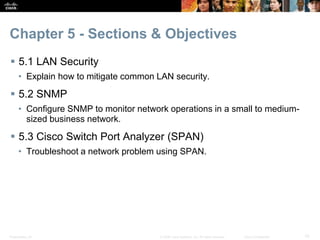
Chapter 5 - Sections & Objectives
 5.1 LAN Security
• Explain how to mitigate common LAN security.
 5.2 SNMP
• Configure SNMP to monitor network operations in a small to medium-
sized business network.
 5.3 Cisco Switch Port Analyzer (SPAN)
• Troubleshoot a network problem using SPAN.
© 2008 Cisco Systems, Inc. All rights reserved. Cisco ConfidentialPresentation_ID 11
5.1 LAN Security
Presentation_ID 12© 2008 Cisco Systems, Inc. All rights reserved. Cisco Confidential
LAN Security
LAN Security Attacks
 Common attacks against the Layer 2 LAN infrastructure
include:
• CDP Reconnaissance Attacks
• Telnet Attacks
• MAC Address Table Flooding Attacks
• VLAN Attacks
• DHCP Attacks
Presentation_ID 13© 2008 Cisco Systems, Inc. All rights reserved. Cisco Confidential
 This topic covers several Layer 2 security solutions:
• Mitigating MAC address table flooding attacks using port security
• Mitigating VLAN attacks
• Mitigating DHCP attacks using DHCP snooping
• Securing administrative access using AAA
• Securing device access using 802.1X port authentication
LAN Security
LAN Security Best Practices
Presentation_ID 14© 2008 Cisco Systems, Inc. All rights reserved. Cisco Confidential
 There are several strategies to help secure Layer 2 of a
network:
• Always use secure variants of these protocols such as SSH, SCP, SSL,
SNMPv3, and SFTP.
• Always use strong passwords and change them often.
• Enable CDP on select ports only.
• Secure Telnet access.
• Use a dedicated management VLAN where nothing but management
traffic resides.
• Use ACLs to filter unwanted access.
LAN Security
LAN Security Best Practices
© 2008 Cisco Systems, Inc. All rights reserved. Cisco ConfidentialPresentation_ID 15
5.2 SNMP
Presentation_ID 16© 2008 Cisco Systems, Inc. All rights reserved. Cisco Confidential
SNMP
SNMP Operation
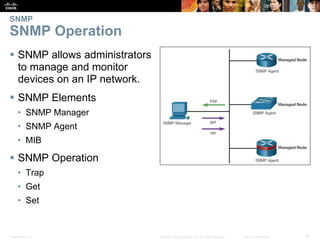
 SNMP allows administrators
to manage and monitor
devices on an IP network.
 SNMP Elements
• SNMP Manager
• SNMP Agent
• MIB
 SNMP Operation
• Trap
• Get
• Set
Presentation_ID 17© 2008 Cisco Systems, Inc. All rights reserved. Cisco Confidential
SNMP
SNMP Operation
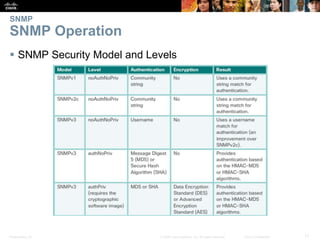
 SNMP Security Model and Levels
Presentation_ID 18© 2008 Cisco Systems, Inc. All rights reserved. Cisco Confidential
SNMP
Configuring SNMP
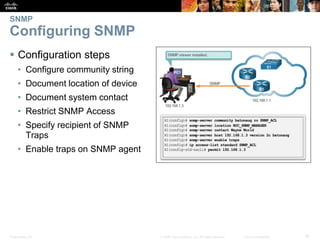
 Configuration steps
• Configure community string
• Document location of device
• Document system contact
• Restrict SNMP Access
• Specify recipient of SNMP
Traps
• Enable traps on SNMP agent
Presentation_ID 19© 2008 Cisco Systems, Inc. All rights reserved. Cisco Confidential
SNMP
Configuring SNMP
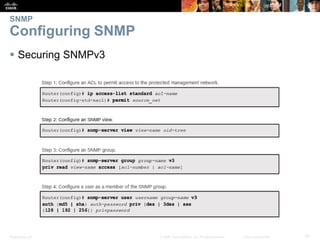
 Securing SNMPv3
© 2008 Cisco Systems, Inc. All rights reserved. Cisco ConfidentialPresentation_ID 20
5.3 Cisco Switch Port Analyzer
(SPAN)
Presentation_ID 21© 2008 Cisco Systems, Inc. All rights reserved. Cisco Confidential
Cisco Switch Port Analyzer
SPAN Overview
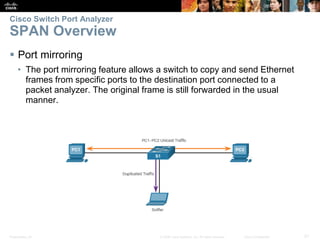
 Port mirroring
• The port mirroring feature allows a switch to copy and send Ethernet
frames from specific ports to the destination port connected to a
packet analyzer. The original frame is still forwarded in the usual
manner.
Presentation_ID 22© 2008 Cisco Systems, Inc. All rights reserved. Cisco Confidential
Cisco Switch Port Analyzer
SPAN Overview
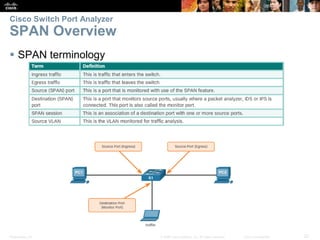
 SPAN terminology
Presentation_ID 23© 2008 Cisco Systems, Inc. All rights reserved. Cisco Confidential
Cisco Switch Port Analyzer
SPAN Overview
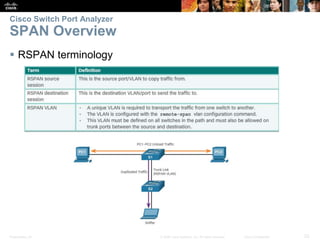
 RSPAN terminology
Presentation_ID 24© 2008 Cisco Systems, Inc. All rights reserved. Cisco Confidential
Cisco Switch Port Analyzer
SPAN Configuration
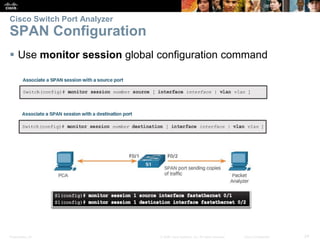
 Use monitor session global configuration command
Presentation_ID 25© 2008 Cisco Systems, Inc. All rights reserved. Cisco Confidential
Cisco Switch Port Analyzer
SPAN as a Troubleshooting Tool
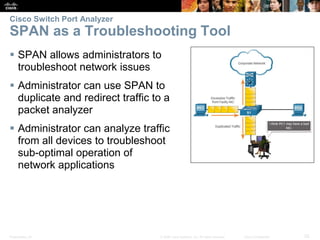
 SPAN allows administrators to
troubleshoot network issues
 Administrator can use SPAN to
duplicate and redirect traffic to a
packet analyzer
 Administrator can analyze traffic
from all devices to troubleshoot
sub-optimal operation of
network applications
© 2008 Cisco Systems, Inc. All rights reserved. Cisco ConfidentialPresentation_ID 26
5.4 Chapter Summary
Presentation_ID 27© 2008 Cisco Systems, Inc. All rights reserved. Cisco Confidential
Chapter Summary
Summary
 At Layer 2, a number of vulnerabilities exist that require
specialized mitigation techniques:
• MAC address table flooding attacks are addressed with port security.
• VLAN attacks are controlled by disabling DTP and following basic
guidelines for configuring trunk ports.
• DHCP attacks are addressed with DHCP snooping.
 The SNMP protocol has three elements: the Manager, the
Agent, and the MIB. The SNMP manager resides on the
NMS, while the Agent and the MIB are on the client devices.
• The SNMP Manager can poll the client devices for information, or it can
use a TRAP message that tells a client to report immediately if the client
reaches a particular threshold. SNMP can also be used to change the
configuration of a device.
Presentation_ID 28© 2008 Cisco Systems, Inc. All rights reserved. Cisco Confidential
Summary Continued
 SNMPv3 is the recommended version because it provides security.
 SNMP is a comprehensive and powerful remote management tool. Nearly every
item available in a show command is available through SNMP.
 Switched Port Analyzer (SPAN) is used to mirror the traffic going to and/or
coming from the host. It is commonly implemented to support traffic analyzers or
IPS devices.
Presentation_ID 29© 2008 Cisco Systems, Inc. All rights reserved. Cisco Confidential
Presentation_ID 30© 2008 Cisco Systems, Inc. All rights reserved. Cisco Confidential

CCNA4 Verson6 Chapter5

  • 1.
    © 2008 CiscoSystems, Inc. All rights reserved. Cisco ConfidentialPresentation_ID 1 Instructor Materials Chapter 5: Network Security and Monitoring CCNA Routing and Switching Connecting Networks
  • 2.
    Presentation_ID 6© 2008Cisco Systems, Inc. All rights reserved. Cisco Confidential Chapter 5: Best Practices Prior to teaching Chapter 5, the instructor should:  Complete Chapter 5 Assessment.  Ensure all activities are completed. This is a very important concept and hands-on time is vital.  Provide the students many network security and network monitoring activities.  Encourage students to login with their cisco.com login and download http://docwiki.cisco.com/wiki/Internetworking_Technology_H andbook • Review the Security Technologies and the Network Management chapters.
  • 3.
    © 2008 CiscoSystems, Inc. All rights reserved. Cisco ConfidentialPresentation_ID 9 Chapter 5: Network Security and Monitoring Connecting Networks
  • 4.
    Presentation_ID 10© 2008Cisco Systems, Inc. All rights reserved. Cisco Confidential Chapter 5 - Sections & Objectives  5.1 LAN Security • Explain how to mitigate common LAN security.  5.2 SNMP • Configure SNMP to monitor network operations in a small to medium- sized business network.  5.3 Cisco Switch Port Analyzer (SPAN) • Troubleshoot a network problem using SPAN.
  • 5.
    © 2008 CiscoSystems, Inc. All rights reserved. Cisco ConfidentialPresentation_ID 11 5.1 LAN Security
  • 6.
    Presentation_ID 12© 2008Cisco Systems, Inc. All rights reserved. Cisco Confidential LAN Security LAN Security Attacks  Common attacks against the Layer 2 LAN infrastructure include: • CDP Reconnaissance Attacks • Telnet Attacks • MAC Address Table Flooding Attacks • VLAN Attacks • DHCP Attacks
  • 7.
    Presentation_ID 13© 2008Cisco Systems, Inc. All rights reserved. Cisco Confidential  This topic covers several Layer 2 security solutions: • Mitigating MAC address table flooding attacks using port security • Mitigating VLAN attacks • Mitigating DHCP attacks using DHCP snooping • Securing administrative access using AAA • Securing device access using 802.1X port authentication LAN Security LAN Security Best Practices
  • 8.
    Presentation_ID 14© 2008Cisco Systems, Inc. All rights reserved. Cisco Confidential  There are several strategies to help secure Layer 2 of a network: • Always use secure variants of these protocols such as SSH, SCP, SSL, SNMPv3, and SFTP. • Always use strong passwords and change them often. • Enable CDP on select ports only. • Secure Telnet access. • Use a dedicated management VLAN where nothing but management traffic resides. • Use ACLs to filter unwanted access. LAN Security LAN Security Best Practices
  • 9.
    © 2008 CiscoSystems, Inc. All rights reserved. Cisco ConfidentialPresentation_ID 15 5.2 SNMP
  • 10.
    Presentation_ID 16© 2008Cisco Systems, Inc. All rights reserved. Cisco Confidential SNMP SNMP Operation  SNMP allows administrators to manage and monitor devices on an IP network.  SNMP Elements • SNMP Manager • SNMP Agent • MIB  SNMP Operation • Trap • Get • Set
  • 11.
    Presentation_ID 17© 2008Cisco Systems, Inc. All rights reserved. Cisco Confidential SNMP SNMP Operation  SNMP Security Model and Levels
  • 12.
    Presentation_ID 18© 2008Cisco Systems, Inc. All rights reserved. Cisco Confidential SNMP Configuring SNMP  Configuration steps • Configure community string • Document location of device • Document system contact • Restrict SNMP Access • Specify recipient of SNMP Traps • Enable traps on SNMP agent
  • 13.
    Presentation_ID 19© 2008Cisco Systems, Inc. All rights reserved. Cisco Confidential SNMP Configuring SNMP  Securing SNMPv3
  • 14.
    © 2008 CiscoSystems, Inc. All rights reserved. Cisco ConfidentialPresentation_ID 20 5.3 Cisco Switch Port Analyzer (SPAN)
  • 15.
    Presentation_ID 21© 2008Cisco Systems, Inc. All rights reserved. Cisco Confidential Cisco Switch Port Analyzer SPAN Overview  Port mirroring • The port mirroring feature allows a switch to copy and send Ethernet frames from specific ports to the destination port connected to a packet analyzer. The original frame is still forwarded in the usual manner.
  • 16.
    Presentation_ID 22© 2008Cisco Systems, Inc. All rights reserved. Cisco Confidential Cisco Switch Port Analyzer SPAN Overview  SPAN terminology
  • 17.
    Presentation_ID 23© 2008Cisco Systems, Inc. All rights reserved. Cisco Confidential Cisco Switch Port Analyzer SPAN Overview  RSPAN terminology
  • 18.
    Presentation_ID 24© 2008Cisco Systems, Inc. All rights reserved. Cisco Confidential Cisco Switch Port Analyzer SPAN Configuration  Use monitor session global configuration command
  • 19.
    Presentation_ID 25© 2008Cisco Systems, Inc. All rights reserved. Cisco Confidential Cisco Switch Port Analyzer SPAN as a Troubleshooting Tool  SPAN allows administrators to troubleshoot network issues  Administrator can use SPAN to duplicate and redirect traffic to a packet analyzer  Administrator can analyze traffic from all devices to troubleshoot sub-optimal operation of network applications
  • 20.
    © 2008 CiscoSystems, Inc. All rights reserved. Cisco ConfidentialPresentation_ID 26 5.4 Chapter Summary
  • 21.
    Presentation_ID 27© 2008Cisco Systems, Inc. All rights reserved. Cisco Confidential Chapter Summary Summary  At Layer 2, a number of vulnerabilities exist that require specialized mitigation techniques: • MAC address table flooding attacks are addressed with port security. • VLAN attacks are controlled by disabling DTP and following basic guidelines for configuring trunk ports. • DHCP attacks are addressed with DHCP snooping.  The SNMP protocol has three elements: the Manager, the Agent, and the MIB. The SNMP manager resides on the NMS, while the Agent and the MIB are on the client devices. • The SNMP Manager can poll the client devices for information, or it can use a TRAP message that tells a client to report immediately if the client reaches a particular threshold. SNMP can also be used to change the configuration of a device.
  • 22.
    Presentation_ID 28© 2008Cisco Systems, Inc. All rights reserved. Cisco Confidential Summary Continued  SNMPv3 is the recommended version because it provides security.  SNMP is a comprehensive and powerful remote management tool. Nearly every item available in a show command is available through SNMP.  Switched Port Analyzer (SPAN) is used to mirror the traffic going to and/or coming from the host. It is commonly implemented to support traffic analyzers or IPS devices.
  • 23.
    Presentation_ID 29© 2008Cisco Systems, Inc. All rights reserved. Cisco Confidential
  • 24.
    Presentation_ID 30© 2008Cisco Systems, Inc. All rights reserved. Cisco Confidential