
Introduction
to Python
Mind Map
SRITOMA MAJUMDER
Class 6 (The Newtown School)
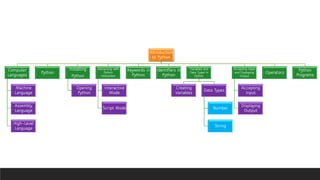
Introduction
to Python
Computer
Languages
Machine
Language
Assembly
Language
High-Level
Language
Python
Installing
Python
Opening
Python
Interacting with
Python
Interpreter
Interactive
Mode
Script Mode
Keywords in
Python
Identifiers in
Python
Variables and
Data Types in
Python
Creating
Variables
Data Types
Number
String
Accepting Input
and Displaying
Output
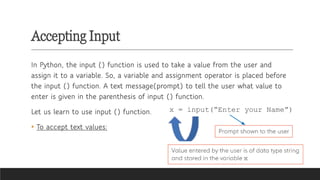
Accepting
Input
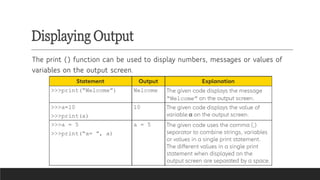
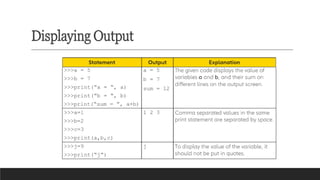
Displaying
Output
Operators
Python
Programs
Computer languages
✓A computer language is used for giving instructions to the computer to perform a
particular task. The sequence of instructions written using a computer language forms a
computer program.
✓Over the years, many computer languages have been developed and they can be
classified into three broad categories:
✓(i) machine language,
✓(ii) assembly language
✓(iii) high-level language.
Machine Language
❑ A computer is an electronic machine. It can only understand the language of
zeros (0) and ones (1). This language is known as binary language or machine
language.
❑ In machine language, instructions are given in the form of strings of 0s and
1s.It is extremely difficult for us to write programs in machine language.
Assembly Language
An assembly language is the language in which instructions are given in the
form of short words called mnemonics such as MOV, ADD and LD. It is easier
to write programs in an assembly language as compared to the machine
language.
High-Level Language
High-level language is the language in which programs are written using English words
and mathematical symbols. Programmers do not need underlying hardware details to
write programs in these languages.
Programs written in high-level languages are machine independent and portable.
However, programs written in assembly or high-level languages cannot be directly
understood by the computer. They have to be translated into their equivalent machine
language form so that they can be executed by the computer. Translators used for
converting high-level language programs into corresponding machine language are
known as compilers or interpreters.
Examples of high-level computer languages are BASIC, FORTRAN, Pascal, C, C++, Java,
Python, Prolog and LISP.
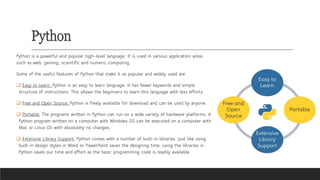
Python
Python is a powerful and popular high-level language. It is used in various application areas
such as web, gaming, scientific and numeric computing.
Some of the useful features of Python that make it so popular and widely used are:
❑ Easy to Learn: Python is an easy to learn language. It has fewer keywords and simple
structure of instructions. This allows the beginners to learn this language with less efforts.
❑ Free and Open Source: Python is freely available for download and can be used by anyone.
❑ Portable: The programs written in Python can run on a wide variety of hardware platforms. A
Python program written on a computer with Windows OS can be executed on a computer with
Mac or Linux OS with absolutely no changes.
❑ Extensive Library Support: Python comes with a number of built-in libraries. Just like using
built-in design styles in Word or PowerPoint saves the designing time, using the libraries in
Python saves our time and effort as the basic programming code is readily available.
Installing Python
We need an interpreter to convert Python programs into a form that can be
understood and executed by the computer.
We can download and install the Python interpreter using the following
address:
https://www.python.org/downloads/windows/ (any version from 3.5 onwards)
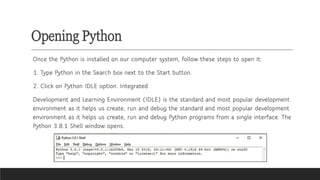
Opening Python
Once the Python is installed on our computer system, follow these steps to open it:
1. Type Python in the Search box next to the Start button.
2. Click on Python IDLE option. Integrated
Development and Learning Environment (IDLE) is the standard and most popular development
environment as it helps us create, run and debug the standard and most popular development
environment as it helps us create, run and debug Python programs from a single interface. The
Python 3.8.1 Shell window opens.
Interacting with Python Interpreter
There are two ways to use the Python interpreter:
(i) interactive mode
(ii) script mode.
Interactive Mode
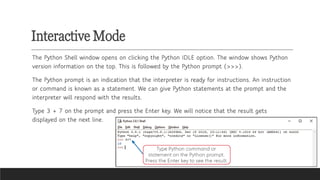
The Python Shell window opens on clicking the Python IDLE option. The window shows Python
version information on the top. This is followed by the Python prompt (>>>).
The Python prompt is an indication that the interpreter is ready for instructions. An instruction
or command is known as a statement. We can give Python statements at the prompt and the
interpreter will respond with the results.
Type 3 + 7 on the prompt and press the Enter key. We will notice that the result gets
displayed on the next line.
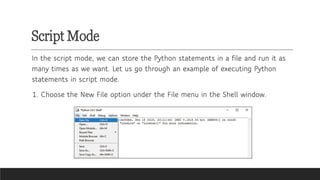
Script Mode
In the script mode, we can store the Python statements in a file and run it as
many times as we want. Let us go through an example of executing Python
statements in script mode.
1. Choose the New File option under the File menu in the Shell window.
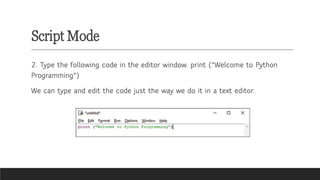
Script Mode
2. Type the following code in the editor window. print ("Welcome to Python
Programming")
We can type and edit the code just the way we do it in a text editor.
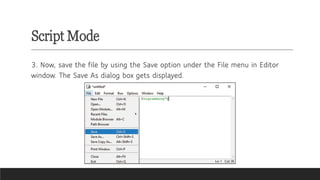
Script Mode
3. Now, save the file by using the Save option under the File menu in Editor
window. The Save As dialog box gets displayed.
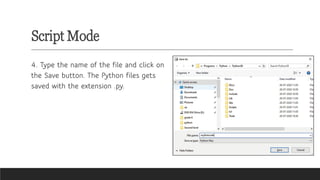
Script Mode
4. Type the name of the file and click on
the Save button. The Python files gets
saved with the extension .py.
Script Mode
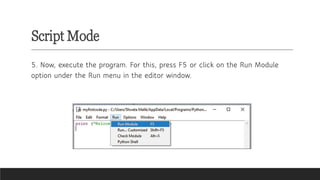
5. Now, execute the program. For this, press F5 or click on the Run Module
option under the Run menu in the editor window.
Script Mode
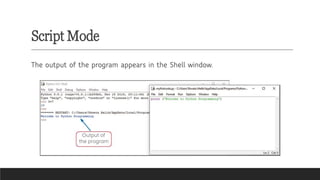
The output of the program appears in the Shell window.
Keywords in Python
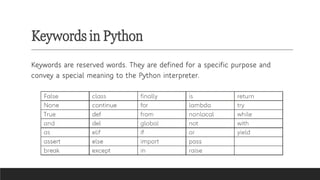
Keywords are reserved words. They are defined for a specific purpose and
convey a special meaning to the Python interpreter.
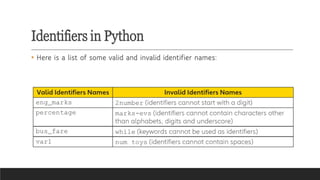
Identifiers in Python
Unlike a keyword, an identifier is a name given by the programmer to a variable, function or any other object in a
language.
There are certain rules that we should follow while naming the identifiers. These include:
• Keywords cannot be used as identifiers.
• Identifiers can be a combination of letters in lowercase (a to z) or uppercase (A to Z) or digits (0 to 9) or an
underscore (_).
• An identifier cannot start with a digit. For example,
• 1variable is invalid, but variable1 is perfectly fine. Python does not allow punctuation characters such as @, $
and % to be used for naming identifiers.
• Python is a case sensitive programming language. Thus, marks and Marks are two different identifiers in Python.
Identifiers in Python
• Here is a list of some valid and invalid identifier names:
Variables and Data Types in Python
Variables refer to a memory location that holds a value. Variables are an
important part of any programming language. They help us store and
manipulate data. Variables are also a type of identifier. The rules for naming an
identifier are applicable to variables also.
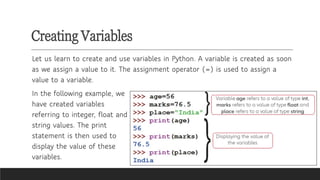
Creating Variables
Let us learn to create and use variables in Python. A variable is created as soon
as we assign a value to it. The assignment operator (=) is used to assign a
value to a variable.
In the following example, we
have created variables
referring to integer, float and
string values. The print
statement is then used to
display the value of these
variables.
Data Types
Python supports a number of data types such as number, string, list, tuple, set
and dictionary. We will learn about number and string data types.
Number
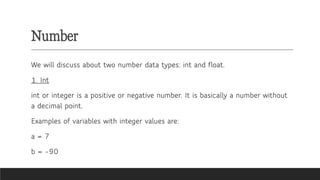
We will discuss about two number data types: int and float.
1. Int
int or integer is a positive or negative number. It is basically a number without
a decimal point.
Examples of variables with integer values are:
a = 7
b = -90
Number
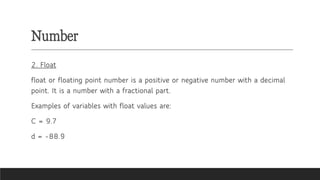
2. Float
float or floating point number is a positive or negative number with a decimal
point. It is a number with a fractional part.
Examples of variables with float values are:
C = 9.7
d = -88.9
String
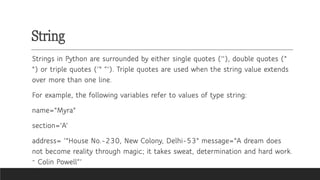
Strings in Python are surrounded by either single quotes (''), double quotes ("
") or triple quotes (‘" “’). Triple quotes are used when the string value extends
over more than one line.
For example, the following variables refer to values of type string:
name="Myra"
section='A’
address= ‘"House No.-230, New Colony, Delhi-53" message="A dream does
not become reality through magic; it takes sweat, determination and hard work.
~ Colin Powell“’
~
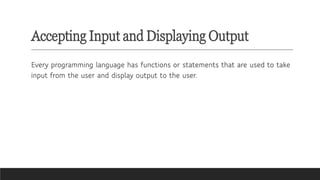
Accepting Input and Displaying Output
Every programming language has functions or statements that are used to take
input from the user and display output to the user.
Accepting Input
In Python, the input () function is used to take a value from the user and
assign it to a variable. So, a variable and assignment operator is placed before
the input () function. A text message(prompt) to tell the user what value to
enter is given in the parenthesis of input () function.
Let us learn to use input () function.
• To accept text values:
Accepting Input
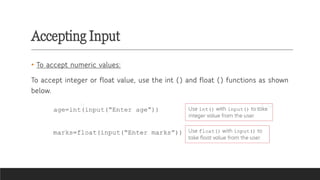
• To accept numeric values:
To accept integer or float value, use the int () and float () functions as shown
below.
Displaying Output
The print () function can be used to display numbers, messages or values of
variables on the output screen.
Displaying Output
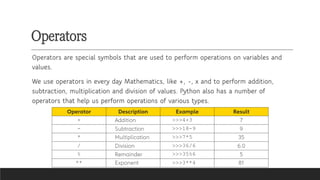
Operators
Operators are special symbols that are used to perform operations on variables and
values.
We use operators in every day Mathematics, like +, -, x and to perform addition,
subtraction, multiplication and division of values. Python also has a number of
operators that help us perform operations of various types.
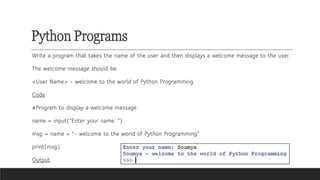
Python Programs
Write a program that takes the name of the user and then displays a welcome message to the user.
The welcome message should be:
<User Name> - welcome to the world of Python Programming
Code
#Program to display a welcome message
name = input("Enter your name: ")
msg = name + "- welcome to the world of Python Programming"
print(msg)
Output
Please subscribe to
my channel for
more videos
PDF of this content is available in
description box.
@sritomamajumder8823

CBSE Grade 6 Computer Science Introduction to Python Mind Map

  • 1.
    Introduction to Python Mind Map SRITOMAMAJUMDER Class 6 (The Newtown School)
  • 2.
    Introduction to Python Computer Languages Machine Language Assembly Language High-Level Language Python Installing Python Opening Python Interacting with Python Interpreter Interactive Mode ScriptMode Keywords in Python Identifiers in Python Variables and Data Types in Python Creating Variables Data Types Number String Accepting Input and Displaying Output Accepting Input Displaying Output Operators Python Programs
  • 3.
    Computer languages ✓A computerlanguage is used for giving instructions to the computer to perform a particular task. The sequence of instructions written using a computer language forms a computer program. ✓Over the years, many computer languages have been developed and they can be classified into three broad categories: ✓(i) machine language, ✓(ii) assembly language ✓(iii) high-level language.
  • 4.
    Machine Language ❑ Acomputer is an electronic machine. It can only understand the language of zeros (0) and ones (1). This language is known as binary language or machine language. ❑ In machine language, instructions are given in the form of strings of 0s and 1s.It is extremely difficult for us to write programs in machine language.
  • 5.
    Assembly Language An assemblylanguage is the language in which instructions are given in the form of short words called mnemonics such as MOV, ADD and LD. It is easier to write programs in an assembly language as compared to the machine language.
  • 6.
    High-Level Language High-level languageis the language in which programs are written using English words and mathematical symbols. Programmers do not need underlying hardware details to write programs in these languages. Programs written in high-level languages are machine independent and portable. However, programs written in assembly or high-level languages cannot be directly understood by the computer. They have to be translated into their equivalent machine language form so that they can be executed by the computer. Translators used for converting high-level language programs into corresponding machine language are known as compilers or interpreters. Examples of high-level computer languages are BASIC, FORTRAN, Pascal, C, C++, Java, Python, Prolog and LISP.
  • 7.
    Python Python is apowerful and popular high-level language. It is used in various application areas such as web, gaming, scientific and numeric computing. Some of the useful features of Python that make it so popular and widely used are: ❑ Easy to Learn: Python is an easy to learn language. It has fewer keywords and simple structure of instructions. This allows the beginners to learn this language with less efforts. ❑ Free and Open Source: Python is freely available for download and can be used by anyone. ❑ Portable: The programs written in Python can run on a wide variety of hardware platforms. A Python program written on a computer with Windows OS can be executed on a computer with Mac or Linux OS with absolutely no changes. ❑ Extensive Library Support: Python comes with a number of built-in libraries. Just like using built-in design styles in Word or PowerPoint saves the designing time, using the libraries in Python saves our time and effort as the basic programming code is readily available.
  • 8.
    Installing Python We needan interpreter to convert Python programs into a form that can be understood and executed by the computer. We can download and install the Python interpreter using the following address: https://www.python.org/downloads/windows/ (any version from 3.5 onwards)
  • 9.
    Opening Python Once thePython is installed on our computer system, follow these steps to open it: 1. Type Python in the Search box next to the Start button. 2. Click on Python IDLE option. Integrated Development and Learning Environment (IDLE) is the standard and most popular development environment as it helps us create, run and debug the standard and most popular development environment as it helps us create, run and debug Python programs from a single interface. The Python 3.8.1 Shell window opens.
  • 10.
    Interacting with PythonInterpreter There are two ways to use the Python interpreter: (i) interactive mode (ii) script mode.
  • 11.
    Interactive Mode The PythonShell window opens on clicking the Python IDLE option. The window shows Python version information on the top. This is followed by the Python prompt (>>>). The Python prompt is an indication that the interpreter is ready for instructions. An instruction or command is known as a statement. We can give Python statements at the prompt and the interpreter will respond with the results. Type 3 + 7 on the prompt and press the Enter key. We will notice that the result gets displayed on the next line.
  • 12.
    Script Mode In thescript mode, we can store the Python statements in a file and run it as many times as we want. Let us go through an example of executing Python statements in script mode. 1. Choose the New File option under the File menu in the Shell window.
  • 13.
    Script Mode 2. Typethe following code in the editor window. print ("Welcome to Python Programming") We can type and edit the code just the way we do it in a text editor.
  • 14.
    Script Mode 3. Now,save the file by using the Save option under the File menu in Editor window. The Save As dialog box gets displayed.
  • 15.
    Script Mode 4. Typethe name of the file and click on the Save button. The Python files gets saved with the extension .py.
  • 16.
    Script Mode 5. Now,execute the program. For this, press F5 or click on the Run Module option under the Run menu in the editor window.
  • 17.
    Script Mode The outputof the program appears in the Shell window.
  • 18.
    Keywords in Python Keywordsare reserved words. They are defined for a specific purpose and convey a special meaning to the Python interpreter.
  • 19.
    Identifiers in Python Unlikea keyword, an identifier is a name given by the programmer to a variable, function or any other object in a language. There are certain rules that we should follow while naming the identifiers. These include: • Keywords cannot be used as identifiers. • Identifiers can be a combination of letters in lowercase (a to z) or uppercase (A to Z) or digits (0 to 9) or an underscore (_). • An identifier cannot start with a digit. For example, • 1variable is invalid, but variable1 is perfectly fine. Python does not allow punctuation characters such as @, $ and % to be used for naming identifiers. • Python is a case sensitive programming language. Thus, marks and Marks are two different identifiers in Python.
  • 20.
    Identifiers in Python •Here is a list of some valid and invalid identifier names:
  • 21.
    Variables and DataTypes in Python Variables refer to a memory location that holds a value. Variables are an important part of any programming language. They help us store and manipulate data. Variables are also a type of identifier. The rules for naming an identifier are applicable to variables also.
  • 22.
    Creating Variables Let uslearn to create and use variables in Python. A variable is created as soon as we assign a value to it. The assignment operator (=) is used to assign a value to a variable. In the following example, we have created variables referring to integer, float and string values. The print statement is then used to display the value of these variables.
  • 23.
    Data Types Python supportsa number of data types such as number, string, list, tuple, set and dictionary. We will learn about number and string data types.
  • 24.
    Number We will discussabout two number data types: int and float. 1. Int int or integer is a positive or negative number. It is basically a number without a decimal point. Examples of variables with integer values are: a = 7 b = -90
  • 25.
    Number 2. Float float orfloating point number is a positive or negative number with a decimal point. It is a number with a fractional part. Examples of variables with float values are: C = 9.7 d = -88.9
  • 26.
    String Strings in Pythonare surrounded by either single quotes (''), double quotes (" ") or triple quotes (‘" “’). Triple quotes are used when the string value extends over more than one line. For example, the following variables refer to values of type string: name="Myra" section='A’ address= ‘"House No.-230, New Colony, Delhi-53" message="A dream does not become reality through magic; it takes sweat, determination and hard work. ~ Colin Powell“’ ~
  • 27.
    Accepting Input andDisplaying Output Every programming language has functions or statements that are used to take input from the user and display output to the user.
  • 28.
    Accepting Input In Python,the input () function is used to take a value from the user and assign it to a variable. So, a variable and assignment operator is placed before the input () function. A text message(prompt) to tell the user what value to enter is given in the parenthesis of input () function. Let us learn to use input () function. • To accept text values:
  • 29.
    Accepting Input • Toaccept numeric values: To accept integer or float value, use the int () and float () functions as shown below.
  • 30.
    Displaying Output The print() function can be used to display numbers, messages or values of variables on the output screen.
  • 31.
  • 32.
    Operators Operators are specialsymbols that are used to perform operations on variables and values. We use operators in every day Mathematics, like +, -, x and to perform addition, subtraction, multiplication and division of values. Python also has a number of operators that help us perform operations of various types.
  • 33.
    Python Programs Write aprogram that takes the name of the user and then displays a welcome message to the user. The welcome message should be: <User Name> - welcome to the world of Python Programming Code #Program to display a welcome message name = input("Enter your name: ") msg = name + "- welcome to the world of Python Programming" print(msg) Output
  • 34.
    Please subscribe to mychannel for more videos PDF of this content is available in description box. @sritomamajumder8823