From 0 to Cassandra on AWS in 30 days
Tsunami alerting with Cassandra
Andrei Arion - Geoffrey Bérard - Charles Herriau
@BeastieFurets
1
1 Context
2 The project, step by step
3 Feedbacks
4 Conclusion
2
3
LesFurets.com
• 1st independant insurance aggregator
• A unique place to compare and buy hundreds of insurance products
• Key figures:
– 2 500 000 quotes/year
– 31% market share on car comparison (january 2015)
– more than 50 insurers
4
LesFurets.com
5
@BeastieFurets
6
4 Teams | 25 Engineers | Lean Kanban | Daily delivery
LesFurets.com
7
Bigdata@Telcom ParisTech
8
Context
• Master Level course
• Big Data Analysis and Management
– Non relational Databases
– 30 hours
• Lectures: 25 %
• Hand’s on: 75 %
9http://www.telecom-paristech.fr/formation-continue/masteres-specialises/big-data.html
Context
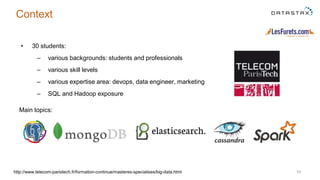
• 30 students:
– various backgrounds: students and professionals
– various skill levels
– various expertise area: devops, data engineer, marketing
– SQL and Hadoop exposure
10http://www.telecom-paristech.fr/formation-continue/masteres-specialises/big-data.html
Main topics:
Project goals
– Choose the right technology
– Implement from scratch a full stack solution
– Optimize data model for a particular use case
– Deploy on cloud
– Discuss tradeoffs
One month to deliver
11http://www.telecom-paristech.fr/formation-continue/masteres-specialises/big-data.html
The project,
Step by step
12
Let’s all become students
13
14
Labor day
15
Discovering the subject
16
Discovering the subject
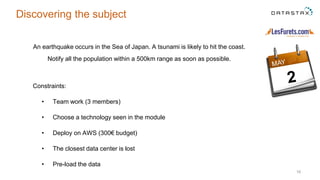
An earthquake occurs in the Sea of Japan. A tsunami is likely to hit the coast.
Notify all the population within a 500km range as soon as possible.
Constraints:
• Team work (3 members)
• Choose a technology seen in the module
• Deploy on AWS (300€ budget)
• The closest data center is lost
• Pre-load the data
17
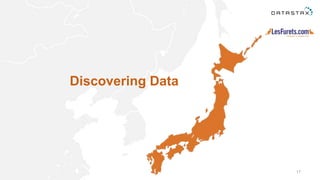
Discovering Data
18
How to get the data ?
• Generated logs from telecom providers
• One month of position tracking
• 1 Mb, 1 Gb, 10 Gb, 100 Gb files
• Available on Amazon S3
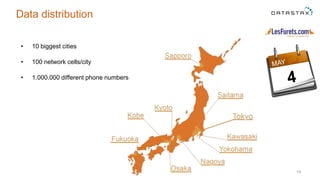
• 10 biggest cities
• 100 network cells/city
• 1.000.000 different phone numbers
19
Data distribution
20
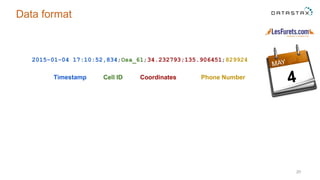
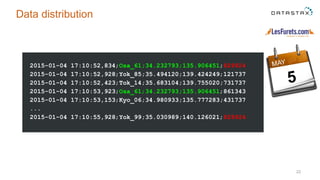
Data format
Timestamp Cell ID Coordinates Phone Number
2015-01-04 17:10:52,834;Osa_61;34.232793;135.906451;829924
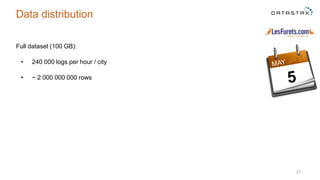
Full dataset (100 GB):
• 240 000 logs per hour / city
• ~ 2 000 000 000 rows
21
Data distribution
22
Data distribution
2015-01-04 17:10:52,834;Osa_61;34.232793;135.906451;829924
2015-01-04 17:10:52,928;Yok_85;35.494120;139.424249;121737
2015-01-04 17:10:52,423;Tok_14;35.683104;139.755020;731737
2015-01-04 17:10:53,923;Osa_61;34.232793;135.906451;861343
2015-01-04 17:10:53,153;Kyo_06;34.980933;135.777283;431737
...
2015-01-04 17:10:55,928;Yok_99;35.030989;140.126021;829924
23
Data distribution
Choosing the stack
24
25
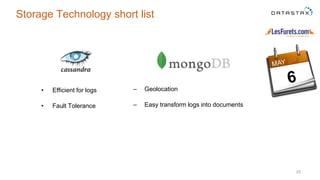
Storage Technology short list
• Efficient for logs
• Fault Tolerance
– Geolocation
– Easy transform logs into documents
26
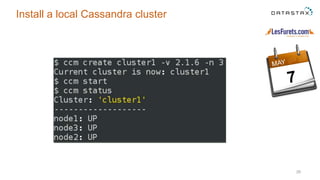
Install a local Cassandra cluster
27
Data Modeling
28
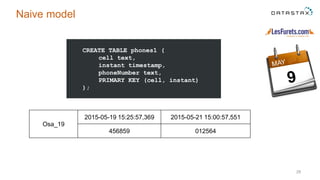
Naive model
Osa_19
2015-05-19 15:25:57,369 2015-05-21 15:00:57,551
456859 012564
CREATE TABLE phones1 (
cell text,
instant timestamp,
phoneNumber text,
PRIMARY KEY (cell, instant)
);
29
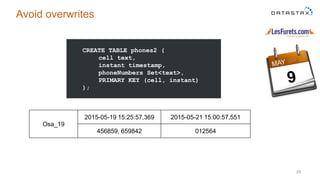
Avoid overwrites
Osa_19
2015-05-19 15:25:57,369 2015-05-21 15:00:57,551
456859, 659842 012564
CREATE TABLE phones2 (
cell text,
instant timestamp,
phoneNumbers Set<text>,
PRIMARY KEY (cell, instant)
);
30
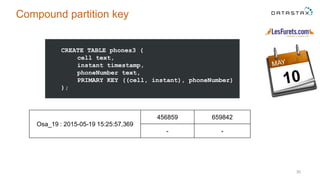
Compound partition key
Osa_19 : 2015-05-19 15:25:57,369
456859 659842
- -
CREATE TABLE phones3 (
cell text,
instant timestamp,
phoneNumber text,
PRIMARY KEY ((cell, instant), phoneNumber)
);
34
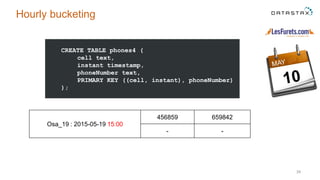
Hourly bucketing
Osa_19 : 2015-05-19 15:00
456859 659842
- -
CREATE TABLE phones4 (
cell text,
instant timestamp,
phoneNumber text,
PRIMARY KEY ((cell, instant), phoneNumber)
);
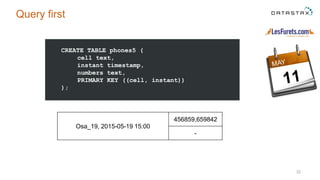
CREATE TABLE phones5 (
cell text,
instant timestamp,
numbers text,
PRIMARY KEY ((cell, instant))
);
32
Query first
Osa_19, 2015-05-19 15:00
456859,659842
-
33
Importing Data
34
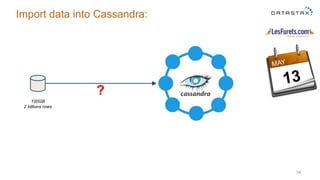
Import data into Cassandra:
100GB
2 billions rows
?
35
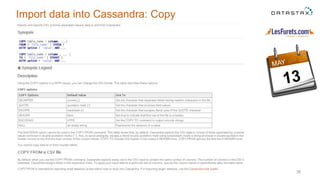
Import data into Cassandra
36
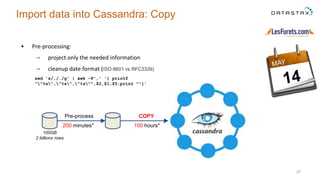
Import data into Cassandra: Copy
• Pre-processing:
– project only the needed information
– cleanup date format (ISO-8601 vs RFC3339)
37
Import data into Cassandra: Copy
100 hours*200 minutes*
Pre-process COPY
100GB
2 billions rows
sed 's/,/./g' | awk -F',' '{ printf
""%s","%s","%s"",$2,$1,$5;print ""}'
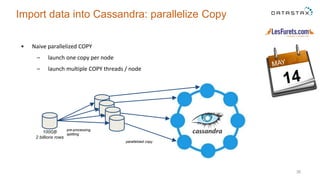
• Naive parallelized COPY
– launch one copy per node
– launch multiple COPY threads / node
38
Import data into Cassandra: parallelize Copy
pre-processing,
splitting
parallelized copy
100GB
2 billions rows
39
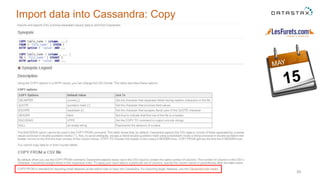
Import data into Cassandra: Copy
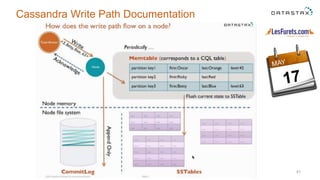
• What really happens during the import?
• IMPORT = WRITE
• What really happens during a WRITE
40
How to speed up Cassandra import?
41
Cassandra Write Path Documentation
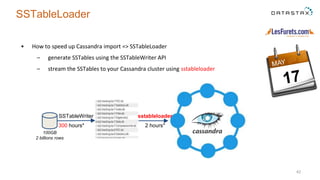
• How to speed up Cassandra import => SSTableLoader
– generate SSTables using the SSTableWriter API
– stream the SSTables to your Cassandra cluster using sstableloader
42
SSTableLoader
SSTableWriter sstableloader
100GB
2 billions rows
300 hours* 2 hours*
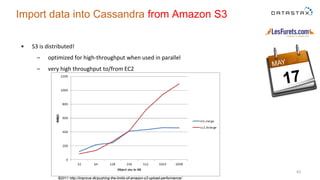
• S3 is distributed!
– optimized for high-throughput when used in parallel
– very high throughput to/from EC2
43
Import data into Cassandra from Amazon S3
©2011 http://improve.dk/pushing-the-limits-of-amazon-s3-upload-performance/
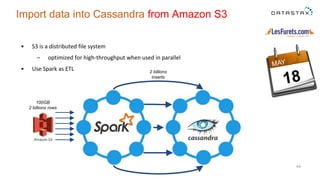
• S3 is a distributed file system
– optimized for high-throughput when used in parallel
• Use Spark as ETL
44
Import data into Cassandra from Amazon S3
S3
100GB
2 billions rows
2 billions
inserts
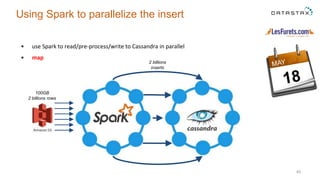
• use Spark to read/pre-process/write to Cassandra in parallel
• map
45
Using Spark to parallelize the insert
S3
100GB
2 billions rows
2 billions
inserts
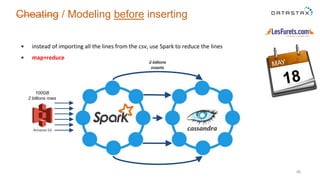
• instead of importing all the lines from the csv, use Spark to reduce the lines
• map+reduce
46
Cheating / Modeling before inserting
S3
100GB
2 billions rows
2 billions
inserts
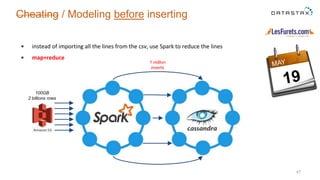
• instead of importing all the lines from the csv, use Spark to reduce the lines
• map+reduce
47
Cheating / Modeling before inserting
S3
100GB
2 billions rows
1 million
inserts
48
Using AWS
49
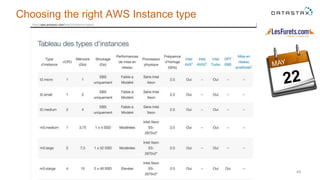
Choosing the right AWS Instance type
50
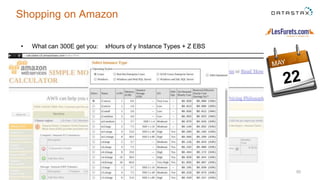
Shopping on Amazon
• What can 300E get you: xHours of y Instance Types + Z EBS
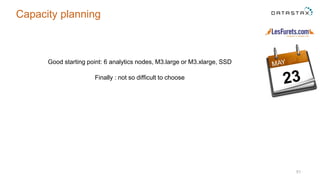
Good starting point: 6 analytics nodes, M3.large or M3.xlarge, SSD
Finally : not so difficult to choose
51
Capacity planning
52
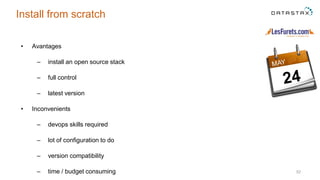
• Avantages
– install an open source stack
– full control
– latest version
• Inconvenients
– devops skills required
– lot of configuration to do
– version compatibility
– time / budget consuming
Install from scratch
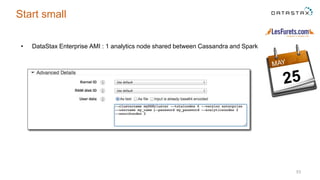
• DataStax Enterprise AMI : 1 analytics node shared between Cassandra and Spark
53
Start small
• Requirement:
– Preload data
• Goal:
– Minimize cluster uptime
• Strategies:
– use EBS -> persistent storage (expensive, slow)
– load the dataset on a node and turn off the others (free, time consuming)
– do everything “the night before” (free, risky)
54
Optimizing budget
55
Preparing for D-Day
• Preload the data into Cassandra on the AWS cluster
• Input: earthquake date and location
• Kill the closest node
• Start simulation
– monitor in realtime the alerting performance
• Tuning (model, import)
Lather, rinse, repeat...
56
Preparing for the D Day
• Alternatives:
– stop/kill the Cassandra process
– turn off the gossip
– AWS instance shutdown
• The effect is the same
57
How to stop a specific node of the cluster ?
58
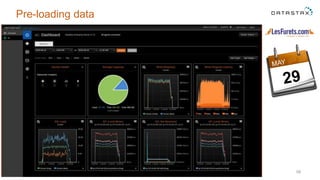
Pre-loading data
59
Waiting our turn
Conclusion
60
61
62
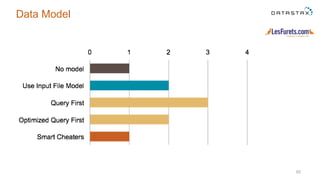
Data Model
63
Modelling in SQL vs CQL
● SQL => CQL : state of mind shifting
○ 3NF vs denormalization
○ model first vs query first
● SQL and CQL are syntactically very similar that can be confusing
○ no Joins, range queries on partition keys...
64
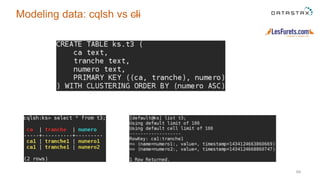
Modeling data: cqlsh vs cli
65
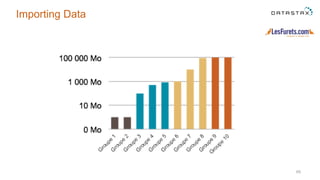
Importing Data
66
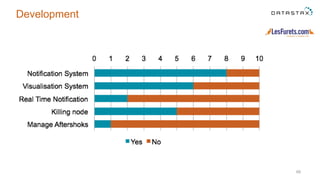
Development
67
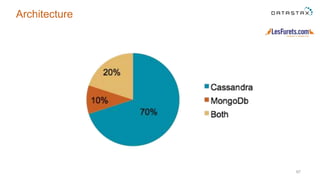
Architecture
68
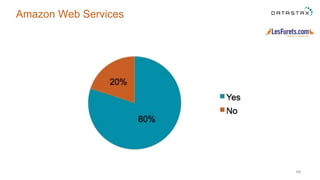
Amazon Web Services
69
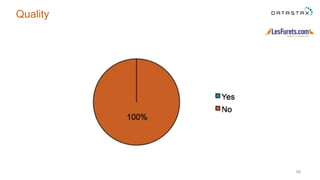
Quality
70
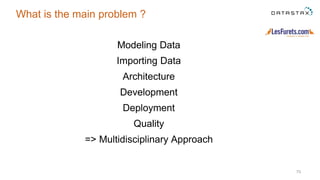
What is the main problem ?
Modeling Data
Importing Data
Architecture
Development
Deployment
Quality
=> Multidisciplinary Approach
71
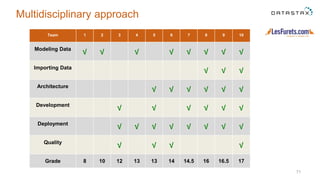
Multidisciplinary approach
Team 1 2 3 4 5 6 7 8 9 10
Modeling Data
√ √ √ √ √ √ √ √
Importing Data
√ √ √
Architecture
√ √ √ √ √ √
Development
√ √ √ √ √ √
Deployment
√ √ √ √ √ √ √ √
Quality
√ √ √ √
Grade 8 10 12 13 13 14 14.5 16 16.5 17
72
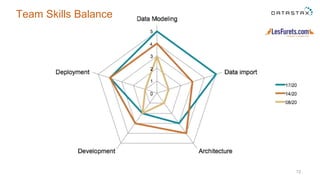
Team Skills Balance
Conclusion
• Easy to learn and easy to teach
• Easy to deploy on AWS
• Performance monitor for tuning the models
• Passing from SQL vs CQL can be challenging
• Fun to implement on a concrete use-case with time/budget constraints
73
74
Thank you
Andrei Arion - aar@lesfurets.com
Geoffrey Bérard - gbe@lesfurets.com
Charles Herriau - che@lesfurets.com
@BeastieFurets

Tsunami alerting with Cassandra (From 0 to Cassandra on AWS in 30 days)

  • 1.
    From 0 toCassandra on AWS in 30 days Tsunami alerting with Cassandra Andrei Arion - Geoffrey Bérard - Charles Herriau @BeastieFurets 1
  • 2.
    1 Context 2 Theproject, step by step 3 Feedbacks 4 Conclusion 2
  • 3.
  • 4.
    LesFurets.com • 1st independantinsurance aggregator • A unique place to compare and buy hundreds of insurance products • Key figures: – 2 500 000 quotes/year – 31% market share on car comparison (january 2015) – more than 50 insurers 4
  • 5.
  • 6.
    @BeastieFurets 6 4 Teams |25 Engineers | Lean Kanban | Daily delivery
  • 7.
  • 8.
  • 9.
    Context • Master Levelcourse • Big Data Analysis and Management – Non relational Databases – 30 hours • Lectures: 25 % • Hand’s on: 75 % 9http://www.telecom-paristech.fr/formation-continue/masteres-specialises/big-data.html
  • 10.
    Context • 30 students: –various backgrounds: students and professionals – various skill levels – various expertise area: devops, data engineer, marketing – SQL and Hadoop exposure 10http://www.telecom-paristech.fr/formation-continue/masteres-specialises/big-data.html Main topics:
  • 11.
    Project goals – Choosethe right technology – Implement from scratch a full stack solution – Optimize data model for a particular use case – Deploy on cloud – Discuss tradeoffs One month to deliver 11http://www.telecom-paristech.fr/formation-continue/masteres-specialises/big-data.html
  • 12.
  • 13.
    Let’s all becomestudents 13
  • 14.
  • 15.
  • 16.
    16 Discovering the subject Anearthquake occurs in the Sea of Japan. A tsunami is likely to hit the coast. Notify all the population within a 500km range as soon as possible. Constraints: • Team work (3 members) • Choose a technology seen in the module • Deploy on AWS (300€ budget) • The closest data center is lost • Pre-load the data
  • 17.
  • 18.
    18 How to getthe data ? • Generated logs from telecom providers • One month of position tracking • 1 Mb, 1 Gb, 10 Gb, 100 Gb files • Available on Amazon S3
  • 19.
    • 10 biggestcities • 100 network cells/city • 1.000.000 different phone numbers 19 Data distribution
  • 20.
    20 Data format Timestamp CellID Coordinates Phone Number 2015-01-04 17:10:52,834;Osa_61;34.232793;135.906451;829924
  • 21.
    Full dataset (100GB): • 240 000 logs per hour / city • ~ 2 000 000 000 rows 21 Data distribution
  • 22.
    22 Data distribution 2015-01-04 17:10:52,834;Osa_61;34.232793;135.906451;829924 2015-01-0417:10:52,928;Yok_85;35.494120;139.424249;121737 2015-01-04 17:10:52,423;Tok_14;35.683104;139.755020;731737 2015-01-04 17:10:53,923;Osa_61;34.232793;135.906451;861343 2015-01-04 17:10:53,153;Kyo_06;34.980933;135.777283;431737 ... 2015-01-04 17:10:55,928;Yok_99;35.030989;140.126021;829924
  • 23.
  • 24.
  • 25.
    25 Storage Technology shortlist • Efficient for logs • Fault Tolerance – Geolocation – Easy transform logs into documents
  • 26.
    26 Install a localCassandra cluster
  • 27.
  • 28.
    28 Naive model Osa_19 2015-05-19 15:25:57,3692015-05-21 15:00:57,551 456859 012564 CREATE TABLE phones1 ( cell text, instant timestamp, phoneNumber text, PRIMARY KEY (cell, instant) );
  • 29.
    29 Avoid overwrites Osa_19 2015-05-19 15:25:57,3692015-05-21 15:00:57,551 456859, 659842 012564 CREATE TABLE phones2 ( cell text, instant timestamp, phoneNumbers Set<text>, PRIMARY KEY (cell, instant) );
  • 30.
    30 Compound partition key Osa_19: 2015-05-19 15:25:57,369 456859 659842 - - CREATE TABLE phones3 ( cell text, instant timestamp, phoneNumber text, PRIMARY KEY ((cell, instant), phoneNumber) );
  • 31.
    34 Hourly bucketing Osa_19 :2015-05-19 15:00 456859 659842 - - CREATE TABLE phones4 ( cell text, instant timestamp, phoneNumber text, PRIMARY KEY ((cell, instant), phoneNumber) );
  • 32.
    CREATE TABLE phones5( cell text, instant timestamp, numbers text, PRIMARY KEY ((cell, instant)) ); 32 Query first Osa_19, 2015-05-19 15:00 456859,659842 -
  • 33.
  • 34.
    34 Import data intoCassandra: 100GB 2 billions rows ?
  • 35.
  • 36.
    36 Import data intoCassandra: Copy
  • 37.
    • Pre-processing: – projectonly the needed information – cleanup date format (ISO-8601 vs RFC3339) 37 Import data into Cassandra: Copy 100 hours*200 minutes* Pre-process COPY 100GB 2 billions rows sed 's/,/./g' | awk -F',' '{ printf ""%s","%s","%s"",$2,$1,$5;print ""}'
  • 38.
    • Naive parallelizedCOPY – launch one copy per node – launch multiple COPY threads / node 38 Import data into Cassandra: parallelize Copy pre-processing, splitting parallelized copy 100GB 2 billions rows
  • 39.
    39 Import data intoCassandra: Copy
  • 40.
    • What reallyhappens during the import? • IMPORT = WRITE • What really happens during a WRITE 40 How to speed up Cassandra import?
  • 41.
  • 42.
    • How tospeed up Cassandra import => SSTableLoader – generate SSTables using the SSTableWriter API – stream the SSTables to your Cassandra cluster using sstableloader 42 SSTableLoader SSTableWriter sstableloader 100GB 2 billions rows 300 hours* 2 hours*
  • 43.
    • S3 isdistributed! – optimized for high-throughput when used in parallel – very high throughput to/from EC2 43 Import data into Cassandra from Amazon S3 ©2011 http://improve.dk/pushing-the-limits-of-amazon-s3-upload-performance/
  • 44.
    • S3 isa distributed file system – optimized for high-throughput when used in parallel • Use Spark as ETL 44 Import data into Cassandra from Amazon S3 S3 100GB 2 billions rows 2 billions inserts
  • 45.
    • use Sparkto read/pre-process/write to Cassandra in parallel • map 45 Using Spark to parallelize the insert S3 100GB 2 billions rows 2 billions inserts
  • 46.
    • instead ofimporting all the lines from the csv, use Spark to reduce the lines • map+reduce 46 Cheating / Modeling before inserting S3 100GB 2 billions rows 2 billions inserts
  • 47.
    • instead ofimporting all the lines from the csv, use Spark to reduce the lines • map+reduce 47 Cheating / Modeling before inserting S3 100GB 2 billions rows 1 million inserts
  • 48.
  • 49.
    49 Choosing the rightAWS Instance type
  • 50.
    50 Shopping on Amazon •What can 300E get you: xHours of y Instance Types + Z EBS
  • 51.
    Good starting point:6 analytics nodes, M3.large or M3.xlarge, SSD Finally : not so difficult to choose 51 Capacity planning
  • 52.
    52 • Avantages – installan open source stack – full control – latest version • Inconvenients – devops skills required – lot of configuration to do – version compatibility – time / budget consuming Install from scratch
  • 53.
    • DataStax EnterpriseAMI : 1 analytics node shared between Cassandra and Spark 53 Start small
  • 54.
    • Requirement: – Preloaddata • Goal: – Minimize cluster uptime • Strategies: – use EBS -> persistent storage (expensive, slow) – load the dataset on a node and turn off the others (free, time consuming) – do everything “the night before” (free, risky) 54 Optimizing budget
  • 55.
  • 56.
    • Preload thedata into Cassandra on the AWS cluster • Input: earthquake date and location • Kill the closest node • Start simulation – monitor in realtime the alerting performance • Tuning (model, import) Lather, rinse, repeat... 56 Preparing for the D Day
  • 57.
    • Alternatives: – stop/killthe Cassandra process – turn off the gossip – AWS instance shutdown • The effect is the same 57 How to stop a specific node of the cluster ?
  • 58.
  • 59.
  • 60.
  • 61.
  • 62.
  • 63.
    63 Modelling in SQLvs CQL ● SQL => CQL : state of mind shifting ○ 3NF vs denormalization ○ model first vs query first ● SQL and CQL are syntactically very similar that can be confusing ○ no Joins, range queries on partition keys...
  • 64.
  • 65.
  • 66.
  • 67.
  • 68.
  • 69.
  • 70.
    70 What is themain problem ? Modeling Data Importing Data Architecture Development Deployment Quality => Multidisciplinary Approach
  • 71.
    71 Multidisciplinary approach Team 12 3 4 5 6 7 8 9 10 Modeling Data √ √ √ √ √ √ √ √ Importing Data √ √ √ Architecture √ √ √ √ √ √ Development √ √ √ √ √ √ Deployment √ √ √ √ √ √ √ √ Quality √ √ √ √ Grade 8 10 12 13 13 14 14.5 16 16.5 17
  • 72.
  • 73.
    Conclusion • Easy tolearn and easy to teach • Easy to deploy on AWS • Performance monitor for tuning the models • Passing from SQL vs CQL can be challenging • Fun to implement on a concrete use-case with time/budget constraints 73
  • 74.
    74 Thank you Andrei Arion- aar@lesfurets.com Geoffrey Bérard - gbe@lesfurets.com Charles Herriau - che@lesfurets.com @BeastieFurets