s i m p l y w o r k s
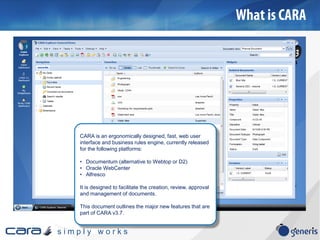
CARA is an ergonomically designed, fast, web user
interface and business rules engine, currently released
for the following platforms:
• Documentum (alternative to Webtop or D2)
• Oracle WebCenter
• Alfresco
It is designed to facilitate the creation, review, approval
and management of documents.
This document outlines the major new features that are
part of CARA v3.7.
s i m p l y w o r k s
Probably the most important enhancement in CARA v3.8 is the Plugin which offers a
replacement to using Java Applets (blocked by several browsers as of Sept 2015) or
HTML5 (which offers very poor features and usability).
The plugin not only allows seamless one-click-editing, but batch import and export.
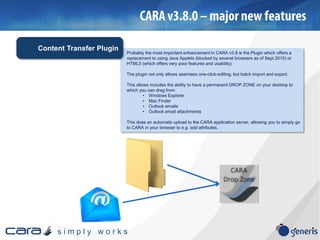
This allows includes the ability to have a permanent DROP ZONE on your desktop to
which you can drag from
• Windows Explorer
• Mac Finder
• Outlook emails
• Outlook email attachments
This does an automatic upload to the CARA application server, allowing you to simply go
to CARA in your browser to e.g. add attributes.
Content Transfer Plugin
s i m p l y w o r k s
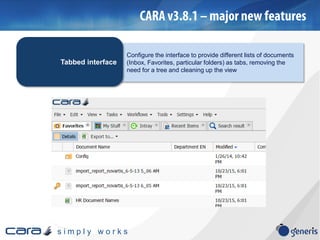
Configure the interface to provide different lists of documents
(Inbox, Favorites, particular folders) as tabs, removing the
need for a tree and cleaning up the view
Tabbed interface
s i m p l y w o r k s
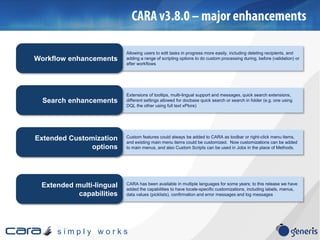
Allowing users to edit tasks in progress more easily, including deleting recipients, and
adding a range of scripting options to do custom processing during, before (validation) or
after workflows
Workflow enhancements
Extensions of tooltips, multi-lingual support and messages, quick search extensions,
different settings allowed for docbase quick search or search in folder (e.g. one using
DQL the other using full text xPlore)
Search enhancements
Custom features could always be added to CARA as toolbar or right-click menu items,
and existing main menu items could be customized. Now customizations can be added
to main menus, and also Custom Scripts can be used in Jobs in the place of Methods.
Extended Customization
options
CARA has been available in multiple languages for some years; to this release we have
added the capabilities to have locale-specific customizations, including labels, menus,
data values (picklists), confirmation and error messages and log messages
Extended multi-lingual
capabilities
s i m p l y w o r k s
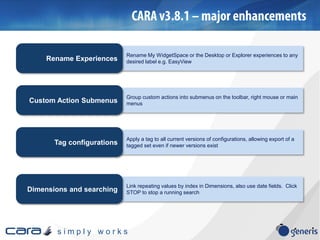
Rename My WidgetSpace or the Desktop or Explorer experiences to any
desired label e.g. EasyViewRename Experiences
Group custom actions into submenus on the toolbar, right mouse or main
menusCustom Action Submenus
Apply a tag to all current versions of configurations, allowing export of a
tagged set even if newer versions existTag configurations
Link repeating values by index in Dimensions, also use date fields. Click
STOP to stop a running searchDimensions and searching
s i m p l y w o r k s
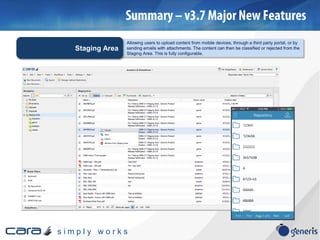
Allowing users to upload content from mobile devices, through a third party portal, or by
sending emails with attachments. The content can then be classified or rejected from the
Staging Area. This is fully configurable.
Staging Area
s i m p l y w o r k s
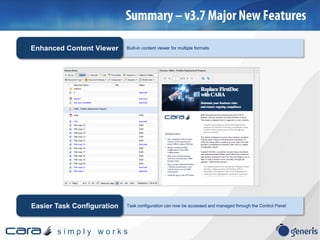
Built-in content viewer for multiple formatsEnhanced Content Viewer
Task configuration can now be accessed and managed through the Control PanelEasier Task Configuration
s i m p l y w o r k s
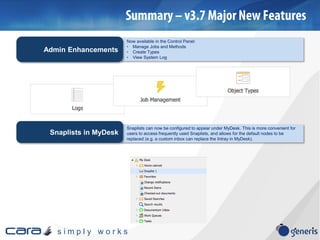
Now available in the Control Panel:
• Manage Jobs and Methods
• Create Types
• View System Log
Admin Enhancements
Snaplists can now be configured to appear under MyDesk. This is more convenient for
users to access frequently used Snaplists, and allows for the default nodes to be
replaced (e.g. a custom inbox can replace the Intray in MyDesk).
Snaplists in MyDesk
s i m p l y w o r k s
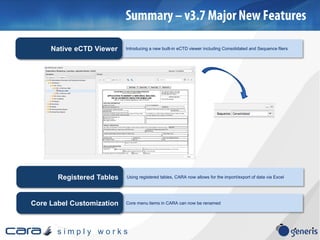
Introducing a new built-in eCTD viewer including Consolidated and Sequence filersNative eCTD Viewer
Using registered tables, CARA now allows for the import/export of data via ExcelRegistered Tables
Core menu items in CARA can now be renamedCore Label Customization
s i m p l y w o r k s
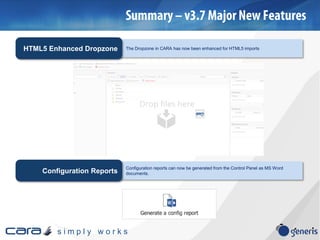
The Dropzone in CARA has now been enhanced for HTML5 importsHTML5 Enhanced Dropzone
Configuration reports can now be generated from the Control Panel as MS Word
documents.Configuration Reports
s i m p l y w o r k s
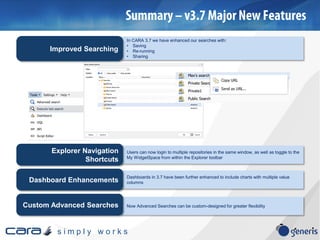
Users can now login to multiple repositories in the same window, as well as toggle to the
My WidgetSpace from within the Explorer toolbar
Explorer Navigation
Shortcuts
Dashboards in 3.7 have been further enhanced to include charts with multiple value
columnsDashboard Enhancements
In CARA 3.7 we have enhanced our searches with:
• Saving
• Re-running
• Sharing
Improved Searching
Now Advanced Searches can be custom-designed for greater flexibilityCustom Advanced Searches
s i m p l y w o r k s
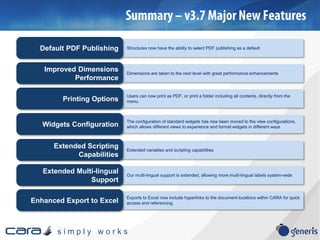
Our multi-lingual support is extended, allowing more multi-lingual labels system-wide
Extended Multi-lingual
Support
Exports to Excel now include hyperlinks to the document locations within CARA for quick
access and referencing.Enhanced Export to Excel
Structures now have the ability to select PDF publishing as a defaultDefault PDF Publishing
Users can now print as PDF, or print a folder including all contents, directly from the
menu.Printing Options
Extended variables and scripting capabilities
Extended Scripting
Capabilities
Dimensions are taken to the next level with great performance enhancements
Improved Dimensions
Performance
The configuration of standard widgets has now been moved to the view configurations,
which allows different views to experience and format widgets in different waysWidgets Configuration
s i m p l y w o r k s
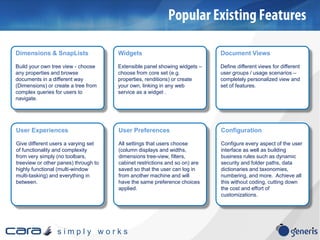
Dimensions & SnapLists
Build your own tree view - choose
any properties and browse
documents in a different way
(Dimensions) or create a tree from
complex queries for users to
navigate.
Widgets
Extensible panel showing widgets –
choose from core set (e.g.
properties, renditions) or create
your own, linking in any web
service as a widget .
User Experiences
Give different users a varying set
of functionality and complexity
from very simply (no toolbars,
treeview or other panes) through to
highly functional (multi-window
multi-tasking) and everything in
between.
User Preferences
All settings that users choose
(column displays and widths,
dimensions tree-view, filters,
cabinet restrictions and so on) are
saved so that the user can log in
from another machine and will
have the same preference choices
applied.
Document Views
Define different views for different
user groups / usage scenarios –
completely personalized view and
set of features.
Configuration
Configure every aspect of the user
interface as well as building
business rules such as dynamic
security and folder paths, data
dictionaries and taxonomies,
numbering, and more. Achieve all
this without coding, cutting down
the cost and effort of
customizations.

Cara v3 8 major new features

  • 2.
    s i mp l y w o r k s CARA is an ergonomically designed, fast, web user interface and business rules engine, currently released for the following platforms: • Documentum (alternative to Webtop or D2) • Oracle WebCenter • Alfresco It is designed to facilitate the creation, review, approval and management of documents. This document outlines the major new features that are part of CARA v3.7.
  • 3.
    s i mp l y w o r k s Probably the most important enhancement in CARA v3.8 is the Plugin which offers a replacement to using Java Applets (blocked by several browsers as of Sept 2015) or HTML5 (which offers very poor features and usability). The plugin not only allows seamless one-click-editing, but batch import and export. This allows includes the ability to have a permanent DROP ZONE on your desktop to which you can drag from • Windows Explorer • Mac Finder • Outlook emails • Outlook email attachments This does an automatic upload to the CARA application server, allowing you to simply go to CARA in your browser to e.g. add attributes. Content Transfer Plugin
  • 4.
    s i mp l y w o r k s Configure the interface to provide different lists of documents (Inbox, Favorites, particular folders) as tabs, removing the need for a tree and cleaning up the view Tabbed interface
  • 5.
    s i mp l y w o r k s Allowing users to edit tasks in progress more easily, including deleting recipients, and adding a range of scripting options to do custom processing during, before (validation) or after workflows Workflow enhancements Extensions of tooltips, multi-lingual support and messages, quick search extensions, different settings allowed for docbase quick search or search in folder (e.g. one using DQL the other using full text xPlore) Search enhancements Custom features could always be added to CARA as toolbar or right-click menu items, and existing main menu items could be customized. Now customizations can be added to main menus, and also Custom Scripts can be used in Jobs in the place of Methods. Extended Customization options CARA has been available in multiple languages for some years; to this release we have added the capabilities to have locale-specific customizations, including labels, menus, data values (picklists), confirmation and error messages and log messages Extended multi-lingual capabilities
  • 6.
    s i mp l y w o r k s Rename My WidgetSpace or the Desktop or Explorer experiences to any desired label e.g. EasyViewRename Experiences Group custom actions into submenus on the toolbar, right mouse or main menusCustom Action Submenus Apply a tag to all current versions of configurations, allowing export of a tagged set even if newer versions existTag configurations Link repeating values by index in Dimensions, also use date fields. Click STOP to stop a running searchDimensions and searching
  • 7.
    s i mp l y w o r k s Allowing users to upload content from mobile devices, through a third party portal, or by sending emails with attachments. The content can then be classified or rejected from the Staging Area. This is fully configurable. Staging Area
  • 8.
    s i mp l y w o r k s Built-in content viewer for multiple formatsEnhanced Content Viewer Task configuration can now be accessed and managed through the Control PanelEasier Task Configuration
  • 9.
    s i mp l y w o r k s Now available in the Control Panel: • Manage Jobs and Methods • Create Types • View System Log Admin Enhancements Snaplists can now be configured to appear under MyDesk. This is more convenient for users to access frequently used Snaplists, and allows for the default nodes to be replaced (e.g. a custom inbox can replace the Intray in MyDesk). Snaplists in MyDesk
  • 10.
    s i mp l y w o r k s Introducing a new built-in eCTD viewer including Consolidated and Sequence filersNative eCTD Viewer Using registered tables, CARA now allows for the import/export of data via ExcelRegistered Tables Core menu items in CARA can now be renamedCore Label Customization
  • 11.
    s i mp l y w o r k s The Dropzone in CARA has now been enhanced for HTML5 importsHTML5 Enhanced Dropzone Configuration reports can now be generated from the Control Panel as MS Word documents.Configuration Reports
  • 12.
    s i mp l y w o r k s Users can now login to multiple repositories in the same window, as well as toggle to the My WidgetSpace from within the Explorer toolbar Explorer Navigation Shortcuts Dashboards in 3.7 have been further enhanced to include charts with multiple value columnsDashboard Enhancements In CARA 3.7 we have enhanced our searches with: • Saving • Re-running • Sharing Improved Searching Now Advanced Searches can be custom-designed for greater flexibilityCustom Advanced Searches
  • 13.
    s i mp l y w o r k s Our multi-lingual support is extended, allowing more multi-lingual labels system-wide Extended Multi-lingual Support Exports to Excel now include hyperlinks to the document locations within CARA for quick access and referencing.Enhanced Export to Excel Structures now have the ability to select PDF publishing as a defaultDefault PDF Publishing Users can now print as PDF, or print a folder including all contents, directly from the menu.Printing Options Extended variables and scripting capabilities Extended Scripting Capabilities Dimensions are taken to the next level with great performance enhancements Improved Dimensions Performance The configuration of standard widgets has now been moved to the view configurations, which allows different views to experience and format widgets in different waysWidgets Configuration
  • 14.
    s i mp l y w o r k s Dimensions & SnapLists Build your own tree view - choose any properties and browse documents in a different way (Dimensions) or create a tree from complex queries for users to navigate. Widgets Extensible panel showing widgets – choose from core set (e.g. properties, renditions) or create your own, linking in any web service as a widget . User Experiences Give different users a varying set of functionality and complexity from very simply (no toolbars, treeview or other panes) through to highly functional (multi-window multi-tasking) and everything in between. User Preferences All settings that users choose (column displays and widths, dimensions tree-view, filters, cabinet restrictions and so on) are saved so that the user can log in from another machine and will have the same preference choices applied. Document Views Define different views for different user groups / usage scenarios – completely personalized view and set of features. Configuration Configure every aspect of the user interface as well as building business rules such as dynamic security and folder paths, data dictionaries and taxonomies, numbering, and more. Achieve all this without coding, cutting down the cost and effort of customizations.