Kristofer	
  Laxdal	
  
Head	
  of	
  Informa,on	
  Security	
  
Rapidly	
  Improving	
  Security	
  
Posture	
  –	
  Using	
  Splunk	
  6.2	
  
Copyright	
  ©	
  2015	
  Splunk	
  Inc.	
  
Introduction
v  Current	
  Role	
  	
  –	
  	
  Kristofer	
  Laxdal	
  ,	
  Head	
  of	
  Informa,on	
  Security	


  CanDeal.ca	
  Inc.	
  
v  Past	
  Life	


  –	
  	
  	
  Informa,on	
  Security	
  Execu,ve	
  ,	
  IBM	
  Security	


  Services	
  (	
  Financial	
  Services	
  Customer	
  Base)	
  	
  
v  Our	
  Problem	
  –	
  	
  	
  Data	
  ,	
  Data,	
  	
  Everywhere	
  !	
  
v  Our	
  SoluDon	
  –	
  	
  	
  Seems	
  we	
  need	
  a	
  SIEM	
  !	
  Let	
  it	
  be	
  Splunk	


2	
  
Our Organization
3	
  
•  CanDeal	
  -­‐	
  sePng	
  the	
  standard	
  for	
  
electronic	
  fixed	
  income	
  and	
  
deriva,ves	
  trading	
  in	
  Canada	
  since	
  
2001.	
  
•  250	
  global	
  ins,tu,onal	
  firms	
  leverage	
  
CanDeal	
  to	
  execute	
  billions	
  of	
  dollars	
  
of	
  fixed	
  income	
  and	
  deriva,ves	
  trades	
  
daily	
  
•  2014	
  Trade	
  Volumes	
  in	
  excess	
  of	
  2.4	
  
Trillion	
  $	
  
•  CanDeal	
  is	
  currently	
  owned	
  by	
  
Canada’s	
  six	
  major	
  banks	
  ,	
  and	
  the	
  
TMX	
  Group	


CanDeal ….or Data , Data, Everywhere !
4	
  
•  “Big	
  Data”,	
  Network	
  Refresh,	
  Social	
  Media,	
  BYOD,	
  cloud	
  services	
  ,	
  and	
  emerging	
  market	
  
expansion	
  -­‐	
  these	
  areas	
  presented	
  new	
  security	
  challenges	
  !	
  
•  At	
  the	
  same	
  ,me	
  Informa,on	
  Technology	
  must	
  look	
  to	
  reduce	
  cost,	
  reduce	
  complexity	
  
through	
  ra,onaliza,on	
  and	
  simplifica,on	
  	
  
•  Large-­‐scale,	
  recent	
  public	
  examples	
  of	
  security	
  breaches	
  and	
  insider	
  fraud;	
  threats	
  from	
  
hack,vists,	
  organized	
  crime	
  cartels	
  &	
  state	
  sponsored	
  organiza,ons.	
  DDoS	
  aeacks	
  ,	
  Malware	
  ,	
  
Trojans	


•  Concerns	
  about	
  corporate	
  reputa,on,	
  regulatory/legal/contractual	
  liability.	
  
•  Financial	
  Services,	
  Government	
  &	
  CSI	
  are	
  primary	
  targeted	
  industries	
  
Seems We Need a SIEM
5	


Source:	
  Government	
  Accountability	
  Office	
  (GAO),	
  Department	
  of	
  Homeland	
  Security's	
  (DHS's)	
  Role	
  in	
  CriBcal	
  Infrastructure	
  ProtecBon	
  (CIP)	
  Cybersecurity,	
  GAO-­‐05-­‐434	


The Decision
	
  
Ease	
  of	
  use/speed	
  of	
  deployment,	
  simplicity	
  !	
  
•  Not	
  a	
  whole	
  lot	
  of	
  tuning	
  to	
  get	
  up	
  and	
  running,	
  as	
  opposed	
  to	
  other	
  SIEMs	
  which	
  require	
  significant	
  tuning	
  which	
  goes	
  on	
  forever.	
  	
  
•  Splunk	
  allows	
  me	
  to	
  be	
  up	
  and	
  running	
  and	
  get	
  results	
  quickly,	
  which	
  is	
  really	
  important	
  for	
  this	
  organizaFon	
  –	
  need	
  to	
  see	
  results	
  quickly.	
  	
  
•  Easy	
  as	
  can	
  be	
  to	
  use.	
  Everyone	
  has	
  an	
  understanding	
  of	
  how	
  to	
  use	
  it.	
  Easiest	
  SIEM	
  to	
  use.	
  Easy	
  to	
  get	
  data	
  in	
  and	
  get	
  results	
  out	
  quickly.	
  	
  
Minimal	
  professional	
  services	
  required	
  
•  We	
  did	
  ES	
  on	
  our	
  own.	
  Minor	
  issue	
  bringing	
  Cisco	
  IPS	
  SDEE	
  in,	
  but	
  worked	
  with	
  support	
  and	
  resolved.	
  Great	
  support	
  network	
  (	
  peer	
  groups)	
  .	
  	
  
Why	
  we	
  chose	
  Splunk	
  versus	
  the	
  alternaDves	
  
•  I	
  previously	
  worked	
  with	
  Q1,	
  LogRhythm,	
  ArcSight	
  and	
  RSA	
  and	
  realized	
  I	
  could	
  get	
  any	
  data	
  into	
  Splunk	
  Quickly.	
  Security	
  and	
  OperaFonally	
  
focused	
  data	
  	
  +	
  More	
  !	
  .	
  	
  
•  With	
  Splunk,	
  easy	
  to	
  get	
  results	
  quickly	
  	
  -­‐	
  this	
  was	
  of	
  vital	
  importance	
  to	
  CanDeal	
  .	
  	
  
•  QRadar	
  or	
  ArcSight	
  can	
  be	
  devil	
  to	
  implement	
  and	
  to	
  get	
  results	
  you’re	
  looking	
  for	
  -­‐	
  quickly.	
  	
  
•  Splunk	
  vs.	
  LogRhythm	
  –	
  Splunk	
  is	
  easier	
  to	
  deploy	
  and	
  get	
  relevant	
  results.	
  	
  
Immediately	
  improved	
  security	
  posture/benefit	
  to	
  business	
  
•  Quickly	
  drove	
  value	
  from	
  Splunk	
  on	
  security	
  posture.	
  Allowed	
  us	
  to	
  correlate	
  all	
  data.	
  Now	
  	
  we’re	
  into	
  our	
  ES	
  implementaFon,	
  also	
  geWng	
  a	
  
lot	
  of	
  value.	
  Also	
  from	
  a	
  risk	
  standpoint,	
  auditors	
  can	
  get	
  an	
  overview	
  of	
  the	
  environment	
  quickly.	
  	
  
•  C-­‐levels	
  can	
  also	
  see	
  dashboards	
  –	
  at	
  a	
  glace	
  understanding	
  of	
  Security	
  Metrics	
  .	
  	
  
•  ES	
  gives	
  us	
  one-­‐stop	
  advanced	
  correlaFon	
  across	
  all	
  inputs	
  and	
  the	
  ability	
  to	
  search	
  deep	
  and	
  wide.	
  We	
  can	
  view	
  risk	
  levels,	
  aggregated	
  
threat	
  stream	
  info,	
  where	
  IPS	
  alert	
  is	
  originaFng	
  from	
  and	
  type	
  of	
  aXacks	
  they’re	
  perpetraFng.	
  Gives	
  me	
  acFonable	
  info.	
  Also,	
  it’s	
  been	
  eye	
  
opener	
  for	
  senior	
  execs.	
  
6	
  
The	
  How	
  
Start Small - Integrate The Data You Have
8	
  
•  Look	
  for	
  relevant	
  data	
  stores	
  
and	
  logs	
  to	
  hit	
  the	
  ground	
  
running	
  
•  In	
  this	
  case	
  –	
  SEPM	
  12	
  	
  
•  Instant	
  End	
  Point	
  Results	


Start Small - Integrate End Point 	
  
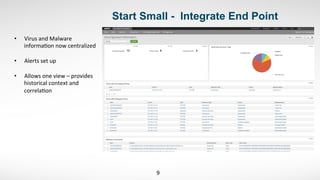
9	
  
•  Virus	
  and	
  Malware	
  
informa,on	
  now	
  centralized	
  
•  Alerts	
  set	
  up	
  	
  
•  Allows	
  one	
  view	
  –	
  provides	
  
historical	
  context	
  and	
  
correla,on	
  
Start Small - Integrate Process Blocking 	
  
10	
  
•  Refined	
  Process	
  Blocking	
  
on	
  SEPM	
  	
  
•  Blacklis,ng	
  Processes	
  /	
  
Whitelis,ng	
  Processes	
  	
  
Start Small - Proactive Threat Detection 	
  
11	
  
•  Aler,ng	
  Established	
  
for	
  Proac,ve	
  
Threat	
  Blocking	
  
Start Small - Host Based Firewall	
  
12	
  
•  Host	
  Based	
  
Firewall	
  
Informa,on	
  	
  
•  Fully	
  
indexed	
  
•  Can	
  
Correlate	
  
against	
  HW	
  
Firewall	
  
Logs	


  Start Small – Endpoint Log Overview
13	
  
•  All	
  Agent	
  Logs	
  
represented	
  in	
  a	
  
meaningful	
  manner	
  	
  
•  Ease	
  of	
  Administra,on	
  
Build From There – Ingress / Egress
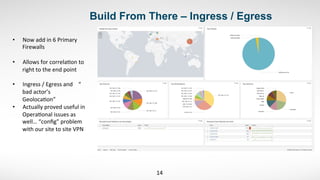
14	
  
•  Now	
  add	
  in	
  6	
  Primary	
  
Firewalls	
  	
  
•  Allows	
  for	
  correla,on	
  to	
  
right	
  to	
  the	
  end	
  point	


•  Ingress	
  /	
  Egress	
  and	


  “	
  
bad	
  actor’s	


Geoloca,on”	
  
•  Actually	
  proved	
  useful	
  in	
  
Opera,onal	
  issues	
  as	
  
well…	
  “config”	
  problem	
  
with	
  our	
  site	
  to	
  site	
  VPN	
  
Build From There – IP Profile 	
  
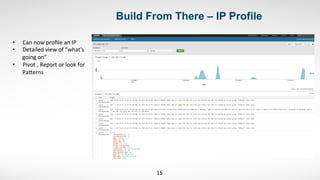
15	
  
•  Can	
  now	
  profile	
  an	
  IP	
  	
  
•  Detailed	
  view	
  of	
  “what's	
  
going	
  on”	
  	
  
•  Pivot	
  ,	
  Report	
  or	
  look	
  for	
  
Paeerns	


Build From There – Firewall(s)	
  
16	
  
•  At	
  a	
  glace	
  Firewall	
  
Overview	
  	
  
•  Gaining	
  Value	
  Quickly	
  	
  
•  But	
  wait	
  …	
  there	
  is	
  
more	


Build From There – IPS…. Yes !	
  
17	
  
•  IPS	
  Events	
  	
  
•  Correlated	
  with	
  End	
  
Point	
  /	
  Firewall	
  
•  Ingress	
  and	
  Egress	


Build From There – IPS ….Yes !	
  
18	
  
•  Drill	
  through	
  the	
  
details	
  	
  
•  Alert	
  Signature	
  
•  Src	
  	
  /	
  Dst	
  
•  Also	
  great	
  for	
  
tuning	


Roll Out The Universal
Forwarders – Windows and
Linux
Now For Some Fun !
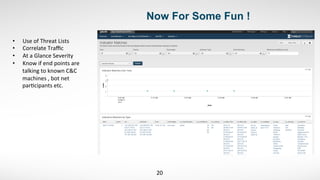
20	
  
•  Use	
  of	
  Threat	
  Lists	
  	
  
•  Correlate	
  Traffic	
  	
  
•  At	
  a	
  Glance	
  Severity	
  	
  
•  Know	
  if	
  end	
  points	
  are	
  
talking	
  to	
  known	
  C&C	
  	
  
machines	
  ,	
  bot	
  net	
  
par,cipants	
  etc.	


Correlate The Bad Actors 	
  
21	
  
•  See	
  who	
  is	
  targe,ng	
  
•  See	
  type	
  of	
  aeack	
  	
  
•  See	
  severity	
  	
  
•  See	
  count	
  /	
  occurrence	
  	
  
Correlate The Bad Actors 	
  
22	
  
•  Show	
  Allowed	
  vs	
  .	
  Blocked	
  	
  
•  Shows	
  all	
  allowed	
  –	
  great	
  
for	
  looking	
  for	
  APTs	
  /	
  
Malware	
  etc.	


Correlate The Bad Actors – Over Time Span	
  
23	
  
•  Show	
  view	
  over	
  ,me	
  	
  
•  Easily	
  determine	
  real	
  
threats	
  –	
  in	
  real	
  ,me	


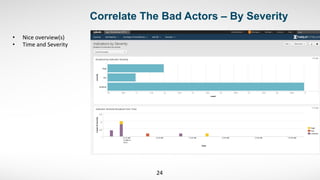
Correlate The Bad Actors – By Severity	
  
24	
  
•  Nice	
  overview(s)	
  	
  
•  Time	
  and	
  Severity	


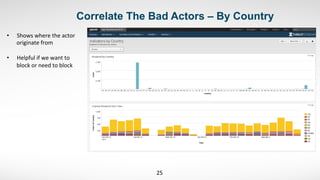
Correlate The Bad Actors – By Country 	
  
25	
  
•  Shows	
  where	
  the	
  actor	
  
originate	
  from	
  
•  Helpful	
  if	
  we	
  want	
  to	
  
block	
  or	
  need	
  to	
  block	


Correlate The Bad Actors – By Country 	
  
26	
  
•  Correlated	
  data	
  –	
  
Geo	
  loca,on	
  	
  
•  Know	
  the	
  point	
  of	
  
origin	
  at	
  a	
  glace	
  	
  
•  Do	
  we	
  do	
  business	
  
there	
  ?	
  	
  
•  If	
  not	
  –	
  drop	
  traffic	
  ?	
  
Correlate Threat List Activity	
  
27	
  
•  Correlated	
  data	
  –	
  now	
  
improved	
  with	
  over	
  25	
  
Threat	
  lists	
  !	


•  Shows	
  emerging	
  Threats	
  
•  Splunk	
  Splice	
  	
  add	
  STIX	
  /	
  
TAXII	
  –	
  FS-­‐ISAC	


Icing on the Cake


  Security Dashboard – Access Center
29	
  
•  Splunk	
  Enterprise	
  Security	
  –	
  The	
  
Next	
  Level	
  	
  
•  Access	
  Center	
  –	
  At	
  a	
  glance	
  by	
  
Aps	


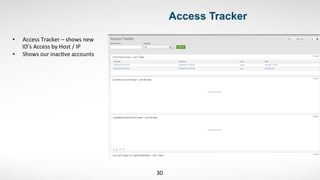
  Access Tracker
30	
  
•  Access	
  Tracker	
  –	
  shows	
  new	
  
ID’s	
  Access	
  by	
  Host	
  /	
  IP	
  
•  Shows	
  our	
  inac,ve	
  accounts	


  Account Management
31	
  
•  Looking	
  for	
  Failed	
  Login	
  
Aeempts	
  	
  
•  Login	
  aeempts	
  using	
  same	
  ID	
  
across	
  +1	
  source(s)	
  
•  Correlate	
  over	
  ,me	
  by	
  IP	
  ,	
  
Host	
  name	
  etc.	


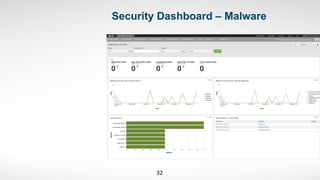
  Security Dashboard – Malware
32	


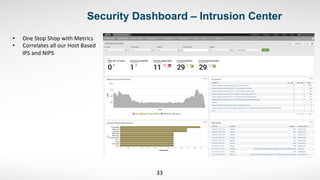
  Security Dashboard – Intrusion Center
33	
  
•  One	
  Stop	
  Shop	
  with	
  Metrics	
  	
  
•  Correlates	
  all	
  our	
  Host	
  Based	
  
IPS	
  and	
  NIPS	


  Network Changes !
34	
  
•  All	
  Switches	
  /	
  Firewalls	
  and	
  
IPS	
  devices	
  	
  
•  Shows	
  who	
  /	
  how	
  /	
  what	
  /	
  
where	
  /	
  when	


  Network Nirvana – Splunk Stream + SIEM
35	
  
•  Bringing	
  in	
  Protocol	
  
Stream	
  Data	
  for	
  further	
  
visibility	
  and	
  correla,on	
  
IP	
  and	
  Host	
  	
  
•  Drill	
  through	
  Data	
  
Services	
  e.g.	
  HTTPS	
  /	
  
DNS	
  /	
  SSL	
  
•  2	
  Linux	
  Indexers	
  –	
  one	
  at	
  
each	
  Data	
  Center	
  –	
  
Spanning	
  Port(s)	


  Network Nirvana – Splunk Stream + SIEM
36	
  
•  At	
  a	
  glace	
  protocol	
  
sta,s,cs	
  
•  Select	
  or	
  De-­‐select	
  
protocol	
  captures	
  with	
  a	
  
‘click’	


  Network Nirvana – Splunk Stream + SIEM
37	
  
SSL	
  ac,vity	
  -­‐	
  	
  index	
  
protocol	
  stats-­‐	
  	
  great	
  for	
  
visibility	
  into	
  network	
  
stream	


  Network Nirvana – Splunk Stream + SIEM
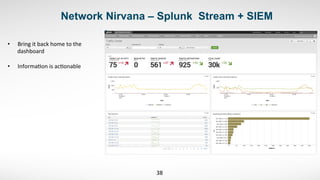
38	
  
•  Bring	
  it	
  back	
  home	
  to	
  the	
  
dashboard	
  	
  
•  Informa,on	
  is	
  ac,onable	
  	
  
Top Takeaways
39	
  
•  Start	
  small	
  and	
  build	
  a	
  founda,on	
  
•  Get	
  to	
  know	
  and	
  love	
  your	
  data	
  –	
  add	
  more	
  
sources	
  when	
  ready	
  	
  don’t	
  ‘boil	
  the	
  ocean’	
  
with	
  the	
  roll	
  out	
  
•  Alert	
  on	
  the	
  cri,cal	
  	
  
•  100s	
  of	
  plug	
  ins	
  and	
  apps	
  are	
  free	
  !	
  Don’t	
  
be	
  afraid	
  experiment	
  and	
  customize	
  to	
  your	
  
organiza,on	
  
•  From	
  the	
  founda,on	
  lay	
  the	
  brick	
  work	
  for	
  
STIX	
  /	
  TAXII	
  feeds	
  –	
  pay	
  close	
  aeen,on	
  to	
  
your	
  IOC’s	
  as	
  Splunk	
  correlates	
  the	
  data	
  
•  Con,nue	
  to	
  evolve	
  !	


Thank	
  You	
  

Rapidly Improving Security Posture - CanDeal

  • 1.
    Kristofer  Laxdal   Head  of  Informa,on  Security   Rapidly  Improving  Security   Posture  –  Using  Splunk  6.2   Copyright  ©  2015  Splunk  Inc.  
  • 2.
    Introduction v  Current  Role    –    Kristofer  Laxdal  ,  Head  of  Informa,on  Security                                                    CanDeal.ca  Inc.   v  Past  Life                –      Informa,on  Security  Execu,ve  ,  IBM  Security                                          Services  (  Financial  Services  Customer  Base)     v  Our  Problem  –      Data  ,  Data,    Everywhere  !   v  Our  SoluDon  –      Seems  we  need  a  SIEM  !  Let  it  be  Splunk           2  
  • 3.
    Our Organization 3   • CanDeal  -­‐  sePng  the  standard  for   electronic  fixed  income  and   deriva,ves  trading  in  Canada  since   2001.   •  250  global  ins,tu,onal  firms  leverage   CanDeal  to  execute  billions  of  dollars   of  fixed  income  and  deriva,ves  trades   daily   •  2014  Trade  Volumes  in  excess  of  2.4   Trillion  $   •  CanDeal  is  currently  owned  by   Canada’s  six  major  banks  ,  and  the   TMX  Group          
  • 4.
    CanDeal ….or Data, Data, Everywhere ! 4   •  “Big  Data”,  Network  Refresh,  Social  Media,  BYOD,  cloud  services  ,  and  emerging  market   expansion  -­‐  these  areas  presented  new  security  challenges  !   •  At  the  same  ,me  Informa,on  Technology  must  look  to  reduce  cost,  reduce  complexity   through  ra,onaliza,on  and  simplifica,on     •  Large-­‐scale,  recent  public  examples  of  security  breaches  and  insider  fraud;  threats  from   hack,vists,  organized  crime  cartels  &  state  sponsored  organiza,ons.  DDoS  aeacks  ,  Malware  ,   Trojans       •  Concerns  about  corporate  reputa,on,  regulatory/legal/contractual  liability.   •  Financial  Services,  Government  &  CSI  are  primary  targeted  industries  
  • 5.
    Seems We Needa SIEM 5     Source:  Government  Accountability  Office  (GAO),  Department  of  Homeland  Security's  (DHS's)  Role  in  CriBcal  Infrastructure  ProtecBon  (CIP)  Cybersecurity,  GAO-­‐05-­‐434    
  • 6.
    The Decision   Ease  of  use/speed  of  deployment,  simplicity  !   •  Not  a  whole  lot  of  tuning  to  get  up  and  running,  as  opposed  to  other  SIEMs  which  require  significant  tuning  which  goes  on  forever.     •  Splunk  allows  me  to  be  up  and  running  and  get  results  quickly,  which  is  really  important  for  this  organizaFon  –  need  to  see  results  quickly.     •  Easy  as  can  be  to  use.  Everyone  has  an  understanding  of  how  to  use  it.  Easiest  SIEM  to  use.  Easy  to  get  data  in  and  get  results  out  quickly.     Minimal  professional  services  required   •  We  did  ES  on  our  own.  Minor  issue  bringing  Cisco  IPS  SDEE  in,  but  worked  with  support  and  resolved.  Great  support  network  (  peer  groups)  .     Why  we  chose  Splunk  versus  the  alternaDves   •  I  previously  worked  with  Q1,  LogRhythm,  ArcSight  and  RSA  and  realized  I  could  get  any  data  into  Splunk  Quickly.  Security  and  OperaFonally   focused  data    +  More  !  .     •  With  Splunk,  easy  to  get  results  quickly    -­‐  this  was  of  vital  importance  to  CanDeal  .     •  QRadar  or  ArcSight  can  be  devil  to  implement  and  to  get  results  you’re  looking  for  -­‐  quickly.     •  Splunk  vs.  LogRhythm  –  Splunk  is  easier  to  deploy  and  get  relevant  results.     Immediately  improved  security  posture/benefit  to  business   •  Quickly  drove  value  from  Splunk  on  security  posture.  Allowed  us  to  correlate  all  data.  Now    we’re  into  our  ES  implementaFon,  also  geWng  a   lot  of  value.  Also  from  a  risk  standpoint,  auditors  can  get  an  overview  of  the  environment  quickly.     •  C-­‐levels  can  also  see  dashboards  –  at  a  glace  understanding  of  Security  Metrics  .     •  ES  gives  us  one-­‐stop  advanced  correlaFon  across  all  inputs  and  the  ability  to  search  deep  and  wide.  We  can  view  risk  levels,  aggregated   threat  stream  info,  where  IPS  alert  is  originaFng  from  and  type  of  aXacks  they’re  perpetraFng.  Gives  me  acFonable  info.  Also,  it’s  been  eye   opener  for  senior  execs.   6  
  • 7.
  • 8.
    Start Small -Integrate The Data You Have 8   •  Look  for  relevant  data  stores   and  logs  to  hit  the  ground   running   •  In  this  case  –  SEPM  12     •  Instant  End  Point  Results        
  • 9.
    Start Small -Integrate End Point   9   •  Virus  and  Malware   informa,on  now  centralized   •  Alerts  set  up     •  Allows  one  view  –  provides   historical  context  and   correla,on  
  • 10.
    Start Small -Integrate Process Blocking   10   •  Refined  Process  Blocking   on  SEPM     •  Blacklis,ng  Processes  /   Whitelis,ng  Processes    
  • 11.
    Start Small -Proactive Threat Detection   11   •  Aler,ng  Established   for  Proac,ve   Threat  Blocking  
  • 12.
    Start Small -Host Based Firewall   12   •  Host  Based   Firewall   Informa,on     •  Fully   indexed   •  Can   Correlate   against  HW   Firewall   Logs    
  • 13.
           Start Small – Endpoint Log Overview 13   •  All  Agent  Logs   represented  in  a   meaningful  manner     •  Ease  of  Administra,on  
  • 14.
    Build From There– Ingress / Egress 14   •  Now  add  in  6  Primary   Firewalls     •  Allows  for  correla,on  to   right  to  the  end  point       •  Ingress  /  Egress  and        “   bad  actor’s       Geoloca,on”   •  Actually  proved  useful  in   Opera,onal  issues  as   well…  “config”  problem   with  our  site  to  site  VPN  
  • 15.
    Build From There– IP Profile   15   •  Can  now  profile  an  IP     •  Detailed  view  of  “what's   going  on”     •  Pivot  ,  Report  or  look  for   Paeerns      
  • 16.
    Build From There– Firewall(s)   16   •  At  a  glace  Firewall   Overview     •  Gaining  Value  Quickly     •  But  wait  …  there  is   more      
  • 17.
    Build From There– IPS…. Yes !   17   •  IPS  Events     •  Correlated  with  End   Point  /  Firewall   •  Ingress  and  Egress      
  • 18.
    Build From There– IPS ….Yes !   18   •  Drill  through  the   details     •  Alert  Signature   •  Src    /  Dst   •  Also  great  for   tuning        
  • 19.
    Roll Out TheUniversal Forwarders – Windows and Linux
  • 20.
    Now For SomeFun ! 20   •  Use  of  Threat  Lists     •  Correlate  Traffic     •  At  a  Glance  Severity     •  Know  if  end  points  are   talking  to  known  C&C     machines  ,  bot  net   par,cipants  etc.      
  • 21.
    Correlate The BadActors   21   •  See  who  is  targe,ng   •  See  type  of  aeack     •  See  severity     •  See  count  /  occurrence    
  • 22.
    Correlate The BadActors   22   •  Show  Allowed  vs  .  Blocked     •  Shows  all  allowed  –  great   for  looking  for  APTs  /   Malware  etc.      
  • 23.
    Correlate The BadActors – Over Time Span   23   •  Show  view  over  ,me     •  Easily  determine  real   threats  –  in  real  ,me        
  • 24.
    Correlate The BadActors – By Severity   24   •  Nice  overview(s)     •  Time  and  Severity    
  • 25.
    Correlate The BadActors – By Country   25   •  Shows  where  the  actor   originate  from   •  Helpful  if  we  want  to   block  or  need  to  block      
  • 26.
    Correlate The BadActors – By Country   26   •  Correlated  data  –   Geo  loca,on     •  Know  the  point  of   origin  at  a  glace     •  Do  we  do  business   there  ?     •  If  not  –  drop  traffic  ?  
  • 27.
    Correlate Threat ListActivity   27   •  Correlated  data  –  now   improved  with  over  25   Threat  lists  !         •  Shows  emerging  Threats   •  Splunk  Splice    add  STIX  /   TAXII  –  FS-­‐ISAC    
  • 28.
  • 29.
           Security Dashboard – Access Center 29   •  Splunk  Enterprise  Security  –  The   Next  Level     •  Access  Center  –  At  a  glance  by   Aps  
  • 30.
                   Access Tracker 30   •  Access  Tracker  –  shows  new   ID’s  Access  by  Host  /  IP   •  Shows  our  inac,ve  accounts    
  • 31.
                 Account Management 31   •  Looking  for  Failed  Login   Aeempts     •  Login  aeempts  using  same  ID   across  +1  source(s)   •  Correlate  over  ,me  by  IP  ,   Host  name  etc.    
  • 32.
             Security Dashboard – Malware 32  
  • 33.
           Security Dashboard – Intrusion Center 33   •  One  Stop  Shop  with  Metrics     •  Correlates  all  our  Host  Based   IPS  and  NIPS  
  • 34.
                 Network Changes ! 34   •  All  Switches  /  Firewalls  and   IPS  devices     •  Shows  who  /  how  /  what  /   where  /  when    
  • 35.
         NetworkNirvana – Splunk Stream + SIEM 35   •  Bringing  in  Protocol   Stream  Data  for  further   visibility  and  correla,on   IP  and  Host     •  Drill  through  Data   Services  e.g.  HTTPS  /   DNS  /  SSL   •  2  Linux  Indexers  –  one  at   each  Data  Center  –   Spanning  Port(s)  
  • 36.
         NetworkNirvana – Splunk Stream + SIEM 36   •  At  a  glace  protocol   sta,s,cs   •  Select  or  De-­‐select   protocol  captures  with  a   ‘click’      
  • 37.
         NetworkNirvana – Splunk Stream + SIEM 37   SSL  ac,vity  -­‐    index   protocol  stats-­‐    great  for   visibility  into  network   stream        
  • 38.
         NetworkNirvana – Splunk Stream + SIEM 38   •  Bring  it  back  home  to  the   dashboard     •  Informa,on  is  ac,onable    
  • 39.
    Top Takeaways 39   • Start  small  and  build  a  founda,on   •  Get  to  know  and  love  your  data  –  add  more   sources  when  ready    don’t  ‘boil  the  ocean’   with  the  roll  out   •  Alert  on  the  cri,cal     •  100s  of  plug  ins  and  apps  are  free  !  Don’t   be  afraid  experiment  and  customize  to  your   organiza,on   •  From  the  founda,on  lay  the  brick  work  for   STIX  /  TAXII  feeds  –  pay  close  aeen,on  to   your  IOC’s  as  Splunk  correlates  the  data   •  Con,nue  to  evolve  !                
  • 40.