INDS Special Topics 483
              Fall 2012


      3D Modeling
of Campus Facilities
Utilizing Open Source
 Modeling Software
            Skylar Spies
   INDS Senior Student Researcher

      Jennifer Blanchard Belk
             Instructor
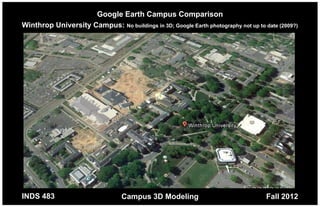
Google Earth Campus Comparison
Winthrop University Campus: No buildings in 3D; Google Earth photography not up to date (2009?)


INDS 483                          Campus 3D Modeling                                Fall 2012
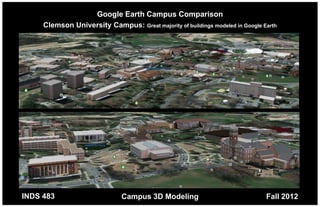
Google Earth Campus Comparison
     Clemson University Campus: Great majority of buildings modeled in Google Earth


INDS 483                       Campus 3D Modeling                              Fall 2012
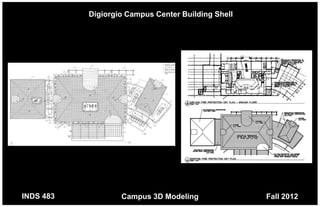
Digiorgio Campus Center Building Shell


INDS 483           Campus 3D Modeling               Fall 2012
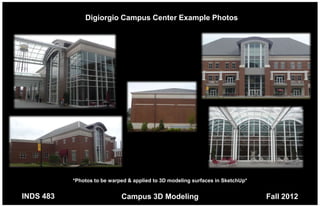
Digiorgio Campus Center Example Photos


           *Photos to be warped & applied to 3D modeling surfaces in SketchUp*


INDS 483                     Campus 3D Modeling                                  Fall 2012
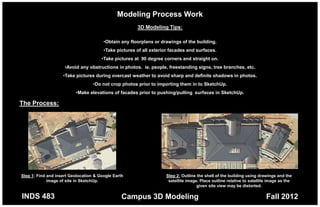
Modeling Process Work
                                                       3D Modeling Tips:

                                        •Obtain any floorplans or drawings of the building.
                                        •Take pictures of all exterior facades and surfaces.
                                       •Take pictures at 90 degree corners and straight on.
                     •Avoid any obstructions in photos. ie. people, freestanding signs, tree branches, etc.
                    •Take pictures during overcast weather to avoid sharp and definite shadows in photos.
                                   •Do not crop photos prior to importing them in to SketchUp.
                          •Make elevations of facades prior to pushing/pulling surfaces in SketchUp.

The Process:


Step 1: Find and insert Geolocation & Google Earth                  Step 2: Outline the shell of the building using drawings and the
             image of site in SketchUp.                              satellite image. Place outline relative to satellite image as the
                                                                                    given site view may be distorted.

INDS 483                                         Campus 3D Modeling                                                     Fall 2012
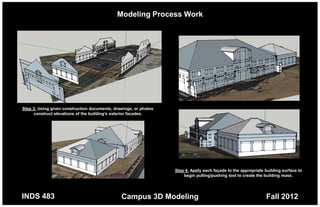
Modeling Process Work


Step 3: Using given construction documents, drawings, or photos
     construct elevations of the building’s exterior facades.


                                                                  Step 4: Apply each façade to the appropriate building surface to
                                                                      begin pulling/pushing tool to create the building mass.


INDS 483                                       Campus 3D Modeling                                              Fall 2012
Modeling Process Work


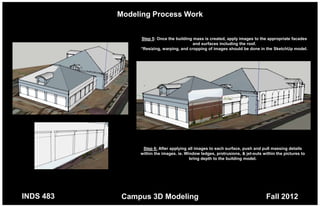
                Step 5: Once the building mass is created, apply images to the appropriate facades
                                          and surfaces including the roof.
                *Resizing, warping, and cropping of images should be done in the SketchUp model.


                 Step 6: After applying all images to each surface, push and pull massing details
                within the images. ie. Window ledges, protrusions, & jet-outs within the pictures to
                                         bring depth to the building model.


INDS 483    Campus 3D Modeling                                                  Fall 2012
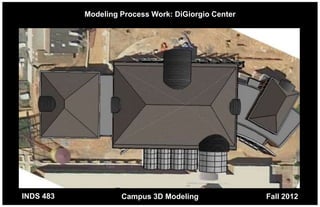
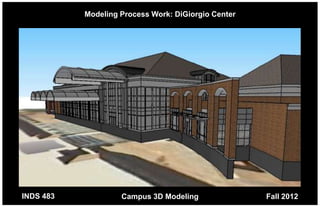
Modeling Process Work: DiGiorgio Center


INDS 483            Campus 3D Modeling               Fall 2012
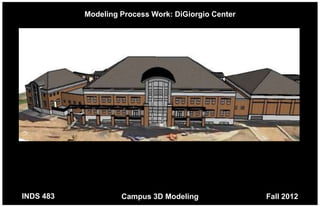
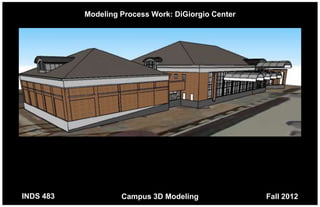
Modeling Process Work: DiGiorgio Center


INDS 483            Campus 3D Modeling               Fall 2012
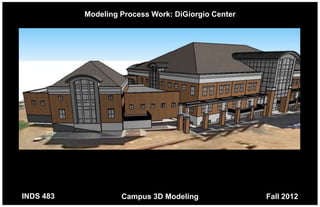
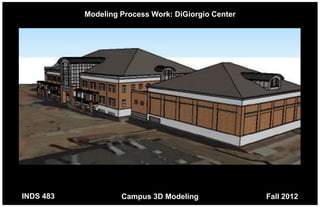
Modeling Process Work: DiGiorgio Center


INDS 483            Campus 3D Modeling               Fall 2012
Modeling Process Work: DiGiorgio Center


INDS 483            Campus 3D Modeling               Fall 2012
Modeling Process Work: DiGiorgio Center


INDS 483            Campus 3D Modeling               Fall 2012
Modeling Process Work: DiGiorgio Center


INDS 483            Campus 3D Modeling               Fall 2012
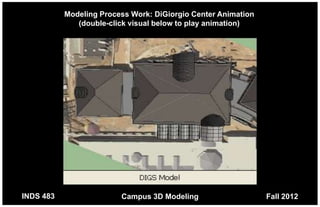
Modeling Process Work: DiGiorgio Center Animation
              (double-click visual below to play animation)


INDS 483                 Campus 3D Modeling                    Fall 2012
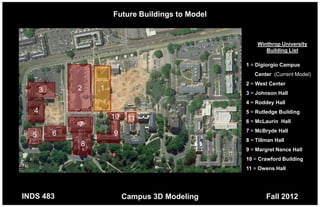
Future Buildings to Model


                                                       Winthrop University
                                                          Building List

                                                   1 = Digiorgio Campus
                                                      Center (Current Model)
                                                   2 = West Center
       3       2   1
                                                   3 = Johnson Hall
                                                   4 = Roddey Hall
   4                                               5 = Rutledge Building
                       10    11                    6 = McLaurin Hall
               7
                                                   7 = McBryde Hall
  5        6           9
                                                   8 = Tillman Hall
               8
                                                   9 = Margret Nance Hall
                                                   10 = Crawford Building
                                                   11 = Owens Hall


INDS 483                    Campus 3D Modeling             Fall 2012

Winthrop Campus 3D modeling

  • 1.
    INDS Special Topics483 Fall 2012 3D Modeling of Campus Facilities Utilizing Open Source Modeling Software Skylar Spies INDS Senior Student Researcher Jennifer Blanchard Belk Instructor
  • 2.
    Google Earth CampusComparison Winthrop University Campus: No buildings in 3D; Google Earth photography not up to date (2009?) INDS 483 Campus 3D Modeling Fall 2012
  • 3.
    Google Earth CampusComparison Clemson University Campus: Great majority of buildings modeled in Google Earth INDS 483 Campus 3D Modeling Fall 2012
  • 4.
    Digiorgio Campus CenterBuilding Shell INDS 483 Campus 3D Modeling Fall 2012
  • 5.
    Digiorgio Campus CenterExample Photos *Photos to be warped & applied to 3D modeling surfaces in SketchUp* INDS 483 Campus 3D Modeling Fall 2012
  • 6.
    Modeling Process Work 3D Modeling Tips: •Obtain any floorplans or drawings of the building. •Take pictures of all exterior facades and surfaces. •Take pictures at 90 degree corners and straight on. •Avoid any obstructions in photos. ie. people, freestanding signs, tree branches, etc. •Take pictures during overcast weather to avoid sharp and definite shadows in photos. •Do not crop photos prior to importing them in to SketchUp. •Make elevations of facades prior to pushing/pulling surfaces in SketchUp. The Process: Step 1: Find and insert Geolocation & Google Earth Step 2: Outline the shell of the building using drawings and the image of site in SketchUp. satellite image. Place outline relative to satellite image as the given site view may be distorted. INDS 483 Campus 3D Modeling Fall 2012
  • 7.
    Modeling Process Work Step3: Using given construction documents, drawings, or photos construct elevations of the building’s exterior facades. Step 4: Apply each façade to the appropriate building surface to begin pulling/pushing tool to create the building mass. INDS 483 Campus 3D Modeling Fall 2012
  • 8.
    Modeling Process Work Step 5: Once the building mass is created, apply images to the appropriate facades and surfaces including the roof. *Resizing, warping, and cropping of images should be done in the SketchUp model. Step 6: After applying all images to each surface, push and pull massing details within the images. ie. Window ledges, protrusions, & jet-outs within the pictures to bring depth to the building model. INDS 483 Campus 3D Modeling Fall 2012
  • 9.
    Modeling Process Work:DiGiorgio Center INDS 483 Campus 3D Modeling Fall 2012
  • 10.
    Modeling Process Work:DiGiorgio Center INDS 483 Campus 3D Modeling Fall 2012
  • 11.
    Modeling Process Work:DiGiorgio Center INDS 483 Campus 3D Modeling Fall 2012
  • 12.
    Modeling Process Work:DiGiorgio Center INDS 483 Campus 3D Modeling Fall 2012
  • 13.
    Modeling Process Work:DiGiorgio Center INDS 483 Campus 3D Modeling Fall 2012
  • 14.
    Modeling Process Work:DiGiorgio Center INDS 483 Campus 3D Modeling Fall 2012
  • 15.
    Modeling Process Work:DiGiorgio Center Animation (double-click visual below to play animation) INDS 483 Campus 3D Modeling Fall 2012
  • 16.
    Future Buildings toModel Winthrop University Building List 1 = Digiorgio Campus Center (Current Model) 2 = West Center 3 2 1 3 = Johnson Hall 4 = Roddey Hall 4 5 = Rutledge Building 10 11 6 = McLaurin Hall 7 7 = McBryde Hall 5 6 9 8 = Tillman Hall 8 9 = Margret Nance Hall 10 = Crawford Building 11 = Owens Hall INDS 483 Campus 3D Modeling Fall 2012