Using FME to Move from          2010:
AutoCAD Map 3D to MapGuide     An FME
                             Odyssey
Enterprise with SQL Server


Gordon Luckett
GIS Consultant
AutoCAD to SQL Server with FME


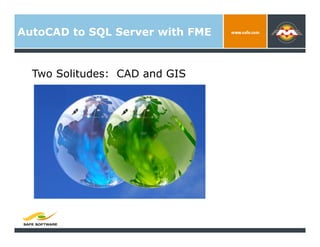
  Two Solitudes: CAD and GIS
AutoCAD to SQL Server with FME


  About the Speaker:
    Gordon Luckett
    GIS Consultant for 14 years
    Arrow Geomatics Inc.
    Focus on Spatial Databases
         SQL Server 2008
         Oracle Spatial/Locator 8i and up to 11G
    Primary Focus: Government Web GIS
AutoCAD to SQL Server with FME


  Proof of Concept
      SQL Server 2008
       City of Grande Prairie, Alberta


  Task:
    Hundreds of DWG files
    Contain “Object Data”
    Move to SQL Server 2008 automatically
    Render in MapGuide Enterprise
AutoCAD to SQL Server with FME


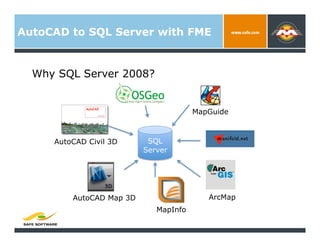
  Why SQL Server 2008?


                                       MapGuide


     AutoCAD Civil 3D      SQL
                          Server


         AutoCAD Map 3D                   ArcMap
                             MapInfo
AutoCAD to SQL Server with FME


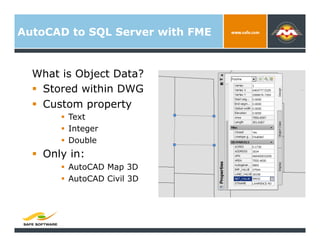
  What is Object Data?
    Stored within DWG
    Custom property
          Text
          Integer
          Double
    Only in:
          AutoCAD Map 3D
          AutoCAD Civil 3D
AutoCAD to SQL Server with FME


  How to get Object Data out of the DWG
     traditionally:
    Export to SDF
    Export to SHP
    Export to …

    Manual process per layer

    Requires re-import into SQL Server
AutoCAD to SQL Server with FME


  Alternative solution FDO for Map 3D:
AutoCAD to SQL Server with FME


  Alternative solution FDO:
    Push all data into SQL Server
    Maintain SQL Server data directly from within
     Map 3D and Civil 3D with FDO
    Directly Draw in Map 3D into SQL Server
    Directly enter attribute data into SQL Server
AutoCAD to SQL Server with FME


  Downside to FDO:
    Some Traditional CAD objects not supported
     (i.e. Leaders, Dimensions, Wipeouts, etc)
    Object Data not available to share data once
     brought back in
    New learning curve to technicians and
     engineers.
AutoCAD to SQL Server with FME


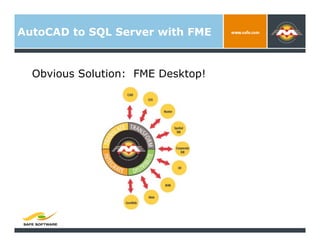
  Obvious Solution: FME Desktop!
AutoCAD to SQL Server with FME


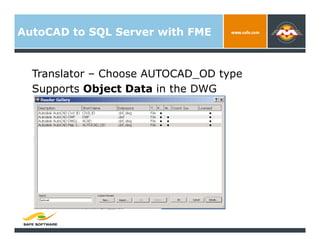
  Translator – Choose AUTOCAD_OD type
  Supports Object Data in the DWG
AutoCAD to SQL Server with FME


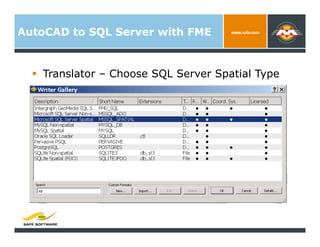
    Translator – Choose SQL Server Spatial Type
AutoCAD to SQL Server with FME


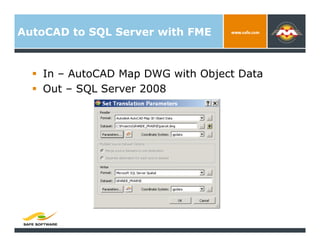
    In – AutoCAD Map DWG with Object Data
    Out – SQL Server 2008
AutoCAD to SQL Server with FME


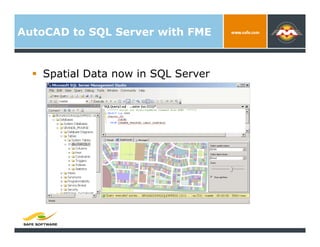
    Spatial Data now in SQL Server
AutoCAD to SQL Server with FME


    Generate a Batch to Repeat Nightly
AutoCAD to SQL Server with FME


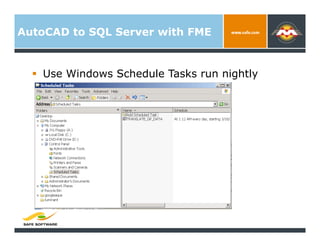
    Use Windows Schedule Tasks run nightly
AutoCAD to SQL Server with FME


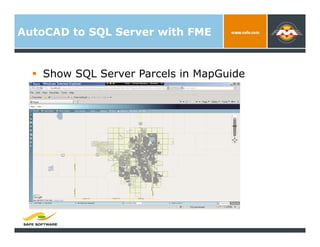
    Show SQL Server Parcels in MapGuide
AutoCAD to SQL Server with FME


    Demonstration
AutoCAD to SQL Server with FME


  Final Note
  No Longer Two Solitudes: CAD and GIS
Thank You!


  Questions?

  For more information:
    Gordon Luckett gordon.luckett@arrowgeo.com
    Arrow Geomatics Inc.

  Other Resources
    fdo.osgeo.org
    www.mapguide.ca

Using FME to move from AutoCAD Map 3D to MapGuide Enterprise with SQL Server

  • 1.
    Using FME toMove from 2010: AutoCAD Map 3D to MapGuide An FME Odyssey Enterprise with SQL Server Gordon Luckett GIS Consultant
  • 2.
    AutoCAD to SQLServer with FME Two Solitudes: CAD and GIS
  • 3.
    AutoCAD to SQLServer with FME About the Speaker:   Gordon Luckett   GIS Consultant for 14 years   Arrow Geomatics Inc.   Focus on Spatial Databases   SQL Server 2008   Oracle Spatial/Locator 8i and up to 11G   Primary Focus: Government Web GIS
  • 4.
    AutoCAD to SQLServer with FME Proof of Concept   SQL Server 2008 City of Grande Prairie, Alberta Task:   Hundreds of DWG files   Contain “Object Data”   Move to SQL Server 2008 automatically   Render in MapGuide Enterprise
  • 5.
    AutoCAD to SQLServer with FME Why SQL Server 2008? MapGuide AutoCAD Civil 3D SQL Server AutoCAD Map 3D ArcMap MapInfo
  • 6.
    AutoCAD to SQLServer with FME What is Object Data?   Stored within DWG   Custom property   Text   Integer   Double   Only in:   AutoCAD Map 3D   AutoCAD Civil 3D
  • 7.
    AutoCAD to SQLServer with FME How to get Object Data out of the DWG traditionally:   Export to SDF   Export to SHP   Export to …   Manual process per layer   Requires re-import into SQL Server
  • 8.
    AutoCAD to SQLServer with FME Alternative solution FDO for Map 3D:
  • 9.
    AutoCAD to SQLServer with FME Alternative solution FDO:   Push all data into SQL Server   Maintain SQL Server data directly from within Map 3D and Civil 3D with FDO   Directly Draw in Map 3D into SQL Server   Directly enter attribute data into SQL Server
  • 10.
    AutoCAD to SQLServer with FME Downside to FDO:   Some Traditional CAD objects not supported (i.e. Leaders, Dimensions, Wipeouts, etc)   Object Data not available to share data once brought back in   New learning curve to technicians and engineers.
  • 11.
    AutoCAD to SQLServer with FME Obvious Solution: FME Desktop!
  • 12.
    AutoCAD to SQLServer with FME Translator – Choose AUTOCAD_OD type Supports Object Data in the DWG
  • 13.
    AutoCAD to SQLServer with FME   Translator – Choose SQL Server Spatial Type
  • 14.
    AutoCAD to SQLServer with FME   In – AutoCAD Map DWG with Object Data   Out – SQL Server 2008
  • 15.
    AutoCAD to SQLServer with FME   Spatial Data now in SQL Server
  • 16.
    AutoCAD to SQLServer with FME   Generate a Batch to Repeat Nightly
  • 17.
    AutoCAD to SQLServer with FME   Use Windows Schedule Tasks run nightly
  • 18.
    AutoCAD to SQLServer with FME   Show SQL Server Parcels in MapGuide
  • 19.
    AutoCAD to SQLServer with FME   Demonstration
  • 20.
    AutoCAD to SQLServer with FME Final Note No Longer Two Solitudes: CAD and GIS
  • 21.
    Thank You!   Questions?  For more information:   Gordon Luckett gordon.luckett@arrowgeo.com   Arrow Geomatics Inc. Other Resources   fdo.osgeo.org   www.mapguide.ca