








CACHING IN
BACKBONE.JS
APPLICATIONS
KONSTANTIN FEDOROV
Project
 Financial company
 Personal reports
 Backbone.js
 Marionette.js
 Symfony2
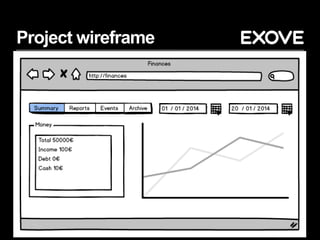
Project wireframe
Project structure
 Tabs
 Each tab has a view
 Each view can consists of few subviews
 Each view or subview collects data from different
AJAX requests
 AJAX requests can be the same for different
views
 Time pickers – requests are time dependent
Project AJAX request
 Financial data related to customer
 FewAJAX request sometimes have to be
requested at the same time to calculate financial
results
 Big bunch of data
Problems
 Browser freezes
 Loading of data takes too long
 Data is private
Big data
 Up to few megabytes (not compressed) per
request
 Freezing browser
 Time to download data
 How to solve issue?
Create application state
 Variable of current state:
 Views
 Collections
 Models
 Related extended objects
 Preloaded templates
Cache requests by URL
 Backbone-fetch-cache
 Rewriting default fetch method
 Saves data temporary or permanently to
memory or to localStorage
 Loads data fast, but this means loading it almost
at the same time - freezing browser
 https://github.com/madglory/backbone-fetch-
cache
Avoid race conditions
 Race conditions and sessions
(http://thwartedefforts.org/2006/11/11/race-
conditions-with-ajax-and-php-sessions/)
 Avoid sessions inAJAX (session_write_close)
 Sessions to database
 Caching on server side
 Gzip
Avoid duplicated requests
 Request to same URLat the same time
 Create wrapper forAJAX requests – checking if
this url already requested in this moment
 Check jQuery deffered statuses
Bootstrap the models
 Preloading data in HTML javascript tag
 Especially for data needed for other models
before start
 http://backbone.js/#FAQ-bootstrap
Browser performance
 Browser freezes on setting of big data
 Do not forget that not everyone uses fast
enough Chrome
 Improving templates, collections and views
Templates
 Big and complicated template with complicated
logic is evil
 Divide templates in few
 Reduce complexity of logic (move it to JS)
 Reduce data size
Collections
 Reset vs. add vs. set
 Method set performs a "smart" update of the
collection with the passed list of models. If a
model in the list isn't yet in the collection it will be
added
 Add adds a model to an existing collection of
models, preserving any model already in the
collection, not full collection at once like reset
 http://jsperf.com/backbone-js-set-vs-reset
Views
 Zombie views
 Switching between tabs - multiple views,
multiple events
 Global views on level of application
 http://lostechies.com/derickbailey/2011/09/15/zo
mbies-run-managing-page-transitions-in-
backbone-apps/
Security
 Data is private
 Push cleaning with user prompt or without
 Everything is cached. Easy to clean it
Cleaning data
 Cleaning before logout
 Emptying fetch-cache
 Emptying models
 Inactivity timer
 Catching 401 inAJAX, reloading
Conclusion
 Avoid calculations in Backbone.js
 Move logic to backend
 Avoid loading big data
 Cache, cache and cache
THANK YOU!
QUESTIONS?

Caching in Backbone Application

  • 1.
  • 2.
    Project  Financial company Personal reports  Backbone.js  Marionette.js  Symfony2
  • 3.
  • 4.
    Project structure  Tabs Each tab has a view  Each view can consists of few subviews  Each view or subview collects data from different AJAX requests  AJAX requests can be the same for different views  Time pickers – requests are time dependent
  • 5.
    Project AJAX request Financial data related to customer  FewAJAX request sometimes have to be requested at the same time to calculate financial results  Big bunch of data
  • 6.
    Problems  Browser freezes Loading of data takes too long  Data is private
  • 7.
    Big data  Upto few megabytes (not compressed) per request  Freezing browser  Time to download data  How to solve issue?
  • 8.
    Create application state Variable of current state:  Views  Collections  Models  Related extended objects  Preloaded templates
  • 9.
    Cache requests byURL  Backbone-fetch-cache  Rewriting default fetch method  Saves data temporary or permanently to memory or to localStorage  Loads data fast, but this means loading it almost at the same time - freezing browser  https://github.com/madglory/backbone-fetch- cache
  • 10.
    Avoid race conditions Race conditions and sessions (http://thwartedefforts.org/2006/11/11/race- conditions-with-ajax-and-php-sessions/)  Avoid sessions inAJAX (session_write_close)  Sessions to database  Caching on server side  Gzip
  • 11.
    Avoid duplicated requests Request to same URLat the same time  Create wrapper forAJAX requests – checking if this url already requested in this moment  Check jQuery deffered statuses
  • 12.
    Bootstrap the models Preloading data in HTML javascript tag  Especially for data needed for other models before start  http://backbone.js/#FAQ-bootstrap
  • 13.
    Browser performance  Browserfreezes on setting of big data  Do not forget that not everyone uses fast enough Chrome  Improving templates, collections and views
  • 14.
    Templates  Big andcomplicated template with complicated logic is evil  Divide templates in few  Reduce complexity of logic (move it to JS)  Reduce data size
  • 15.
    Collections  Reset vs.add vs. set  Method set performs a "smart" update of the collection with the passed list of models. If a model in the list isn't yet in the collection it will be added  Add adds a model to an existing collection of models, preserving any model already in the collection, not full collection at once like reset  http://jsperf.com/backbone-js-set-vs-reset
  • 16.
    Views  Zombie views Switching between tabs - multiple views, multiple events  Global views on level of application  http://lostechies.com/derickbailey/2011/09/15/zo mbies-run-managing-page-transitions-in- backbone-apps/
  • 17.
    Security  Data isprivate  Push cleaning with user prompt or without  Everything is cached. Easy to clean it
  • 18.
    Cleaning data  Cleaningbefore logout  Emptying fetch-cache  Emptying models  Inactivity timer  Catching 401 inAJAX, reloading
  • 19.
    Conclusion  Avoid calculationsin Backbone.js  Move logic to backend  Avoid loading big data  Cache, cache and cache
  • 20.